
Most first tries at ASP.NET Core JWT authentication sign tokens with a short string like my-secret-key-16. It compiles fine, then the first token you generate throws this:
ArgumentOutOfRangeException: IDX10720: Unable to create KeyedHashAlgorithm for algorithm 'HS256', the key size must be greater than: '256' bits, key has '128' bits. (Parameter 'keyBytes')HS256 needs a signing key of at least 256 bits, and that string is only 128. The fix is a long random key kept in user secrets, plus AddJwtBearer checking the issuer, audience, signature and lifetime of every token.
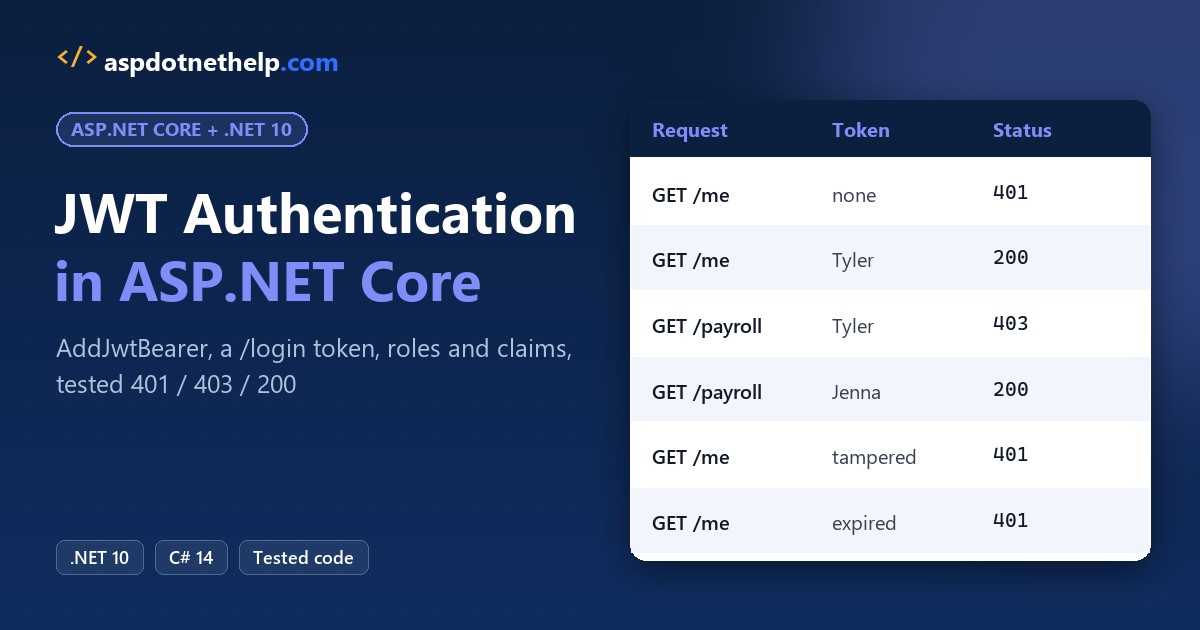
Here’s what we’re building, a .NET 10 payroll API answering a real HttpClient test run:
How Does JWT Bearer Authentication Work in ASP.NET Core?
A JSON Web Token is three Base64Url parts joined by dots: a header, a payload of claims and a signature. Your API signs it at login, and the client sends it back on every call in an Authorization: Bearer header.
| Step | Who does it | In this build |
|---|---|---|
| 1. Sign in | Client | POST /login with a username and password |
| 2. Issue the token | API | JsonWebTokenHandler.CreateToken signs it with HS256 |
| 3. Send it | Client | Authorization: Bearer <token> on each request |
| 4. Validate it | JwtBearer handler | Signature, issuer, audience and lifetime |
| 5. Authorize | Authorization middleware | RequireAuthorization, a role policy, a claim policy |
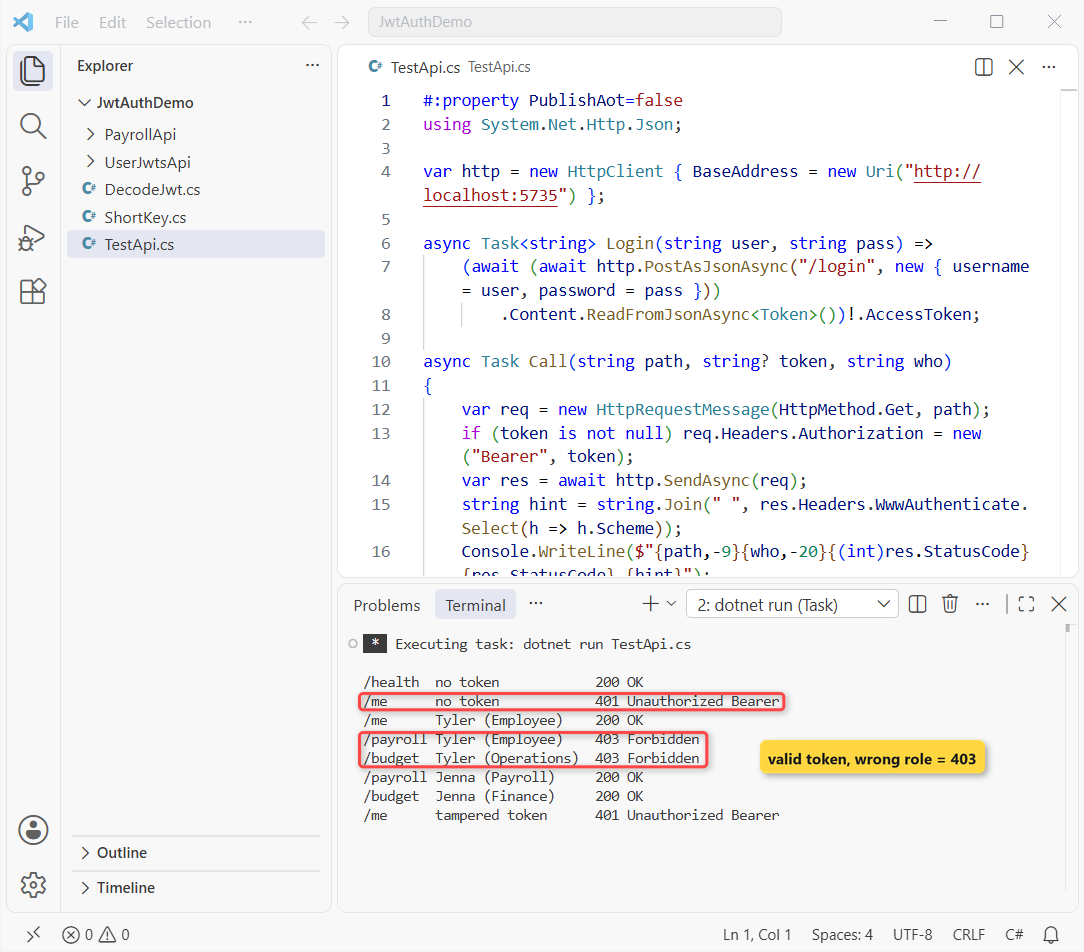
Failing step 4 gives a 401, and passing it but failing step 5 gives a 403. That split is what the test run above shows. If minimal APIs are new to you, the ASP.NET Core Web API CRUD tutorial builds one from scratch.
Before You Start the JWT Build
You need the .NET 10 SDK (I used 10.0.402) and any editor; I used VS Code. Not sure which SDK you have? Check your .NET version first. Here’s the NuGet package and the library it brings in:
| Package | Version | Used for |
|---|---|---|
| Microsoft.AspNetCore.Authentication.JwtBearer | 10.0.14 | AddJwtBearer, validates incoming tokens |
| Microsoft.IdentityModel.JsonWebTokens | 8.19.2 (comes with JwtBearer) | JsonWebTokenHandler, creates tokens |
The sample API has two demo users and four endpoints. Tyler works in Operations, and Jenna runs payroll in Finance:
| Username | Name | Department | Roles |
|---|---|---|---|
| tbrooks | Tyler Brooks | Operations | Employee |
| jmorales | Jenna Morales | Finance | Employee, Payroll |
| Endpoint | Rule | Tyler | Jenna |
|---|---|---|---|
| GET /health | Public | 200 | 200 |
| GET /me | Any valid token | 200 | 200 |
| GET /payroll | Role Payroll | 403 | 200 |
| GET /budget | Claim department = Finance | 403 | 200 |
Step 1: Create the Minimal API and Add the JwtBearer Package
Start from the empty web template and add the JWT bearer handler at the exact version I tested:
dotnet new web -n PayrollApi -o PayrollApi
cd PayrollApi
dotnet add package Microsoft.AspNetCore.Authentication.JwtBearer --version 10.0.14
I trimmed Properties/launchSettings.json to one http profile on port 5735. It also sets the Development environment, which matters in Step 2:
{
  "$schema": "https://json.schemastore.org/launchsettings.json",
  "profiles": {
    "http": {
      "commandName": "Project",
      "dotnetRunMessages": true,
      "launchBrowser": false,
      "applicationUrl": "http://localhost:5735",
      "environmentVariables": {
        "ASPNETCORE_ENVIRONMENT": "Development"
      }
    }
  }
}
I deleted appsettings.Development.json since nothing here needs it. Here’s the project file after Step 2 adds the user secrets ID:
<Project Sdk="Microsoft.NET.Sdk.Web">

  <PropertyGroup>
    <TargetFramework>net10.0</TargetFramework>
    <Nullable>enable</Nullable>
    <ImplicitUsings>enable</ImplicitUsings>
    <UserSecretsId>a911f57d-d8b7-444f-b815-6f906b67e6e9</UserSecretsId>
  </PropertyGroup>

  <ItemGroup>
    <PackageReference Include="Microsoft.AspNetCore.Authentication.JwtBearer" Version="10.0.14" />
  </ItemGroup>

</Project>
Checkpoint: dotnet build succeeds and the csproj references JwtBearer 10.0.14.
Step 2: Store the JWT Signing Key with dotnet user-secrets
The issuer, audience and token lifetime aren’t secret, so they go in appsettings.json. The signing key is, so it doesn’t:
{
  "Logging": {
    "LogLevel": {
      "Default": "Information",
      "Microsoft.AspNetCore": "Warning"
    }
  },
  "AllowedHosts": "*",
  "Jwt": {
    "Issuer": "payroll-api-demo",
    "Audience": "payroll-web",
    "AccessTokenMinutes": 15
  }
}
Anyone holding the key can mint a valid token for any user. Generate 48 random bytes and save them as a user secret without ever printing them (PowerShell 7):
dotnet user-secrets init
$key = [Convert]::ToBase64String([System.Security.Cryptography.RandomNumberGenerator]::GetBytes(48))
dotnet user-secrets set "Jwt:SigningKey" $key
Successfully saved Jwt:SigningKey to the secret store.User secrets live in your Windows profile, outside the repo, and WebApplication.CreateBuilder loads them only in Development. In production, set an environment variable named Jwt__SigningKey (double underscore) or read it from Azure Key Vault.
Why 48 bytes? The 64-character Base64 text becomes the key bytes through Encoding.UTF8.GetBytes, so that’s 512 bits. Here’s the short key from the intro, run on its own so you can see the real exception:
#:package Microsoft.IdentityModel.JsonWebTokens@8.19.2
using System.Text;
using Microsoft.IdentityModel.JsonWebTokens;
using Microsoft.IdentityModel.Tokens;

var key = new SymmetricSecurityKey(Encoding.UTF8.GetBytes("my-secret-key-16"));
Console.WriteLine($"Key size: {key.KeySize} bits");
try
{
    new JsonWebTokenHandler().CreateToken(new SecurityTokenDescriptor
    {
        Issuer = "payroll-api-demo",
        SigningCredentials = new SigningCredentials(key, SecurityAlgorithms.HmacSha256)
    });
}
catch (Exception ex) { Console.WriteLine($"{ex.GetType().Name}: {ex.Message}"); }
Output:
Key size: 128 bits
ArgumentOutOfRangeException: IDX10720: Unable to create KeyedHashAlgorithm for algorithm 'HS256', the key size must be greater than: '256' bits, key has '128' bits. (Parameter 'keyBytes')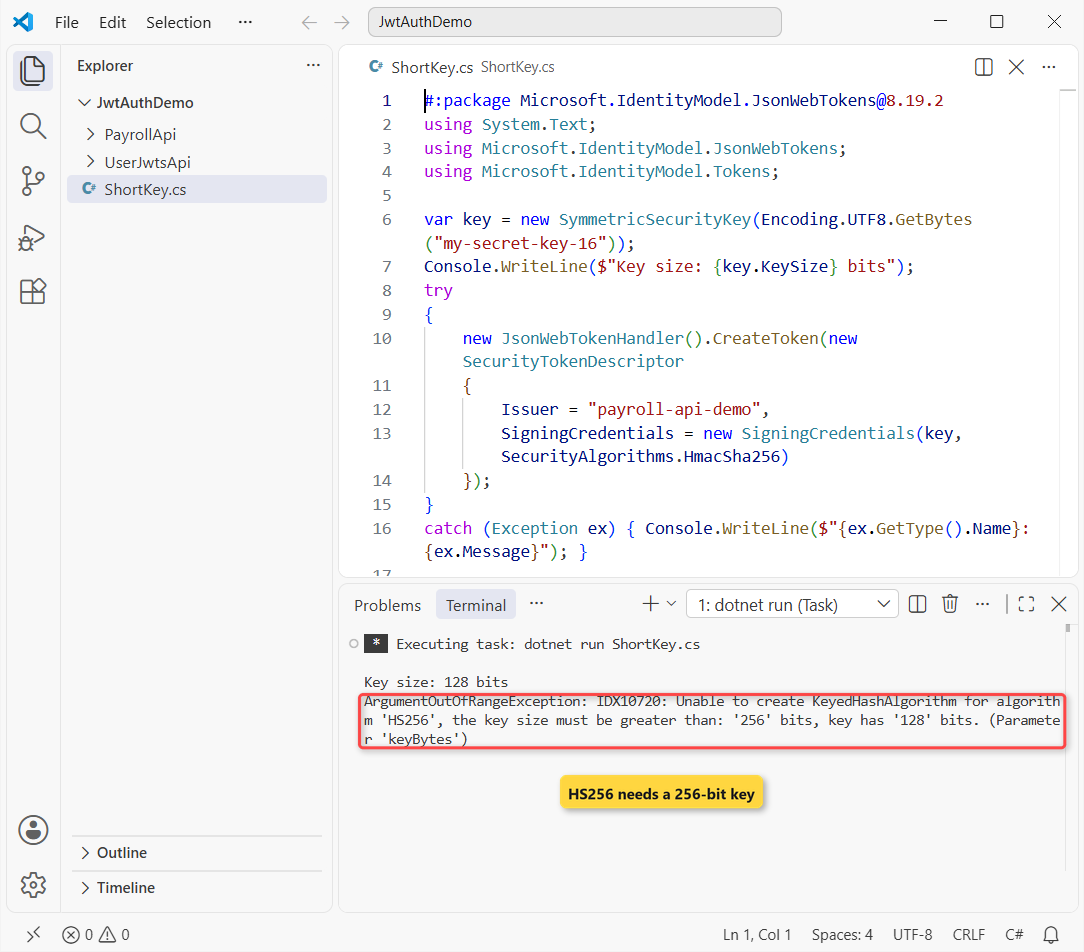
It’s a file-based app, so the #:package line pulls the same JsonWebTokens version the API uses. The API’s Program.cs checks KeySize at startup, so a weak key fails before the first request.
Checkpoint: dotnet user-secrets list shows a Jwt:SigningKey entry, and the value never lands in a file inside the project.
Step 3: Configure AddJwtBearer with TokenValidationParameters
This block tells the JWT bearer handler what a good token looks like. Every check is on, and the values come from configuration:
builder.Services.AddAuthentication(JwtBearerDefaults.AuthenticationScheme)
    .AddJwtBearer(options =>
    {
        options.MapInboundClaims = false;          // keep "name" and "role" as they are in the token
        options.TokenValidationParameters = new TokenValidationParameters
        {
            ValidateIssuer = true,
            ValidIssuer = jwt["Issuer"],
            ValidateAudience = true,
            ValidAudience = jwt["Audience"],
            ValidateIssuerSigningKey = true,
            IssuerSigningKey = signingKey,
            ValidateLifetime = true,
            ClockSkew = TimeSpan.Zero,             // the default is 5 minutes
            NameClaimType = "name",
            RoleClaimType = "role"
        };
});| Setting | What it rejects | Default |
|---|---|---|
| ValidateIssuer + ValidIssuer | Tokens from another issuer | On |
| ValidateAudience + ValidAudience | Tokens minted for another API | On |
| IssuerSigningKey | Forged or edited tokens | Required |
| ValidateLifetime | Expired or not-yet-valid tokens | On |
| ClockSkew | How late an expired token still passes | 5 minutes |
MapInboundClaims = false keeps short claim names like role instead of the long WS-Federation URIs, so NameClaimType and RoleClaimType point at the names I issue.
Since ASP.NET Core 8, the handler validates with the newer JsonWebTokenHandler by default (Microsoft quotes about 30% faster). Set UseSecurityTokenValidators = true only if old code casts to JwtSecurityToken.
The explicit app.UseAuthentication() and app.UseAuthorization() calls are optional on .NET 10, because WebApplication adds both when the services exist. I keep them so the order is visible, and the Troubleshooting section shows what happens when it’s wrong.
Checkpoint: the API starts and logs the Development environment on port 5735:
Building...
info: Microsoft.Hosting.Lifetime[14]
      Now listening on: http://localhost:5735
info: Microsoft.Hosting.Lifetime[0]
      Application started. Press Ctrl+C to shut down.
info: Microsoft.Hosting.Lifetime[0]
      Hosting environment: Development
info: Microsoft.Hosting.Lifetime[0]
      Content root path: C:\DotNetDemo\JwtAuthDemo\PayrollApi
Step 4: Generate the JWT Token in a /login Endpoint
This is the generate-a-JWT-token part. I use JsonWebTokenHandler.CreateToken with a SecurityTokenDescriptor. The older JwtSecurityTokenHandler from System.IdentityModel.Tokens.Jwt still works, but it’s the previous generation:
app.MapPost("/login", (LoginRequest login) =>
{
    var user = DemoUsers.Find(login.Username, login.Password);
    if (user is null) return Results.Unauthorized();

    var expires = DateTime.UtcNow.AddMinutes(jwt.GetValue<double>("AccessTokenMinutes"));
    var token = new JsonWebTokenHandler().CreateToken(new SecurityTokenDescriptor
    {
        Issuer = jwt["Issuer"],
        Audience = jwt["Audience"],
        Expires = expires,
        Subject = new ClaimsIdentity(
        [
            new Claim(JwtRegisteredClaimNames.Sub, user.Username),
            new Claim(JwtRegisteredClaimNames.Jti, Guid.NewGuid().ToString()),
            new Claim("name", user.FullName),
            new Claim("department", user.Department),
            .. user.Roles.Select(role => new Claim("role", role))
        ]),
        SigningCredentials = new SigningCredentials(signingKey, SecurityAlgorithms.HmacSha256)
    });
    return Results.Ok(new TokenResponse(token, expires));
});
Each token gets a GUID as its jti (token ID), one role claim per role, and a 15-minute expiry from configuration. The request and response types are C# records.
Calling it with Tyler’s demo login returns the token (I cut it to 24 characters here) and its expiry:
curl.exe -s -X POST http://localhost:5735/login -H "Content-Type: application/json" -d "{\"username\":\"tbrooks\",\"password\":\"demo-tyler-2026\"}"{"accessToken":"eyJhbGciOiJIUzI1NiIsInR5...","expiresAt":"2026-11-01T13:53:20.2627547Z"}Checkpoint: a wrong password returns 401 and no token, and a correct one returns a token starting with eyJ.
Step 5: Protect Endpoints with RequireAuthorization, JWT Roles and Claims
Authentication only tells you who’s calling. Nothing is locked until an endpoint asks for it. Two named policies cover the role rule and the claim rule:
builder.Services.AddAuthorizationBuilder()
    .AddPolicy("PayrollOnly", policy => policy.RequireRole("Payroll"))
    .AddPolicy("FinanceOnly", policy => policy.RequireClaim("department", "Finance"));
app.MapGet("/me", (ClaimsPrincipal user) => new
{
Name = user.Identity?.Name,
Department = user.FindFirstValue("department"),
Roles = user.FindAll("role").Select(r => r.Value)
}).RequireAuthorization();
app.MapGet("/payroll", () => DemoUsers.Payroll).RequireAuthorization("PayrollOnly");
app.MapGet("/budget", () => new { Quarter = "Q4 2026", Budget = 184_500m })
.RequireAuthorization("FinanceOnly");RequireAuthorization() with no name means any valid token. In controllers, the same rule is [Authorize] or [Authorize(Policy = "PayrollOnly")]. Here’s the whole Program.cs at this point:
using System.Security.Claims;
using System.Text;
using Microsoft.AspNetCore.Authentication.JwtBearer;
using Microsoft.IdentityModel.JsonWebTokens;
using Microsoft.IdentityModel.Tokens;
var builder = WebApplication.CreateBuilder(args);
var jwt = builder.Configuration.GetSection("Jwt");
var keyText = jwt["SigningKey"]
?? throw new InvalidOperationException("Jwt:SigningKey is missing. Set it with dotnet user-secrets.");
var signingKey = new SymmetricSecurityKey(Encoding.UTF8.GetBytes(keyText));
if (signingKey.KeySize < 256)
throw new InvalidOperationException($"Jwt:SigningKey has {signingKey.KeySize} bits; HS256 needs 256 or more.");
builder.Services.AddAuthentication(JwtBearerDefaults.AuthenticationScheme)
.AddJwtBearer(options =>
{
options.MapInboundClaims = false; // keep "name" and "role" as they are in the token
options.TokenValidationParameters = new TokenValidationParameters
{
ValidateIssuer = true,
ValidIssuer = jwt["Issuer"],
ValidateAudience = true,
ValidAudience = jwt["Audience"],
ValidateIssuerSigningKey = true,
IssuerSigningKey = signingKey,
ValidateLifetime = true,
ClockSkew = TimeSpan.Zero, // the default is 5 minutes
NameClaimType = "name",
RoleClaimType = "role"
};
});
builder.Services.AddAuthorizationBuilder()
.AddPolicy("PayrollOnly", policy => policy.RequireRole("Payroll"))
.AddPolicy("FinanceOnly", policy => policy.RequireClaim("department", "Finance"));
var app = builder.Build();
app.UseAuthentication();
app.UseAuthorization();
app.MapGet("/health", () => "OK");
app.MapPost("/login", (LoginRequest login) =>
{
var user = DemoUsers.Find(login.Username, login.Password);
if (user is null) return Results.Unauthorized();
var expires = DateTime.UtcNow.AddMinutes(jwt.GetValue<double>("AccessTokenMinutes"));
var token = new JsonWebTokenHandler().CreateToken(new SecurityTokenDescriptor
{
Issuer = jwt["Issuer"],
Audience = jwt["Audience"],
Expires = expires,
Subject = new ClaimsIdentity(
[
new Claim(JwtRegisteredClaimNames.Sub, user.Username),
new Claim(JwtRegisteredClaimNames.Jti, Guid.NewGuid().ToString()),
new Claim("name", user.FullName),
new Claim("department", user.Department),
.. user.Roles.Select(role => new Claim("role", role))
]),
SigningCredentials = new SigningCredentials(signingKey, SecurityAlgorithms.HmacSha256)
});
return Results.Ok(new TokenResponse(token, expires));
});
app.MapGet("/me", (ClaimsPrincipal user) => new
{
    Name = user.Identity?.Name,
    Department = user.FindFirstValue("department"),
    Roles = user.FindAll("role").Select(r => r.Value)
}).RequireAuthorization();

app.MapGet("/payroll", () => DemoUsers.Payroll).RequireAuthorization("PayrollOnly");

app.MapGet("/budget", () => new { Quarter = "Q4 2026", Budget = 184_500m })
    .RequireAuthorization("FinanceOnly");
app.Run();
record LoginRequest(string Username, string Password);
record TokenResponse(string AccessToken, DateTime ExpiresAt);
record DemoUser(string Username, string Password, string FullName, string Department, string[] Roles);
record PayrollRow(string Employee, string City, string State, decimal AnnualSalary);
static class DemoUsers
{
// Demo only. A real app checks hashed passwords (ASP.NET Core Identity) or uses an identity provider.
static readonly DemoUser[] Users =
[
new("tbrooks", "demo-tyler-2026", "Tyler Brooks", "Operations", ["Employee"]),
new("jmorales", "demo-jenna-2026", "Jenna Morales", "Finance", ["Employee", "Payroll"]),
];
public static DemoUser? Find(string username, string password) =>
Users.FirstOrDefault(u => u.Username == username && u.Password == password);
public static readonly PayrollRow[] Payroll =
[
new("Tyler Brooks", "Columbus", "OH", 58_400m),
new("Jenna Morales", "Austin", "TX", 91_250m),
new("Rachel Kim", "Seattle", "WA", 104_800m),
];
}Calling /me with no token proves the lock and shows the challenge header the HTTP spec requires:
HTTP/1.1 401 Unauthorized
Content-Length: 0
Server: Kestrel
WWW-Authenticate: Bearer
Checkpoint: no token gives 401 with WWW-Authenticate: Bearer, and Jenna’s token on /me returns {"name":"Jenna Morales","department":"Finance","roles":["Employee","Payroll"]}.
Step 6: Decode the JWT and Read Its Claims
A JWT is signed, not encrypted. Anyone with the token can read the payload, which this little client proves. It uses System.Text.Json and the Base64Url class from .NET 9:
#:property PublishAot=false
using System.Buffers.Text;
using System.Net.Http.Json;
using System.Text;
using System.Text.Json;

var http = new HttpClient { BaseAddress = new Uri("http://localhost:5735") };
var login = await http.PostAsJsonAsync("/login", new { username = "jmorales", password = "demo-jenna-2026" });
string token = (await login.Content.ReadFromJsonAsync<JsonElement>()).GetProperty("accessToken").GetString()!;

string[] parts = token.Split('.');
Console.WriteLine($"{parts.Length} parts, {token.Length} characters: {token[..20]}...");
var pretty = new JsonSerializerOptions { WriteIndented = true };
foreach (var (label, part) in new[] { ("Header", parts[0]), ("Payload", parts[1]) })
{
    using var doc = JsonDocument.Parse(Encoding.UTF8.GetString(Base64Url.DecodeFromChars(part)));
    Console.WriteLine($"{label}: {JsonSerializer.Serialize(doc.RootElement, pretty)}");
}
Output:
3 parts, 395 characters: eyJhbGciOiJIUzI1NiIs...
Header: {
  "alg": "HS256",
  "typ": "JWT"
}
Payload: {
  "aud": "payroll-web",
  "iss": "payroll-api-demo",
  "exp": 1793541200,
  "sub": "jmorales",
  "jti": "dc270880-8f35-4dc4-a159-c811c1751823",
  "name": "Jenna Morales",
  "department": "Finance",
  "role": [
    "Employee",
    "Payroll"
  ],
  "iat": 1793540300,
  "nbf": 1793540300
}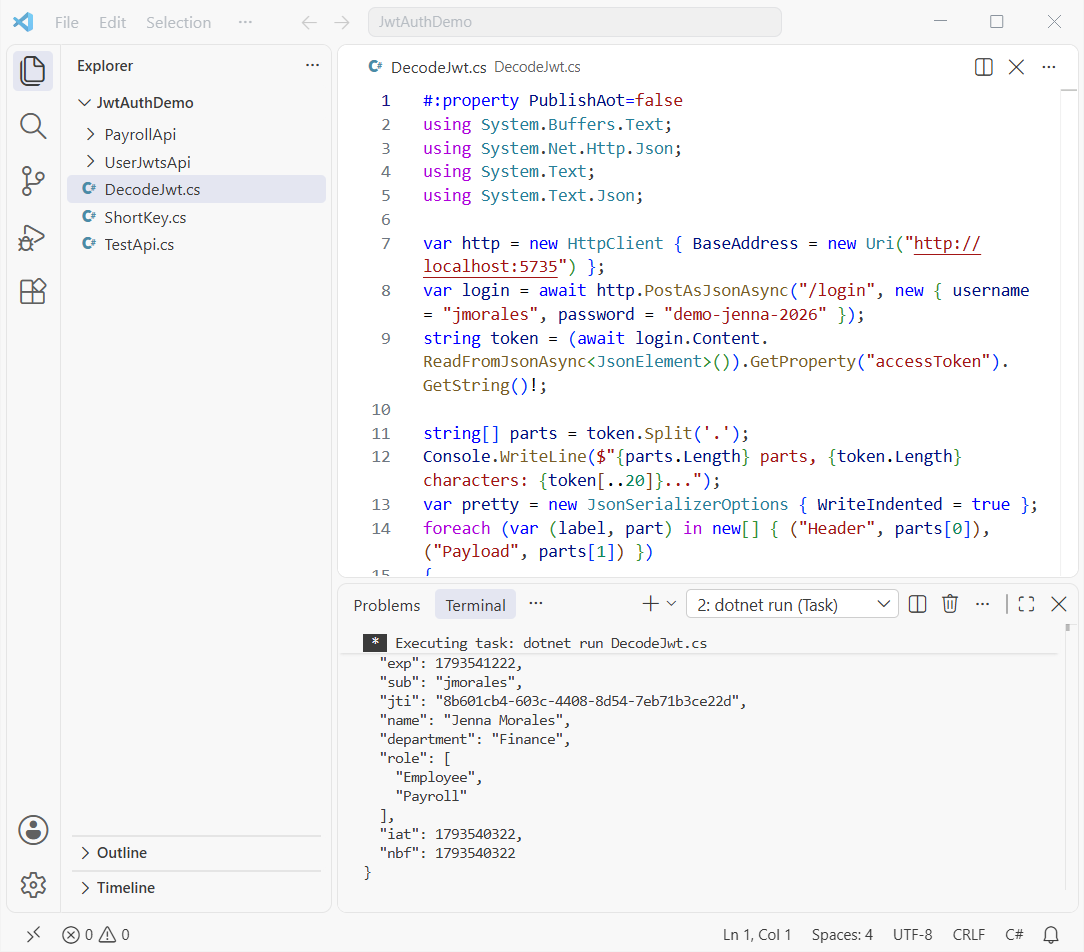
The claims match the descriptor. exp, iat and nbf are Unix seconds, and role became a JSON array because Jenna has two roles. Never put a password, SSN or anything private in a claim.
Checkpoint: the payload shows "iss": "payroll-api-demo" and "aud": "payroll-web", the same values the API validates.
Test the JWT Bearer Authentication with HttpClient
This client logs in both users and calls every endpoint. It’s plain async/await in C# with one HttpClient:
#:property PublishAot=false
using System.Net.Http.Json;

var http = new HttpClient { BaseAddress = new Uri("http://localhost:5735") };

async Task<string> Login(string user, string pass) =>
    (await (await http.PostAsJsonAsync("/login", new { username = user, password = pass }))
        .Content.ReadFromJsonAsync<Token>())!.AccessToken;

async Task Call(string path, string? token, string who)
{
    var req = new HttpRequestMessage(HttpMethod.Get, path);
    if (token is not null) req.Headers.Authorization = new("Bearer", token);
    var res = await http.SendAsync(req);
    string hint = string.Join(" ", res.Headers.WwwAuthenticate.Select(h => h.Scheme));
    Console.WriteLine($"{path,-9}{who,-20}{(int)res.StatusCode} {res.StatusCode} {hint}");
}

string tyler = await Login("tbrooks", "demo-tyler-2026");
string jenna = await Login("jmorales", "demo-jenna-2026");
await Call("/health", null, "no token");
await Call("/me", null, "no token");
await Call("/me", tyler, "Tyler (Employee)");
await Call("/payroll", tyler, "Tyler (Employee)");
await Call("/budget", tyler, "Tyler (Operations)");
await Call("/payroll", jenna, "Jenna (Payroll)");
await Call("/budget", jenna, "Jenna (Finance)");
await Call("/me", tyler[..^4] + "AAAA", "tampered token");

record Token(string AccessToken, DateTime ExpiresAt);
Output:
/health  no token            200 OK
/me      no token            401 Unauthorized Bearer
/me      Tyler (Employee)    200 OK
/payroll Tyler (Employee)    403 Forbidden
/budget  Tyler (Operations)  403 Forbidden
/payroll Jenna (Payroll)     200 OK
/budget  Jenna (Finance)     200 OK
/me      tampered token      401 Unauthorized Bearer
Note: file-based apps publish as Native AOT by default, which turns off reflection-based JSON. My first run of PostAsJsonAsync died with “Reflection-based serialization has been disabled”, so the clients start with #:property PublishAot=false.
What each JWT test result means
| Call | Status | Why |
|---|---|---|
| /health, no token | 200 | No RequireAuthorization, so it’s public |
| /me, no token | 401 | Challenge with WWW-Authenticate: Bearer |
| /payroll, Tyler | 403 | Valid token, but no Payroll role |
| /budget, Tyler | 403 | department is Operations, not Finance |
| /payroll and /budget, Jenna | 200 | Role and claim both match |
| /me, tampered token | 401 | Signature check fails |
The tampered call changed the last four characters of the signature. The full response header says why:
HTTP/1.1 401 Unauthorized
WWW-Authenticate: Bearer error="invalid_token", error_description="The signature key was not found"
Test an expired JWT token (lifetime and ClockSkew)
For this run I started the API with Jwt__AccessTokenMinutes=0.1, a six-second token, and waited eight seconds between calls:
#:property PublishAot=false
using System.Net.Http.Json;

var http = new HttpClient { BaseAddress = new Uri("http://localhost:5735") };
var login = await http.PostAsJsonAsync("/login", new { username = "tbrooks", password = "demo-tyler-2026" });
var token = (await login.Content.ReadFromJsonAsync<Token>())!;
http.DefaultRequestHeaders.Authorization = new("Bearer", token.AccessToken);
Console.WriteLine($"Token expires at {token.ExpiresAt:HH:mm:ss} UTC");

for (int i = 0; i < 2; i++)
{
    var res = await http.GetAsync("/me");
    Console.WriteLine($"{DateTime.UtcNow:HH:mm:ss}  GET /me -> {(int)res.StatusCode} {res.StatusCode}");
    foreach (var h in res.Headers.WwwAuthenticate) Console.WriteLine($"  WWW-Authenticate: {h}");
    if (i == 0) await Task.Delay(TimeSpan.FromSeconds(8));
}

record Token(string AccessToken, DateTime ExpiresAt);
Output:
Token expires at 13:39:33 UTC
13:39:27  GET /me -> 200 OK
13:39:35  GET /me -> 401 Unauthorized
  WWW-Authenticate: Bearer error="invalid_token", error_description="The token expired at '11/01/2026 13:39:33'"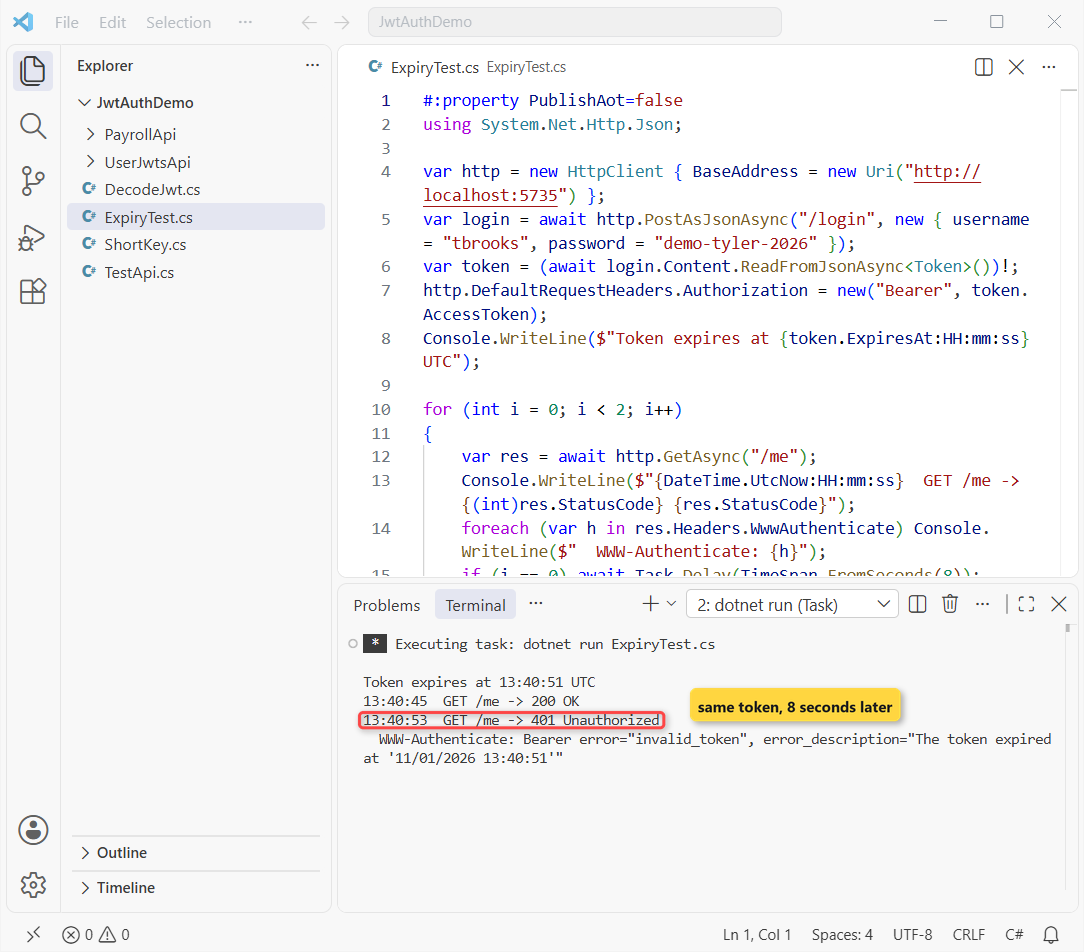
It failed right on time because ClockSkew is zero. With the default five minutes, that token would have kept working for five more minutes.
Generate a Dev JWT Token with dotnet user-jwts
Don’t want a /login endpoint while you build? The dotnet user-jwts tool mints local tokens and keeps its signing key in user secrets. It works when AddJwtBearer() reads its options from configuration, so I used a second small project:
using System.Security.Claims;

var builder = WebApplication.CreateBuilder(args);

builder.Services.AddAuthentication("Bearer").AddJwtBearer();   // options come from appsettings
builder.Services.AddAuthorization();

var app = builder.Build();

app.MapGet("/secret", (ClaimsPrincipal user) => $"Hello {user.Identity?.Name}, you're in.")
    .RequireAuthorization();
app.MapGet("/payroll", () => "Payroll data for Q4 2026")
    .RequireAuthorization(p => p.RequireRole("Payroll"));

app.Run();
It has the same launchSettings.json as PayrollApi. Create a token for Jenna with the Payroll role:
dotnet user-jwts create --name "Jenna Morales" --role PayrollNew JWT saved with ID 'ca875434'.
Name: Jenna Morales
Roles: [Payroll]
Token: eyJhbGciOiJIUzI1NiIsInR5...The tool also wrote the matching issuer and audience into appsettings.Development.json, and it added a UserSecretsId to the csproj:
{
  "Logging": {
    "LogLevel": {
      "Default": "Information",
      "Microsoft.AspNetCore": "Warning"
    }
  },
  "Authentication": {
    "Schemes": {
      "Bearer": {
        "ValidAudiences": [
          "http://localhost:5735"
        ],
        "ValidIssuer": "dotnet-user-jwts"
      }
    }
  }
}
<Project Sdk="Microsoft.NET.Sdk.Web">
<PropertyGroup>
<TargetFramework>net10.0</TargetFramework>
<Nullable>enable</Nullable>
<ImplicitUsings>enable</ImplicitUsings>
<UserSecretsId>1acd2c24-eb31-4a71-a13c-3a7ab23a1a79</UserSecretsId>
</PropertyGroup>
<ItemGroup>
<PackageReference Include="Microsoft.AspNetCore.Authentication.JwtBearer" Version="10.0.14" />
</ItemGroup>
</Project>dotnet user-jwts print with the ID shows everything in the token, including the claims and the expiry:
dotnet user-jwts print ca875434 --show-allFound JWT with ID 'ca875434'.
ID: ca875434
Name: Jenna Morales
Scheme: Bearer
Audience(s): http://localhost:5735
Not Before: 2026-11-01T13:41:42.0000000+00:00
Expires On: 2027-02-01T13:41:42.0000000+00:00
Issued On: 2026-11-01T13:41:43.0000000+00:00
Scopes: none
Roles: [Payroll]
Custom Claims: [none]
Token Header: {"alg":"HS256","typ":"JWT"}
Token Payload: {"unique_name":"Jenna Morales","sub":"Jenna Morales","jti":"ca875434","role":"Payroll","aud":"http://localhost:5735","nbf":1793540502,"exp":1801489302,"iat":1793540503,"iss":"dotnet-user-jwts"}
Compact Token: eyJhbGciOiJIUzI1NiIsInR5...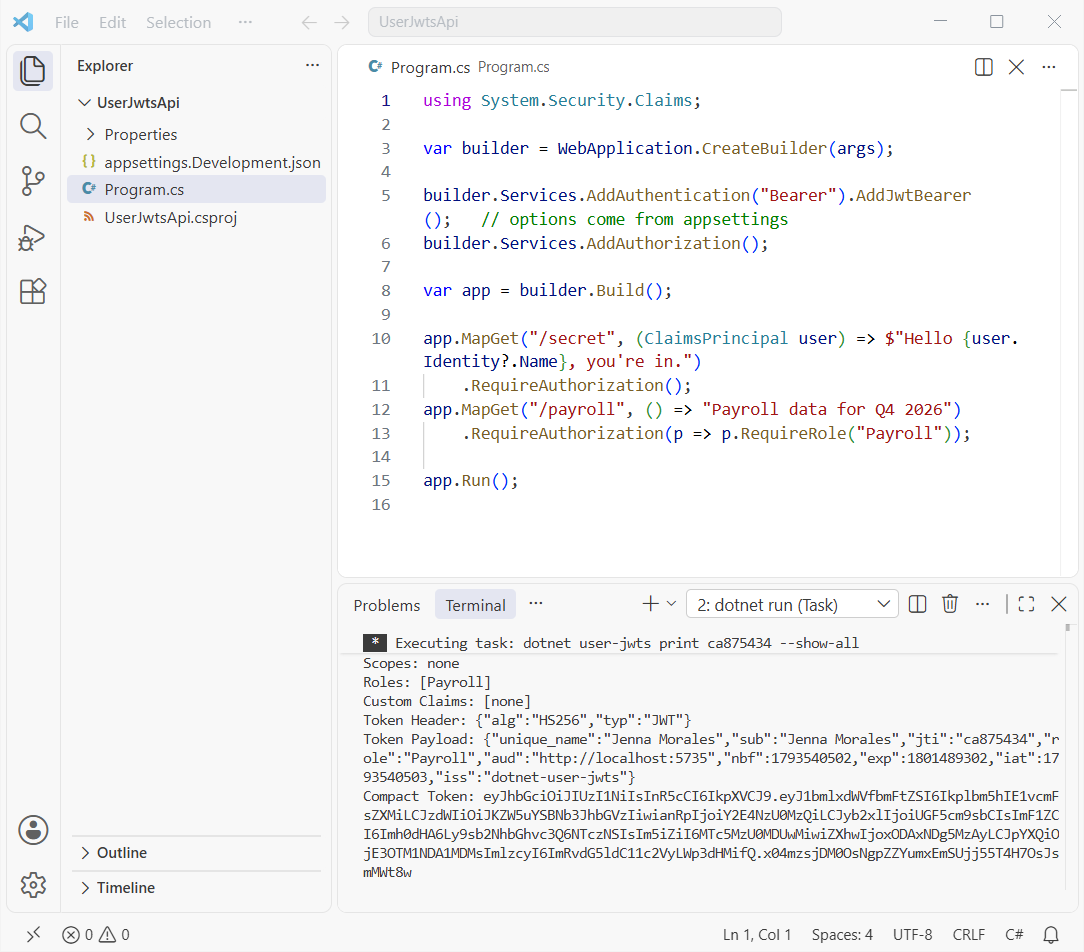
With that token, /secret answered Hello Jenna Morales, you're in. and /payroll returned 200. Without it, /secret returned 401. My token expires three months out, as the tool’s help says.
JWT Refresh Tokens: What They Do (Not Built Here)
A short access token is safer, but nobody wants to sign in every 15 minutes. A refresh token is a long random value, stored on the server, that the client trades for a new access token.
The server rotates it on every use, revokes it on sign-out, and never puts it in browser storage. That’s real work, which is why I’d lean on ASP.NET Core Identity or an identity provider before writing my own.
ASP.NET Core Identity vs JWT, and Cookie vs JWT: Which One Do You Need?
These aren’t really rivals. Identity stores users and passwords, while cookies and JWTs are two ways to carry the signed-in user on each request:
| Option | Best for | Watch out for |
|---|---|---|
| Cookie authentication | Server-rendered sites, Blazor, a backend for your SPA | CSRF protection, same-site only |
| JWT bearer | APIs called by mobile apps, other services, other domains | Can’t be revoked before it expires |
| ASP.NET Core Identity | Storing users, hashed passwords, MFA | It’s a user store, not a token format |
| Identity provider (Entra ID, Auth0) | Production sign-in with OAuth and OpenID Connect | Setup and cost |
Identity can issue bearer tokens too, through MapIdentityApi. If a code-based sign-in fits your users better than passwords, my OTP sign-in example in ASP.NET Core covers that half.
Make the ASP.NET Core JWT Setup Production-Ready
- HTTPS only. A bearer token works like a password until it expires, so never send it over plain HTTP outside localhost.
- Short lifetimes. 5 to 15 minutes for access tokens, with ClockSkew of 30 seconds or less.
- Keep the key out of the repo. User secrets in development, Key Vault or an environment variable in production, and rotate it.
- Store tokens safely. Don’t keep them in browser localStorage; use a backend with an HttpOnly cookie for browser apps.
- Use an identity provider for real users. Microsoft recommends asymmetric keys and OAuth or OpenID Connect flows over issuing tokens from a username and password.
Want a token box in your API docs? My OpenAPI and Scalar guide for ASP.NET Core adds the Bearer security scheme so you can paste a JWT and try the locked endpoints.
Troubleshooting ASP.NET Core JWT Authentication Errors
IDX10720: the key size must be greater than ‘256’ bits. Your HS256 key is shorter than 32 bytes. Generate a new one as in Step 2.
A valid token still gets 401. I swapped the two middleware lines so UseAuthorization ran first, and Tyler’s good token on /me returned 401. Authentication must run before authorization.
Everyone gets in. The endpoint has no RequireAuthorization, exactly like /health, which returned 200 with no token. To lock every endpoint by default, set a fallback policy with SetFallbackPolicy.
Roles never match, so every call is 403. With MapInboundClaims = false you must set RoleClaimType = "role". Leave mapping on and the handler renames role to the long ClaimTypes.Role URI instead.
Expired tokens still work for a few minutes. That’s the 5-minute default ClockSkew. Lower it, as in Step 3.
dotnet user-jwts says it could not find appsettings.Development.json. I hit this after deleting that file. The tool edits it rather than creating it, so put back a file with just the Logging section.
Note: a 401 with no error_description usually means no token arrived at all. Check the header is exactly Bearer plus a space, and wrap client calls in a try-catch block while you debug.
Where to Take It Next with JWT in ASP.NET Core
Swap the in-memory payroll list for a database with the LINQ queries you already know, and move the demo users into ASP.NET Core Identity. Then put an identity provider in front of the API when real customers sign in.
Every API here targets .NET 10. The What is new in .NET 10 roundup lists the other runtime and ASP.NET Core changes worth knowing.
A few more pages that fit this one:
- Every ASP.NET Core tutorial on AspDotnetHelp
- Move an older API from .NET 8 to .NET 10
- .NET 8 and .NET 9 end-of-support dates
- Interfaces in C# for a token service
Frequently Asked Questions
How do I generate a JWT token in .NET?
Build a SecurityTokenDescriptor with the issuer, audience, expiry, claims and SigningCredentials, then call new JsonWebTokenHandler().CreateToken(descriptor). Use a key of at least 256 bits for HS256.
How do I validate a JWT token manually in C#?
Call JsonWebTokenHandler.ValidateTokenAsync(token, parameters) with the same TokenValidationParameters the API uses, then check result.IsValid and result.Exception. In an API, let AddJwtBearer do it for you.
What is the difference between 401 and 403 with JWT?
401 means the token is missing or failed validation (signature, issuer, audience or expiry). 403 means the token is valid but the user lacks the role or claim the policy needs.
Where should I store the JWT signing key?
Use dotnet user-secrets during development and Azure Key Vault or an environment variable in production. Never commit it to appsettings.json or source control.
Is a JWT encrypted?
No. A signed JWT is only Base64Url-encoded, so anyone holding it can read the claims. The signature stops edits, not reading, so keep secrets out of the payload.
Should I issue my own JWTs in production?
Microsoft advises against creating access tokens from a username and password request and recommends OpenID Connect or OAuth flows with asymmetric keys. See Configure JWT bearer authentication on Microsoft Learn.

Bijay Kumar is a renowned software engineer, accomplished author, and distinguished Microsoft Most Valuable Professional (MVP) specializing in SharePoint. With a rich professional background spanning over 15 years, Bijay has established himself as an authority in the field of information technology. He possesses unparalleled expertise in multiple programming languages and technologies such as ASP.NET, ASP.NET MVC, C#.NET, and SharePoint, which has enabled him to develop innovative and cutting-edge solutions for clients across the globe. Read more…