
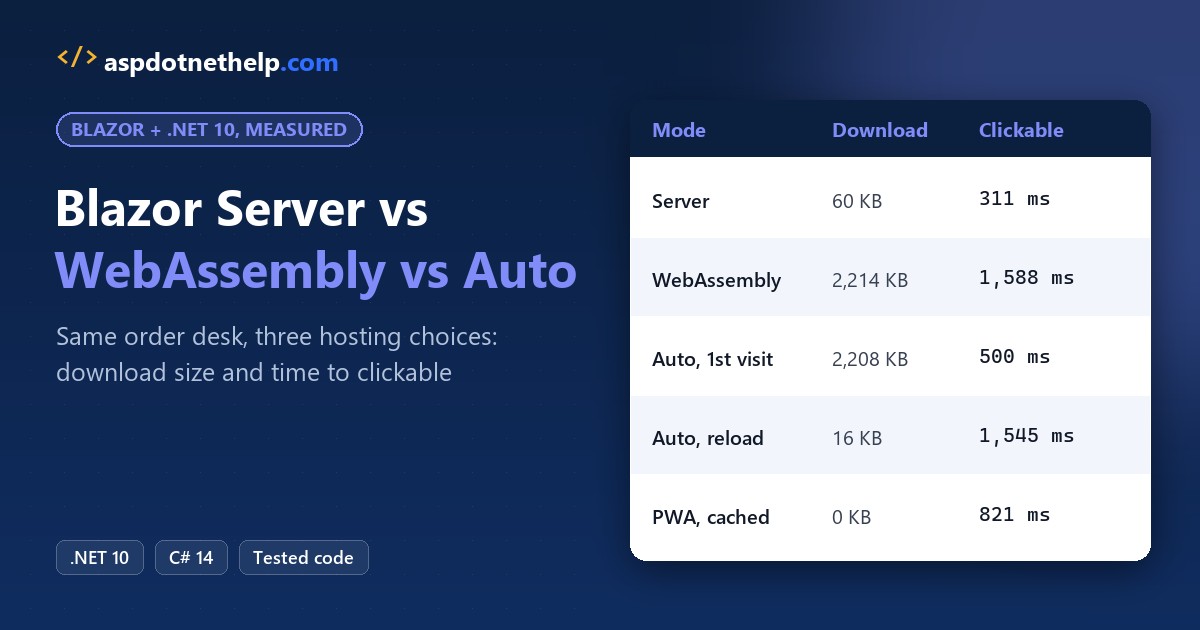
If you’re choosing between Blazor Server and WebAssembly for a .NET 10 app, use Server for internal line-of-business apps near their data and WebAssembly for offline or static-hosted apps. For public apps, pick Auto. That’s my verdict on Blazor Server vs WebAssembly.
I ran one order-desk component all three ways. On localhost, Server was clickable after 311 ms, while WebAssembly needed 1,588 ms and a 2,214 KB download. Here’s the full comparison.
Blazor Server vs WebAssembly vs Auto at a Glance
Every number below comes from my Release builds on .NET 10, measured in headless Edge on localhost, so read timings as best case.
| Feature | Blazor Server | Blazor WebAssembly | Auto (Blazor Web App) |
|---|---|---|---|
| Where your C# runs | Server, over a SignalR circuit | Browser, on .NET for WebAssembly | Server first, browser on later visits |
| First-visit download | 60 KB | 2,214 KB | 2,208 KB, mostly in the background |
| Clickable after (localhost) | 311 ms | 1,588 ms | 500 ms; 1,545 ms on reload |
| Median click (localhost) | 5.7 ms | 2.9 ms | 10.5 ms; 3.4 ms on reload |
| Works offline | No | Yes, as a standalone PWA | No |
| Hosting | ASP.NET Core server | Any static host or CDN (standalone) | ASP.NET Core server |
| Content in the first HTML | Yes, prerendered | No (standalone) | Yes, prerendered |
| App code in the browser | No | Yes, as .wasm files | Yes, the .Client project |
| Server memory per user | ~168 KB of heap per circuit (my test) | None | Only during Server visits |
Auto is a render mode of a Blazor Web App; how to apply it is in my Blazor render modes guide.
The Sample Order Desk Used for Every Blazor Test
One component runs in all four setups: a button that counts packed orders and a list of five US orders. It prints RendererInfo.Name so each test shows where it ran.
@using System.Globalization

<div class="board" data-interactive="@RendererInfo.IsInteractive.ToString().ToLower()">
    <h1>Order desk</h1>
    <p>Running on: <strong id="where">@RendererInfo.Name</strong></p>
    <button id="pack" @onclick="Pack" disabled="@(!RendererInfo.IsInteractive)">Pack next order</button>
    <p id="packed">Orders packed: @packed</p>
    <ul id="orders">
        @foreach (var o in orders)
        {
            <li>#@o.Id @o.City, @o.State: $@o.Total.ToString("0.00", CultureInfo.InvariantCulture)</li>
        }
    </ul>
</div>

@code {
    private int packed;

    private readonly Order[] orders =
    [
        new(1001, "Austin", "TX", 84.50m),
        new(1002, "Denver", "CO", 129.99m),
        new(1003, "Raleigh", "NC", 42.75m),
        new(1004, "Boise", "ID", 310.00m),
        new(1005, "Tampa", "FL", 67.20m)
    ];

    private void Pack() => packed++;

    private record Order(int Id, string City, string State, decimal Total);
}
In the Blazor Web App it lives in the .Client project, and three one-line pages give it a mode. Here’s the Server one; the others swap in InteractiveWebAssembly and InteractiveAuto:
@page "/server"
@rendermode InteractiveServer

<PageTitle>Server desk</PageTitle>

<OrdersBoard />
The standalone app shows the same file on its home page (new to components? see how Blazor components work). Both apps came from .NET 10 templates:
dotnet new blazor --interactivity Auto --empty -o W11BlazorWeb
dotnet new blazorwasm --pwa --empty -o W11BlazorPwa
Since .NET 8, “Blazor Server” means a Blazor Web App created with --interactivity Server, the setup my Blazor tutorial for beginners uses. My dotnet new list blazor still shows blazorserver, but only for net6.0 and net7.0.
Download Size: How Big Is a Blazor WebAssembly App?
Same app, same five orders, now on disk: I published the standalone app with dotnet publish -c Release. Its _framework folder held 42 files and 8,903 KB, plus Brotli copies totaling 2,669 KB.
The browser skips some of it, but the first visit to /wasm still pulled 33 .wasm files, 2,202 KB over the wire. The /server page moved 60 KB in total, mostly blazor.web.js.
Auto pulled 2,208 KB too, just after the page was usable. The Web App’s client bundle (2,697 KB of Brotli files) matched the standalone one, and AOT compilation would make it bigger, not smaller.
Which Loads Faster: Time to Interactive for Server, WebAssembly and Auto
Same five orders on every page, and a fresh Edge profile each time. I recorded when the five orders first showed and when the button became clickable. The last column repeats the test with Edge throttled to 20 Mbps and 40 ms of latency.
| Same page, cold visit | Orders visible | Clickable | Clickable at 20 Mbps |
|---|---|---|---|
| Blazor Server | 85 ms | 311 ms | 609 ms |
| WebAssembly in a Web App | 42 ms | 1,588 ms | 2,656 ms |
| Auto, first visit | 57 ms | 500 ms | 513 ms |
| Auto, reload (cached) | 55 ms | 1,545 ms | – |
| Standalone WASM PWA | 1,734 ms | 1,734 ms | 4,536 ms |
| Standalone PWA, reload | 821 ms | 821 ms | – |
Prerendering is why the Web App rows show orders in under 100 ms, even for WebAssembly. The standalone PWA shows nothing until .NET has booted, 1,734 ms here and 4,536 ms on the throttled run.
Note: the Auto reload surprised me. It moved only 16 KB, yet the button took 1,545 ms, because starting the cached WebAssembly runtime still costs a second or more. The first Server-backed visit was faster at 500 ms.
Click Latency: Blazor Server SignalR Round Trip vs WebAssembly
Same five orders, now clicked: I pressed Pack next order 20 times on each page and timed each click until the counter changed. On localhost the medians were 5.7 ms for Server and 2.9 ms for WebAssembly.
With Edge’s 40 ms latency setting, the Server median rose to 24.4 ms while WebAssembly stayed at 2.7 ms. Every Server click is a network round trip; WebAssembly never leaves the browser.
Microsoft Learn recommends UI latency of 250 ms or less, which hotel Wi-Fi can break. Calls through Blazor JavaScript interop pay the same round trip on Server.
How Much Server Memory Does a Blazor Server Circuit Use?
Each browser tab on a Server page gets its own circuit, which keeps your component state in server memory. My demo-only /heap endpoint reports the managed heap after a full garbage collection.
With no visitors the heap was 4,339 KB. With 30 Edge tabs open on /server it was 9,386 KB, about 168 KB per circuit for this tiny component.
That’s the managed heap only, not the whole process. Microsoft’s planning number is about 250 KB per circuit for a Hello World app, so a page holding a QuickGrid with thousands of rows will cost far more. WebAssembly uses none of it.
Offline and PWA: Does Blazor WebAssembly Work Without a Server?
Yes, but only a standalone app built as a PWA, and only once it’s published. I visited the PWA, stopped my static file host, reloaded and clicked three times. It kept working, because the service worker had cached every file.
Then I stopped the server behind the Blazor Server page and clicked. The circuit was gone, so you get the reconnect dialog and nothing else.
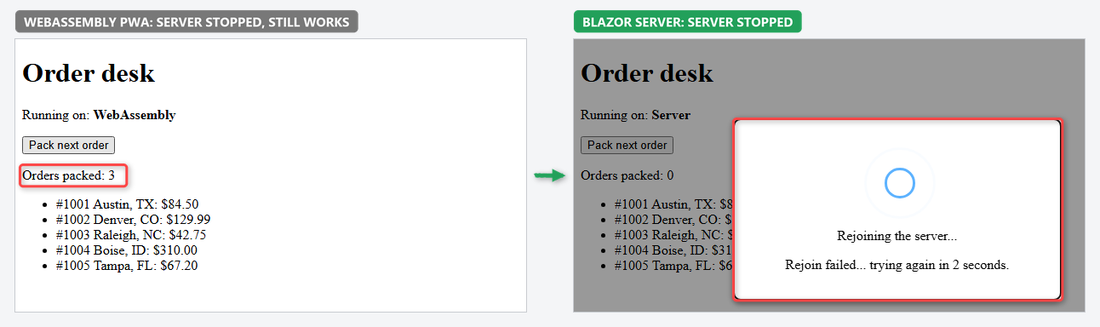
A Blazor Web App can’t do this, Auto included, because its pages come from ASP.NET Core.
Hosting Blazor: Static Files vs an ASP.NET Core Server
The standalone app is just files. Its Program.cs mounts the root component and registers an HttpClient:
using Microsoft.AspNetCore.Components.Web;
using Microsoft.AspNetCore.Components.WebAssembly.Hosting;
using W11BlazorPwa;

var builder = WebAssemblyHostBuilder.CreateDefault(args);
builder.RootComponents.Add<App>("#app");
builder.RootComponents.Add<HeadOutlet>("head::after");

builder.Services.AddScoped(sp => new HttpClient { BaseAddress = new Uri(builder.HostEnvironment.BaseAddress) });

await builder.Build().RunAsync();
Its project file uses the WebAssembly SDK, and the ServiceWorker item is what the PWA option adds:
<Project Sdk="Microsoft.NET.Sdk.BlazorWebAssembly">

  <PropertyGroup>
    <TargetFramework>net10.0</TargetFramework>
    <Nullable>enable</Nullable>
    <ImplicitUsings>enable</ImplicitUsings>
    <OverrideHtmlAssetPlaceholders>true</OverrideHtmlAssetPlaceholders>
    <ServiceWorkerAssetsManifest>service-worker-assets.js</ServiceWorkerAssetsManifest>
  </PropertyGroup>

  <ItemGroup>
    <PackageReference Include="Microsoft.AspNetCore.Components.WebAssembly" Version="10.0.13" />
    <PackageReference Include="Microsoft.AspNetCore.Components.WebAssembly.DevServer" Version="10.0.13" PrivateAssets="all" />
  </ItemGroup>

  <ItemGroup>
    <ServiceWorker Include="wwwroot\service-worker.js" PublishedContent="wwwroot\service-worker.published.js" />
  </ItemGroup>

</Project>
I served the published wwwroot folder from a tiny Node.js static host that sends the .br files. Azure Static Web Apps or any CDN does the same job.
Server and Auto need ASP.NET Core. Here’s the server Program.cs, trimmed for this test, with the /heap endpoint at the end:
using W11BlazorWeb.Components;

var builder = WebApplication.CreateBuilder(args);

builder.Services.AddRazorComponents()
    .AddInteractiveServerComponents()
    .AddInteractiveWebAssemblyComponents();

var app = builder.Build();

app.UseExceptionHandler("/Error", createScopeForErrors: true);
app.UseAntiforgery();

app.MapStaticAssets();
app.MapRazorComponents<App>()
    .AddInteractiveServerRenderMode()
    .AddInteractiveWebAssemblyRenderMode()
    .AddAdditionalAssemblies(typeof(W11BlazorWeb.Client._Imports).Assembly);

// demo only: managed heap after a full GC, to estimate memory per circuit
app.MapGet("/heap", () => $"{GC.GetTotalMemory(forceFullCollection: true) / 1024:N0} KB");

app.Run();
The server project references the .Client project, which builds the WebAssembly half:
<Project Sdk="Microsoft.NET.Sdk.Web">

  <PropertyGroup>
    <TargetFramework>net10.0</TargetFramework>
    <Nullable>enable</Nullable>
    <ImplicitUsings>enable</ImplicitUsings>
    <BlazorDisableThrowNavigationException>true</BlazorDisableThrowNavigationException>
  </PropertyGroup>

  <ItemGroup>
    <ProjectReference Include="..\W11BlazorWeb.Client\W11BlazorWeb.Client.csproj" />
    <PackageReference Include="Microsoft.AspNetCore.Components.WebAssembly.Server" Version="10.0.13" />
  </ItemGroup>

</Project>
<Project Sdk="Microsoft.NET.Sdk.BlazorWebAssembly">
<PropertyGroup>
<TargetFramework>net10.0</TargetFramework>
<ImplicitUsings>enable</ImplicitUsings>
<Nullable>enable</Nullable>
<NoDefaultLaunchSettingsFile>true</NoDefaultLaunchSettingsFile>
<StaticWebAssetProjectMode>Default</StaticWebAssetProjectMode>
<BlazorDisableThrowNavigationException>true</BlazorDisableThrowNavigationException>
</PropertyGroup>
<ItemGroup>
<PackageReference Include="Microsoft.AspNetCore.Components.WebAssembly" Version="10.0.13" />
</ItemGroup>
</Project>using Microsoft.AspNetCore.Components.WebAssembly.Hosting;
var builder = WebAssemblyHostBuilder.CreateDefault(args);
await builder.Build().RunAsync();When a standalone app calls an API on another domain, that API needs CORS in ASP.NET Core turned on for the app’s origin.
SEO and Prerendering in Blazor Server vs WebAssembly
Search engines and link previews read the first HTML response. I fetched both apps with curl and filtered for the orders:
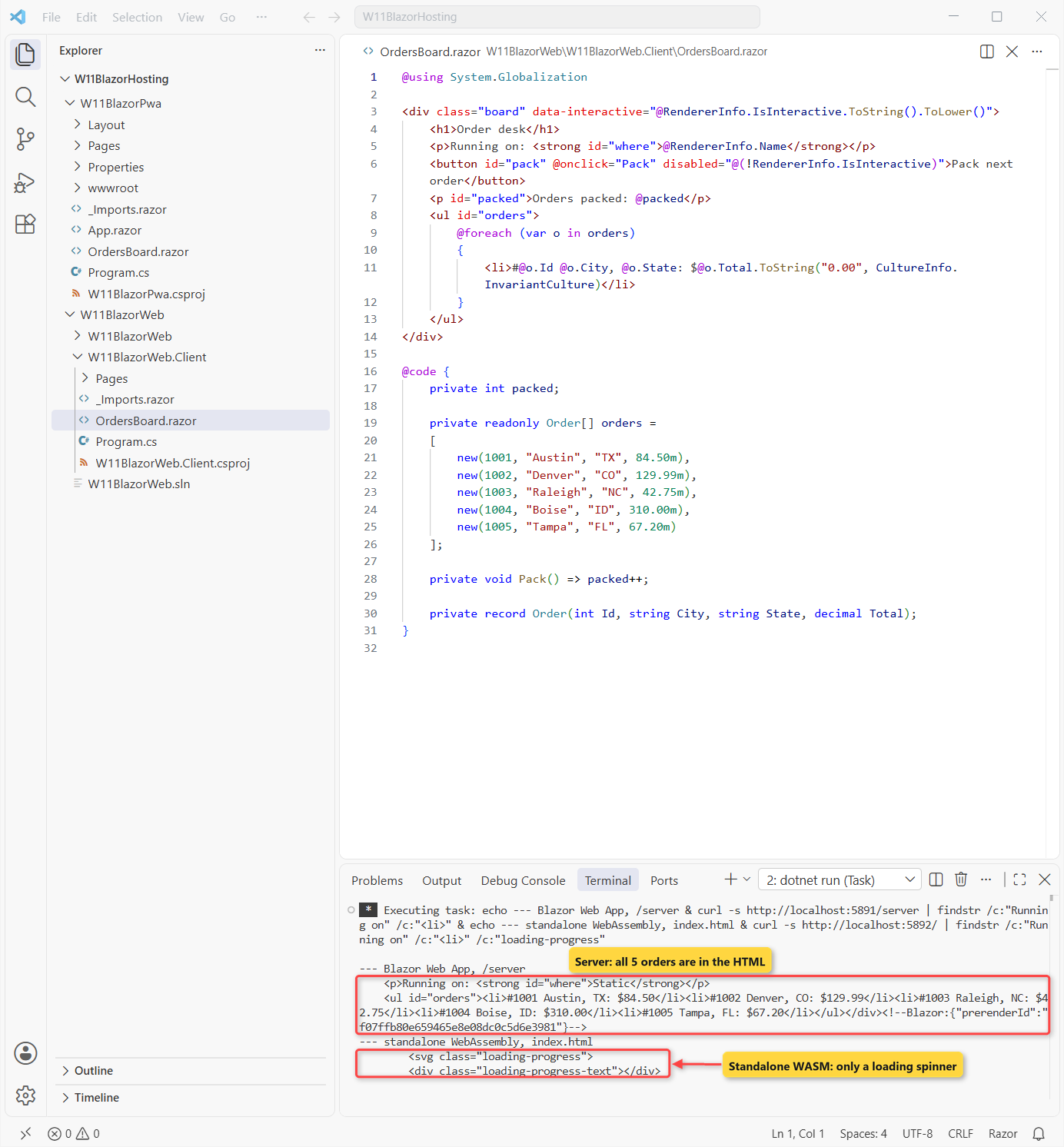
The Web App page had 5 order rows (and Static, the prerendered pass). The standalone index.html had 0, just a spinner.
Prerendering does mean OnInitializedAsync runs twice, once for the HTML and once when the page goes interactive, as I show in the Blazor component lifecycle.
Security: What Blazor WebAssembly Sends to the Browser
With WebAssembly, your compiled code is a public download. Since .NET 8, assemblies ship in the Webcil format with a .wasm extension instead of .dll, but they’re still .NET assemblies anyone can save and decompile.
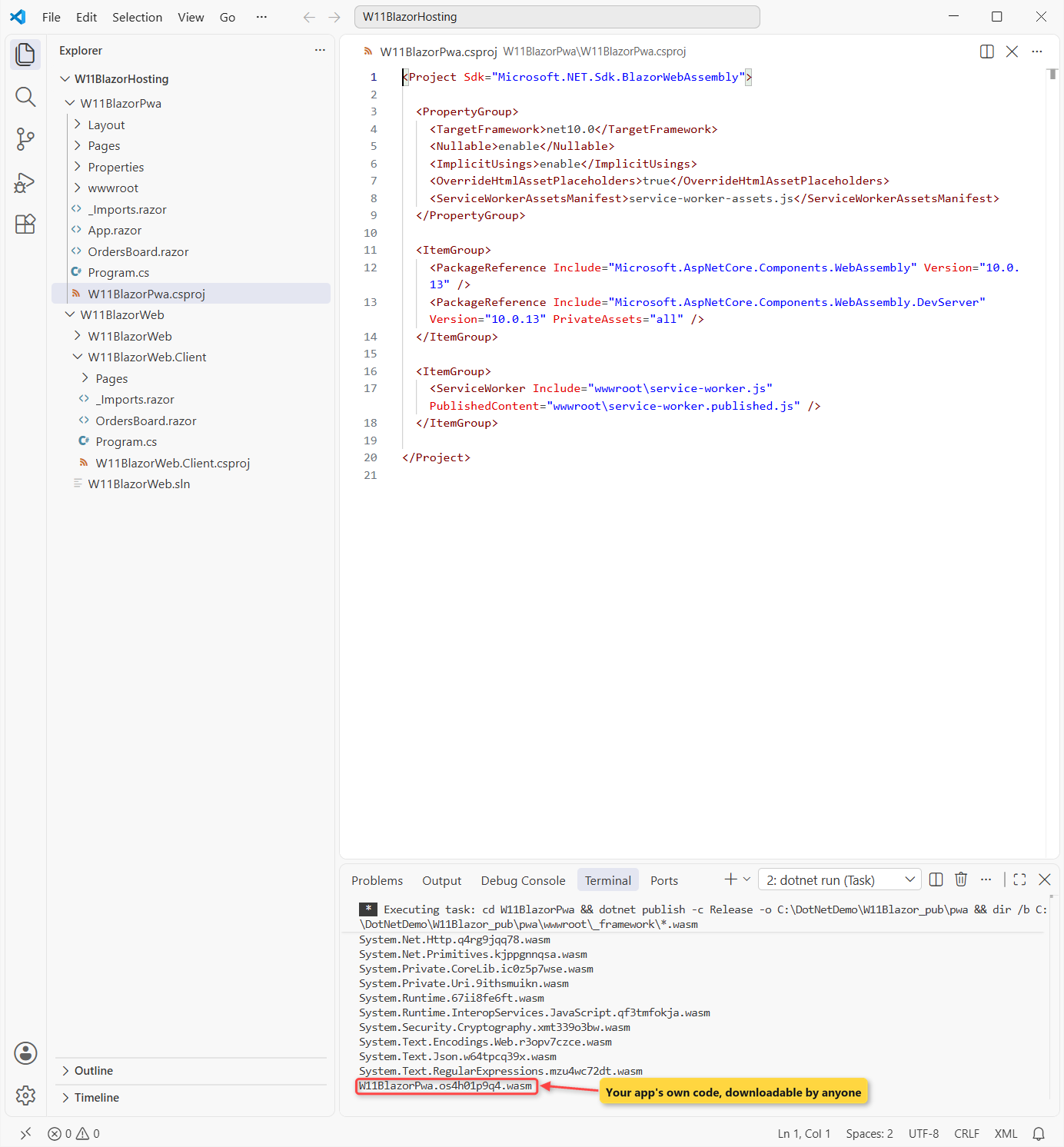
My publish produced 35 .wasm files, including W11BlazorPwa.os4h01p9q4.wasm. So never put connection strings, API keys or pricing rules in a WebAssembly or Auto component.
Keep them on the server behind an API, like the one in my ASP.NET Core Web API with EF Core guide, protected with JWT authentication. Blazor Server code never leaves your server.
Scaling Blazor Server: Circuits, Sticky Sessions and Azure SignalR Service
A circuit lives on one server, so your load balancer needs sticky sessions. On Azure App Service, turn WebSockets on and leave session affinity on.
Scoped services live as long as the circuit, not one request, which changes how DI lifetimes in ASP.NET Core behave.
For many concurrent users or several regions, Microsoft recommends Azure SignalR Service. WebAssembly needs none of this.
When to Use Blazor Server, WebAssembly or Auto
- Internal line-of-business app on a fast network, data next to the server: Blazor Server.
- Field app that must keep working offline, or you only have static hosting: standalone WebAssembly PWA.
- Public site that needs fast first paint and SEO, with heavy interactivity later: Auto.
- Mostly content pages with a few forms: static SSR, with Server only on the pages that need clicks.
In short, Server wins on first load, privacy and simplicity, WebAssembly wins on offline use, static hosting and click speed, and Auto gives you a 500 ms first visit with in-browser clicks afterward.
More Blazor and ASP.NET Core reading on the site:
- Every Blazor tutorial on one page
- Blazor forms and validation with EditForm
- Minimal APIs vs controllers for your Blazor backend
- Upgrading a .NET 8 Blazor app to .NET 10
Frequently Asked Questions
Is Blazor Server faster than Blazor WebAssembly?
For the first load, yes: 311 ms versus 1,588 ms in my localhost test. After loading, WebAssembly clicks skip the network.
What is the difference between Blazor Server and a Blazor Web App?
Blazor Web App is the .NET 8+ project template. Blazor Server is what you get when that app uses the Interactive Server render mode. The old blazorserver template only targets .NET 7 and earlier.
Can I switch from Blazor WebAssembly to Blazor Server later?
Yes. Components are the same in every hosting model; the work is moving direct DbContext calls behind an API, since WebAssembly code can’t reach your database.
Does Blazor WebAssembly work offline?
A standalone app created with dotnet new blazorwasm –pwa works offline after the first visit, once published. Blazor Server and Blazor Web App pages need the server.
Should I use Blazor Auto render mode for a new app?
Use it for public apps that need a fast first visit and less server load later. It needs a .Client project and services registered on both sides. See ASP.NET Core Blazor hosting models on Microsoft Learn.

Bijay Kumar is a renowned software engineer, accomplished author, and distinguished Microsoft Most Valuable Professional (MVP) specializing in SharePoint. With a rich professional background spanning over 15 years, Bijay has established himself as an authority in the field of information technology. He possesses unparalleled expertise in multiple programming languages and technologies such as ASP.NET, ASP.NET MVC, C#.NET, and SharePoint, which has enabled him to develop innovative and cutting-edge solutions for clients across the globe. Read more…