
Say you sell coffee gear from a small Austin shop, and one buggy script hits your public /api/orders endpoint 300 times a minute while a signed-in customer refreshes nonstop. Every other shopper waits.
ASP.NET Core rate limiting stops that with the built-in AddRateLimiter and UseRateLimiter middleware: you cap requests per window, per IP or per user, and answer the extras with a 429.
I ran each limiter below on .NET 10 against one small orders API and counted the real 200s and 429s.
The Sample Orders API and Burst Script for Rate Limiting
Everything runs on one tiny project, W11RateLimitApi, on http://localhost:5890. You don’t need a NuGet package: the middleware lives in the Microsoft.AspNetCore.RateLimiting namespace of the shared framework (since .NET 7). I used SDK 10.0.402.
<Project Sdk="Microsoft.NET.Sdk.Web">

  <PropertyGroup>
    <TargetFramework>net10.0</TargetFramework>
    <Nullable>enable</Nullable>
    <ImplicitUsings>enable</ImplicitUsings>
  </PropertyGroup>

</Project>
Here’s the starting Program.cs with no limits at all. Three US orders, one endpoint:
var builder = WebApplication.CreateBuilder(args);
var app = builder.Build();

string[] orders = ["#1001 Austin, TX $84.50", "#1002 Denver, CO $129.99", "#1003 Columbus, OH $42.00"];
app.MapGet("/api/orders", () => orders);

app.Run("http://localhost:5890");
To play the bot, I wrote W11Burst.cs, a file-based app you start with dotnet run. It fires N requests at the same moment and counts the status codes:
#!/usr/bin/env dotnet
#:property PublishAot=false
// dotnet run W11Burst.cs -- <url> <count> [Header:Value]
string url = args[0];
int count = int.Parse(args[1]);
using var http = new HttpClient();
if (args.Length > 2)
{
    var header = args[2].Split(':', 2);
    http.DefaultRequestHeaders.Add(header[0], header[1]);
}

// fire every request at once, like a script or bot would
var responses = await Task.WhenAll(Enumerable.Range(0, count).Select(_ => http.GetAsync(url)));

Console.WriteLine($"{count} requests -> {url} {(args.Length > 2 ? args[2] : "")}".TrimEnd());
foreach (var g in responses.GroupBy(r => (int)r.StatusCode).OrderBy(g => g.Key))
    Console.WriteLine($"  {g.Key}: {g.Count()}");
var retry = responses.Select(r => r.Headers.RetryAfter?.Delta).FirstOrDefault(d => d is not null);
if (retry is not null) Console.WriteLine($"  Retry-After: {retry.Value.TotalSeconds} seconds");
It sends everything in parallel with Task.WhenAll (see async and await in C#) and groups the replies with GroupBy. Against the unprotected API, all 12 requests got through:
dotnet run W11Burst.cs -- http://localhost:5890/api/orders 12

12 requests -> http://localhost:5890/api/orders
  200: 12
That’s the problem in one line. Nothing stops the 13th request, or the 13,000th, and your real customers pay for it.
How the Rate Limiting Middleware Works (AddRateLimiter + UseRateLimiter)
There are two pieces. AddRateLimiter registers your policies as a service, and UseRateLimiter adds the middleware that checks every request before your endpoint runs. A rejected request never reaches your handler.
Order matters. Microsoft Learn says UseRateLimiter must come after UseRouting when you use endpoint policies such as RequireRateLimiting or [EnableRateLimiting]. A global limiter alone can sit before it.
With WebApplication you rarely call UseRouting yourself, because routing is added at the start of the pipeline for you. So app.UseRateLimiter() right after Build() just works. If the middleware pipeline order is new to you, that post walks through it.
Important: if you do call UseRouting, put it first. I flipped the two lines in the fixed window example below, and the policy was silently ignored:
app.UseRateLimiter();
app.UseRouting();   // too late
12 requests -> http://localhost:5890/api/orders
200: 12No error, no warning, and all 12 requests got a 200.
Method 1: Fixed Window Rate Limiting with AddFixedWindowLimiter (Recommended)
A fixed window is the one I start with on almost every API. It’s easy to explain to clients: 5 requests per 10 seconds, then wait for the next window.
Same orders API, now with a named fixed window policy on /api/orders:
using System.Threading.RateLimiting;
using Microsoft.AspNetCore.RateLimiting;

var builder = WebApplication.CreateBuilder(args);
builder.Services.AddRateLimiter(options =>
{
    options.RejectionStatusCode = StatusCodes.Status429TooManyRequests;
    options.AddFixedWindowLimiter("orders", limiter =>
    {
        limiter.PermitLimit = 5;                     // 5 requests...
        limiter.Window = TimeSpan.FromSeconds(10);   // ...per 10 seconds
        limiter.QueueLimit = 0;                      // reject the rest at once
        limiter.QueueProcessingOrder = QueueProcessingOrder.OldestFirst;
    });
});
var app = builder.Build();
app.UseRateLimiter();

string[] orders = ["#1001 Austin, TX $84.50", "#1002 Denver, CO $129.99", "#1003 Columbus, OH $42.00"];
app.MapGet("/api/orders", () => orders).RequireRateLimiting("orders");

app.Run("http://localhost:5890");
I fired the same 12-request burst. Five got through and seven were turned away:
dotnet run W11Burst.cs -- http://localhost:5890/api/orders 12

12 requests -> http://localhost:5890/api/orders
  200: 5
  429: 7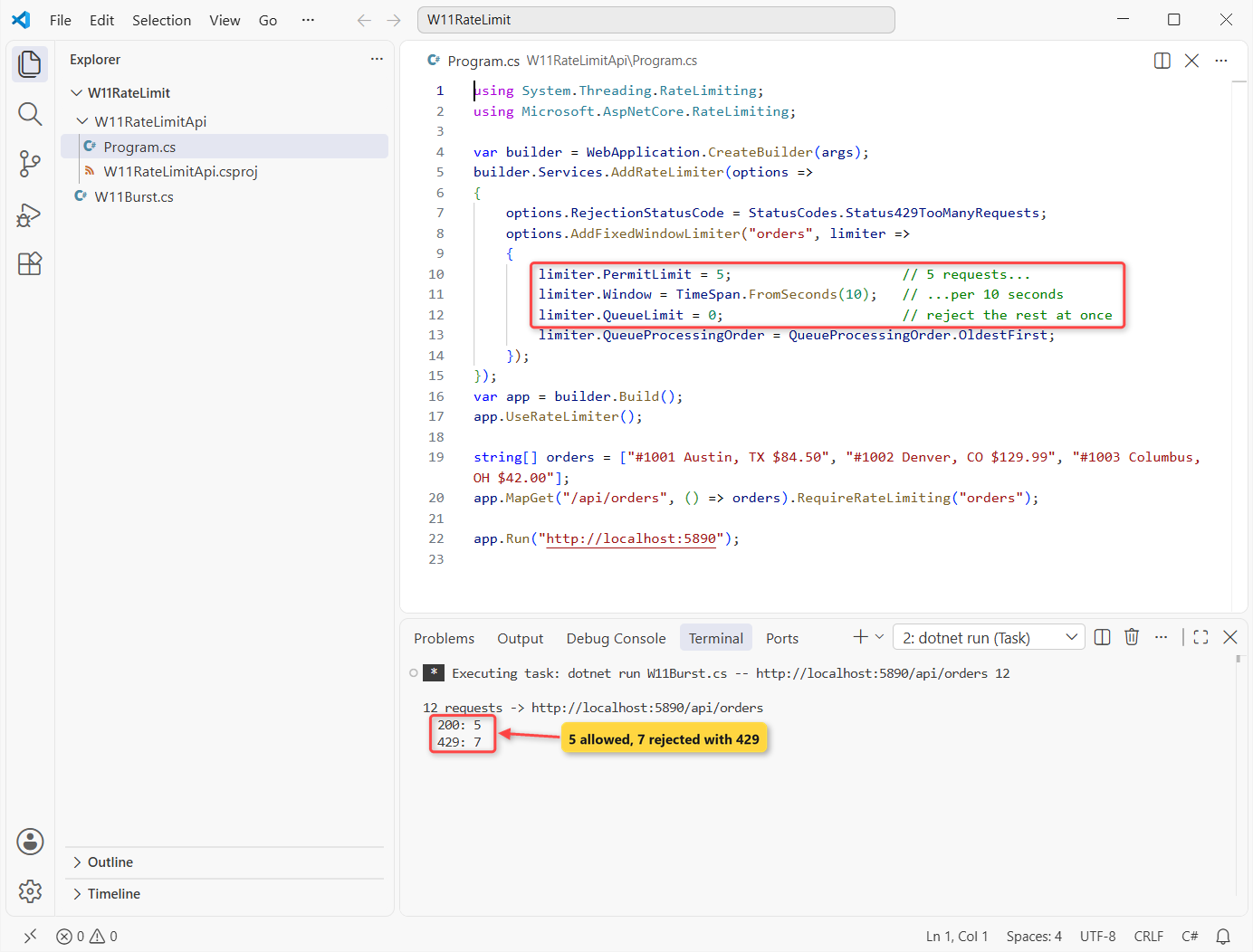
How does this work?
AddFixedWindowLimiter("orders", ...) creates a named policy. PermitLimit = 5 and Window = TimeSpan.FromSeconds(10) mean five permits per 10-second window, and the count resets when the window ends.
RequireRateLimiting("orders") attaches that policy to the endpoint. With QueueLimit = 0, requests six through twelve are rejected on the spot instead of waiting.
RejectionStatusCode is the line people forget. Its default is 503 Service Unavailable, which tells a client your server is broken. I removed it and ran the burst again:
12 requests -> http://localhost:5890/api/orders
  200: 5
  503: 7
Set it to 429 Too Many Requests so well-behaved clients know they should slow down.
Want a few extra requests to wait instead of failing? Set limiter.QueueLimit = 2; and rerun:
12 requests -> http://localhost:5890/api/orders
  200: 7
  429: 5
Two more succeeded, but they waited for the next window: the whole run took 10.8 seconds versus 0.5 seconds without the queue. QueueProcessingOrder.OldestFirst serves the oldest waiting request first.
So here’s the catch: a fixed window allows a double burst at the boundary. Five requests at second 9 and five more at second 10 all pass. Method 4’s sliding window smooths that out.
How Do You Return 429 with a Retry-After Header in ASP.NET Core?
A 429 alone tells the client to back off, but not for how long. The OnRejected callback lets you add a Retry-After header and a short message. Same orders API again:
using System.Globalization;
using System.Threading.RateLimiting;
using Microsoft.AspNetCore.RateLimiting;

var builder = WebApplication.CreateBuilder(args);
builder.Services.AddRateLimiter(options =>
{
    options.RejectionStatusCode = StatusCodes.Status429TooManyRequests;
    options.OnRejected = async (context, token) =>
    {
        if (context.Lease.TryGetMetadata(MetadataName.RetryAfter, out TimeSpan retryAfter))
            context.HttpContext.Response.Headers.RetryAfter =
                ((int)Math.Ceiling(retryAfter.TotalSeconds)).ToString(NumberFormatInfo.InvariantInfo);
        await context.HttpContext.Response.WriteAsync("Too many requests. Try again later.", token);
    };
    options.AddFixedWindowLimiter("orders", limiter =>
    {
        limiter.PermitLimit = 5;
        limiter.Window = TimeSpan.FromSeconds(10);
    });
});
var app = builder.Build();
app.UseRateLimiter();

string[] orders = ["#1001 Austin, TX $84.50", "#1002 Denver, CO $129.99", "#1003 Columbus, OH $42.00"];
app.MapGet("/api/orders", () => orders).RequireRateLimiting("orders");

app.Run("http://localhost:5890");
I sent 8 requests this time. The 3 rejected ones carried the header:
dotnet run W11Burst.cs -- http://localhost:5890/api/orders 8

8 requests -> http://localhost:5890/api/orders
  200: 5
  429: 3
  Retry-After: 10 seconds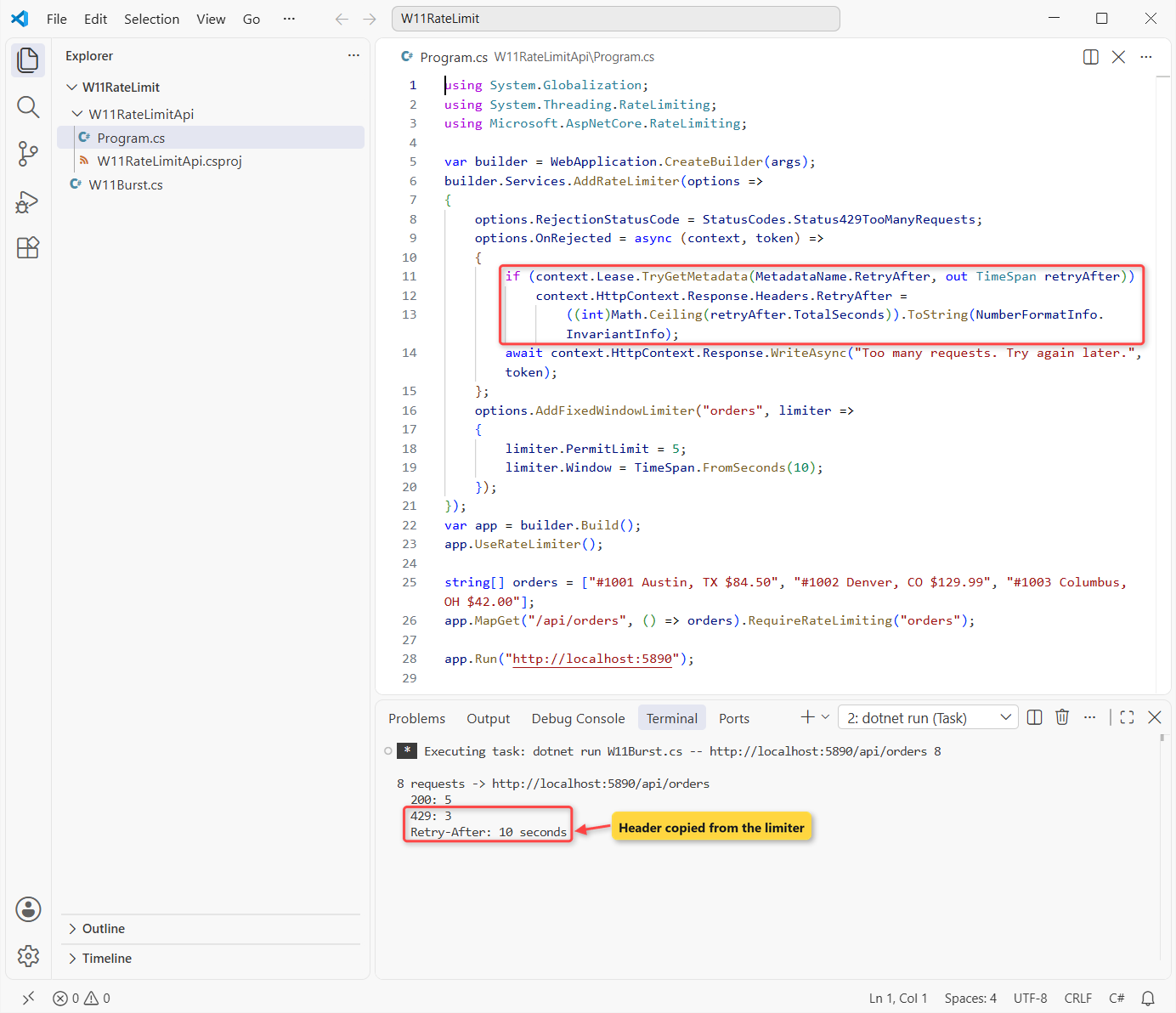
How does this work?
The middleware sets RejectionStatusCode first and then calls OnRejected, so a status code you set in the callback wins. context.Lease.TryGetMetadata(MetadataName.RetryAfter, ...) asks the limiter how long to wait.
The header value is whole seconds, written with NumberFormatInfo.InvariantInfo so a server culture can’t change the format. If your API returns ProblemDetails for errors, match that shape here too, as in global error handling in ASP.NET Core.
One thing surprised me. I used five permits, waited six seconds and sent three more.
On .NET 10 the header still said 10 seconds, the full window, not the few seconds left. Learn says the fixed window limiter reports the next window boundary starting with ASP.NET Core 11.
The concurrency limiter doesn’t provide RetryAfter at all, so always check the TryGetMetadata result.
Method 2: Rate Limiting per IP Address with PartitionedRateLimiter
One shared counter punishes everyone for one bad client. That’s the Austin bot again: once it burns the 5 permits, real shoppers get 429s too. Partitioning gives each client IP its own counter.
Same orders data, but this time it’s a GlobalLimiter: 5 requests per minute per IP on every endpoint, except a health check:
using System.Threading.RateLimiting;

var builder = WebApplication.CreateBuilder(args);
builder.Services.AddRateLimiter(options =>
{
    options.RejectionStatusCode = StatusCodes.Status429TooManyRequests;
    options.GlobalLimiter = PartitionedRateLimiter.Create<HttpContext, string>(context =>
        RateLimitPartition.GetFixedWindowLimiter(
            partitionKey: context.Connection.RemoteIpAddress?.ToString() ?? "unknown",
            factory: _ => new FixedWindowRateLimiterOptions
            {
                PermitLimit = 5,
                Window = TimeSpan.FromMinutes(1)
            }));
});
var app = builder.Build();
app.UseRateLimiter();

string[] orders = ["#1001 Austin, TX $84.50", "#1002 Denver, CO $129.99", "#1003 Columbus, OH $42.00"];
app.MapGet("/api/orders", () => orders);
app.MapGet("/health", () => "Healthy").DisableRateLimiting();

app.Run("http://localhost:5890");
From one PC I can still look like two clients: 127.0.0.1 (IPv4) and [::1] (IPv6) are different addresses. Each got its own 5 permits, and /health never counted:
dotnet run W11Burst.cs -- http://127.0.0.1:5890/api/orders 8
dotnet run W11Burst.cs -- http://[::1]:5890/api/orders 8
dotnet run W11Burst.cs -- http://127.0.0.1:5890/health 8

8 requests -> http://127.0.0.1:5890/api/orders
  200: 5
  429: 3
8 requests -> http://[::1]:5890/api/orders
  200: 5
  429: 3
8 requests -> http://127.0.0.1:5890/health
  200: 8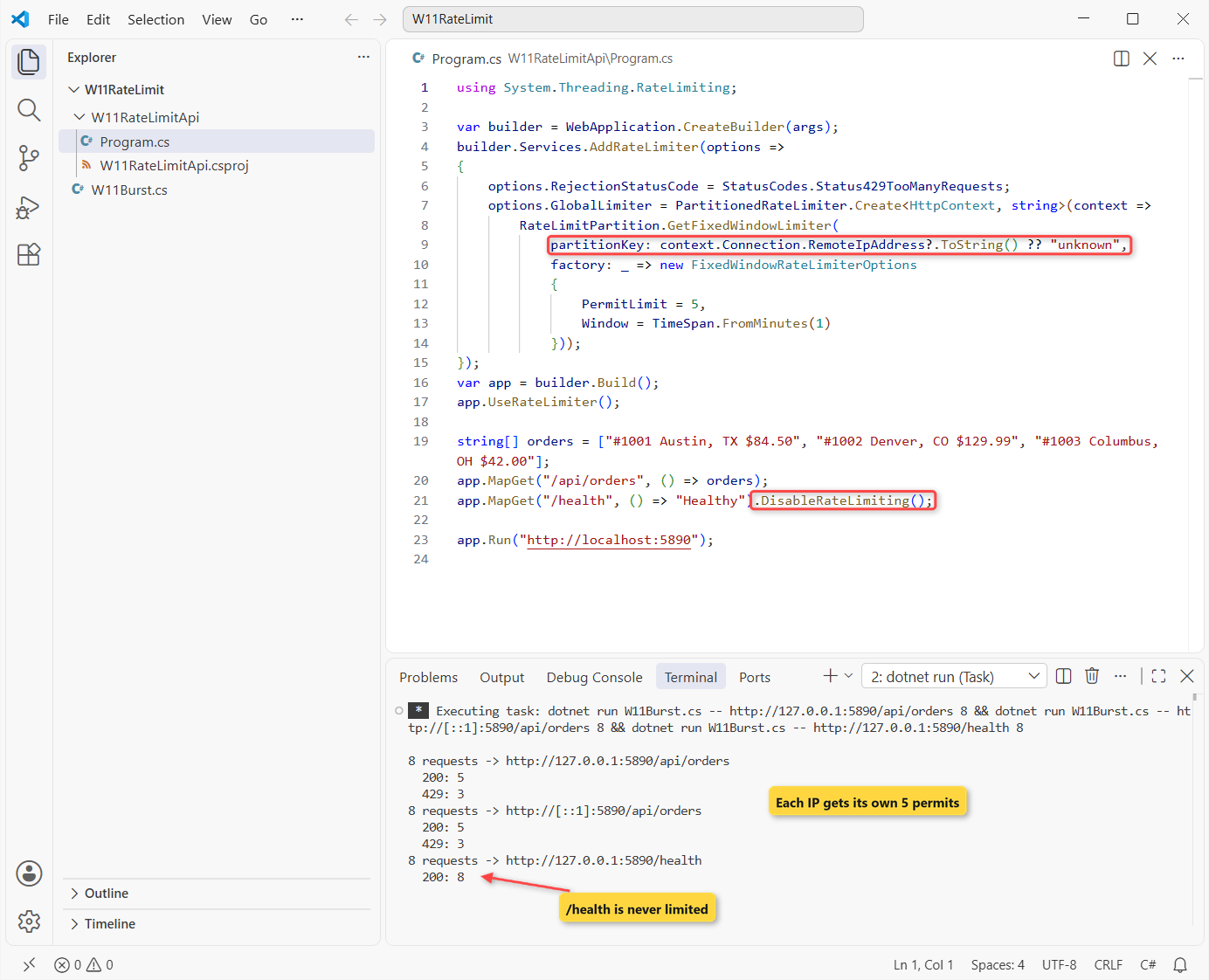
How does this work?
PartitionedRateLimiter.Create<HttpContext, string> runs your function on every request and gets back a partition. RateLimitPartition.GetFixedWindowLimiter builds one fixed window limiter per key, here RemoteIpAddress, and caches it.
DisableRateLimiting() turned off the global limiter for /health, which matches Learn: it disables rate limiting regardless of named or global limiters. Keep health probes there so a busy minute doesn’t pull a server out of rotation.
A global limiter and a named policy can both apply. The request then needs a permit from each, so a 5-per-minute global cap still holds on an endpoint with RequireRateLimiting.
Important: Learn warns that partitions built from client input, IP addresses included, open the door to spoofing and memory exhaustion. Rate limiting helps against abuse, but it isn’t DDoS protection.
Method 3: Rate Limiting per User or API Key
Per-IP fails for signed-in customers behind one office network, and it can’t give paying customers a bigger budget. A per-user policy keys on who’s calling. Same orders API, now with a named policy built with AddPolicy:
using System.Threading.RateLimiting;
using Microsoft.AspNetCore.RateLimiting;

string[] apiKeys = ["jenna-morales-key", "tyler-brooks-key"];   // load these from your key store

var builder = WebApplication.CreateBuilder(args);
builder.Services.AddRateLimiter(options =>
{
    options.RejectionStatusCode = StatusCodes.Status429TooManyRequests;
    options.AddPolicy("per-user", context =>
    {
        string? user = context.User.Identity?.Name;                // set by JWT or cookie auth
        string apiKey = context.Request.Headers["X-Api-Key"].ToString();
        if (user is null && apiKeys.Contains(apiKey)) user = apiKey;

        return user is not null
            ? RateLimitPartition.GetFixedWindowLimiter("user:" + user,
                _ => new FixedWindowRateLimiterOptions { PermitLimit = 10, Window = TimeSpan.FromSeconds(10) })
            : RateLimitPartition.GetFixedWindowLimiter("ip:" + context.Connection.RemoteIpAddress,
                _ => new FixedWindowRateLimiterOptions { PermitLimit = 3, Window = TimeSpan.FromSeconds(10) });
    });
});
var app = builder.Build();
app.UseRateLimiter();

string[] orders = ["#1001 Austin, TX $84.50", "#1002 Denver, CO $129.99", "#1003 Columbus, OH $42.00"];
app.MapGet("/api/orders", () => orders).RequireRateLimiting("per-user");

app.Run("http://localhost:5890");
Two known API keys and one anonymous caller, 12 requests each:
dotnet run W11Burst.cs -- http://localhost:5890/api/orders 12 X-Api-Key:jenna-morales-key
dotnet run W11Burst.cs -- http://localhost:5890/api/orders 12 X-Api-Key:tyler-brooks-key
dotnet run W11Burst.cs -- http://localhost:5890/api/orders 12

12 requests -> http://localhost:5890/api/orders X-Api-Key:jenna-morales-key
  200: 10
  429: 2
12 requests -> http://localhost:5890/api/orders X-Api-Key:tyler-brooks-key
  200: 10
  429: 2
12 requests -> http://localhost:5890/api/orders
  200: 3
  429: 9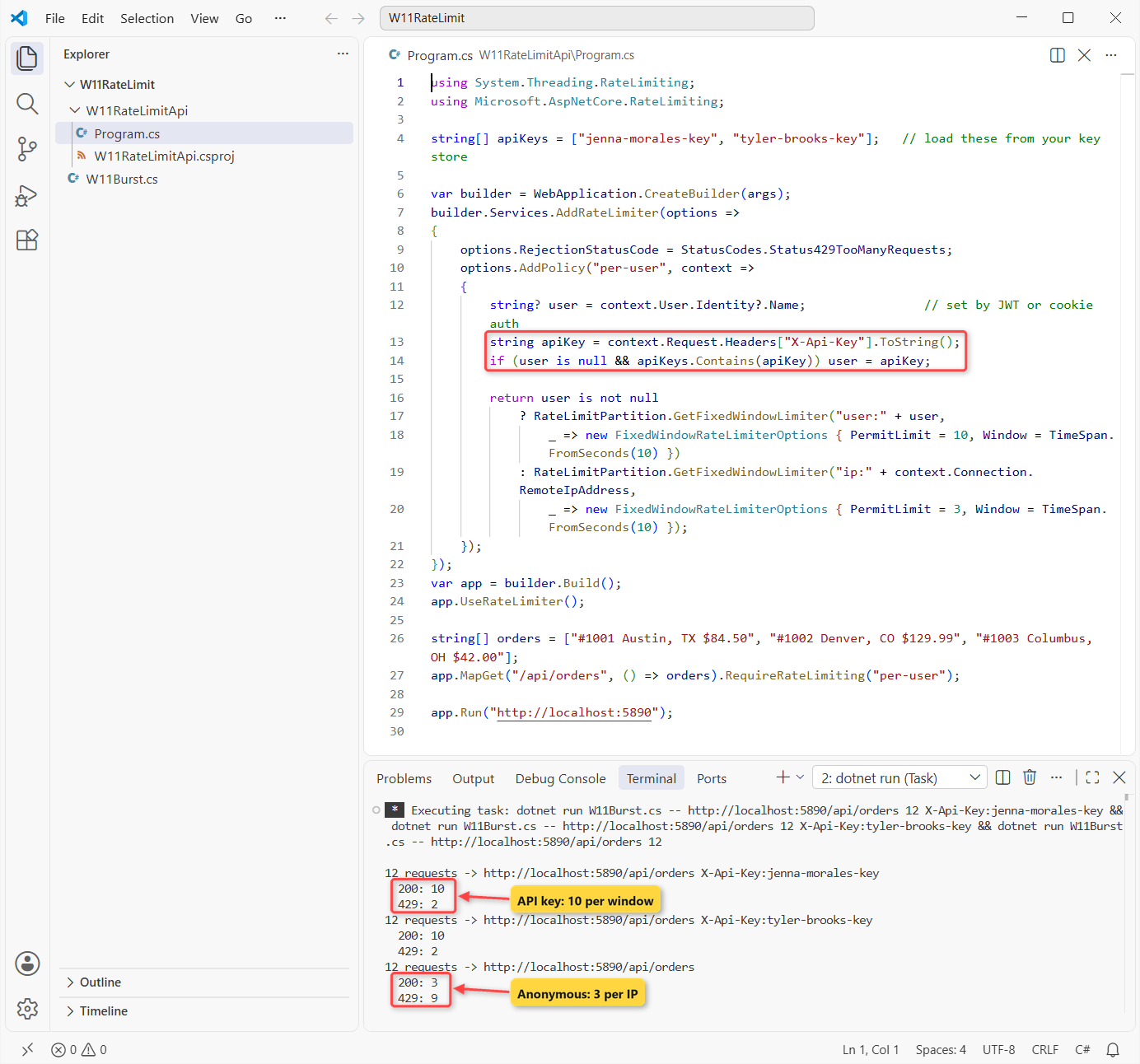
How does this work?
The policy runs per request. It takes User.Identity?.Name first, which is filled in once you add JWT authentication in ASP.NET Core and call UseAuthentication before UseRateLimiter.
Without a signed-in user, a known API key becomes the partition. Anything else falls back to the caller’s IP with a tighter limit of 3. The “user:” and “ip:” prefixes keep the two kinds of keys from colliding.
I only accept keys from a known list on purpose. Every distinct key creates and caches a limiter, so partitioning on any header value a caller sends lets an attacker invent millions of keys.
Method 4: Sliding Window, Token Bucket and Concurrency Rate Limiters
The other three built-in algorithms fit different traffic. Same orders data, three policies on three endpoints:
using System.Threading.RateLimiting;
using Microsoft.AspNetCore.RateLimiting;

var builder = WebApplication.CreateBuilder(args);
builder.Services.AddRateLimiter(options =>
{
    options.RejectionStatusCode = StatusCodes.Status429TooManyRequests;
    options.AddSlidingWindowLimiter("sliding", o =>
    {
        o.PermitLimit = 6;
        o.Window = TimeSpan.FromSeconds(30);
        o.SegmentsPerWindow = 3;                       // slides every 10 seconds
    });
    options.AddTokenBucketLimiter("token", o =>
    {
        o.TokenLimit = 4;                              // burst size
        o.TokensPerPeriod = 2;                         // refill 2 tokens...
        o.ReplenishmentPeriod = TimeSpan.FromSeconds(5);   // ...every 5 seconds
    });
    options.AddConcurrencyLimiter("reports", o => o.PermitLimit = 2);
});
var app = builder.Build();
app.UseRateLimiter();

string[] orders = ["#1001 Austin, TX $84.50", "#1002 Denver, CO $129.99", "#1003 Columbus, OH $42.00"];
app.MapGet("/api/orders/sliding", () => orders).RequireRateLimiting("sliding");
app.MapGet("/api/orders/token", () => orders).RequireRateLimiting("token");
app.MapGet("/api/reports/sales", async () =>
{
    await Task.Delay(1000);                            // a slow report query
    return "Q3 sales report: $48,210.75";
}).RequireRateLimiting("reports");

app.Run("http://localhost:5890");
I sent 8 requests to the sliding endpoint, 8 to the token endpoint twice (12 seconds apart) and 6 slow report requests:
8 requests -> http://localhost:5890/api/orders/sliding
  200: 6
  429: 2
8 requests -> http://localhost:5890/api/orders/token
  200: 4
  429: 4
8 requests -> http://localhost:5890/api/orders/token
  200: 4
  429: 4
6 requests -> http://localhost:5890/api/reports/sales
  200: 2
429: 4| Limiter | Settings | Burst | Result |
|---|---|---|---|
| Sliding window | 6 per 30 s, 3 segments | 8 at once | 6 OK, 2 rejected |
| Token bucket | 4 tokens, +2 every 5 s | 8 at once | 4 OK, 4 rejected |
| Token bucket | same, 12 s later | 8 at once | 4 OK, 4 rejected |
| Concurrency | 2 at a time, 1 s each | 6 at once | 2 OK, 4 rejected |
How does this work?
The sliding window splits its 30 seconds into SegmentsPerWindow = 3 segments and slides every 10 seconds. Permits used in a segment come back one full window later, which stops the boundary double burst.
The token bucket refills TokensPerPeriod tokens each ReplenishmentPeriod, but never above TokenLimit. That’s why the second burst got 4 again, not 4 plus every refill from the 12-second wait.
The concurrency limiter doesn’t count requests over time at all. It caps how many run at once, which suits slow, expensive endpoints like reports or exports.
Rate Limiting Behind a Proxy or Load Balancer
Behind nginx, Azure Front Door or a load balancer, RemoteIpAddress is the proxy’s address. Every shopper then shares one per-IP bucket. I sent two different X-Forwarded-For clients to the Method 2 server:
8 requests -> http://127.0.0.1:5890/api/orders X-Forwarded-For:203.0.113.10
  200: 5
  429: 3
8 requests -> http://127.0.0.1:5890/api/orders X-Forwarded-For:203.0.113.25
  429: 8
The second client got 8 rejections without sending a single earlier request. To fix it, run the forwarded headers middleware first so RemoteIpAddress becomes the real client:
using System.Net;
using System.Threading.RateLimiting;
using Microsoft.AspNetCore.HttpOverrides;

var builder = WebApplication.CreateBuilder(args);
builder.Services.Configure<ForwardedHeadersOptions>(options =>
{
    options.ForwardedHeaders = ForwardedHeaders.XForwardedFor;
    options.KnownProxies.Add(IPAddress.Parse("10.0.0.4"));     // your load balancer
});
builder.Services.AddRateLimiter(options =>
{
    options.RejectionStatusCode = StatusCodes.Status429TooManyRequests;
    options.GlobalLimiter = PartitionedRateLimiter.Create<HttpContext, string>(context =>
        RateLimitPartition.GetFixedWindowLimiter(
            partitionKey: context.Connection.RemoteIpAddress?.ToString() ?? "unknown",
            factory: _ => new FixedWindowRateLimiterOptions
            {
                PermitLimit = 5,
                Window = TimeSpan.FromMinutes(1)
            }));
});
var app = builder.Build();
app.UseForwardedHeaders();      // must run before UseRateLimiter
app.UseRateLimiter();

string[] orders = ["#1001 Austin, TX $84.50", "#1002 Denver, CO $129.99", "#1003 Columbus, OH $42.00"];
app.MapGet("/api/orders", () => orders);

app.Run("http://localhost:5890");
8 requests -> http://127.0.0.1:5890/api/orders X-Forwarded-For:203.0.113.10
200: 5
429: 3
8 requests -> http://127.0.0.1:5890/api/orders X-Forwarded-For:203.0.113.25
200: 5
429: 3Now each client address gets its own 5 permits. Learn says forwarded headers middleware should run before other middleware, and it only trusts headers from KnownProxies or known networks. Loopback is trusted by default, which is why my local test worked.
Add your real proxy or load balancer address, as with 10.0.0.4 here. ForwardLimit defaults to 1, so only the rightmost X-Forwarded-For value is used. The same proxy setup matters for CORS in ASP.NET Core when traffic comes through a gateway.
Rate Limiting MVC Controllers with [EnableRateLimiting] and [DisableRateLimiting]
Controllers use attributes instead of RequireRateLimiting. Same fixed window policy, now on a StoresController:
using System.Threading.RateLimiting;
using Microsoft.AspNetCore.Mvc;
using Microsoft.AspNetCore.RateLimiting;

var builder = WebApplication.CreateBuilder(args);
builder.Services.AddControllers();
builder.Services.AddRateLimiter(options =>
{
    options.RejectionStatusCode = StatusCodes.Status429TooManyRequests;
    options.AddFixedWindowLimiter("orders", o =>
    {
        o.PermitLimit = 5;
        o.Window = TimeSpan.FromSeconds(10);
    });
});
var app = builder.Build();
app.UseRateLimiter();
app.MapControllers();

app.Run("http://localhost:5890");

[ApiController, Route("api/stores")]
[EnableRateLimiting("orders")]
public class StoresController : ControllerBase
{
    [HttpGet]
    public string[] Get() => ["Austin, TX", "Denver, CO", "Columbus, OH"];

    [HttpGet("status"), DisableRateLimiting]
    public string Status() => "Open until 9:00 PM";
}
8 requests -> http://localhost:5890/api/stores
200: 5
429: 3
8 requests -> http://localhost:5890/api/stores/status
200: 8[EnableRateLimiting("orders")] on the class covers every action, and [DisableRateLimiting] on Status wins over it. If you’re choosing between the two styles, I compared minimal APIs and controllers separately.
Note: if you call MapControllers().RequireRateLimiting("orders") instead, an action’s own [EnableRateLimiting] policy isn’t applied. Pick one place to set policies.
Pro Tip: don’t hard-code PermitLimit and Window. Bind them from configuration with the options pattern, so staging and production can use different appsettings per environment.
Which Rate Limiter Should You Use in ASP.NET Core?
| Situation | Use | Why |
|---|---|---|
| One public endpoint, simple rule | Fixed window | Easy to explain and test |
| Bursts at window edges hurt | Sliding window | Permits return gradually |
| Short bursts, steady average | Token bucket | Burst size and refill rate are separate |
| Slow, expensive endpoint | Concurrency | Caps work in progress, not requests |
| Anonymous public API | GlobalLimiter partitioned by IP | One bot can’t starve everyone |
| Signed-in users or API keys | AddPolicy partitioned by user | Fair share per customer |
For the Austin shop, I’d put a per-IP global limiter on everything and a per-user fixed window on /api/orders.
Things to Keep in Mind with ASP.NET Core Rate Limiting
- Counters live in memory per instance. Three instances at 100 per minute allow up to 300. Use an API gateway or a shared store for one global limit.
- The default rejection is 503. Set
RejectionStatusCodeto 429 every time. - Order matters. UseForwardedHeaders, then UseRouting (if you call it), then UseAuthentication, then UseRateLimiter.
- Clients must back off. Have callers honor Retry-After and set a sensible HttpClient timeout so queued requests don’t hang.
- Load test before you ship. A burst script like W11Burst.cs catches a wrong partition key fast.
More ASP.NET Core Tutorials to Pair with Rate Limiting
A rate-limited API usually needs these next:
- All ASP.NET Core tutorials on AspDotnetHelp
- HttpClient vs IHttpClientFactory for API clients
- Minimal API validation in ASP.NET Core
- OpenAPI and Scalar in ASP.NET Core
Frequently Asked Questions
Do I need a NuGet package for rate limiting in ASP.NET Core?
No. Since .NET 7 the middleware ships with ASP.NET Core in the Microsoft.AspNetCore.RateLimiting namespace. Older guides use the third-party AspNetCoreRateLimit package, which you don’t need on .NET 10.
What status code does the rate limiter return by default?
503 Service Unavailable. Set options.RejectionStatusCode = StatusCodes.Status429TooManyRequests, or set the status in OnRejected.
Does ASP.NET Core rate limiting work across multiple servers?
No. Counters are kept in memory per app instance, so the effective limit grows with every instance. For one shared limit, use an API gateway or a custom limiter backed by a shared store such as Redis.
How do I rate limit per IP address in ASP.NET Core?
Set options.GlobalLimiter to PartitionedRateLimiter.Create and key each partition on HttpContext.Connection.RemoteIpAddress. Behind a proxy, add UseForwardedHeaders first.
Can I rate limit Blazor Server or Razor Pages?
Yes. Call RequireRateLimiting on MapRazorComponents or MapRazorPages, or use the attributes, as shown in Rate limiting middleware in ASP.NET Core on Microsoft Learn.

Bijay Kumar is a renowned software engineer, accomplished author, and distinguished Microsoft Most Valuable Professional (MVP) specializing in SharePoint. With a rich professional background spanning over 15 years, Bijay has established himself as an authority in the field of information technology. He possesses unparalleled expertise in multiple programming languages and technologies such as ASP.NET, ASP.NET MVC, C#.NET, and SharePoint, which has enabled him to develop innovative and cutting-edge solutions for clients across the globe. Read more…