
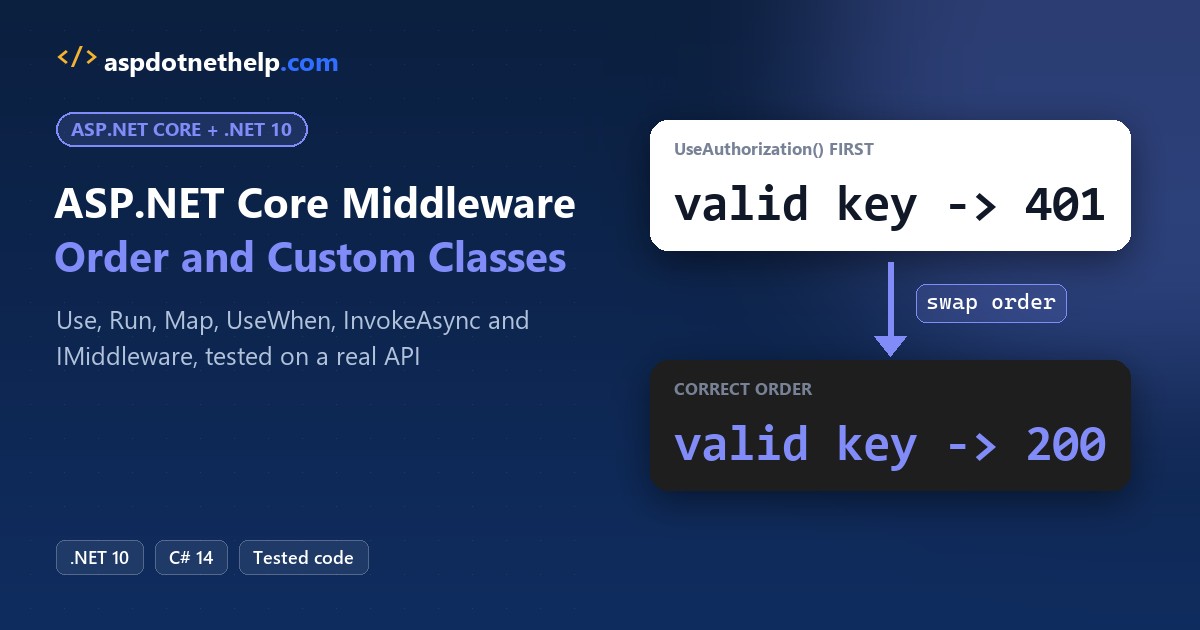
ASP.NET Core middleware is the chain of components every request passes through. Each one gets the HttpContext, does its job and calls next() to hand the request on, or skips next() to answer early.
The order you register them in Program.cs is the order they run, and the response travels back in reverse. I built a .NET 10 orders API with a request timer, a correlation ID and an API-key check, then broke its order on purpose.
What Is the ASP.NET Core Middleware Pipeline?
The pipeline is a list of request delegates called one after another. A RequestDelegate is just a delegate in C# that takes an HttpContext and returns a Task.
Code before await next(context) works on the request on its way in. Code after it runs on the way out, once everything later in the pipeline has finished. That’s why exception handlers go first: they wrap everything below them.
The Sample Orders API We’ll Use for Middleware
Everything runs on the .NET 10 SDK (10.0.402); check your .NET version if you’re not sure what you have. The main project is an empty web template called OrdersApi:
dotnet new web -n OrdersApi -o OrdersApiIt serves three orders from Austin, Columbus and Seattle. Four endpoints exercise the pipeline in different ways:
| Endpoint | Rule | Why it’s in the demo |
|---|---|---|
| GET /orders | Public | The happy path, returns the three orders |
| GET /orders/fail | Public | Throws, so the exception handler has work |
| GET /admin/report | Needs an X-Api-Key header | Proves authentication and authorization order |
| GET /wp-login.php | Blocked | Short-circuited by inline middleware |
I deleted appsettings.Development.json and the Properties folder, and I start it with dotnet run -- --urls http://localhost:5790 --environment Development. Here are the project file and appsettings.json, both straight from the template:
<Project Sdk="Microsoft.NET.Sdk.Web">

  <PropertyGroup>
    <TargetFramework>net10.0</TargetFramework>
    <Nullable>enable</Nullable>
    <ImplicitUsings>enable</ImplicitUsings>
  </PropertyGroup>

</Project>
{
"Logging": {
"LogLevel": {
"Default": "Information",
"Microsoft.AspNetCore": "Warning"
}
},
"AllowedHosts": "*"
}Method 1: Inline Middleware with app.Use and app.Run (Recommended to Start)
Inline middleware is the fastest way to see how the pipeline behaves, and it’s fine in real apps for one-off jobs like the bot blocker you’ll see later.
This demo, like the next two, is one of the file-based apps that .NET 10 added. The #:sdk Microsoft.NET.Sdk.Web line makes it a web app that starts, calls itself and stops.
Same order #1042 from the sample data. Here’s the code, with two Use calls and one Run:
#:sdk Microsoft.NET.Sdk.Web
var builder = WebApplication.CreateBuilder();
builder.Logging.ClearProviders();
var app = builder.Build();

app.Use(async (context, next) =>
{
    Console.WriteLine("1. Logger: request in");
    await next(context);
    Console.WriteLine("1. Logger: response out");
});
app.Use(async (context, next) =>
{
    Console.WriteLine("2. Timer: request in");
    await next(context);
    Console.WriteLine("2. Timer: response out");
});
app.Run(async context =>
{
    Console.WriteLine("3. Run: writes the response");
    await context.Response.WriteAsync("Order #1042 shipped to Austin, TX");
});

app.Urls.Add("http://localhost:5790");
await app.StartAsync();
Console.WriteLine(await new HttpClient().GetStringAsync("http://localhost:5790/"));
await app.StopAsync();
Output:
1. Logger: request in
2. Timer: request in
3. Run: writes the response
2. Timer: response out
1. Logger: response out
Order #1042 shipped to Austin, TX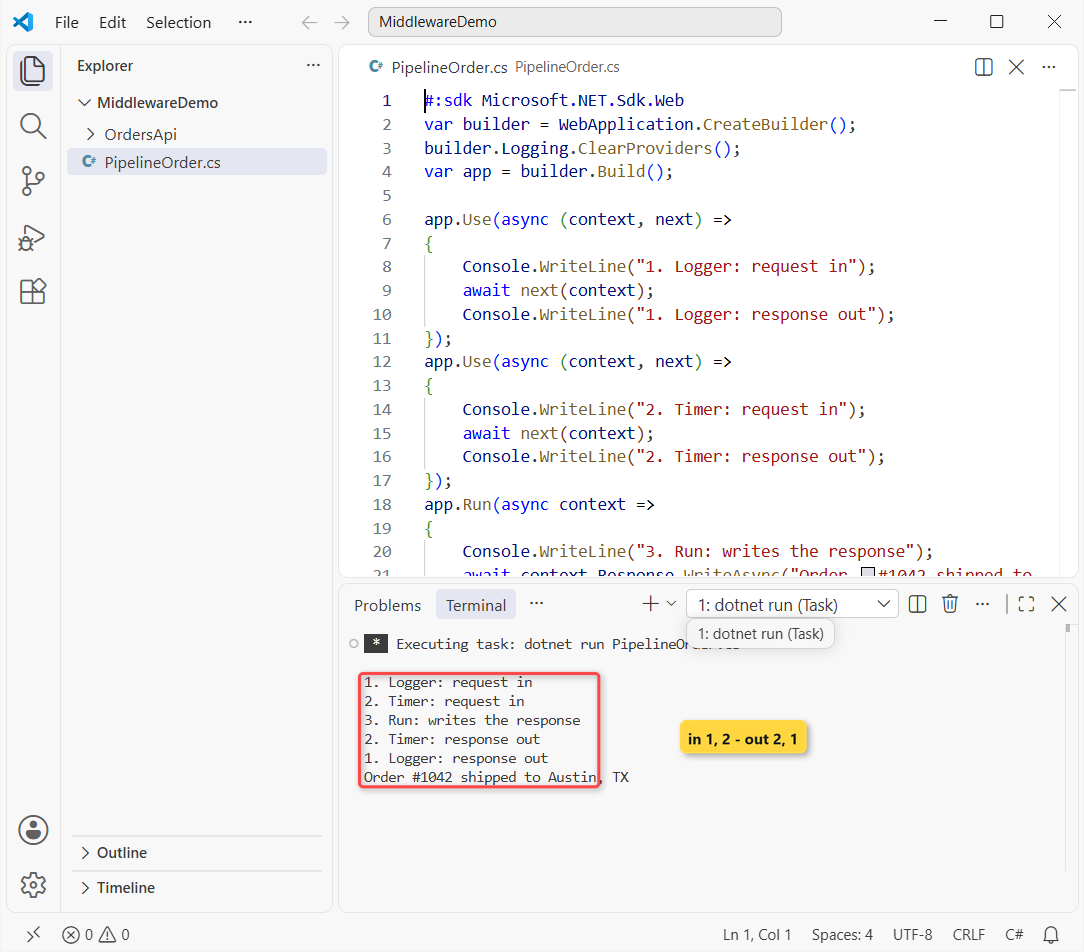
The client got Order #1042 shipped to Austin, TX, and the console shows the request going in and coming back out in reverse.
How does this work?
The first app.Use prints its line, then await next(context) hands the request to the second one. That one prints and calls next too, which reaches app.Run.
app.Run has no next parameter, so it’s terminal. It writes the response, and control unwinds back through the second and then the first middleware, which is why the out lines come in reverse order.
Note: Use has two overloads. Prefer the one where next is a RequestDelegate and you call next(context); Microsoft says it saves two internal allocations per request over the Func<Task> one.
Method 2: Branch the Middleware Pipeline with Map, MapWhen and UseWhen
Branch when only some requests need different middleware: a health check, an old API version or an admin area.
Here’s the code, with paths borrowed from the same orders API:
#:sdk Microsoft.NET.Sdk.Web
var builder = WebApplication.CreateBuilder();
builder.Logging.ClearProviders();
var app = builder.Build();

app.Map("/health", health => health.Run(c => c.Response.WriteAsync("Healthy")));
app.MapWhen(c => c.Request.Query.ContainsKey("legacy"),
    v1 => v1.Run(c => c.Response.WriteAsync("Legacy v1 orders")));
app.UseWhen(c => c.Request.Path.StartsWithSegments("/admin"),
    admin => admin.Use(async (c, next) =>
    {
        c.Response.Headers["X-Admin-Area"] = "true";
        await next(c);
    }));
app.Run(c => c.Response.WriteAsync($"Main pipeline: {c.Request.Path}"));

app.Urls.Add("http://localhost:5790");
await app.StartAsync();
var http = new HttpClient { BaseAddress = new Uri("http://localhost:5790") };
foreach (var path in new[] { "/health", "/orders?legacy=1", "/admin/report", "/orders" })
{
    var res = await http.GetAsync(path);
    var tag = res.Headers.Contains("X-Admin-Area") ? "  [X-Admin-Area: true]" : "";
    Console.WriteLine($"{path,-17} -> {await res.Content.ReadAsStringAsync()}{tag}");
}
await app.StopAsync();
Output:
/health           -> Healthy
/orders?legacy=1  -> Legacy v1 orders
/admin/report     -> Main pipeline: /admin/report  [X-Admin-Area: true]
/orders           -> Main pipeline: /orders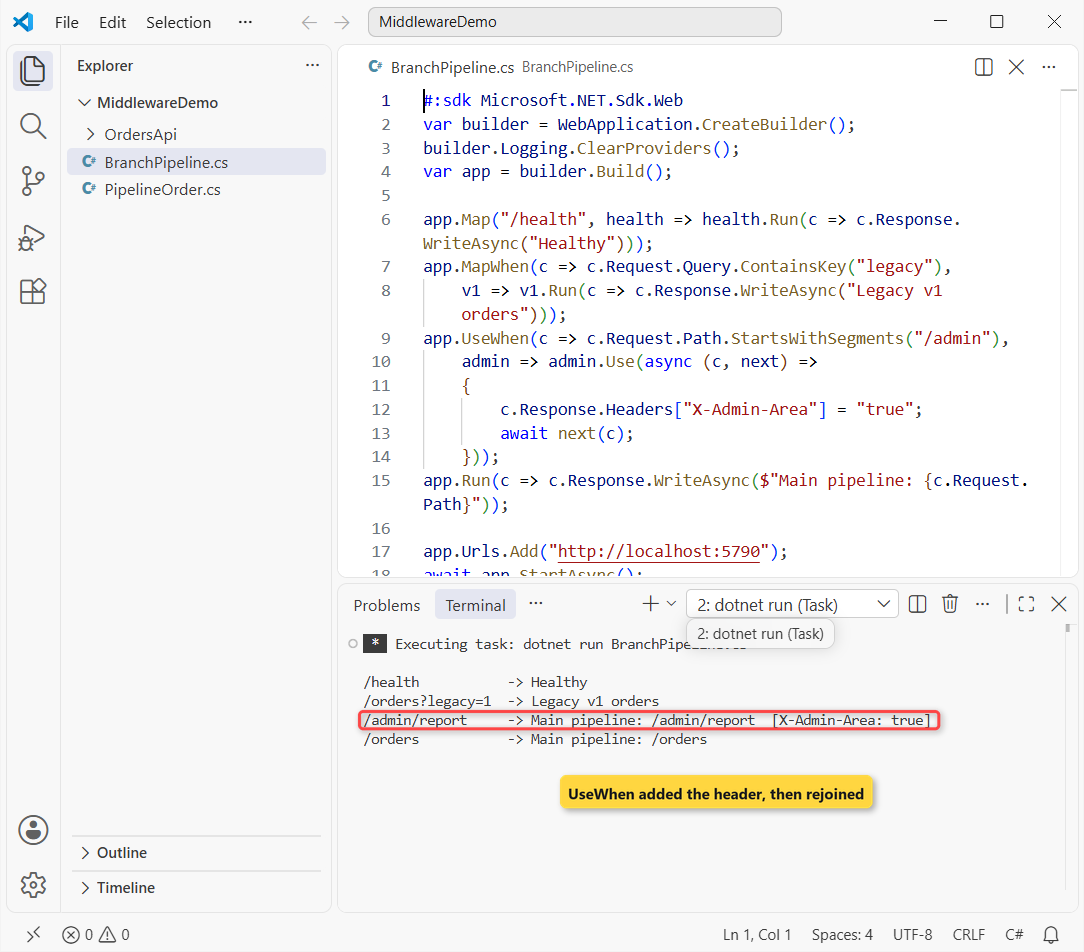
How does this work?
app.Map("/health", ...) matched the path prefix and ran its own Run, so the answer was Healthy. Map also moves the matched segment from Request.Path to Request.PathBase inside the branch.
app.MapWhen takes any Func<HttpContext, bool>; Query.ContainsKey works like it does on a Dictionary in C#. The ?legacy=1 request went into its branch and never came back to the main pipeline.
app.UseWhen is different. It added the X-Admin-Area header to /admin/report, then rejoined the main pipeline, so the main Run still wrote the body.
Important: app.Map branches the middleware pipeline. It isn’t app.MapGet, which maps an endpoint for routing.
Method 3: Write a Custom Middleware Class (Convention-Based)
Once middleware has more than a few lines, move it into a class. Microsoft’s rules for a convention-based class are short:
- a public constructor with a
RequestDelegateparameter; - a public method named
InvokeorInvokeAsyncthat returns aTaskand takes anHttpContextfirst; - any other constructor or InvokeAsync parameters come from dependency injection.
Here’s the request timing middleware for the same orders API, with its UseRequestTiming extension method in the same file (Middleware/RequestTimingMiddleware.cs):
using System.Diagnostics;

namespace OrdersApi.Middleware;

// Convention-based middleware: created once at startup, InvokeAsync runs for every request.
public class RequestTimingMiddleware(RequestDelegate next, ILogger<RequestTimingMiddleware> logger)
{
    public const string Header = "X-Response-Time-ms";

    public async Task InvokeAsync(HttpContext context)
    {
        var timer = Stopwatch.StartNew();
        context.Response.OnStarting(() =>
        {
            // runs just before the headers go out, so it's still safe to add one
            context.Response.Headers[Header] = timer.ElapsedMilliseconds.ToString();
            return Task.CompletedTask;
        });
        try
        {
            await next(context);
        }
        finally
        {
            logger.LogInformation("{Method} {Path} -> {Status} in {Elapsed} ms",
                context.Request.Method, context.Request.Path, context.Response.StatusCode, timer.ElapsedMilliseconds);
        }
    }
}

public static class RequestTimingExtensions
{
    public static IApplicationBuilder UseRequestTiming(this IApplicationBuilder app) =>
        app.UseMiddleware<RequestTimingMiddleware>();
}
Program.cs adds it with app.UseRequestTiming(); right after the exception handler, so you’ll see an X-Response-Time-ms header on every response.
How does this work?
The Stopwatch starts as the request arrives. Response.OnStarting runs its callback just before the headers go out, so the header lands even though an endpoint writes the body later.
The log line sits in a finally block, the same idea as a try-catch-finally in C#: it still runs when something deeper throws. The await keeps it all non-blocking, as in async/await in C#.
The extension method just wraps UseMiddleware<RequestTimingMiddleware>(), the same UseXxx pattern the built-in middleware uses.
Important: this class is built once, when the app starts, so never put a scoped service in its constructor. I added CorrelationContext there as a test, and the API wouldn’t even start in Development:
System.InvalidOperationException: Cannot resolve scoped service 'OrdersApi.Middleware.CorrelationContext' from root provider.Ask for scoped services as extra InvokeAsync parameters instead. My DI lifetimes guide for ASP.NET Core explains why a singleton can’t hold a scoped service.
Method 4: Factory-Based Middleware with IMiddleware and Scoped Services
If your middleware needs scoped services in its constructor, implement IMiddleware. ASP.NET Core resolves it from DI for every request, and you get strong typing from the interface.
Same orders API, now with a correlation ID that ties a request to its log lines (Middleware/CorrelationIdMiddleware.cs):
namespace OrdersApi.Middleware;

// Scoped: one instance per request, shared by the middleware and the endpoint.
public class CorrelationContext
{
    public string CorrelationId { get; set; } = "";
}

// Factory-based middleware: resolved from DI for every request, so scoped services can go in the constructor.
public class CorrelationIdMiddleware(CorrelationContext correlation, ILogger<CorrelationIdMiddleware> logger) : IMiddleware
{
    public const string Header = "X-Correlation-ID";

    public async Task InvokeAsync(HttpContext context, RequestDelegate next)
    {
        string? incoming = context.Request.Headers[Header];
        correlation.CorrelationId = string.IsNullOrWhiteSpace(incoming)
            ? Guid.NewGuid().ToString("N")[..12]
            : incoming;
        context.Response.Headers[Header] = correlation.CorrelationId;   // nothing is written yet

        logger.LogInformation("{Id} {Path} user={User}", correlation.CorrelationId,
            context.Request.Path, context.User.Identity?.Name ?? "anonymous");
        await next(context);
    }
}

public static class CorrelationIdExtensions
{
    public static IApplicationBuilder UseCorrelationId(this IApplicationBuilder app) =>
        app.UseMiddleware<CorrelationIdMiddleware>();
}
Program.cs registers both classes with AddScoped<CorrelationContext>() and AddTransient<CorrelationIdMiddleware>(), then calls app.UseCorrelationId() after authorization.
How does this work?
UseMiddleware sees that the class implements IMiddleware and asks the IMiddlewareFactory for an instance. That’s why the class has to be registered, as scoped or transient.
It reuses the caller’s X-Correlation-ID or makes a short GUID in C#. The header is set before next, while nothing is written yet.
The /orders endpoint asks for CorrelationContext too, and because it’s scoped, it’s the same object, so the JSON echoes the ID back.
Important: I deleted the AddTransient line to see what breaks. The app started, but every request returned 500 with this logged:
System.InvalidOperationException: No service for type 'OrdersApi.Middleware.CorrelationIdMiddleware' has been registered.Also, you can’t pass extra arguments to an IMiddleware class through UseMiddleware<T>(args); Microsoft documents that as a NotSupportedException. The interface in C# contract is the only signature it gets.
The Recommended ASP.NET Core Middleware Order
Microsoft’s rule: the order in the Program file is the order middleware runs on a request, and the reverse on the response. Here’s the order the docs recommend for common apps, with my one-line reason for each:
| # | Middleware | Why it sits here |
|---|---|---|
| 1 | UseExceptionHandler (developer exception page in Development) | Catches exceptions thrown by everything after it |
| 2 | UseHsts (outside Development) | Adds the Strict-Transport-Security header |
| 3 | UseHttpsRedirection | Redirects HTTP to HTTPS before anything reads the URL |
| 4 | UseStaticFiles or MapStaticAssets | Serves files early and short-circuits |
| 5 | UseRouting | Picks the endpoint |
| 6 | UseCors | Before authentication, authorization and response caching |
| 7 | UseAuthentication | Sets HttpContext.User |
| 8 | UseAuthorization | Right after authentication, checks the endpoint’s policy |
| 9 | Your custom middleware | Can see the endpoint and the signed-in user |
| 10 | Endpoints (MapGet, MapControllers, MapRazorPages) | Run last and write the response |
Here’s the full Program.cs of the sample orders API in that order. The timing middleware and the bot blocker go up front on purpose, because they should see every request:
using System.Globalization;
using Microsoft.AspNetCore.Authentication;
using OrdersApi;
using OrdersApi.Middleware;

var builder = WebApplication.CreateBuilder(args);

builder.Services.AddProblemDetails();
builder.Services.AddCors(o => o.AddDefaultPolicy(p => p.WithOrigins("https://shop.example.com")));
builder.Services.AddAuthentication(ApiKeyHandler.SchemeName)
    .AddScheme<AuthenticationSchemeOptions, ApiKeyHandler>(ApiKeyHandler.SchemeName, null);
builder.Services.AddAuthorization();
builder.Services.AddScoped<CorrelationContext>();
builder.Services.AddTransient<CorrelationIdMiddleware>();   // IMiddleware classes must be registered

var app = builder.Build();

// 1. Exception handler first, so it catches errors thrown anywhere below it
app.UseExceptionHandler();
if (!app.Environment.IsDevelopment())
{
    app.UseHsts();
}
// app.UseHttpsRedirection();   // on in production; this demo listens on http only
// app.UseStaticFiles();        // or app.MapStaticAssets() when the app serves files

// 2. Custom middleware that must see every request
app.UseRequestTiming();
app.Use(async (context, next) =>
{
    var path = context.Request.Path;
    if (path.StartsWithSegments("/wp-admin") || path.Value!.EndsWith(".php"))
    {
        context.Response.StatusCode = StatusCodes.Status404NotFound;
        return;                                  // short-circuit: next is never called
    }
    await next(context);
});

// 3. Routing, CORS, authentication, authorization - in this order
app.UseRouting();
app.UseCors();
app.UseAuthentication();
app.UseAuthorization();

// 4. Custom middleware that needs the matched endpoint and the signed-in user
app.UseCorrelationId();

// 5. Endpoints
var usDollars = CultureInfo.GetCultureInfo("en-US");
app.MapGet("/orders", (CorrelationContext correlation) =>
    new { correlation.CorrelationId, Orders = SampleOrders.All });
app.MapGet("/orders/fail", string () => throw new InvalidOperationException("Payment gateway timed out"));
app.MapGet("/admin/report", (HttpContext context) =>
    $"Q4 2026 report for {context.User.Identity!.Name}: {SampleOrders.All.Sum(o => o.Total).ToString("C", usDollars)}")
    .RequireAuthorization();

app.Run();

record Order(int Id, string Customer, string City, decimal Total);

static class SampleOrders
{
    public static readonly Order[] All =
    [
        new(1042, "Jenna Morales", "Austin, TX", 84.50m),
        new(1043, "Tyler Brooks", "Columbus, OH", 129.99m),
        new(1044, "Rachel Kim", "Seattle, WA", 42.25m),
    ];
}
The three orders are a C# record, and the report total uses a LINQ Sum formatted as en-US dollars. The demo authentication handler (ApiKeyHandler.cs) is deliberately tiny:
using System.Security.Claims;
using System.Text.Encodings.Web;
using Microsoft.AspNetCore.Authentication;
using Microsoft.Extensions.Options;

namespace OrdersApi;

// Demo only: a fixed API key. Use a real identity provider in production.
public class ApiKeyHandler(IOptionsMonitor<AuthenticationSchemeOptions> options, ILoggerFactory logger, UrlEncoder encoder)
    : AuthenticationHandler<AuthenticationSchemeOptions>(options, logger, encoder)
{
    public const string SchemeName = "ApiKey";

    protected override Task<AuthenticateResult> HandleAuthenticateAsync()
    {
        if (!Request.Headers.TryGetValue("X-Api-Key", out var key))
            return Task.FromResult(AuthenticateResult.NoResult());
        if (key != "demo-key-2026")
            return Task.FromResult(AuthenticateResult.Fail("Invalid API key"));

        var identity = new ClaimsIdentity([new Claim(ClaimTypes.Name, "jenna.morales")], SchemeName);
        var ticket = new AuthenticationTicket(new ClaimsPrincipal(identity), SchemeName);
        return Task.FromResult(AuthenticateResult.Success(ticket));
    }
}
Note: WebApplication adds UseRouting, UseAuthentication and UseAuthorization for you when you don’t call them, right at the start of the pipeline. Call them yourself, as above, when middleware like UseCorrelationId must come after them.
Test the Request Timing and Correlation ID Middleware
With the API running in the background, this client sends six requests and prints the status and both headers. It’s a plain HttpClient in C# call per line:
var http = new HttpClient { BaseAddress = new Uri("http://localhost:5790") };

async Task Call(string path, string? apiKey = null, string? correlationId = null)
{
    var request = new HttpRequestMessage(HttpMethod.Get, path);
    if (apiKey is not null) request.Headers.Add("X-Api-Key", apiKey);
    if (correlationId is not null) request.Headers.Add("X-Correlation-ID", correlationId);
    var res = await http.SendAsync(request);
    string Header(string name) => res.Headers.TryGetValues(name, out var v) ? v.First() : "-";
    Console.WriteLine($"{path,-15}{(int)res.StatusCode,-5}id={Header("X-Correlation-ID"),-15}{Header("X-Response-Time-ms")} ms");
}

await Call("/orders");
await Call("/orders", correlationId: "order-1042-tx");
await Call("/admin/report");
await Call("/admin/report", apiKey: "demo-key-2026");
await Call("/wp-login.php");
await Call("/orders/fail");
Output:
/orders        200  id=701240978db2   45 ms
/orders        200  id=order-1042-tx  4 ms
/admin/report  401  id=-              5 ms
/admin/report  200  id=117c47a0bd4f   8 ms
/wp-login.php  404  id=-              0 ms
/orders/fail   500  id=-              22 ms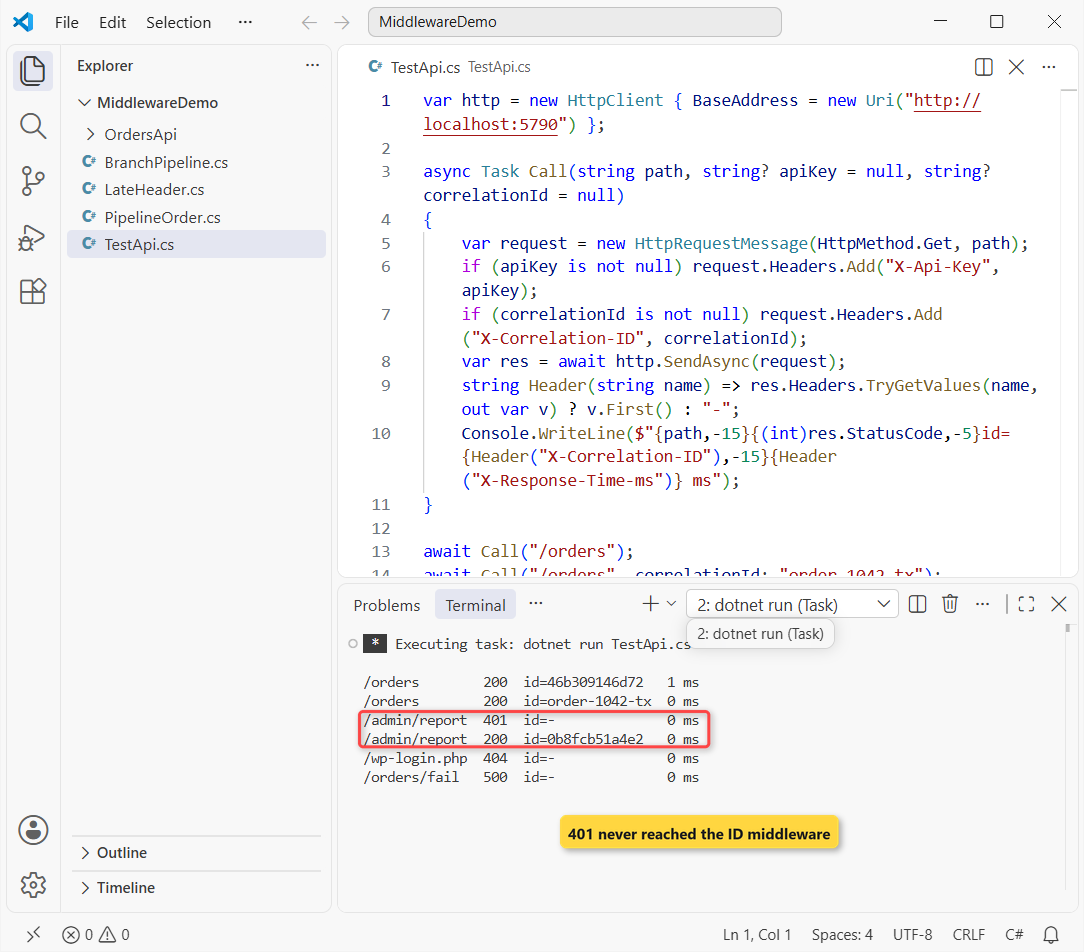
How does this work?
The first /orders call got a generated 12-character ID, and the second got back the order-1042-tx it sent. The timing header is on every single line because that middleware sits near the top.
/admin/report with no key returned 401 and no ID. Authorization stopped the request before it reached the correlation middleware, so the order decides which middleware sees a request.
With the key it returned 200 (Q4 2026 report for jenna.morales: $256.74), and /wp-login.php got 404 from the bot blocker.
So here’s the catch: /orders/fail returned 500 without its correlation ID. The exception handler clears the response before it writes the error, but the timing header survived because OnStarting runs later.
Here’s the same /orders call through curl, with the headers:
curl.exe -i -H "X-Correlation-ID: order-1042-tx" http://localhost:5790/ordersHTTP/1.1 200 OK
Content-Type: application/json; charset=utf-8
Server: Kestrel
Transfer-Encoding: chunked
X-Correlation-ID: order-1042-tx
X-Response-Time-ms: 0
{"correlationId":"order-1042-tx","orders":[{"id":1042,"customer":"Jenna Morales","city":"Austin, TX","total":84.50},{"id":1043,"customer":"Tyler Brooks","city":"Columbus, OH","total":129.99},{"id":1044,"customer":"Rachel Kim","city":"Seattle, WA","total":42.25}]}And the API’s own log for the /orders/fail request:
info: OrdersApi.Middleware.CorrelationIdMiddleware[0]
      4ad5e92245fb /orders/fail user=anonymous
info: OrdersApi.Middleware.RequestTimingMiddleware[0]
      GET /orders/fail -> 200 in 1 ms
Note: the timing log says /orders/fail -> 200, while the client got 500. The exception handler is outside the timing middleware, so it set the status code after timing had already logged.
How Do You Short-Circuit ASP.NET Core Middleware?
You short-circuit by not calling next, like the bot blocker in Program.cs: it sets 404 and returns. The rest of the pipeline is skipped, but middleware registered earlier still runs its after-next code.
A probe for /wp-admin/install.php got 404 with no routing, authentication or endpoint work at all. Built-in middleware does this too: static files end the pipeline when a file matches, and authorization returns 401 or 403 without calling the endpoint.
Common ASP.NET Core Middleware Mistakes
UseAuthorization before UseAuthentication
This is the order bug I see most, and my JWT authentication guide hit it too. I swapped the two lines in the same Program.cs:
app.UseAuthorization();
app.UseAuthentication();
A request with the valid key now got 401 Unauthorized. Authorization ran first and saw an anonymous user, because authentication hadn’t set HttpContext.User yet. Put them back in that order: authentication, then authorization.
Changing headers after next() has started the response
This is the timing middleware written the obvious way, setting the header after the endpoint wrote its body:
#:sdk Microsoft.NET.Sdk.Web
using System.Diagnostics;

var builder = WebApplication.CreateBuilder();
builder.Logging.ClearProviders();
var app = builder.Build();

app.Use(async (context, next) =>
{
    var timer = Stopwatch.StartNew();
    await next(context);
    try
    {
        context.Response.Headers["X-Response-Time-ms"] = timer.ElapsedMilliseconds.ToString();
    }
    catch (InvalidOperationException ex)
    {
        Console.WriteLine($"HasStarted = {context.Response.HasStarted}");
        Console.WriteLine($"{ex.GetType().Name}: {ex.Message}");
    }
});
app.Run(context => context.Response.WriteAsync("3 open orders"));

app.Urls.Add("http://localhost:5790");
await app.StartAsync();
var res = await new HttpClient().GetAsync("http://localhost:5790/");
Console.WriteLine($"Client got {(int)res.StatusCode}, timing header sent: {res.Headers.Contains("X-Response-Time-ms")}");
await app.StopAsync();
Output:
HasStarted = True
InvalidOperationException: Headers are read-only, response has already started.
Client got 200, timing header sent: False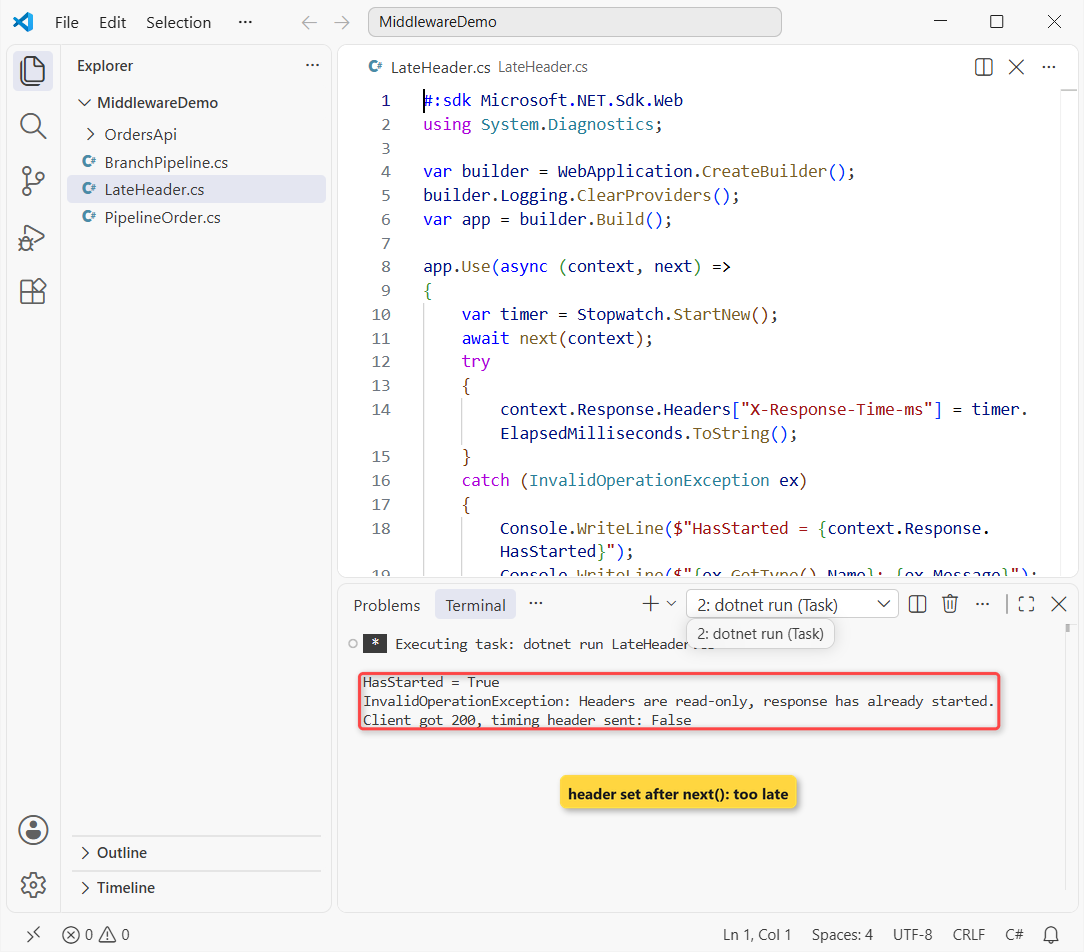
The client still got 200, so this bug hides easily. Check context.Response.HasStarted before touching headers, or register them in OnStarting like Method 3 does.
Which ASP.NET Core Middleware Approach Should You Use?
| Approach | Use it when | Lifetime |
|---|---|---|
Inline app.Use | A few lines, one app, like the bot blocker | Built once |
Map / MapWhen | A path or condition gets its own mini pipeline | Built once |
UseWhen | Extra middleware for some requests, then rejoin | Built once |
| Convention-based class | Reusable middleware with singleton-safe dependencies | Once per app; scoped services go in InvokeAsync |
IMiddleware | You want scoped services in the constructor and strong typing | Per request, from DI |
I’d pick a convention-based class with a UseXxx extension for most shared middleware, and IMiddleware when you need a DbContext in the constructor.
Things to Keep in Mind
- Exception handler first. It only catches what runs after it, so register it before everything else.
- Authentication before authorization. Swapping them returned 401 for a valid key in my test.
- Headers before the body. Set them before
nextor inOnStarting; after the response starts they’re read-only. - Mind the automatic calls. Call
UseRoutingand the auth middleware yourself when your own middleware must sit between them.
These pages pair well with this one:
- All ASP.NET Core tutorials on AspDotnetHelp
- Build an ASP.NET Core Web API with EF Core
- Add OpenAPI and Scalar to ASP.NET Core
- Upgrade an app from .NET 8 to .NET 10
Frequently Asked Questions
What is the difference between middleware and filters in ASP.NET Core?
Middleware runs for every request and only knows the HttpContext. Filters run inside MVC, or as endpoint filters in minimal APIs, so they see the action and its arguments. Use a filter when you need that context.
What is the correct middleware order in ASP.NET Core?
Exception handling, HSTS, HTTPS redirection, static files, routing, CORS, authentication, authorization, your custom middleware, then endpoints.
What is the difference between app.Use and app.Run?
app.Use gets a next delegate and can pass the request on. app.Run has no next, ends the pipeline, and anything registered after the first Run never runs.
Can ASP.NET Core middleware use dependency injection?
Yes. Convention-based middleware takes singleton-safe services in its constructor and scoped ones as extra InvokeAsync parameters. A class that implements IMiddleware is resolved per request, so it can take scoped services in its constructor.
How do I add a header to every response in middleware?
Set it before calling next, or register it with context.Response.OnStarting. Setting it after the endpoint wrote the body throws "Headers are read-only, response has already started."
Do I have to call UseRouting in .NET 10?
No. WebApplication adds UseRouting, UseAuthentication and UseAuthorization automatically when you don’t call them. Call them yourself when your middleware must run between them. See ASP.NET Core middleware on Microsoft Learn.

Bijay Kumar is a renowned software engineer, accomplished author, and distinguished Microsoft Most Valuable Professional (MVP) specializing in SharePoint. With a rich professional background spanning over 15 years, Bijay has established himself as an authority in the field of information technology. He possesses unparalleled expertise in multiple programming languages and technologies such as ASP.NET, ASP.NET MVC, C#.NET, and SharePoint, which has enabled him to develop innovative and cutting-edge solutions for clients across the globe. Read more…