
You’re starting a new .NET 10 Web API, run it and type /swagger out of habit. You get a 404, because the template doesn’t ship Swashbuckle anymore.
ASP.NET Core OpenAPI support is built in now: AddOpenApi and MapOpenApi write the document to /openapi/v1.json, and you add Scalar or Swagger UI to read it. We’ll build that for a small orders API, then lock it with a bearer token.
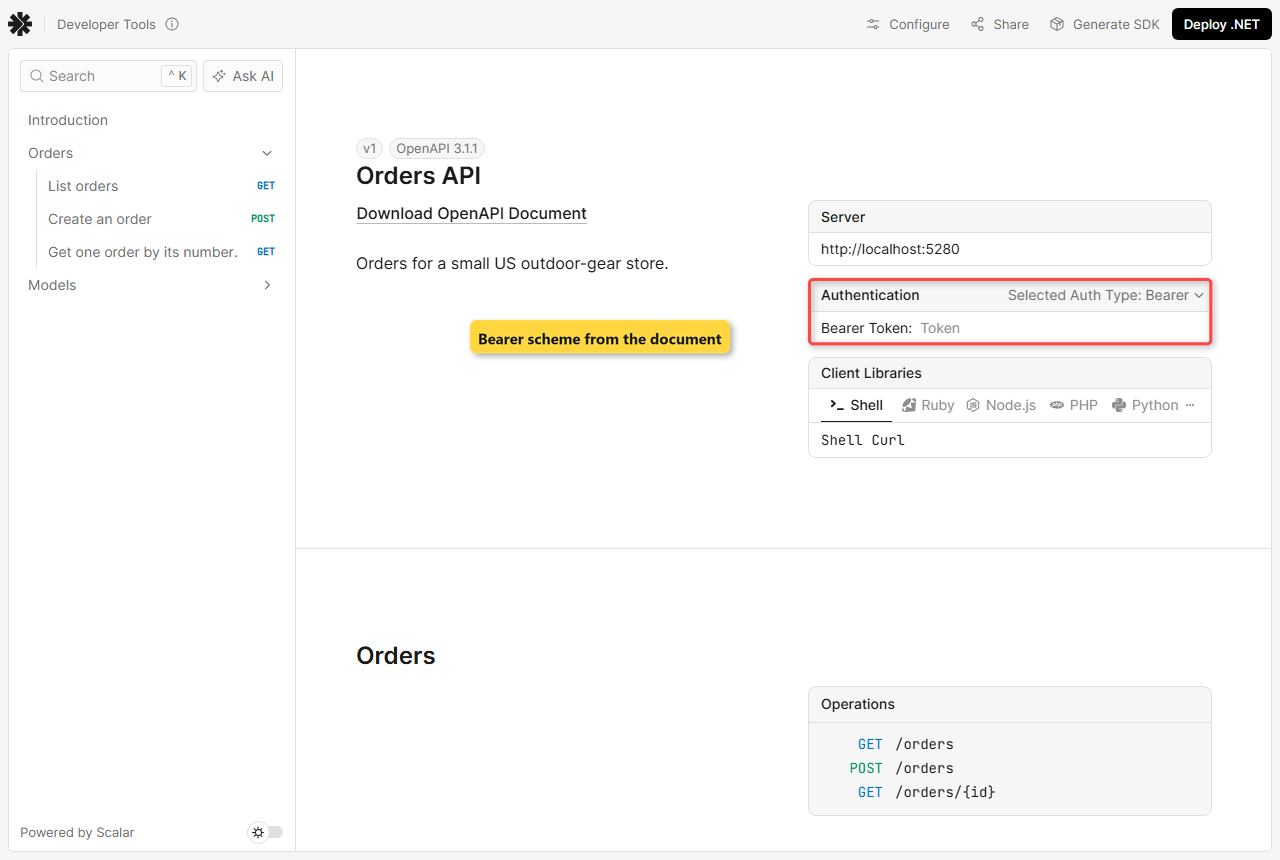
Here’s what we’re building. Scalar reads the generated OpenAPI 3.1 document and lists three order endpoints with a Bearer token box:
Why Doesn’t the .NET 10 Web API Template Have Swagger?
Starting with .NET 9, ASP.NET Core generates OpenAPI documents itself through the Microsoft.AspNetCore.OpenApi package, and Swashbuckle left the webapi template. It’s still a community package you can add by hand. The .NET 10 release kept that model and moved to OpenAPI 3.1.
| Piece | .NET 8 template | .NET 9 / .NET 10 template |
|---|---|---|
| Document generator | Swashbuckle (AddSwaggerGen) | Microsoft.AspNetCore.OpenApi (AddOpenApi) |
| Default document URL | /swagger/v1/swagger.json | /openapi/v1.json |
| OpenAPI version | 3.0 | 3.0 in .NET 9, 3.1 in .NET 10 |
| Built-in UI | Swagger UI at /swagger | None, you pick Scalar, Swagger UI or ReDoc |
If you’re moving an older project, the .NET 8 to .NET 10 upgrade guide covers the rest of the jump. Swashbuckle still works, so nothing forces you to rip it out on day one.
Before You Start the OpenAPI Build
You need the .NET 10 SDK (I used 10.0.402) and VS Code or Visual Studio. Not sure what’s installed? Check your .NET version first. The sample API serves four orders from an in-memory list:
| Id | Customer | City | State | Total (USD) |
|---|---|---|---|---|
| 1001 | Jenna Morales | Austin | TX | $249.99 |
| 1002 | Tyler Brooks | Denver | CO | $89.50 |
| 1003 | Rachel Kim | Seattle | WA | $412.00 |
| 1004 | Marcus Reed | Dallas | TX | $156.25 |
These are the NuGet packages and exact versions this build uses (current stable on November 1, 2026):
| Package | Version | Used for |
|---|---|---|
| Microsoft.AspNetCore.OpenApi | 10.0.14 | Generates the document (in the template) |
| Scalar.AspNetCore | 2.18.7 | Scalar UI |
| Swashbuckle.AspNetCore.SwaggerUI | 10.3.1 | Swagger UI only, no generator |
| Microsoft.AspNetCore.Authentication.JwtBearer | 10.0.14 | Bearer token auth |
| Microsoft.Extensions.ApiDescription.Server | 10.0.14 | Build-time document |
Step 1: Create the Web API and Open /openapi/v1.json
Create the project from the template. It already references Microsoft.AspNetCore.OpenApi (the template pinned 10.0.13, so I bumped it):
dotnet new webapi -n OrdersApi -o OrdersApi
cd OrdersApi
dotnet add package Microsoft.AspNetCore.OpenApi --version 10.0.14
Replace the weather sample in Program.cs with the orders endpoints. The two OpenAPI lines are exactly what the template gives you, plus a YAML route:
var builder = WebApplication.CreateBuilder(args);

builder.Services.AddOpenApi();

var app = builder.Build();

if (app.Environment.IsDevelopment())
{
    app.MapOpenApi();                                  // /openapi/v1.json
    app.MapOpenApi("/openapi/{documentName}.yaml");    // /openapi/v1.yaml
}

app.MapGet("/orders", (string? state) =>
    OrderStore.Orders.Where(o => state is null || o.State == state));

app.MapGet("/orders/{id:int}", (int id) =>
    OrderStore.Orders.FirstOrDefault(o => o.Id == id) is { } order
        ? Results.Ok(order)
        : Results.NotFound());

app.Run();

static class OrderStore
{
    public static readonly List<Order> Orders =
    [
        new(1001, "Jenna Morales", "Austin", "TX", 249.99m),
        new(1002, "Tyler Brooks", "Denver", "CO", 89.50m),
        new(1003, "Rachel Kim", "Seattle", "WA", 412.00m),
        new(1004, "Marcus Reed", "Dallas", "TX", 156.25m),
    ];
}

record Order(int Id, string Customer, string City, string State, decimal Total);
I trimmed Properties/launchSettings.json to one http profile on port 5280. It’s also where the Development environment comes from:
{
  "$schema": "https://json.schemastore.org/launchsettings.json",
  "profiles": {
    "http": {
      "commandName": "Project",
      "dotnetRunMessages": true,
      "launchBrowser": false,
      "applicationUrl": "http://localhost:5280",
      "environmentVariables": {
        "ASPNETCORE_ENVIRONMENT": "Development"
      }
    }
  }
}
I also deleted appsettings.Development.json and the .http file. This is the appsettings.json the template left:
{
  "Logging": {
    "LogLevel": {
      "Default": "Information",
      "Microsoft.AspNetCore": "Warning"
    }
  },
  "AllowedHosts": "*"
}
Run dotnet run. Here’s the startup log:
Building...
info: Microsoft.Hosting.Lifetime[14]
      Now listening on: http://localhost:5280
info: Microsoft.Hosting.Lifetime[0]
      Application started. Press Ctrl+C to shut down.
info: Microsoft.Hosting.Lifetime[0]
      Hosting environment: Development
info: Microsoft.Hosting.Lifetime[0]
      Content root path: C:\DotNetDemo\OpenApiScalarDemo\OrdersApi
Now open http://localhost:5280/openapi/v1.json. That’s the default OpenAPI URL, /openapi/{documentName}.json with the document name v1. The top of the response:
{
  "openapi": "3.1.1",
  "info": {
    "title": "OrdersApi | v1",
    "version": "1.0.0"
  },
  "servers": [
    {
      "url": "http://localhost:5280/"
    }
  ],
  "paths": {
Raw JSON gets old fast, so I wrote a tiny checker. It’s a file-based app next to the project folder, not inside it, or the project would compile it too.
It uses JsonDocument and a little LINQ in C# to print one line per operation:
using System.Text.Json;

var http = new HttpClient { BaseAddress = new Uri("http://localhost:5280") };
var doc = JsonDocument.Parse(await http.GetStringAsync("/openapi/v1.json")).RootElement;
Console.WriteLine($"OpenAPI {doc.GetProperty("openapi")} | {doc.GetProperty("info").GetProperty("title")}");

foreach (var path in doc.GetProperty("paths").EnumerateObject())
    foreach (var op in path.Value.EnumerateObject())
    {
        var codes = op.Value.GetProperty("responses").EnumerateObject().Select(r => r.Name);
        var summary = op.Value.TryGetProperty("summary", out var s) ? s.GetString() : "-";
        var locked = op.Value.TryGetProperty("security", out _) ? " [Bearer]" : "";
        Console.WriteLine($"{op.Name.ToUpper(),-5}{path.Name,-14}{string.Join(",", codes),-9}{summary}{locked}");
    }

if (doc.GetProperty("components").TryGetProperty("securitySchemes", out var schemes))
    foreach (var sc in schemes.EnumerateObject())
        Console.WriteLine($"Security scheme: {sc.Name} = {sc.Value.GetProperty("type")} {sc.Value.GetProperty("scheme")}");
Output:
OpenAPI 3.1.1 | OrdersApi | v1
GET  /orders       200      -
GET  /orders/{id}  200      -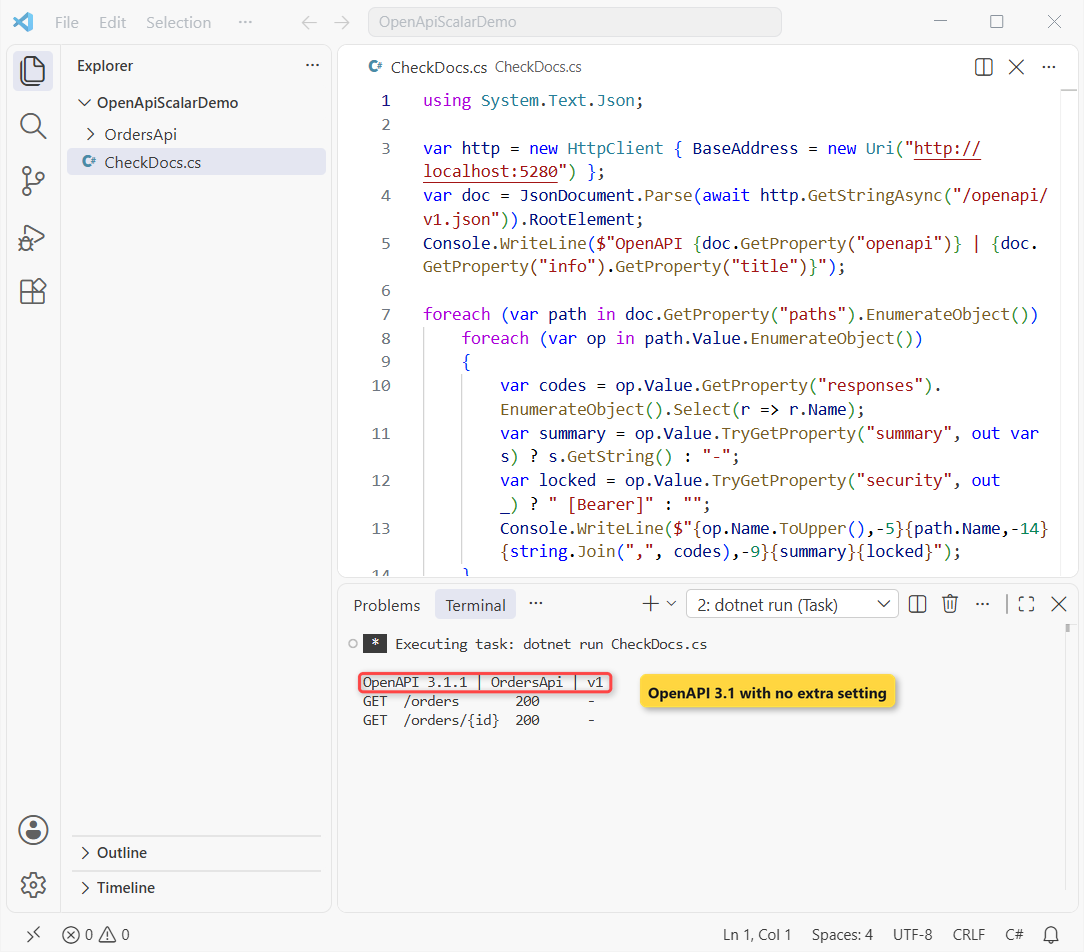
Two things stand out. The document is OpenAPI 3.1.1 with no extra setting, and GET /orders/{id} lists only a 200 response with no schema, because Results.Ok returns a plain IResult. We’ll fix that in Step 3.
The YAML route works too. /openapi/v1.yaml returned 200:
openapi: '3.1.1'
info:
  title: OrdersApi | v1
  version: 1.0.0
servers:
  - url: http://localhost:5280/
paths:
  /orders:
Checkpoint: /openapi/v1.json returns 200, CheckDocs prints OpenAPI 3.1.1 | OrdersApi | v1, and /swagger still returns 404.
Step 2: Add Scalar with MapScalarApiReference
Scalar is an open-source OpenAPI UI that Microsoft’s docs show next to Swagger UI. Add the package, then one using and one line inside the Development block:
dotnet add package Scalar.AspNetCore --version 2.18.7using Scalar.AspNetCore;
// ...
if (app.Environment.IsDevelopment())
{
app.MapOpenApi(); // /openapi/v1.json
app.MapOpenApi("/openapi/{documentName}.yaml"); // /openapi/v1.yaml
app.MapScalarApiReference(); // /scalar
}Restart and browse to /scalar/v1. In my run /scalar answered 302 and redirected to /scalar/, and /scalar/v1 returned 200:
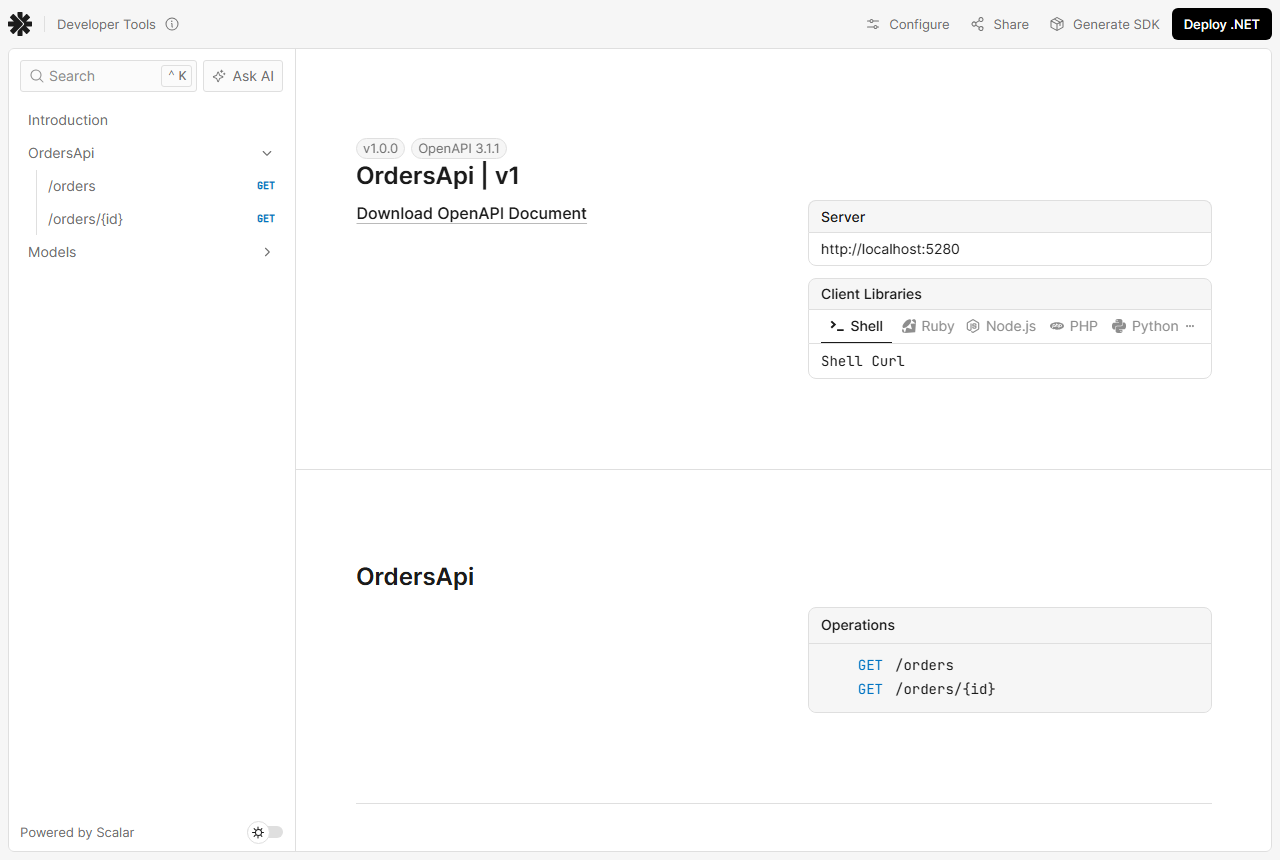
Scalar reads the same /openapi/v1.json, so whatever your document lacks, your page lacks. Right now you’re missing titles, descriptions and response types.
Checkpoint: Scalar shows OrdersApi | v1 and two GET endpoints.
Step 3: Describe OpenAPI Endpoints with WithSummary, TypedResults and XML Comments
This step changes the document, not the UI. I grouped the routes with MapGroup and WithTags, gave each one WithSummary or WithDescription, and switched to TypedResults so the response types show up. A document transformer sets the title:
builder.Services.AddOpenApi(options =>
{
    options.AddDocumentTransformer((document, context, ct) =>
    {
        document.Info = new() { Title = "Orders API", Version = "v1",
            Description = "Orders for a small US outdoor-gear store." };
        return Task.CompletedTask;
    });
});
var api = app.MapGroup("/orders").WithTags("Orders");
api.MapGet("/", (string? state) =>
TypedResults.Ok(OrderStore.Orders.Where(o => state is null || o.State == state)))
.WithSummary("List orders")
.WithDescription("Returns every order, or only the orders shipped to one US state (TX, CO, WA).");
api.MapGet("/{id:int}", OrderStore.GetOrderById);
api.MapPost("/", (NewOrder input) =>
{
var order = new Order(OrderStore.Orders.Max(o => o.Id) + 1,
input.Customer, input.City, input.State, input.Total);
OrderStore.Orders.Add(order);
return TypedResults.Created($"/orders/{order.Id}", order);
})
.WithSummary("Create an order");GET /orders/{id} is a named method, so I documented it with XML comments instead. In .NET 10 a source generator copies them into the document when the project has <GenerateDocumentationFile>true</GenerateDocumentationFile> (it’s in the csproj in Step 7):
static class OrderStore
{
    // ... Orders list from Step 1 ...

/// <summary>Get one order by its number.</summary>
/// <param name="id">The order number, for example 1001.</param>
/// <response code="200">The order was found.</response>
/// <response code="404">No order has that number.</response>
public static Results<Ok<Order>, NotFound> GetOrderById(int id) =>
    Orders.FirstOrDefault(o => o.Id == id) is { } order
        ? TypedResults.Ok(order)
        : TypedResults.NotFound();
}
The return type Results<Ok<Order>, NotFound> tells OpenAPI about both the 200 and the 404, and the response tags only add the descriptions. The checker now prints:
OpenAPI 3.1.1 | Orders API
GET  /orders       200      List orders
POST /orders       201      Create an order
GET  /orders/{id}  200,404  Get one order by its number.
One surprise in the schema: decimal Total (and int Id) came out as a number or a string, because ASP.NET Core’s web JSON defaults accept numbers in quotes. Here’s the real snippet:
"total": {
  "pattern": "^-?(?:0|[1-9]\\d*)(?:\\.\\d+)?$",
  "type": [
    "number",
    "string"
  ],
  "format": "double"
}
If you’d rather send plain numbers, tune the serializer options; my notes on System.Text.Json options for clean JSON cover the same settings.
Checkpoint: every operation has a summary, and GET /orders/{id} lists 200,404.
Step 4: Add Swagger UI to the .NET 10 OpenAPI Document (Optional)
Prefer the classic Swagger page? You don’t need all of Swashbuckle. Swashbuckle.AspNetCore.SwaggerUI is just the UI, and you point it at the document ASP.NET Core already generates:
dotnet add package Swashbuckle.AspNetCore.SwaggerUI --version 10.3.1app.UseSwaggerUI(o => o.SwaggerEndpoint("/openapi/v1.json", "Orders API v1"));Put that line inside the same Development block. In my run /swagger returned 301 (a redirect) and /swagger/index.html returned 200:
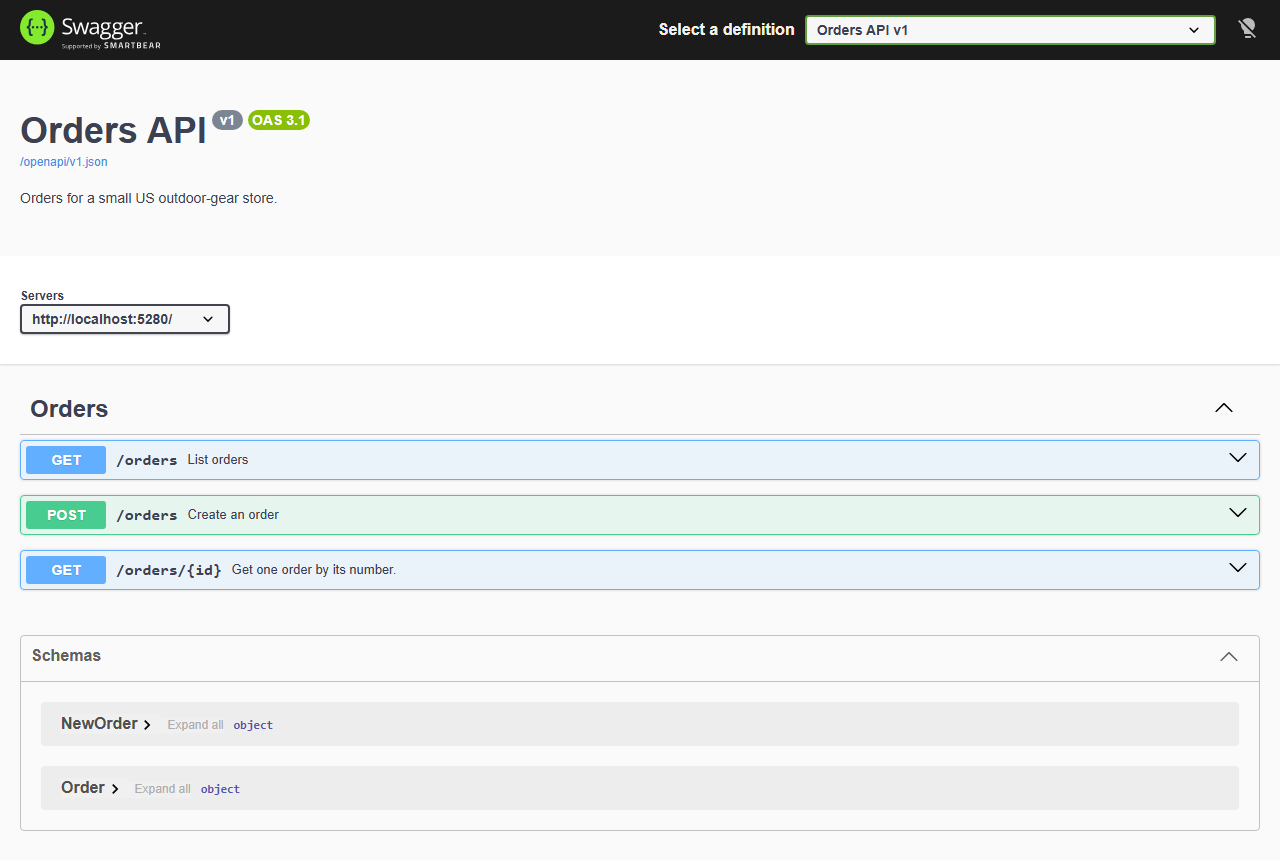
Don’t call AddSwaggerGen or UseSwagger here. They’d generate a second document from Swashbuckle, and you’d have two sources of truth. Running Scalar and Swagger UI side by side is fine, since both read the same JSON.
Checkpoint: Swagger UI lists the same three operations and summaries as Scalar.
Step 5: Keep the OpenAPI Docs in Development Only
Every docs line in this build sits inside if (app.Environment.IsDevelopment()). Microsoft recommends that for Swagger UI, ReDoc and Scalar, so you don’t hand your API map to the internet. I ran the final app with ASPNETCORE_ENVIRONMENT=Production on port 5281 to prove it:
404  /openapi/v1.json
404  /scalar/v1
404  /swagger/index.html
200  /orders
The docs vanish and the API keeps working. If a staging site needs docs, add a check for that environment name rather than deleting the if.
Checkpoint: all three docs URLs return 404 in Production while /orders returns 200.
Step 6: Add OpenAPI Authentication with a Bearer Security Scheme
Next, lock POST /orders behind a JWT. Two parts, and people usually forget the second: the app has to require the token, and the OpenAPI document has to say so, or Scalar’s token box does nothing.
dotnet add package Microsoft.AspNetCore.Authentication.JwtBearer --version 10.0.14In .NET 10 the OpenAPI types live in the Microsoft.OpenApi namespace (it was Microsoft.OpenApi.Models in .NET 9). A document transformer adds the scheme, written as an interface implementation:
sealed class BearerSecuritySchemeTransformer : IOpenApiDocumentTransformer
{
    public Task TransformAsync(OpenApiDocument document,
        OpenApiDocumentTransformerContext context, CancellationToken ct)
    {
        document.Components ??= new OpenApiComponents();
        document.Components.SecuritySchemes = new Dictionary<string, IOpenApiSecurityScheme>
        {
            ["Bearer"] = new OpenApiSecurityScheme
            {
                Type = SecuritySchemeType.Http,
                Scheme = "bearer",
                In = ParameterLocation.Header,
                BearerFormat = "JWT"
            }
        };
        return Task.CompletedTask;
    }
}
An operation transformer then marks only the endpoints that carry authorization metadata, so the public GETs stay open in the docs:
builder.Services.AddAuthentication().AddJwtBearer();
builder.Services.AddAuthorization();
builder.Services.AddOpenApi(options =>
{
    // ... Info transformer from Step 3 ...
options.AddDocumentTransformer<BearerSecuritySchemeTransformer>();
options.AddOperationTransformer((operation, context, ct) =>
{
    bool needsToken = context.Description.ActionDescriptor.EndpointMetadata
        .OfType<IAuthorizeData>().Any();
    if (needsToken)
    {
        operation.Security ??= [];
        operation.Security.Add(new OpenApiSecurityRequirement
        {
            [new OpenApiSecuritySchemeReference("Bearer", context.Document)] = []
        });
    }
    return Task.CompletedTask;
});
});
Finally, .Produces(StatusCodes.Status401Unauthorized) and .RequireAuthorization() go on the POST, and AddPreferredSecuritySchemes("Bearer") makes Scalar preselect it. Here’s the whole Program.cs at this point:
using Microsoft.AspNetCore.Authorization;
using Microsoft.AspNetCore.Http.HttpResults;
using Microsoft.AspNetCore.OpenApi;
using Microsoft.OpenApi;
using Scalar.AspNetCore;

var builder = WebApplication.CreateBuilder(args);

builder.Services.AddAuthentication().AddJwtBearer();
builder.Services.AddAuthorization();
builder.Services.AddOpenApi(options =>
{
    options.AddDocumentTransformer((document, context, ct) =>
    {
        document.Info = new() { Title = "Orders API", Version = "v1",
            Description = "Orders for a small US outdoor-gear store." };
        return Task.CompletedTask;
    });
options.AddDocumentTransformer<BearerSecuritySchemeTransformer>();
options.AddOperationTransformer((operation, context, ct) =>
{
    bool needsToken = context.Description.ActionDescriptor.EndpointMetadata
        .OfType<IAuthorizeData>().Any();
    if (needsToken)
    {
        operation.Security ??= [];
        operation.Security.Add(new OpenApiSecurityRequirement
        {
            [new OpenApiSecuritySchemeReference("Bearer", context.Document)] = []
        });
    }
    return Task.CompletedTask;
});
});

var app = builder.Build();

if (app.Environment.IsDevelopment())
{
    app.MapOpenApi();                                  // /openapi/v1.json
    app.MapOpenApi("/openapi/{documentName}.yaml");    // /openapi/v1.yaml
    app.MapScalarApiReference(o => o.AddPreferredSecuritySchemes("Bearer"));
    app.UseSwaggerUI(o => o.SwaggerEndpoint("/openapi/v1.json", "Orders API v1"));
}

var api = app.MapGroup("/orders").WithTags("Orders");

api.MapGet("/", (string? state) =>
        TypedResults.Ok(OrderStore.Orders.Where(o => state is null || o.State == state)))
   .WithSummary("List orders")
   .WithDescription("Returns every order, or only the orders shipped to one US state (TX, CO, WA).");

api.MapGet("/{id:int}", OrderStore.GetOrderById);

api.MapPost("/", (NewOrder input) =>
    {
        var order = new Order(OrderStore.Orders.Max(o => o.Id) + 1,
            input.Customer, input.City, input.State, input.Total);
        OrderStore.Orders.Add(order);
        return TypedResults.Created($"/orders/{order.Id}", order);
    })
   .WithSummary("Create an order")
   .Produces(StatusCodes.Status401Unauthorized)
   .RequireAuthorization();

app.Run();

static class OrderStore
{
    public static readonly List<Order> Orders =
    [
        new(1001, "Jenna Morales", "Austin", "TX", 249.99m),
        new(1002, "Tyler Brooks", "Denver", "CO", 89.50m),
        new(1003, "Rachel Kim", "Seattle", "WA", 412.00m),
        new(1004, "Marcus Reed", "Dallas", "TX", 156.25m),
    ];

/// <summary>Get one order by its number.</summary>
/// <param name="id">The order number, for example 1001.</param>
/// <response code="200">The order was found.</response>
/// <response code="404">No order has that number.</response>
public static Results<Ok<Order>, NotFound> GetOrderById(int id) =>
    Orders.FirstOrDefault(o => o.Id == id) is { } order
        ? TypedResults.Ok(order)
        : TypedResults.NotFound();
}

record Order(int Id, string Customer, string City, string State, decimal Total);
record NewOrder(string Customer, string City, string State, decimal Total);

sealed class BearerSecuritySchemeTransformer : IOpenApiDocumentTransformer
{
    public Task TransformAsync(OpenApiDocument document,
        OpenApiDocumentTransformerContext context, CancellationToken ct)
    {
        document.Components ??= new OpenApiComponents();
        document.Components.SecuritySchemes = new Dictionary<string, IOpenApiSecurityScheme>
        {
            ["Bearer"] = new OpenApiSecurityScheme
            {
                Type = SecuritySchemeType.Http,
                Scheme = "bearer",
                In = ParameterLocation.Header,
                BearerFormat = "JWT"
            }
        };
        return Task.CompletedTask;
    }
}
using System.Text.Json;
var http = new HttpClient { BaseAddress = new Uri("http://localhost:5280") };
var doc = JsonDocument.Parse(await http.GetStringAsync("/openapi/v1.json")).RootElement;
Console.WriteLine($"OpenAPI {doc.GetProperty("openapi")} | {doc.GetProperty("info").GetProperty("title")}");
foreach (var path in doc.GetProperty("paths").EnumerateObject())
foreach (var op in path.Value.EnumerateObject())
{
var codes = op.Value.GetProperty("responses").EnumerateObject().Select(r => r.Name);
var summary = op.Value.TryGetProperty("summary", out var s) ? s.GetString() : "-";
var locked = op.Value.TryGetProperty("security", out _) ? " [Bearer]" : "";
Console.WriteLine($"{op.Name.ToUpper(),-5}{path.Name,-14}{string.Join(",", codes),-9}{summary}{locked}");
}
if (doc.GetProperty("components").TryGetProperty("securitySchemes", out var schemes))
foreach (var sc in schemes.EnumerateObject())
Console.WriteLine($"Security scheme: {sc.Name} = {sc.Value.GetProperty("type")} {sc.Value.GetProperty("scheme")}");Output:
OpenAPI 3.1.1 | Orders API
GET  /orders       200      List orders
POST /orders       201,401  Create an order [Bearer]
GET  /orders/{id}  200,404  Get one order by its number.
Security scheme: Bearer = http bearer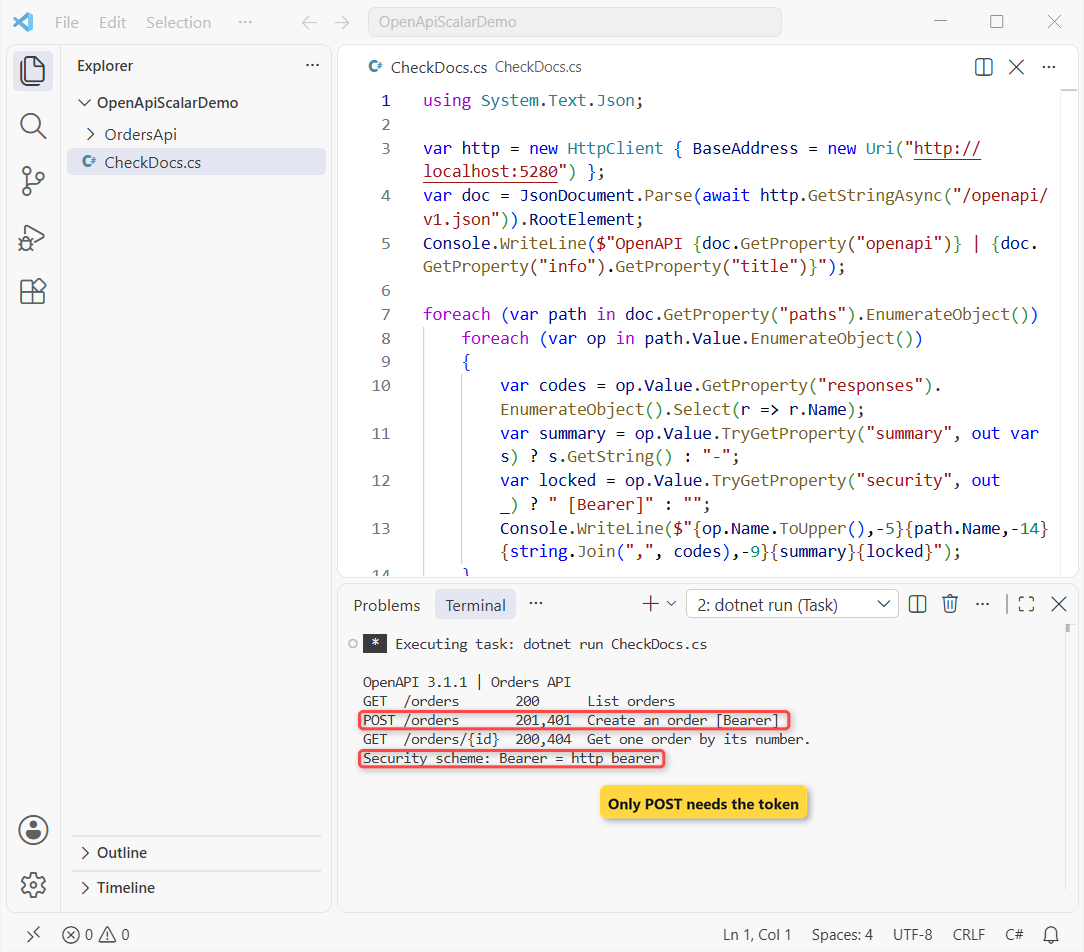
Checkpoint: [Bearer] appears on POST /orders only, and the last line reads Security scheme: Bearer = http bearer.
Step 7: Generate the OpenAPI Document at Build Time
Client generators and CI linters want a file, not a running server. Add Microsoft.Extensions.ApiDescription.Server and turn on OpenApiGenerateDocumentsOnBuild. Here’s the final project file:
dotnet add package Microsoft.Extensions.ApiDescription.Server --version 10.0.14<Project Sdk="Microsoft.NET.Sdk.Web">
<PropertyGroup>
<TargetFramework>net10.0</TargetFramework>
<Nullable>enable</Nullable>
<ImplicitUsings>enable</ImplicitUsings>
<GenerateDocumentationFile>true</GenerateDocumentationFile>
<OpenApiGenerateDocumentsOnBuild>true</OpenApiGenerateDocumentsOnBuild>
</PropertyGroup>
<ItemGroup>
<PackageReference Include="Microsoft.AspNetCore.Authentication.JwtBearer" Version="10.0.14" />
<PackageReference Include="Microsoft.AspNetCore.OpenApi" Version="10.0.14" />
<PackageReference Include="Microsoft.Extensions.ApiDescription.Server" Version="10.0.14">
<IncludeAssets>runtime; build; native; contentfiles; analyzers; buildtransitive</IncludeAssets>
<PrivateAssets>all</PrivateAssets>
</PackageReference>
<PackageReference Include="Scalar.AspNetCore" Version="2.18.7" />
<PackageReference Include="Swashbuckle.AspNetCore.SwaggerUI" Version="10.3.1" />
</ItemGroup>
</Project>dotnet build now starts the app’s host briefly and writes obj/OrdersApi.json. In the shot I deleted the file and rebuilt with --no-incremental, so you can see it come back:
del obj\OrdersApi.json & dotnet build --no-incremental -v:m -tl:off -nologo && findstr /n openapi obj\OrdersApi.json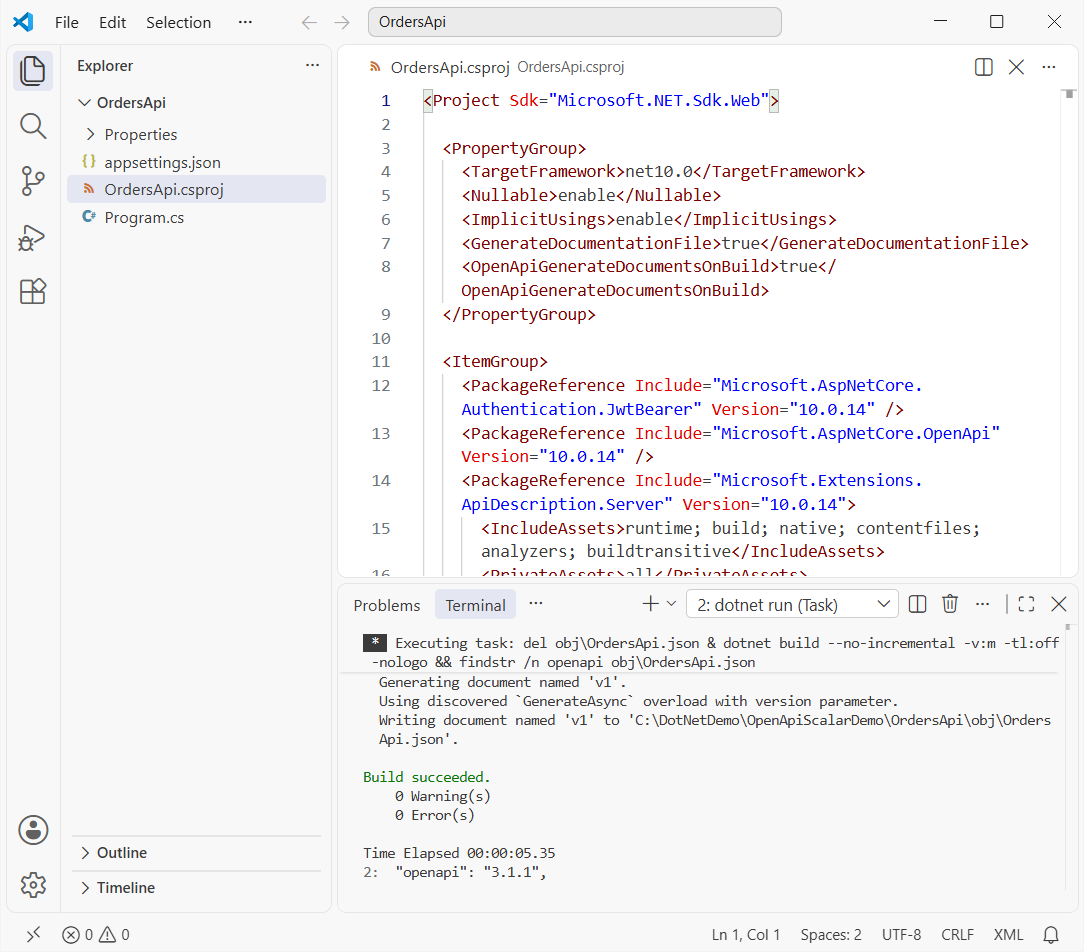
The first lines of the generated file match what you saw from the live endpoint:
{
  "openapi": "3.1.1",
  "info": {
    "title": "Orders API",
    "description": "Orders for a small US outdoor-gear store.",
    "version": "v1"
Want it next to the csproj instead? Set OpenApiDocumentsDirectory to $(MSBuildProjectDirectory). YAML output at build time isn’t supported yet in .NET 10, so build-time files are JSON.
Checkpoint: obj/OrdersApi.json exists after the build and starts with "openapi": "3.1.1".
Test the OpenAPI Bearer Lock and Endpoints
The docs say POST needs a token, so the API had better agree. Posting an order for Ava Thompson in Phoenix without one:
curl.exe -i -X POST http://localhost:5280/orders -H "Content-Type: application/json" -d "{\"customer\":\"Ava Thompson\",\"city\":\"Phoenix\",\"state\":\"AZ\",\"total\":74.10}"HTTP/1.1 401 Unauthorized
Content-Length: 0
Server: Kestrel
WWW-Authenticate: BearerA 401 with WWW-Authenticate: Bearer, exactly as documented. The open endpoints still answer; GET /orders?state=TX returns the two Texas orders:
[{"id":1001,"customer":"Jenna Morales","city":"Austin","state":"TX","total":249.99},{"id":1004,"customer":"Marcus Reed","city":"Dallas","state":"TX","total":156.25}]And GET /orders/2001 returned 404, the 404 the XML comment describes. A filter like this is plain List<T> in C# filtering, so swap in EF Core when the data gets real.
Troubleshooting ASP.NET Core OpenAPI and Scalar
/swagger returns 404. Expected on .NET 9 and 10. Use /openapi/v1.json or /scalar/v1, or add the Swagger UI package from Step 4.
The type IOpenApiDocumentTransformer could not be found. I hit this on my first build. The transformer types need using Microsoft.AspNetCore.OpenApi;, and the model types need using Microsoft.OpenApi; in .NET 10.
Scalar ignores the token you paste. The document has no security scheme. Add the transformer from Step 6 and check that components.securitySchemes appears in the JSON.
XML comments don’t show up. They apply to named methods and types, not to inline lambdas, and need GenerateDocumentationFile. Use WithSummary for lambdas.
Deleted obj/OrdersApi.json and the build didn’t recreate it. I hit this too: an up-to-date build skips the generator, so findstr couldn’t find the file. Rebuild with dotnet build --no-incremental.
Note: a 500 on /openapi/v1.json usually means an endpoint threw during generation; wrap that handler’s logic in a try-catch in C# while you find it, and read the server log.
Where to Take It Next with ASP.NET Core OpenAPI
Add a sign-in flow that issues the JWT; my OTP sign-in API in ASP.NET Core is one way to get there. Then feed the build-time JSON to a client generator such as Kiota or NSwag.
If production still runs .NET 8, check the .NET 8 and .NET 9 end-of-support dates before you plan the move to the built-in generator.
More ASP.NET Core and .NET reading on the site:
- All ASP.NET Core tutorials on AspDotnetHelp
- Every .NET version and what changed
- Dictionary in C# for a keyed order lookup
- Create a console app in VS Code
Frequently Asked Questions
What is the default OpenAPI URL in ASP.NET Core?
/openapi/{documentName}.json, so /openapi/v1.json for the default document. Pass a different pattern to MapOpenApi to change it, for example /openapi/{documentName}.yaml for YAML.
Why was Swagger removed from ASP.NET Core?
Swashbuckle was dropped from the templates in .NET 9 because ASP.NET Core now generates OpenAPI documents itself. Swagger UI isn’t banned; see the Use the generated OpenAPI documents guide on Microsoft Learn.
Should I use Scalar or Swagger UI in .NET 10?
Both read the same /openapi/v1.json, so it’s taste. I default to Scalar for the cleaner layout and built-in code samples, and keep Swagger UI when a team already knows it.
Does .NET 10 generate OpenAPI 3.1?
Yes. .NET 10 produces OpenAPI 3.1 by default; my run returned 3.1.1. Set options.OpenApiVersion = OpenApiSpecVersion.OpenApi3_0 in AddOpenApi for tools that only read 3.0.
How do I add authentication to the OpenAPI document?
Register the scheme in a document transformer under components.securitySchemes, then add a security requirement to the protected operations. Without it, Scalar and Swagger UI can’t send your token.
Is OpenAPI the same as Swagger?
Swagger was the original name of the spec, renamed OpenAPI in 2016; “Swagger” now means the SmartBear tools. See the OpenAPI 3.1.1 specification.

Bijay Kumar is a renowned software engineer, accomplished author, and distinguished Microsoft Most Valuable Professional (MVP) specializing in SharePoint. With a rich professional background spanning over 15 years, Bijay has established himself as an authority in the field of information technology. He possesses unparalleled expertise in multiple programming languages and technologies such as ASP.NET, ASP.NET MVC, C#.NET, and SharePoint, which has enabled him to develop innovative and cutting-edge solutions for clients across the globe. Read more…