
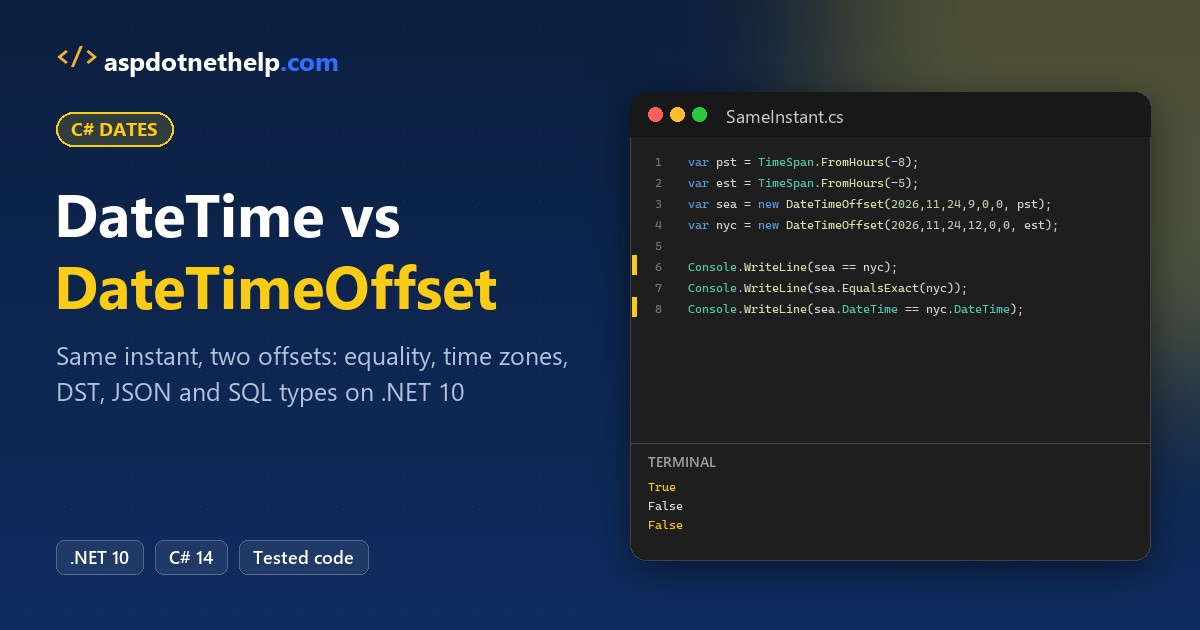
If the same Seattle webinar showed up as two different times in your code, you’ve hit the one difference that matters in C# DateTime vs DateTimeOffset: a DateTimeOffset stores its offset from UTC, and a DateTime doesn’t.
Use DateTimeOffset for real instants like orders, logs and meetings, DateOnly for due dates and birthdays, and DateTime only for UTC values or plain wall-clock times.
On .NET 10, DateTimeOffset called the Seattle and New York copies of one webinar equal. DateTime put them 3 hours apart.
DateTime vs DateTimeOffset vs DateOnly at a Glance
Every row below comes from the runs in this post, each a .NET 10 file-based app started with dotnet run:
| Feature | DateTime | DateTimeOffset | DateOnly / TimeOnly |
|---|---|---|---|
| Stores | Date + time + Kind (Utc, Local, Unspecified) | Date + time + offset from UTC | Date only / time of day only |
| Knows the real instant? | Only when Kind is Utc | Always | No (no time or no date) |
| Same instant, two offsets | == returns False | == returns True | n/a |
| Time zone rules (DST) | None | None; just a fixed offset | None |
| System.Text.Json | 2026-11-24T09:00:00 or ...Z | 2026-11-24T09:00:00-08:00 | 2026-12-01 / 09:00:00 |
| SQL Server type (EF Core) | datetime2 | datetimeoffset | date / time |
| Available since | .NET Framework 1.0 | .NET Framework 3.5 | .NET 6 (not .NET Framework) |
| Best for | UTC timestamps, legacy APIs | Orders, logs, meetings, API payloads | Due dates, birthdays, store hours |
What DateTime, DateTimeOffset and DateOnly Store
The sample is one webinar that Jenna Morales hosts from Seattle on 11/24/2026 at 9:00 AM Pacific, plus a $1,250 invoice due 12/01/2026. Here it is in each type:
#:property PublishAot=false
using System.Globalization;
CultureInfo.CurrentCulture = new("en-US");
// Jenna's webinar: 11/24/2026, 9:00 AM Pacific (UTC-08:00)
var dt = new DateTime(2026, 11, 24, 9, 0, 0);
var utc = new DateTime(2026, 11, 24, 17, 0, 0, DateTimeKind.Utc);
var dto = new DateTimeOffset(2026, 11, 24, 9, 0, 0, TimeSpan.FromHours(-8));
var due = new DateOnly(2026, 12, 1);
var start = new TimeOnly(9, 0);

Console.WriteLine($"DateTime:       {dt}  Kind={dt.Kind}");
Console.WriteLine($"DateTime (UTC): {utc}  Kind={utc.Kind}");
Console.WriteLine($"DateTimeOffset: {dto}");
Console.WriteLine($"  as UTC:       {dto.UtcDateTime}");
Console.WriteLine($"DateOnly:       {due}");
Console.WriteLine($"TimeOnly:       {start}");
Output:
DateTime:       11/24/2026 9:00:00 AM  Kind=Unspecified
DateTime (UTC): 11/24/2026 5:00:00 PM  Kind=Utc
DateTimeOffset: 11/24/2026 9:00:00 AM -08:00
  as UTC:       11/24/2026 5:00:00 PM
DateOnly:       12/1/2026
TimeOnly:       9:00 AM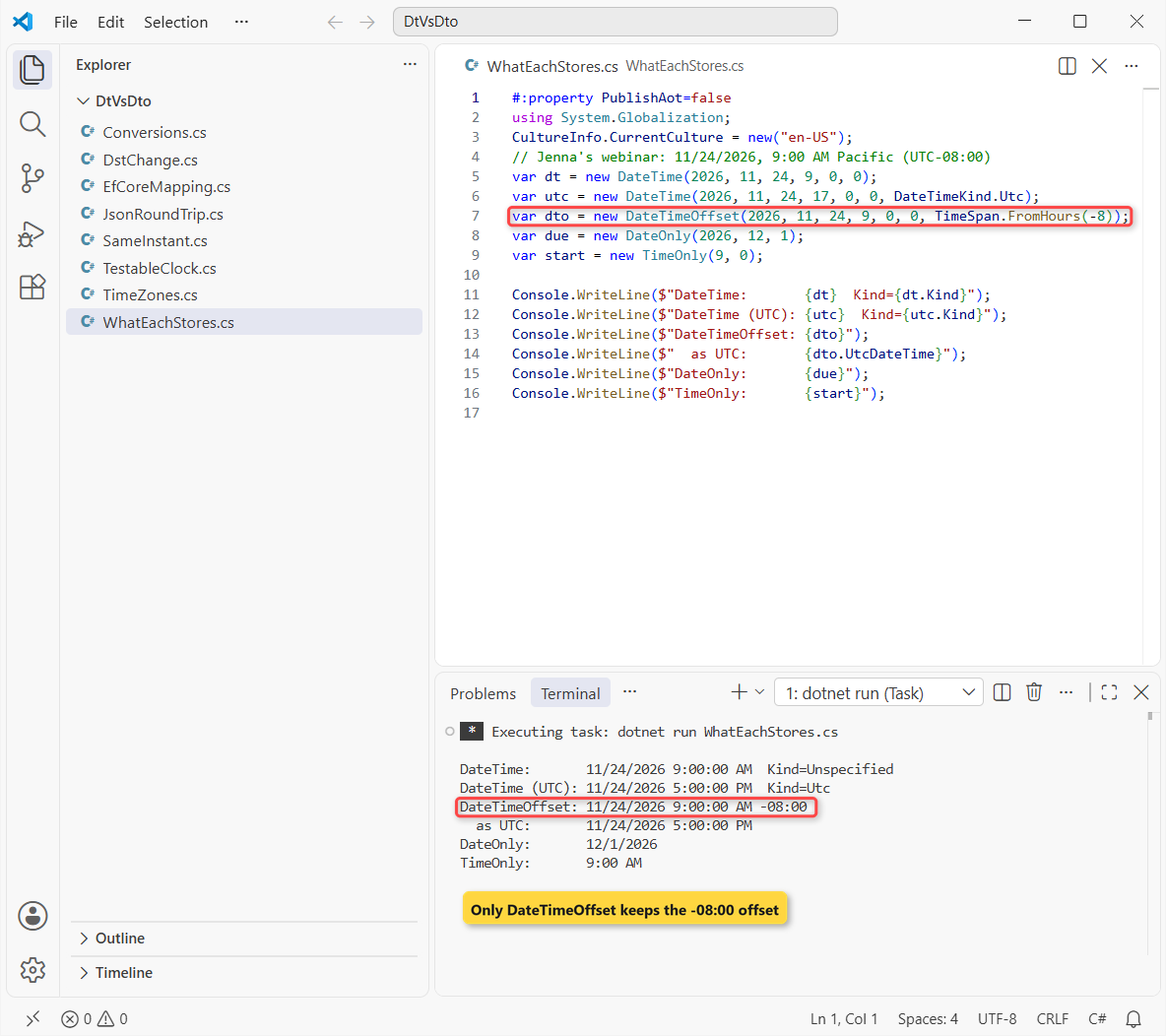
The plain DateTime printed Kind=Unspecified. It’s 9:00 AM somewhere, and nothing in the value says where. The DateTimeOffset printed -08:00, so .NET could work out 11/24/2026 5:00:00 PM UTC on its own.
DateOnly and TimeOnly drop the half you don’t need. Want a different display, like MM/dd/yyyy? My C# DateTime format guide has every format string.
Is DateTimeOffset Equal to DateTime for the Same Instant?
Same webinar dates, now saved twice: the Seattle office writes 9:00 AM -08:00 and the New York office writes 12:00 PM -05:00. Both describe one moment:
#:property PublishAot=false
using System.Globalization;
CultureInfo.CurrentCulture = new("en-US");
// The same webinar instant, written by two offices
var seattle = new DateTimeOffset(2026, 11, 24, 9, 0, 0, TimeSpan.FromHours(-8));
var newYork = new DateTimeOffset(2026, 11, 24, 12, 0, 0, TimeSpan.FromHours(-5));

Console.WriteLine($"DateTimeOffset ==   : {seattle == newYork}");
Console.WriteLine($"EqualsExact         : {seattle.EqualsExact(newYork)}");
Console.WriteLine($"Hours apart         : {(newYork - seattle).TotalHours}");

// The same two values as plain DateTime
DateTime a = seattle.DateTime, b = newYork.DateTime;
Console.WriteLine($"DateTime ==         : {a == b}");
Console.WriteLine($"Hours apart         : {(b - a).TotalHours}");

// DateTime compares ticks only and ignores Kind
var asUtc = DateTime.SpecifyKind(a, DateTimeKind.Utc);
Console.WriteLine($"Utc == Unspecified  : {asUtc == a}");
Output:
DateTimeOffset ==   : True
EqualsExact         : False
Hours apart         : 0
DateTime ==         : False
Hours apart         : 3
Utc == Unspecified  : True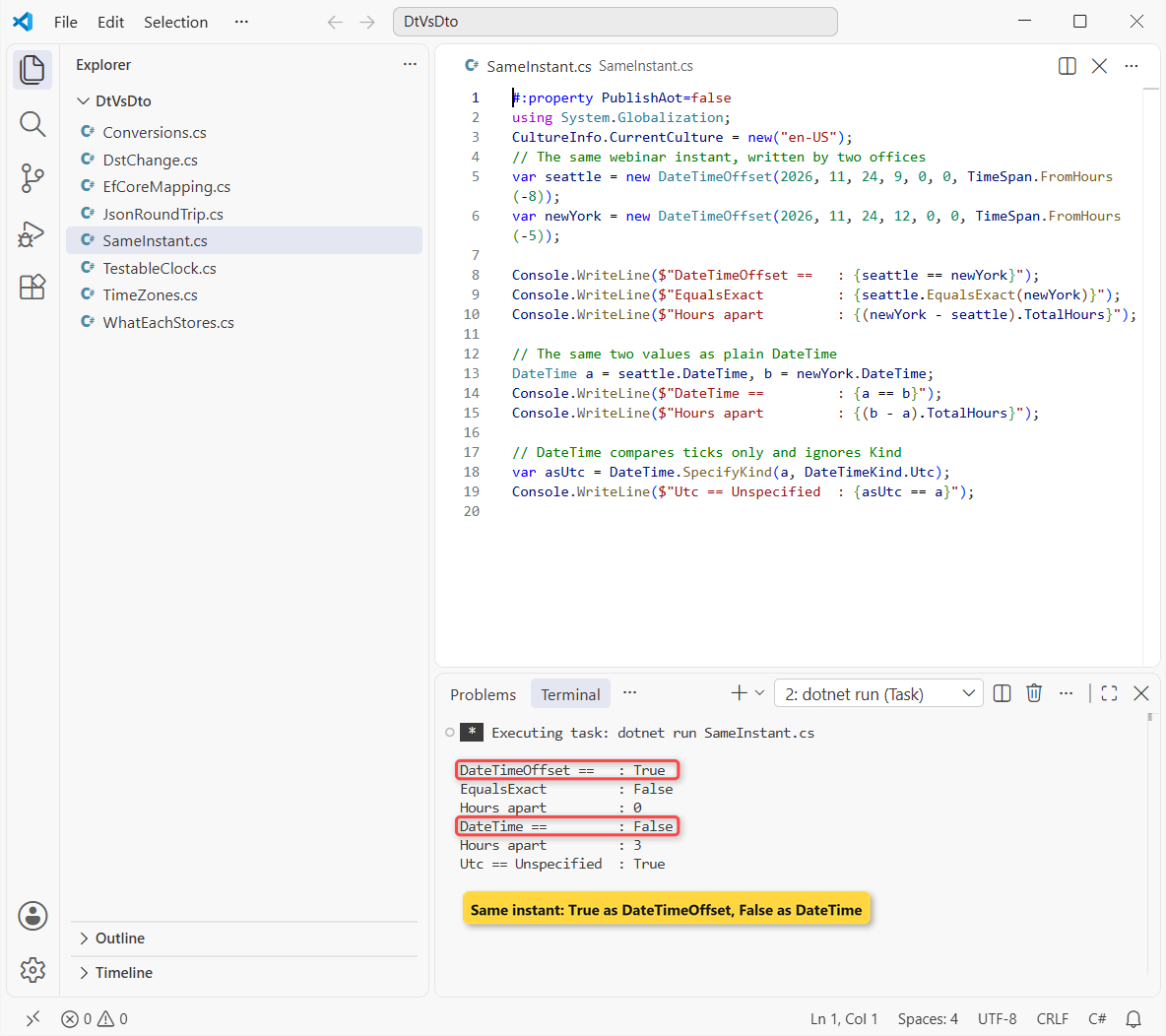
DateTimeOffset‘s == compares the UTC instant, so it returned True with 0 hours between them. Use EqualsExact when the offset itself must match; it returned False.
Strip the offsets with .DateTime and the two values are 3 hours apart. Worse, the last line printed True: DateTime compares ticks and ignores Kind, so a UTC value equals a local one with the same digits.
Both are value types; my struct in C# guide covers why == works on them at all.
DateTimeOffset and Time Zones: Eastern vs Pacific
An offset isn’t a time zone. To show the webinar to an attendee in New York, you need TimeZoneInfo and its daylight saving rules:
#:property PublishAot=false
using System.Globalization;
CultureInfo.CurrentCulture = new("en-US");
var pacific = TimeZoneInfo.FindSystemTimeZoneById("Pacific Standard Time");
var eastern = TimeZoneInfo.FindSystemTimeZoneById("America/New_York");
var webinar = new DateTimeOffset(2026, 11, 24, 9, 0, 0, TimeSpan.FromHours(-8));

Console.WriteLine($"Seattle:  {TimeZoneInfo.ConvertTime(webinar, pacific)}");
Console.WriteLine($"New York: {TimeZoneInfo.ConvertTime(webinar, eastern)}");
Console.WriteLine($"IANA id resolved to: {eastern.Id}");

// Eastern offset before and after the 11/01/2026 DST change
var oct = new DateTime(2026, 10, 30, 12, 0, 0);
var nov = new DateTime(2026, 11, 2, 12, 0, 0);
Console.WriteLine($"Eastern on 10/30: {eastern.GetUtcOffset(oct)}");
Console.WriteLine($"Eastern on 11/02: {eastern.GetUtcOffset(nov)}");

var clockBack = new DateTime(2026, 11, 1, 1, 30, 0);
Console.WriteLine($"1:30 AM on 11/01 ambiguous? {eastern.IsAmbiguousTime(clockBack)}");
Output:
Seattle:  11/24/2026 9:00:00 AM -08:00
New York: 11/24/2026 12:00:00 PM -05:00
IANA id resolved to: America/New_York
Eastern on 10/30: -04:00:00
Eastern on 11/02: -05:00:00
1:30 AM on 11/01 ambiguous? True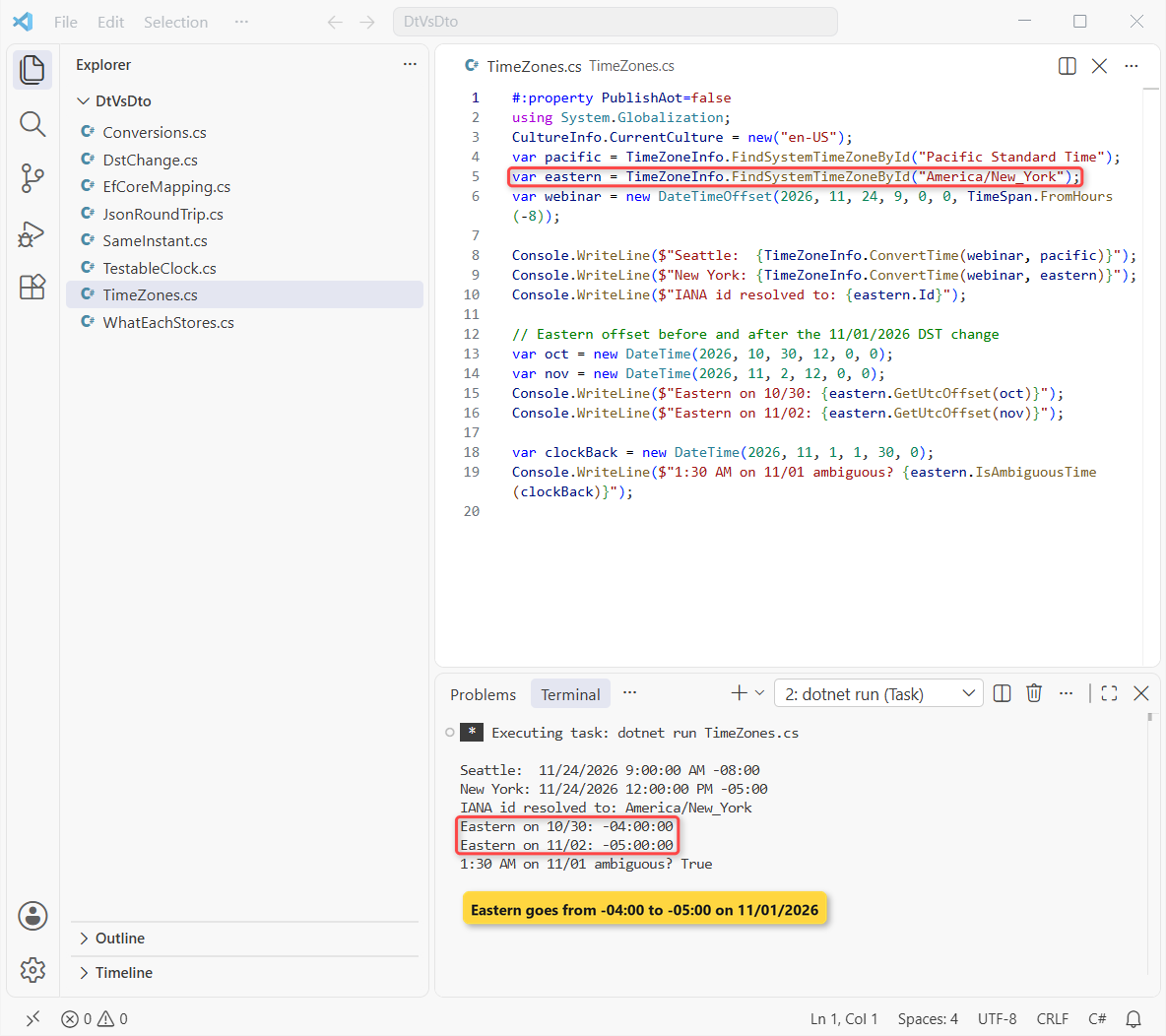
"Pacific Standard Time" is the Windows id. Starting with .NET 6, Windows also accepts IANA ids like America/New_York, which is what Linux containers use. That’s handy for code that runs on both.
The Eastern offset went from -04:00:00 to -05:00:00 across 11/01/2026, and 1:30 AM that night happened twice, so IsAmbiguousTime returned True.
An unknown id throws TimeZoneNotFoundException. Wrap user-supplied ids as shown in my try-catch guide.
Daylight Saving Time: Why DateTimeOffset.AddHours(24) Goes Wrong
Same sample dates in the Eastern zone, same DST weekend. Say a reminder should go out 24 hours after Saturday noon, 10/31/2026:
#:property PublishAot=false
using System.Globalization;
CultureInfo.CurrentCulture = new("en-US");
var eastern = TimeZoneInfo.FindSystemTimeZoneById("Eastern Standard Time");

// Reminder 24 hours after Saturday noon, across the 11/01/2026 change
var sat = new DateTimeOffset(2026, 10, 31, 12, 0, 0, TimeSpan.FromHours(-4));
var plus24 = sat.AddHours(24);
Console.WriteLine($"Offset math only:     {plus24}");
Console.WriteLine($"Real Eastern time:    {TimeZoneInfo.ConvertTime(plus24, eastern)}");

// "Same time tomorrow" means a local wall-clock time, not +24 h
var noonLocal = sat.DateTime.AddDays(1);
var sunNoon = new DateTimeOffset(noonLocal, eastern.GetUtcOffset(noonLocal));
Console.WriteLine($"Sunday noon Eastern:  {sunNoon}");
Console.WriteLine($"Hours between noons:  {(sunNoon - sat).TotalHours}");
Output:
Offset math only:     11/1/2026 12:00:00 PM -04:00
Real Eastern time:    11/1/2026 11:00:00 AM -05:00
Sunday noon Eastern:  11/1/2026 12:00:00 PM -05:00
Hours between noons:  25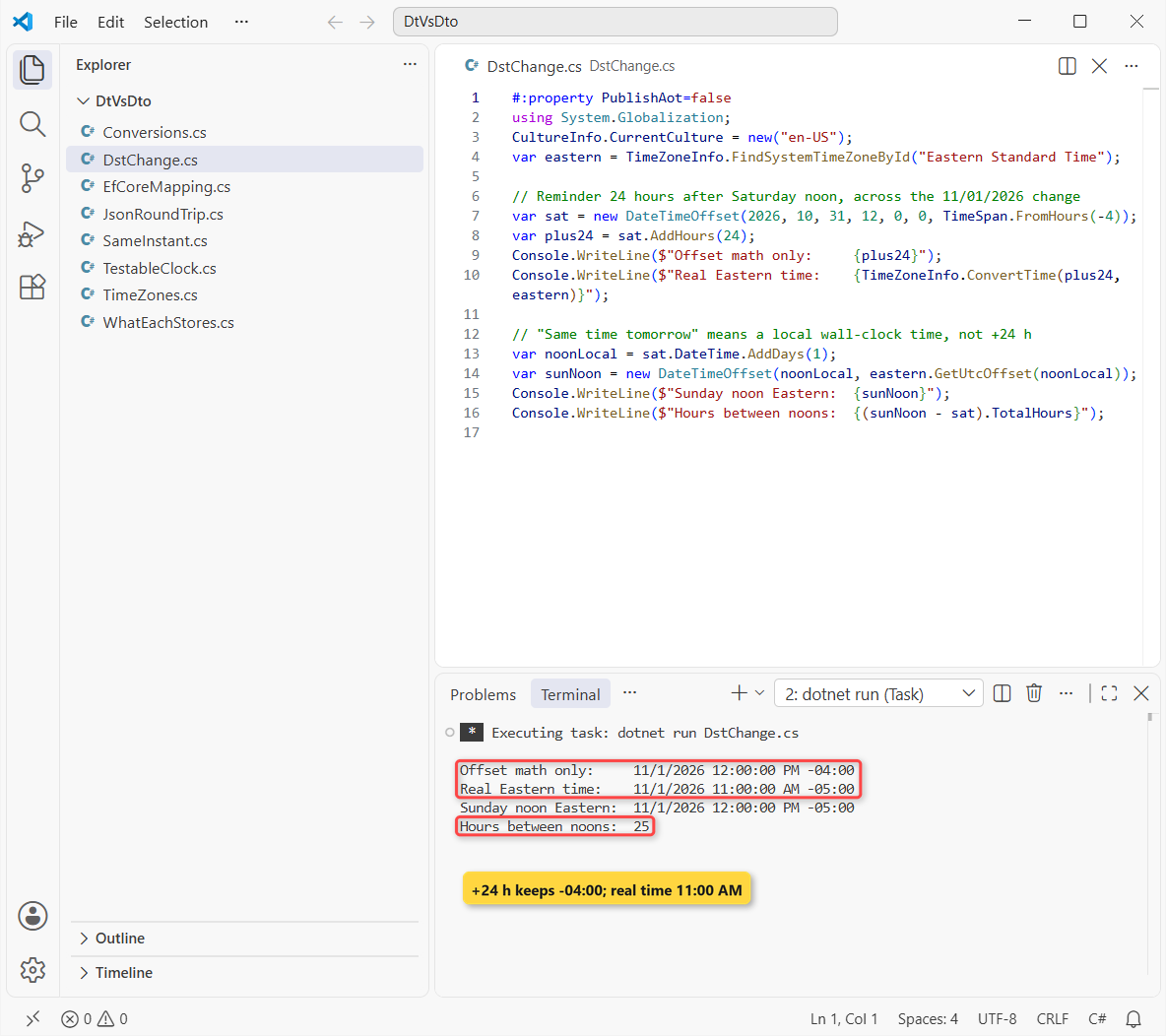
AddHours(24) gave 11/1/2026 12:00:00 PM -04:00. That’s the right instant, but with Saturday’s offset. Converting it shows the truth: 11/1/2026 11:00:00 AM -05:00.
“Same time tomorrow” is a different question. Noon to noon that weekend took 25 hours, because the clocks fell back. So store recurring local events as a DateOnly + TimeOnly + time zone, and work out the offset when you need it.
Note: a DateTimeOffset never adjusts itself for DST. It’s a fixed offset, not a time zone.
DateTime vs DateOnly for Due Dates and Birthdays
Jenna’s invoice is due 12/01/2026, all day, in every time zone. A DateTime at midnight can slide to 11/30 when someone converts it; DateOnly can’t. Converting between the types is one call each:
#:property PublishAot=false
using System.Globalization;
CultureInfo.CurrentCulture = new("en-US");
var eastern = TimeZoneInfo.FindSystemTimeZoneById("Eastern Standard Time");
var webinar = new DateTimeOffset(2026, 11, 24, 9, 0, 0, TimeSpan.FromHours(-8));

DateTime utc = webinar.UtcDateTime;                  // Kind = Utc
DateTime wall = webinar.DateTime;                    // Kind = Unspecified
DateOnly day = DateOnly.FromDateTime(wall);
TimeOnly time = TimeOnly.FromDateTime(wall);
DateTime back = day.ToDateTime(new TimeOnly(9, 0));
var fromUtc = new DateTimeOffset(utc);               // offset 00:00

Console.WriteLine($"UtcDateTime: {utc} ({utc.Kind})");
Console.WriteLine($"DateTime:    {wall} ({wall.Kind})");
Console.WriteLine($"DateOnly:    {day}   TimeOnly: {time}");
Console.WriteLine($"ToDateTime:  {back}");
Console.WriteLine($"From UTC:    {fromUtc}");
Console.WriteLine($"Eastern:     {TimeZoneInfo.ConvertTime(fromUtc, eastern)}");
Output:
UtcDateTime: 11/24/2026 5:00:00 PM (Utc)
DateTime:    11/24/2026 9:00:00 AM (Unspecified)
DateOnly:    11/24/2026   TimeOnly: 9:00 AM
ToDateTime:  11/24/2026 9:00:00 AM
From UTC:    11/24/2026 5:00:00 PM +00:00
Eastern:     11/24/2026 12:00:00 PM -05:00
DateOnly.FromDateTime and TimeOnly.FromDateTime split a value, and ToDateTime joins them back with Kind=Unspecified. UtcDateTime is the safe way out of a DateTimeOffset, since it keeps Kind=Utc.
Reading dates from text? Convert a string to DateTime in C# covers parsing; DateOnly.ParseExact takes the same format strings. For billing periods, see how to get the first and last day of a month.
How System.Text.Json Serializes DateTime, DateTimeOffset and DateOnly
Same webinar dates again, this time as an API payload. One record holds all five values:
#:property PublishAot=false
using System.Globalization;
using System.Text.Json;
CultureInfo.CurrentCulture = new("en-US");
var webinar = new Webinar(
    new DateTime(2026, 11, 24, 9, 0, 0),
    new DateTime(2026, 11, 24, 17, 0, 0, DateTimeKind.Utc),
    new DateTimeOffset(2026, 11, 24, 9, 0, 0, TimeSpan.FromHours(-8)),
    new DateOnly(2026, 12, 1),
    new TimeOnly(9, 0));

var opts = new JsonSerializerOptions { WriteIndented = true };
string json = JsonSerializer.Serialize(webinar, opts);
Console.WriteLine(json);

var back = JsonSerializer.Deserialize<Webinar>(json)!;
Console.WriteLine($"Kinds after round trip: {back.Local.Kind}, {back.Utc.Kind}");

record Webinar(DateTime Local, DateTime Utc, DateTimeOffset StartsAt,
               DateOnly InvoiceDue, TimeOnly DoorsOpen);
Output:
{
  "Local": "2026-11-24T09:00:00",
  "Utc": "2026-11-24T17:00:00Z",
  "StartsAt": "2026-11-24T09:00:00-08:00",
  "InvoiceDue": "2026-12-01",
  "DoorsOpen": "09:00:00"
}
Kinds after round trip: Unspecified, Utc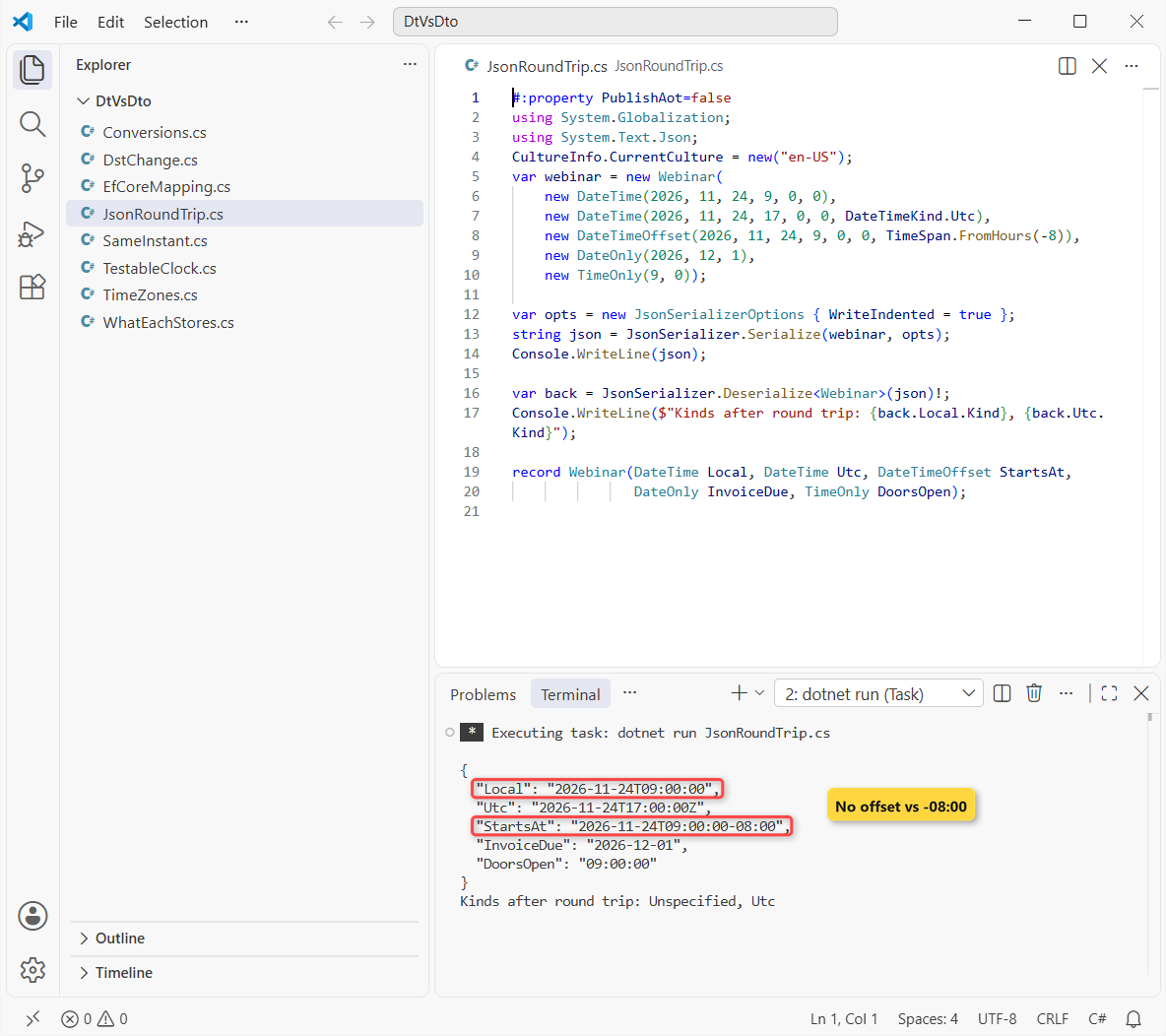
Every value is ISO 8601. The unspecified DateTime wrote 2026-11-24T09:00:00 with nothing after it, and a client in another state will read that in its own zone. The DateTimeOffset kept -08:00, and DateOnly wrote a plain 2026-12-01.
On the way back, Kind survived (Unspecified, Utc). For options and converters, read my System.Text.Json guide. I used a positional record here; record vs class vs struct explains why.
EF Core and SQL Server: datetime2 vs datetimeoffset vs date
You don’t need a database to see the column types. GenerateCreateScript prints the DDL that EF Core 10.0.14 would run for the webinar entity:
#:package Microsoft.EntityFrameworkCore.SqlServer@10.0.14
#:property PublishAot=false
using Microsoft.EntityFrameworkCore;

using var db = new WebinarDb();
Console.WriteLine(db.Database.GenerateCreateScript());

class WebinarDb : DbContext
{
    public DbSet<Webinar> Webinars => Set<Webinar>();
    protected override void OnConfiguring(DbContextOptionsBuilder o) =>
        o.UseSqlServer("Server=(localdb)\\mssqllocaldb;Database=Webinars");
}

class Webinar
{
    public int Id { get; set; }
    public DateTime CreatedUtc { get; set; }
    public DateTimeOffset StartsAt { get; set; }
    public DateOnly InvoiceDue { get; set; }
    public TimeOnly DoorsOpen { get; set; }
}
Output:
CREATE TABLE [Webinars] (
    [Id] int NOT NULL IDENTITY,
    [CreatedUtc] datetime2 NOT NULL,
    [StartsAt] datetimeoffset NOT NULL,
    [InvoiceDue] date NOT NULL,
    [DoorsOpen] time NOT NULL,
    CONSTRAINT [PK_Webinars] PRIMARY KEY ([Id])
);
GO
DateTime became datetime2, DateTimeOffset became datetimeoffset, and DateOnly / TimeOnly mapped to date and time (supported on SQL Server since EF Core 8). datetime2 stores no offset, so name the column CreatedUtc and always save UTC.
Note: restore printed for a transitive System.Security.Cryptography.Pkcs package. In a real project, run dotnet list package --vulnerable --include-transitive and pin the patched version.
The EF Core tutorial walks through migrations, and the Web API CRUD tutorial uses these mappings in a real API.
DateTime.Now vs TimeProvider for Testable Code
DateTime.Now reads the server’s zone and can’t be faked in a test. .NET 8 added TimeProvider: production code takes TimeProvider.System, and tests pass a FakeTimeProvider from Microsoft.Extensions.TimeProvider.Testing 10.11.0.
Same $1,250 invoice due 12/01/2026. Is it overdue at 10:00 PM Eastern that night, and two hours later?
#:package Microsoft.Extensions.TimeProvider.Testing@10.11.0
#:property PublishAot=false
using System.Globalization;
using Microsoft.Extensions.Time.Testing;
CultureInfo.CurrentCulture = new("en-US");
var eastern = TimeZoneInfo.FindSystemTimeZoneById("Eastern Standard Time");
// 10:00 PM Eastern on 12/01/2026 = 03:00 UTC on 12/02 (start value in UTC)
var fake = new FakeTimeProvider(new DateTimeOffset(2026, 12, 2, 3, 0, 0, TimeSpan.Zero));
fake.SetLocalTimeZone(eastern);
var invoices = new InvoiceChecker(fake);
var due = new DateOnly(2026, 12, 1);

Console.WriteLine($"Local now: {fake.GetLocalNow()}  overdue? {invoices.IsOverdue(due)}");
fake.Advance(TimeSpan.FromHours(2));
Console.WriteLine($"Local now: {fake.GetLocalNow()}  overdue? {invoices.IsOverdue(due)}");

class InvoiceChecker(TimeProvider clock)
{
    public bool IsOverdue(DateOnly due) =>
        DateOnly.FromDateTime(clock.GetLocalNow().DateTime) > due;
}
Output:
Local now: 12/1/2026 10:00:00 PM -05:00  overdue? False
Local now: 12/2/2026 12:00:00 AM -05:00  overdue? True
At 10:00 PM it wasn’t overdue; at midnight Eastern it was. The checker gets its clock through a primary constructor, so the test controls time instead of waiting for it.
Pro Tip: give FakeTimeProvider its start time in UTC. My first try passed 10:00 PM -05:00, and GetLocalNow shifted it a second time.
In ASP.NET Core, register TimeProvider.System as a singleton (see DI lifetimes) and use FakeTimeProvider in your xUnit tests.
When to Use DateTime, DateTimeOffset or DateOnly
- An order, payment, log entry or meeting, anything that happened at one moment:
DateTimeOffset. - A due date, birthday, holiday or report day with no time:
DateOnly. - A daily time with no date, like store hours or doors-open time:
TimeOnly. - A UTC timestamp in a column named
...Utc, or an older API that only takesDateTime:DateTimewithKind=Utc. - A recurring local event, like 9:00 AM every Monday in Seattle:
DateOnly/TimeOnlyplus aTimeZoneInfoid.
How to Switch from DateTime to DateTimeOffset
- Replace
DateTime.Now/DateTime.UtcNowwithTimeProvider.GetUtcNow()orDateTimeOffset.UtcNow. - Change entity properties to
DateTimeOffsetand add an EF Core migration (datetime2becomesdatetimeoffset). - Move date-only fields (due dates, birthdays) to
DateOnlyand their columns todate. - Where old code still needs a
DateTime, pass.UtcDateTime, never.DateTime. - Convert to the user’s zone with
TimeZoneInfo.ConvertTimeonly when you display the value.
The deciding differences: DateTimeOffset knows the instant and compares correctly across offsets, DateOnly can’t drift a day, and DateTime is safe only as UTC. None of them knows DST rules; TimeZoneInfo does.
Working with dates in more places? These pair well with this comparison:
- C# data types, from int to decimal
- How ToString works in C#
- What’s new in .NET 10
- Nullable reference types in C#
Frequently Asked Questions
How do I convert a DateTimeOffset to a DateTime in C#?
Use .UtcDateTime for a UTC DateTime (Kind = Utc), or .DateTime for the clock reading with Kind = Unspecified. Prefer UtcDateTime unless you only need the wall-clock digits.
How do I convert a DateTime to a DateTimeOffset?
Pass it to new DateTimeOffset(dateTime). A UTC value gets offset 00:00; a Local or Unspecified value gets the server’s local offset, which is often wrong. Use the overload that takes an explicit TimeSpan offset.
Does DateTimeOffset store the time zone?
No. It stores a fixed offset like -08:00, and several zones share any offset. Keep a TimeZoneInfo id next to it when DST matters. Microsoft’s comparison of the date and time types recommends DateTimeOffset as the default type.
Should I use DateTime.UtcNow or DateTimeOffset.UtcNow?
Both give the current UTC instant. DateTimeOffset.UtcNow keeps the offset in the type, so the value can’t be mistaken for local time later. For testable code, inject TimeProvider instead.
Is DateOnly available in .NET Framework?
No. DateOnly and TimeOnly arrived in .NET 6 and aren’t part of .NET Framework. On .NET Framework, use DateTime with the time set to midnight and treat it as a date.
How do I mock DateTime.Now in unit tests?
Don’t call DateTime.Now directly. Take a TimeProvider in the constructor and pass a FakeTimeProvider in tests, as the TimeProvider overview on Microsoft Learn describes.

Bijay Kumar is a renowned software engineer, accomplished author, and distinguished Microsoft Most Valuable Professional (MVP) specializing in SharePoint. With a rich professional background spanning over 15 years, Bijay has established himself as an authority in the field of information technology. He possesses unparalleled expertise in multiple programming languages and technologies such as ASP.NET, ASP.NET MVC, C#.NET, and SharePoint, which has enabled him to develop innovative and cutting-edge solutions for clients across the globe. Read more…