
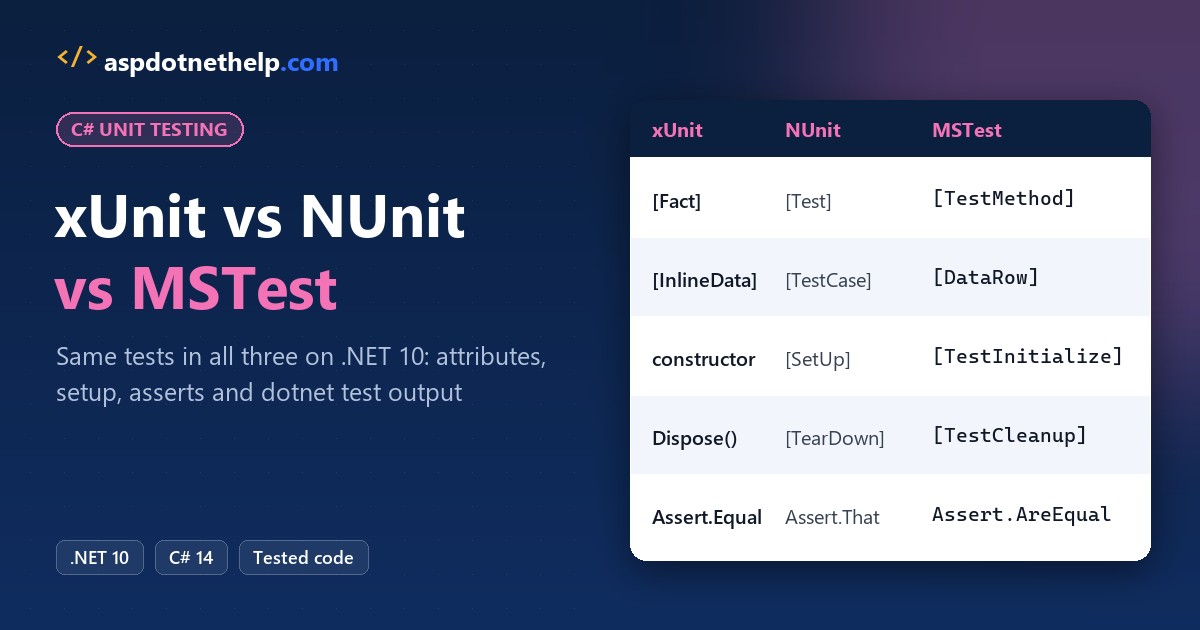
Say you’re testing the shipping fee for an online store in Columbus, Ohio: $8.95 under $75, free above it, plus $15 for Alaska and Hawaii. I wrote the same tests in xUnit, NUnit and MSTest, and all three caught the same Hawaii bug.
My verdict on xunit vs nunit vs mstest: use xUnit for a new .NET 10 project, NUnit when your team likes Assert.That, and MSTest when you want Microsoft’s own runner. They really differ in setup, data rows and failure messages.
xUnit vs NUnit vs MSTest at a Glance
This table comes from three real test projects on the .NET 10 SDK 10.0.402 (not sure which SDK you have? Check your .NET version) and the current docs. Versions are what dotnet new gave me, plus today’s latest stable on NuGet.
| Feature | xUnit | NUnit | MSTest |
|---|---|---|---|
Package from dotnet new | xunit 2.9.3 | NUnit 4.3.2 | MSTest 4.0.2 |
| Latest stable on NuGet (11/07/2026) | xunit 2.9.3, xunit.v3 4.0.2 | NUnit 5.0.0 | MSTest 4.5.2 |
| Test attribute | [Fact] | [Test] | [TestMethod] in a [TestClass] |
| Data-driven test | [Theory] + [InlineData] | [TestCase] | [DataRow], [DynamicData] |
| Setup before each test | Constructor | [SetUp] | [TestInitialize] |
| Cleanup after each test | IDisposable.Dispose | [TearDown] | [TestCleanup] |
| Once per test class | IClassFixture<T> | [OneTimeSetUp] | [ClassInitialize] |
| Equality assert | Assert.Equal(expected, actual) | Assert.That(actual, Is.EqualTo(expected)) | Assert.AreEqual(expected, actual) |
decimal parameter from 40.00 literal | Converted, test runs | Converted, test runs | Fails: MSTEST0014 |
| Parallel by default | Classes in parallel, tests in a class one at a time | No, opt in with [Parallelizable] | No, but the template turns on method-level parallel runs |
| Microsoft.Testing.Platform | v3 yes; v2 only through a third-party package | Yes, NUnit runner | Yes, MSTest runner |
The Sample Shipping Calculator and Three Test Projects
One class library holds the code under test, and each framework gets its own test project in the same solution. On .NET 10, dotnet new sln creates the new TestFw.slnx format (one of the changes in .NET 10):
dotnet new sln -n TestFw
dotnet new classlib -o ShipCalc
dotnet new xunit -o XunitTests
dotnet new nunit -o NunitTests
dotnet new mstest -o MstestTests
dotnet sln add ShipCalc XunitTests NunitTests MstestTests
dotnet reference add ShipCalc --project XunitTests
dotnet reference add ShipCalc --project NunitTests
dotnet reference add ShipCalc --project MstestTests
Here’s the class all three projects test. Fees are decimal, the right C# type for money, and the state list is a collection expression:
namespace ShipCalc;

public class ShippingCalculator
{
    public const decimal FreeShippingMinimum = 75m;
    public const decimal StandardFee = 8.95m;
    public const decimal RemoteSurcharge = 15m;   // Alaska and Hawaii

    private static readonly HashSet<string> RemoteStates = ["AK", "HI"];

    public decimal Fee(decimal orderTotal, string state)
    {
        ArgumentOutOfRangeException.ThrowIfNegative(orderTotal);

        decimal fee = orderTotal >= FreeShippingMinimum ? 0m : StandardFee;
        if (RemoteStates.Contains(state))
            fee += RemoteSurcharge;
        return fee;
    }
}
Four cases cover the rule: $40 to Texas pays $8.95, $75 to Ohio ships free, $40 to Hawaii pays $23.95, and $120 to Alaska pays $15.
What dotnet new generated for each project
I deleted Class1.cs, UnitTest1.cs and Test1.cs. The class library is the plain template:
<Project Sdk="Microsoft.NET.Sdk">

  <PropertyGroup>
    <TargetFramework>net10.0</TargetFramework>
    <ImplicitUsings>enable</ImplicitUsings>
    <Nullable>enable</Nullable>
  </PropertyGroup>

</Project>
The xUnit template still gives you xUnit v2, with a global using Xunit:
<Project Sdk="Microsoft.NET.Sdk">

  <PropertyGroup>
    <TargetFramework>net10.0</TargetFramework>
    <ImplicitUsings>enable</ImplicitUsings>
    <Nullable>enable</Nullable>
    <IsPackable>false</IsPackable>
  </PropertyGroup>

  <ItemGroup>
    <PackageReference Include="coverlet.collector" Version="6.0.4" />
    <PackageReference Include="Microsoft.NET.Test.Sdk" Version="17.14.1" />
    <PackageReference Include="xunit" Version="2.9.3" />
    <PackageReference Include="xunit.runner.visualstudio" Version="3.1.4" />
  </ItemGroup>

  <ItemGroup>
    <Using Include="Xunit" />
  </ItemGroup>

  <ItemGroup>
    <ProjectReference Include="..\ShipCalc\ShipCalc.csproj" />
  </ItemGroup>

</Project>
NUnit adds its analyzers, which flag swapped expected and actual values at build time:
<Project Sdk="Microsoft.NET.Sdk">

  <PropertyGroup>
    <TargetFramework>net10.0</TargetFramework>
    <LangVersion>latest</LangVersion>
    <ImplicitUsings>enable</ImplicitUsings>
    <Nullable>enable</Nullable>
    <IsPackable>false</IsPackable>
  </PropertyGroup>

  <ItemGroup>
    <PackageReference Include="coverlet.collector" Version="6.0.4" />
    <PackageReference Include="Microsoft.NET.Test.Sdk" Version="17.14.0" />
    <PackageReference Include="NUnit" Version="4.3.2" />
    <PackageReference Include="NUnit.Analyzers" Version="4.7.0" />
    <PackageReference Include="NUnit3TestAdapter" Version="5.0.0" />
  </ItemGroup>

  <ItemGroup>
    <Using Include="NUnit.Framework" />
  </ItemGroup>

  <ItemGroup>
    <ProjectReference Include="..\ShipCalc\ShipCalc.csproj" />
  </ItemGroup>

</Project>
MSTest needs a single metapackage, which brings in the test SDK, adapter, framework and analyzers:
<Project Sdk="Microsoft.NET.Sdk">

  <PropertyGroup>
    <TargetFramework>net10.0</TargetFramework>
    <LangVersion>latest</LangVersion>
    <ImplicitUsings>enable</ImplicitUsings>
    <Nullable>enable</Nullable>
  </PropertyGroup>

  <ItemGroup>
    <PackageReference Include="MSTest" Version="4.0.2" />
  </ItemGroup>

  <ItemGroup>
    <Using Include="Microsoft.VisualStudio.TestTools.UnitTesting" />
  </ItemGroup>

  <ItemGroup>
    <ProjectReference Include="..\ShipCalc\ShipCalc.csproj" />
  </ItemGroup>

</Project>
xUnit, NUnit and MSTest Test Attributes: [Fact] vs [Test] vs [TestMethod]
Same calculator, same four rows, same exception check. If you’ve never written a C# unit test, start with my xUnit beginner tutorial and come back. Here’s the xUnit version:
using ShipCalc;

namespace XunitTests;

public class ShippingTests
{
    private readonly ShippingCalculator _calc = new();   // new instance per test

    [Theory]
    [InlineData(40.00, "TX", 8.95)]
    [InlineData(75.00, "OH", 0.00)]
    [InlineData(40.00, "HI", 23.95)]
    [InlineData(120.00, "AK", 15.00)]
    public void Fee_ByTotalAndState(decimal total, string state, decimal expected) =>
        Assert.Equal(expected, _calc.Fee(total, state));

    [Fact]
    public void Fee_NegativeTotal_Throws() =>
        Assert.Throws<ArgumentOutOfRangeException>(() => _calc.Fee(-1m, "TX"));
}
xUnit splits tests into two kinds: a [Fact] has no inputs, and a [Theory] runs once per [InlineData] row. NUnit uses one attribute for both:
using ShipCalc;

namespace NunitTests;

public class ShippingTests
{
    private ShippingCalculator _calc = null!;

    [SetUp]
    public void SetUp() => _calc = new ShippingCalculator();

    [TestCase(40.00, "TX", 8.95)]
    [TestCase(75.00, "OH", 0.00)]
    [TestCase(40.00, "HI", 23.95)]
    [TestCase(120.00, "AK", 15.00)]
    public void Fee_ByTotalAndState(decimal total, string state, decimal expected) =>
        Assert.That(_calc.Fee(total, state), Is.EqualTo(expected));

    [Test]
    public void Fee_NegativeTotal_Throws() =>
        Assert.That(() => _calc.Fee(-1m, "TX"), Throws.TypeOf<ArgumentOutOfRangeException>());
}
A plain [Test] or a [TestCase] row is enough; NUnit doesn’t need a class attribute. MSTest wants [TestClass] on the class and [TestMethod] on every test:
using ShipCalc;

namespace MstestTests;

[TestClass]
public sealed class ShippingTests
{
    private ShippingCalculator _calc = null!;

    [TestInitialize]
    public void Init() => _calc = new ShippingCalculator();

    public static IEnumerable<(decimal, string, decimal)> Orders =>
    [
        (40.00m, "TX", 8.95m),
        (75.00m, "OH", 0.00m),
        (40.00m, "HI", 23.95m),
        (120.00m, "AK", 15.00m),
    ];

    [TestMethod]
    [DynamicData(nameof(Orders))]
    public void Fee_ByTotalAndState(decimal total, string state, decimal expected) =>
        Assert.AreEqual(expected, _calc.Fee(total, state));

    [TestMethod]
    public void Fee_NegativeTotal_Throws() =>
        Assert.ThrowsExactly<ArgumentOutOfRangeException>(() => _calc.Fee(-1m, "TX"));
}
MSTest’s rows come from [DynamicData] here, not [DataRow]. That’s not style; it’s the decimal problem covered below. All three name the tests the same way, which follows our C# method naming conventions.
Setup and Teardown in xUnit, NUnit and MSTest
This is the difference you’ll feel first. xUnit has no setup attribute: it creates a new instance of the test class for every test, so the constructor (or a field initializer, as in my file) is the setup.
NUnit and MSTest reuse a familiar pattern: a method marked [SetUp] or [TestInitialize] runs before each test. That’s why their _calc field starts as null! and gets its value in that method.
| When it runs | xUnit | NUnit | MSTest |
|---|---|---|---|
| Before each test | Constructor | [SetUp] | [TestInitialize] |
| After each test | Dispose() | [TearDown] | [TestCleanup] |
| Once for the class | IClassFixture<T> | [OneTimeSetUp] / [OneTimeTearDown] | [ClassInitialize] / [ClassCleanup] |
| Once for the assembly | [assembly: AssemblyFixture] (v3) | [SetUpFixture] | [AssemblyInitialize] |
For cleanup in xUnit, implement IDisposable; my post on Dispose and Finalize in C# explains the pattern. Shared fixtures are for expensive things, like a database. A calculator should always be new per test.
Which Test Framework Gives the Clearest Failure Message?
To compare failures, I planted a bug in the calculator. The surcharge line checked only Alaska:
if (state == "AK")
    fee += RemoteSurcharge;
Then I ran dotnet test on each project. Same calculator class, same Hawaii row, three different messages. Here’s xUnit:
[xUnit.net 00:00:01.02]     XunitTests.ShippingTests.Fee_ByTotalAndState(total: 40, state: "HI", expected: 23.95) [FAIL]
  Failed XunitTests.ShippingTests.Fee_ByTotalAndState(total: 40, state: "HI", expected: 23.95) [263 ms]
  Error Message:
   Assert.Equal() Failure: Values differ
Expected: 23.95
Actual:   8.95
Failed!  - Failed:     1, Passed:     4, Skipped:     0, Total:     5, Duration: 294 ms - XunitTests.dll (net10.0)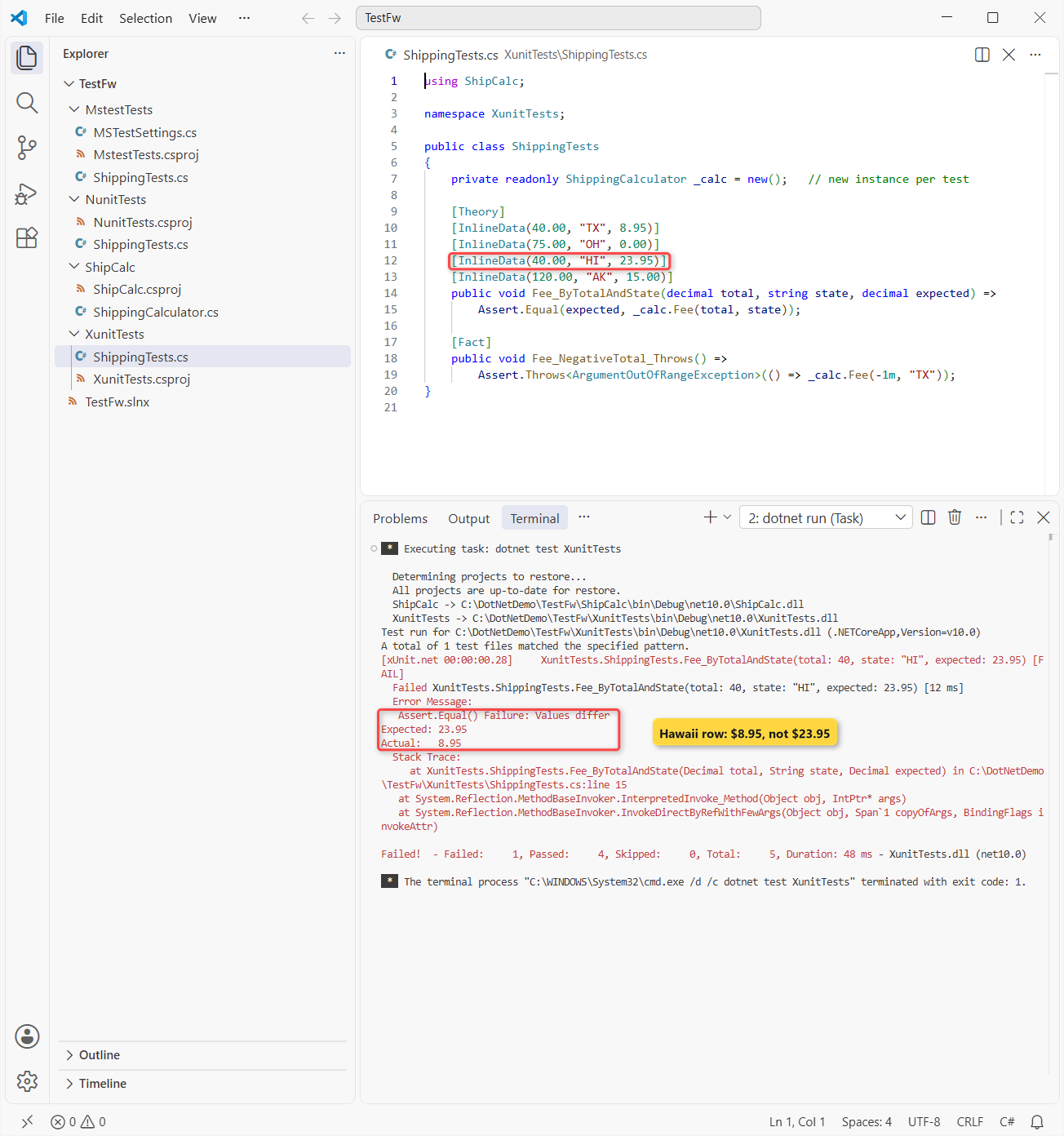
xUnit prints the test with its parameter values, then Expected and Actual on two lines. NUnit adds the assert expression itself:
  Failed Fee_ByTotalAndState(40.0d,"HI",23.95d) [52 ms]
  Error Message:
     Assert.That(_calc.Fee(total, state), Is.EqualTo(expected))
  Expected: 23.95m
  But was:  8.95m
Failed!  - Failed:     1, Passed:     4, Skipped:     0, Total:     5, Duration: 73 ms - NunitTests.dll (net10.0)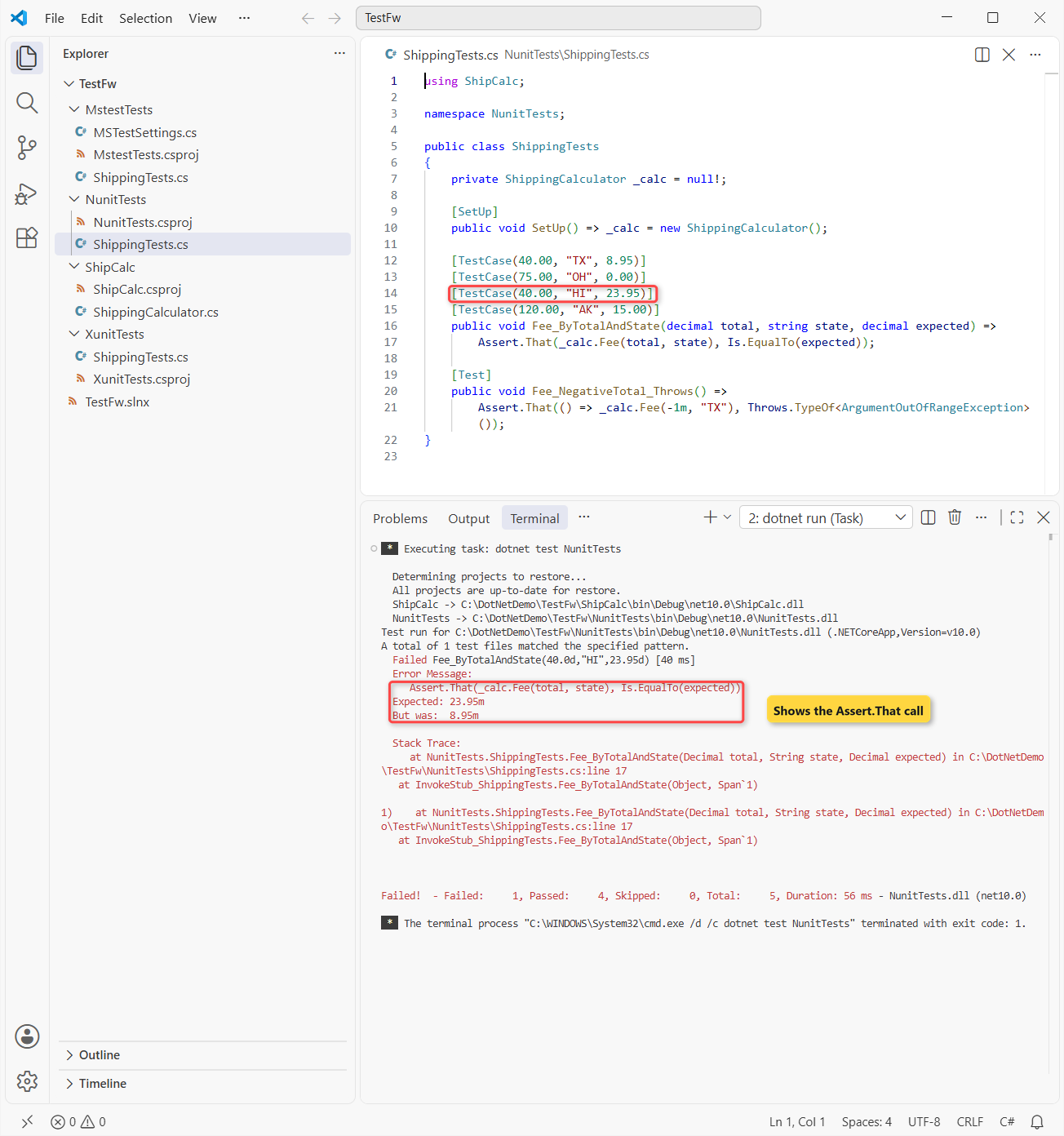
MSTest 4 also shows the argument expressions, which helps when the assert sits in a longer test:
  Failed Fee_ByTotalAndState (40.00,"HI",23.95) [37 ms]
  Error Message:
   Assert.AreEqual failed. Expected:<23.95>. Actual:<8.95>. 'expected' expression: 'expected', 'actual' expression: '_calc.Fee(total, state)'.
Failed!  - Failed:     1, Passed:     4, Skipped:     0, Total:     5, Duration: 57 ms - MstestTests.dll (net10.0)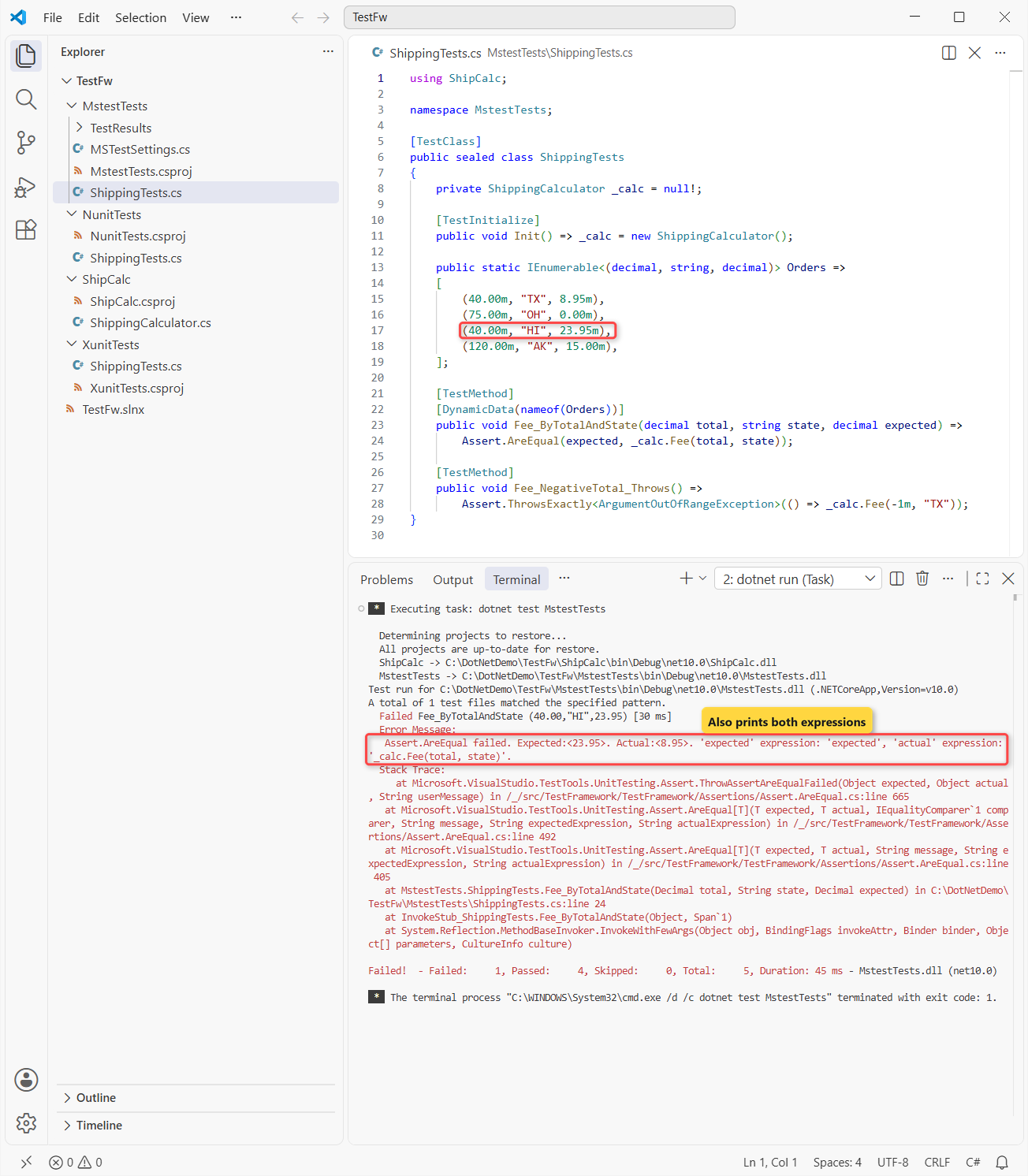
All three summaries say the same thing: 5 tests, 1 failed. I find NUnit’s message the easiest to read cold, and MSTest’s the most detailed. xUnit’s is the shortest, which is fine once you know the format.
Can You Pass decimal Values in xUnit, NUnit and MSTest Data Rows?
C# attributes can’t take decimal constants, so [InlineData(8.95)] really passes a double. xUnit and NUnit convert it to the decimal parameter for you; that’s why their rows above work as-is.
MSTest 4.0.2 doesn’t. With the bug fixed, I swapped the MSTest file to [DataRow] rows, the same rows the other two use:
using ShipCalc;

namespace MstestTests;

[TestClass]
public sealed class ShippingTests
{
    private ShippingCalculator _calc = null!;

    [TestInitialize]
    public void Init() => _calc = new ShippingCalculator();

    [TestMethod]
    [DataRow(40.00, "TX", 8.95)]
    [DataRow(75.00, "OH", 0.00)]
    [DataRow(40.00, "HI", 23.95)]
    [DataRow(120.00, "AK", 15.00)]
    public void Fee_ByTotalAndState(decimal total, string state, decimal expected) =>
        Assert.AreEqual(expected, _calc.Fee(total, state));
}
The build warned first: MSTEST0014: DataRow argument types do not match method parameter types. Parameter ‘total’ expects type ‘decimal’, but the provided value has type ‘double’; Parameter ‘expected’ expects type ‘decimal’, but the provided value has type ‘double’ (MSTEST0014). The run then failed every row:
  Failed Fee_ByTotalAndState (40,"TX",8.95) [19 ms]
  Error Message:
   Cannot run test method 'MstestTests.ShippingTests.Fee_ByTotalAndState': Test data doesn't match method parameters. Either the count or types are different.
Test expected 3 parameter(s), with types 'Decimal, String, Decimal',
but received 3 argument(s), with types 'Double, String, Double'.
Failed!  - Failed:     4, Passed:     0, Skipped:     0, Total:     4, Duration: 37 ms - MstestTests.dll (net10.0)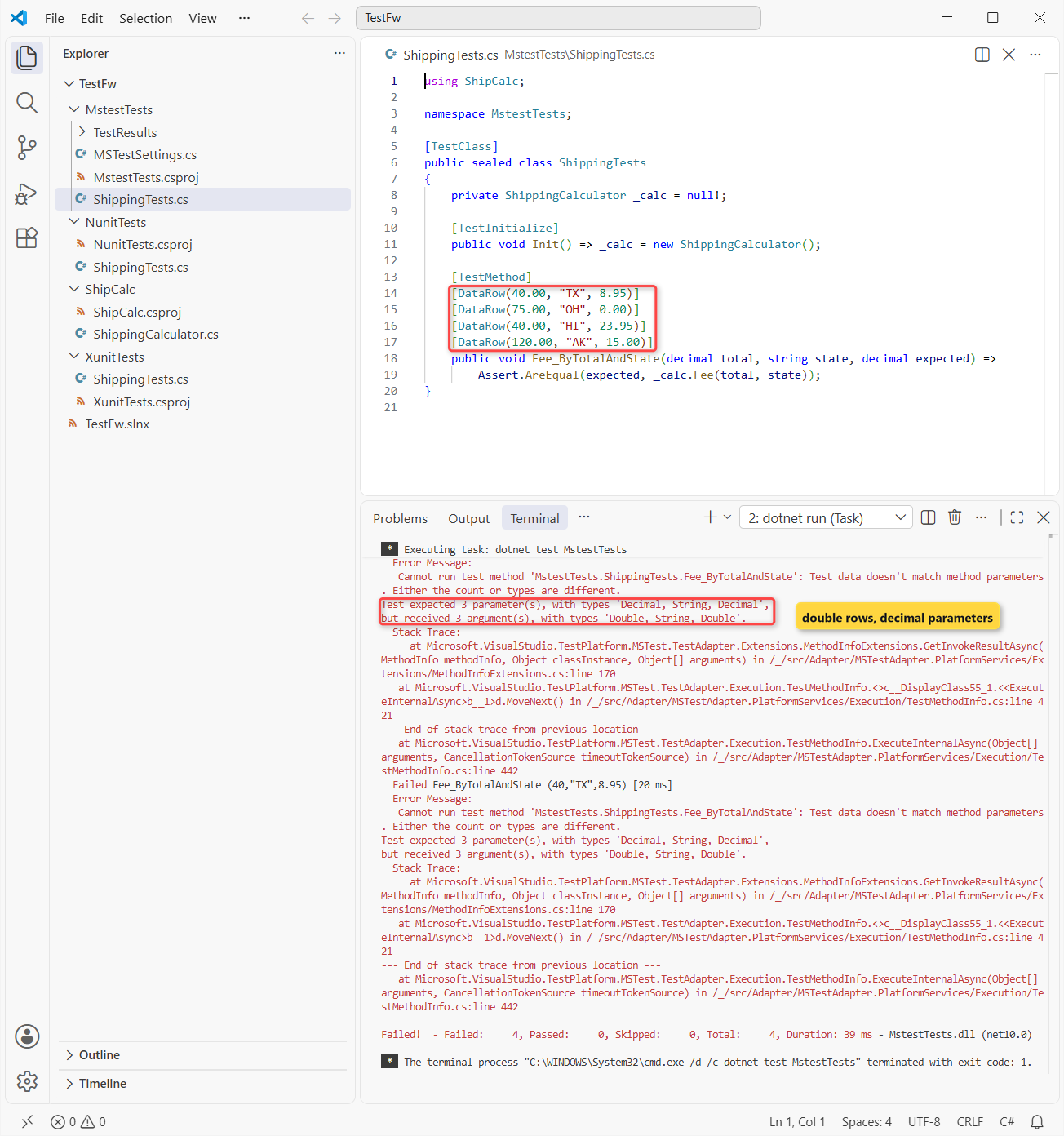
The fix is the [DynamicData] property from the MSTest file earlier: a list of tuples with real m-suffixed decimals. Strings that you parse with CultureInfo.InvariantCulture also work, but they read worse.
Important: don’t ignore MSTEST0014 if you’re moving tests from xUnit or NUnit to MSTest. Your rows compile, but every one of them fails at run time.
xUnit vs NUnit vs MSTest Assertions: Equal vs That vs AreEqual
xUnit and MSTest use classic assert methods with the expected value first. NUnit 4 pushes the constraint model, Assert.That(actual, constraint), and moved the old methods to ClassicAssert in NUnit.Framework.Legacy.
| Check | xUnit | NUnit 4 | MSTest 4 |
|---|---|---|---|
| Equal | Assert.Equal(8.95m, fee) | Assert.That(fee, Is.EqualTo(8.95m)) | Assert.AreEqual(8.95m, fee) |
| Throws | Assert.Throws<T>(...) | Assert.That(..., Throws.TypeOf<T>()) | Assert.ThrowsExactly<T>(...) |
| Old style | n/a | ClassicAssert.AreEqual(...) | n/a |
NUnit’s analyzer pushes back too: a ClassicAssert call gets warning NUnit2005, which suggests the constraint form. For records, all three compare by value, so one equality assert checks a whole object.
Assert.Throws in xUnit and ThrowsExactly in MSTest both demand the exact exception type, the same idea as a typed catch block in C#. MSTest 4 dropped the old ExpectedException attribute, so this is the only way there.
Do xUnit, NUnit and MSTest Run Tests in Parallel by Default?
They don’t agree. xUnit runs test classes in parallel with each other, but tests inside one class run one at a time. NUnit runs nothing in parallel until you add [Parallelizable].
MSTest runs tests one at a time by default, but the MSTest template adds this file, which turns on method-level parallelism for the whole project:
[assembly: Parallelize(Scope = ExecutionScope.MethodLevel)]So with the same test class, a new MSTest project is actually the most parallel of the three. If tests share static state, mark them [DoNotParallelize]. For async code, all three accept async Task tests; see my async/await guide.
Microsoft.Testing.Platform and dotnet test on .NET 10
Microsoft.Testing.Platform (MTP) is the newer, lighter runner that replaces VSTest. MSTest and NUnit support it through their own runners, and xUnit v3 supports it; xUnit v2 needs a third-party package. The templates still run on VSTest, which is the default mode of dotnet test.
Running dotnet test from the solution folder ran all three projects, each with its own summary line:
Passed!  - Failed:     0, Passed:     5, Skipped:     0, Total:     5, Duration: 26 ms - NunitTests.dll (net10.0)
Passed!  - Failed:     0, Passed:     5, Skipped:     0, Total:     5, Duration: 59 ms - MstestTests.dll (net10.0)
Passed!  - Failed:     0, Passed:     5, Skipped:     0, Total:     5, Duration: 49 ms - XunitTests.dll (net10.0)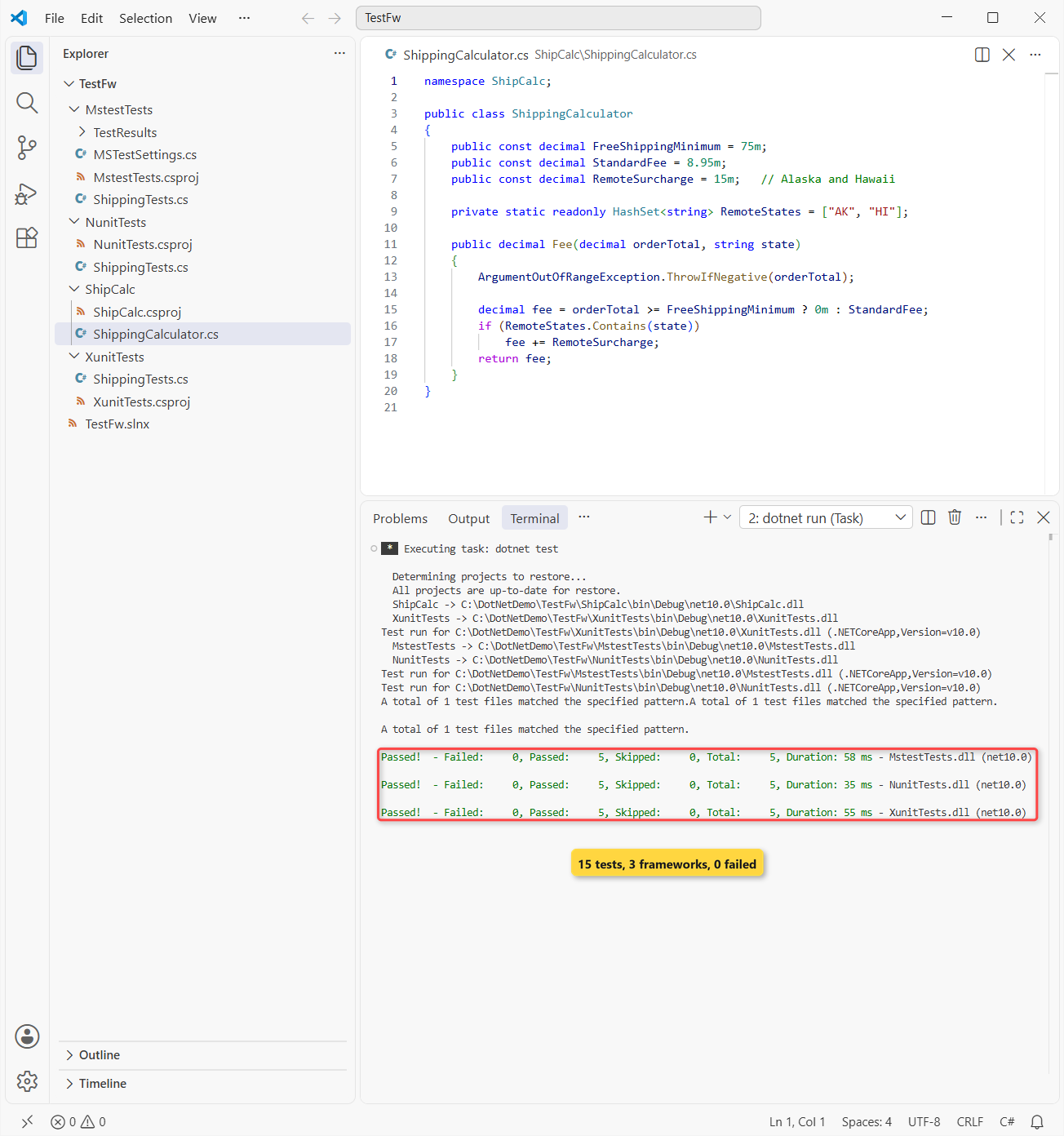
To switch dotnet test to MTP mode on the .NET 10 SDK, add this to global.json. Every test project must support MTP then, or the run fails:
{
    "test": {
        "runner": "Microsoft.Testing.Platform"
    }
}
In VS Code, the C# Dev Kit’s Testing panel lists tests from all three frameworks, and Visual Studio’s Test Explorer does too. If you’re still on .NET 8, the .NET 8 to .NET 10 upgrade moves test projects with it.
Which C# Test Framework Should You Pick?
- New .NET 10 app or library: xUnit. It’s the most common choice in .NET open source, and fresh-instance-per-test keeps tests isolated.
- Team that likes readable asserts and lots of attributes: NUnit, for
Assert.That,[TestCase]and fixtures. - Visual Studio shop, or you want MTP with the least setup: MSTest, via the MSTest runner or MSTest.Sdk.
- Existing suite: keep the framework you have. Switching rarely pays for itself.
- Mocking dependencies: any of the three. Put each dependency behind an interface so a test can pass a fake.
How to Switch from MSTest or NUnit to xUnit
- Create the project with
dotnet new xunitand add a reference to the code under test. - Rename the attributes:
[TestMethod]/[Test]to[Fact],[DataRow]/[TestCase]to[InlineData]plus[Theory]. - Move
[TestInitialize]/[SetUp]code into the constructor and cleanup intoDispose. - Rewrite asserts:
Assert.AreEqualorAssert.That(x, Is.EqualTo(y))becomesAssert.Equal(y, x). - Run
dotnet testand compare the test count with the old project before you delete it.
All three frameworks caught the Hawaii bug, and all three run under dotnet test. What decides it is setup style, MSTest’s decimal data-row catch, and how your team likes to read a failure.
Testing more of your C# code? These posts pair well with this comparison:
- Nullable reference types in C# (why the fields use null!)
- Primary constructors in C#
- LINQ in C#, a common thing to unit test
- All C# tutorials on AspDotnetHelp
Frequently Asked Questions
Is xUnit better than NUnit?
Not in a way that matters for most apps. xUnit gives each test a fresh class instance and has fewer attributes; NUnit has more attributes and the Assert.That constraint model. Both converted my decimal rows and caught the same bug.
Which test framework does Microsoft use?
Microsoft’s .NET repos use xUnit widely, and Microsoft builds MSTest. The dotnet new templates ship all three, and Microsoft Learn has a tutorial for each.
Can I mix xUnit, NUnit and MSTest in one solution?
Yes, in separate test projects. My solution has one of each, and a single dotnet test run executed all 15 tests. Don’t mix VSTest and MTP projects, though.
What is the MSTest equivalent of xUnit [Theory]?
A [TestMethod] with [DataRow] attributes, or [DynamicData] for values attributes can’t hold, such as decimal. In NUnit, it’s [TestCase].
Do xUnit, NUnit and MSTest support Microsoft.Testing.Platform?
MSTest and NUnit do through their runners, and xUnit v3 does; xUnit v2 needs a third-party package. The Microsoft.Testing.Platform overview on Learn lists the supported frameworks.
Does MSTest run tests in parallel?
Not by default. The MSTest template adds [assembly: Parallelize(Scope = ExecutionScope.MethodLevel)], which turns it on. The MSTest execution docs cover the scopes and [DoNotParallelize].

Bijay Kumar is a renowned software engineer, accomplished author, and distinguished Microsoft Most Valuable Professional (MVP) specializing in SharePoint. With a rich professional background spanning over 15 years, Bijay has established himself as an authority in the field of information technology. He possesses unparalleled expertise in multiple programming languages and technologies such as ASP.NET, ASP.NET MVC, C#.NET, and SharePoint, which has enabled him to develop innovative and cutting-edge solutions for clients across the globe. Read more…