
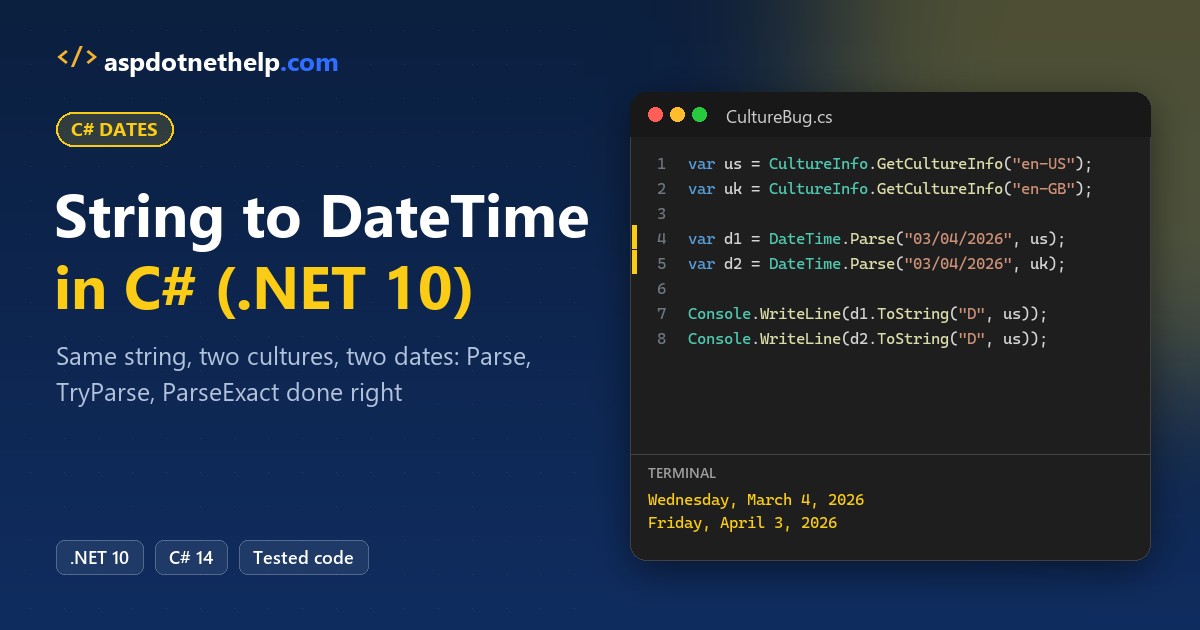
Here’s a bug we catch in code reviews every month: DateTime.Parse("03/04/2026") returns March 4 on a US server and April 3 on a UK one. Same line, two dates, no error.
Quick answer: to convert string to DateTime in C#, always pass the culture: DateTime.Parse(text, CultureInfo.GetCultureInfo("en-US")). Use TryParse for user input and ParseExact when you know the format.
We ran every example below on .NET 10 with 2026 appointment dates, FormatException cases included.
What You Need Before You Start Parsing DateTime Strings
- The .NET 10 SDK. Each program is a file-based app you run with
dotnet run File.cs. - VS Code with the C# Dev Kit (the screenshots) or Visual Studio 2026.
using System.Globalization;at the top, forCultureInfoandDateTimeStyles.
The running sample is a made-up Columbus, Ohio dental clinic’s booking data. The APIs work the same back to .NET 6; what changed in .NET 10 covers the rest.
Step 1: Convert a String to DateTime with DateTime.Parse and CultureInfo
DateTime.Parse(string) reads the text with the current culture of the machine. Here’s the clinic’s appointment string under two cultures, with nothing else changed:
using System.Globalization;

string appointment = "03/04/2026";

foreach (string name in new[] { "en-US", "en-GB" })
{
    CultureInfo.CurrentCulture = new CultureInfo(name);
    DateTime when = DateTime.Parse(appointment);   // no culture
    Console.WriteLine($"{name}: {when:dddd, MMMM d, yyyy}");
}

try { DateTime.Parse("11/24/2026"); }   // still en-GB here
catch (FormatException ex) { Console.WriteLine(ex.Message); }
Output:
en-US: Wednesday, March 4, 2026
en-GB: Friday, April 3, 2026
String '11/24/2026' was not recognized as a valid DateTime.
en-US reads 03/04/2026 as Wednesday, March 4. en-GB reads it as Friday, April 3, and then throws FormatException on 11/24/2026 because there’s no 24th month.
The fix is one argument. Pass the culture the text was written in, and the server’s setting stops mattering:
using System.Globalization;

var us = CultureInfo.GetCultureInfo("en-US");
CultureInfo.CurrentCulture = us;   // print in en-US too
string appointment = "03/04/2026";

foreach (string name in new[] { "en-US", "en-GB" })
{
    CultureInfo.CurrentCulture = new CultureInfo(name);
    DateTime when = DateTime.Parse(appointment, us);  // fixed
    Console.WriteLine($"{name}: {when.ToString("D", us)}");
}

DateTime visit = DateTime.Parse("11/24/2026 2:30 PM", us);
Console.WriteLine(visit.ToString("g", us));
Output:
en-US: Wednesday, March 4, 2026
en-GB: Wednesday, March 4, 2026
11/24/2026 2:30 PM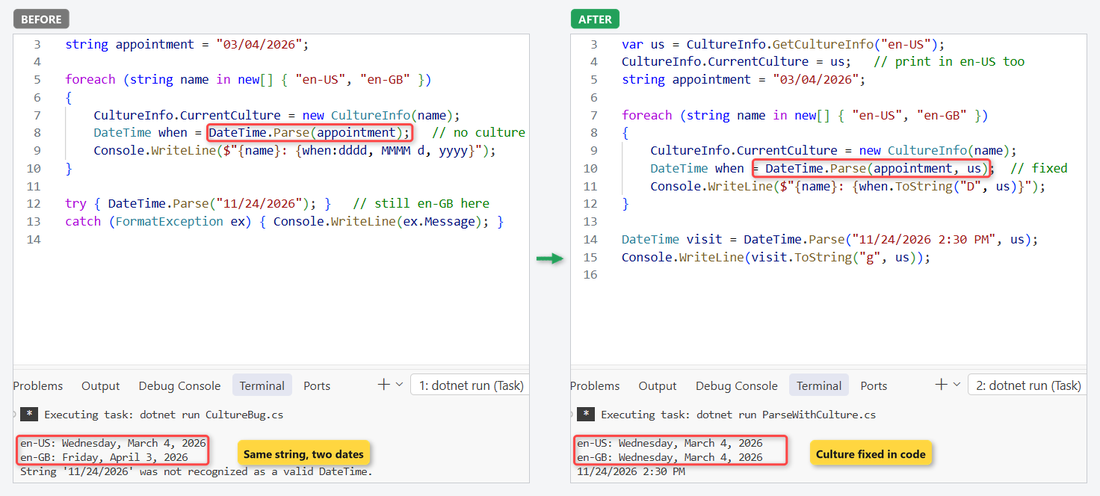
Both lines now print Wednesday, March 4, 2026, and 11/24/2026 2:30 PM parses with its time. This is the same culture trap we hit when we convert a number with commas to decimal.
Step 2: Use DateTime.TryParse for User Input
Parse throws on bad text. For anything a patient types into the booking form, DateTime.TryParse returns false instead:
using System.Globalization;

var us = CultureInfo.GetCultureInfo("en-US");
CultureInfo.CurrentCulture = us;
string?[] inputs = { "11/24/2026", "Nov 24, 2026 9:15 AM",
    "2026-11-24", "13/24/2026", "02/30/2026", "", null };

foreach (string? input in inputs)
{
    if (DateTime.TryParse(input, us, out DateTime date))
        Console.WriteLine($"{input,-22} -> {date:g}");
    else
        Console.WriteLine($"{input ?? "null",-22} -> not a date");
}
Output:
11/24/2026             -> 11/24/2026 12:00 AM
Nov 24, 2026 9:15 AM   -> 11/24/2026 9:15 AM
2026-11-24             -> 11/24/2026 12:00 AM
13/24/2026             -> not a date
02/30/2026             -> not a date
                       -> not a date
null                   -> not a date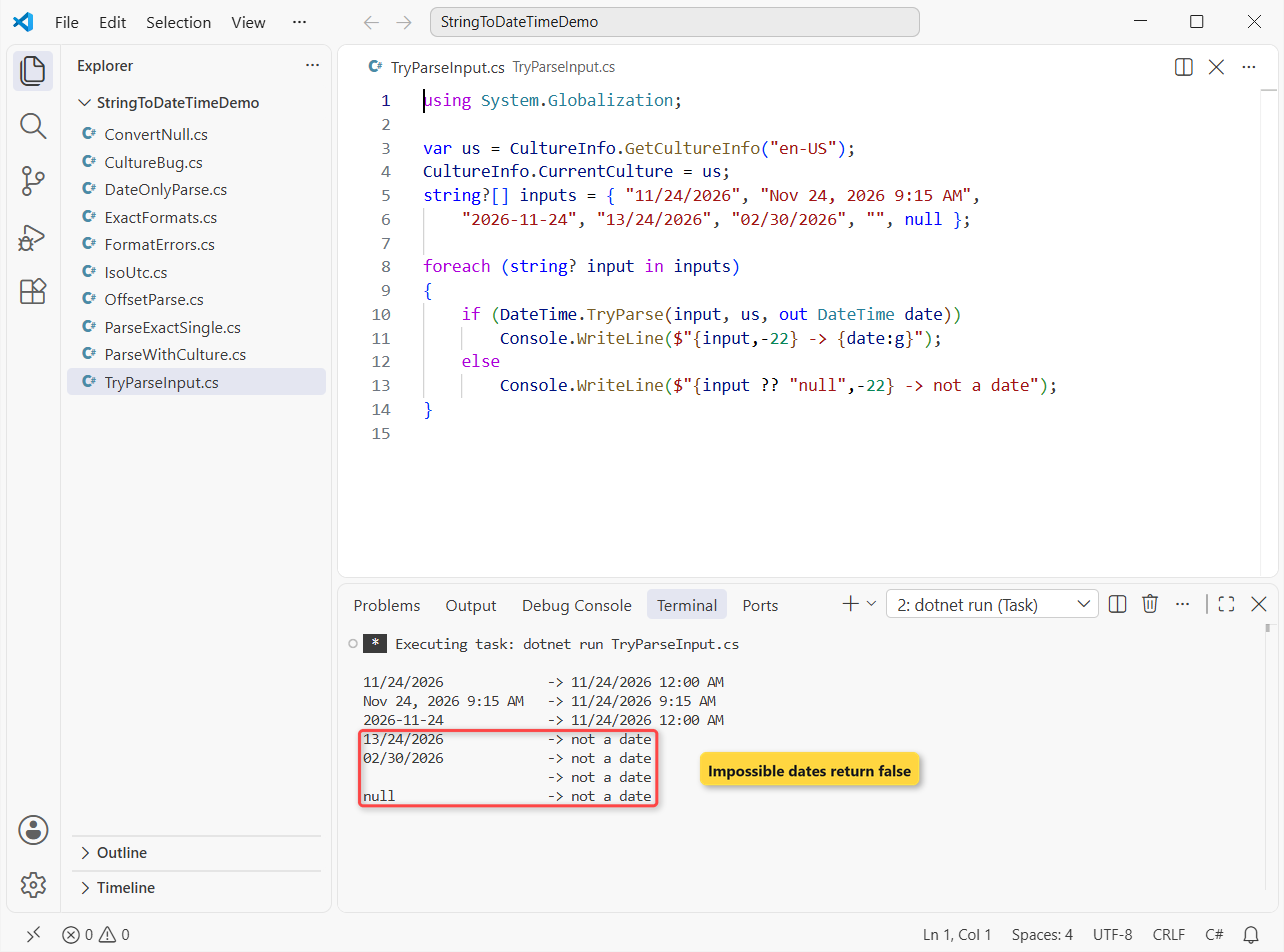
Three formats parse, including ISO 2026-11-24. Month 13, February 30, the empty string and null all print “not a date”.
That’s cheaper and cleaner than wrapping Parse in a try-catch block. If you want a friendlier message for blanks, check for null or empty first.
Step 3: Parse a Known Format with DateTime.ParseExact
When a file or API always sends one layout, use DateTime.ParseExact. The text must match the format exactly, or it throws:
using System.Globalization;

var inv = CultureInfo.InvariantCulture;
DateTime due = DateTime.ParseExact("24-11-2026", "dd-MM-yyyy", inv);
Console.WriteLine(due.ToString("yyyy-MM-dd", inv));   // 2026-11-24

DateTime shift = DateTime.ParseExact("2026-11-24 18:05",
    "yyyy-MM-dd HH:mm", inv);
Console.WriteLine(shift.ToString("h:mm tt", inv));      // 6:05 PM
Output:
2026-11-24
6:05 PM
Our insurance vendor sends 24-11-2026, and dd-MM-yyyy reads it as November 24 regardless of culture. Pass CultureInfo.InvariantCulture with ParseExact so separators and AM/PM text don’t change per machine.
The specifiers you’ll use most:
| Specifier | Means | Matches |
|---|---|---|
yyyy | 4-digit year | 2026 |
MM / M | Month, 2-digit / 1-2 digits | 07 / 7 |
dd / d | Day, 2-digit / 1-2 digits | 04 / 4 |
HH / h | 24-hour / 12-hour hour | 18 / 6 |
mm | Minutes (not months) | 05 |
tt | AM/PM designator | PM |
These are the same letters you use to format a date back to text with ToString in C#.
Step 4: Accept Multiple Formats with TryParseExact
The clinic’s old scheduler exported 12/1/2026, the new one writes 2026-12-01, and the lab sends 20261201. Pass an array of formats:
using System.Globalization;

var inv = CultureInfo.InvariantCulture;
CultureInfo.CurrentCulture = CultureInfo.GetCultureInfo("en-US");
string[] formats = { "MM/dd/yyyy", "M/d/yyyy", "yyyy-MM-dd",
    "yyyyMMdd", "M/d/yyyy h:mm tt" };
string[] rows = { "12/01/2026", "12/1/2026", "2026-12-01",
    "20261201", "12/1/2026 4:45 PM", "01-12-2026" };

foreach (string row in rows)
{
    bool ok = DateTime.TryParseExact(row, formats, inv,
        DateTimeStyles.None, out DateTime d);
    Console.WriteLine($"{row,-18} {(ok ? d.ToString("g") : "rejected")}");
}
Output:
12/01/2026         12/1/2026 12:00 AM
12/1/2026          12/1/2026 12:00 AM
2026-12-01         12/1/2026 12:00 AM
20261201           12/1/2026 12:00 AM
12/1/2026 4:45 PM  12/1/2026 4:45 PM
01-12-2026         rejected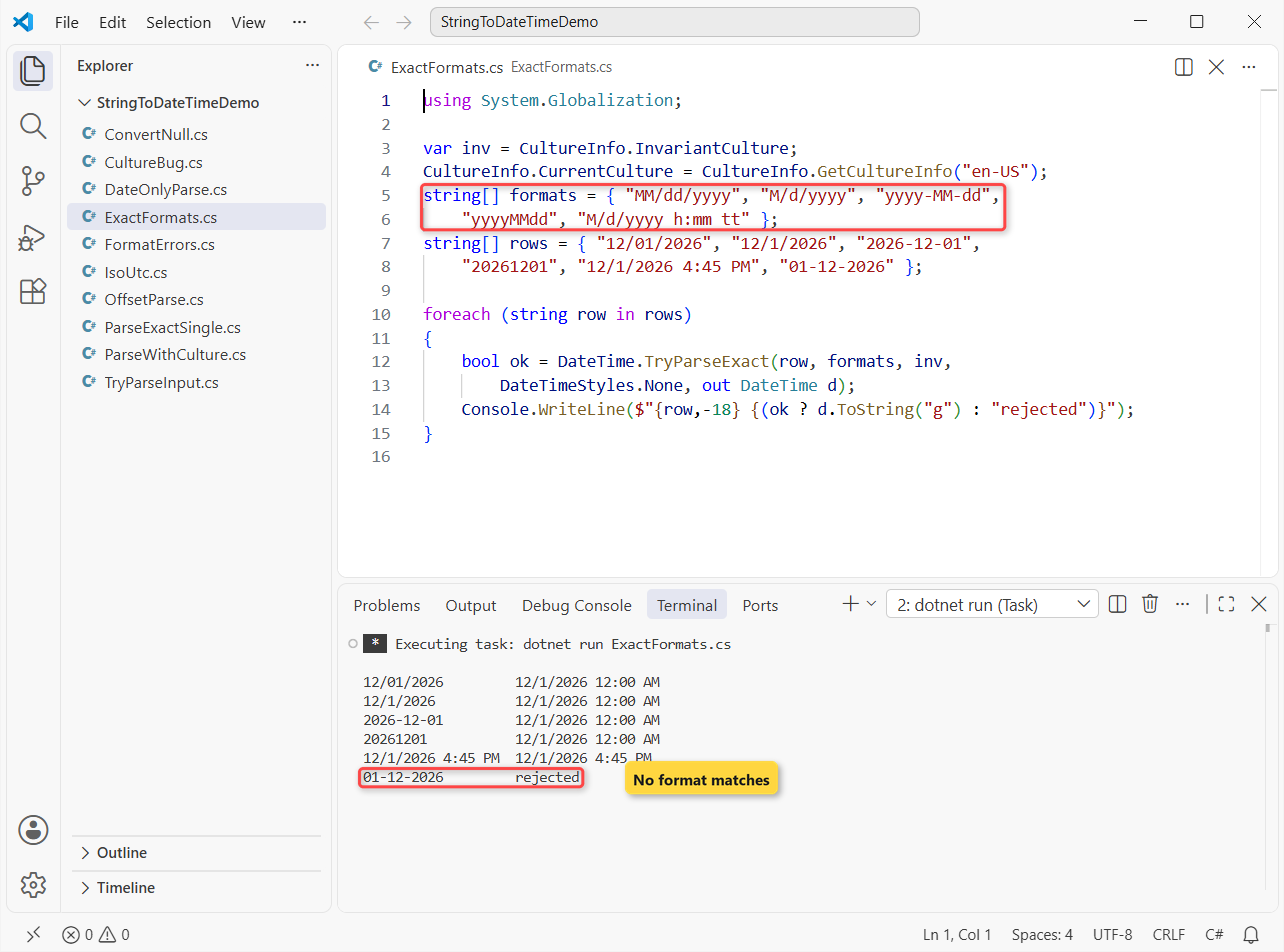
Five rows land on December 1, 2026; 01-12-2026 is rejected because no format uses dashes in that order. It’s the same TryParse pattern we use to convert a string to int without Parse.
Pro Tip: list both MM/dd/yyyy and M/d/yyyy. With ParseExact, MM requires two digits, so 12/1/2026 fails on the strict format alone.
Step 5: Parse ISO 8601 and UTC Strings with DateTimeStyles
APIs send ISO 8601 such as 2026-11-24T14:30:00Z. Parse it plainly and .NET converts the time to the server’s local zone and sets Kind = Local. DateTimeStyles controls that:
using System.Globalization;

var inv = CultureInfo.InvariantCulture;
var utcStyle = DateTimeStyles.AdjustToUniversal;

DateTime a = DateTime.Parse("2026-11-24T14:30:00Z", inv);
DateTime b = DateTime.Parse("2026-11-24T14:30:00Z", inv, utcStyle);
DateTime c = DateTime.Parse("2026-11-24 14:30", inv,
    DateTimeStyles.AssumeUniversal | utcStyle);
Console.WriteLine($"No style:      Kind = {a.Kind}");
Console.WriteLine($"Adjust:        {b:yyyy-MM-dd HH:mm} {b.Kind}");
Console.WriteLine($"Assume+Adjust: {c:yyyy-MM-dd HH:mm} {c.Kind}");

var sent = new DateTime(2026, 11, 24, 14, 30, 0, DateTimeKind.Utc);
string o = sent.ToString("o");
DateTime back = DateTime.Parse(o, inv, DateTimeStyles.RoundtripKind);
Console.WriteLine($"{o} -> {back.Kind}");
Output:
No style:      Kind = Local
Adjust:        2026-11-24 14:30 Utc
Assume+Adjust: 2026-11-24 14:30 Utc
2026-11-24T14:30:00.0000000Z -> Utc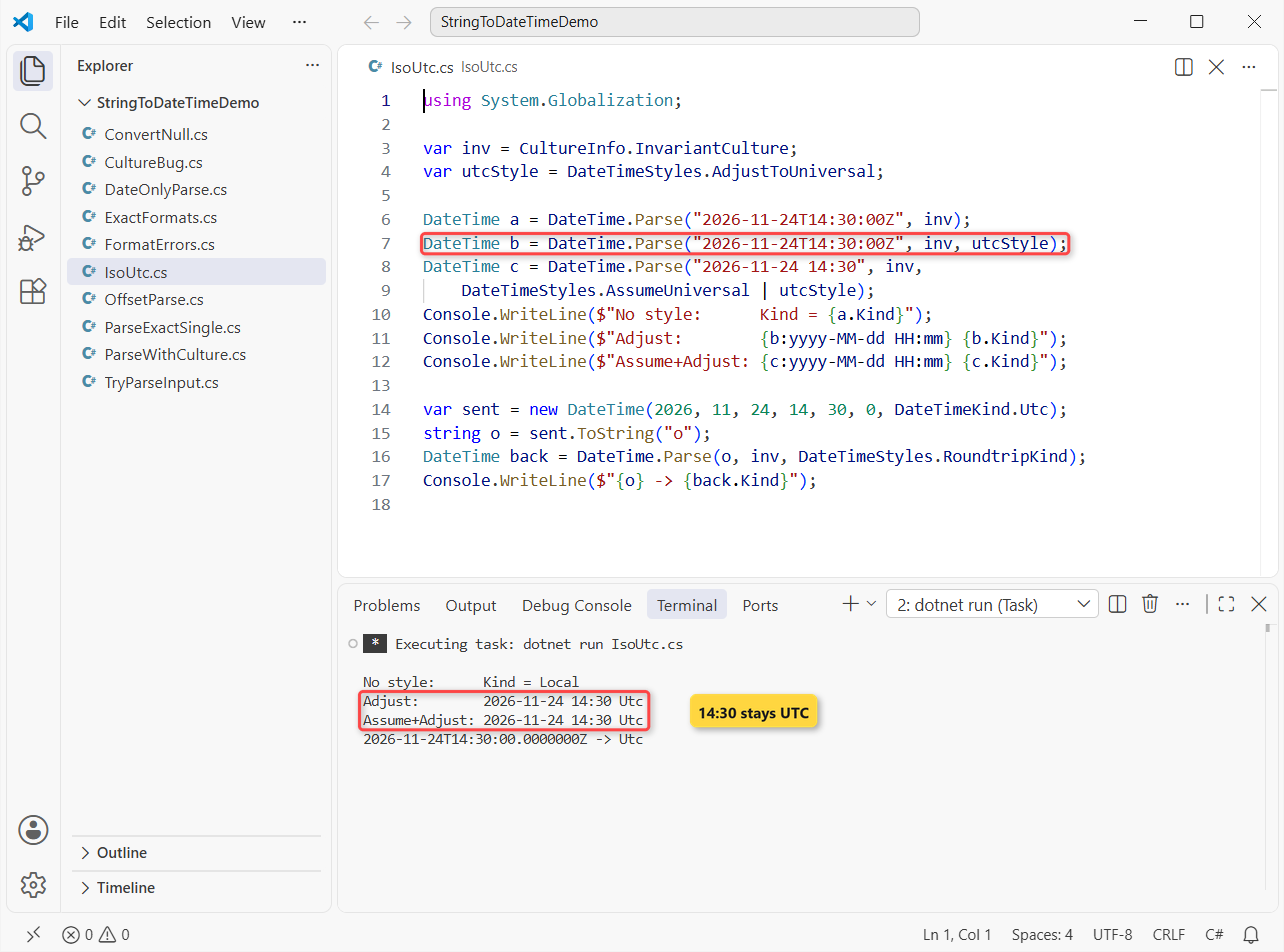
| DateTimeStyles | What it does |
|---|---|
AdjustToUniversal | Returns the result in UTC (Kind = Utc) |
AssumeUniversal | Treats text with no offset as UTC |
RoundtripKind | Keeps the Kind from an “o” or “r” string |
Store dates as text with the round-trip "o" format; it comes back with Kind = Utc.
Step 6: Use DateTimeOffset When the Time Zone Matters
A DateTime can’t hold an offset, so a booking made in Ohio loses its zone the moment you parse it. DateTimeOffset.Parse keeps it:
using System.Globalization;

var inv = CultureInfo.InvariantCulture;
var booked = DateTimeOffset.Parse("2026-11-24T09:30:00-05:00", inv);

Console.WriteLine($"Clinic time: {booked:yyyy-MM-dd HH:mm zzz}");
Console.WriteLine($"UTC:         {booked.UtcDateTime:yyyy-MM-dd HH:mm}");

var la = TimeZoneInfo.FindSystemTimeZoneById("America/Los_Angeles");
var pacific = TimeZoneInfo.ConvertTime(booked, la);
Console.WriteLine($"Los Angeles: {pacific:yyyy-MM-dd HH:mm zzz}");
Output:
Clinic time: 2026-11-24 09:30 -05:00
UTC:         2026-11-24 14:30
Los Angeles: 2026-11-24 06:30 -08:00
The appointment stays 09:30 -05:00, which is 14:30 UTC and 06:30 for a patient’s relative in Los Angeles. On Windows, .NET 6 and later accept IANA IDs like America/Los_Angeles too.
Step 7: Parse Date-Only Strings with DateOnly and TimeOnly
For a birthday or a holiday, a time of midnight is just noise. DateOnly and TimeOnly (.NET 6+) have the same Parse, TryParse and ParseExact methods:
using System.Globalization;

var us = CultureInfo.GetCultureInfo("en-US");
CultureInfo.CurrentCulture = us;
DateOnly thanksgiving = DateOnly.Parse("11/26/2026", us);
DateOnly holiday = DateOnly.ParseExact("2026-12-24", "yyyy-MM-dd", us);
TimeOnly opens = TimeOnly.Parse("7:30 AM", us);

Console.WriteLine($"{thanksgiving:dddd, MMMM d}  |  {holiday:D}  |  {opens:HH:mm}");
Console.WriteLine(DateOnly.TryParse("11/26/2026 3:00 PM", us, out _));
Output:
Thursday, November 26  |  Thursday, December 24, 2026  |  07:30
False
Thanksgiving 2026 is Thursday, November 26. Text with a time fails DateOnly.TryParse, so strip it first. For month boundaries, see the first and last day of a month in C#.
String to DateTime in C# Cheat Sheet: Which Method to Use
| Input | Method | Culture |
|---|---|---|
| User typed it | DateTime.TryParse | User’s culture |
| File/API, one fixed layout | DateTime.ParseExact | InvariantCulture |
| File, several layouts | TryParseExact(text, string[], ...) | InvariantCulture |
| ISO 8601 with Z | Parse + AdjustToUniversal | InvariantCulture |
| Has an offset (-05:00) | DateTimeOffset.Parse | InvariantCulture |
| Date only | DateOnly.Parse / ParseExact | Explicit culture |
| Legacy object value | Convert.ToDateTime | Current culture |
Numbers follow the same rules; see convert a string to double in C#.
Common Mistakes to Avoid When Parsing DateTime Strings
These four ParseExact calls cause most FormatException reports we see:
using System.Globalization;

var inv = CultureInfo.InvariantCulture;
(string text, string fmt)[] tests = {
    ("11/1/2026", "MM/dd/yyyy"),     // one-digit day
    ("2026-11-01 ", "yyyy-MM-dd"),   // trailing space
    ("2:30 PM", "HH:mm tt"),         // 24-hour HH + AM/PM
    ("2026-11-01", "yyyy-mm-dd") };  // mm = minutes!

foreach (var (text, fmt) in tests)
{
    string result;
    try { result = DateTime.ParseExact(text, fmt, inv).ToString("MMM d HH:mm", inv); }
    catch (FormatException) { result = "FormatException"; }
    Console.WriteLine($"{fmt,-11} -> {result}");
}
Output:
MM/dd/yyyy  -> FormatException
yyyy-MM-dd  -> FormatException
HH:mm tt    -> FormatException
yyyy-mm-dd  -> Jan 1 00:11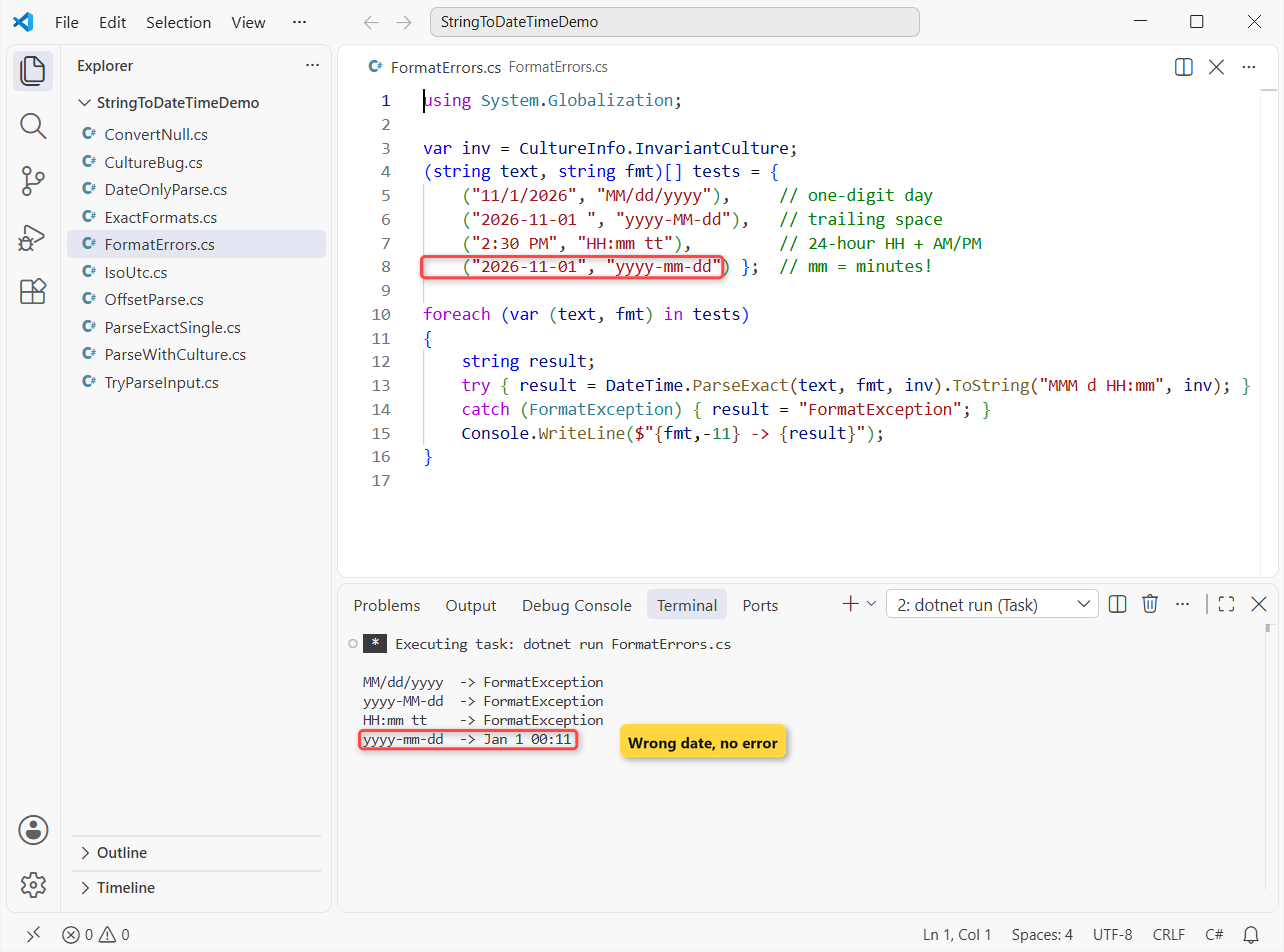
- One-digit day.
ddneeds01; used. - Stray spaces. Call
Trim()or passAllowWhiteSpaces. - HH with tt. Use
h:mm ttfor AM/PM. - mm instead of MM. You get January 1 at 00:11 and no error.
An impossible date such as February 30 also throws. When the input is February 29, check whether the year is a leap year before you blame the parser.
What Does Convert.ToDateTime Return for Null?
Convert.ToDateTime(string) parses with the current culture, with one twist: a null string returns DateTime.MinValue instead of throwing.
using System.Globalization;

CultureInfo.CurrentCulture = CultureInfo.GetCultureInfo("en-US");
string? missing = null;

DateTime fromNull = Convert.ToDateTime(missing);
Console.WriteLine(fromNull == DateTime.MinValue);    // True
Console.WriteLine(fromNull.ToString("MM/dd/yyyy")); // 01/01/0001

try { Convert.ToDateTime(""); }
catch (FormatException) { Console.WriteLine("Empty string: FormatException"); }
Output:
True
01/01/0001
Empty string: FormatException
That 01/01/0001 can slip into a database unnoticed, while an empty string still throws. We’d rather check for null values explicitly and use TryParse.
Next Steps
Once your dates parse reliably, the next job is usually date math: due dates and billing periods. Keep the culture explicit in every call.
Three more conversions, plus one reference page, pair well with this one:
- Handling null when converting to int
- Implicit and explicit type casting in C#
- Where DateTime fits among C# data types
- Parsing numbers that keep leading zeros
Frequently Asked Questions
How do I convert a string to DateTime in C#?
Call DateTime.Parse(text, CultureInfo.GetCultureInfo("en-US")) for trusted text, DateTime.TryParse for user input, and DateTime.ParseExact when you know the exact format.
How do I convert a dd/MM/yyyy string to DateTime?
Use DateTime.ParseExact("24/11/2026", "dd/MM/yyyy", CultureInfo.InvariantCulture), or parse with the en-GB culture, which reads the day first.
Why does DateTime.Parse throw “String was not recognized as a valid DateTime”?
The text doesn’t fit the culture or format being used, for example 11/24/2026 under en-GB, or a ParseExact format that expects two-digit days. Pass the right culture or format, or use TryParse.
How do I convert a string to DateTime without the time?
Parse it into DateOnly (.NET 6+) with DateOnly.Parse or DateOnly.ParseExact. With DateTime, a date-only string gets a midnight time; use .Date to drop any time.
Where does Microsoft document date parsing in .NET?
See Parse date and time strings in .NET on Microsoft Learn, which covers DateTime, DateOnly and TimeOnly parsing.

Bijay Kumar is a renowned software engineer, accomplished author, and distinguished Microsoft Most Valuable Professional (MVP) specializing in SharePoint. With a rich professional background spanning over 15 years, Bijay has established himself as an authority in the field of information technology. He possesses unparalleled expertise in multiple programming languages and technologies such as ASP.NET, ASP.NET MVC, C#.NET, and SharePoint, which has enabled him to develop innovative and cutting-edge solutions for clients across the globe. Read more…