
Say you roast coffee in Portland and sell wholesale to four cafes in Oregon, Colorado, Texas and Louisiana. You want their orders in SQL Server, and you’d rather not hand-write a single INSERT or JOIN.
That’s what this EF Core tutorial builds: C# classes plus a DbContext describe the data, a migration creates the tables, and LINQ does every read and write.
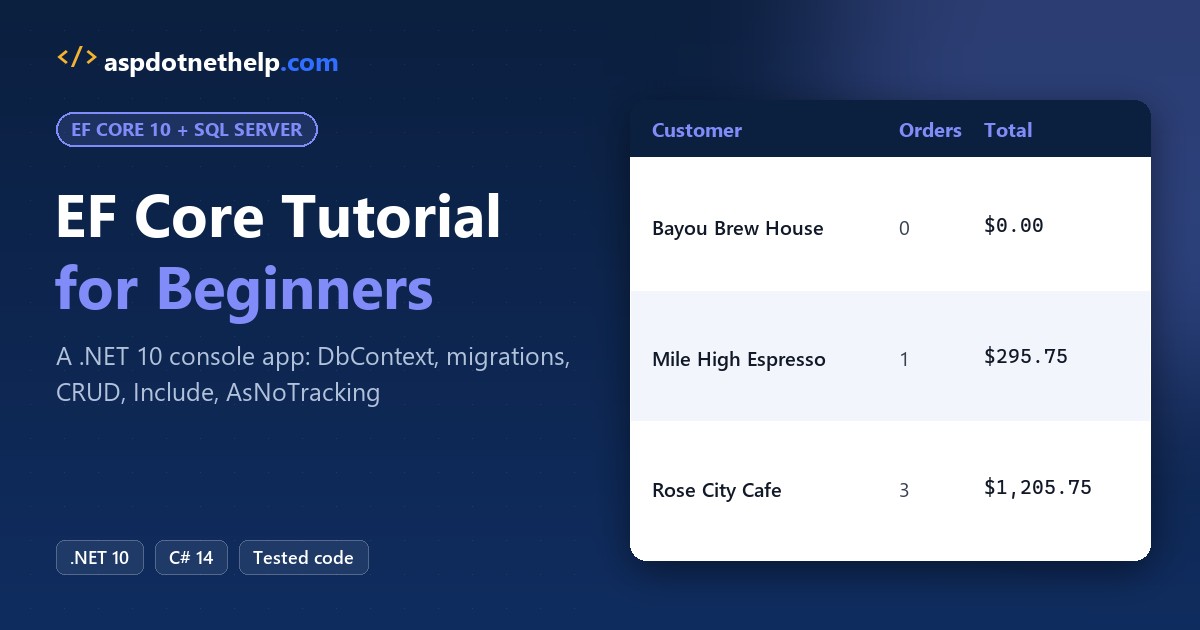
Here’s what we’re building, a .NET 10 console app that prints each cafe’s orders straight from SQL Server:
Before You Start the EF Core Tutorial
You need the .NET 10 SDK (I used 10.0.402), a SQL Server you can reach with Windows authentication, and VS Code. I ran everything on a local SQL Server 2025; Express or LocalDB work with a different Server value.
Not sure which SDK you have? Check your .NET version first.
Our two tables form a one-to-many relationship: one customer, many orders. These are the sample rows the app inserts, all 2026 orders:
| Customer | City | Orders |
|---|---|---|
| Rose City Cafe | Portland, OR | $412.50 (Oct 5), $388.00 (Oct 19), $405.25 (Nov 2) |
| Mile High Espresso | Denver, CO | $295.75 (Oct 12) |
| Lone Star Beans | Austin, TX | $520.00 (Oct 26) |
| Bayou Brew House | New Orleans, LA | none yet |
Step 1: Create the Console App and Add the EF Core Packages
Create the project, then add the SQL Server provider and the design-time package. I pinned the versions; 10.0.14 is the current stable EF Core release as I write this:
dotnet new console -n EfCoreTutorial -o EfCoreTutorial
cd EfCoreTutorial
dotnet add package Microsoft.EntityFrameworkCore.SqlServer --version 10.0.14
dotnet add package Microsoft.EntityFrameworkCore.Design --version 10.0.14
My first dotnet build warned NU1903: the SQL Server provider pulls in System.Security.Cryptography.Pkcs 9.0.11, which has a known advisory. A direct reference to the patched version clears it:
dotnet add package System.Security.Cryptography.Pkcs --version 10.0.14Next, install dotnet-ef as a local tool, so the version is pinned in the folder instead of on your machine:
dotnet new tool-manifest
dotnet tool install dotnet-ef --version 10.0.14
Here are the project file and the tool manifest those commands produced:
<Project Sdk="Microsoft.NET.Sdk">

  <PropertyGroup>
    <OutputType>Exe</OutputType>
    <TargetFramework>net10.0</TargetFramework>
    <ImplicitUsings>enable</ImplicitUsings>
    <Nullable>enable</Nullable>
  </PropertyGroup>

  <ItemGroup>
    <PackageReference Include="Microsoft.EntityFrameworkCore.Design" Version="10.0.14">
      <IncludeAssets>runtime; build; native; contentfiles; analyzers; buildtransitive</IncludeAssets>
      <PrivateAssets>all</PrivateAssets>
    </PackageReference>
    <PackageReference Include="Microsoft.EntityFrameworkCore.SqlServer" Version="10.0.14" />
    <PackageReference Include="System.Security.Cryptography.Pkcs" Version="10.0.14" />
  </ItemGroup>

</Project>
{
"version": 1,
"isRoot": true,
"tools": {
"dotnet-ef": {
"version": "10.0.14",
"commands": [
"dotnet-ef"
],
"rollForward": false
}
}
}EF Core 10 targets .NET 10 only, so an older project needs the .NET 8 to .NET 10 upgrade before these packages install.
Checkpoint: dotnet build ends with 0 Warning(s), and dotnet ef --version prints 10.0.14.
Step 2: Create the Entities and the EF Core DbContext
Entities are plain classes. Id becomes the primary key by convention, and CustomerId plus the two navigations tell EF Core that one customer has many orders. Add Models.cs:
namespace EfCoreTutorial;

public class Customer
{
    public int Id { get; set; }
    public required string Name { get; set; }
    public required string City { get; set; }
    public required string State { get; set; }
    public List<Order> Orders { get; } = [];
}

public class Order
{
    public int Id { get; set; }
    public DateOnly OrderDate { get; set; }
    public decimal Total { get; set; }
    public int CustomerId { get; set; }
    public Customer Customer { get; set; } = null!;
}
I used decimal for money, never double (my notes on C# data types explain why), and required so the compiler flags a customer without a name. The null! on Order.Customer is the usual pattern with nullable reference types in C#: EF Core fills it in.
The DbContext is your session with the database. It exposes one DbSet per table and, in a console app, gets its connection string from OnConfiguring. Add CoffeeDb.cs:
using Microsoft.EntityFrameworkCore;

namespace EfCoreTutorial;

public class CoffeeDb : DbContext
{
    public DbSet<Customer> Customers => Set<Customer>();
    public DbSet<Order> Orders => Set<Order>();

    protected override void OnConfiguring(DbContextOptionsBuilder options) =>
        options.UseSqlServer("Server=.;Database=CoffeeRoasterDemo;Trusted_Connection=True;TrustServerCertificate=True");

    protected override void OnModelCreating(ModelBuilder modelBuilder)
    {
        modelBuilder.Entity<Customer>(c =>
        {
            c.Property(x => x.Name).HasMaxLength(100);
            c.Property(x => x.City).HasMaxLength(60);
            c.Property(x => x.State).HasMaxLength(2).IsFixedLength();
        });
        modelBuilder.Entity<Order>().Property(o => o.Total).HasPrecision(10, 2);
    }
}
Important: a hard-coded connection string is fine for a local demo, not for production. Move it to configuration or user secrets once you go past a console app.
Step 3: Run EF Core Migrations to Create the SQL Server Database
A migration compares your model with the last snapshot and writes C# that changes the schema. Run both commands in the project folder:
dotnet ef migrations add InitialCreate
dotnet ef database update
The first command created Migrations/20261103161646_InitialCreate.cs, a designer file and a model snapshot. Here’s the Orders part of the migration; note the cascade delete on the foreign key, because CustomerId is required:
migrationBuilder.CreateTable(
    name: "Orders",
    columns: table => new
    {
        Id = table.Column<int>(type: "int", nullable: false)
            .Annotation("SqlServer:Identity", "1, 1"),
        OrderDate = table.Column<DateOnly>(type: "date", nullable: false),
        Total = table.Column<decimal>(type: "decimal(10,2)", precision: 10, scale: 2, nullable: false),
        CustomerId = table.Column<int>(type: "int", nullable: false)
    },
    constraints: table =>
    {
        table.PrimaryKey("PK_Orders", x => x.Id);
        table.ForeignKey(
            name: "FK_Orders_Customers_CustomerId",
            column: x => x.CustomerId,
            principalTable: "Customers",
            principalColumn: "Id",
            onDelete: ReferentialAction.Cascade);
    });
database update created CoffeeRoasterDemo, because it didn’t exist yet, and applied the migration. These are the key lines from my run:
Build succeeded.
Acquiring an exclusive lock for migration application. See https://aka.ms/efcore-docs-migrations-lock for more information if this takes too long.
Applying migration '20261103161646_InitialCreate'.
Done.
The lock line is new in EF Core 10, which shipped with the .NET 10 LTS release: two deployments can’t migrate the same database at once. To confirm what’s applied, list the migrations:
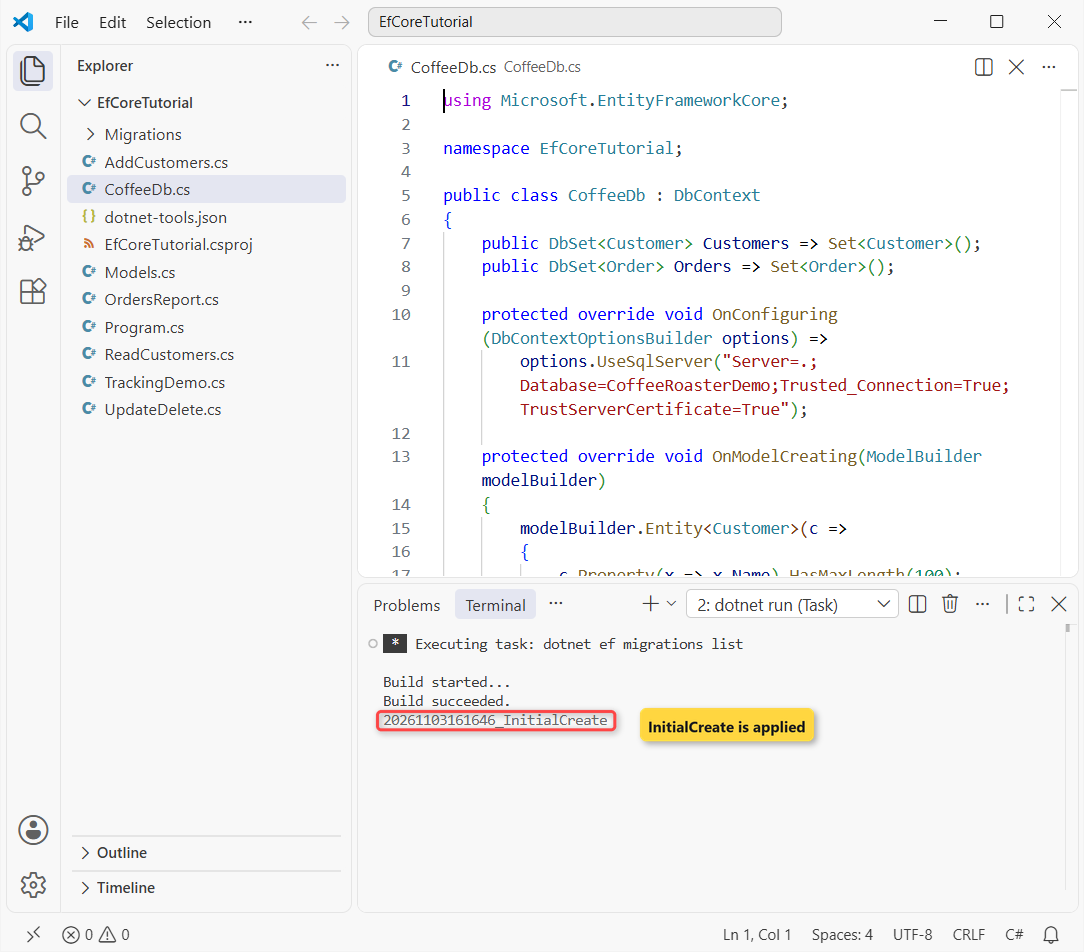
Build succeeded.
20261103161646_InitialCreate
Checkpoint: the list shows 20261103161646_InitialCreate with no (Pending) after it, and SQL Server has a CoffeeRoasterDemo database with Customers and Orders tables.
Step 4: Insert Rows with Add and SaveChangesAsync
Now the C# side. Program.cs creates one CoffeeDb and runs the step you name on the command line with a switch statement, so each step can live in its own small file:
using System.Globalization;
using EfCoreTutorial;

CultureInfo.CurrentCulture = new CultureInfo("en-US");
using var db = new CoffeeDb();

switch (args.FirstOrDefault())
{
    case "add": await AddCustomers.RunAsync(db); break;
    case "read": await ReadCustomers.RunAsync(db); break;
    case "update": await UpdateDelete.RunAsync(db); break;
    case "report": await OrdersReport.RunAsync(db); break;
    case "tracking": await TrackingDemo.RunAsync(db); break;
    default: Console.WriteLine("Pass add, read, update, report or tracking."); break;
}
Comment out the cases whose files you haven’t added yet, or the project won’t build. Then add the insert step:
namespace EfCoreTutorial;

public static class AddCustomers
{
    public static async Task RunAsync(CoffeeDb db)
    {
        var roseCity = new Customer { Name = "Rose City Cafe", City = "Portland", State = "OR" };
        roseCity.Orders.Add(new Order { OrderDate = new(2026, 10, 5), Total = 412.50m });
        roseCity.Orders.Add(new Order { OrderDate = new(2026, 10, 19), Total = 388.00m });
        roseCity.Orders.Add(new Order { OrderDate = new(2026, 11, 2), Total = 405.25m });

        var mileHigh = new Customer { Name = "Mile High Espresso", City = "Denver", State = "CO" };
        mileHigh.Orders.Add(new Order { OrderDate = new(2026, 10, 12), Total = 295.75m });

        var loneStar = new Customer { Name = "Lone Star Beans", City = "Austin", State = "TX" };
        loneStar.Orders.Add(new Order { OrderDate = new(2026, 10, 26), Total = 520.00m });

        var bayou = new Customer { Name = "Bayou Brew House", City = "New Orleans", State = "LA" };

        db.Customers.AddRange(roseCity, mileHigh, loneStar, bayou);
        int rows = await db.SaveChangesAsync();
        Console.WriteLine($"Saved {rows} rows. Rose City Cafe got Id {roseCity.Id}.");
    }
}
AddRange only marks the objects as Added. Nothing touches SQL Server until SaveChangesAsync, which inserts the customers first, then the orders with the right CustomerId. Run dotnet run -- add:
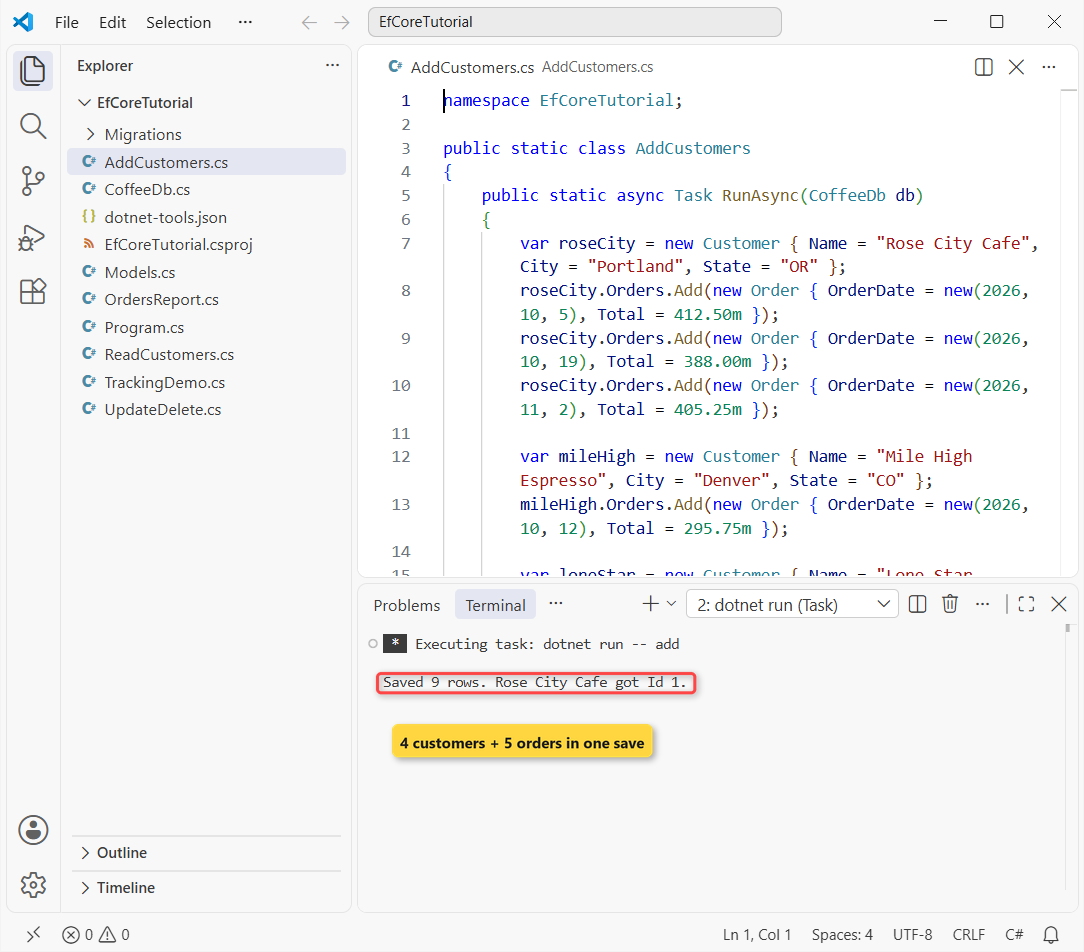
Saved 9 rows. Rose City Cafe got Id 1.Checkpoint: 9 rows saved (4 customers + 5 orders), and the new key is back on the object: roseCity.Id is 1.
Step 5: Read Data with LINQ, FindAsync and SumAsync
Reads are LINQ queries on a DbSet, awaited like any I/O call. EF Core translates them to SQL, so the filtering and the math run in SQL Server, not in your app:
using Microsoft.EntityFrameworkCore;

namespace EfCoreTutorial;

public static class ReadCustomers
{
    public static async Task RunAsync(CoffeeDb db)
    {
        var all = await db.Customers.OrderBy(c => c.Name).ToListAsync();
        foreach (var c in all)
            Console.WriteLine($"{c.Id}  {c.Name,-20} {c.City}, {c.State}");

        var one = await db.Customers.FindAsync(2);
        Console.WriteLine($"FindAsync(2): {one?.Name}");

        var bigOrders = await db.Orders.Where(o => o.Total > 400m).CountAsync();
        var revenue = await db.Orders.SumAsync(o => o.Total);
        Console.WriteLine($"Orders over $400: {bigOrders}, all orders: {revenue:C}");
    }
}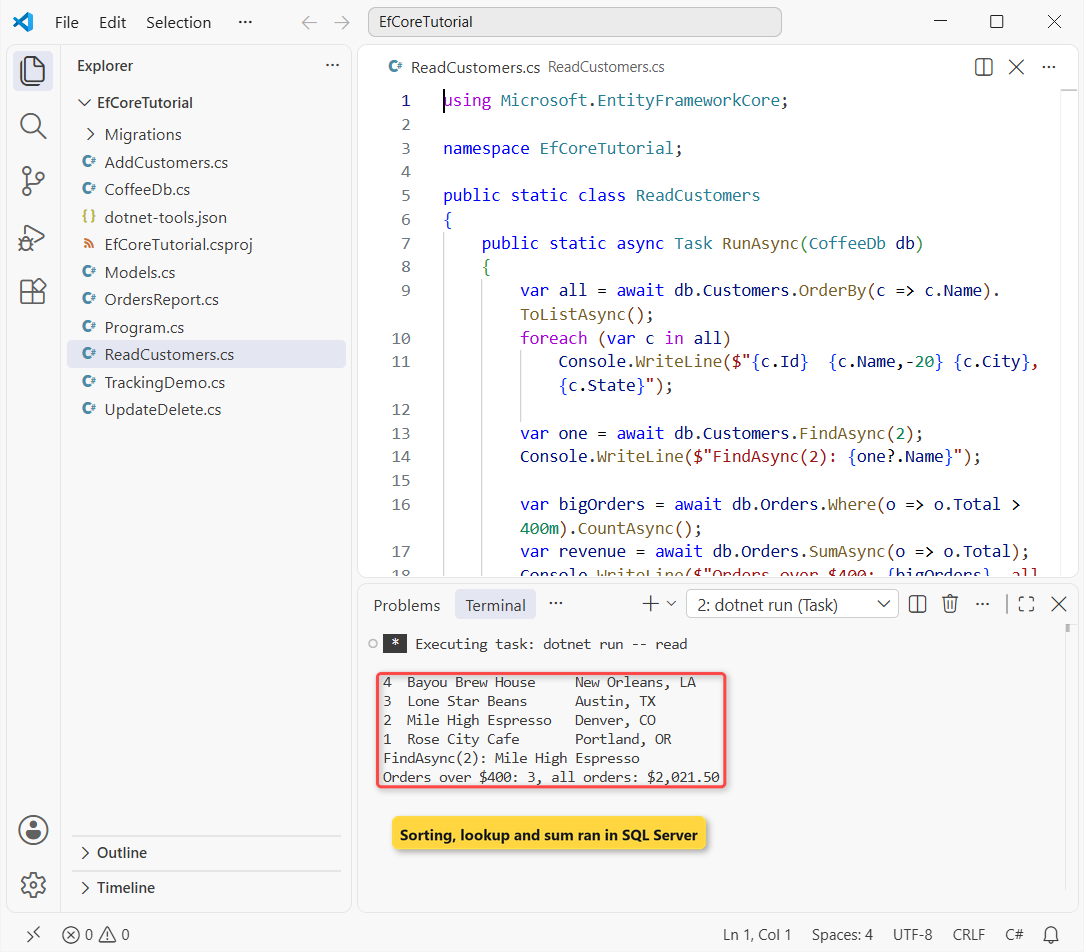
4  Bayou Brew House     New Orleans, LA
3  Lone Star Beans      Austin, TX
2  Mile High Espresso   Denver, CO
1  Rose City Cafe       Portland, OR
FindAsync(2): Mile High Espresso
Orders over $400: 3, all orders: $2,021.50
FindAsync looks up a primary key and checks the change tracker before it queries. CountAsync and SumAsync send one aggregate query each and bring back just the number, here $2,021.50 across all five orders.
Checkpoint: four customers sorted by name, Mile High Espresso for Id 2, and 3 orders over $400.
Step 6: Update and Delete Entities in EF Core
To update, load the entity, change a property and save. The change tracker notices the edit and sends an UPDATE for that one column. To delete, pass the entity to Remove:
using Microsoft.EntityFrameworkCore;

namespace EfCoreTutorial;

public static class UpdateDelete
{
    public static async Task RunAsync(CoffeeDb db)
    {
        var mileHigh = await db.Customers.SingleAsync(c => c.Name == "Mile High Espresso");
        mileHigh.City = "Boulder";
        Console.WriteLine($"State before save: {db.Entry(mileHigh).State}");
        await db.SaveChangesAsync();
        Console.WriteLine($"Updated: {mileHigh.Name} is now in {mileHigh.City}");

        Console.WriteLine($"Orders before delete: {await db.Orders.CountAsync()}");
        var loneStar = await db.Customers.SingleAsync(c => c.Name == "Lone Star Beans");
        db.Customers.Remove(loneStar);
        await db.SaveChangesAsync();
        Console.WriteLine($"Deleted {loneStar.Name}, orders after: {await db.Orders.CountAsync()}");
    }
}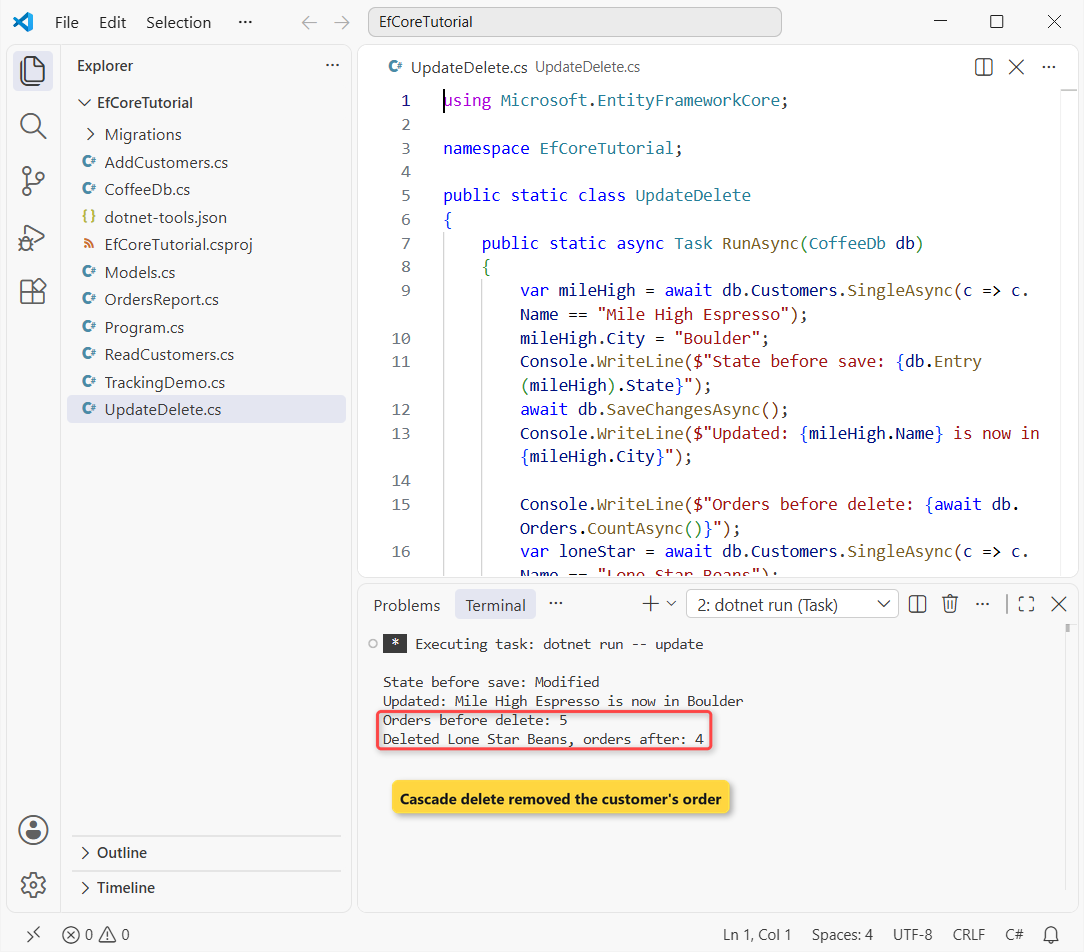
State before save: Modified
Updated: Mile High Espresso is now in Boulder
Orders before delete: 5
Deleted Lone Star Beans, orders after: 4
Mile High Espresso moved to Boulder, and its state was Modified before the save. Deleting Lone Star Beans also removed its $520.00 order, because the migration created the foreign key with cascade delete.
If a save breaks a constraint, SaveChangesAsync throws DbUpdateException, so wrap real writes in a try-catch block.
Note: for bulk changes, ExecuteUpdateAsync and ExecuteDeleteAsync run one SQL statement without loading anything, but they skip the change tracker.
Checkpoint: Boulder for Mile High Espresso, and orders after: 4.
Step 7: Load a One-to-Many Relationship with Include
Here’s the catch most beginners hit: loading a customer doesn’t load its orders. EF Core doesn’t lazy-load by default, so Orders stays empty until you ask for it with Include:
using Microsoft.EntityFrameworkCore;

namespace EfCoreTutorial;

public static class OrdersReport
{
    public static async Task RunAsync(CoffeeDb db)
    {
        var plain = await db.Customers.FirstAsync(c => c.Name == "Rose City Cafe");
        Console.WriteLine($"Without Include: {plain.Orders.Count} orders loaded");
        db.ChangeTracker.Clear();

        var customers = await db.Customers
            .Include(c => c.Orders)
            .OrderBy(c => c.Name)
            .ToListAsync();

        foreach (var c in customers)
        {
            Console.WriteLine($"{c.Name} ({c.City}, {c.State}) - orders: {c.Orders.Count}, total: {c.Orders.Sum(o => o.Total):C}");
            foreach (var o in c.Orders.OrderBy(o => o.OrderDate))
                Console.WriteLine($"    {o.OrderDate:yyyy-MM-dd}  {o.Total,9:C}");
        }
    }
}
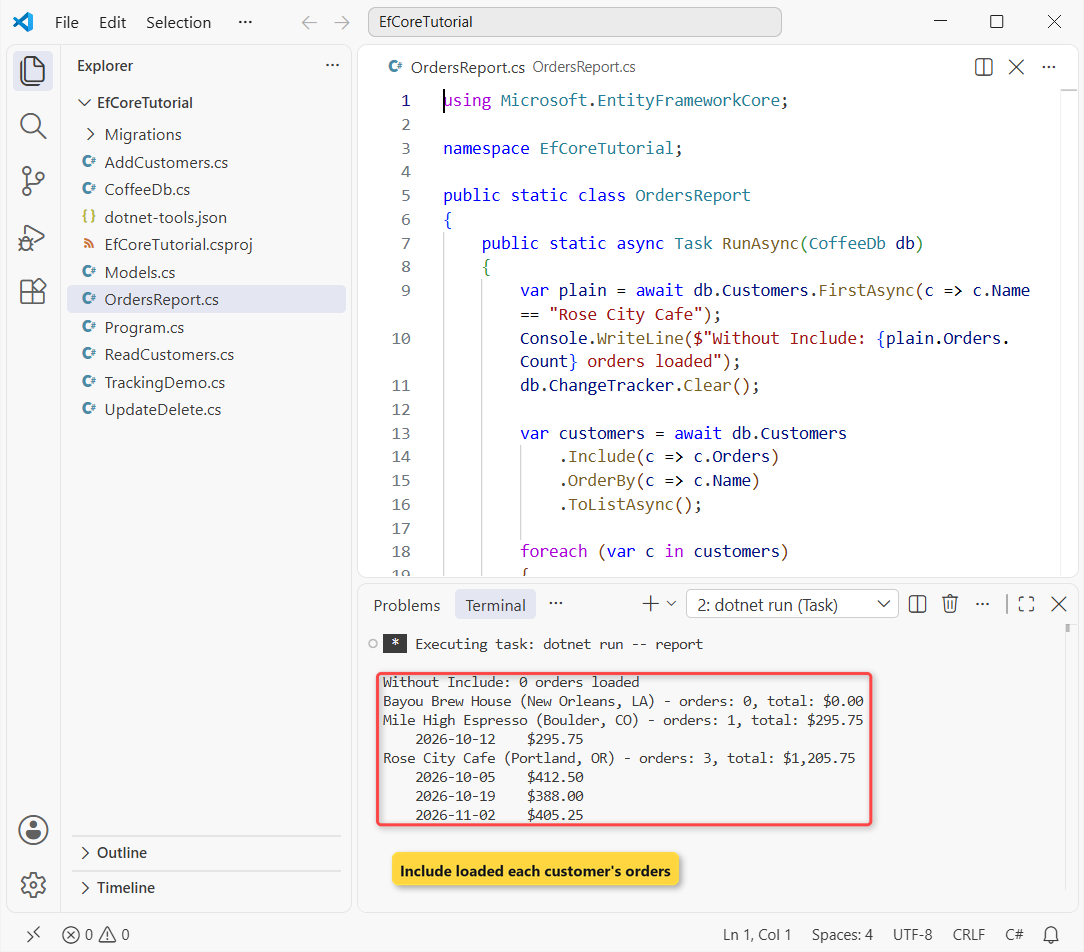
Without Include: 0 orders loaded
Bayou Brew House (New Orleans, LA) - orders: 0, total: $0.00
Mile High Espresso (Boulder, CO) - orders: 1, total: $295.75
2026-10-12 $295.75
Rose City Cafe (Portland, OR) - orders: 3, total: $1,205.75
2026-10-05 $412.50
2026-10-19 $388.00
2026-11-02 $405.25The first line proves it: 0 orders loaded for Rose City Cafe, which has three. ChangeTracker.Clear() then forgets that customer before the Include query.
With Include, EF Core joins Orders in the same query and fills each List<T>. That’s the report from the top of this post. Bayou Brew House still shows up with zero orders, because Include is a LEFT JOIN.
Checkpoint: Rose City Cafe shows 3 orders and $1,205.75, and Lone Star Beans is gone.
Step 8: Use AsNoTracking and See the SQL with ToQueryString
By default, every entity a query returns is tracked, so EF Core can save changes to it later. For read-only screens that’s wasted work, and AsNoTracking() turns it off. ToQueryString() shows the SQL EF Core will send:
using Microsoft.EntityFrameworkCore;

namespace EfCoreTutorial;

public static class TrackingDemo
{
    public static async Task RunAsync(CoffeeDb db)
    {
        decimal minTotal = 400m;
        var query = db.Orders
            .AsNoTracking()
            .Where(o => o.Total > minTotal)
            .OrderBy(o => o.OrderDate);

        Console.WriteLine(query.ToQueryString());
        var orders = await query.ToListAsync();
        Console.WriteLine($"AsNoTracking: {orders.Count} rows, {db.ChangeTracker.Entries().Count()} tracked");

        var tracked = await db.Orders.Where(o => o.Total > minTotal).ToListAsync();
        Console.WriteLine($"Default query: {tracked.Count} rows, {db.ChangeTracker.Entries().Count()} tracked");
    }
}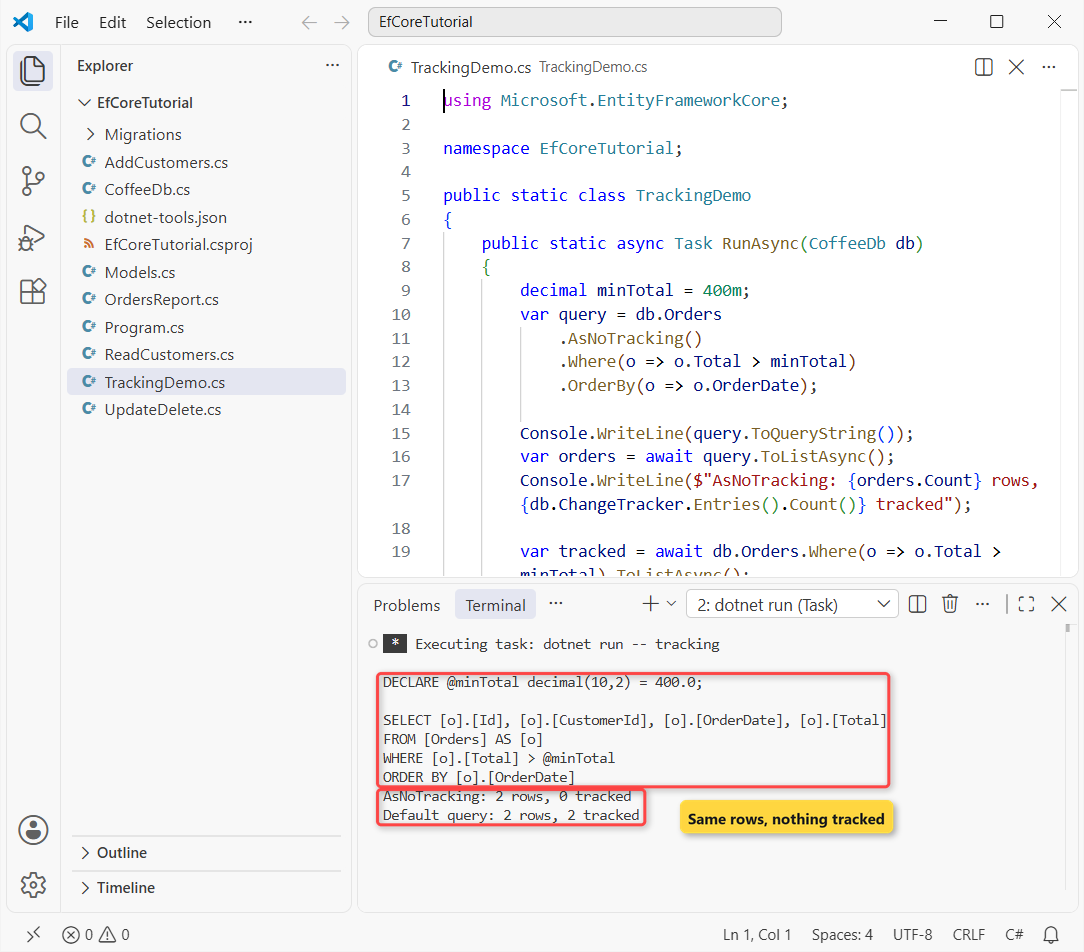
DECLARE @minTotal decimal(10,2) = 400.0;

SELECT [o].[Id], [o].[CustomerId], [o].[OrderDate], [o].[Total]
FROM [Orders] AS [o]
WHERE [o].[Total] > @minTotal
ORDER BY [o].[OrderDate]
AsNoTracking: 2 rows, 0 tracked
Default query: 2 rows, 2 tracked
The local variable became a SQL parameter, @minTotal, so SQL Server can reuse the plan. Both queries returned the same 2 rows, but only the default one left 2 entities in the change tracker.
Projecting with Select into a record skips tracking too, since the result isn’t an entity.
Pro Tip: ToQueryString() is for debugging. To log every command your app runs, add LogTo(Console.WriteLine, LogLevel.Information) in OnConfiguring.
Test the EF Core App Against SQL Server
For the test, I dropped the database, ran the migration and the five steps again in order, then checked the tables with sqlcmd, outside EF Core:
sqlcmd -S . -E -d CoffeeRoasterDemo -W -Q "SET NOCOUNT ON; SELECT c.Name, c.City, c.State, o.OrderDate, o.Total FROM Customers c LEFT JOIN Orders o ON o.CustomerId = c.Id ORDER BY c.Name, o.OrderDate"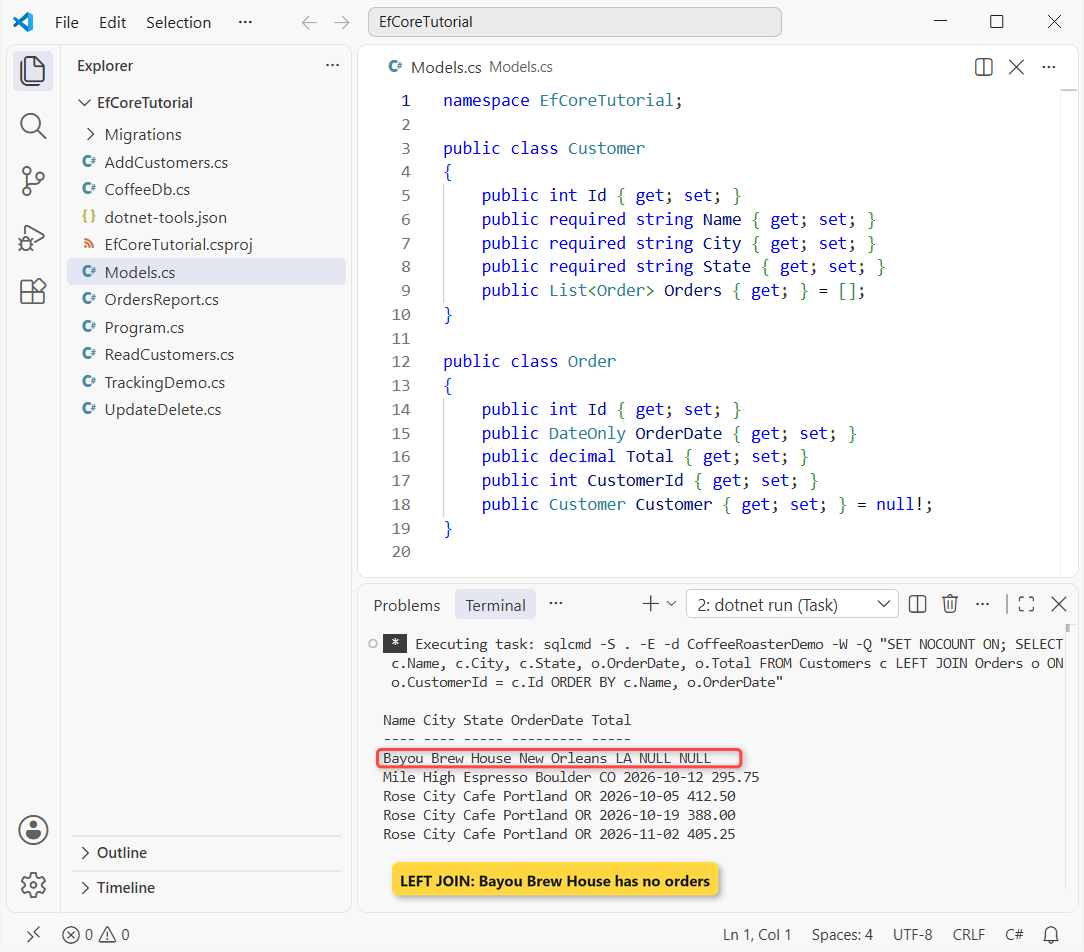
Name City State OrderDate Total
---- ---- ----- --------- -----
Bayou Brew House New Orleans LA NULL NULL
Mile High Espresso Boulder CO 2026-10-12 295.75
Rose City Cafe Portland OR 2026-10-05 412.50
Rose City Cafe Portland OR 2026-10-19 388.00
Rose City Cafe Portland OR 2026-11-02 405.25
SQL Server agrees with the console app: Boulder saved, Lone Star Beans and its order gone, and NULL order columns for Bayou Brew House. When you’re done, remove the demo database with dotnet ef database drop --force.
How Do You Remove an EF Core Migration?
If you add a migration by mistake and haven’t applied it yet, dotnet ef migrations remove deletes it and rolls the snapshot back. I added an empty one to try it:
dotnet ef migrations add AddLoyaltyTier
dotnet ef migrations remove
Removing migration '20261103161744_AddLoyaltyTier'.
Reverting the model snapshot.
Done.Already applied it? Run dotnet ef database update InitialCreate first to roll the database back to that migration, then remove it.
Troubleshooting EF Core Migrations and SQL Server Errors
Could not execute because the specified command or file was not found. The local dotnet-ef tool isn’t restored. Run dotnet tool restore in the folder with dotnet-tools.json.
Your startup project doesn’t reference Microsoft.EntityFrameworkCore.Design. Add the Design package with the same version as the provider.
The certificate chain was issued by an authority that is not trusted. Microsoft.Data.SqlClient encrypts by default, so a local self-signed certificate needs TrustServerCertificate=True.
Where to Take It Next with EF Core
The natural next step is a web front end: my CRUD Web API with EF Core registers the same kind of DbContext with dependency injection and serves it over HTTP. AddDbContext makes it a scoped service, one of the DI lifetimes in ASP.NET Core.
You could also group the orders by month with LINQ GroupBy, or add an Email column to Customer and run dotnet ef migrations add AddCustomerEmail to watch a second migration appear.
For more .NET walk-throughs, these are good places to go next:
- All ASP.NET Core tutorials on the site
- Every .NET version and what changed
- Create a console app in VS Code
- Learn C# step by step
Frequently Asked Questions
How do I add a migration in EF Core?
Run dotnet ef migrations add <Name> in the project folder, review the generated file, then run dotnet ef database update to apply it.
How do I see the SQL that EF Core generates?
Call ToQueryString() on a query for a one-off look, or add LogTo(Console.WriteLine, LogLevel.Information) in OnConfiguring to log every command.
When should I use AsNoTracking in EF Core?
Use it for read-only queries such as reports and lists, where you won’t save the entities back. See tracking vs. no-tracking queries on Microsoft Learn.
Does EF Core load related data automatically?
No. Navigations stay empty unless you use Include, an explicit load, or lazy loading with proxies. Include is the simplest choice for a one-to-many report.

Bijay Kumar is a renowned software engineer, accomplished author, and distinguished Microsoft Most Valuable Professional (MVP) specializing in SharePoint. With a rich professional background spanning over 15 years, Bijay has established himself as an authority in the field of information technology. He possesses unparalleled expertise in multiple programming languages and technologies such as ASP.NET, ASP.NET MVC, C#.NET, and SharePoint, which has enabled him to develop innovative and cutting-edge solutions for clients across the globe. Read more…