
If your minimal API sent back an empty 404 while the controller next to it returned a full ProblemDetails body, you’ve found the real ASP.NET Core minimal API vs controller difference: controllers hand you MVC’s conventions, minimal APIs make you opt in.
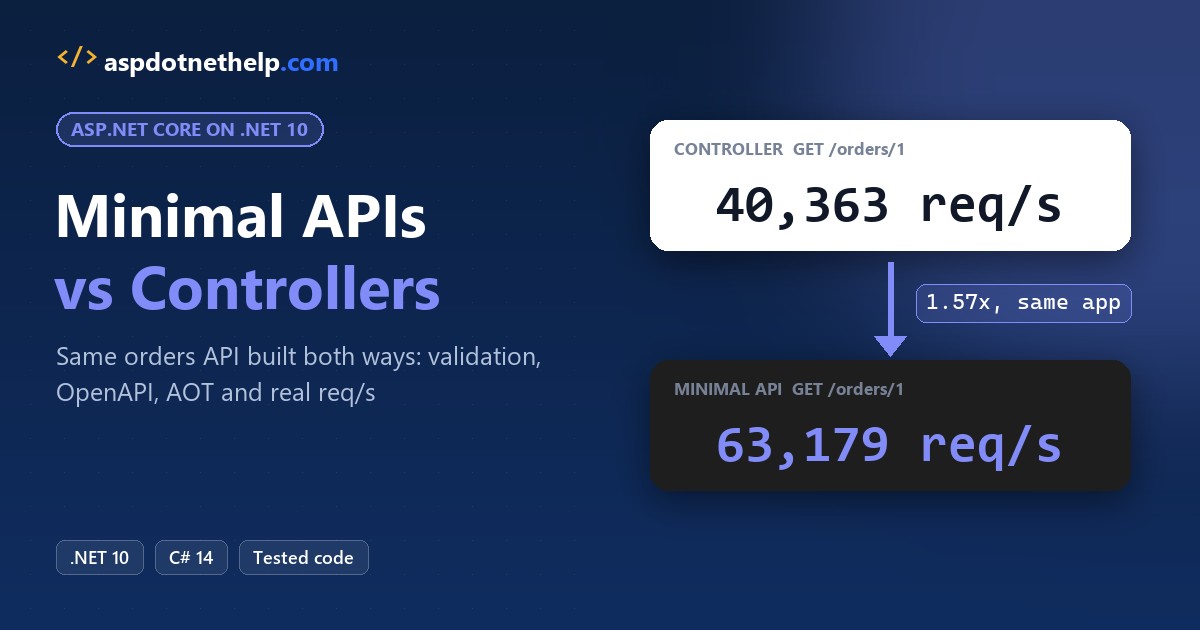
Use minimal APIs for new .NET 10 APIs, and keep controllers when you need MVC-only features like custom model binders or OData. In my local benchmarks of one orders API, the minimal endpoint was faster in 5 of 6 runs, by up to 1.57x.
Minimal APIs vs Controllers at a Glance
Every row comes from the same project, tested on .NET 10 (SDK 10.0.402) further down:
| Feature | Minimal APIs | Controllers |
|---|---|---|
| Define an endpoint | app.MapGet(...) lambda or static method | Action method on a ControllerBase class |
| Group routes | MapGroup("/minimal/orders") | [Route("controllers/orders")] on the class |
| Body binding | Inferred for complex types | Inferred by [ApiController] ([FromBody] optional) |
| Validation | AddValidation() (new in .NET 10) | Automatic with [ApiController] |
| Default 404 body | Empty | ProblemDetails JSON |
| Filters | IEndpointFilter | Action, resource, result, exception filters |
| OpenAPI 404 documented | Yes, from Results<Ok, NotFound> | Only with [ProducesResponseType] |
| Local throughput (GET by id, one run) | 63,179 req/s | 40,363 req/s |
| Native AOT | Supported (partial) | Not supported |
Microsoft’s own guidance now says to start new projects with minimal APIs. If you’re still on .NET 8, upgrade to .NET 10 first: the validation support below needs it.
The Sample: One US Orders API Built Both Ways
I put both styles in one project, UsOrdersApi, so they share the same store, middleware and server. /minimal/orders is the minimal API and /controllers/orders is the controller. The only package is Microsoft.AspNetCore.OpenApi 10.0.14:
<Project Sdk="Microsoft.NET.Sdk.Web">

  <PropertyGroup>
    <TargetFramework>net10.0</TargetFramework>
    <Nullable>enable</Nullable>
    <ImplicitUsings>enable</ImplicitUsings>
  </PropertyGroup>

  <ItemGroup>
    <PackageReference Include="Microsoft.AspNetCore.OpenApi" Version="10.0.14" />
  </ItemGroup>

</Project>
The models are positional records (here’s when a record beats a class), and CreateOrder carries the validation attributes. Three Texas and California orders seed the store:
using System.ComponentModel.DataAnnotations;

namespace UsOrdersApi;

public record Order(int Id, string Customer, string State, decimal Total);

public record CreateOrder(
    [Required] string Customer,
    [Required, StringLength(2, MinimumLength = 2)] string State,
    [Range(1, 10_000)] decimal Total);

// One in-memory store, shared by both styles (registered as a singleton)
public class OrderStore
{
    readonly List<Order> orders =
    [
        new(1, "Jenna Morales", "TX", 249.99m),
        new(2, "Tyler Brooks", "CA", 89.50m),
        new(3, "Rachel Kim", "TX", 1200.00m),
    ];

    public IEnumerable<Order> All(string? state) =>
        state is null ? orders : orders.Where(o => o.State == state);

    public Order? Find(int id) => orders.FirstOrDefault(o => o.Id == id);

    public Order Add(CreateOrder input)
    {
        lock (orders)
        {
            var order = new Order(orders.Count + 1, input.Customer, input.State, input.Total);
            orders.Add(order);
            return order;
        }
    }
}
Program.cs registers both styles side by side. Yes, one app can serve minimal endpoints and controllers at the same time:
using UsOrdersApi;

var builder = WebApplication.CreateBuilder(args);

builder.Services.AddSingleton<OrderStore>();
builder.Services.AddControllers();   // controllers
builder.Services.AddValidation();    // .NET 10 validation for minimal APIs
builder.Services.AddOpenApi();

var app = builder.Build();

app.MapOpenApi();
app.MapControllers();                // OrdersController
app.MapOrderEndpoints();             // OrderEndpoints (MapGroup)

app.Run();
The launch profile pins port 5793, and appsettings.json is the template’s logging config:
{
  "$schema": "https://json.schemastore.org/launchsettings.json",
  "profiles": {
    "http": {
      "commandName": "Project",
      "dotnetRunMessages": true,
      "launchBrowser": false,
      "applicationUrl": "http://localhost:5793",
      "environmentVariables": {
        "ASPNETCORE_ENVIRONMENT": "Development"
      }
    }
  }
}
{
"Logging": {
"LogLevel": {
"Default": "Information",
"Microsoft.AspNetCore": "Warning"
}
}
}Routing: Minimal API MapGroup vs Controller [Route]
The minimal side lives in OrderEndpoints.cs. MapGroup sets the prefix, the OpenAPI tag and the filter once for every endpoint in the group:
using Microsoft.AspNetCore.Http.HttpResults;

namespace UsOrdersApi;

public static class OrderEndpoints
{
    public static RouteGroupBuilder MapOrderEndpoints(this IEndpointRouteBuilder app)
    {
        var group = app.MapGroup("/minimal/orders")
            .WithTags("Minimal")
            .AddEndpointFilter<StyleHeaderFilter>();

        group.MapGet("/", (string? state, OrderStore store) => store.All(state));
        group.MapGet("/{id:int}", GetById);
        group.MapPost("/", Create);
        return group;
    }

    public static Results<Ok<Order>, NotFound> GetById(int id, OrderStore store) =>
        store.Find(id) is { } order ? TypedResults.Ok(order) : TypedResults.NotFound();

    public static Created<Order> Create(CreateOrder input, OrderStore store)
    {
        var order = store.Add(input);
        return TypedResults.Created($"/minimal/orders/{order.Id}", order);
    }
}
The controller gets the same thing from attributes: [Route] on the class, [HttpGet] and [HttpPost] on the actions:
using Microsoft.AspNetCore.Mvc;

namespace UsOrdersApi.Controllers;

[ApiController]
[Route("controllers/orders")]
[StyleHeader]
public class OrdersController(OrderStore store) : ControllerBase
{
    [HttpGet]
    public IEnumerable<Order> GetAll(string? state) => store.All(state);

    [HttpGet("{id:int}")]
    public ActionResult<Order> GetById(int id) =>
        store.Find(id) is { } order ? order : NotFound();

    [HttpPost]
    public ActionResult<Order> Create([FromBody] CreateOrder input)
    {
        var order = store.Add(input);
        return CreatedAtAction(nameof(GetById), new { id = order.Id }, order);
    }
}
Same store, same query. Here’s Texas orders from both:
curl.exe -i "http://localhost:5793/minimal/orders?state=TX"
HTTP/1.1 200 OK
Content-Type: application/json; charset=utf-8
X-Api-Style: minimal (endpoint filter)
[{"id":1,"customer":"Jenna Morales","state":"TX","total":249.99},{"id":3,"customer":"Rachel Kim","state":"TX","total":1200.00}]

curl.exe -i "http://localhost:5793/controllers/orders?state=TX"
HTTP/1.1 200 OK
Content-Type: application/json; charset=utf-8
X-Api-Style: controller (action filter)
[{"id":1,"customer":"Jenna Morales","state":"TX","total":249.99},{"id":3,"customer":"Rachel Kim","state":"TX","total":1200.00}]
Both returned the same two orders, Jenna Morales ($249.99) and Rachel Kim ($1,200.00). The bodies match byte for byte; only my style header differs.
Route constraints like {id:int} work the same in both. Under the hood, both use endpoint routing, so ASP.NET Core middleware runs the same way for either style.
Model Binding: Do Minimal APIs Need [FromBody]?
No. A minimal API binds a complex type like CreateOrder from the JSON body on its own, and simple types like string? state from the route or query string. [ApiController] applies the same rules to controllers, so [FromBody] there is just documentation.
Posting a valid Florida order to both:
curl.exe -i -X POST http://localhost:5793/minimal/orders -H "Content-Type: application/json" -d '{"customer":"Marcus Reed","state":"FL","total":74.25}'
HTTP/1.1 201 Created
Content-Type: application/json; charset=utf-8
Location: /minimal/orders/4
X-Api-Style: minimal (endpoint filter)
{"id":4,"customer":"Marcus Reed","state":"FL","total":74.25}

curl.exe -i -X POST http://localhost:5793/controllers/orders -H "Content-Type: application/json" -d '{"customer":"Marcus Reed","state":"FL","total":74.25}'
HTTP/1.1 201 Created
Content-Type: application/json; charset=utf-8
Location: http://localhost:5793/controllers/orders/5
X-Api-Style: controller (action filter)
{"id":5,"customer":"Marcus Reed","state":"FL","total":74.25}
Both returned 201 Created. The Location header differs, though: TypedResults.Created sent my relative /minimal/orders/4, while CreatedAtAction built the absolute http://localhost:5793/controllers/orders/5 from the route.
Validation: AddValidation in .NET 10 vs [ApiController] ModelState
Controllers have validated automatically for years: [ApiController] checks ModelState and returns a 400 before the action runs. Minimal APIs got the same thing in .NET 10 with builder.Services.AddValidation(), which uses a source generator to find the endpoint parameter types.
Same bad order to both (blank customer, “Texas” as the state, a $0 total):
curl.exe -i -X POST http://localhost:5793/minimal/orders -H "Content-Type: application/json" -d '{"customer":"","state":"Texas","total":0}'
HTTP/1.1 400 Bad Request
Content-Type: application/json; charset=utf-8
{"title":"One or more validation errors occurred.","errors":{"Customer":["The Customer field is required."],"State":["The field State must be a string with a minimum length of 2 and a maximum length of 2."],"Total":["The field Total must be between 1 and 10000."]}}

curl.exe -i -X POST http://localhost:5793/controllers/orders -H "Content-Type: application/json" -d '{"customer":"","state":"Texas","total":0}'
HTTP/1.1 400 Bad Request
Content-Type: application/problem+json; charset=utf-8
{"type":"https://tools.ietf.org/html/rfc9110#section-15.5.1","title":"One or more validation errors occurred.","status":400,"errors":{"State":["The field State must be a string with a minimum length of 2 and a maximum length of 2."],"Total":["The field Total must be between 1 and 10000."],"Customer":["The Customer field is required."]},"traceId":"00-…-00"}
Both caught all three errors with the same messages. The shape differs: the minimal API sent plain application/json with only title and errors, while the controller sent application/problem+json with type, status and traceId.
To get the controller’s shape, I added builder.Services.AddProblemDetails(); and posted the same order again:
HTTP/1.1 400 Bad Request
Content-Type: application/problem+json
{"type":"https://tools.ietf.org/html/rfc9110#section-15.5.1","title":"One or more validation errors occurred.","status":400,"errors":{"Customer":["The Customer field is required."],"State":["The field State must be a string with a minimum length of 2 and a maximum length of 2."],"Total":["The field Total must be between 1 and 10000."]},"traceId":"00-…-00"}
Note: skip AddValidation() and nothing fails loudly. Invalid orders just reach your handler. On .NET 10, nullable value type parameters (like int?) also aren’t validated yet.
Filters: Minimal API IEndpointFilter vs Controller Action Filters
Both styles let you run code around the handler. Minimal APIs use IEndpointFilter; controllers use MVC’s filter pipeline. Mine both set an X-Api-Style header:
using Microsoft.AspNetCore.Mvc.Filters;

namespace UsOrdersApi;

// Minimal APIs: endpoint filter, runs around the handler
public class StyleHeaderFilter : IEndpointFilter
{
    public async ValueTask<object?> InvokeAsync(EndpointFilterInvocationContext context,
        EndpointFilterDelegate next)
    {
        context.HttpContext.Response.Headers["X-Api-Style"] = "minimal (endpoint filter)";
        return await next(context);
    }
}

// Controllers: action filter, runs around the action method
public class StyleHeaderAttribute : ActionFilterAttribute
{
    public override void OnActionExecuting(ActionExecutingContext context) =>
        context.HttpContext.Response.Headers["X-Api-Style"] = "controller (action filter)";
}
You saw them work in the curl output: every 200 and 201 carried the header. The 400s didn’t, in either style, because validation short-circuited the request before my filter ran.
Controllers still have more filter types (resource, result, exception, authorization). For minimal APIs, I put cross-cutting work like error handling and auth in middleware or on the group with RequireAuthorization(), which pairs well with JWT bearer authentication.
Dependency Injection in Minimal API Handlers vs Controllers
Look back at the two files. The minimal handler takes OrderStore store as a parameter, and ASP.NET Core sees it’s a registered service. The controller takes it through a primary constructor, and a new controller is created for every request.
The lifetimes work the same either way, so OrderStore is one singleton shared by both styles. My guide to transient, scoped and singleton lifetimes covers which one to pick.
One practical difference: a controller with ten actions builds every dependency for every request, even ones only one action needs. A minimal handler asks only for what it uses.
OpenAPI Support for Minimal APIs and Controllers
Both styles feed the built-in AddOpenApi() document. This file-based app reads /openapi/v1.json and lists each operation with its tag and response codes:
using System.Text.Json;

var http = new HttpClient();
var url = "http://localhost:5793/openapi/v1.json";
using var doc = JsonDocument.Parse(await http.GetStringAsync(url));

foreach (var path in doc.RootElement.GetProperty("paths").EnumerateObject())
    foreach (var op in path.Value.EnumerateObject())
    {
        var tag = op.Value.GetProperty("tags")[0].GetString();
        var codes = string.Join(",", op.Value.GetProperty("responses")
            .EnumerateObject().Select(r => r.Name));
        Console.WriteLine(
            $"{op.Name.ToUpper(),-5} {path.Name,-26} {tag,-8} {codes}");
    }
Output:
GET   /minimal/orders            Minimal  200
POST  /minimal/orders            Minimal  201
GET   /minimal/orders/{id}       Minimal  200,404
GET   /controllers/orders        Orders   200
POST  /controllers/orders        Orders   200
GET   /controllers/orders/{id}   Orders   200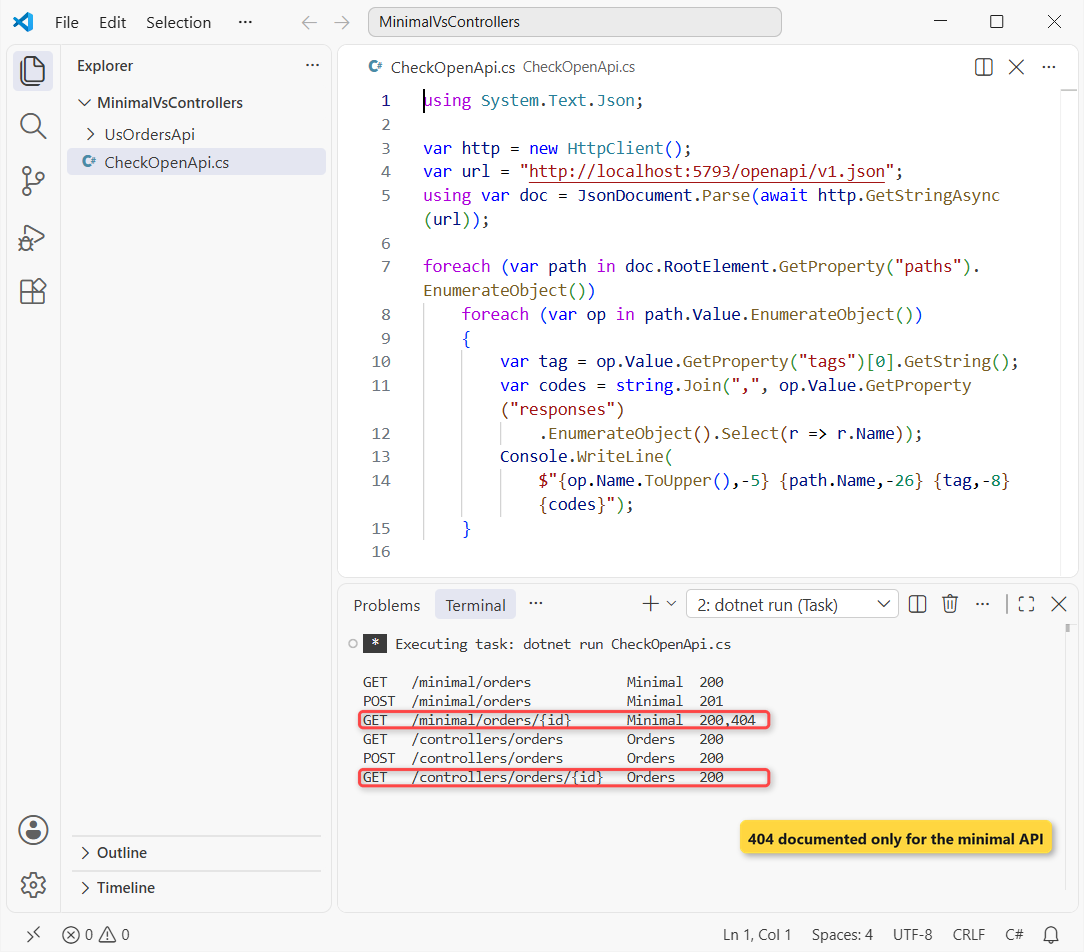
The minimal GetById returns Results<Ok<Order>, NotFound>, so OpenAPI knows both codes. The controller’s ActionResult<Order> only documents 200 until you add [ProducesResponseType(StatusCodes.Status404NotFound)].
The POST rows tell the same story: the minimal Created<Order> documents 201, while the controller claims 200 even though it really returns 201. Neither side lists the validation 400 on its own.
To browse that document in a UI, follow my OpenAPI with Scalar setup; it works the same for both styles.
Testing Minimal API Handlers vs Controller Actions
Unit tests are where named handlers pay off. This file-based app references the project with #:project and calls both styles directly, no server involved:
#:project UsOrdersApi/UsOrdersApi.csproj
using Microsoft.AspNetCore.Http.HttpResults;
using UsOrdersApi;
using UsOrdersApi.Controllers;

var store = new OrderStore();

// Minimal API: the handler is a plain static method
var found = OrderEndpoints.GetById(1, store).Result;
var missing = OrderEndpoints.GetById(99, store).Result;
if (found is Ok<Order> ok) Console.WriteLine($"Minimal 1:     Ok, {ok.Value!.Customer}");
if (missing is NotFound) Console.WriteLine("Minimal 99:    NotFound");

// Controller: create it with its dependencies, then call the action
var ctrl = new OrdersController(store);
Console.WriteLine($"Controller 1:  {ctrl.GetById(1).Value!.Customer}");
var notFound = ctrl.GetById(99).Result!;
Console.WriteLine($"Controller 99: {notFound.GetType().Name}");
Output:
Minimal 1:     Ok, Jenna Morales
Minimal 99:    NotFound
Controller 1:  Jenna Morales
Controller 99: NotFoundResult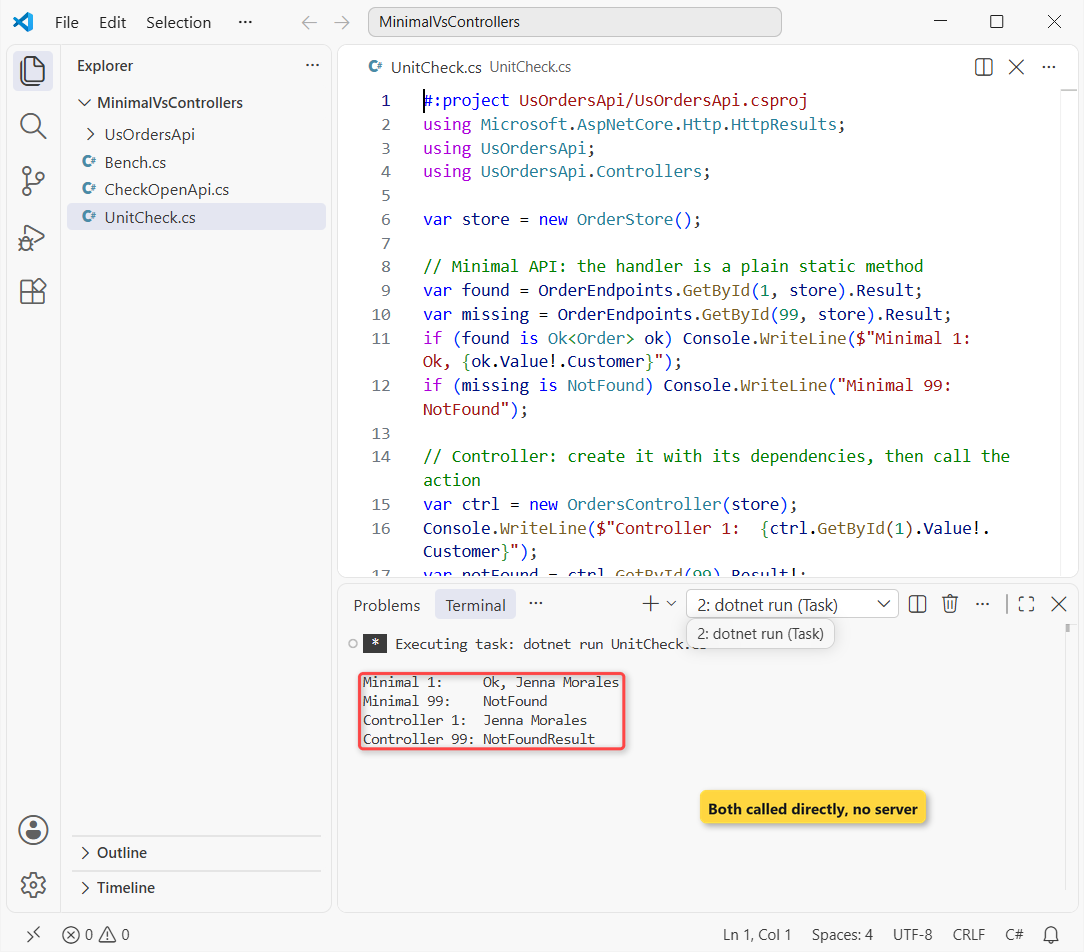
The minimal handler is a static method, so the test passes in the store and pattern-matches Ok<Order> or NotFound. The controller works too, but you build it first and inspect Value or Result (NotFoundResult).
For integration tests, WebApplicationFactory from Microsoft.AspNetCore.Mvc.Testing hosts the whole app in memory and works the same for both. Your test client is just an HttpClient.
Minimal API Performance: Is It Faster Than Controllers?
Usually, yes. I ran this benchmark against the Release build of UsOrdersApi: 2,000 warm-up calls each, then three rounds of 20,000 GET /orders/1 requests at 32 concurrent, keeping each style’s best round:
using System.Diagnostics;
using System.Globalization;

CultureInfo.CurrentCulture = new CultureInfo("en-US");
var http = new HttpClient();
var api = "http://localhost:5793";
string[] urls = [$"{api}/minimal/orders/1", $"{api}/controllers/orders/1"];
foreach (var url in urls) await Run(url, 2_000);       // warm-up
var best = new double[2];
for (int round = 0; round < 3; round++)                // best of 3
    for (int i = 0; i < 2; i++)
        best[i] = Math.Max(best[i], await Run(urls[i], 20_000));
string[] lines = [$"Minimal API  {best[0],8:N0} req/s",
                  $"Controller   {best[1],8:N0} req/s",
                  $"Ratio        {best[0] / best[1],8:F2}x"];
foreach (var line in lines) Console.WriteLine(line);
File.WriteAllLines("bench-results.txt", lines);

async Task<double> Run(string url, int count)
{
    var sw = Stopwatch.StartNew();
    var opts = new ParallelOptions { MaxDegreeOfParallelism = 32 };
    await Parallel.ForAsync(0, count, opts, async (_, ct) =>
        (await http.GetAsync(url, ct)).EnsureSuccessStatusCode());
    return count / sw.Elapsed.TotalSeconds;
}
Output:
Minimal API    63,179 req/s
Controller     40,363 req/s
Ratio            1.57x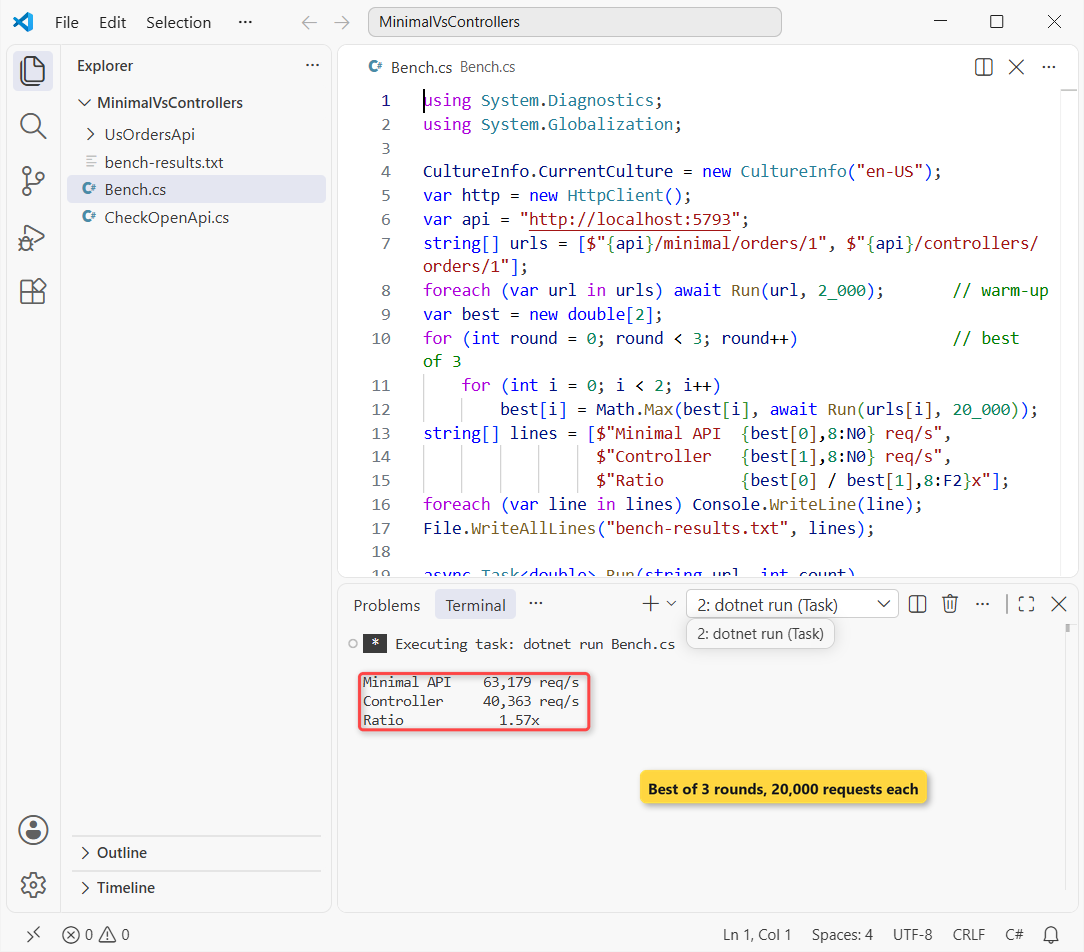
In the run you see, the minimal endpoint served 63,179 requests per second and the controller 40,363, a ratio of 1.57x. The client uses async and await with Parallel.ForAsync to keep 32 requests in flight.
Raw numbers swung a lot. Across 6 runs of this benchmark, minimal APIs came out ahead 5 times (1.29x to 1.57x), and the other run was within 2% either way, a tie.
Important: this is one laptop, with the client and server sharing CPU, on a tiny in-memory endpoint. A database call or real JSON payload costs far more than the framework gap, so don’t migrate a working API for speed alone.
Native AOT: Minimal APIs Only
Native AOT compiles the app to one self-contained executable with faster startup and less memory. Microsoft’s compatibility table lists minimal APIs as partially supported and MVC as not supported. I turned on PublishAot for UsOrdersApi to see what the analyzer says:
dotnet build --no-incremental -p:PublishAot=true
Program.cs(6,1): warning IL2026: Using member 'Microsoft.Extensions.DependencyInjection.MvcServiceCollectionExtensions.AddControllers(IServiceCollection)' which has 'RequiresUnreferencedCodeAttribute' can break functionality when trimming application code. MVC does not currently support trimming or native AOT. https://aka.ms/aspnet/trimming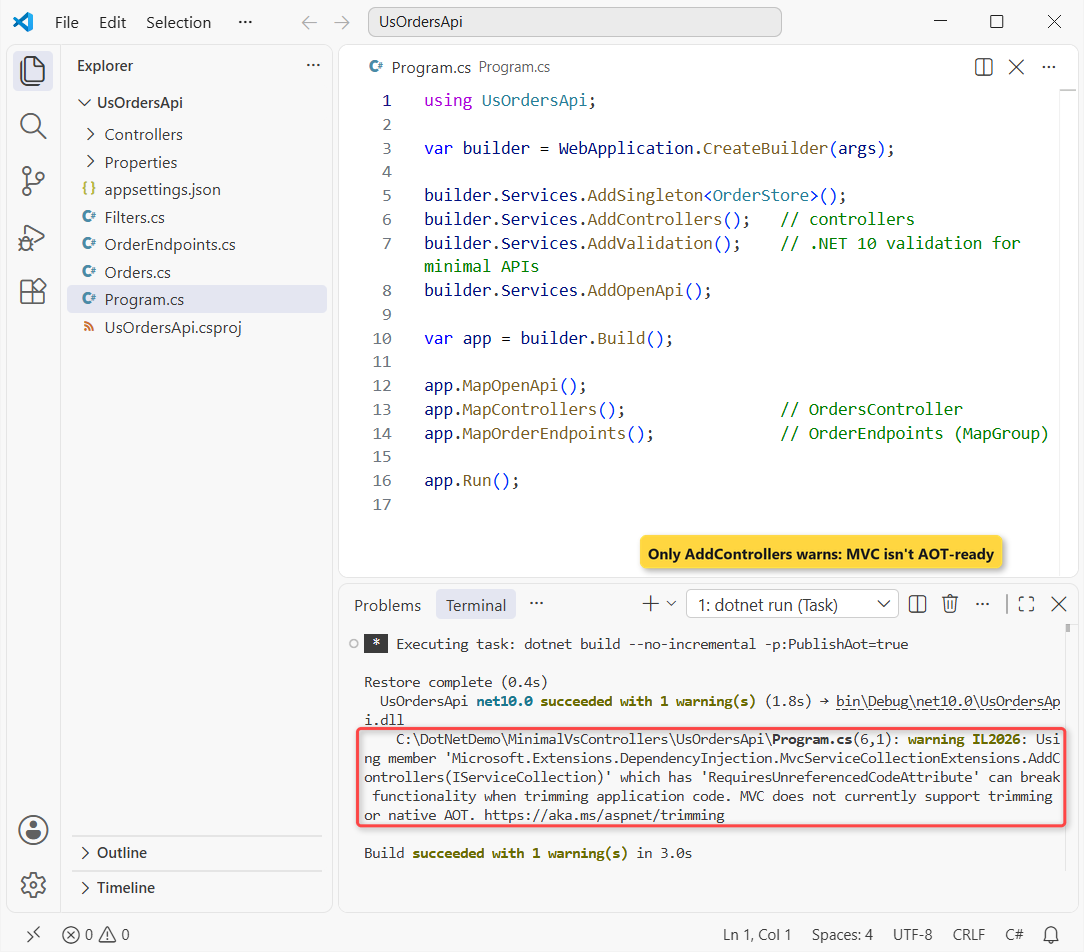
The only warning landed on AddControllers. The minimal endpoints passed. For a real AOT app you’d also start from dotnet new webapiaot, use CreateSlimBuilder and register a JsonSerializerContext.
Organizing Minimal APIs at Scale
The fair complaint about minimal APIs is a 900-line Program.cs. That’s a habit, not a limit. My OrderEndpoints.cs already shows the pattern I use on bigger projects:
- One static class per resource with a
Map*Endpointsextension method, soProgram.csstays at one line per feature. - One
MapGroupper resource for the prefix, tags, filters andRequireAuthorization(). - Named static handlers instead of long lambdas, so they’re testable and show up in stack traces.
You can see the same layout on a full EF Core app in my ASP.NET Core Web API CRUD tutorial. Controllers give you this folder structure by convention, which is why large teams that already know MVC often stay with them.
When to Use Controllers Instead of Minimal APIs
Here’s how I decide for a new endpoint today:
- New API on .NET 10, microservice or AOT target: minimal APIs.
- You need custom
IModelBinderproviders,IModelValidator, application parts or OData: controllers. - Big existing MVC codebase with a team that knows it: keep controllers, and add new endpoints as minimal APIs if you like.
- Mixed needs: both in one app, exactly like this sample.
So the deciding differences are small: validation and OpenAPI now work in both, minimal APIs usually edge ahead on speed and win on testing and AOT, and controllers keep the MVC extensibility points. Check what changed in .NET 10 before you plan a migration.
A few more ASP.NET Core and C# guides from the site:
- All ASP.NET Core tutorials on AspDotnetHelp
- Interfaces in C# (IEndpointFilter is one)
- LINQ in C# for filtering results like the state query
- .NET Core interview questions and answers
Frequently Asked Questions
Can I use minimal APIs and controllers in the same project?
Yes. Call AddControllers() and MapControllers() next to your Map* calls. The sample in this post serves both from one app and one service container.
Does dotnet new webapi create minimal APIs or controllers?
Minimal APIs. Add --use-controllers (or -controllers) to get a controller-based project instead.
Why does my minimal API return a 404 with no body?
TypedResults.NotFound() writes no body, and it stayed empty in my test even after AddProblemDetails(). Return TypedResults.Problem(statusCode: 404) when clients need a ProblemDetails body.
Do minimal APIs support authorization like [Authorize]?
Yes. Put [Authorize] on the handler or call RequireAuthorization() on an endpoint or a whole MapGroup.
Are minimal APIs only for small projects?
No. With one endpoint class and one MapGroup per resource they scale fine, and Microsoft recommends them for new projects. See APIs overview on Microsoft Learn.

Bijay Kumar is a renowned software engineer, accomplished author, and distinguished Microsoft Most Valuable Professional (MVP) specializing in SharePoint. With a rich professional background spanning over 15 years, Bijay has established himself as an authority in the field of information technology. He possesses unparalleled expertise in multiple programming languages and technologies such as ASP.NET, ASP.NET MVC, C#.NET, and SharePoint, which has enabled him to develop innovative and cutting-edge solutions for clients across the globe. Read more…