
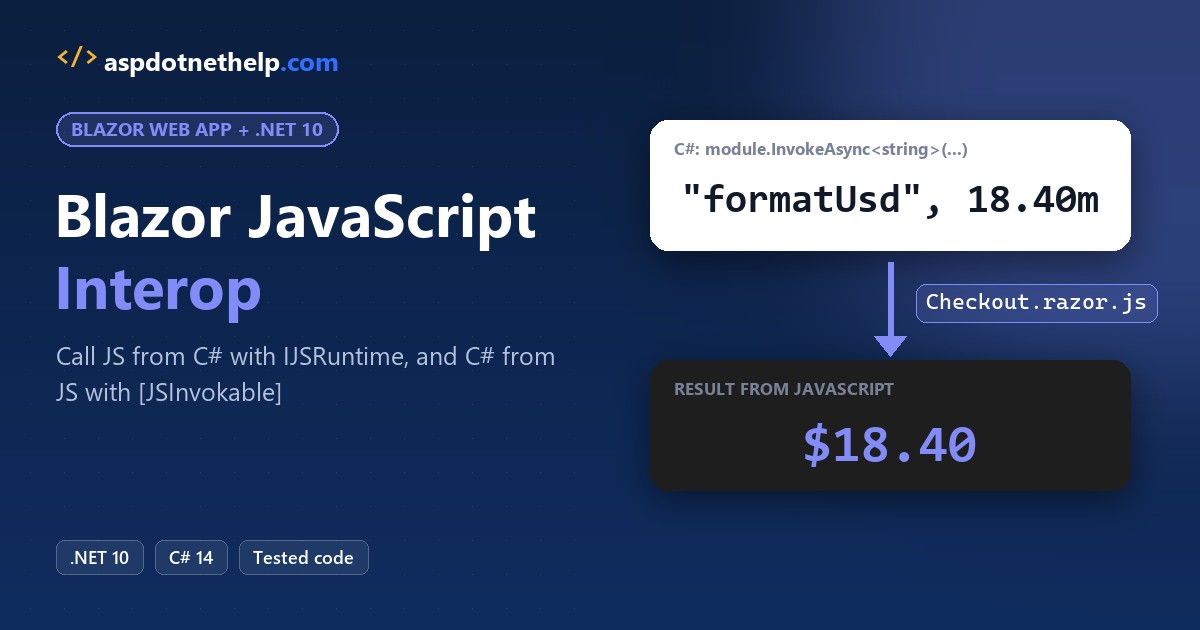
Blazor JavaScript interop runs both ways. From C#, inject IJSRuntime and await InvokeVoidAsync (no result) or InvokeAsync<T> (a result). From JavaScript, call a C# method marked [JSInvokable] with DotNet.invokeMethodAsync.
The catch is timing: there’s no browser during prerendering, so JS calls belong in OnAfterRenderAsync. I ran every pattern below on .NET 10, in one checkout page.
The Sample Blazor Checkout Page We’ll Use
The running sample is a checkout page for Lone Star Coffee in Austin, Texas. It’s a Blazor Web App with the InteractiveServer render mode, on .NET SDK 10.0.402 (check your .NET version first).
If Blazor is new to you, start with my Blazor tutorial for beginners.
You’ll see four interop jobs on it: a saved ZIP code, a $18.40 total formatted in JS, a Texas tax rate and a greeting for Jenna Morales.
dotnet new blazor -o BlazorJsInteropI deleted appsettings.Development.json, trimmed Program.cs to plain http and set port 5883 in the launch profile. The four files as they ran:
{
  "Logging": {
    "LogLevel": {
      "Default": "Information",
      "Microsoft.AspNetCore": "Warning"
    }
  },
  "AllowedHosts": "*"
}
{
"$schema": "https://json.schemastore.org/launchsettings.json",
"profiles": {
"http": {
"commandName": "Project",
"dotnetRunMessages": true,
"launchBrowser": false,
"applicationUrl": "http://localhost:5883",
"environmentVariables": {
"ASPNETCORE_ENVIRONMENT": "Development"
}
}
}
}<Project Sdk="Microsoft.NET.Sdk.Web">
<PropertyGroup>
<TargetFramework>net10.0</TargetFramework>
<Nullable>enable</Nullable>
<ImplicitUsings>enable</ImplicitUsings>
<BlazorDisableThrowNavigationException>true</BlazorDisableThrowNavigationException>
</PropertyGroup>
</Project>using BlazorJsInterop.Components;
var builder = WebApplication.CreateBuilder(args);
builder.Services.AddRazorComponents()
.AddInteractiveServerComponents();
var app = builder.Build();
app.UseAntiforgery();
app.MapStaticAssets();
app.MapRazorComponents<App>()
.AddInteractiveServerRenderMode();
app.Run();The page itself is Components/Pages/Checkout.razor. Every method in this post points back at a few lines of it:
@page "/checkout"
@rendermode InteractiveServer
@implements IAsyncDisposable
@inject IJSRuntime JS

<PageTitle>Checkout</PageTitle>

<h1>Lone Star Coffee - Checkout</h1>
<p>Saved ZIP: <strong>@zip</strong> | Window width: <strong>@width px</strong></p>
<p>Order total (formatted in JS): <strong>@total</strong></p>

<button class="btn btn-primary" @onclick="GreetAsync">Greet from JavaScript</button>
<button id="tax" class="btn btn-outline-secondary" @ref="taxButton">Texas tax rate</button>
<p class="mt-3">@greeting</p>
<p id="tax-result"></p>

@code {
    private IJSObjectReference? module;
    private DotNetObjectReference<Checkout>? selfRef;
    private ElementReference taxButton;
    private string? zip, total, greeting;
    private int width;

    protected override async Task OnAfterRenderAsync(bool firstRender)
    {
        if (!firstRender) return;

        // global JS: the identifier is resolved from window
        await JS.InvokeVoidAsync("localStorage.setItem", "zip", "78701");
        zip = await JS.InvokeAsync<string>("localStorage.getItem", "zip");
        width = await JS.GetValueAsync<int>("window.innerWidth");
        Log($"localStorage zip = {zip}, innerWidth = {width}");

        // JS isolation: import the collocated module once
        module = await JS.InvokeAsync<IJSObjectReference>(
            "import", "./Components/Pages/Checkout.razor.js");
        total = await module.InvokeAsync<string>("formatUsd", 18.40m);
        await module.InvokeVoidAsync("wireTaxButton", taxButton);
        Log($"formatUsd(18.40) returned {total}");

        StateHasChanged();
    }

    private async Task GreetAsync()
    {
        selfRef ??= DotNetObjectReference.Create(this);
        greeting = await module!.InvokeAsync<string>(
            "greet", selfRef, "Jenna Morales");
    }

    [JSInvokable]
    public string GetGreeting(string name)
    {
        Log($"JS called instance GetGreeting(\"{name}\")");
        return $"Hi {name}, your cold brew is ready for pickup!";
    }

    [JSInvokable]
    public static decimal GetTaxRate(string state)
    {
        Log($"JS called static GetTaxRate(\"{state}\")");
        return state == "TX" ? 8.25m : 0m;
    }

    async ValueTask IAsyncDisposable.DisposeAsync()
    {
        selfRef?.Dispose();
        if (module is not null)
        {
            try
            {
                await module.DisposeAsync();
                Log("DisposeAsync: module released");
            }
            catch (JSDisconnectedException)
            {
                Log("DisposeAsync: circuit gone (JSDisconnectedException)");
            }
        }
    }

    private static void Log(string text) => Console.WriteLine($"[interop] {text}");
}
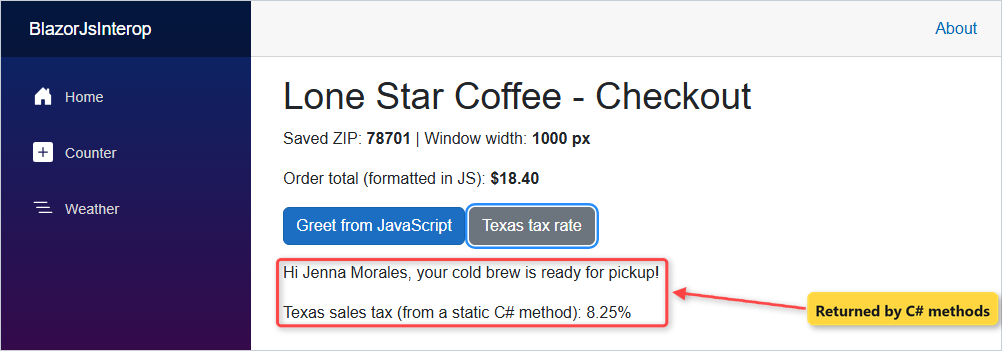
Here’s the page after both buttons were clicked in Edge:
Method 1: Call a JavaScript Function From C# With IJSRuntime InvokeAsync (Recommended)
Use this when the JavaScript already exists in the browser: a browser API, a library or a global function. Same checkout app; these are the first three calls in OnAfterRenderAsync:
await JS.InvokeVoidAsync("localStorage.setItem", "zip", "78701");
zip = await JS.InvokeAsync<string>("localStorage.getItem", "zip");
width = await JS.GetValueAsync<int>("window.innerWidth");
The server console printed the values the browser sent back:
[interop] localStorage zip = 78701, innerWidth = 1000
[interop] formatUsd(18.40) returned $18.40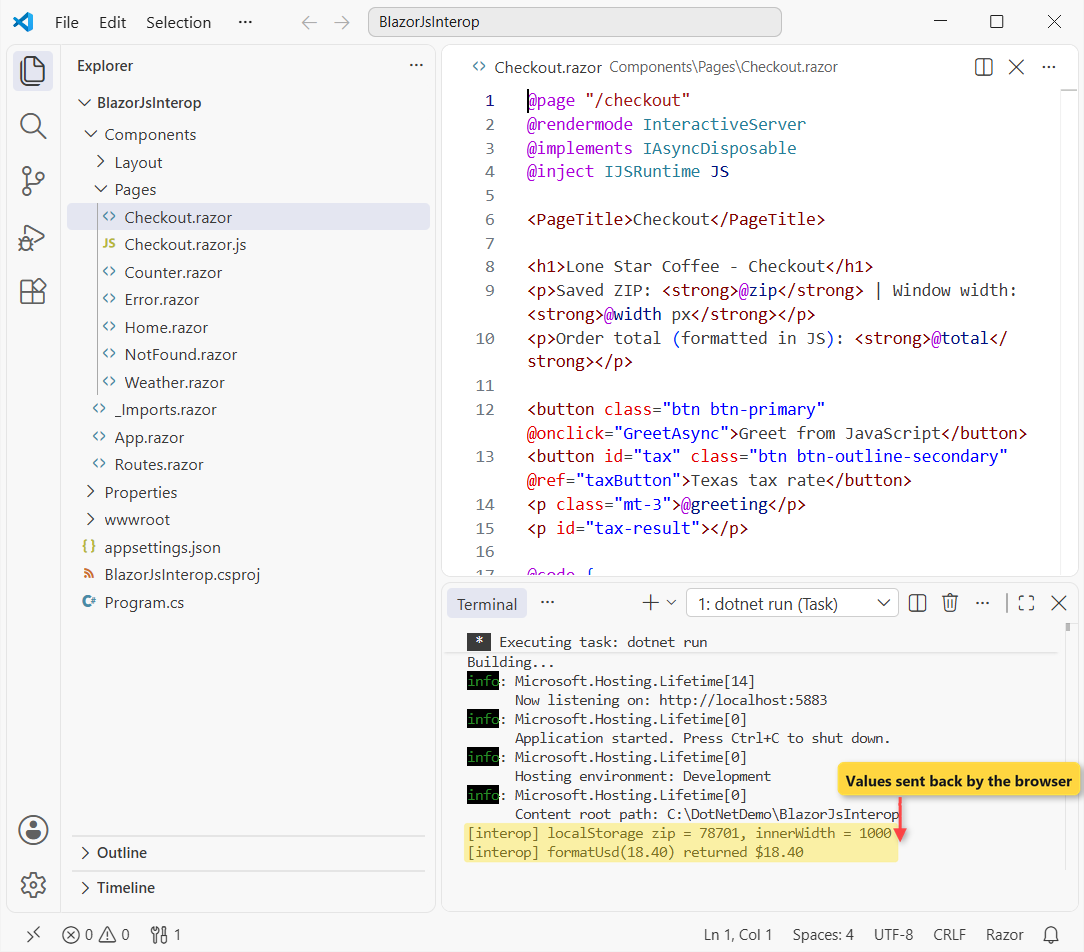
How does this code work?
The first argument is an identifier resolved from window, so localStorage.setItem means window.localStorage.setItem. The rest are arguments, serialized to JSON with System.Text.Json.
InvokeVoidAsync only waits for the call to finish. InvokeAsync<string> also turns the JSON result into a C# string, so zip came back as 78701.
Each call is a SignalR round trip, so always await it. GetValueAsync<T> (new in .NET 10) reads a JS property directly: 1000 px here.
Important: your own global function needs a <script> tag after blazor.web.js in App.razor; Microsoft recommends Method 2 instead.
Method 2: Blazor JS Isolation With a Collocated .razor.js Module
Use this for your own JavaScript. Put it in a file named after the component, Checkout.razor.js, right next to Checkout.razor. Export each function; nothing leaks into the global scope.
Here’s the whole module for the checkout page:
export function formatUsd(amount) {
  return new Intl.NumberFormat('en-US', { style: 'currency', currency: 'USD' })
    .format(amount);
}

export function wireTaxButton(button) {
  button.addEventListener('click', async () => {
    const rate = await DotNet.invokeMethodAsync(
      'BlazorJsInterop', 'GetTaxRate', 'TX');
    document.getElementById('tax-result').textContent =
      `Texas sales tax (from a static C# method): ${rate}%`;
  });
}

export function greet(dotNetHelper, name) {
  return dotNetHelper.invokeMethodAsync('GetGreeting', name);
}
The page loads it once with the import call in OnAfterRenderAsync and keeps the reference in module.
How does this code work?
import is the browser’s dynamic import(). Blazor serves collocated files at the component’s path, so the URL is ./Components/Pages/Checkout.razor.js. On publish, the file moves to wwwroot without a code change.
The IJSObjectReference is a handle to that module; module.InvokeAsync calls its exports. The decimal 18.40 arrives as a JS number.
Important: don’t add a <script> tag for a module. The template works the same way: its own ReconnectModal.razor.js sits next to its component.
Method 3: Call a Static C# Method From JavaScript With [JSInvokable]
Use this when your JavaScript needs data that doesn’t belong to one component, like a tax rate. Back in the same checkout app, wireTaxButton receives the button as an ElementReference and adds a normal JS click listener.
On the C# side, GetTaxRate in the page is public static with [JSInvokable]. Here’s the JS call inside the listener:
const rate = await DotNet.invokeMethodAsync(
  'BlazorJsInterop', 'GetTaxRate', 'TX');
Clicking “Texas tax rate” logged [interop] JS called static GetTaxRate("TX") and the page printed 8.25%.
How does this code work?
Blazor’s script adds a global DotNet object. invokeMethodAsync takes the assembly name, the method identifier and the arguments, and returns a Promise with the result.
All three are required. The identifier defaults to the method name; [JSInvokable("OtherName")] changes it.
Passing taxButton is safe in OnAfterRenderAsync because the DOM exists by then.
Method 4: Call an Instance Method With DotNetObjectReference
Use this when JavaScript must reach one specific component. Same checkout app: “Greet from JavaScript” wraps the component and hands it to the module’s greet function.
selfRef ??= DotNetObjectReference.Create(this);
greeting = await module!.InvokeAsync<string>(
    "greet", selfRef, "Jenna Morales");
In JS, dotNetHelper.invokeMethodAsync('GetGreeting', name) calls the instance method. Both clicks logged:
[interop] JS called instance GetGreeting("Jenna Morales")
[interop] JS called static GetTaxRate("TX")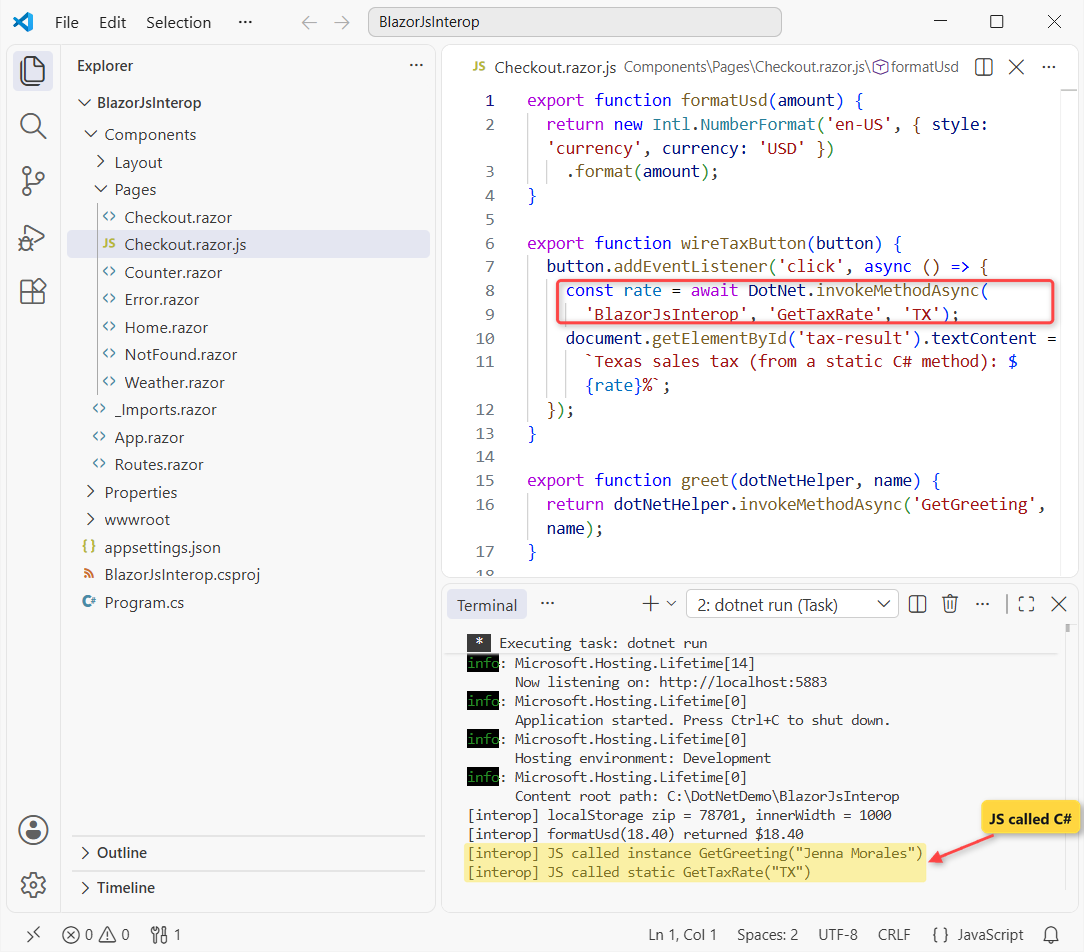
How does this code work?
DotNetObjectReference.Create(this) serializes to a JS object that points at this component. It has its own invokeMethodAsync, which takes no assembly name because the instance is already known.
The reference keeps the component alive, so dispose it in DisposeAsync. My page creates it on the first click with ??=, a nice fit for nullable reference types.
Pro Tip: the synchronous DotNet.invokeMethod only works in client-side (WebAssembly) components.
Why Does Blazor JavaScript Interop Fail During Prerendering?
InteractiveServer prerenders by default: the server renders static HTML first, with no browser on the other end. My Blazor render modes guide explains the passes. Here’s the mistake I made in the checkout page:
    protected override async Task OnInitializedAsync()
    {
        zip = await JS.InvokeAsync<string>("localStorage.getItem", "zip");
    }
The page returned HTTP 500, and the server logged this:
System.InvalidOperationException: JavaScript interop calls cannot be issued at this time. This is because the component is being statically rendered. When prerendering is enabled, JavaScript interop calls can only be performed during the OnAfterRenderAsync lifecycle method.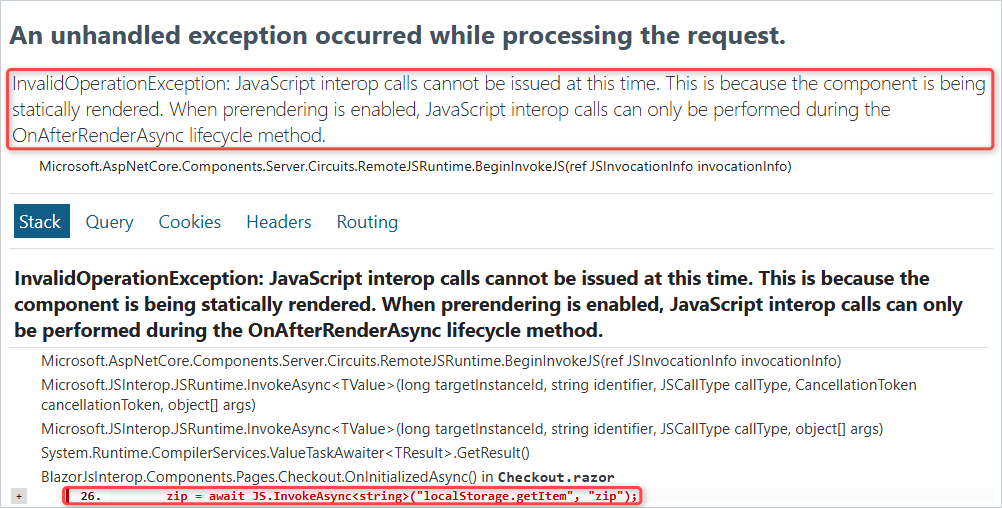
There are two fixes. The one the checkout page uses: move the call into OnAfterRenderAsync behind if (firstRender), which never runs during prerendering (see my Blazor component lifecycle post).
The other: switch prerendering off for the page. I kept the bad OnInitializedAsync and changed only the render mode:
@rendermode @(new InteractiveServerRenderMode(prerender: false))That run returned HTTP 200 and logged [interop] localStorage zip = 78701, innerWidth = 1000. The cost: no HTML until the circuit connects.
How Do You Dispose Blazor JS Interop References Safely?
Implement IAsyncDisposable, dispose the DotNetObjectReference and the module, and catch JSDisconnectedException. It’s the same cleanup idea as the Dispose pattern in C#.
Leaving via the home link (circuit still connected) logged:
[interop] DisposeAsync: module releasedNavigating the tab to another site. Blazor disposed the page after the circuit closed, so module.DisposeAsync() threw:
[interop] DisposeAsync: circuit gone (JSDisconnectedException)Without that try catch, the second case is an unhandled exception. WebAssembly has no circuit, so it doesn’t need the catch.
Which Blazor JS Interop Method Should You Use?
| You want to … | Use |
|---|---|
| Call a browser API or global JS | JS.InvokeVoidAsync / JS.InvokeAsync<T> |
| Call your own JavaScript | .razor.js module + IJSObjectReference |
| Let JS call shared C# logic | [JSInvokable] static + DotNet.invokeMethodAsync |
| Let JS update one component | DotNetObjectReference.Create(this) |
| Read a JS property (.NET 10) | JS.GetValueAsync<T> |
For new code, I’d start with Method 2: it keeps each component’s JavaScript next to its markup.
Things to Keep in Mind
- Arguments and results travel as JSON, so pass small, plain data, not big objects or whole DOM trees.
- Dispose every
IJSObjectReferenceandDotNetObjectReference, and catchJSDisconnectedExceptionon Blazor Server. - Static
[JSInvokable]identifiers must be unique in the assembly; pass a custom name when two methods clash.
To split the page into reusable parts, see my Blazor components guide. Where you can go next:
- Every Blazor tutorial on the site
- Validate the checkout form with EditForm
- List past orders in a Blazor QuickGrid
- What else changed in .NET 10
Frequently Asked Questions
How do I call a JavaScript function from C# in Blazor?
Inject IJSRuntime with @inject IJSRuntime JS and await JS.InvokeVoidAsync(“functionName”, args) when you don’t need a result, or JS.InvokeAsync<T>(“functionName”, args) when you do.
What is the difference between InvokeAsync and InvokeVoidAsync?
InvokeAsync<T> waits for the JavaScript function and deserializes its return value into T. InvokeVoidAsync only waits for the call to finish and ignores any return value.
How do I call a C# method from JavaScript in Blazor?
Mark a public static method [JSInvokable] and call DotNet.invokeMethodAsync(‘AssemblyName’, ‘MethodName’, args). For an instance method, pass DotNetObjectReference.Create(this) to JavaScript and call invokeMethodAsync(‘MethodName’, args) on it.
Why do I get “JavaScript interop calls cannot be issued at this time”?
Your component called JavaScript while it was being prerendered, usually from OnInitializedAsync. Move the call to OnAfterRenderAsync inside if (firstRender), or set prerender: false on the render mode.
Do I need to catch JSDisconnectedException?
On Blazor Server, yes, when you dispose JS object references: if the SignalR circuit is already gone, the call throws it. Blazor WebAssembly doesn’t need the catch. Microsoft Learn’s Call JavaScript functions from .NET methods page covers the disposal rules.

Bijay Kumar is a renowned software engineer, accomplished author, and distinguished Microsoft Most Valuable Professional (MVP) specializing in SharePoint. With a rich professional background spanning over 15 years, Bijay has established himself as an authority in the field of information technology. He possesses unparalleled expertise in multiple programming languages and technologies such as ASP.NET, ASP.NET MVC, C#.NET, and SharePoint, which has enabled him to develop innovative and cutting-edge solutions for clients across the globe. Read more…