
For ASP.NET Core global exception handling, call AddProblemDetails() and app.UseExceptionHandler(), then add an IExceptionHandler class for each kind of error you want to map. Every unhandled exception comes back as a clean application/problem+json response instead of a stack trace or an empty 500.
I built a small .NET 10 shipping API with three handlers, broke their registration order on purpose and recorded every JSON response you’ll see below.
The Sample Shipping API We’ll Use for Global Error Handling
Everything here runs on the .NET 10 SDK (10.0.402); check your .NET version first if you’re not sure. The project is the empty web template, named ShippingApi:
dotnet new web -n ShippingApi -o ShippingApiIt tracks three shipments (#1042 to #1044) for Jenna Morales in Austin, Tyler Brooks in Columbus and Rachel Kim in Seattle. Five requests each fail in a different way:
| Request | What goes wrong | Status we want |
|---|---|---|
| GET /shipments/2001 | No such shipment | 404 Not Found |
| POST /shipments | ZIP code 981O1 has a letter O in it | 400 Bad Request |
| GET /rates/78701 | The carrier rate service times out | 503 Service Unavailable |
| GET /reports/daily | A missing connection string (a real bug) | 500, with no internals leaked |
| GET /tracking | No endpoint at all, so nothing throws | 404 with a JSON body |
The two app-specific errors are plain exception classes in Exceptions.cs:
namespace ShippingApi;

public class ShipmentNotFoundException(int shipmentId)
    : Exception($"Shipment {shipmentId} was not found.")
{
    public int ShipmentId { get; } = shipmentId;
}

public class AddressValidationException(string field, string message) : Exception(message)
{
    public string Field { get; } = field;
}
The project file and appsettings.json are the template’s own. I deleted appsettings.Development.json and the Properties folder, and I start the API with dotnet run -- --urls http://localhost:5836 --environment Production.
<Project Sdk="Microsoft.NET.Sdk.Web">

  <PropertyGroup>
    <TargetFramework>net10.0</TargetFramework>
    <Nullable>enable</Nullable>
    <ImplicitUsings>enable</ImplicitUsings>
  </PropertyGroup>

</Project>
{
"Logging": {
"LogLevel": {
"Default": "Information",
"Microsoft.AspNetCore": "Warning"
}
},
"AllowedHosts": "*"
}Method 1: UseExceptionHandler with AddProblemDetails (Recommended Starting Point)
This is the two-line version, and it’s enough for a small API: you get a standard error body without writing a handler.
This demo is one of the file-based apps .NET 10 added: it starts, calls the same /reports/daily endpoint, prints the response and stops. Here’s the code:
#:sdk Microsoft.NET.Sdk.Web
using System.Text.Json.Nodes;

var builder = WebApplication.CreateBuilder();
builder.Logging.ClearProviders();
builder.Services.AddProblemDetails();        // JSON fallback for errors
var app = builder.Build();

app.UseExceptionHandler();                   // catches what's thrown below
app.MapGet("/reports/daily", string () =>
    throw new InvalidOperationException("Connection string 'ShippingDb' was not found"));

app.Urls.Add("http://localhost:5836");
await app.StartAsync();
var res = await new HttpClient().GetAsync("http://localhost:5836/reports/daily");
Console.WriteLine($"{(int)res.StatusCode} {res.Content.Headers.ContentType}");
Console.WriteLine(JsonNode.Parse(await res.Content.ReadAsStringAsync())!.ToJsonString(new() { WriteIndented = true }));
await app.StopAsync();
Output:
500 application/problem+json
{
  "type": "https://tools.ietf.org/html/rfc9110#section-15.6.1",
  "title": "An error occurred while processing your request.",
  "status": 500,
  "traceId": "0HNPPOF7DE9SG:00000001"
}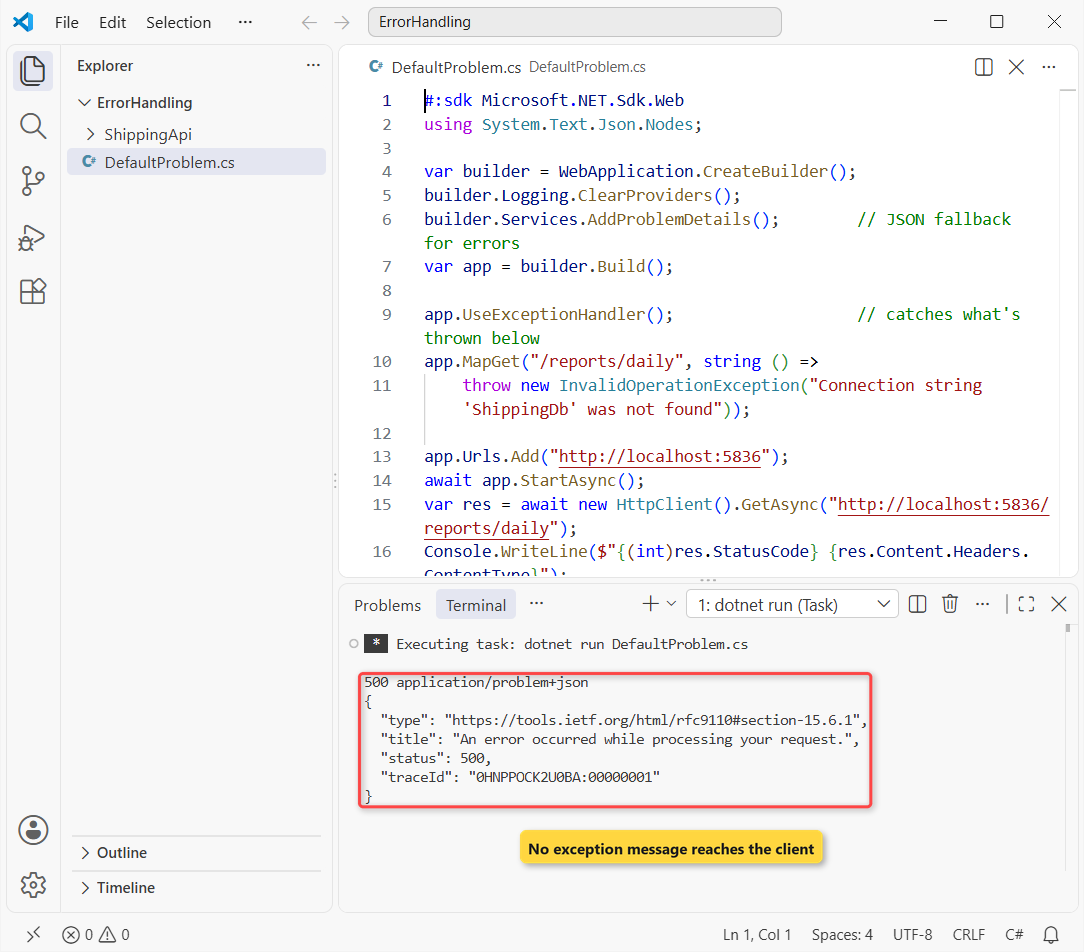
The client got a 500 with the application/problem+json content type and four fields: type, title, status and traceId. The exception message about ShippingDb never left the server.
How does this work?
UseExceptionHandler() adds the exception handler middleware. It wraps everything registered after it, the same way a try-catch block in C# wraps the code inside it, so it has to go first in the pipeline.
When the endpoint threw, the middleware caught it, cleared the response and set 500. With no handler of its own, it asked the IProblemDetailsService that AddProblemDetails() registered to write the body.
The traceId lets you find the request in your logs. My ASP.NET Core middleware guide shows why the order of these calls matters.
Important: UseExceptionHandler() with no arguments needs AddProblemDetails(), a handler path or a lambda. I removed the AddProblemDetails line and the app crashed on startup with this:
Unhandled exception. System.InvalidOperationException: An error occurred when configuring the exception handler middleware. Either the 'ExceptionHandlingPath' or the 'ExceptionHandler' property must be set in 'UseExceptionHandler()'. Alternatively, set one of the aforementioned properties in 'Startup.ConfigureServices' as follows: 'services.AddExceptionHandler(options => { ... });' or configure to generate a 'ProblemDetails' response in 'service.AddProblemDetails()'.Method 2: Write an IExceptionHandler for Custom Status Codes
Method 1 returns 500 for everything. As soon as you want a timeout to be a 503, or a friendlier title, write a class that implements IExceptionHandler. It’s been in ASP.NET Core since .NET 8.
The interface has one method, TryHandleAsync. Return true when you wrote the response, false to pass the exception on. Here’s the catch-all handler for the same sample project (Handlers/GlobalExceptionHandler.cs):
using Microsoft.AspNetCore.Diagnostics;

namespace ShippingApi.Handlers;

// The catch-all: registered last, so it only sees what the specific handlers passed on.
public class GlobalExceptionHandler(IProblemDetailsService problemDetails, ILogger<GlobalExceptionHandler> logger)
    : IExceptionHandler
{
    public async ValueTask<bool> TryHandleAsync(
        HttpContext httpContext, Exception exception, CancellationToken cancellationToken)
    {
        logger.LogError(exception, "Unhandled exception on {Path}", httpContext.Request.Path);

        var (status, title) = exception switch
        {
            TimeoutException => (StatusCodes.Status503ServiceUnavailable, "A carrier service is not responding"),
            _ => (StatusCodes.Status500InternalServerError, "Something went wrong on our side")
        };

        httpContext.Response.StatusCode = status;
        return await problemDetails.TryWriteAsync(new ProblemDetailsContext
        {
            HttpContext = httpContext,
            Exception = exception,
            ProblemDetails = { Title = title }   // no exception.Message: never leak internals to callers
        });
    }
}
Register it with builder.Services.AddExceptionHandler<GlobalExceptionHandler>(), and keep AddProblemDetails() and app.UseExceptionHandler() from Method 1. GET /rates/78701 now returns 503 instead of 500:
curl.exe -i http://localhost:5836/rates/78701HTTP/1.1 503 Service Unavailable
Content-Type: application/problem+json
{
"type": "https://tools.ietf.org/html/rfc9110#section-15.6.4",
"title": "A carrier service is not responding",
"status": 503,
"instance": "GET /rates/78701",
"traceId": "00-a49eb8b88ec79bce096c59e9b0dea8db-04477027ff162032-00"
}How does this work?
The middleware calls each registered handler until one returns true. This one maps the exception type to a status code with a switch expression; pattern matching in C# keeps that mapping to one line per exception.
It sets the status code, then calls TryWriteAsync so the body uses the same problem details format, with type, status and traceId filled in for you. Handlers are singletons, so only inject singleton-safe services; my DI lifetimes guide explains why.
The title is fixed text on purpose. GET /reports/daily returned “Something went wrong on our side”, not the connection string message, because anything in an exception message can end up in front of a stranger.
Note: in .NET 10 the middleware no longer logs exceptions your handler returned true for. My server log had 0 lines from ExceptionHandlerMiddleware and only the handler’s own entry:
fail: ShippingApi.Handlers.GlobalExceptionHandler[0]
      Unhandled exception on /rates/78701
      System.TimeoutException: Carrier rate service did not respond for ZIP 78701
         at Program.<>c.<<Main>$>b__0_3(String zip) in C:\DotNetDemo\ErrorHandling\ShippingApi\Program.cs:line 24
That’s why the handler calls logger.LogError itself. To get the .NET 8 and 9 behavior back, use the options overload; with it, the same two failing requests wrote 2 extra middleware log entries. It’s one of the quieter changes in .NET 10.
app.UseExceptionHandler(new ExceptionHandlerOptions
{
    SuppressDiagnosticsCallback = context => false   // log handled exceptions too (the .NET 8/9 behavior)
});
Method 3: Chain Multiple IExceptionHandler Classes in Registration Order
One giant switch works, but you’ll find separate handlers easier to test and reuse. Give each exception type its own class.
Same project, now with a handler for missing shipments (Handlers/NotFoundExceptionHandler.cs):
using Microsoft.AspNetCore.Diagnostics;

namespace ShippingApi.Handlers;

public class NotFoundExceptionHandler(IProblemDetailsService problemDetails) : IExceptionHandler
{
    public async ValueTask<bool> TryHandleAsync(
        HttpContext httpContext, Exception exception, CancellationToken cancellationToken)
    {
        if (exception is not ShipmentNotFoundException notFound)
            return false;                       // not mine: the next handler gets a turn

        httpContext.Response.StatusCode = StatusCodes.Status404NotFound;
        return await problemDetails.TryWriteAsync(new ProblemDetailsContext
        {
            HttpContext = httpContext,
            Exception = exception,
            ProblemDetails =
            {
                Title = "Shipment not found",
                Detail = notFound.Message,
                Extensions = { ["shipmentId"] = notFound.ShipmentId }
            }
        });
    }
}
And one for bad addresses (Handlers/ValidationExceptionHandler.cs). It returns HttpValidationProblemDetails, which adds the errors object ASP.NET Core’s own validation uses. The errors are a plain Dictionary in C# of field name to messages:
using Microsoft.AspNetCore.Diagnostics;

namespace ShippingApi.Handlers;

public class ValidationExceptionHandler(IProblemDetailsService problemDetails) : IExceptionHandler
{
    public async ValueTask<bool> TryHandleAsync(
        HttpContext httpContext, Exception exception, CancellationToken cancellationToken)
    {
        if (exception is not AddressValidationException invalid)
            return false;

        httpContext.Response.StatusCode = StatusCodes.Status400BadRequest;
        return await problemDetails.TryWriteAsync(new ProblemDetailsContext
        {
            HttpContext = httpContext,
            Exception = exception,
            ProblemDetails = new HttpValidationProblemDetails(
                new Dictionary<string, string[]> { [invalid.Field] = [invalid.Message] })
            {
                Title = "The shipping address is not valid"
            }
        });
    }
}
Here’s the full Program.cs. The specific handlers are registered first and the catch-all last:
using ShippingApi;
using ShippingApi.Handlers;

var builder = WebApplication.CreateBuilder(args);

builder.Services.AddProblemDetails(options =>
    options.CustomizeProblemDetails = context =>
        context.ProblemDetails.Instance = $"{context.HttpContext.Request.Method} {context.HttpContext.Request.Path}");

// Handlers run in registration order: specific ones first, the catch-all last
builder.Services.AddExceptionHandler<NotFoundExceptionHandler>();
builder.Services.AddExceptionHandler<ValidationExceptionHandler>();
builder.Services.AddExceptionHandler<GlobalExceptionHandler>();

var app = builder.Build();

app.UseExceptionHandler();   // first, so it wraps everything registered below it
app.UseStatusCodePages();    // ProblemDetails body for 4xx/5xx responses that have no body

app.MapGet("/shipments/{id:int}", (int id) => Shipments.Find(id));
app.MapPost("/shipments", (ShipmentRequest request) =>
    Results.Created("/shipments/1045", Shipments.Create(request)));
app.MapGet("/rates/{zip}", string (string zip) =>
    throw new TimeoutException($"Carrier rate service did not respond for ZIP {zip}"));
app.MapGet("/reports/daily", string () =>
    throw new InvalidOperationException("Connection string 'ShippingDb' was not found"));

app.Run();

record Shipment(int Id, string Customer, string City, string Status);
record ShipmentRequest(string Customer, string City, string Zip);

static class Shipments
{
    static readonly Shipment[] All =
    [
        new(1042, "Jenna Morales", "Austin, TX", "Delivered"),
        new(1043, "Tyler Brooks", "Columbus, OH", "In transit"),
        new(1044, "Rachel Kim", "Seattle, WA", "Label created"),
    ];

    public static Shipment Find(int id) =>
        All.FirstOrDefault(s => s.Id == id) ?? throw new ShipmentNotFoundException(id);

    public static Shipment Create(ShipmentRequest r) =>
        r.Zip.Length == 5 && r.Zip.All(char.IsDigit)
            ? new Shipment(1045, r.Customer, r.City, "Label created")
            : throw new AddressValidationException("zip", $"'{r.Zip}' is not a 5-digit ZIP code.");
}
The shipments are a C# record, and CustomizeProblemDetails stamps the method and path into instance on every error body.
With the API running, this test client sends one request per row of the sample table. It’s a plain HttpClient call each, and it reads title with System.Text.Json:
using System.Text;
using System.Text.Json;

var http = new HttpClient { BaseAddress = new Uri("http://localhost:5836") };

async Task Show(string label, HttpResponseMessage res)
{
    var type = res.Content.Headers.ContentType?.MediaType ?? "(no body)";
    var title = type == "application/problem+json"
        ? JsonDocument.Parse(await res.Content.ReadAsStringAsync()).RootElement.GetProperty("title").GetString()
        : type;
    Console.WriteLine($"{label,-22}{(int)res.StatusCode}  {title}");
}

await Show("GET /shipments/1043", await http.GetAsync("/shipments/1043"));
await Show("GET /shipments/2001", await http.GetAsync("/shipments/2001"));
var badZip = """{ "customer": "Rachel Kim", "city": "Seattle, WA", "zip": "981O1" }""";
await Show("POST /shipments", await http.PostAsync("/shipments",
    new StringContent(badZip, Encoding.UTF8, "application/json")));
await Show("GET /rates/78701", await http.GetAsync("/rates/78701"));
await Show("GET /reports/daily", await http.GetAsync("/reports/daily"));
await Show("GET /tracking", await http.GetAsync("/tracking"));
Output:
GET /shipments/1043   200  application/json
GET /shipments/2001   404  Shipment not found
POST /shipments       400  The shipping address is not valid
GET /rates/78701      503  A carrier service is not responding
GET /reports/daily    500  Something went wrong on our side
GET /tracking         404  Not Found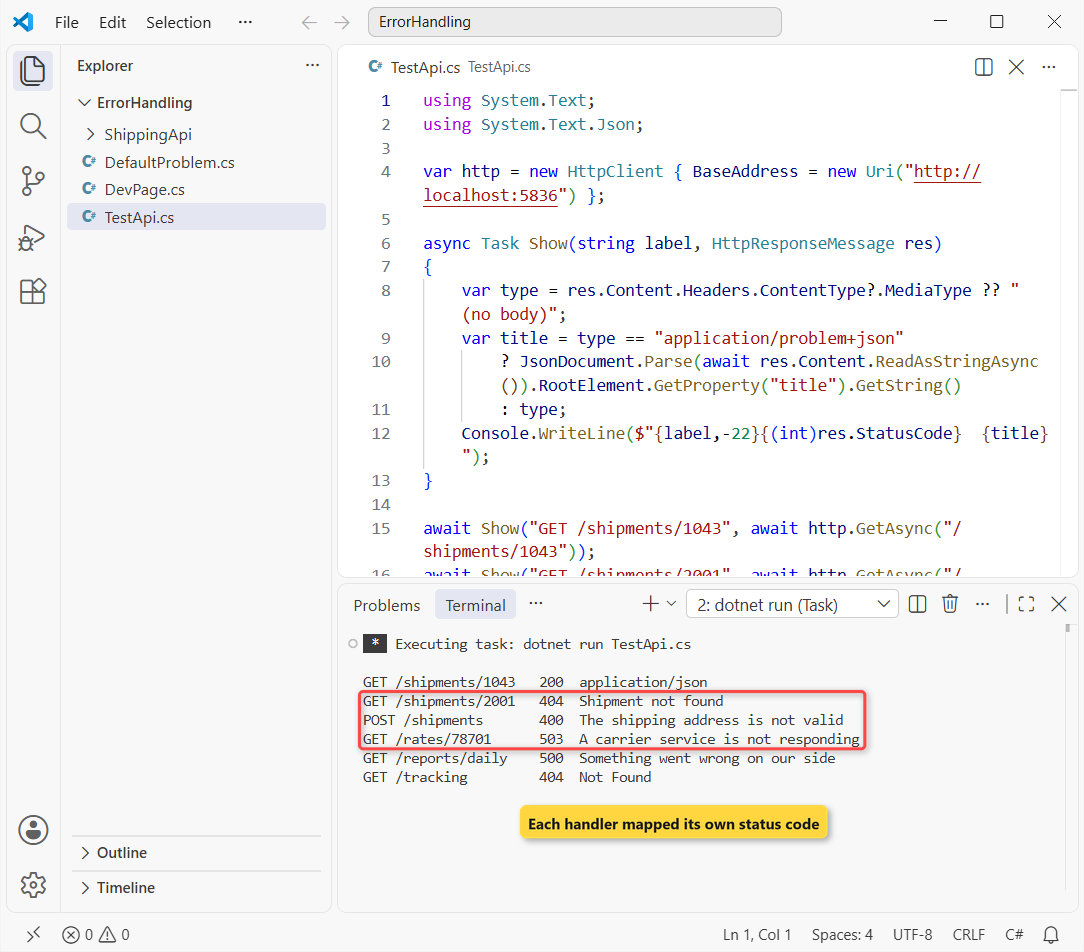
Every failure got its own status code: 404, 400, 503, 500 and 404. Here’s the 404 body for shipment 2001:
curl.exe -i http://localhost:5836/shipments/2001HTTP/1.1 404 Not Found
Content-Type: application/problem+json
{
"type": "https://tools.ietf.org/html/rfc9110#section-15.5.5",
"title": "Shipment not found",
"status": 404,
"detail": "Shipment 2001 was not found.",
"instance": "GET /shipments/2001",
"shipmentId": 2001,
"traceId": "00-fc9f4717a399b0fba753dfc79b71131c-f7242db055ced229-00"
}And the 400 for the bad ZIP code:
curl.exe -i -H "Content-Type: application/json" -d "{\"customer\":\"Rachel Kim\",\"city\":\"Seattle, WA\",\"zip\":\"981O1\"}" http://localhost:5836/shipmentsHTTP/1.1 400 Bad Request
Content-Type: application/problem+json
{
"type": "https://tools.ietf.org/html/rfc9110#section-15.5.1",
"title": "The shipping address is not valid",
"status": 400,
"instance": "POST /shipments",
"errors": {
"zip": [
"'981O1' is not a 5-digit ZIP code."
]
},
"traceId": "00-103901b8389d90769cd45c450b533701-4580d4279bc306cb-00"
}How does this work?
For shipment 2001, NotFoundExceptionHandler matched first and returned true, so the other two never ran. The shipmentId field came from Extensions.
For the bad ZIP, the not-found handler returned false, the validation handler matched, and the client got the zip key under errors. Only the timeout and the connection-string bug reached the catch-all.
What Happens When You Register the Exception Handlers in the Wrong Order?
The order of AddExceptionHandler calls is the order the middleware tries them. I moved the catch-all to the top of the same Program.cs and sent the same requests:
builder.Services.AddExceptionHandler<GlobalExceptionHandler>();
builder.Services.AddExceptionHandler<NotFoundExceptionHandler>();
builder.Services.AddExceptionHandler<ValidationExceptionHandler>();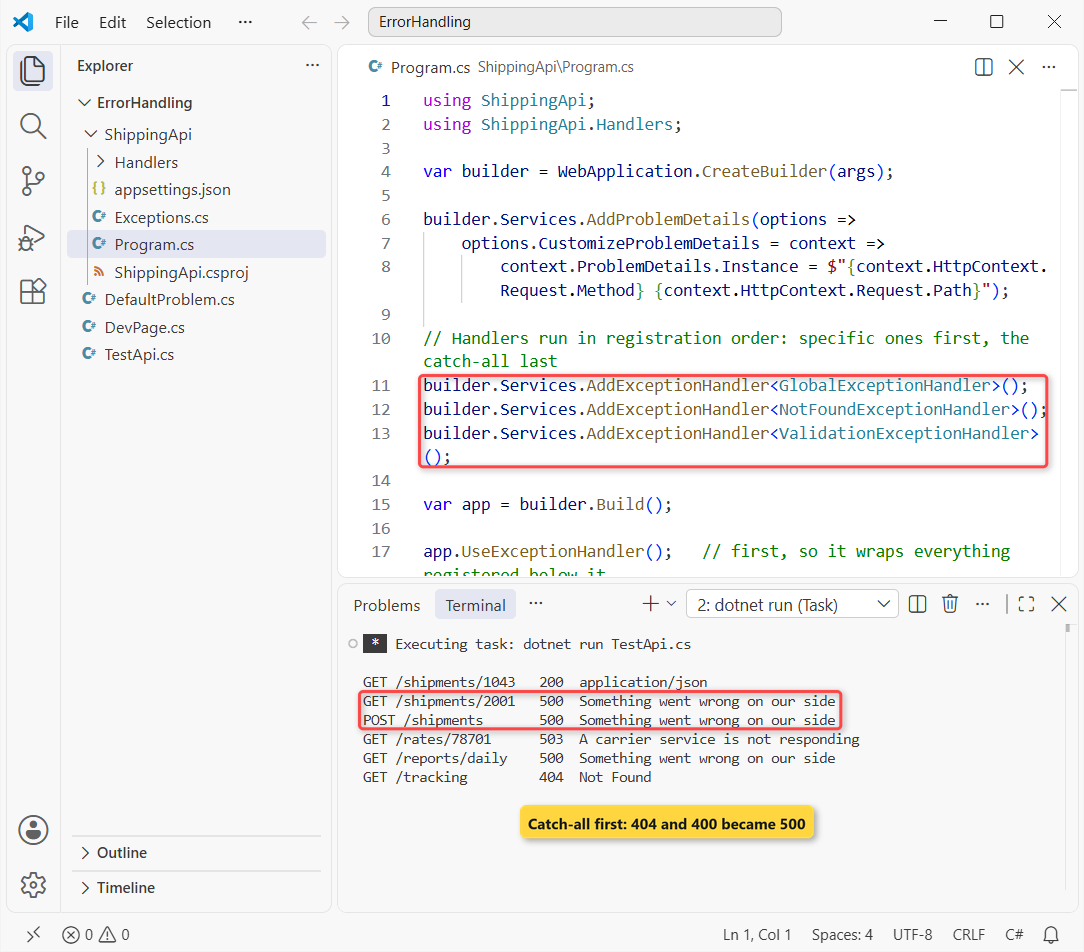
The missing shipment and the bad ZIP both came back 500 “Something went wrong on our side”. The timeout still got 503, because the catch-all maps it itself.
So here’s the catch: nothing fails at startup and nothing warns you. The catch-all returns true for everything, so the handlers after it are dead code. Always register it last.
Method 4: Status Code Pages for Errors That Don’t Throw
Some errors never throw. A request for a route that doesn’t exist, like GET /tracking, just gets a 404 from routing, and exception handlers never see it.
Same Program.cs, minus app.UseStatusCodePages(): GET /tracking returned 404 Not Found with Content-Length: 0. An empty body is hard on any client that expects JSON.
With app.UseStatusCodePages() back in, and AddProblemDetails() registered, the same request gets a problem details body:
HTTP/1.1 404 Not Found
Content-Type: application/problem+json

{
  "type": "https://tools.ietf.org/html/rfc9110#section-15.5.5",
  "title": "Not Found",
  "status": 404,
  "instance": "GET /tracking",
  "traceId": "00-3445082e4615fc6831ed4568194f812f-676416a4eb414ac7-00"
}
How does this work?
The status code pages middleware checks every 400-599 response on its way out. If the body is still empty, it writes one, and with AddProblemDetails registered that body is problem details, customized instance included.
It doesn’t catch exceptions, so it complements UseExceptionHandler rather than replacing it. Call it before your endpoints, right after the exception handler.
Note: for a page instead of JSON, UseStatusCodePagesWithReExecute("/StatusCode/{0}") re-runs the pipeline on that path and keeps the original status code.
Developer Exception Page in Development
While you’re building the API, you want the real exception, not “Something went wrong”. That’s the developer exception page’s job.
An app created with WebApplication.CreateBuilder turns it on automatically in the Development environment, so you don’t call UseDeveloperExceptionPage() yourself. This file-based app runs in Development with no UseExceptionHandler and calls the same /rates/78701:
#:sdk Microsoft.NET.Sdk.Web
using System.Text.Json;

var builder = WebApplication.CreateBuilder(new WebApplicationOptions { EnvironmentName = "Development" });
builder.Logging.ClearProviders();
builder.Services.AddProblemDetails();
var app = builder.Build();   // Development + no UseExceptionHandler: the developer exception page answers

app.MapGet("/rates/{zip}", string (string zip) =>
    throw new TimeoutException($"Carrier rate service did not respond for ZIP {zip}"));

app.Urls.Add("http://localhost:5836");
await app.StartAsync();
var res = await new HttpClient().GetAsync("http://localhost:5836/rates/78701");
var json = JsonDocument.Parse(await res.Content.ReadAsStringAsync()).RootElement;
Console.WriteLine($"{(int)res.StatusCode} {res.Content.Headers.ContentType}");
Console.WriteLine($"title:  {json.GetProperty("title")}");
Console.WriteLine($"detail: {json.GetProperty("detail")}");
foreach (var p in json.GetProperty("exception").EnumerateObject())
{
    var v = p.Value.ToString().Split('\n')[0].Trim();
    Console.WriteLine($"exception.{p.Name}: {(v.Length > 60 ? v[..60] + "..." : v)}");
}
await app.StopAsync();
Output:
500 application/problem+json
title:  System.TimeoutException
detail: Carrier rate service did not respond for ZIP 78701
exception.details: System.TimeoutException: Carrier rate service did not respon...
exception.headers: {"Host":["localhost:5836"]}
exception.path: /rates/78701
exception.endpoint: HTTP: GET /rates/{zip}
exception.routeValues: {"zip":"78701"}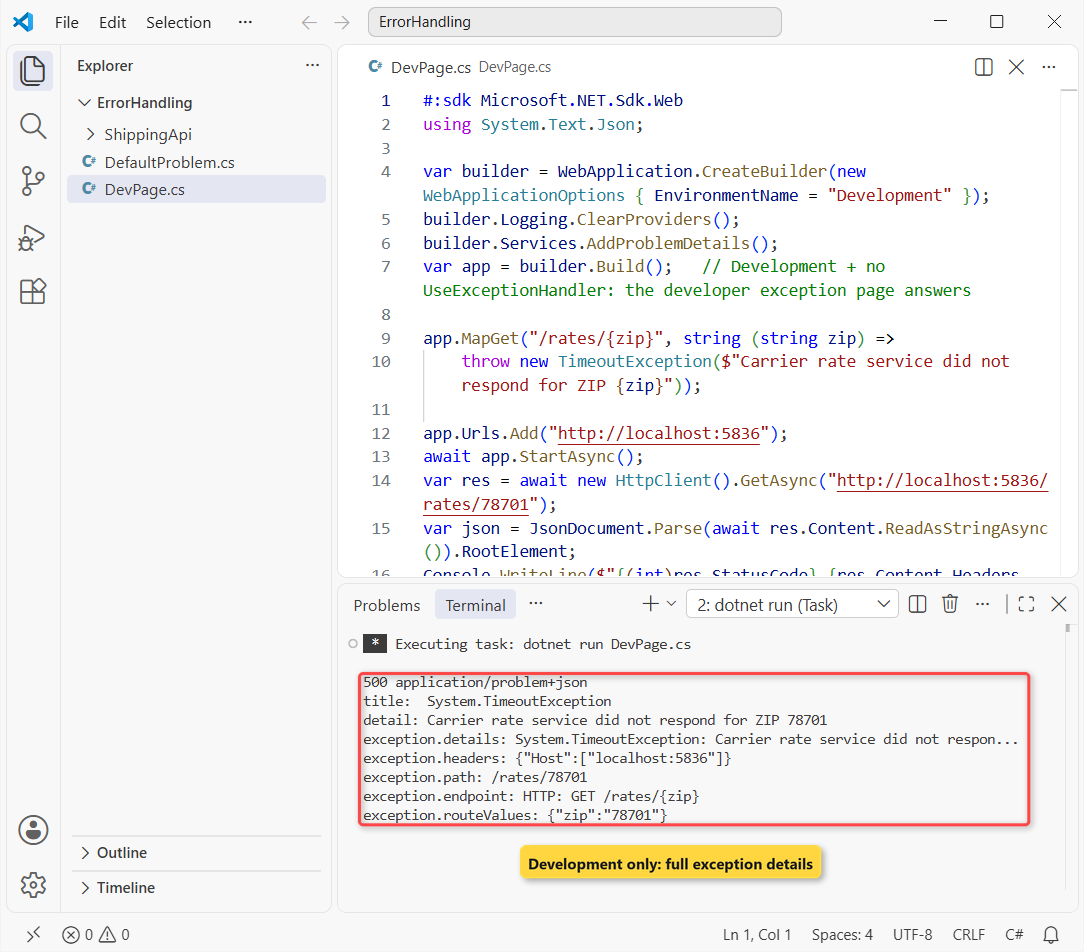
Because AddProblemDetails is registered and my HttpClient didn’t ask for HTML, the page answered with problem details. Title is the exception type, detail is its message, and an exception object adds the stack trace, headers, path, endpoint and route values.
Important: UseExceptionHandler wins when both are on. I ran the full ShippingApi with --environment Development, and GET /reports/daily still returned the handler’s “Something went wrong on our side”.
If you want the developer page while you build, wrap the call the way the templates do:
if (!app.Environment.IsDevelopment())
{
    app.UseExceptionHandler();
}
I keep it unconditional in APIs, because I’d rather test the same JSON my clients get. Either way, never turn the developer page on outside Development.
UseExceptionHandler vs Custom Middleware: Which Should You Use?
Before .NET 8, most global error handling was a custom middleware with a try-catch around await next(context). It still works, but here’s how the options compare:
| Approach | Use it when | Watch out for |
|---|---|---|
UseExceptionHandler + AddProblemDetails | A small API that only needs a clean 500 | Every error is a 500 |
IExceptionHandler classes (Recommended) | You map exception types to status codes | Registration order; handlers are singletons |
| Custom try-catch middleware | Older apps you haven’t moved yet | You must check Response.HasStarted and write the body yourself |
UseStatusCodePages | Empty 4xx/5xx responses, like unknown routes | Doesn’t catch exceptions |
| MVC exception filters | Errors from controller actions only | Miss middleware, routing and minimal API errors |
I’d pick IExceptionHandler classes for any new API, minimal or controller-based; my minimal API vs controllers comparison covers where each style fits. The built-in middleware already handles edge cases a hand-written one forgets, like a response that has already started.
Things to Keep in Mind
- Exception handler first. UseExceptionHandler only catches what runs after it, so register it before everything else.
- Catch-all last. In my test, registering the global handler first turned the 404 and the 400 into 500s.
- Set the status code yourself. A handler that returns true without writing a response produces a 404, which Microsoft’s docs warn about.
- Log in the handler. .NET 10 stops logging exceptions a handler returned true for, unless you set SuppressDiagnosticsCallback.
- Never echo exception messages. Use fixed titles in production; leave the details to the developer page in Development.
Once your errors are in shape, these are good next steps:
- All ASP.NET Core tutorials on AspDotnetHelp
- Build an ASP.NET Core Web API with EF Core
- Add JWT authentication to ASP.NET Core
- Document your API with OpenAPI and Scalar
Frequently Asked Questions
What is the best way to handle exceptions globally in ASP.NET Core?
Call AddProblemDetails() and app.UseExceptionHandler(), then register one or more IExceptionHandler classes with AddExceptionHandler<T>(). The handlers map exception types to status codes, and the response is written as application/problem+json.
What is the difference between UseExceptionHandler and custom exception middleware?
UseExceptionHandler is built in: it clears the response, sets the status code, calls your handlers and writes problem details. Custom try-catch middleware does the same job by hand, so you have to handle edge cases like a response that has already started.
In what order do multiple IExceptionHandler classes run?
In the order you register them. The first handler that returns true from TryHandleAsync ends the chain, so register specific handlers first and the catch-all last.
Do I still need try-catch blocks with a global exception handler?
Yes, where you can recover: retrying a call, using a default value or cleaning up. The global handler is for exceptions you can’t handle locally, so the client still gets a consistent error.
Why does UseExceptionHandler() throw an InvalidOperationException at startup?
Without arguments it needs something to fall back on. Add builder.Services.AddProblemDetails(), pass an error path such as “/Error”, or pass a lambda.
Does the developer exception page show in production?
No. WebApplication only enables it in the Development environment, and you shouldn’t turn it on anywhere else. See Handle errors in ASP.NET Core and Handle errors in ASP.NET Core APIs on Microsoft Learn.

Bijay Kumar is a renowned software engineer, accomplished author, and distinguished Microsoft Most Valuable Professional (MVP) specializing in SharePoint. With a rich professional background spanning over 15 years, Bijay has established himself as an authority in the field of information technology. He possesses unparalleled expertise in multiple programming languages and technologies such as ASP.NET, ASP.NET MVC, C#.NET, and SharePoint, which has enabled him to develop innovative and cutting-edge solutions for clients across the globe. Read more…