
Dispatch software for a Texas freight client starts every morning with zero orders and ends with a few hundred. Nobody knows the final number in advance, so a fixed-size C# array is the wrong container for that list.
In this tutorial, I’ll walk through List in C# the way I use it on .NET 10: create it, add and remove items, search, sort, loop, convert it, and fix the two exceptions everybody hits.
Quick answer: write List<string> cities = ["Austin", "Denver"];, then call cities.Add("Seattle"), cities.Remove("Denver") and cities.Sort(). The list grows and shrinks for you, and cities.Count always tells you how many items it holds.
What Is a List in C#?
List<T> in System.Collections.Generic is a strongly typed collection you can read by index and resize at run time. T is the item type, so List<int> only takes integers.
Under the hood it’s an array that gets replaced with a bigger one when it fills up, the same idea I covered in dynamic arrays in C#. It allows duplicates, and for reference types it accepts null.
I’ll use one running sample: a list of US cities a delivery route visits, plus a few customers like Jenna Moore and Ryan Carter later on.
How to Create and Initialize a List in C#
Since C# 12 my default is a collection expression in square brackets. The older new() and collection-initializer forms still work, and you’ll see them in most existing code:
string[] west = ["Portland", "Boise"];

List<string> cities = ["Austin", "Denver", "Seattle"];
List<int> zipCodes = new();
var states = new List<string> { "TX", "CO", "WA" };
List<string> route = [.. cities, .. west, "Phoenix"];
List<decimal> orders = new(500);

Console.WriteLine($"cities: {cities.Count} items");
Console.WriteLine($"zipCodes: {zipCodes.Count} items");
Console.WriteLine($"states: {string.Join(", ", states)}");
Console.WriteLine($"route: {string.Join(", ", route)}");
Console.WriteLine($"orders: Count {orders.Count}, Capacity {orders.Capacity}");
Output:
cities: 3 items
zipCodes: 0 items
states: TX, CO, WA
route: Austin, Denver, Seattle, Portland, Boise, Phoenix
orders: Count 0, Capacity 500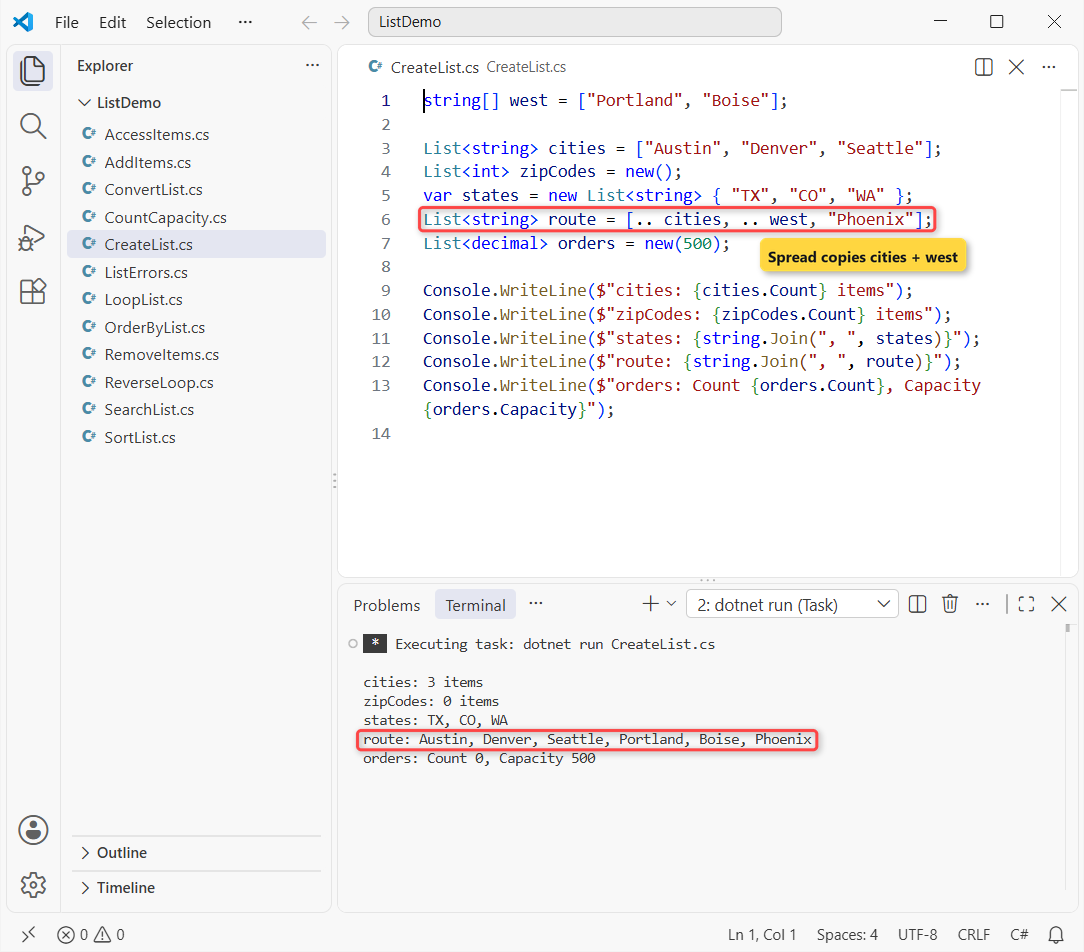
The .. spread copied the C# array of western cities into route, which ends up with six stops. new(500) pre-sizes the list: Count is 0, Capacity is 500.
Note: this is a .NET 10 file-based app, so dotnet run CreateList.cs runs it without a project. If you’d rather start from a template, see creating a console app in VS Code.
Add Items to a List: Add, AddRange and Insert
Add appends one item, AddRange appends a whole collection, and Insert / InsertRange push items in at an index and shift everything after it to the right:
List<string> cities = ["Austin", "Denver", "Seattle"];

cities.Add("Boston");
cities.AddRange(["Miami", "Chicago"]);
cities.Insert(0, "Atlanta");
cities.InsertRange(2, ["Dallas", "Houston"]);

Console.WriteLine(string.Join(", ", cities));
Console.WriteLine($"Count: {cities.Count}");
Output:
Atlanta, Austin, Dallas, Houston, Denver, Seattle, Boston, Miami, Chicago
Count: 9
Atlanta landed at index 0, Dallas and Houston at 2 and 3, and the list now holds 9 cities. Inserting near the front moves every later item, so on big lists I add at the end and sort afterwards.
Access and Update List Items by Index (Including ^1)
Indexes start at 0. The hat operator ^1 counts from the end, so you don’t need cities[cities.Count - 1] anymore. Assigning to an index replaces that item:
List<string> cities = ["Austin", "Denver", "Seattle", "Boston", "Miami"];

Console.WriteLine($"First: {cities[0]}");
Console.WriteLine($"Last: {cities[^1]}");
Console.WriteLine($"Second to last: {cities[^2]}");

cities[1] = "Boulder";
Console.WriteLine($"After update: {string.Join(", ", cities)}");
Console.WriteLine($"GetRange(1, 3): {string.Join(", ", cities.GetRange(1, 3))}");
Console.WriteLine($"cities[1..3]: {string.Join(", ", cities[1..3])}");
Output:
First: Austin
Last: Miami
Second to last: Boston
After update: Austin, Boulder, Seattle, Boston, Miami
GetRange(1, 3): Boulder, Seattle, Boston
cities[1..3]: Boulder, Seattle
Both GetRange(1, 3) and the range [1..3] return a new list; the range stops before index 3, so it has two items. Index-from-end and ranges work the same way on arrays, as shown in reversing an array in C#.
Count vs Capacity: How a C# List Grows
Count is how many items you stored. Capacity is how many fit before the list has to allocate a bigger internal array. Watch it double:
List<int> orders = [];
int lastCapacity = -1;

for (int i = 1; i <= 20; i++)
{
    orders.Add(i);
    if (orders.Capacity != lastCapacity)
    {
        Console.WriteLine($"Count {orders.Count,2} -> Capacity {orders.Capacity}");
        lastCapacity = orders.Capacity;
    }
}

orders.TrimExcess();
Console.WriteLine($"After TrimExcess: Count {orders.Count}, Capacity {orders.Capacity}");
Output:
Count  1 -> Capacity 4
Count  5 -> Capacity 8
Count  9 -> Capacity 16
Count 17 -> Capacity 32
After TrimExcess: Count 20, Capacity 20
Capacity went 4, 8, 16, 32 while Count climbed to 20. TrimExcess() shrank it to 20 because more than 10% was unused. If you know the size up front, pass it to the constructor and skip the copies.
Remove Items from a List: Remove, RemoveAt and RemoveAll
Each method removes by a different rule, and two of them hand back a result you can check:
List<string> cities =
    ["Austin", "Denver", "Austin", "Boise", "Seattle", "Boston", "Miami"];
string Show() => string.Join(", ", cities);

bool removed = cities.Remove("Austin");
Console.WriteLine($"Remove: {removed} -> {Show()}");

cities.RemoveAt(0);
Console.WriteLine($"RemoveAt(0): {Show()}");

int gone = cities.RemoveAll(city => city.StartsWith('B'));
Console.WriteLine($"RemoveAll: {gone} removed -> {Show()}");

cities.RemoveRange(0, 1);
Console.WriteLine($"RemoveRange(0, 1): {Show()}");

Console.WriteLine($"Remove missing: {cities.Remove("Chicago")}");
cities.Clear();
Console.WriteLine($"Clear: Count {cities.Count}");
Output:
Remove: True -> Denver, Austin, Boise, Seattle, Boston, Miami
RemoveAt(0): Austin, Boise, Seattle, Boston, Miami
RemoveAll: 2 removed -> Austin, Seattle, Miami
RemoveRange(0, 1): Seattle, Miami
Remove missing: False
Clear: Count 0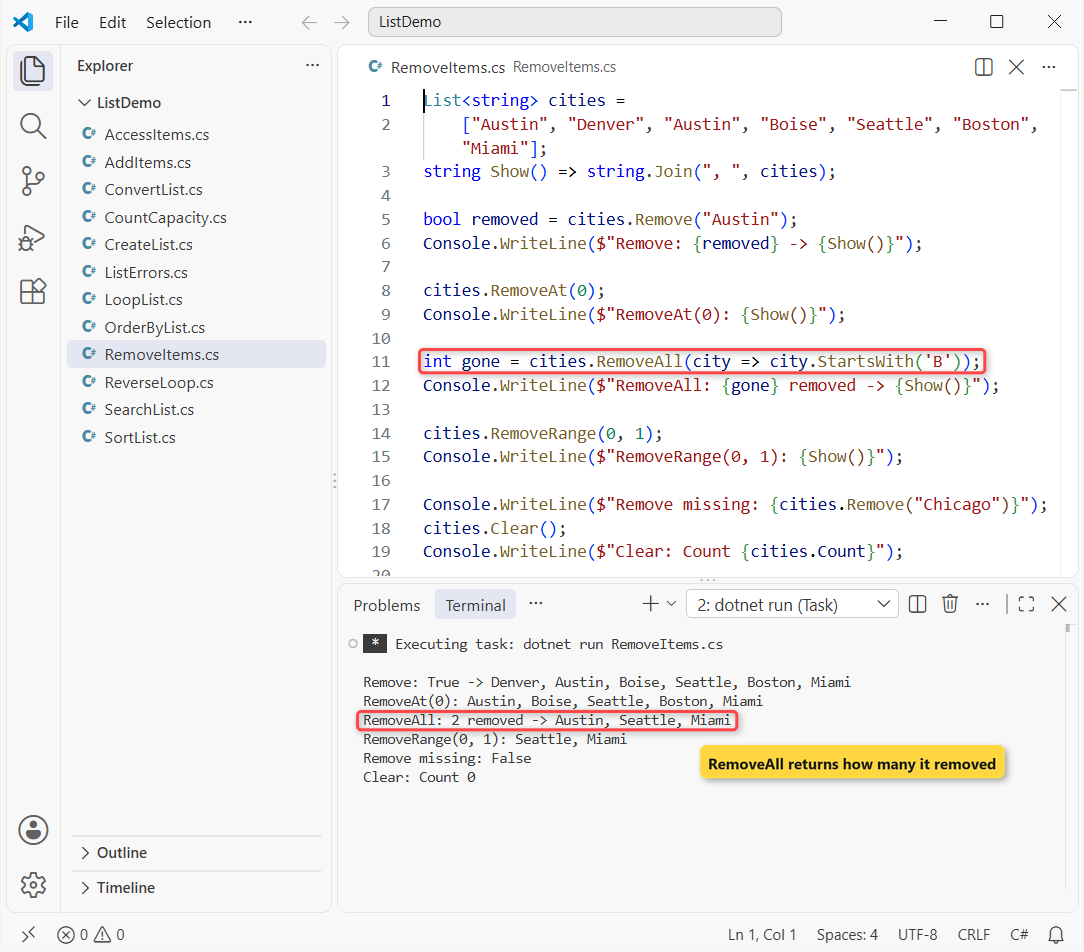
| Method | Removes | Returns |
|---|---|---|
Remove(item) | First matching item only | bool (false if not found) |
RemoveAt(index) | Item at that index | nothing |
RemoveAll(predicate) | Every item that matches | int count removed |
RemoveRange(index, count) | A block of items | nothing |
Clear() | Everything (Capacity stays) | nothing |
The second Austin survived Remove, and RemoveAll took out both Boise and Boston. Removing a missing city doesn’t throw; it just returns false.
Search a List: Contains, IndexOf, Find, FindAll and Exists
Same idea, now with a small Customer record so you can search by property, not just by value:
List<Customer> customers =
[
    new("Jenna Moore", "WA", 12),
    new("Ryan Carter", "TX", 3),
    new("Chloe Brady", "TX", 8),
    new("Zoe Ng", "NY", 5),
];
List<string> states = customers.ConvertAll(c => c.State);

Console.WriteLine($"Contains TX: {states.Contains("TX")}");
Console.WriteLine($"IndexOf TX: {states.IndexOf("TX")}, LastIndexOf TX: {states.LastIndexOf("TX")}");
Console.WriteLine($"IndexOf FL: {states.IndexOf("FL")}");
Console.WriteLine($"Contains record: {customers.Contains(new("Zoe Ng", "NY", 5))}");

Customer? firstTexan = customers.Find(c => c.State == "TX");
Console.WriteLine($"Find TX: {firstTexan?.Name}");
Console.WriteLine($"Find FL is null: {customers.Find(c => c.State == "FL") is null}");

List<Customer> texans = customers.FindAll(c => c.State == "TX");
Console.WriteLine($"FindAll TX: {string.Join(", ", texans.Select(c => c.Name))}");
Console.WriteLine($"FindIndex Zoe Ng: {customers.FindIndex(c => c.Name == "Zoe Ng")}");
Console.WriteLine($"Exists 10+ orders: {customers.Exists(c => c.Orders >= 10)}");

record Customer(string Name, string State, int Orders);
Output:
Contains TX: True
IndexOf TX: 1, LastIndexOf TX: 2
IndexOf FL: -1
Contains record: True
Find TX: Ryan Carter
Find FL is null: True
FindAll TX: Ryan Carter, Chloe Brady
FindIndex Zoe Ng: 3
Exists 10+ orders: True
IndexOf returns -1 when nothing matches, and Find returns null (the default value) for a reference type. Contains found the Zoe Ng record because records compare by value.
The predicates like c => c.State == "TX" are lambdas passed as delegates. For plain arrays, the matching techniques are in checking if a string array contains an element.
How Do You Sort a List in C#?
Call Sort(). It sorts in place using the default comparer, and the overloads take a comparer or a Comparison<T> lambda when the default order isn’t what you want:
List<int> orders = [12, 3, 8, 5];
orders.Sort();
Console.WriteLine($"Sort(): {string.Join(", ", orders)}");
orders.Reverse();
Console.WriteLine($"Reverse(): {string.Join(", ", orders)}");

List<string> cities = ["Seattle", "austin", "Denver", "Boston"];
cities.Sort(StringComparer.Ordinal);
Console.WriteLine($"Ordinal: {string.Join(", ", cities)}");
cities.Sort(StringComparer.OrdinalIgnoreCase);
Console.WriteLine($"IgnoreCase: {string.Join(", ", cities)}");

List<Customer> customers =
    [new("Jenna Moore", 12), new("Ryan Carter", 3), new("Chloe Brady", 8)];
customers.Sort((x, y) => y.Orders.CompareTo(x.Orders));
Console.WriteLine($"Most orders first: {customers[0].Name}");

record Customer(string Name, int Orders);
Output:
Sort(): 3, 5, 8, 12
Reverse(): 12, 8, 5, 3
Ordinal: Boston, Denver, Seattle, austin
IgnoreCase: austin, Boston, Denver, Seattle
Most orders first: Jenna Moore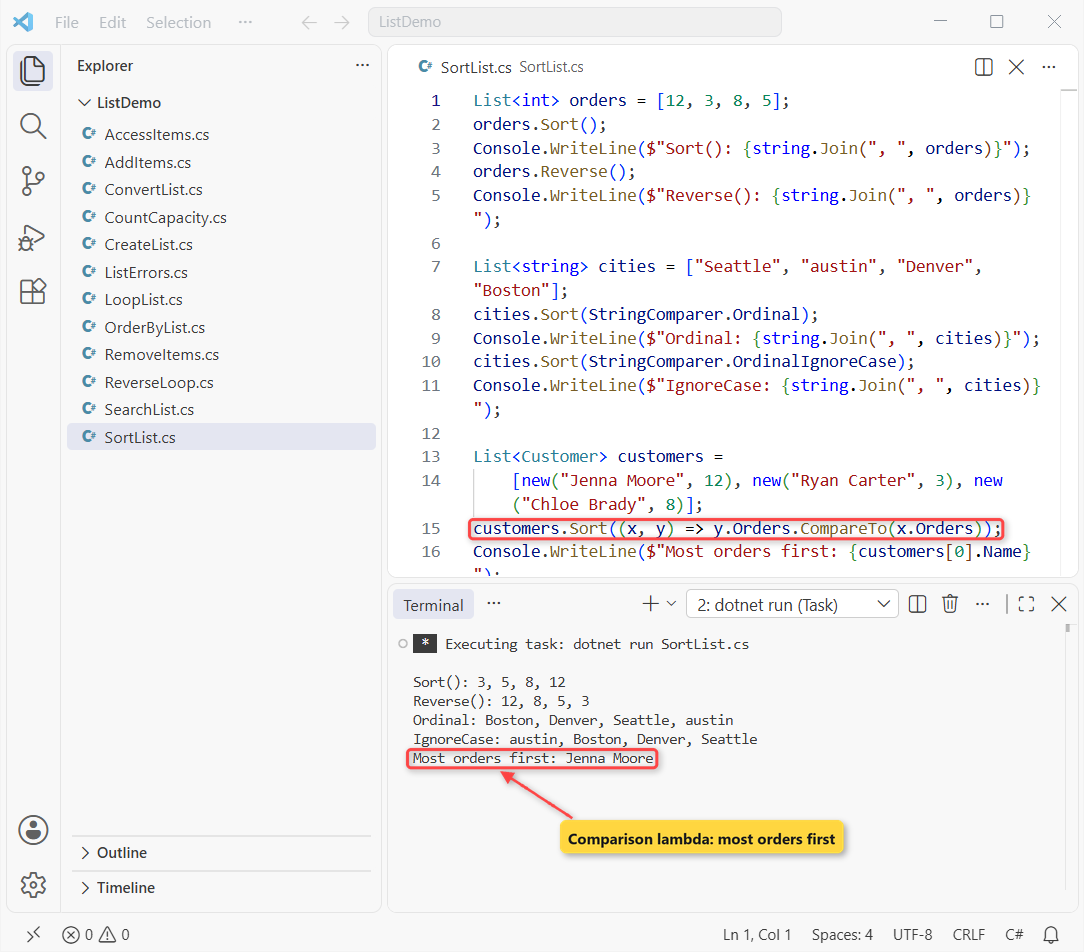
Ordinal puts “austin” last because lowercase letters sort after uppercase; OrdinalIgnoreCase fixes that. The lambda sorted customers by orders, highest first, so Jenna Moore comes out on top.
Important: List.Sort is an unstable sort, so equal items can swap places. The array version behaves the same, see sorting an array in C#.
Sort a List with LINQ OrderBy and ThenBy
When I need a stable sort, several keys, or the original order kept intact, I use LINQ instead:
List<Customer> customers =
[
    new("Jenna Moore", "WA", 12),
    new("Ryan Carter", "TX", 3),
    new("Chloe Brady", "TX", 8),
    new("Zoe Ng", "NY", 5),
];

List<Customer> sorted = customers
    .OrderBy(c => c.State)
    .ThenByDescending(c => c.Orders)
    .ToList();

foreach (var c in sorted)
    Console.WriteLine($"{c.State}  {c.Name,-12} {c.Orders,3}");

Console.WriteLine($"Original list still starts with: {customers[0].Name}");

record Customer(string Name, string State, int Orders);
Output:
NY  Zoe Ng         5
TX  Chloe Brady    8
TX  Ryan Carter    3
WA  Jenna Moore   12
Original list still starts with: Jenna Moore
New York comes first, the two Texas customers are ordered by orders descending, and customers itself didn’t change.
Loop Through a List in C#
Use a foreach loop when you only read items, a for loop when you need the index, and ForEach for a one-line action:
List<string> cities = ["Austin", "Denver", "Seattle"];

foreach (string city in cities)
    Console.Write($"{city} ");
Console.WriteLine();

for (int i = 0; i < cities.Count; i++)
    Console.WriteLine($"{i}: {cities[i]}");

cities.ForEach(city => Console.Write($"{city.ToUpperInvariant()} "));
Console.WriteLine();
Output:
Austin Denver Seattle
0: Austin
1: Denver
2: Seattle
AUSTIN DENVER SEATTLE
All three print the same three cities. Keep ForEach for short side effects; a plain loop is easier to debug.
Convert a List to an Array, a String or a Dictionary
These are the conversions I reach for most often:
List<string> cities = ["Austin", "Denver", "Seattle"];

string[] array = cities.ToArray();
string csv = string.Join(", ", cities);
List<string> fromArray = [.. array, "Boston"];
Dictionary<string, int> lengths = cities.ToDictionary(c => c, c => c.Length);
IReadOnlyList<string> readOnly = cities.AsReadOnly();

Console.WriteLine($"Array: {array.GetType().Name}, Length {array.Length}");
Console.WriteLine($"CSV: {csv}");
Console.WriteLine($"Back to a list: {fromArray.Count} items");
Console.WriteLine($"Denver has {lengths["Denver"]} letters");
Console.WriteLine($"Read-only wrapper: {readOnly.GetType().Name}");
Output:
Array: String[], Length 3
CSV: Austin, Denver, Seattle
Back to a list: 4 items
Denver has 6 letters
Read-only wrapper: ReadOnlyCollection`1
ToArray() copies the items, so changing the array later won’t touch the list. AsReadOnly() is a wrapper, not a copy, so callers see later changes but can’t make them.
Joining with a separator has a few more options, covered in converting a list to a comma-separated string. For key-based lookups, a Dictionary in C# beats searching a list every time.
List vs Array vs ArrayList in C#
Here’s how I choose between the three:
| Array (T[]) | List<T> | ArrayList | |
|---|---|---|---|
| Size | Fixed when created | Grows and shrinks | Grows and shrinks |
| Type safety | Typed | Typed | Stores object |
| Item count | Length | Count | Count |
| Add / remove | No | Yes | Yes |
| Boxing for int, decimal | No | No | Yes |
| Use it for | Fixed data, hot loops | Almost everything | Legacy code only |
ArrayList predates generics and boxes every value type, as explained in boxing and unboxing in C#. My notes on ArrayList in C# show how to migrate it.
Common List Errors and How to Fix Them
These two exceptions account for nearly every List bug I’ve debugged. Both are in one file:
List<string> cities = ["Austin", "Denver", "Boise", "Boston"];

try { Console.WriteLine(cities[4]); }
catch (ArgumentOutOfRangeException ex) { Console.WriteLine(ex.Message); }

try
{
    foreach (var city in cities)
        if (city.StartsWith('B')) cities.Remove(city);
}
catch (InvalidOperationException ex) { Console.WriteLine(ex.Message); }
Console.WriteLine($"Half done: {string.Join(", ", cities)}");

cities.RemoveAll(city => city.StartsWith('B'));
Console.WriteLine($"Fixed: {string.Join(", ", cities)}");
Output:
Index was out of range. Must be non-negative and less than the size of the collection. (Parameter 'index')
Collection was modified; enumeration operation may not execute.
Half done: Austin, Denver, Boston
Fixed: Austin, Denver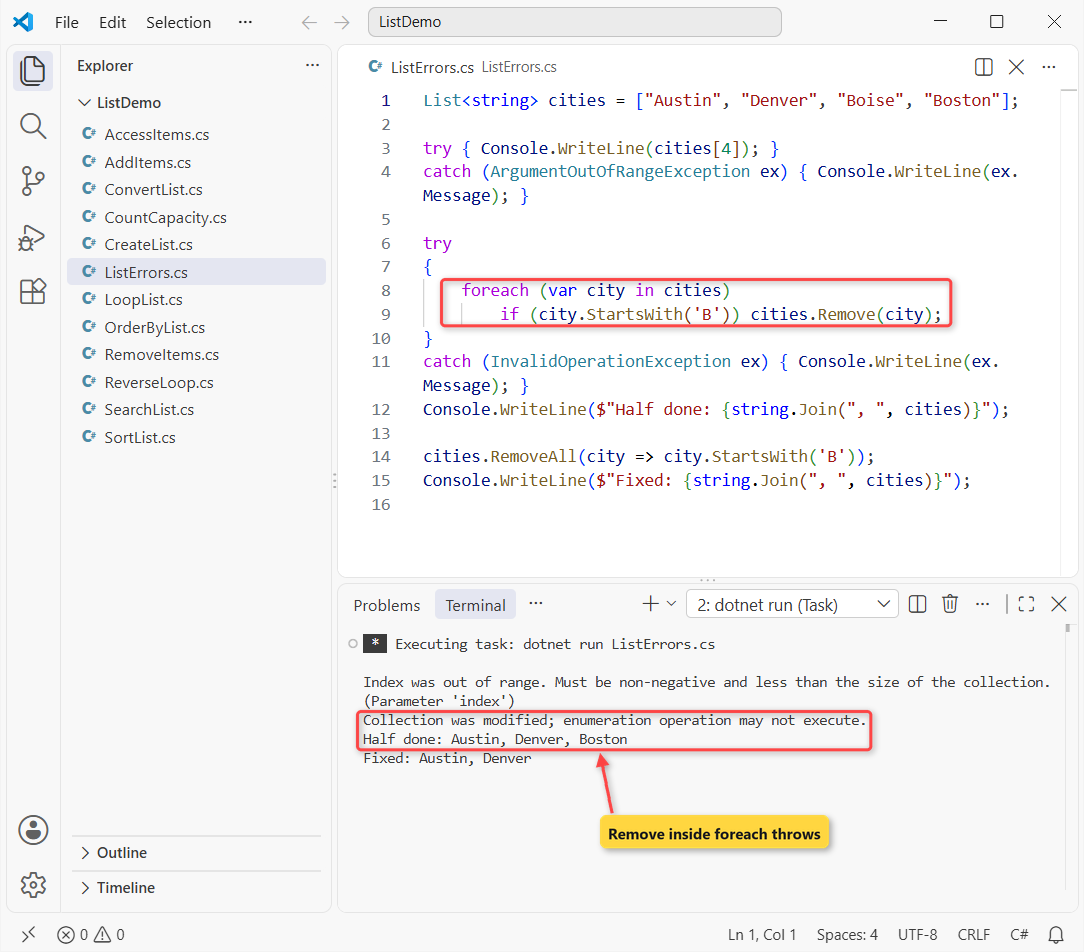
Index 4 throws ArgumentOutOfRangeException because the last valid index is Count - 1. Wrap risky reads in try-catch in C# only when the index comes from user input; otherwise check it first.
The foreach removed Boise and then threw InvalidOperationException, leaving the list half changed. Use RemoveAll, or loop backward with an index:
List<string> cities = ["Austin", "Denver", "Boise", "Boston"];

for (int i = cities.Count - 1; i >= 0; i--)
    if (cities[i].StartsWith('B')) cities.RemoveAt(i);

Console.WriteLine(string.Join(", ", cities));
Output:
Austin, DenverGoing from the end means a removal never shifts an item you haven’t visited yet.
Which List Method Should You Use?
Create lists with [...], add with Add/AddRange, remove in bulk with RemoveAll, search with Find/Exists, and sort in place with Sort or into a new list with OrderBy.
Ready for the next C# collection? Start with one of these:
- Look up values by key with a Hashtable
- Return several values at once with tuples
- Fill a list with random numbers that don’t repeat
- Process a list until a condition changes with while
Frequently Asked Questions
How do I check if a List is empty in C#?
Check list.Count == 0, or use the list pattern list is []. If the variable itself can be null, test list is null or [] or list?.Count is null or 0.
What is the difference between Count and Capacity?
Count is the number of items in the list. Capacity is how many items the internal array can hold before the list allocates a bigger one. Capacity is always greater than or equal to Count.
Is List<T> thread-safe?
No. Several threads can read a List at the same time, but writes need a lock. For concurrent writes, use a collection from System.Collections.Concurrent such as ConcurrentBag or ConcurrentQueue.
Can a C# List hold duplicate or null values?
Yes. List<T> allows duplicates and accepts null for reference types. If items must be unique, use a HashSet<T> instead. Details are on the List<T> class page on Microsoft Learn.
Which C# version added collection expressions for lists?
Collection expressions like ["Austin", "Denver"] and the .. spread element arrived in C# 12 (.NET 8). See collection expressions on Microsoft Learn.
How do I remove duplicates from a List?
Call list.Distinct().ToList() to get a new list with the first occurrence of each value, or build a HashSet<T> from the list when order doesn’t matter.

Bijay Kumar is a renowned software engineer, accomplished author, and distinguished Microsoft Most Valuable Professional (MVP) specializing in SharePoint. With a rich professional background spanning over 15 years, Bijay has established himself as an authority in the field of information technology. He possesses unparalleled expertise in multiple programming languages and technologies such as ASP.NET, ASP.NET MVC, C#.NET, and SharePoint, which has enabled him to develop innovative and cutting-edge solutions for clients across the globe. Read more…