
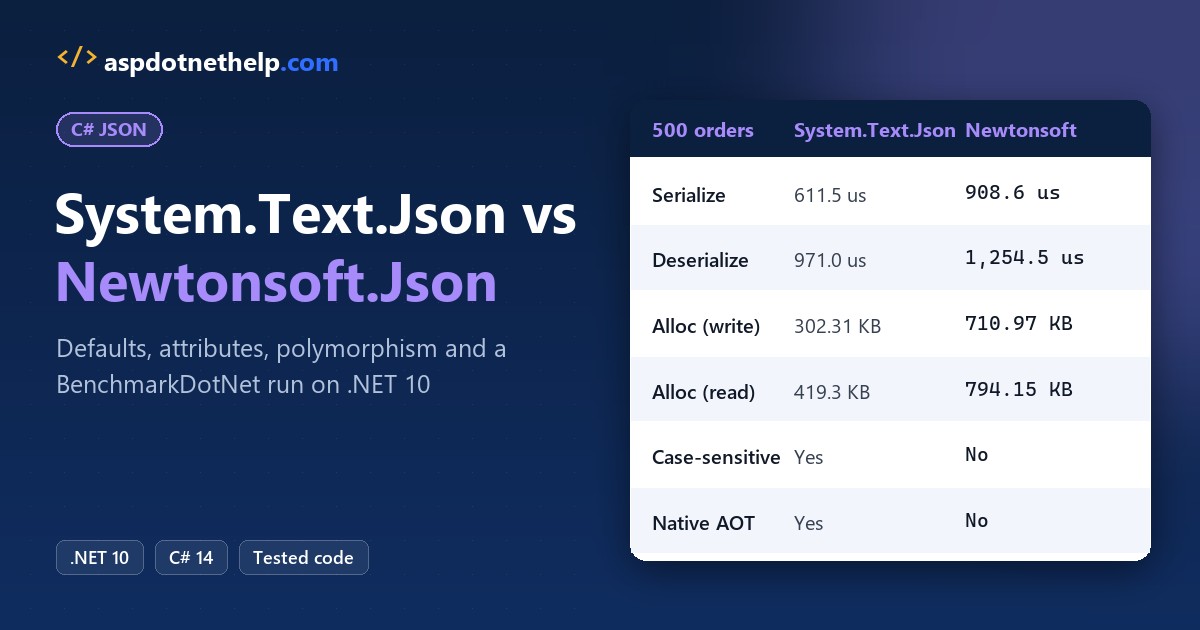
If you’re choosing a JSON library for a new project, use the built-in serializer for anything on .NET 8 or later: System.Text.Json. Keep Newtonsoft.Json when code depends on its loose parsing, TypeNameHandling or JSONPath. That’s my verdict on System.Text.Json vs Newtonsoft.Json in 2026.
I ran both on the same 500 US orders with BenchmarkDotNet 0.15.8. System.Text.Json serialized 1.5x faster and deserialized 1.3x faster, and allocated about half the memory. Below are the defaults that trip people up, each tested on .NET 10.
System.Text.Json vs Newtonsoft.Json at a Glance
System.Text.Json ships inside .NET, so there’s nothing to install. Newtonsoft.Json (Json.NET) is a NuGet package; the current stable version is 13.0.4, which I used for every test. For the basics, start with my System.Text.Json guide.
| Feature | System.Text.Json | Newtonsoft.Json |
|---|---|---|
| Install | Built into .NET (Core 3.0+) | NuGet package, 13.0.4 |
| Property name matching on read | Case-sensitive | Case-insensitive |
| Comments, trailing commas, quoted numbers | Throws (opt-in options) | Accepted |
Escapes ' and & on write | Yes (\u0027, \u0026) | No |
| Enums | Numbers; JsonStringEnumConverter | Numbers; StringEnumConverter |
| Rename attribute | [JsonPropertyName] | [JsonProperty] |
| Private setters | [JsonInclude] | [JsonProperty] |
| Reference loops | Throws; ReferenceHandler.IgnoreCycles | Throws; ReferenceLoopHandling.Ignore |
| Polymorphism | [JsonDerivedType] (.NET 7+) | TypeNameHandling |
| Dynamic JSON | JsonNode, JsonDocument | JObject + JSONPath |
| Native AOT / source generation | Yes | No |
| Speed in my benchmark (500 orders) | 611.5 us write, 971.0 us read | 908.6 us write, 1,254.5 us read |
The Sample Order Both Libraries Use
Every test runs on one Order.cs: an Austin, Texas order for $149.90 with two line items. Each demo pulls it in with #:include Order.cs, references the package with #:package Newtonsoft.Json@13.0.4, and runs as a .NET 10 file-based app:
public enum OrderStatus { Pending, Shipped, Delivered }

public record LineItem(string Sku, string Name, int Qty, decimal Price);

public class Order
{
    public int OrderId { get; set; }
    public string Customer { get; set; } = "";
    public string City { get; set; } = "";
    public string State { get; set; } = "";
    public decimal Total { get; set; }
    public OrderStatus Status { get; set; }
    public DateTime PlacedOn { get; set; }
    public List<LineItem> Items { get; set; } = [];

    public static Order Sample() => new()
    {
        OrderId = 1001, Customer = "Jenna Morales", City = "Austin", State = "TX",
        Total = 149.90m, Status = OrderStatus.Shipped,
        PlacedOn = new DateTime(2026, 11, 20, 9, 30, 0),
        Items = [new("BK-200", "Kids' Bike & Helmet", 1, 129.95m),
                 new("LT-10", "Bike Light", 1, 19.95m)]
    };
}
Both libraries have a class named JsonSerializer, so the demos alias the System.Text.Json one as Stj. Same story with JsonException: you’ll hit that name clash in any project that references both.
JSON Serialization Defaults: Escaping and Enums
Same order object, serialized with zero options. The first two lines are the order header, the last two are the bike line item:
#!/usr/bin/env dotnet
#:package Newtonsoft.Json@13.0.4
#:property PublishAot=false
#:include Order.cs
using Newtonsoft.Json;
using Stj = System.Text.Json.JsonSerializer;

var order = Order.Sample();
var head = new { order.OrderId, order.Status, order.Total };
Console.WriteLine("STJ: " + Stj.Serialize(head));
Console.WriteLine("NSJ: " + JsonConvert.SerializeObject(head));

LineItem bike = order.Items[0];
Console.WriteLine("STJ: " + Stj.Serialize(bike));
Console.WriteLine("NSJ: " + JsonConvert.SerializeObject(bike));
Output:
STJ: {"OrderId":1001,"Status":1,"Total":149.90}
NSJ: {"OrderId":1001,"Status":1,"Total":149.90}
STJ: {"Sku":"BK-200","Name":"Kids\u0027 Bike \u0026 Helmet","Qty":1,"Price":129.95}
NSJ: {"Sku":"BK-200","Name":"Kids' Bike & Helmet","Qty":1,"Price":129.95}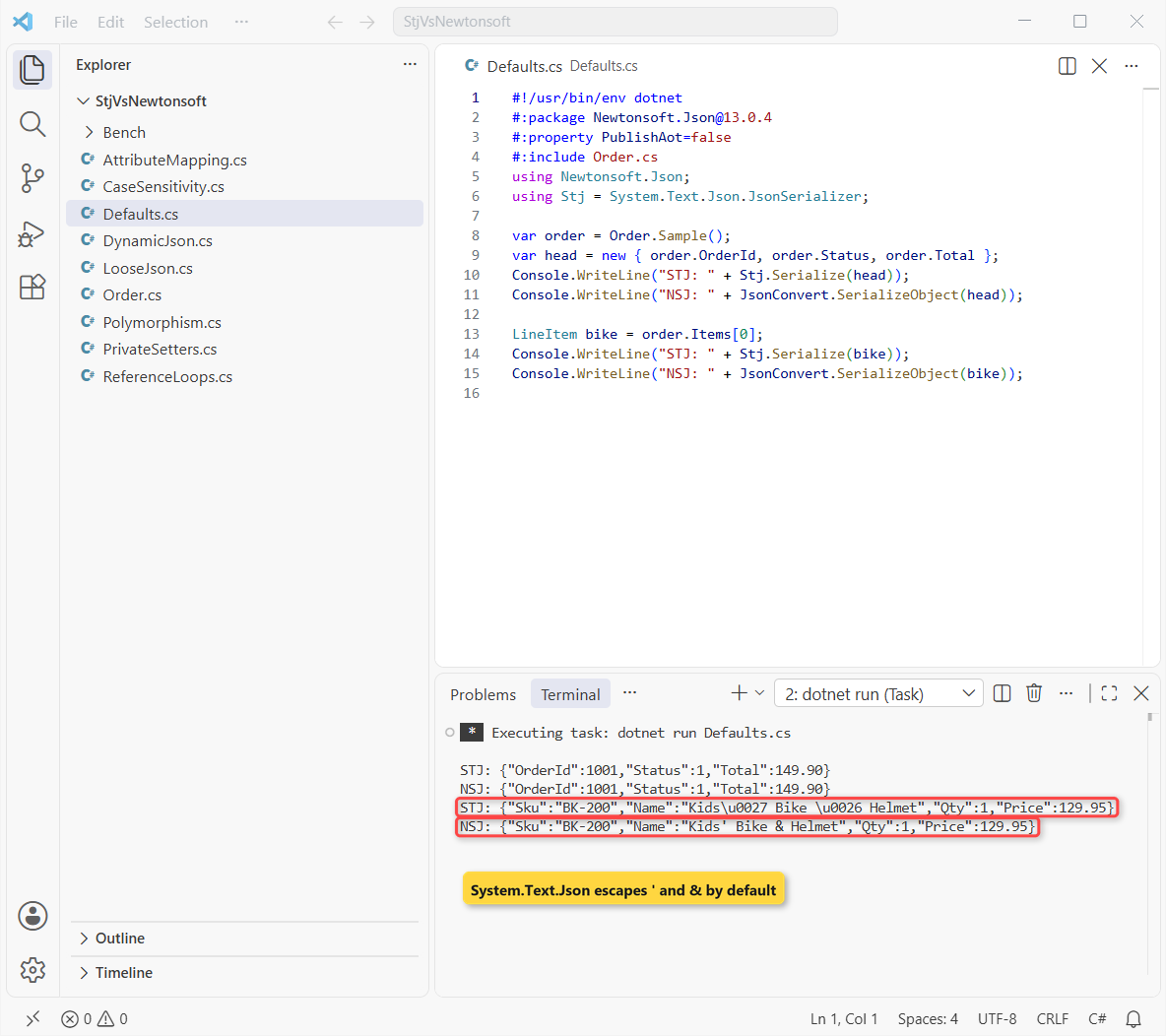
Property names stay PascalCase and the Shipped status comes out as 1 in both. The real difference is escaping: System.Text.Json wrote Kids\u0027 Bike \u0026 Helmet, while Newtonsoft.Json left the text alone.
That’s still valid JSON, and any parser reads it back correctly. If you want the readable form, my post on how to serialize JSON without escape characters shows the encoder settings.
Case Sensitivity: Why Does System.Text.Json Return Empty Properties?
This is the difference most people hit first. Same order data, now as the camelCase JSON a JavaScript front end or a public API sends:
#!/usr/bin/env dotnet
#:package Newtonsoft.Json@13.0.4
#:property PublishAot=false
#:include Order.cs
using Newtonsoft.Json;
using Stj = System.Text.Json.JsonSerializer;
using System.Text.Json;

string json = """{"orderId":1001,"customer":"Jenna Morales","total":149.90}""";

var a = Stj.Deserialize<Order>(json)!;
Console.WriteLine($"STJ default: {a.OrderId} '{a.Customer}' {a.Total}");

var b = JsonConvert.DeserializeObject<Order>(json)!;
Console.WriteLine($"Newtonsoft:  {b.OrderId} '{b.Customer}' {b.Total}");

var web = new JsonSerializerOptions(JsonSerializerDefaults.Web);
var w = Stj.Deserialize<Order>(json, web)!;
Console.WriteLine($"STJ Web:     {w.OrderId} '{w.Customer}' {w.Total}");
Console.WriteLine("STJ Web out: " + Stj.Serialize(new { w.OrderId, w.Total }, web));
Output:
STJ default: 0 '' 0
Newtonsoft:  1001 'Jenna Morales' 149.90
STJ Web:     1001 'Jenna Morales' 149.90
STJ Web out: {"orderId":1001,"total":149.90}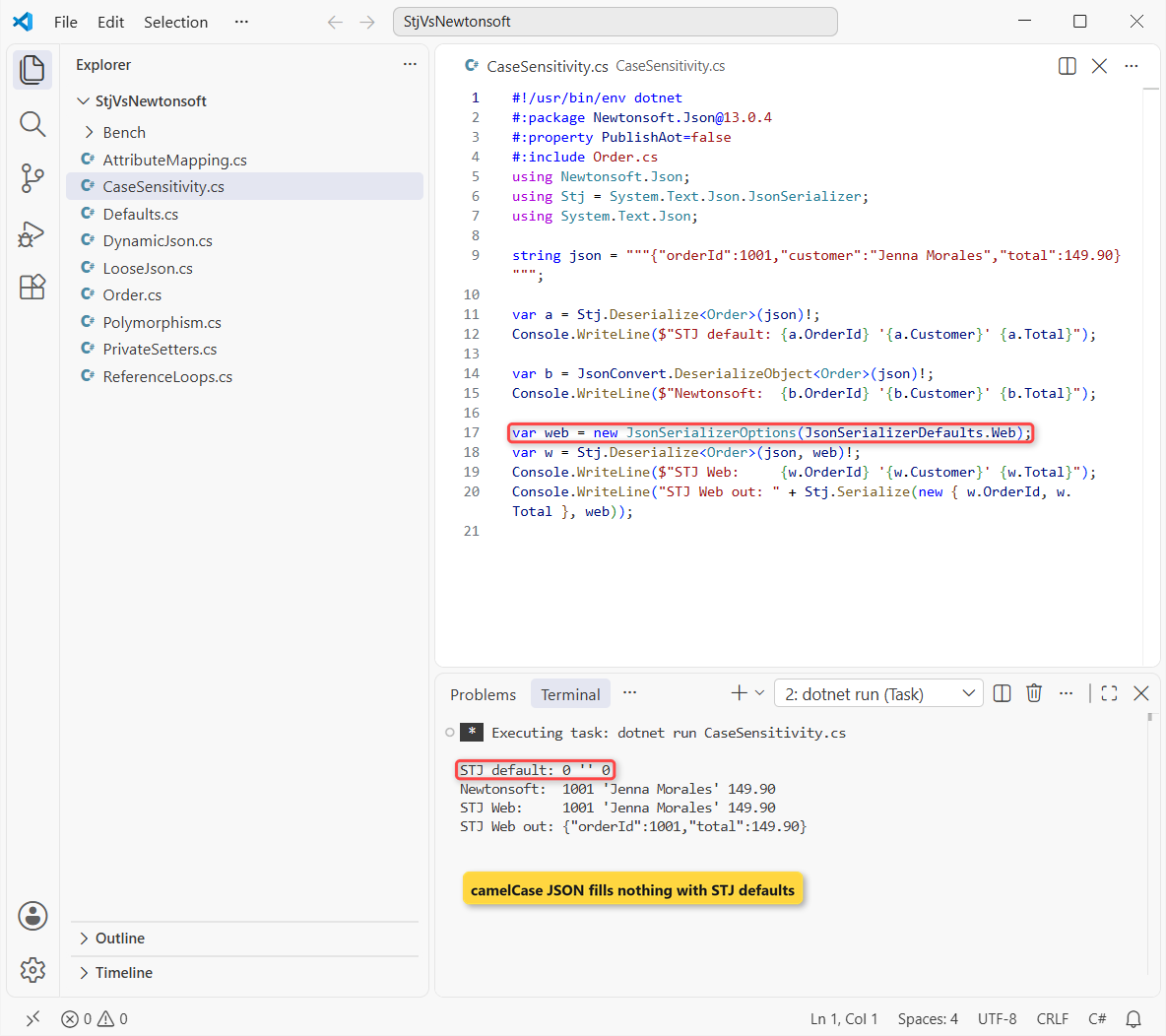
System.Text.Json matched nothing, so you get 0 and an empty customer with no error. Newtonsoft.Json matched names case-insensitively and filled all three. JsonSerializerDefaults.Web fixes it: case-insensitive reads, camelCase writes and quoted numbers allowed.
ASP.NET Core already uses those web defaults, so minimal APIs and controllers behave like Newtonsoft.Json here. So do GetFromJsonAsync and the other HttpClient JSON helpers. The trap is a bare JsonSerializer.Deserialize call.
JSON Comments, Trailing Commas and Quoted Numbers
Hand-edited config files and older APIs often send JSON that isn’t strictly valid. Same order data again, with a comment, a quoted total and a trailing comma:
#!/usr/bin/env dotnet
#:package Newtonsoft.Json@13.0.4
#:property PublishAot=false
#:include Order.cs
using Newtonsoft.Json;
using Stj = System.Text.Json.JsonSerializer;
using System.Text.Json;

string json = """
{
  "orderId": 1001, // Austin store
  "total": "149.90",
}
""";
try { Stj.Deserialize<Order>(json); }
catch (System.Text.Json.JsonException ex) { Console.WriteLine("STJ default: " + ex.Message.Split('.')[0]); }

var n = JsonConvert.DeserializeObject<Order>(json)!;
Console.WriteLine($"Newtonsoft:  {n.OrderId} {n.Total}");

var loose = new JsonSerializerOptions(JsonSerializerDefaults.Web)
{
    ReadCommentHandling = JsonCommentHandling.Skip,
    AllowTrailingCommas = true
};
var s = Stj.Deserialize<Order>(json, loose)!;
Console.WriteLine($"STJ loose:   {s.OrderId} {s.Total}");
Output:
STJ default: '/' is an invalid start of a property name
Newtonsoft:  1001 149.90
STJ loose:   1001 149.90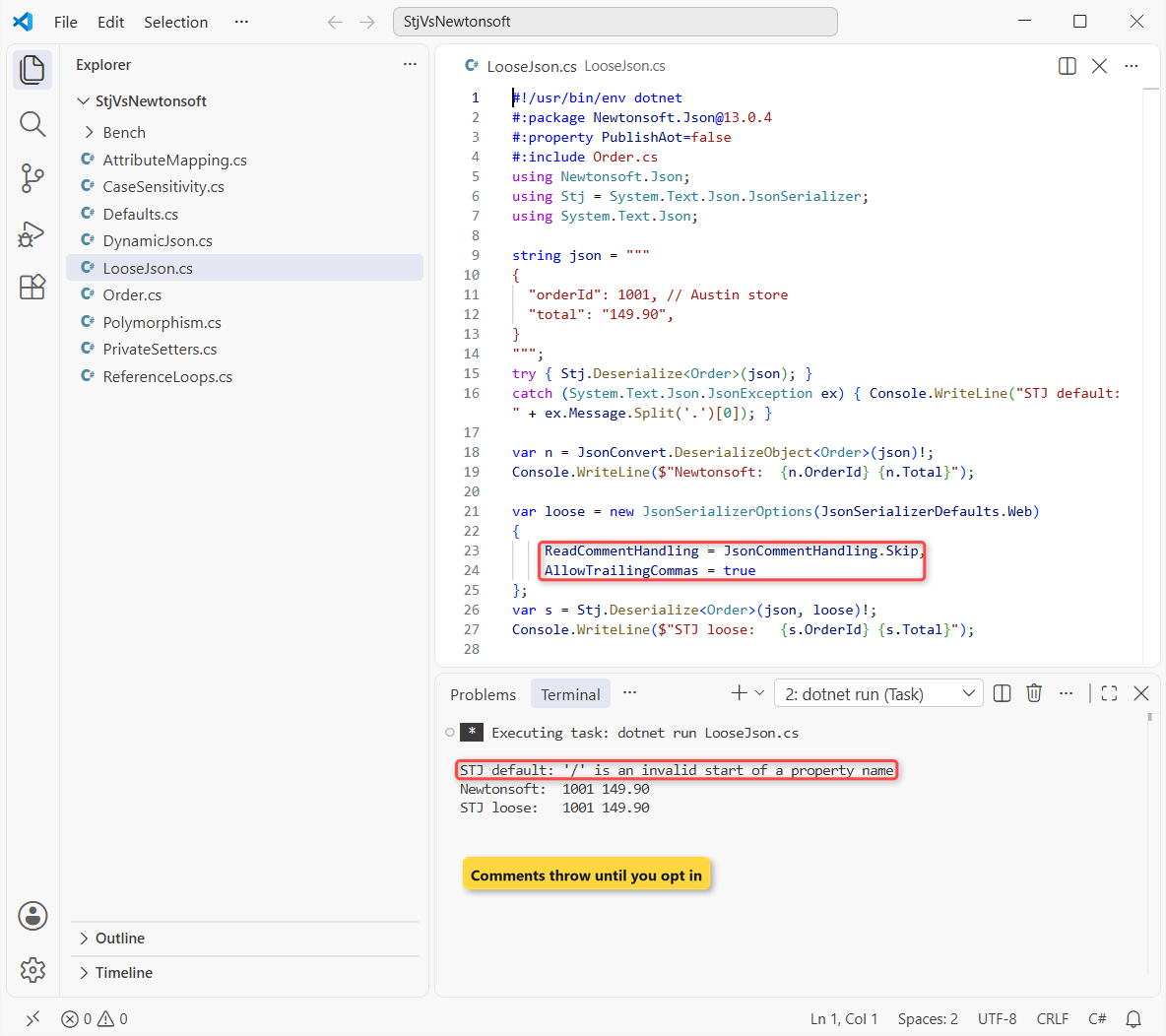
System.Text.Json stopped at the comment with “‘/’ is an invalid start of a property name”. Newtonsoft.Json read the order without complaint, and turned the string “149.90” into a decimal on its own.
To match it, set ReadCommentHandling = JsonCommentHandling.Skip and AllowTrailingCommas = true. The web defaults already add JsonNumberHandling.AllowReadingFromString for the quoted total.
[JsonPropertyName] vs [JsonProperty]: Attributes Don’t Cross Over
During a migration, it’s tempting to leave the old attributes in place. Here’s a shipment class with a mix of both, plus each library’s enum-as-string converter:
#!/usr/bin/env dotnet
#:package Newtonsoft.Json@13.0.4
#:property PublishAot=false
#:include Order.cs
using Newtonsoft.Json;
using Stj = System.Text.Json.JsonSerializer;
using STJ = System.Text.Json.Serialization;
using NSJ = Newtonsoft.Json;

var ship = new Shipment { TrackingNo = "1Z999AA10123456784", Status = OrderStatus.Shipped };
Console.WriteLine("STJ: " + Stj.Serialize(ship));
Console.WriteLine("NSJ: " + JsonConvert.SerializeObject(ship));

class Shipment
{
    [STJ.JsonPropertyName("tracking_no")]
    [NSJ.JsonProperty("tracking_no")]
    public string TrackingNo { get; set; } = "";

    [NSJ.JsonProperty("ship_status")]          // Newtonsoft attribute only
    [STJ.JsonConverter(typeof(STJ.JsonStringEnumConverter))]
    [NSJ.JsonConverter(typeof(NSJ.Converters.StringEnumConverter))]
    public OrderStatus Status { get; set; }
}
Output:
STJ: {"tracking_no":"1Z999AA10123456784","Status":"Shipped"}
NSJ: {"tracking_no":"1Z999AA10123456784","ship_status":"Shipped"}
Where both attributes exist, both libraries wrote tracking_no. But System.Text.Json ignored the Newtonsoft-only [JsonProperty("ship_status")] and wrote Status. Each library reads only its own attributes.
Enums work the same way: JsonStringEnumConverter for System.Text.Json and StringEnumConverter for Newtonsoft.Json both wrote “Shipped”. For more on how C# stores enum values, see my enum in C# tutorial.
Private Setters: [JsonInclude] vs [JsonProperty]
Lots of domain classes protect a total with a private setter. Same order number and total, read into two invoice classes:
#!/usr/bin/env dotnet
#:package Newtonsoft.Json@13.0.4
#:property PublishAot=false
#:include Order.cs
using Newtonsoft.Json;
using Stj = System.Text.Json.JsonSerializer;
using System.Text.Json.Serialization;

string json = """{"OrderId":1001,"Total":149.90}""";

var a = Stj.Deserialize<Invoice>(json)!;
var b = JsonConvert.DeserializeObject<Invoice>(json)!;
var c = Stj.Deserialize<TaggedInvoice>(json)!;
var d = JsonConvert.DeserializeObject<TaggedInvoice>(json)!;
Console.WriteLine($"No attribute    STJ: {a.Total}  NSJ: {b.Total}");
Console.WriteLine($"With attributes STJ: {c.Total}  NSJ: {d.Total}");

class Invoice
{
    public int OrderId { get; set; }
    public decimal Total { get; private set; }
}
class TaggedInvoice
{
    public int OrderId { get; set; }
    [JsonInclude, JsonProperty]
    public decimal Total { get; private set; }
}
Output:
No attribute    STJ: 0  NSJ: 0
With attributes STJ: 149.90  NSJ: 149.90
Neither library touched the private setter by default, so both left Total at 0. That surprised me with Newtonsoft.Json. [JsonInclude] turns it on for System.Text.Json, and [JsonProperty] does the same for Newtonsoft.Json.
A positional record or init setters avoid the attributes entirely; my record vs class vs struct comparison covers when each fits.
JSON Reference Loops: IgnoreCycles vs ReferenceLoopHandling
EF Core entities often point both ways: a customer has orders, and each order points back to its customer. Same Jenna Morales, same order 1001:
#!/usr/bin/env dotnet
#:package Newtonsoft.Json@13.0.4
#:property PublishAot=false
#:include Order.cs
using Newtonsoft.Json;
using Stj = System.Text.Json.JsonSerializer;
using System.Text.Json;
using System.Text.Json.Serialization;

var jenna = new Customer { Name = "Jenna Morales" };
jenna.Orders.Add(new CustomerOrder { OrderId = 1001, Buyer = jenna });

try { Stj.Serialize(jenna); }
catch (System.Text.Json.JsonException ex) { Console.WriteLine("STJ: " + ex.Message.Split('.')[0]); }
try { JsonConvert.SerializeObject(jenna); }
catch (JsonSerializationException ex) { Console.WriteLine("NSJ: " + ex.Message.Split('.')[0]); }

var cycles = new JsonSerializerOptions { ReferenceHandler = ReferenceHandler.IgnoreCycles };
Console.WriteLine("STJ: " + Stj.Serialize(jenna, cycles));
var loop = new JsonSerializerSettings { ReferenceLoopHandling = ReferenceLoopHandling.Ignore };
Console.WriteLine("NSJ: " + JsonConvert.SerializeObject(jenna, loop));

class Customer { public string Name { get; set; } = ""; public List<CustomerOrder> Orders { get; } = []; }
class CustomerOrder { public int OrderId { get; set; } public Customer? Buyer { get; set; } }
Output:
STJ: A possible object cycle was detected
NSJ: Self referencing loop detected for property 'Buyer' with type 'Customer'
STJ: {"Name":"Jenna Morales","Orders":[{"OrderId":1001,"Buyer":null}]}
NSJ: {"Name":"Jenna Morales","Orders":[{"OrderId":1001}]}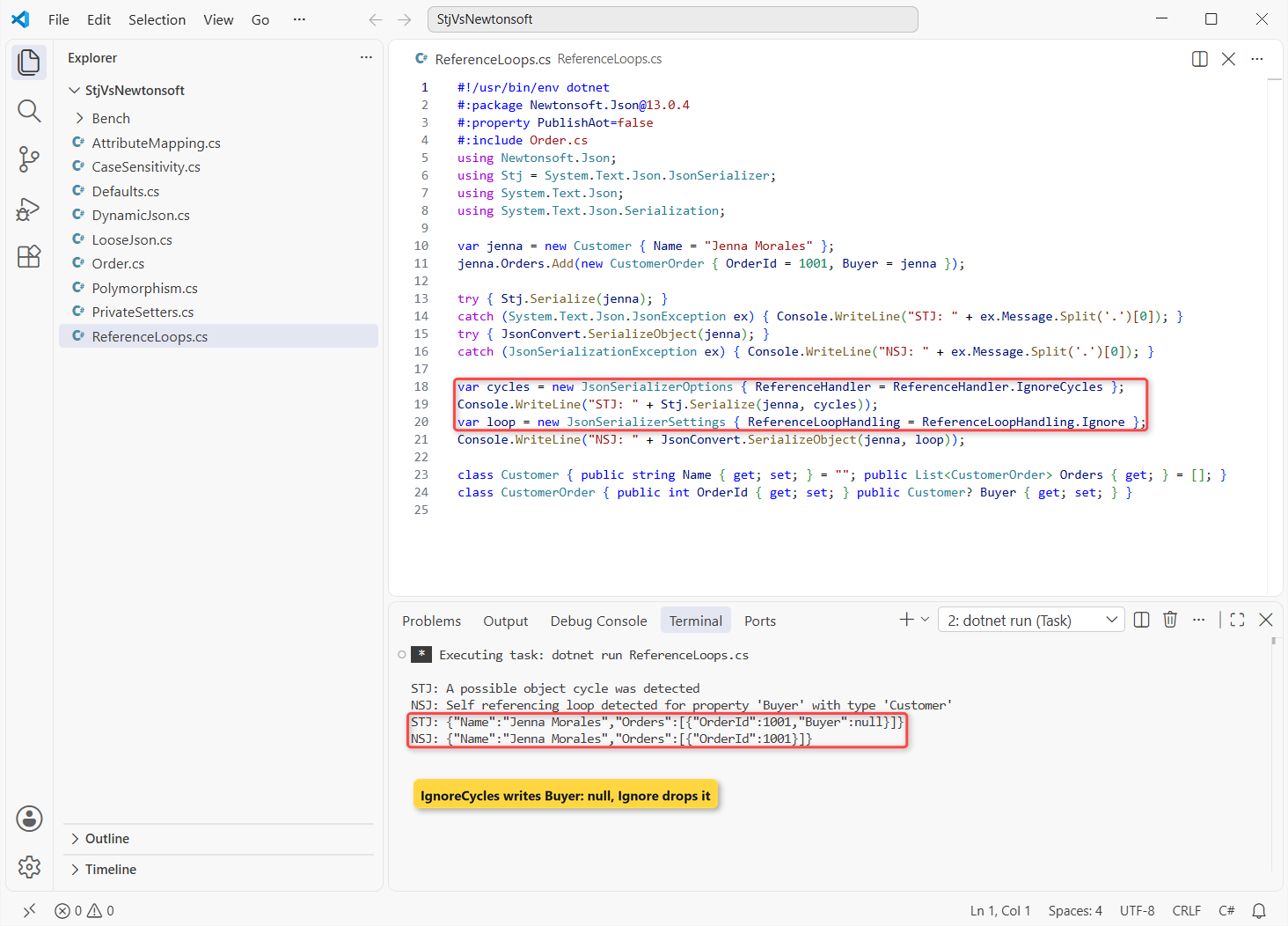
Both libraries threw. System.Text.Json said “A possible object cycle was detected” and Newtonsoft.Json said “Self referencing loop detected for property ‘Buyer’ with type ‘Customer'”. Catch each library’s own exception type, as shown in my try-catch guide.
The fixes aren’t identical, though. ReferenceHandler.IgnoreCycles wrote "Buyer":null, while ReferenceLoopHandling.Ignore left the property out. If a client checks for the key, that matters.
For APIs, I’d return a DTO without the back-reference instead.
Polymorphism: [JsonDerivedType] vs TypeNameHandling
Say the order was paid with a card and a check, stored in a Payment[] of derived records. Each library needs to know the real type to read it back:
#!/usr/bin/env dotnet
#:package Newtonsoft.Json@13.0.4
#:property PublishAot=false
#:include Order.cs
using Newtonsoft.Json;
using Stj = System.Text.Json.JsonSerializer;
using System.Text.Json.Serialization;

Payment[] paid = [new CardPayment(149.90m, "4242"), new CheckPayment(60m, "1187")];
string stj = Stj.Serialize(paid);
Console.WriteLine("STJ: " + stj);
var auto = new JsonSerializerSettings { TypeNameHandling = TypeNameHandling.Auto };
Console.WriteLine("NSJ: " + JsonConvert.SerializeObject(paid, auto));

var back = Stj.Deserialize<Payment[]>(stj)!;
Console.WriteLine("STJ read back: " + string.Join(", ", back.Select(p => p.GetType().Name)));

[JsonDerivedType(typeof(CardPayment), "card")]
[JsonDerivedType(typeof(CheckPayment), "check")]
abstract record Payment(decimal Amount);
record CardPayment(decimal Amount, string Last4) : Payment(Amount);
record CheckPayment(decimal Amount, string CheckNo) : Payment(Amount);
Output:
STJ: [{"$type":"card","Last4":"4242","Amount":149.90},{"$type":"check","CheckNo":"1187","Amount":60}]
NSJ: [{"$type":"CardPayment, Polymorphism","Last4":"4242","Amount":149.90},{"$type":"CheckPayment, Polymorphism","CheckNo":"1187","Amount":60.0}]
STJ read back: CardPayment, CheckPayment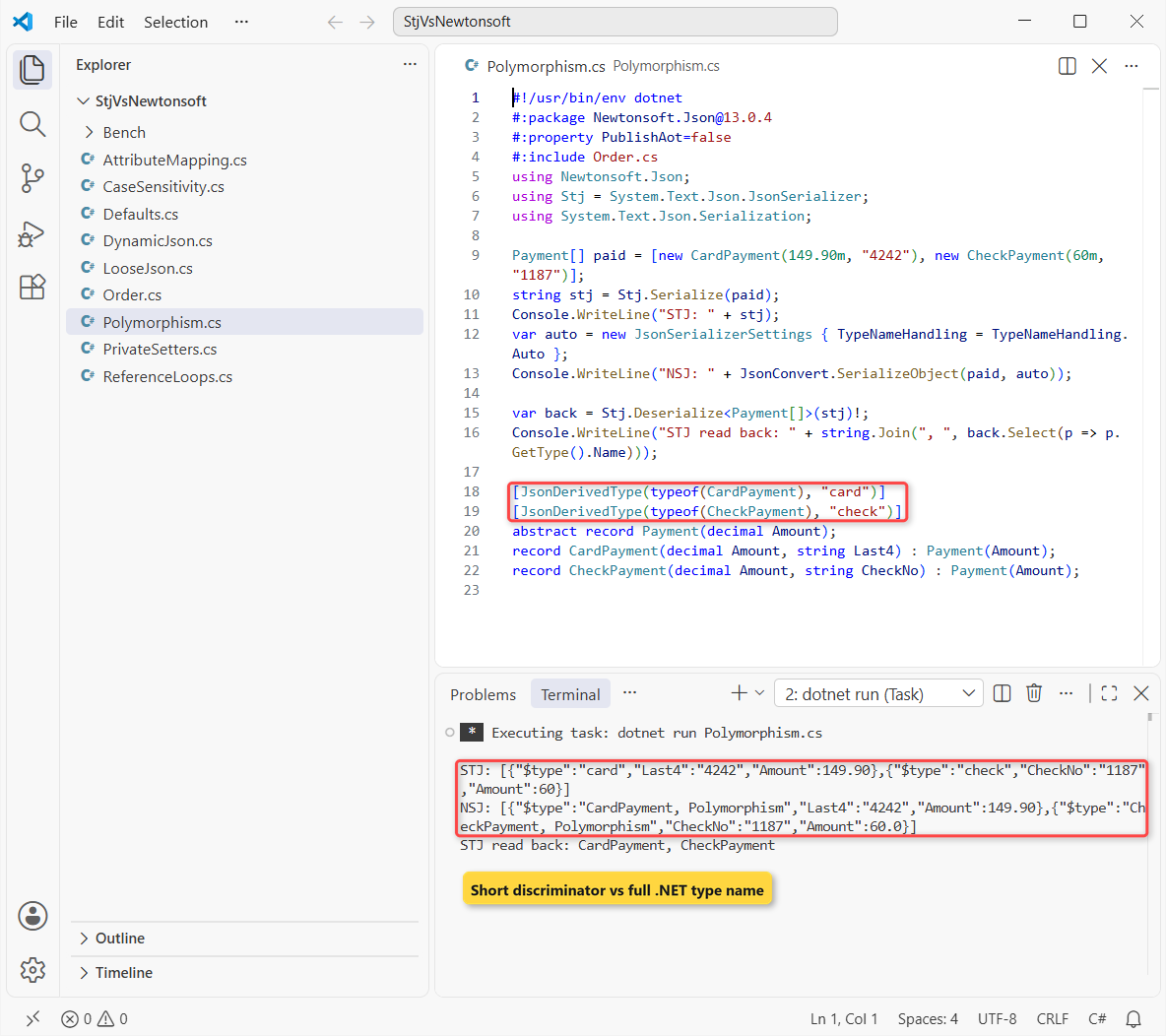
System.Text.Json wrote the discriminators I registered with [JsonDerivedType] (.NET 7+) and read back a CardPayment and a CheckPayment. Newtonsoft.Json wrote CardPayment, Polymorphism: the class plus the assembly name.
That type name is the security problem. With TypeNameHandling on, a crafted payload can name a different type. The base-class pattern itself is covered in my abstract class guide.
Note: Newtonsoft.Json wrote the $60 check as 60.0, System.Text.Json as 60. Compare the numbers, not the raw strings, in tests.
JsonNode vs JObject for Dynamic JSON
When there’s no class to deserialize into, both libraries give you a writable DOM. Same order data, read and changed without a model:
#!/usr/bin/env dotnet
#:package Newtonsoft.Json@13.0.4
#:property PublishAot=false
#:include Order.cs
using Newtonsoft.Json;
using Stj = System.Text.Json.JsonSerializer;
using System.Text.Json.Nodes;
using Newtonsoft.Json.Linq;

string json = """{"orderId":1001,"items":[{"sku":"BK-200","price":129.95}]}""";

JsonNode node = JsonNode.Parse(json)!;
node["status"] = "Shipped";
Console.WriteLine($"JsonNode: {node["items"]![0]!["sku"]}");
Console.WriteLine(node.ToJsonString());

JObject jo = JObject.Parse(json);
jo["status"] = "Shipped";
Console.WriteLine($"JObject:  {jo["items"]![0]!["sku"]}");
Console.WriteLine(jo.ToString(Formatting.None));
Console.WriteLine($"JSONPath: {jo.SelectToken("$.items[0].price")}");
Output:
JsonNode: BK-200
{"orderId":1001,"items":[{"sku":"BK-200","price":129.95}],"status":"Shipped"}
JObject:  BK-200
{"orderId":1001,"items":[{"sku":"BK-200","price":129.95}],"status":"Shipped"}
JSONPath: 129.95
The code is almost line-for-line the same, and both printed BK-200 and the same JSON. What JsonNode lacks is JSONPath: SelectToken("$.items[0].price") returned 129.95 only on the JObject.
For read-only work, JsonDocument is lighter still. A Dictionary<string, JsonElement> works for flat payloads.
Performance: System.Text.Json vs Newtonsoft.Json Benchmark
For the numbers I used BenchmarkDotNet 0.15.8 in a Release console project, since BenchmarkDotNet needs an optimized build. It compiles the same Order.cs and serializes 500 copies of the sample order:
<Project Sdk="Microsoft.NET.Sdk">

  <PropertyGroup>
    <OutputType>Exe</OutputType>
    <TargetFramework>net10.0</TargetFramework>
    <ImplicitUsings>enable</ImplicitUsings>
    <Nullable>enable</Nullable>
  </PropertyGroup>

  <ItemGroup>
    <Compile Include="..\Order.cs" />
    <PackageReference Include="BenchmarkDotNet" Version="0.15.8" />
    <PackageReference Include="Newtonsoft.Json" Version="13.0.4" />
  </ItemGroup>

</Project>
using BenchmarkDotNet.Attributes;
using BenchmarkDotNet.Running;
using Newtonsoft.Json;
using Stj = System.Text.Json.JsonSerializer;
BenchmarkRunner.Run<JsonBench>();
[MemoryDiagnoser]
public class JsonBench
{
private readonly List<Order> orders = Enumerable.Range(0, 500)
.Select(i => { var o = Order.Sample(); o.OrderId += i; return o; })
.ToList();
private string json = "";
[GlobalSetup]
public void Setup() => json = Stj.Serialize(orders);
[Benchmark] public string StjSerialize() => Stj.Serialize(orders);
[Benchmark] public string NewtonsoftSerialize() => JsonConvert.SerializeObject(orders);
[Benchmark] public object? StjDeserialize() => Stj.Deserialize<List<Order>>(json);
[Benchmark] public object? NewtonsoftDeserialize() => JsonConvert.DeserializeObject<List<Order>>(json);
}I ran it with dotnet run -c Release in the Bench folder. This is the summary it printed:
BenchmarkDotNet v0.15.8, Windows 11 (10.0.26200.9457/25H2/2025Update/HudsonValley2)
12th Gen Intel Core i7-1260P 2.10GHz, 1 CPU, 16 logical and 12 physical cores
.NET SDK 10.0.402
  [Host]     : .NET 10.0.13 (10.0.13, 10.0.1326.50504), X64 RyuJIT x86-64-v3
  DefaultJob : .NET 10.0.13 (10.0.13, 10.0.1326.50504), X64 RyuJIT x86-64-v3

| Method                | Mean       | Error    | StdDev   | Median     | Gen0     | Gen1     | Gen2    | Allocated |
|---------------------- |-----------:|---------:|---------:|-----------:|---------:|---------:|--------:|----------:|
| StjSerialize          |   611.5 us | 45.70 us | 134.8 us |   580.1 us | 250.0000 | 250.0000 | 74.2188 | 302.31 KB |
| NewtonsoftSerialize   |   908.6 us | 62.40 us | 177.0 us |   854.7 us | 232.4219 | 232.4219 | 66.4063 | 710.97 KB |
| StjDeserialize        |   971.0 us | 47.21 us | 133.9 us |   936.2 us |  44.9219 |  23.4375 |       - |  419.3 KB |
| NewtonsoftDeserialize | 1,254.5 us | 44.90 us | 124.4 us | 1,229.2 us |  85.9375 |  29.2969 |       - | 794.15 KB |
System.Text.Json serialized the list in 611.5 us against 908.6 us (1.5x), and allocated 2.4x less. Reading it back took 971.0 us against 1,254.5 us (1.3x), with 1.9x less memory.
The spread was wide: StdDev ran 134.8 us to 177.0 us, and BenchmarkDotNet flagged bimodal timings on my laptop. The ranking held across runs, but don’t quote the decimals as universal truth.
Keep it in proportion: that’s one laptop and one payload shape. In a typical API call, the network costs far more than 908.6 us. The gap shows up as CPU and GC load on busy servers. .NET 10 ships the newest System.Text.Json with the runtime.
System.Text.Json Source Generation and Native AOT
System.Text.Json can generate its serialization code at compile time with a JsonSerializerContext, which is what Native AOT and trimmed apps need. Newtonsoft.Json is built on runtime reflection and has no source generator.
If AOT is on your roadmap, that alone decides it. The setup is a partial class with [JsonSerializable] attributes, shown step by step in the System.Text.Json guide linked above.
When to Use Newtonsoft.Json Instead of System.Text.Json
- New .NET 8, 9 or 10 code, ASP.NET Core APIs, Blazor, Azure Functions: System.Text.Json.
- Native AOT, trimming or high-traffic services where allocations matter: System.Text.Json.
- You query JSON with JSONPath (
SelectToken) or rely onJsonConvert.PopulateObject: Newtonsoft.Json. - You read loose JSON you can’t fix (single quotes, unquoted names): Newtonsoft.Json, since System.Text.Json rejects those by design.
- A large codebase full of
JObject, customJsonConverterclasses or .NET Framework targets: stay on Newtonsoft.Json until you can migrate in steps.
How to Switch from Newtonsoft.Json to System.Text.Json
- Replace
JsonConvert.SerializeObject/DeserializeObjectwithJsonSerializer.Serialize/Deserialize, and keep one sharedJsonSerializerOptionsinstance. - Start from
new JsonSerializerOptions(JsonSerializerDefaults.Web)so casing and quoted numbers behave like before. - Swap attributes:
[JsonProperty]to[JsonPropertyName](or[JsonInclude]for private setters),StringEnumConvertertoJsonStringEnumConverter. - Replace
ReferenceLoopHandlingwithReferenceHandler.IgnoreCycles, andTypeNameHandlingwith[JsonDerivedType]. - Rewrite
JObjectcode withJsonNode, and test against real payloads, not just the happy path.
In ASP.NET Core you can switch one layer at a time. AddNewtonsoftJson() from the Microsoft.AspNetCore.Mvc.NewtonsoftJson package keeps controllers on Newtonsoft.Json; my Web API CRUD tutorial uses the System.Text.Json defaults throughout.
The deciding differences: System.Text.Json is strict about casing and JSON syntax, faster with less memory, and the only one that works with Native AOT. Newtonsoft.Json still wins on loose input and JSONPath.
Working with JSON in a web app? These go well with this comparison:
- Validate request bodies in minimal APIs
- Global error handling in ASP.NET Core
- OpenAPI documents with Scalar in ASP.NET Core
- Upgrade a project from .NET 8 to .NET 10
Frequently Asked Questions
Is System.Text.Json faster than Newtonsoft.Json?
In my BenchmarkDotNet run on .NET 10, yes: 1.5x faster to serialize and 1.3x faster to deserialize 500 orders, with fewer allocations. Your numbers depend on payload shape and settings, so benchmark your own data.
Does Microsoft still recommend Newtonsoft.Json?
Microsoft’s default is System.Text.Json, which ASP.NET Core uses out of the box. The Microsoft Learn migration guide lists each Newtonsoft.Json feature and its System.Text.Json equivalent or workaround.
Can I use System.Text.Json and Newtonsoft.Json in the same project?
Yes. Both load side by side. Alias one JsonSerializer, fully qualify JsonException, and remember each library reads only its own attributes.
How do I make System.Text.Json case-insensitive like Newtonsoft.Json?
Set PropertyNameCaseInsensitive = true, or start from new JsonSerializerOptions(JsonSerializerDefaults.Web), which also writes camelCase and accepts quoted numbers.
Is Newtonsoft.Json TypeNameHandling safe?
Not with untrusted input. Code analysis rule CA2326 flags any value other than None. Restrict types with a custom ISerializationBinder, or use System.Text.Json’s [JsonDerivedType] discriminators.

Bijay Kumar is a renowned software engineer, accomplished author, and distinguished Microsoft Most Valuable Professional (MVP) specializing in SharePoint. With a rich professional background spanning over 15 years, Bijay has established himself as an authority in the field of information technology. He possesses unparalleled expertise in multiple programming languages and technologies such as ASP.NET, ASP.NET MVC, C#.NET, and SharePoint, which has enabled him to develop innovative and cutting-edge solutions for clients across the globe. Read more…