
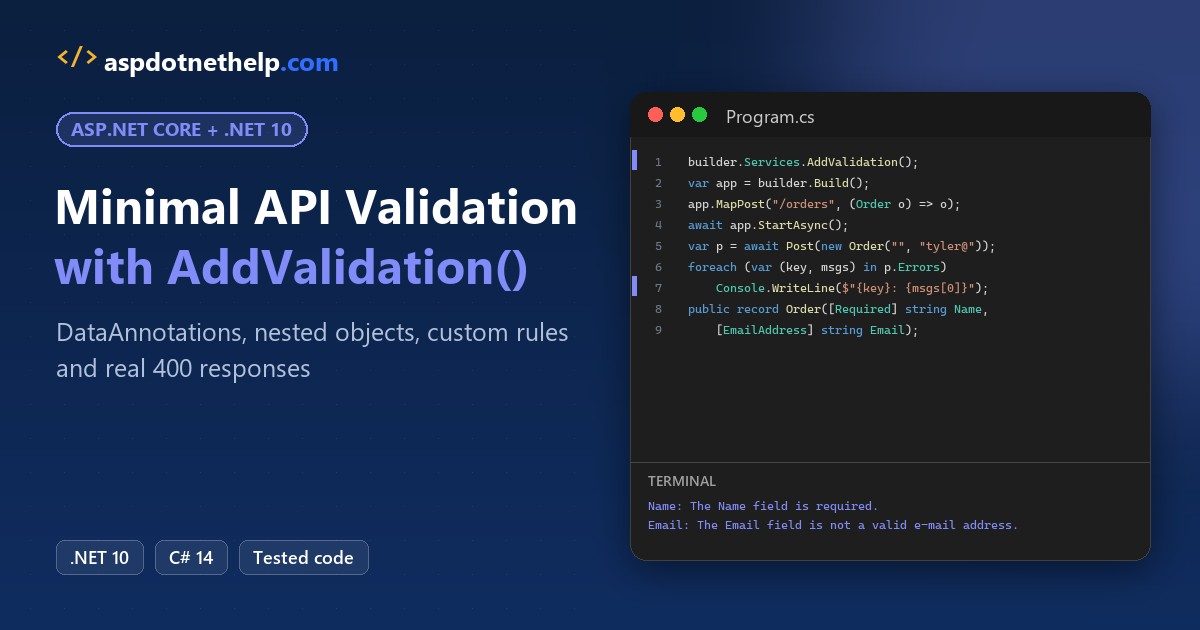
Your endpoint just saved an order with a blank customer name and the email address tyler.brooks@. Nothing stopped it.
Quick answer: minimal API validation is built into .NET 10. Call builder.Services.AddValidation(), put DataAnnotations such as [Required] and [Range] on your request types, and bad requests get a 400 before your handler runs:
builder.Services.AddValidation();

public record OrderLine(
    [Required] string Sku,
    [Range(1, 20)] int Quantity);
Below, we build a small orders API on .NET 10 and send it real bad requests, so every 400 response you see here came from a run.
What You Need Before You Start with Minimal API Validation
- The .NET 10 SDK. I used 10.0.402; check your .NET version if you’re not sure what’s installed. AddValidation doesn’t exist in .NET 9.
- VS Code or Visual Studio 2026, plus curl.exe (it ships with Windows 11).
- The sample: an outdoor gear store’s orders API with customers in Austin, Seattle and Anchorage.
Step 1: Create the Project and Turn On Validation with AddValidation()
We start from the empty web template:
dotnet new web -n OrdersApi -o OrdersApiHere’s the whole Program.cs. One line, AddValidation(), turns validation on for every endpoint in the app:
using System.ComponentModel.DataAnnotations;
using Microsoft.AspNetCore.Mvc;
using OrdersApi.Models;

var builder = WebApplication.CreateBuilder(args);
builder.Services.AddValidation();       // .NET 10: validate endpoint parameters
builder.Services.AddProblemDetails();
var app = builder.Build();

app.MapPost("/orders", (OrderRequest order) => TypedResults.Created("/orders/5001", order));

app.MapGet("/stores/{storeId}/orders", ([Range(100, 999)] int storeId, [Range(1, 50)] int pageSize,
    [FromHeader(Name = "X-Region"), AllowedValues("East", "West", "Central")] string region) =>
    TypedResults.Ok(new { storeId, pageSize, region }));

app.MapPost("/orders/import", (OrderRequest order) => TypedResults.Accepted("/orders/import", order))
   .DisableValidation();

app.Run();
It has three endpoints:
- POST /orders binds an OrderRequest from the JSON body.
- GET /stores/{storeId}/orders validates a route value, a query string value and a header.
- POST /orders/import takes the same body but opts out of validation.
If you’re still choosing between this style and controllers, my minimal API vs controllers comparison lays out the tradeoffs.
The project file is the template’s own. We didn’t add a NuGet package or any extra MSBuild property:
<Project Sdk="Microsoft.NET.Sdk.Web">

  <PropertyGroup>
    <TargetFramework>net10.0</TargetFramework>
    <Nullable>enable</Nullable>
    <ImplicitUsings>enable</ImplicitUsings>
  </PropertyGroup>

</Project>
I deleted appsettings.Development.json and the Properties folder, kept the template’s appsettings.json, and started the API with dotnet run -- --urls http://localhost:5876.
{
  "Logging": {
    "LogLevel": {
      "Default": "Information",
      "Microsoft.AspNetCore": "Warning"
    }
  },
  "AllowedHosts": "*"
}
Step 2: Add DataAnnotations to the Minimal API Request Record
Validation rules are plain attributes from System.ComponentModel.DataAnnotations. On a positional record, you put them right on the constructor parameters (Models/OrderRequest.cs):
using System.ComponentModel.DataAnnotations;

namespace OrdersApi.Models;

public partial record OrderRequest(
    [Required, StringLength(60, MinimumLength = 2)] string CustomerName,
    [Required, EmailAddress] string Email,
    [Required] ShippingAddress ShipTo,
    [Required, MinLength(1)] List<OrderLine> Items,
    bool Expedited);

public record OrderLine(
    [Required] string Sku,
    [Range(1, 20)] int Quantity);
OrderRequest is the type POST /orders binds from the body, so the validation source generator finds it from the endpoint signature. ShipTo and Items get their own step later; the record is partial because Step 7 adds a rule in a second file.
Step 3: Send a Bad Request and Read the Minimal API 400 Response
To test, we use a small file-based app that posts a JSON file and prints the status, the title and each error. It’s an ordinary HttpClient call (Post.cs, next to the project folder):
using System.Text;
using System.Text.Json;

var (path, file) = (args[0], args[1]);
using var http = new HttpClient { BaseAddress = new Uri("http://localhost:5876") };
var json = new StringContent(File.ReadAllText(file), Encoding.UTF8, "application/json");
var res = await http.PostAsync(path, json);
Console.WriteLine($"POST {path} ({file}) -> {(int)res.StatusCode} {res.StatusCode}");

var body = await res.Content.ReadAsStringAsync();
using var doc = JsonDocument.Parse(body.Length > 0 ? body : "{}");
if (doc.RootElement.TryGetProperty("title", out var title)) Console.WriteLine($"title: {title}");
if (doc.RootElement.TryGetProperty("errors", out var errors))
    foreach (var e in errors.EnumerateObject())
        Console.WriteLine($"  {e.Name}: {string.Join(" | ", e.Value.EnumerateArray())}");
This is the first request body, requests/bad-order.json. The name is blank and the email has no domain:
{
  "customerName": "",
  "email": "tyler.brooks@",
  "shipTo": { "street": "1100 Congress Ave", "city": "Austin", "state": "TX", "zip": "78701" },
  "items": [ { "sku": "TRAIL-RUN-10", "quantity": 2 } ],
  "expedited": false
}
dotnet run Post.cs -- /orders requests/bad-order.jsonPOST /orders (requests/bad-order.json) -> 400 BadRequest
title: One or more validation errors occurred.
CustomerName: The CustomerName field is required.
Email: The Email field is not a valid e-mail address.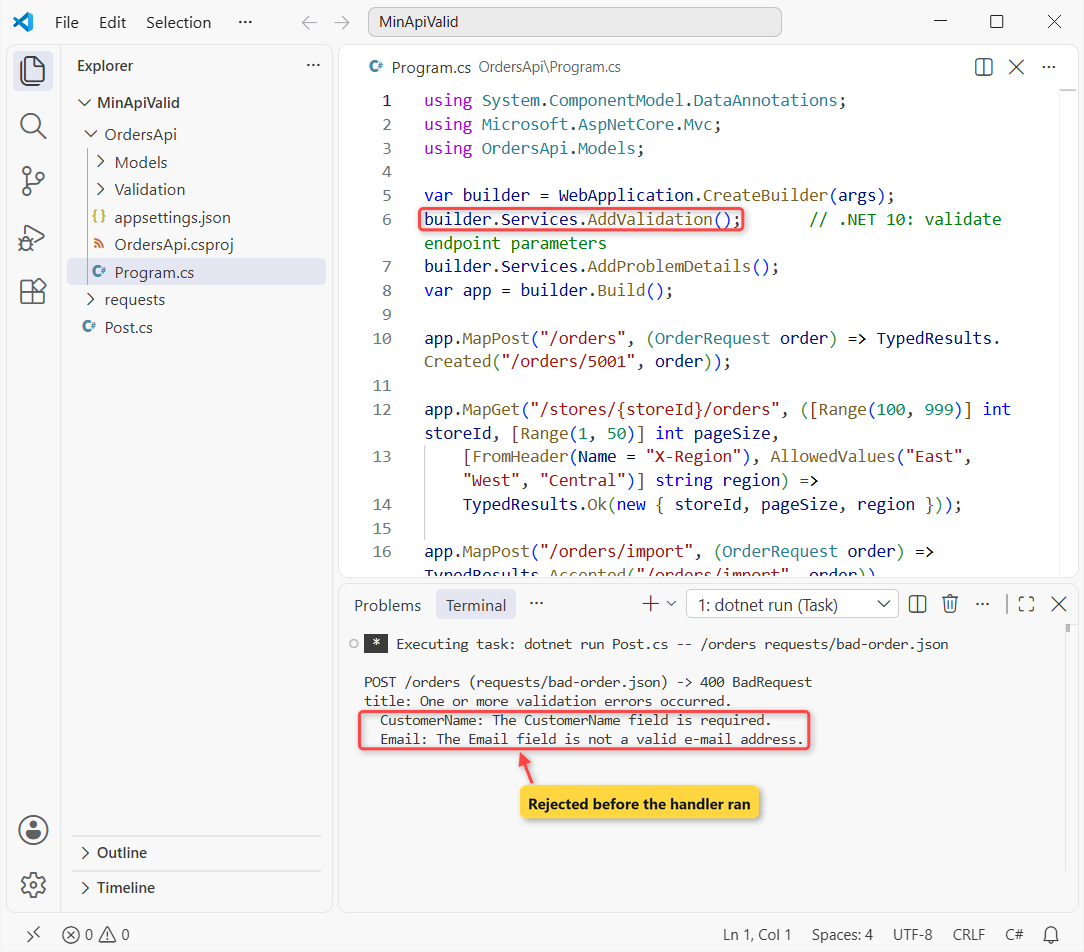
The handler never ran. The valid sample, requests/good-order.json, got 201 Created from the same endpoint:
{
  "customerName": "Tyler Brooks",
  "email": "tyler.brooks@example.com",
  "shipTo": { "street": "1100 Congress Ave", "city": "Austin", "state": "TX", "zip": "78701" },
  "items": [ { "sku": "TRAIL-RUN-10", "quantity": 2 } ],
  "expedited": false
}
Here’s the raw response for the bad order from curl:
curl.exe -i -H "Content-Type: application/json" --data-binary "@requests/bad-order.json" http://localhost:5876/ordersHTTP/1.1 400 Bad Request
Content-Type: application/problem+json
{
"type": "https://tools.ietf.org/html/rfc9110#section-15.5.1",
"title": "One or more validation errors occurred.",
"status": 400,
"errors": {
"CustomerName": [
"The CustomerName field is required."
],
"Email": [
"The Email field is not a valid e-mail address."
]
},
"traceId": "00-b8cf5186c5ce59b8d19aea1efd368ff5-1fd84ad137f0a4f6-00"
}That body is HttpValidationProblemDetails: the standard problem details fields plus an errors object, which is a dictionary of field name to messages. It’s the same shape TypedResults.ValidationProblem returns.
Note: the error keys are the C# names (CustomerName, Email), not the camelCase names in the JSON. Map them on the client if your UI matches errors to inputs.
We also tried it without AddProblemDetails(). The status was still 400, but the content type dropped to application/json and the body kept only title and errors:
HTTP/1.1 400 Bad Request
Content-Type: application/json; charset=utf-8

{
  "title": "One or more validation errors occurred.",
  "errors": {
    "CustomerName": [
      "The CustomerName field is required."
    ],
    "Email": [
      "The Email field is not a valid e-mail address."
    ]
  }
}
Step 4: Validate Minimal API Query String, Route and Header Parameters
Validation isn’t only for JSON bodies. Attributes on simple endpoint parameters work for route values, the query string and headers too. Same Program.cs, this time the GET endpoint:
curl.exe -i -H "X-Region: Northeast" "http://localhost:5876/stores/42/orders?pageSize=500"HTTP/1.1 400 Bad Request
Content-Type: application/problem+json
{
"type": "https://tools.ietf.org/html/rfc9110#section-15.5.1",
"title": "One or more validation errors occurred.",
"status": 400,
"errors": {
"storeId": [
"The field storeId must be between 100 and 999."
],
"pageSize": [
"The field pageSize must be between 1 and 50."
],
"region": [
"The region field does not equal any of the values specified in AllowedValuesAttribute."
]
},
"traceId": "00-00eb5c004a911eb2368d79926ae7fe46-5a3e98fc09a11b03-00"
}All three failed in one response. Here the keys are the parameter names, and AllowedValues (added in .NET 8) handled the header. With good values, the same URL returns 200:
curl.exe -i -H "X-Region: West" "http://localhost:5876/stores/214/orders?pageSize=25"HTTP/1.1 200 OK
Content-Type: application/json; charset=utf-8
{
"storeId": 214,
"pageSize": 25,
"region": "West"
}Important: in .NET 10, nullable value type parameters such as int? aren’t validated. Microsoft lists it as a known limitation that’s fixed in .NET 11, so keep validated parameters non-nullable for now.
Step 5: Validate Nested Objects and Collections in a Minimal API
Validation walks the whole object graph: ShipTo, and every item in the Items list. The address is a class with its own rules (Models/ShippingAddress.cs):
using System.ComponentModel.DataAnnotations;
using OrdersApi.Validation;

namespace OrdersApi.Models;

public class ShippingAddress
{
    [Required] public string? Street { get; set; }
    [Required] public string? City { get; set; }
    [Required, StringLength(2, MinimumLength = 2)] public string? State { get; set; }
    [Required, UsZipCode] public string? Zip { get; set; }
}
This body has a blank street, a ZIP code with the letter O in it, and a second item with quantity 0 (requests/nested-order.json):
{
  "customerName": "Rachel Kim",
  "email": "rachel.kim@example.com",
  "shipTo": { "street": "", "city": "Seattle", "state": "WA", "zip": "981O1" },
  "items": [ { "sku": "RAIN-SHELL-M", "quantity": 1 }, { "sku": "HIKE-SOCK-3PK", "quantity": 0 } ],
  "expedited": false
}
dotnet run Post.cs -- /orders requests/nested-order.jsonPOST /orders (requests/nested-order.json) -> 400 BadRequest
title: One or more validation errors occurred.
ShipTo.Street: The Street field is required.
ShipTo.Zip: '981O1' is not a US ZIP code.
Items[1].Quantity: The field Quantity must be between 1 and 20.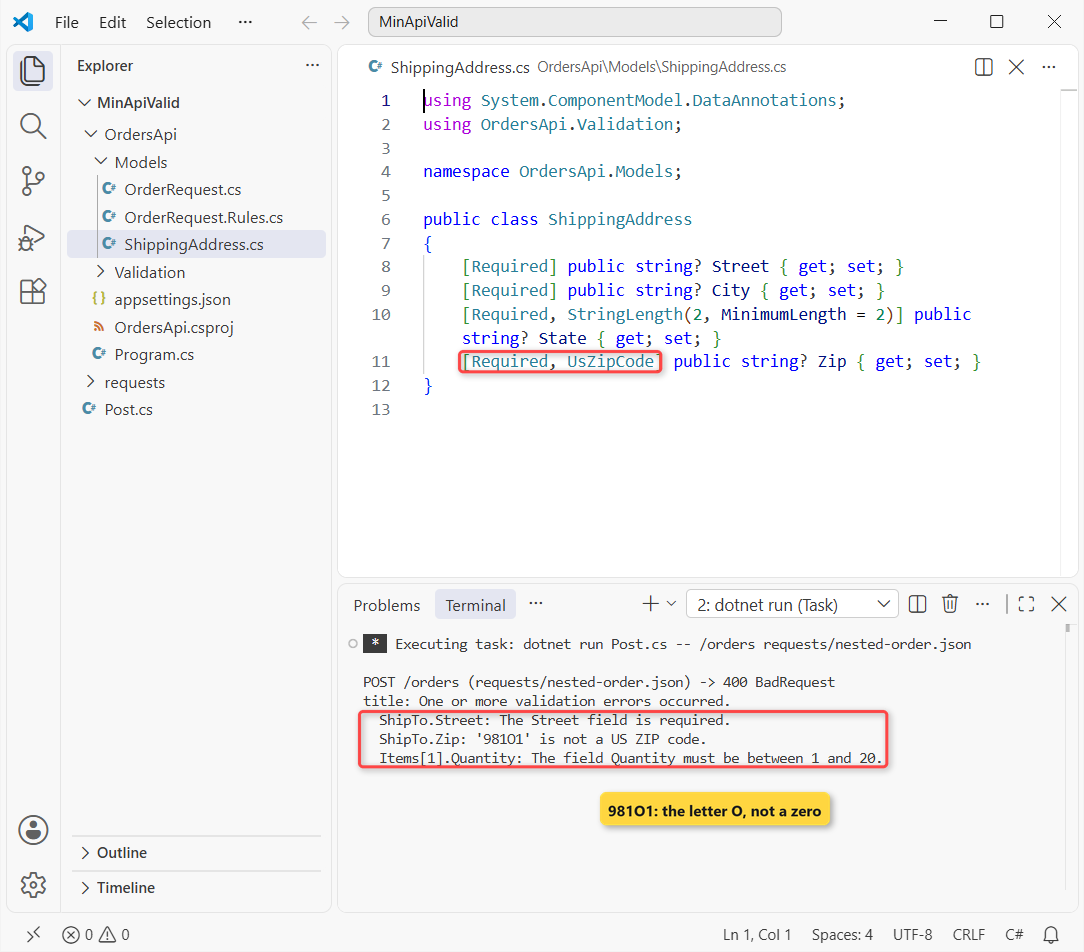
Nested errors use paths: ShipTo.Street, ShipTo.Zip and Items[1].Quantity. The first item was fine, so it isn’t listed. Nothing in Program.cs changed for this.
Step 6: Write a Custom ValidationAttribute
No built-in attribute checks a US ZIP code, so we wrote one (Validation/UsZipCodeAttribute.cs). It derives from ValidationAttribute and overrides IsValid:
using System.ComponentModel.DataAnnotations;
using System.Text.RegularExpressions;

namespace OrdersApi.Validation;

public partial class UsZipCodeAttribute : ValidationAttribute
{
    protected override ValidationResult? IsValid(object? value, ValidationContext context)
    {
        if (value is null or "") return ValidationResult.Success;   // [Required] reports missing values
        return value is string zip && ZipPattern().IsMatch(zip)
            ? ValidationResult.Success
            : new ValidationResult($"'{value}' is not a US ZIP code.", [context.MemberName!]);
    }

    [GeneratedRegex(@"^[0-9]{5}(-[0-9]{4})?$")]
    private static partial Regex ZipPattern();
}
Two details matter. Pass context.MemberName into the ValidationResult so the error lands on the right field, and return Success for null so [Required] owns the missing-value message. That’s how ShipTo.Zip got “‘981O1’ is not a US ZIP code.” in Step 5.
The pattern uses [0-9] instead of \d, because \d also matches non-ASCII digits. For rules that need a database, Microsoft’s docs show resolving services with validationContext.GetService<T>().
Step 7: Add Cross-Field Validation Rules with IValidatableObject
Some rules depend on two fields. Our store can’t ship expedited to Alaska, Hawaii or Puerto Rico, so the record implements the interface IValidatableObject (Models/OrderRequest.Rules.cs):
using System.ComponentModel.DataAnnotations;

namespace OrdersApi.Models;

// Cross-field rule: runs only after every property-level check passed
public partial record OrderRequest : IValidatableObject
{
    static readonly string[] NoExpedited = ["AK", "HI", "PR"];

    public IEnumerable<ValidationResult> Validate(ValidationContext context)
    {
        if (Expedited && NoExpedited.Contains(ShipTo.State))
            yield return new ValidationResult(
                $"Expedited shipping isn't available to {ShipTo.State}.", [nameof(Expedited)]);
    }
}
Jenna Morales in Anchorage asked for expedited shipping (requests/expedited-order.json):
{
  "customerName": "Jenna Morales",
  "email": "jenna.morales@example.com",
  "shipTo": { "street": "600 W 7th Ave", "city": "Anchorage", "state": "AK", "zip": "99501" },
  "items": [ { "sku": "PARKA-XL", "quantity": 1 } ],
  "expedited": true
}
dotnet run Post.cs -- /orders requests/expedited-order.jsonPOST /orders (requests/expedited-order.json) -> 400 BadRequest
title: One or more validation errors occurred.
Expedited: Expedited shipping isn't available to AK.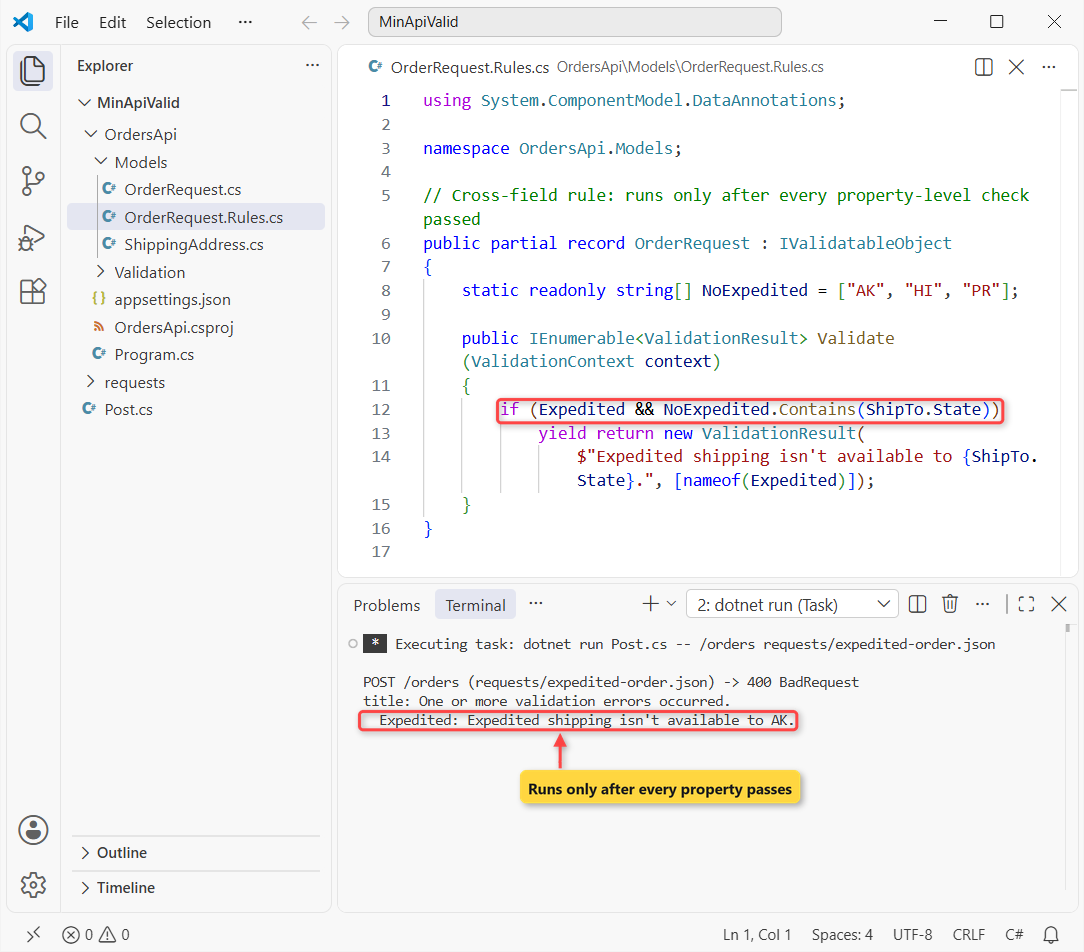
Then we sent the same order with a broken email. Only the Email error came back:
HTTP/1.1 400 Bad Request
Content-Type: application/problem+json

{
  "type": "https://tools.ietf.org/html/rfc9110#section-15.5.1",
  "title": "One or more validation errors occurred.",
  "status": 400,
  "errors": {
    "Email": [
      "The Email field is not a valid e-mail address."
    ]
  },
  "traceId": "00-a058fac13f8e2d2fdd573652cade4f2d-8b18485920b15890-00"
}
That’s by design: Validate runs only after every property-level check passes. Users can fix the field errors, resubmit, and hit the cross-field rule on the next try.
Step 8: Customize the Validation Error Response
Validation writes its 400 through IProblemDetailsService, so CustomizeProblemDetails changes it. Same Program.cs, with the AddProblemDetails line replaced by this:
builder.Services.AddProblemDetails(options =>
    options.CustomizeProblemDetails = context =>
    {
        if (context.ProblemDetails.Status == StatusCodes.Status400BadRequest)
        {
            context.ProblemDetails.Title = "Check the order and try again";
            context.ProblemDetails.Extensions["support"] = "orders@example.com";
        }
    });
HTTP/1.1 400 Bad Request
Content-Type: application/problem+json
{
"type": "https://tools.ietf.org/html/rfc9110#section-15.5.1",
"title": "Check the order and try again",
"status": 400,
"errors": {
"CustomerName": [
"The CustomerName field is required."
],
"Email": [
"The Email field is not a valid e-mail address."
]
},
"traceId": "00-b8ec733ba5ef1c1c5ee50af3dc29e7e0-b14210ca57ec35dc-00",
"support": "orders@example.com"
}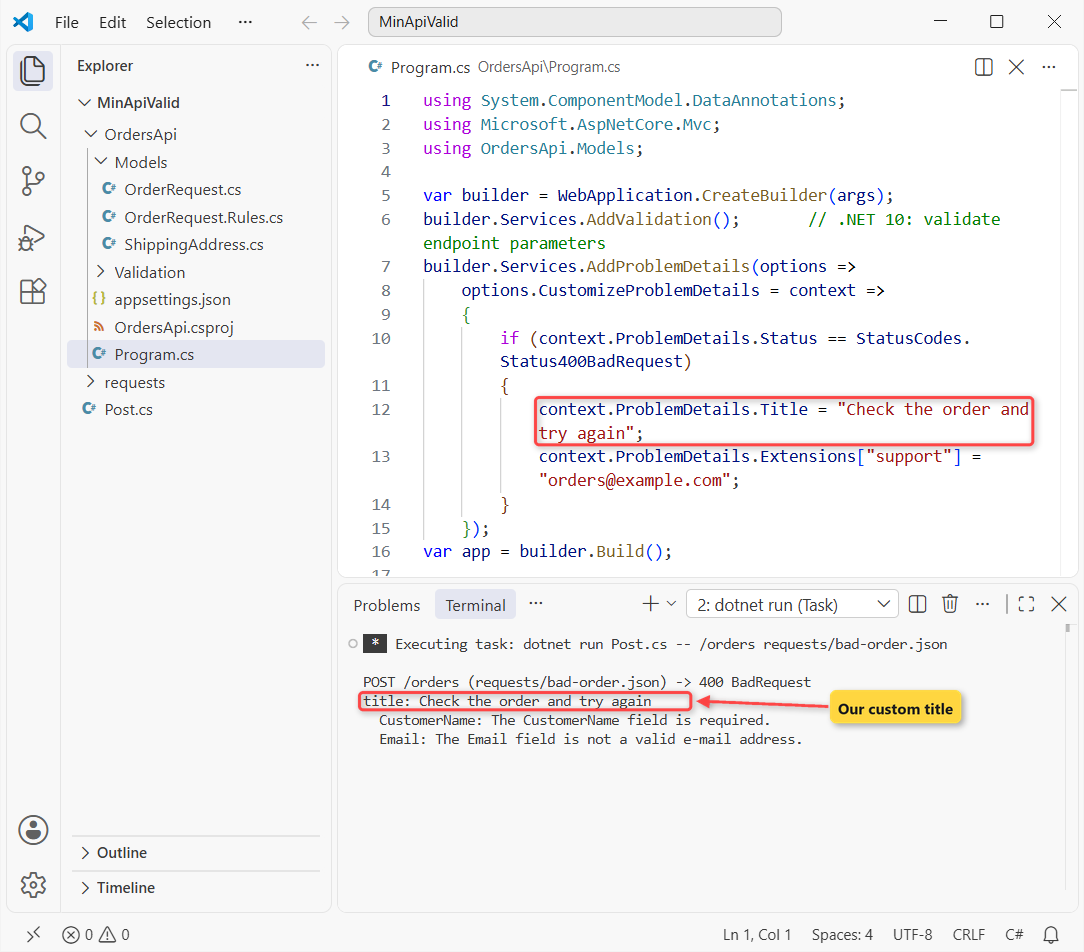
The errors stayed the same; only the title changed and a support field was added. If you already map exceptions to problem details, my ASP.NET Core global error handling guide uses the same service, so both kinds of errors look alike to clients.
How Do You Turn Off Validation for One Endpoint?
Call .DisableValidation() on the endpoint. Our POST /orders/import takes the same OrderRequest, and the bad order from Step 3 went straight through:
POST /orders/import (requests/bad-order.json) -> 202 AcceptedUse it for bulk imports or webhooks where you validate later. To skip one property or type instead, there’s [SkipValidation], which is marked experimental in .NET 10 and raises warning ASP0029 in plain class libraries.
Does Minimal API Validation Work Without AddValidation()?
No, and it fails quietly. We removed the AddValidation line and posted the same bad order:
POST /orders (requests/bad-order.json) -> 201 CreatedThe blank name and the broken email were accepted with a 201. There’s no exception and no log entry, because the attributes do nothing until a source generator creates validation code at build time.
The generator only covers the assembly that calls AddValidation. If your models live in a class library, add an extension method there that calls AddValidation, and call it from the host.
Validated types and properties also have to be accessible to the generated code. It’s one of the bigger changes in .NET 10 for API projects.
Minimal API Validation Cheat Sheet
Everything we tested, in one table:
| You want to | Use | What we got |
|---|---|---|
| Turn validation on | builder.Services.AddValidation() | 400 before the handler runs |
| Check a body, query, route or header value | [Required], [Range], [EmailAddress], [AllowedValues] | Keys like Email, pageSize |
| Check nested objects and lists | Attributes on the nested type | ShipTo.Zip, Items[1].Quantity |
| Write your own rule | Subclass ValidationAttribute | ‘981O1’ is not a US ZIP code. |
| Compare two fields | IValidatableObject | Runs only if properties pass |
| Change the error body | CustomizeProblemDetails | Custom title + extra field |
| Skip one endpoint | .DisableValidation() | 202, no checks |
Common Minimal API Validation Mistakes to Avoid
- Forgetting AddValidation(). The attributes compile fine and nothing is checked. We got a 201 for a bad order.
- Models in another project. The generator only sees the assembly that calls AddValidation, so call it from the library too.
- Leaving the model internal. In a quick single-file test, a record declared without
publicwas skipped silently and the bad body came back 200. Addingpublicfixed it. - Expecting camelCase keys. Body errors came back as CustomerName and ShipTo.Zip, not customerName.
- Waiting for the cross-field error. IValidatableObject stays silent while any property fails.
- Using int? for validated parameters. Nullable value type parameters aren’t validated in .NET 10.
- Putting it in an MVC controller. AddValidation isn’t supported for MVC or Razor Pages; controllers keep their own model validation.
Next Steps After Adding Minimal API Validation
Once the 400s look right, document them: my OpenAPI and Scalar guide for ASP.NET Core shows how to publish every response, including these validation errors, to your API docs.
When your validation works, our team suggests these four reads:
- All ASP.NET Core tutorials on AspDotnetHelp
- Build a Web API with EF Core
- Validate Blazor forms with the same attributes
- Secure your API with JWT authentication
Frequently Asked Questions
Does .NET 10 have built-in validation for minimal APIs?
Yes. Call builder.Services.AddValidation() and minimal API endpoints validate DataAnnotations on their parameters and request types before the handler runs. Before .NET 10 you had to validate by hand or use a library such as FluentValidation.
What does a minimal API validation error response look like?
A 400 Bad Request with an HttpValidationProblemDetails body: type, title, status, an errors object of field name to messages, and traceId. Without AddProblemDetails() the body keeps only title and errors.
Why isn’t my minimal API validating the request?
Usually AddValidation() is missing, or the model type is in another assembly that never calls AddValidation(). Missing validation doesn’t throw or log anything, so test a bad request and check for a 400.
Can I still use FluentValidation with minimal APIs?
Yes. It’s a separate library you call yourself, often from an endpoint filter. The built-in validation covers attribute-based rules with no extra package; FluentValidation fits when rules are long or need fluent, testable classes.
Does AddValidation() work with MVC controllers?
No. Microsoft.Extensions.Validation is for minimal APIs and Blazor. Controllers with [ApiController] already return an automatic 400 from their own model validation.
How do I validate nested objects in a minimal API?
Put attributes on the nested type’s properties. With AddValidation() on, validation follows nested objects and list items and reports paths such as ShipTo.Zip. See Validation in ASP.NET Core on Microsoft Learn.

Bijay Kumar is a renowned software engineer, accomplished author, and distinguished Microsoft Most Valuable Professional (MVP) specializing in SharePoint. With a rich professional background spanning over 15 years, Bijay has established himself as an authority in the field of information technology. He possesses unparalleled expertise in multiple programming languages and technologies such as ASP.NET, ASP.NET MVC, C#.NET, and SharePoint, which has enabled him to develop innovative and cutting-edge solutions for clients across the globe. Read more…