
Say a sales manager in Austin starts a five-store revenue export, then clicks Cancel half a second later. Without cancellation, your code keeps querying Phoenix, Seattle and Boston for nobody.
A C# CancellationToken fixes that: a CancellationTokenSource raises the request, and every method you hand its token to stops at its next check.
Quick answer: create the source, pass cts.Token down, check it in loops, and catch OperationCanceledException. I ran every sample below on .NET 10.
What Is a CancellationToken in C#?
Cancellation in .NET is cooperative. Nothing kills your code; it asks, and your code decides where to stop. Three types do the work:
| Type | Who uses it | Job |
|---|---|---|
CancellationTokenSource | the caller | creates the token and calls Cancel() or CancelAfter() |
CancellationToken | the worker | a small struct you pass down and check |
OperationCanceledException | both | thrown when work stops because of the token |
A token can only be watched, never canceled. Every sample here is a single-file app; see dotnet run file-based apps if that’s new to you.
How to Use CancellationTokenSource and Pass the Token
Here’s the export from the intro. The worker calls ThrowIfCancellationRequested before each store, and the caller cancels after 450 ms:
using var cts = new CancellationTokenSource();
Task export = ExportAsync(cts.Token);
await Task.Delay(450);                 // the manager clicks Cancel
cts.Cancel();
try { await export; }
catch (OperationCanceledException)
{
    Console.WriteLine("Export canceled by the user");
}

static async Task ExportAsync(CancellationToken token)
{
    foreach (var store in new[] { "Denver", "Austin", "Phoenix", "Seattle", "Boston" })
    {
        token.ThrowIfCancellationRequested();
        await Task.Delay(300);         // pretend to query one store
        Console.WriteLine($"Exported {store}");
    }
}
Output:
Exported Denver
Exported Austin
Export canceled by the user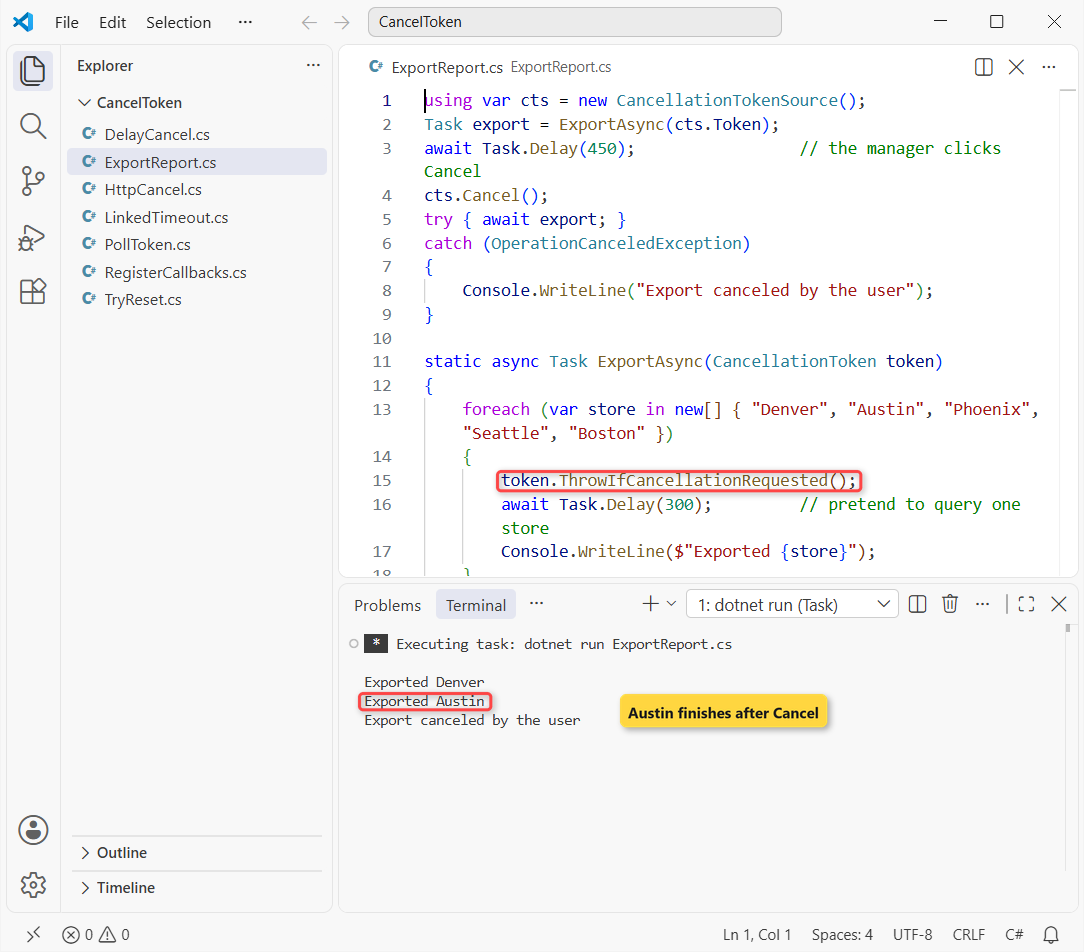
Austin still printed after Cancel at 450 ms: the token is checked between stores, and Task.Delay(300) never got it.
My rule: pass the token to every async call that accepts one. The async and await in C# guide covers the Task side of this pattern.
ThrowIfCancellationRequested vs IsCancellationRequested
Throwing isn’t the only option. If partial results are useful, poll IsCancellationRequested and return what you have. Same five stores, counted with a 500 ms limit:
using var cts = new CancellationTokenSource();
cts.CancelAfter(500);
int done = CountOrders(cts.Token);
Console.WriteLine($"Stopped early: {done} of 5 stores counted");

static int CountOrders(CancellationToken token)
{
    int done = 0;
    foreach (var store in new[] { "Denver", "Austin", "Phoenix", "Seattle", "Boston" })
    {
        if (token.IsCancellationRequested)
            break;                     // return what we have, no exception
        Thread.Sleep(200);
        done++;
        Console.WriteLine($"Counted {store}");
    }
    return done;
}
Output:
Counted Denver
Counted Austin
Counted Phoenix
Stopped early: 3 of 5 stores counted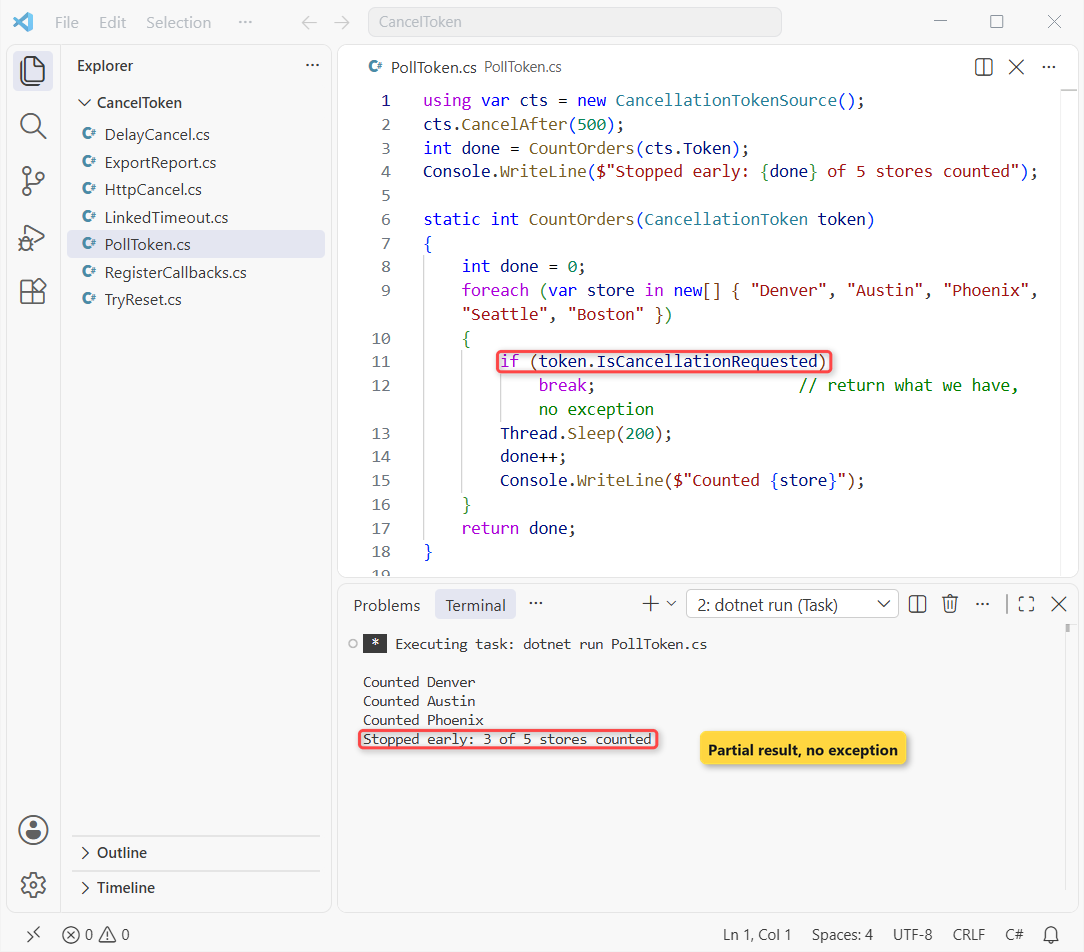
ThrowIfCancellationRequested() | IsCancellationRequested | |
|---|---|---|
| What happens | throws OperationCanceledException | returns true; you decide |
| Caller sees | a canceled Task | a normal result |
| Use it for | async methods, libraries | loops with useful partial output |
I default to throwing; a partial result that looks complete is a bug.
OperationCanceledException vs TaskCanceledException When a Token Is Canceled
Built-in methods often throw TaskCanceledException, which derives from OperationCanceledException. Here a 200 ms timeout cancels a 5-second Task.Delay:
using var cts = new CancellationTokenSource(TimeSpan.FromMilliseconds(200));
Task delay = Task.Delay(5000, cts.Token);
try
{
    await delay;
}
catch (OperationCanceledException ex)
{
    Console.WriteLine($"Caught: {ex.GetType().Name}");
    Console.WriteLine($"Is it an OperationCanceledException? {ex is OperationCanceledException}");
    Console.WriteLine($"Came from my token: {ex.CancellationToken == cts.Token}");
}
Console.WriteLine($"Task status: {delay.Status}");
Output:
Caught: TaskCanceledException
Is it an OperationCanceledException? True
Came from my token: True
Task status: Canceled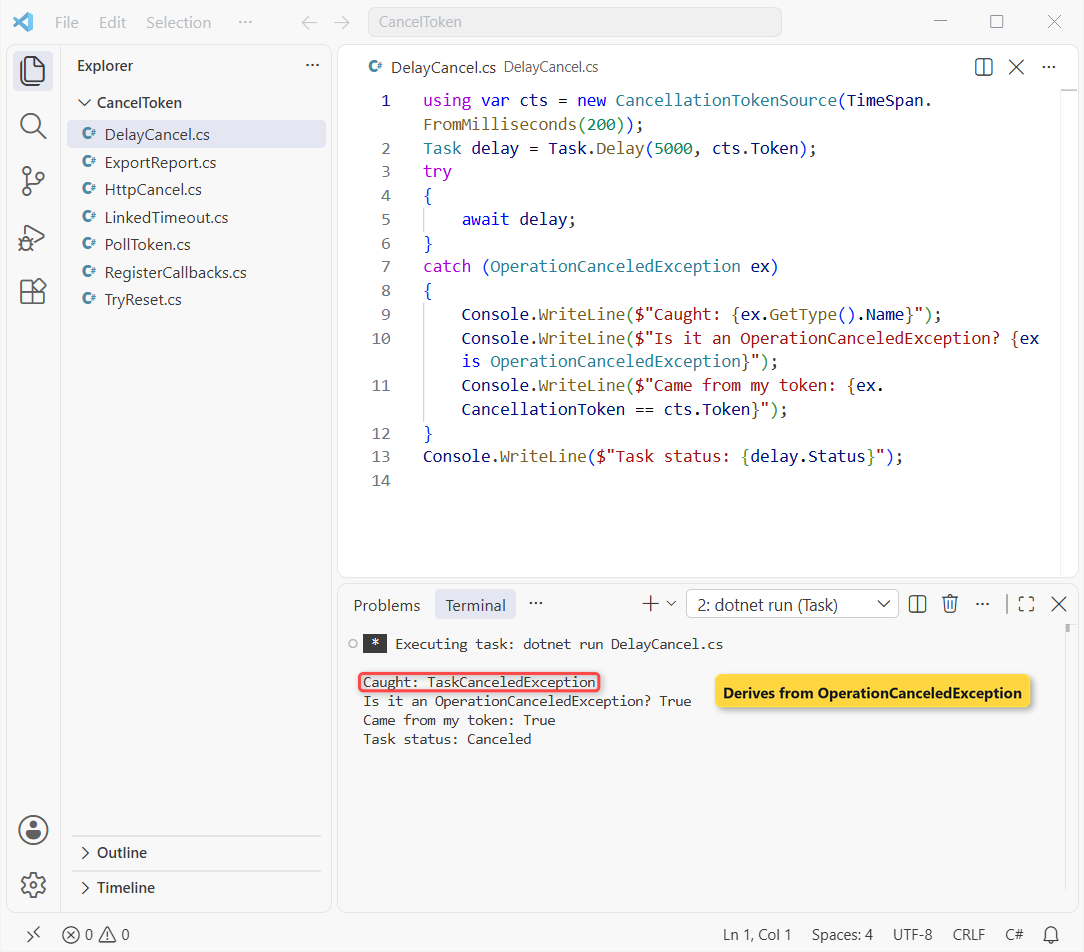
So catch OperationCanceledException; it covers both. Comparing ex.CancellationToken with your token confirms who canceled.
Don’t log cancellation as an error. It’s an expected exit, so give it its own catch block, as in try-catch in C#.
Timeouts with CancelAfter and Linked Tokens
CancelAfter(500) or new CancellationTokenSource(500) cancels on a timer, and a second CancelAfter call resets the countdown. Real code usually needs a timeout and the caller’s token, so link them with CreateLinkedTokenSource:
using var manager = new CancellationTokenSource();
Console.WriteLine(await RunReportAsync(manager.Token, timeoutMs: 2000));
Console.WriteLine(await RunReportAsync(manager.Token, timeoutMs: 300));
manager.CancelAfter(100);              // the manager gives up first
Console.WriteLine(await RunReportAsync(manager.Token, timeoutMs: 2000));

static async Task<string> RunReportAsync(CancellationToken userToken, int timeoutMs)
{
    using var timeout = new CancellationTokenSource(timeoutMs);
    using var linked = CancellationTokenSource.CreateLinkedTokenSource(userToken, timeout.Token);
    try
    {
        await Task.Delay(1000, linked.Token);   // the 1-second report query
        return "Report finished";
    }
    catch (OperationCanceledException) when (timeout.IsCancellationRequested)
    {
        return $"Timed out after {timeoutMs} ms";
    }
    catch (OperationCanceledException) { return "Canceled by the manager"; }
}
Output:
Report finished
Timed out after 300 ms
Canceled by the manager
The 1-second report finished, timed out at 300 ms, then stopped on the manager’s cancel. The when filter tells a timeout from a user cancel.
Run Cleanup Code with CancellationToken.Register
Register runs a callback the moment cancellation happens, which suits work you can’t poll, like closing a connection. It takes an Action, the same idea as delegates in C#:
using var cts = new CancellationTokenSource();
cts.Token.Register(() => Console.WriteLine("Close the SQL connection"));
cts.Token.Register(() => Console.WriteLine("Delete the temp CSV"));
var undo = cts.Token.Register(() => Console.WriteLine("Never printed"));
undo.Dispose();                        // unregister

Console.WriteLine("Calling Cancel...");
cts.Cancel();
Console.WriteLine("Cancel returned");

cts.Token.Register(() => Console.WriteLine("Late callback runs right away"));
Output:
Calling Cancel...
Delete the temp CSV
Close the SQL connection
Cancel returned
Late callback runs right away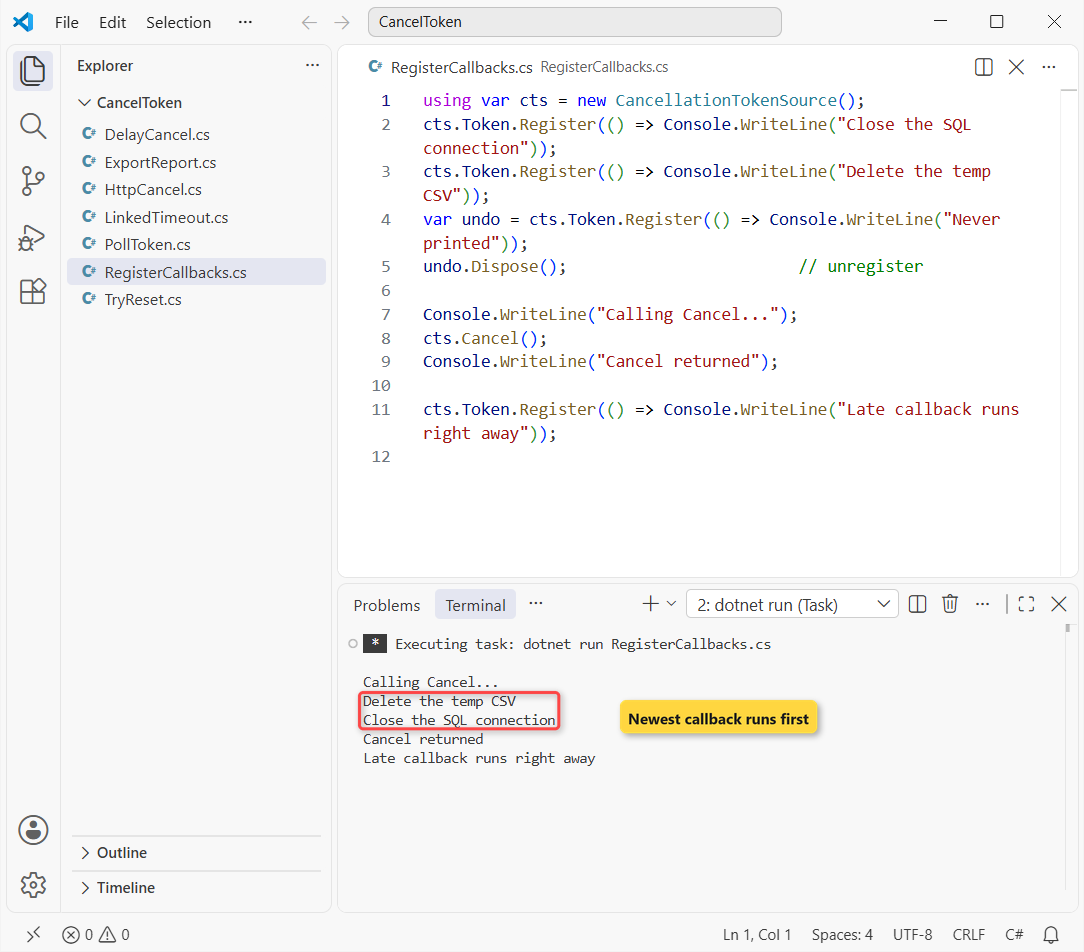
The callbacks ran newest first, Cancel() waited for them, and a late registration ran right away. Keep callbacks short, since they run inside Cancel.
How Do You Cancel an HttpClient Request with a CancellationToken?
Pass the token to the call. To test both kinds of cancel offline, I pointed HttpClient at a local socket that never answers:
using System.Net;
using System.Net.Sockets;

var server = new TcpListener(IPAddress.Loopback, 0);   // accepts, never answers
server.Start();
var url = $"http://localhost:{((IPEndPoint)server.LocalEndpoint).Port}/sales";

using var http = new HttpClient { Timeout = TimeSpan.FromSeconds(1) };
try { await http.GetStringAsync(url); }
catch (TaskCanceledException ex)
{
    Console.WriteLine($"HttpClient.Timeout: inner = {ex.InnerException?.GetType().Name}");
}

using var cts = new CancellationTokenSource(300);
try { await http.GetStringAsync(url, cts.Token); }
catch (TaskCanceledException ex)
{
    Console.WriteLine($"My token: inner = {ex.InnerException?.GetType().Name ?? "none"}");
}
Output:
HttpClient.Timeout: inner = TimeoutException
My token: inner = TaskCanceledException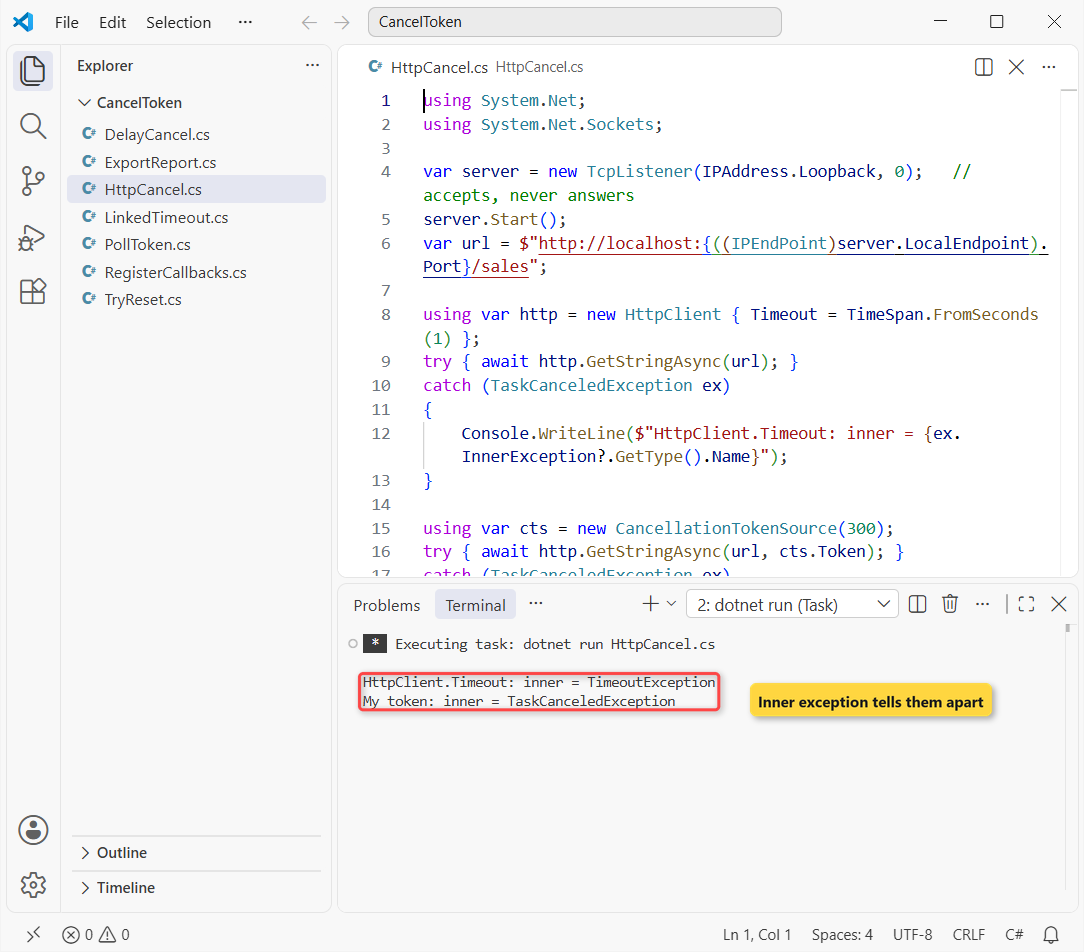
Both throw TaskCanceledException. On .NET 10 the timeout case carries an inner TimeoutException, which is how you tell them apart.
The default Timeout is 100 seconds, and when both are set, the shorter one wins. More request patterns are in HttpClient in C#.
CancellationToken in ASP.NET Core
Add a CancellationToken parameter and ASP.NET Core binds it to HttpContext.RequestAborted, which fires when the browser disconnects. In a minimal API:
app.MapGet("/reports/sales", async (CancellationToken cancellationToken) =>
{
    await Task.Delay(5000, cancellationToken);   // the slow report query
    return Results.Ok("Sales report ready");
});
Controller actions bind a CancellationToken parameter the same way; pass it on to EF Core and HttpClient calls. Both endpoint styles are compared in minimal APIs vs controllers.
Can You Reuse a CancellationTokenSource?
Not after it’s canceled; a token never goes back to false. TryReset() (.NET 6+) works only while nothing has canceled it yet:
var cts = new CancellationTokenSource();
cts.CancelAfter(5000);
Console.WriteLine($"TryReset before Cancel: {cts.TryReset()}");

await cts.CancelAsync();
Console.WriteLine($"TryReset after Cancel:  {cts.TryReset()}");
Console.WriteLine($"Still canceled:         {cts.IsCancellationRequested}");
cts.Dispose();
Output:
TryReset before Cancel: True
TryReset after Cancel:  False
Still canceled:         True
Create a new source per operation and dispose it with using var; Dispose and Finalize in C# explains why. CancelAsync() (.NET 8+) runs the callbacks without blocking the caller.
Common CancellationToken Mistakes
- Not passing the token down: the Austin row above. Every async call that takes a token should get it.
- Catching Exception first: a general catch logs cancellations as errors. Catch
OperationCanceledExceptionbefore it. - Forgetting Dispose: linked and timer sources leak without
using.
Which Cancellation Approach Should You Pick?
| You want to … | Use |
|---|---|
| Let a user stop work | CancellationTokenSource.Cancel() |
| Add a timeout | CancelAfter or the TimeSpan constructor |
| Timeout plus caller token | CreateLinkedTokenSource |
| Stop and return partial data | IsCancellationRequested |
| Release a resource on cancel | Register |
If you only add one habit, make it this: every async method takes a token and passes it on. Newer runtime changes are listed in what’s new in .NET 10.
Cancellation shows up all over .NET, so these are good next reads:
- Keep canceled requests out of your ASP.NET Core error logs
- Events in C#, the other way to signal a stop
- Unit test your cancellation paths with xUnit
- Every C# tutorial on aspdotnethelp.com
Frequently Asked Questions
Is CancellationToken a struct or a class?
A struct, so passing it is cheap. default(CancellationToken) equals CancellationToken.None, a token that never cancels.
Do I need to dispose CancellationTokenSource?
Yes. Microsoft says to call Dispose when you’re done; it matters most with CancelAfter and linked sources. A using declaration handles it.
What’s the difference between HttpClient timeout and a CancellationToken?
Timeout covers every request from that client (100 seconds by default); a token cancels one call. The shorter one wins.
Should every async method take a CancellationToken?
Any method doing I/O or long work should. Put it last as CancellationToken cancellationToken = default.
Does Cancel() stop a thread immediately?
No. Cancellation is cooperative: your code stops at its next check or awaited call. The cancellation guide on Microsoft Learn explains the model.

Bijay Kumar is a renowned software engineer, accomplished author, and distinguished Microsoft Most Valuable Professional (MVP) specializing in SharePoint. With a rich professional background spanning over 15 years, Bijay has established himself as an authority in the field of information technology. He possesses unparalleled expertise in multiple programming languages and technologies such as ASP.NET, ASP.NET MVC, C#.NET, and SharePoint, which has enabled him to develop innovative and cutting-edge solutions for clients across the globe. Read more…