
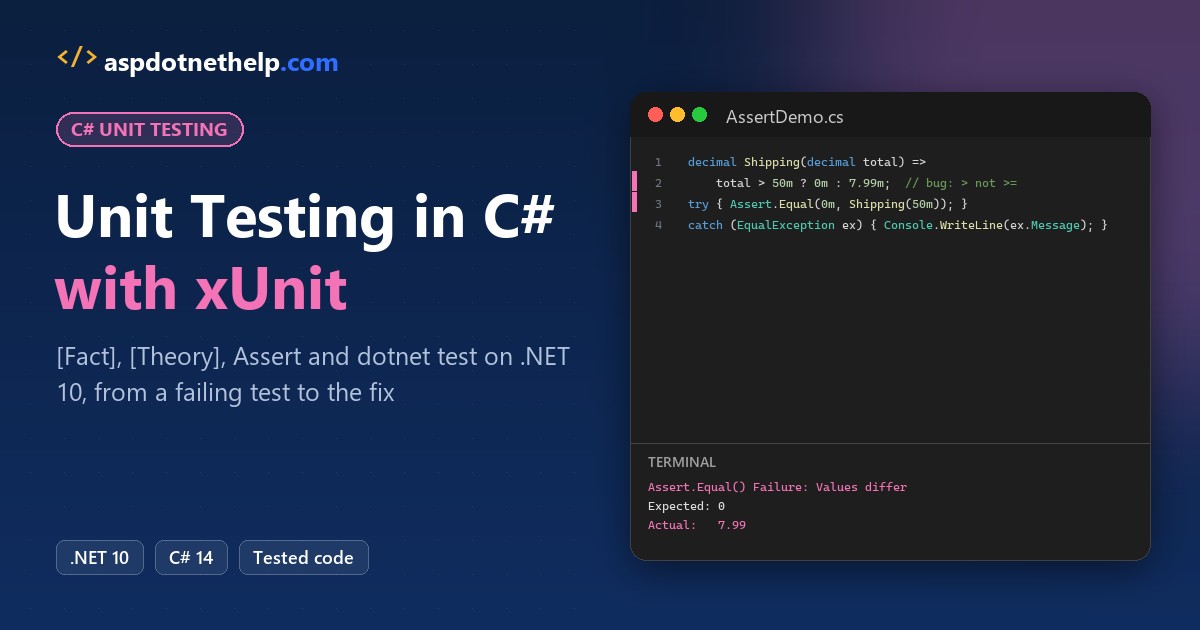
The first xUnit test most C# developers write checks a condition with Assert.True. When it fails, the runner tells you almost nothing about why:
[Fact]
public void FreeShippingAt50()
{
    var calculator = new OrderCalculator();
    Assert.True(calculator.Shipping(50m) == 0m);
}
Assert.True() Failure
Expected: True
Actual: FalseQuick answer: the first rule of any xUnit C# tutorial is to compare values with Assert.Equal(expected, actual), so a failure prints both of them.
Below, we build a small class library and its test project on .NET 10, then let a [Theory] catch a real bug and fix it.
What You Need Before You Start Unit Testing in C#
- The .NET 10 SDK (I used 10.0.402). Not sure what you have? Check your .NET version first.
- VS Code with the C# Dev Kit, or Visual Studio 2026. The screenshots come from VS Code; setting up VS Code for C# covers the install.
- The sample: a small online store’s order math for US customers: subtotal, state sales tax, a $7.99 shipping fee that’s free from $50, and percent discounts.
Step 1: Create the Class Library and the xUnit Test Project
We keep the code and the tests in two projects inside one solution. Run these from an empty folder:
dotnet new sln -n XunitDemo
dotnet new classlib -o ShopCart
dotnet new xunit -o ShopCart.Tests
dotnet sln add ShopCart/ShopCart.csproj ShopCart.Tests/ShopCart.Tests.csproj
dotnet reference add ShopCart/ShopCart.csproj --project ShopCart.Tests/ShopCart.Tests.csproj
On the .NET 10 SDK, dotnet new sln creates the new XML solution format, XunitDemo.slnx (one of the changes in .NET 10). The last line is also how you add tests to an existing project: point the test project at the code.
<Solution>
  <Project Path="ShopCart.Tests/ShopCart.Tests.csproj" />
  <Project Path="ShopCart/ShopCart.csproj" />
</Solution>
The built-in xunit template gives you xUnit v2. Here’s the test project file it generated, with the project reference added:
<Project Sdk="Microsoft.NET.Sdk">

  <PropertyGroup>
    <TargetFramework>net10.0</TargetFramework>
    <ImplicitUsings>enable</ImplicitUsings>
    <Nullable>enable</Nullable>
    <IsPackable>false</IsPackable>
  </PropertyGroup>

  <ItemGroup>
    <PackageReference Include="coverlet.collector" Version="6.0.4" />
    <PackageReference Include="Microsoft.NET.Test.Sdk" Version="17.14.1" />
    <PackageReference Include="xunit" Version="2.9.3" />
    <PackageReference Include="xunit.runner.visualstudio" Version="3.1.4" />
  </ItemGroup>

  <ItemGroup>
    <Using Include="Xunit" />
  </ItemGroup>

  <ItemGroup>
    <ProjectReference Include="..\ShopCart\ShopCart.csproj" />
  </ItemGroup>

</Project>
So the exact versions are xunit 2.9.3, xunit.runner.visualstudio 3.1.4, Microsoft.NET.Test.Sdk 17.14.1 and coverlet.collector 6.0.4. The <Using Include="Xunit" /> line is a global using, which is why our test files never write using Xunit;.
The class library’s project file is the plain template. We deleted Class1.cs and UnitTest1.cs:
<Project Sdk="Microsoft.NET.Sdk">

  <PropertyGroup>
    <TargetFramework>net10.0</TargetFramework>
    <ImplicitUsings>enable</ImplicitUsings>
    <Nullable>enable</Nullable>
  </PropertyGroup>

</Project>
Step 2: Write the C# Class You Want to Unit Test
Here’s OrderCalculator, the class every test below exercises. The tax rates live in a Dictionary<string, decimal>, and the shipping rule has a bug we planted on purpose:
namespace ShopCart;

public class OrderCalculator
{
    private static readonly Dictionary<string, decimal> TaxRates = new()
    {
        ["OH"] = 0.0575m,
        ["TX"] = 0.0625m,
        ["OR"] = 0m,
    };

    public decimal Subtotal(params decimal[] prices) => prices.Sum();

    public decimal SalesTax(decimal subtotal, string state) =>
        Math.Round(subtotal * TaxRates[state], 2);

    // Free shipping on orders of $50 or more
    public decimal Shipping(decimal subtotal) => subtotal > 50m ? 0m : 7.99m;

    public decimal ApplyDiscount(decimal subtotal, int percent)
    {
        ArgumentOutOfRangeException.ThrowIfNegative(percent);
        ArgumentOutOfRangeException.ThrowIfGreaterThan(percent, 50);
        return subtotal - subtotal * percent / 100m;
    }

    public List<string> ShippingStates() => [.. TaxRates.Keys];
}
The comment says free shipping starts at $50, but the code uses > instead of >=. A $50.00 order still pays $7.99, and nothing crashes. Bugs like that are what unit tests catch.
Step 3: Write Your First xUnit Test with [Fact]
A [Fact] is a test with no inputs: it should pass every time. We name tests Method_Scenario_Result, which reads well in the test output (our C# method naming conventions cover the rest):
using ShopCart;

namespace ShopCart.Tests;

public class SubtotalTests
{
    [Fact]
    public void Subtotal_ThreeItems_AddsPrices()
    {
        // Arrange
        var calculator = new OrderCalculator();

        // Act
        decimal subtotal = calculator.Subtotal(19.99m, 24.50m, 5.25m);

        // Assert
        Assert.Equal(49.74m, subtotal);
    }
}
The Arrange, Act, Assert comments are the shape every test should follow: set up, call one method, check one result.
Step 4: Run dotnet test and Read the xUnit Output
From the solution folder, dotnet test builds both projects and runs every test it finds:
Test run for C:\DotNetDemo\XunitDemo\ShopCart.Tests\bin\Debug\net10.0\ShopCart.Tests.dll (.NETCoreApp,Version=v10.0)
A total of 1 test files matched the specified pattern.
Passed!  - Failed:     0, Passed:     1, Skipped:     0, Total:     1, Duration: 378 ms - ShopCart.Tests.dll (net10.0)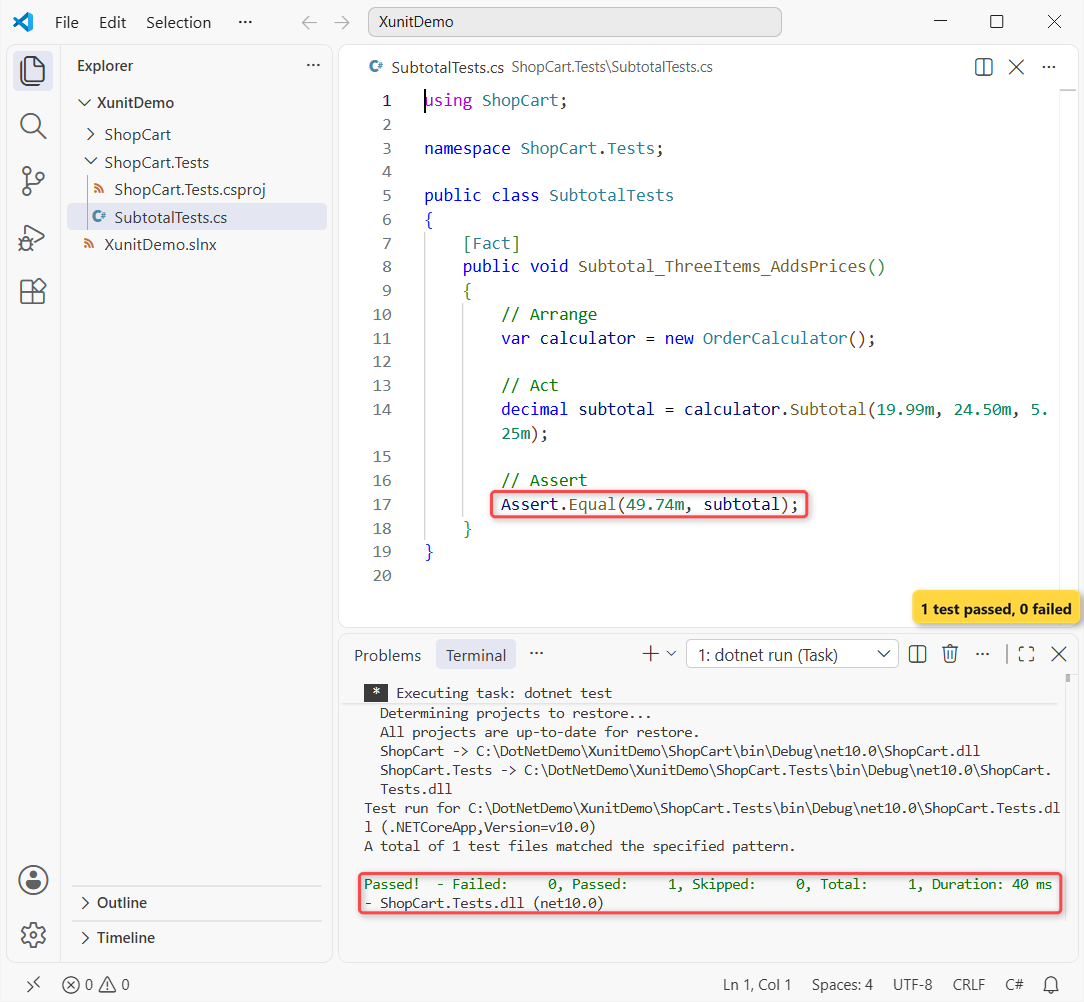
$19.99 + $24.50 + $5.25 is $49.74, so the test passes. In VS Code, the C# Dev Kit also lists these tests in the Testing panel, where you can run or debug one at a time.
Step 5: Test Many Inputs with [Theory] and [InlineData]
Shipping needs at least three checks: just under $50, exactly $50, and well over. Instead of three copies of a [Fact], one [Theory] runs the same method once per [InlineData] row:
using ShopCart;

namespace ShopCart.Tests;

public class ShippingTests
{
    private readonly OrderCalculator _calculator = new();

    [Theory]
    [InlineData(49.99, 7.99)]
    [InlineData(50.00, 0)]
    [InlineData(120.00, 0)]
    public void Shipping_ByOrderTotal_ChargesOrWaivesFee(double subtotal, double expected)
    {
        decimal fee = _calculator.Shipping((decimal)subtotal);

        Assert.Equal((decimal)expected, fee);
    }
}
Attribute arguments can’t be decimal, so the rows pass double and the test converts them (more on that below). Run dotnet test again:
[xUnit.net 00:00:00.43]     ShopCart.Tests.ShippingTests.Shipping_ByOrderTotal_ChargesOrWaivesFee(subtotal: 50, expected: 0) [FAIL]
  Failed ShopCart.Tests.ShippingTests.Shipping_ByOrderTotal_ChargesOrWaivesFee(subtotal: 50, expected: 0) [14 ms]
  Error Message:
   Assert.Equal() Failure: Values differ
Expected: 0
Actual:   7.99
  Stack Trace:
     at ShopCart.Tests.ShippingTests.Shipping_ByOrderTotal_ChargesOrWaivesFee(Double subtotal, Double expected) in C:\DotNetDemo\XunitDemo\ShopCart.Tests\ShippingTests.cs:line 17
   at System.Reflection.MethodBaseInvoker.InterpretedInvoke_Method(Object obj, IntPtr* args)
   at System.Reflection.MethodBaseInvoker.InvokeDirectByRefWithFewArgs(Object obj, Span`1 copyOfArgs, BindingFlags invokeAttr)
Failed!  - Failed:     1, Passed:     3, Skipped:     0, Total:     4, Duration: 62 ms - ShopCart.Tests.dll (net10.0)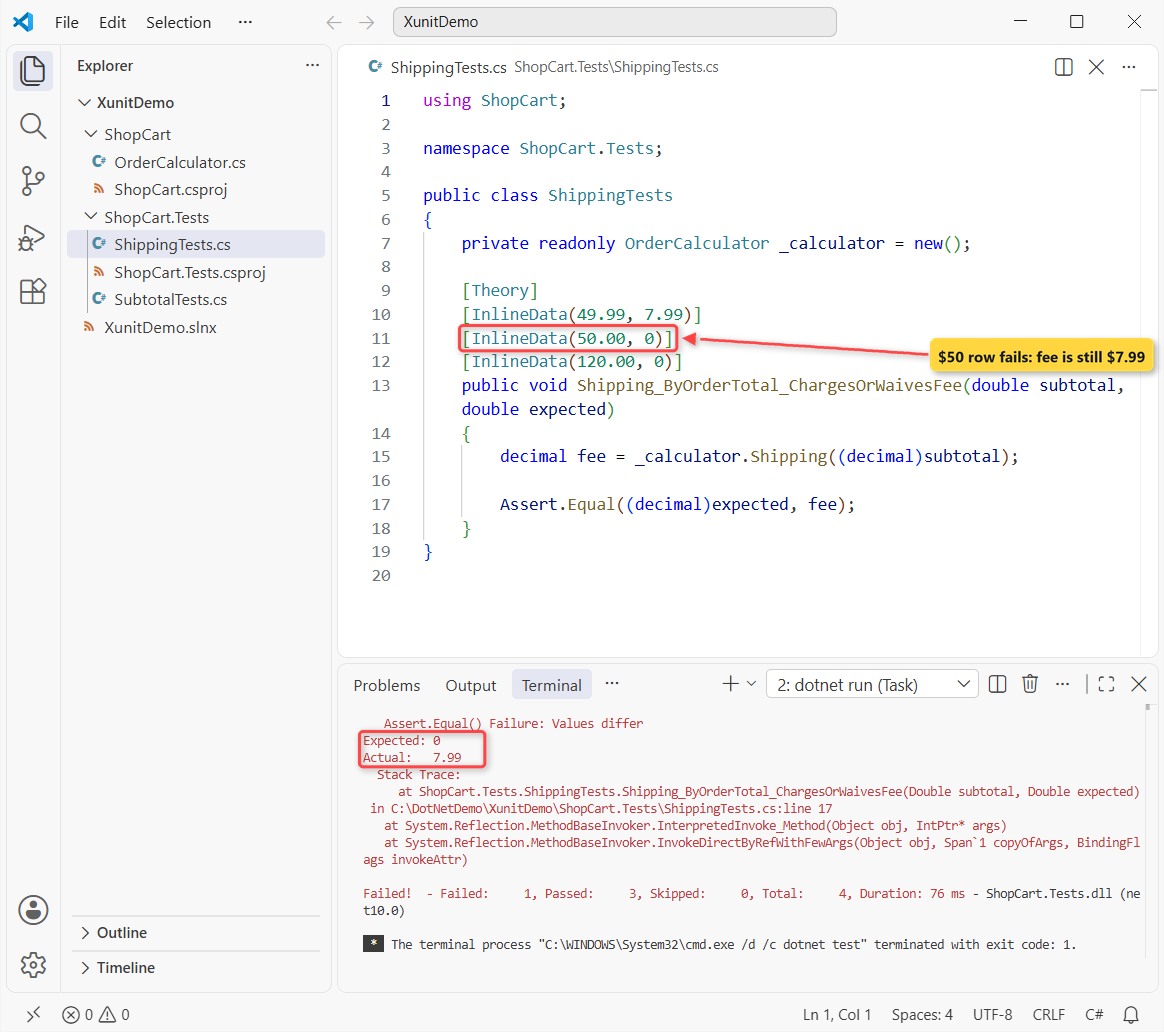
That’s the planted bug. Each row counts as its own test, so the summary says 4 total: 3 passed and 1 failed. Assert.Equal prints Expected 0 and Actual 7.99, which points straight at the > comparison.
Step 6: Fix the Failing xUnit Test and Run It Again
The fix goes in the code, never in the test. We change one character in Shipping, from > to >=. Here’s the finished class:
namespace ShopCart;

public class OrderCalculator
{
    private static readonly Dictionary<string, decimal> TaxRates = new()
    {
        ["OH"] = 0.0575m,
        ["TX"] = 0.0625m,
        ["OR"] = 0m,
    };

    public decimal Subtotal(params decimal[] prices) => prices.Sum();

    public decimal SalesTax(decimal subtotal, string state) =>
        Math.Round(subtotal * TaxRates[state], 2);

    // Free shipping on orders of $50 or more
    public decimal Shipping(decimal subtotal) => subtotal >= 50m ? 0m : 7.99m;

    public decimal ApplyDiscount(decimal subtotal, int percent)
    {
        ArgumentOutOfRangeException.ThrowIfNegative(percent);
        ArgumentOutOfRangeException.ThrowIfGreaterThan(percent, 50);
        return subtotal - subtotal * percent / 100m;
    }

    public List<string> ShippingStates() => [.. TaxRates.Keys];
}
Test run for C:\DotNetDemo\XunitDemo\ShopCart.Tests\bin\Debug\net10.0\ShopCart.Tests.dll (.NETCoreApp,Version=v10.0)
A total of 1 test files matched the specified pattern.
Passed! - Failed: 0, Passed: 4, Skipped: 0, Total: 4, Duration: 42 ms - ShopCart.Tests.dll (net10.0)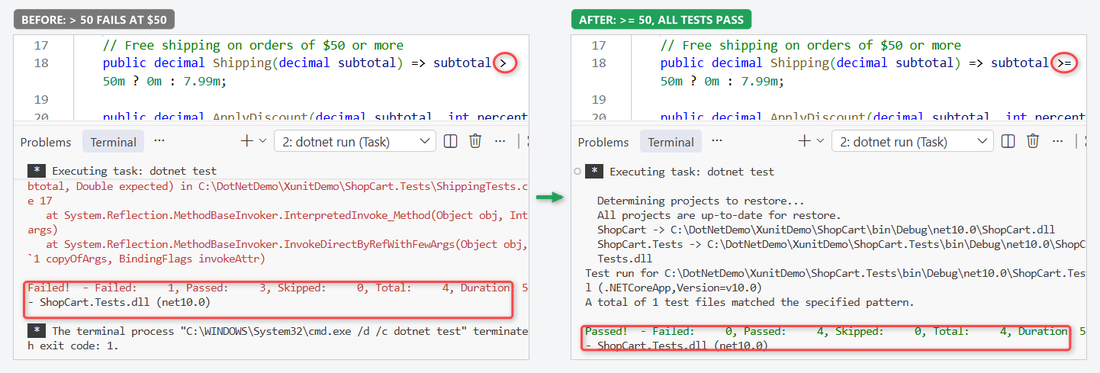
All 4 tests pass. The theory stays in the project, so if someone changes the rule back, dotnet test fails before the code ships.
Step 7: Use the Common xUnit Assert Methods
Assert.Equal covers most tests, but xUnit has an assert for each kind of check. This class uses the ones we reach for most, on the same calculator:
using ShopCart;

namespace ShopCart.Tests;

public class AssertExamples
{
    private readonly OrderCalculator _calc = new();

    [Fact]
    public void SalesTax_Ohio_RoundsToCents() =>
        Assert.Equal(2.87m, _calc.SalesTax(49.99m, "OH"));

    [Fact]
    public void Shipping_SmallOrder_IsNotFree() =>
        Assert.NotEqual(0m, _calc.Shipping(12.00m));

    [Fact]
    public void ShippingStates_IncludeTexas_NotCalifornia()
    {
        List<string> states = _calc.ShippingStates();
        Assert.Contains("TX", states);
        Assert.DoesNotContain("CA", states);
        Assert.Equal(3, states.Count);
    }

    [Fact]
    public void ApplyDiscount_15Percent_StaysInRange() =>
        Assert.InRange(_calc.ApplyDiscount(80.00m, 15), 60m, 70m);

    [Fact]
    public void ApplyDiscount_Over50Percent_Throws()
    {
        var ex = Assert.Throws<ArgumentOutOfRangeException>(
            () => _calc.ApplyDiscount(80.00m, 60));
        Assert.Equal("percent", ex.ParamName);
    }

    [Fact]
    public void SalesTax_UnknownState_Throws() =>
        Assert.Throws<KeyNotFoundException>(() => _calc.SalesTax(10m, "ZZ"));
}
Test run for C:\DotNetDemo\XunitDemo\ShopCart.Tests\bin\Debug\net10.0\ShopCart.Tests.dll (.NETCoreApp,Version=v10.0)
A total of 1 test files matched the specified pattern.
Passed! - Failed: 0, Passed: 10, Skipped: 0, Total: 10, Duration: 139 ms - ShopCart.Tests.dll (net10.0)All 10 tests pass. Note that Assert.Throws returns the exception, so you can check its ParamName too (see try-catch in C# for how the calling code handles it).
xUnit Assert cheat sheet
| Assert method | Passes when | Example from our tests |
|---|---|---|
Assert.Equal(expected, actual) | Values are equal | Ohio tax on $49.99 is 2.87 |
Assert.NotEqual | Values differ | A $12 order isn’t free to ship |
Assert.True / Assert.False | A condition holds (no values in the message) | Use only for real booleans |
Assert.Contains / DoesNotContain | A collection has (or lacks) an item | TX is a ship-to state, CA isn’t |
Assert.InRange(actual, low, high) | Value is between low and high | 15% off $80 is 60-70 |
Assert.Throws<T> | The code throws exactly T | A 60% discount throws |
Assert.Null / NotNull, Empty, Single | Null checks and collection size | Same pattern, other cases |
How Do You Pass decimal Values to an xUnit Theory?
Remember the double rows? List the tests with dotnet test --list-tests and the display names give the conversion away:
ShopCart.Tests.ShippingTests.Shipping_ByOrderTotal_ChargesOrWaivesFee(subtotal: 49.990000000000002, expected: 7.9900000000000002)
ShopCart.Tests.ShippingTests.Shipping_ByOrderTotal_ChargesOrWaivesFee(subtotal: 50, expected: 0)
ShopCart.Tests.ShippingTests.Shipping_ByOrderTotal_ChargesOrWaivesFee(subtotal: 120, expected: 0)
Our test still passed, but 49.99 isn’t exact as a double, and that’s the wrong type for money (see C# data types). The fix is TheoryData<decimal, decimal> with [MemberData]:
using ShopCart;

namespace ShopCart.Tests;

public class ShippingTests
{
    private readonly OrderCalculator _calculator = new();

    public static TheoryData<decimal, decimal> Orders => new()
    {
        { 49.99m, 7.99m },
        { 50.00m, 0m },
        { 120.00m, 0m },
    };

    [Theory]
    [MemberData(nameof(Orders))]
    public void Shipping_ByOrderTotal_ChargesOrWaivesFee(decimal subtotal, decimal expected) =>
        Assert.Equal(expected, _calculator.Shipping(subtotal));
}
ShopCart.Tests.ShippingTests.Shipping_ByOrderTotal_ChargesOrWaivesFee(subtotal: 49.99, expected: 7.99)
ShopCart.Tests.ShippingTests.Shipping_ByOrderTotal_ChargesOrWaivesFee(subtotal: 50.00, expected: 0)
ShopCart.Tests.ShippingTests.Shipping_ByOrderTotal_ChargesOrWaivesFee(subtotal: 120.00, expected: 0)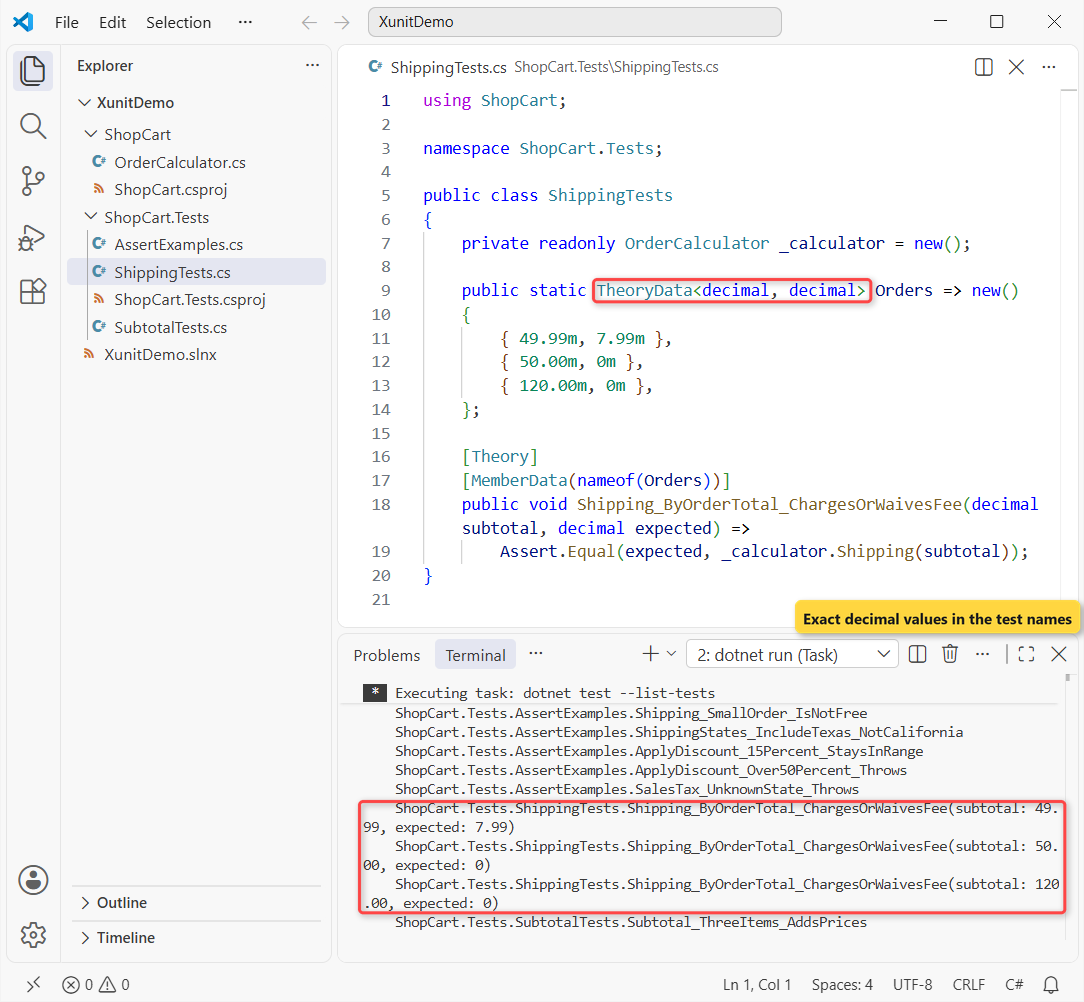
Now the rows are real decimals, and the compiler checks their types. The final dotnet test run is 10 passed, 0 failed.
Does xUnit Have a Setup Method?
No [SetUp] attribute like NUnit. xUnit creates a new instance of the test class for every test, so the constructor is your setup. That’s why _calculator in ShippingTests is fresh for each row.
For teardown, implement IDisposable and clean up in Dispose. When the setup is expensive, like a database, share one instance across a class with IClassFixture<T>.
Should You Use xUnit v2 or xUnit v3?
Microsoft Learn’s xUnit tutorial still uses dotnet new xunit, which on SDK 10.0.402 means xunit 2.9.3. That’s what we used, and it’s fine for a new project today.
xUnit v3 is the newer major version (the xunit.v3 package is 4.0.2 on NuGet as I write this). You get it from separate templates: dotnet new install xunit.v3.templates, then dotnet new xunit3.
If your solution is still on .NET 8, do the .NET 8 to .NET 10 upgrade first; the test project upgrades with it.
v3 test projects build as stand-alone executables. [Fact], [Theory], [InlineData] and Assert work the same way, so everything above carries over.
Common Mistakes to Avoid with xUnit in C#
| Mistake | What happens | Fix |
|---|---|---|
Assert.True(a == b) | Failure says only Expected True, Actual False | Assert.Equal(b, a) |
| Expected and actual swapped | The message points the wrong way | Expected value first |
[InlineData(49.99m)] | Doesn’t compile: attributes can’t take decimal | TheoryData<decimal, ...> |
| Test class or method not public | The test is never discovered | Make both public |
| Shared static state | Tests pass alone but fail together | Create state in the constructor |
| Fixing the test to match buggy code | The bug ships with a green build | Fix the code |
For async code under test, write public async Task tests and await the call, as in async and await in C#.
Next Steps After Your First xUnit Tests
Once the order math is covered, test classes with dependencies. Put each dependency behind an interface so a test can pass a fake, which is what mocking libraries automate.
A few more posts our team pairs with this one:
- What’s new in C# 14, for the syntax in these tests
- Record vs class vs struct, since records make equality asserts easy
- List in C#, the collection behind Assert.Contains
- All C# tutorials on AspDotnetHelp
Frequently Asked Questions
What is the difference between Fact and Theory in xUnit?
A [Fact] runs once with no parameters. A [Theory] takes parameters and runs once per data row from [InlineData], [MemberData] or [ClassData], and each row counts as a separate test.
How do I run xUnit tests from the command line?
Run dotnet test from the solution or test project folder. It builds the projects and runs every test. Add –list-tests to see the tests without running them, or –filter to run a subset.
Is xUnit better than NUnit or MSTest?
All three are supported by dotnet test and Visual Studio. xUnit is the default in many .NET open-source projects and creates a new class instance per test; NUnit and MSTest use setup attributes instead. Pick one per solution.
Can I use decimal in InlineData?
No. Attribute arguments must be constants of types like int, double, string or bool, and decimal isn’t one. Use TheoryData<decimal, decimal> with [MemberData], or pass strings and parse them.
How do I add an xUnit test project to an existing solution?
Run dotnet new xunit -o MyApp.Tests, then dotnet sln add for the new project and dotnet reference add to point it at the project under test. The Microsoft Learn xUnit tutorial uses the same steps.
How do I start with xUnit v3?
Install the templates with dotnet new install xunit.v3.templates and create a project with dotnet new xunit3. The xUnit.net v3 getting started guide covers the details.

Bijay Kumar is a renowned software engineer, accomplished author, and distinguished Microsoft Most Valuable Professional (MVP) specializing in SharePoint. With a rich professional background spanning over 15 years, Bijay has established himself as an authority in the field of information technology. He possesses unparalleled expertise in multiple programming languages and technologies such as ASP.NET, ASP.NET MVC, C#.NET, and SharePoint, which has enabled him to develop innovative and cutting-edge solutions for clients across the globe. Read more…