
Say you’re building order intake for a Seattle coffee roaster. Every order needs a customer, a five-digit ZIP code and at least one pound of beans, and a half-built order should never exist.
Quick answer: a constructor in C# is the method named after the class, with no return type, that runs on new. That’s where we put those rules.
We built that Order class on .NET 10 one constructor type at a time, ending with primary constructors, required members and records.
What You Need Before You Start with C# Constructors
- The .NET 10 SDK. Every program here is a file-based app you run with
dotnet run File.cs, so there’s no project file. - VS Code with the C# Dev Kit, or Visual Studio 2026. The screenshots are from VS Code.
- Basic class syntax. If fields and properties are new to you, skim OOPs concepts in C# first.
The sample is one Order class for the roaster. We change one thing per step, so you can see exactly what each constructor type adds.
Step 1: Use the Default (Parameterless) Constructor
If a class declares no constructor at all, C# gives it a public parameterless one. It runs the field and property initializers and leaves everything else at its default value:
var order = new Order();
Console.WriteLine($"Customer: {order.Customer ?? "null"}");
Console.WriteLine($"Pounds: {order.Pounds}, Rush: {order.Rush}");
Console.WriteLine($"Status: {order.Status}");

class Order
{
    public string? Customer { get; set; }    // no initializer -> null
    public int Pounds { get; set; }          // -> 0
    public bool Rush { get; set; }           // -> false
    public string Status { get; set; } = "New";   // initializer runs
    // no constructor written, so C# adds a public Order()
}
Output:
Customer: null
Pounds: 0, Rush: False
Status: New
The order prints null for the customer, 0 pounds, False for rush and New for the status, the only property with an initializer.
That free constructor disappears the moment you write any constructor yourself (Common Mistakes shows the error). A structure in C# is different: a struct always has a parameterless constructor.
Step 2: Add a Parameterized Constructor That Validates Input
A parameterized constructor takes the values the object can’t live without. It’s also the one place to reject bad data, because nothing outside can skip it:
var order = new Order("Jenna Morales", "98101", 2);
Console.WriteLine($"{order.Customer} | ZIP {order.Zip} | {order.Pounds} lb");

try { new Order("Tyler Brooks", "", 1); }
catch (ArgumentException ex) { Console.WriteLine($"Rejected: {ex.Message}"); }

class Order
{
    public string Customer { get; }
    public string Zip { get; }
    public int Pounds { get; }

    public Order(string customer, string zip, int pounds)
    {
        ArgumentException.ThrowIfNullOrWhiteSpace(zip);
        ArgumentOutOfRangeException.ThrowIfLessThan(pounds, 1);
        Customer = customer;
        Zip = zip;
        Pounds = pounds;
    }
}
Output:
Jenna Morales | ZIP 98101 | 2 lb
Rejected: The value cannot be an empty string or composed entirely of whitespace. (Parameter 'zip')
Jenna’s order is created with ZIP 98101 and 2 lb. Tyler’s blank ZIP never becomes an order; the constructor throws before any property is set.
ArgumentException.ThrowIfNullOrWhiteSpace and ArgumentOutOfRangeException.ThrowIfLessThan are one-line guard helpers in .NET 8 and later. The caller catches the failure with try-catch in C#, and the properties are get-only, so the order stays valid afterward.
Step 3: Overload Constructors and Chain Them with this()
Constructor overloading is method overloading in C# applied to new: same name, different parameter lists. The trick is to keep the real work in one constructor and have the others call it with : this(...):
new Order("Jenna Morales", "98101", 2, true);
new Order("Tyler Brooks", "97205");
new Order();

class Order
{
    public string Customer { get; }
    public string Zip { get; }
    public int Pounds { get; }
    public bool Rush { get; }

    public Order(string customer, string zip, int pounds, bool rush)
    {
        Customer = customer; Zip = zip; Pounds = pounds; Rush = rush;
        Console.WriteLine($"{Customer,-14}{Zip}  {Pounds} lb  rush={Rush}");
    }
    public Order(string customer, string zip) : this(customer, zip, 1, false) { }
    public Order() : this("Walk-in", "98101") { }
}
Output:
Jenna Morales 98101  2 lb  rush=True
Tyler Brooks  97205  1 lb  rush=False
Walk-in       98101  1 lb  rush=False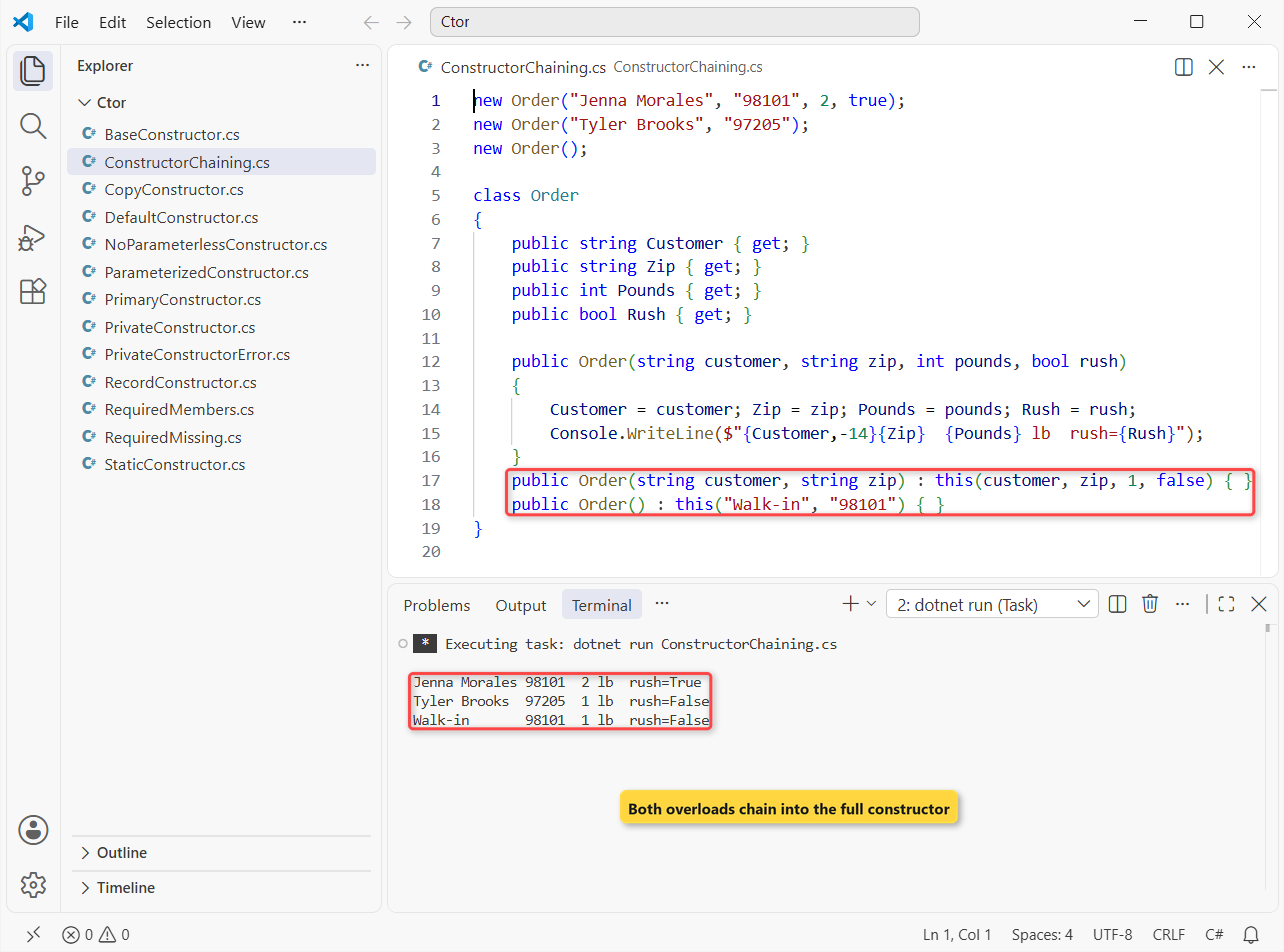
All three lines come from the full constructor, so the walk-in order with no arguments still got ZIP 98101 and 1 lb from the chain.
Order() calls the two-parameter version, which calls the full one. The this(...) call runs first, then the calling constructor’s own body, so add a rule once and every overload gets it. I always put the validation in the constructor with the most parameters.
Step 4: Call a Base Class Constructor with base()
When one class inherits from another, the base class constructor always runs first. If the base has no parameterless constructor, the derived one must pass values up with : base(...). The wholesale orders for cafes use the same Order class as the base:
var w = new WholesaleOrder("Pike Street Cafe", 40);
Console.WriteLine($"{w.Customer}: {w.Pounds} lb, {w.DiscountPercent}% off");

class Order
{
    public string Customer { get; }
    public int Pounds { get; }
    public Order(string customer, int pounds)
    {
        Console.WriteLine("1. Order constructor (base)");
        Customer = customer; Pounds = pounds;
    }
}
class WholesaleOrder : Order
{
    public int DiscountPercent => Pounds >= 25 ? 15 : 5;
    public WholesaleOrder(string customer, int pounds) : base(customer, pounds)
        => Console.WriteLine("2. WholesaleOrder constructor (derived)");
}
Output:
1. Order constructor (base)
2. WholesaleOrder constructor (derived)
Pike Street Cafe: 40 lb, 15% off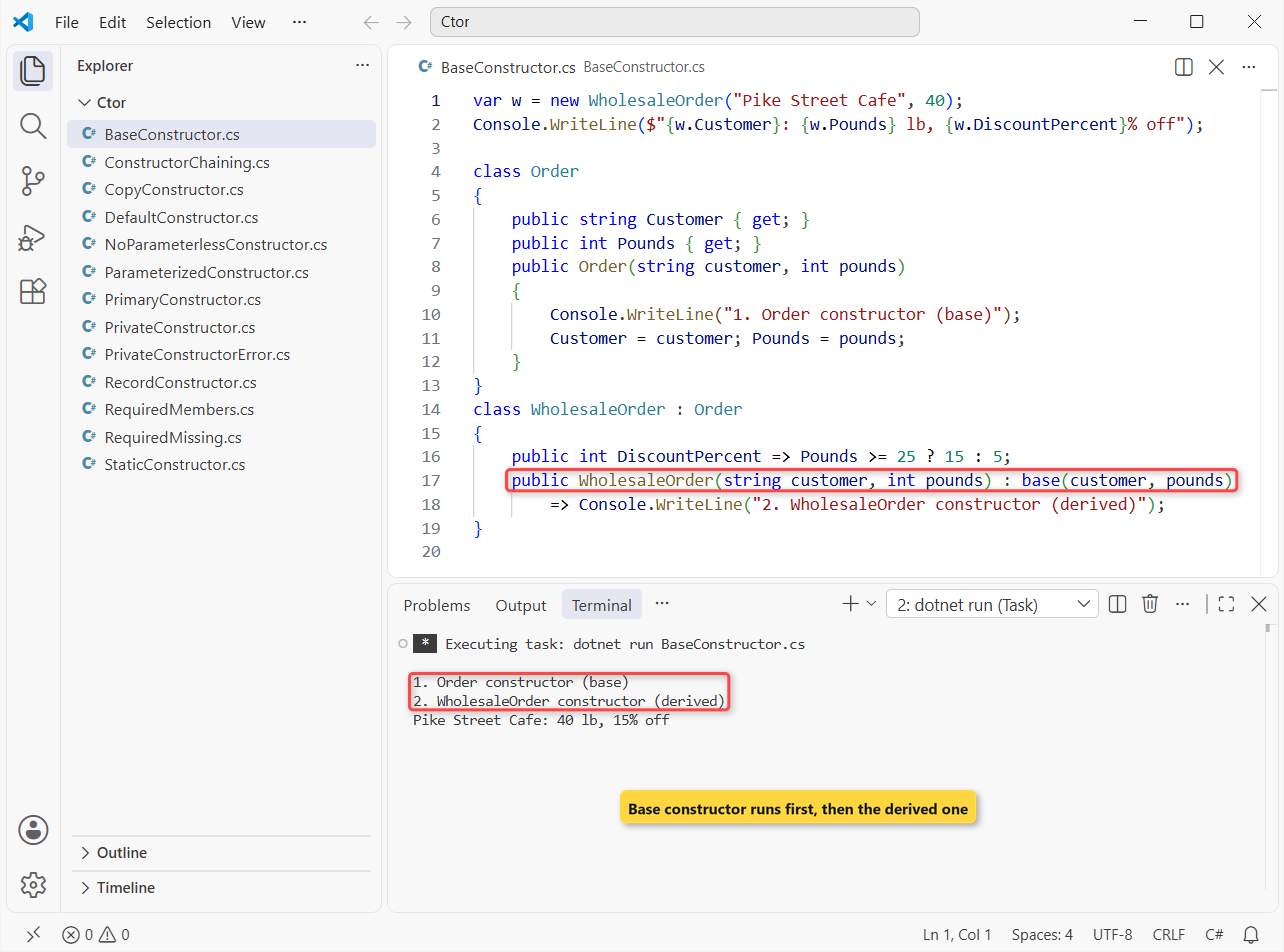
Line 1 comes from Order, line 2 from WholesaleOrder, and Pike Street Cafe’s 40 lb order gets the 15% discount.
Constructors aren’t inherited, so WholesaleOrder must declare its own. Our inheritance in C# guide covers the rest of the chain, and an abstract class in C# uses the same base(...) call from its derived types.
Step 5: Run One-Time Setup in a Static Constructor
A static constructor initializes static data once per type. It takes no access modifier and no parameters, a class gets only one, and you never call it; the runtime does, right before the type is first used:
using System.Globalization;
CultureInfo.CurrentCulture = new("en-US");

Console.WriteLine("Program started");
Console.WriteLine(ShippingRates.For("WA"));
Console.WriteLine(ShippingRates.For("TX"));

static class ShippingRates
{
    static readonly Dictionary<string, decimal> rates;

    static ShippingRates()
    {
        Console.WriteLine("Static constructor: loading rates (runs once)");
        rates = new() { ["WA"] = 4.95m, ["OR"] = 5.95m, ["TX"] = 8.95m };
    }

    public static string For(string state) => $"{state}: {rates[state]:C}";
}
Output:
Program started
Static constructor: loading rates (runs once)
WA: $4.95
TX: $8.95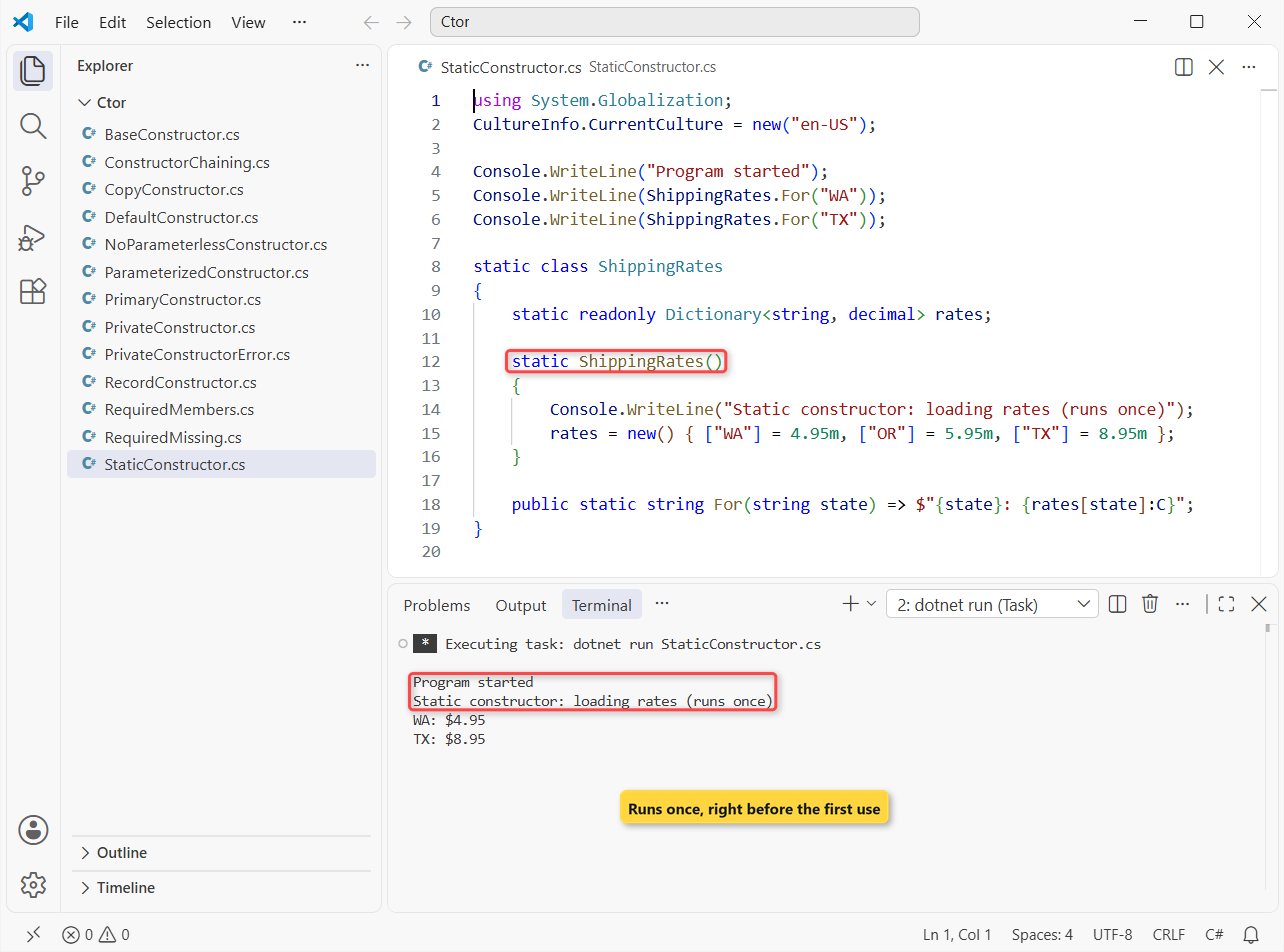
Program started prints before the rates load, and the second lookup (TX, $8.95) doesn’t load them again. I use this for lookup tables like this dictionary in C# of state rates.
Important: if a static constructor throws, the runtime doesn’t retry it. Every later use of the type fails with TypeInitializationException, so keep that code simple and never wait on tasks or locks inside it.
Microsoft also notes that an explicit static constructor blocks a runtime optimization (BeforeFieldInit). If a field initializer can do the job, prefer it.
Step 6: Hide Construction Behind a Private Constructor
A private constructor means only the class itself can call new. We use it when an order should come from a factory method that can say no, which is encapsulation in C# applied to object creation:
var good = Order.FromWebForm("Dana Whitfield", "98101", "3");
var bad = Order.FromWebForm("Marcus Hill", "981", "2");
Console.WriteLine($"Good form: {good?.Customer}, {good?.Pounds} lb");
Console.WriteLine($"Bad ZIP:   {(bad is null ? "no order created" : "order created")}");

class Order
{
    public string Customer { get; }
    public int Pounds { get; }

    private Order(string customer, int pounds) { Customer = customer; Pounds = pounds; }

    public static Order? FromWebForm(string name, string zip, string pounds) =>
        zip.Length == 5 && int.TryParse(pounds, out int lb) && lb > 0
            ? new Order(name, lb)
            : null;
}
Output:
Good form: Dana Whitfield, 3 lb
Bad ZIP:   no order created
Dana’s form becomes a 3 lb order. Marcus typed a three-digit ZIP, so FromWebForm returns null instead of throwing.
Try to call the constructor from outside and the build stops:
var order = new Order("Dana Whitfield", 3);

class Order
{
    private Order(string customer, int pounds) { }
}
Output:
C:\DotNetDemo\Ctor\PrivateConstructorError.cs(1,17): error CS0122: 'Order.Order(string, int)' is inaccessible due to its protection level

The build failed. Fix the build errors and run again.
That’s CS0122. The same trick powers singletons and classes with only static members, though a static class is the cleaner choice for the second.
Step 7: Write a Copy Constructor for a Repeat Order
C# classes don’t get a copy constructor for free. You write one that takes the same type and copies its state, and you decide how deep the copy goes. Same Order idea, now holding a list of blends:
var march = new Order("Jenna Morales", ["Ethiopia Yirgacheffe", "House Espresso"]);
var april = new Order(march);
april.Blends.Add("Decaf Colombia");
Console.WriteLine($"March order: {march.Blends.Count} blends");
Console.WriteLine($"April order: {april.Blends.Count} blends");

class Order
{
    public string Customer { get; }
    public List<string> Blends { get; }

    public Order(string customer, List<string> blends) { Customer = customer; Blends = blends; }

    public Order(Order other)              // copy constructor
    {
        Customer = other.Customer;
        Blends = [.. other.Blends];        // a new list, not the same one
    }
}
Output:
March order: 2 blends
April order: 3 blends
Adding decaf to April’s order left March’s at 2 blends. Without [.. other.Blends], both orders would share one list and both would show 3.
Copy every reference-type field into a new instance (lists, arrays, nested objects). Copying the reference alone is a shallow copy, and that’s the bug this step avoids. More on List<T> is in our List in C# guide.
Step 8: Shorten the Class with a Primary Constructor (C# 12)
Since C# 12, a class can declare its constructor parameters right after the class name. The parameters are in scope for the whole class body:
var order = new Order("Tyler Brooks", "97205", 3);
var sample = new Order("Ava Coleman");
Console.WriteLine(order.Label);
Console.WriteLine(sample.Label);
try { new Order("Marcus Hill", "981", 1); }
catch (ArgumentException ex) { Console.WriteLine($"Rejected: {ex.Message}"); }

class Order(string customer, string zip, int pounds)
{
    // any other constructor must call this(...)
    public Order(string customer) : this(customer, "98101", 1) { }

    public string Customer { get; } = customer;
    public string Zip { get; } = zip.Length == 5
        ? zip
        : throw new ArgumentException("ZIP must be 5 digits");
    public string Label => $"{Customer} | {Zip} | {pounds} lb";
}
Output:
Tyler Brooks | 97205 | 3 lb
Ava Coleman | 98101 | 1 lb
Rejected: ZIP must be 5 digits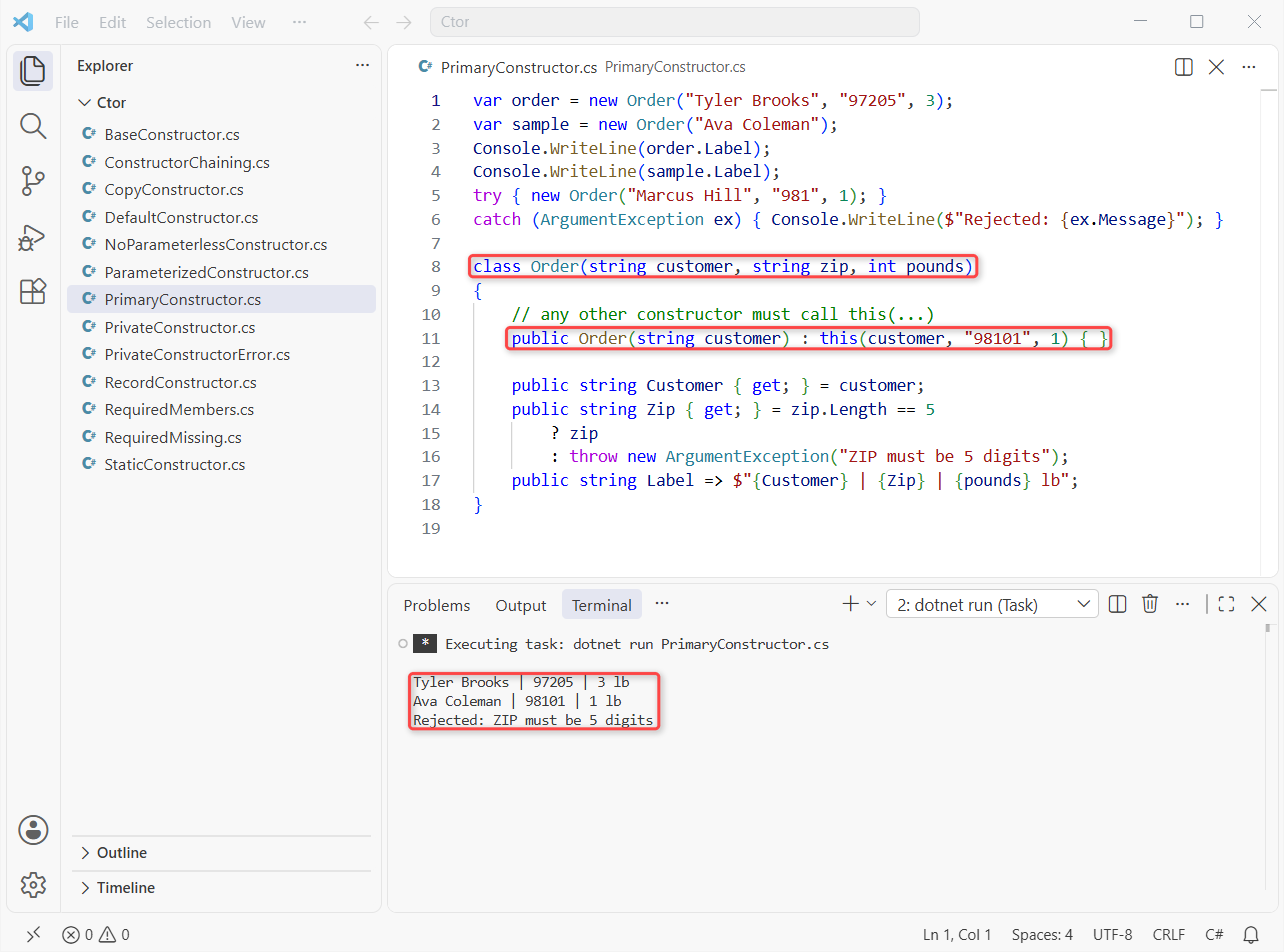
Tyler’s order prints ZIP 97205 and 3 lb, Ava’s falls back to 98101 and 1 lb, and Marcus’s three-digit ZIP is rejected with ZIP must be 5 digits.
Three rules matter here. Any other constructor must call the primary one with this(...). A class with a primary constructor gets no implicit parameterless constructor, and unlike a record, it doesn’t turn the parameters into public properties.
A derived class passes its parameters on with class WholesaleOrder(string c, int lb) : Order(c, "98101", lb). C# 14 also lets you split a constructor across a partial class in C#; see what is new in C# 14.
Should You Use required and init Members Instead of a Constructor?
Sometimes object-initializer syntax reads better than a long parameter list. Mark the must-have properties required and the compiler forces every caller to set them. Same Order, rebuilt that way:
using System.Diagnostics.CodeAnalysis;

var web = new Order { Customer = "Jenna Morales", Zip = "98101" };
var phone = new Order("Tyler Brooks", "97205") { Pounds = 5 };
Console.WriteLine($"{web.Customer,-14}{web.Zip}  {web.Pounds} lb");
Console.WriteLine($"{phone.Customer,-14}{phone.Zip}  {phone.Pounds} lb");

class Order
{
    public required string Customer { get; init; }
    public required string Zip { get; init; }
    public int Pounds { get; init; } = 1;

    public Order() { }

    [SetsRequiredMembers]
    public Order(string customer, string zip) { Customer = customer; Zip = zip; }
}
Output:
Jenna Morales 98101  1 lb
Tyler Brooks  97205  5 lb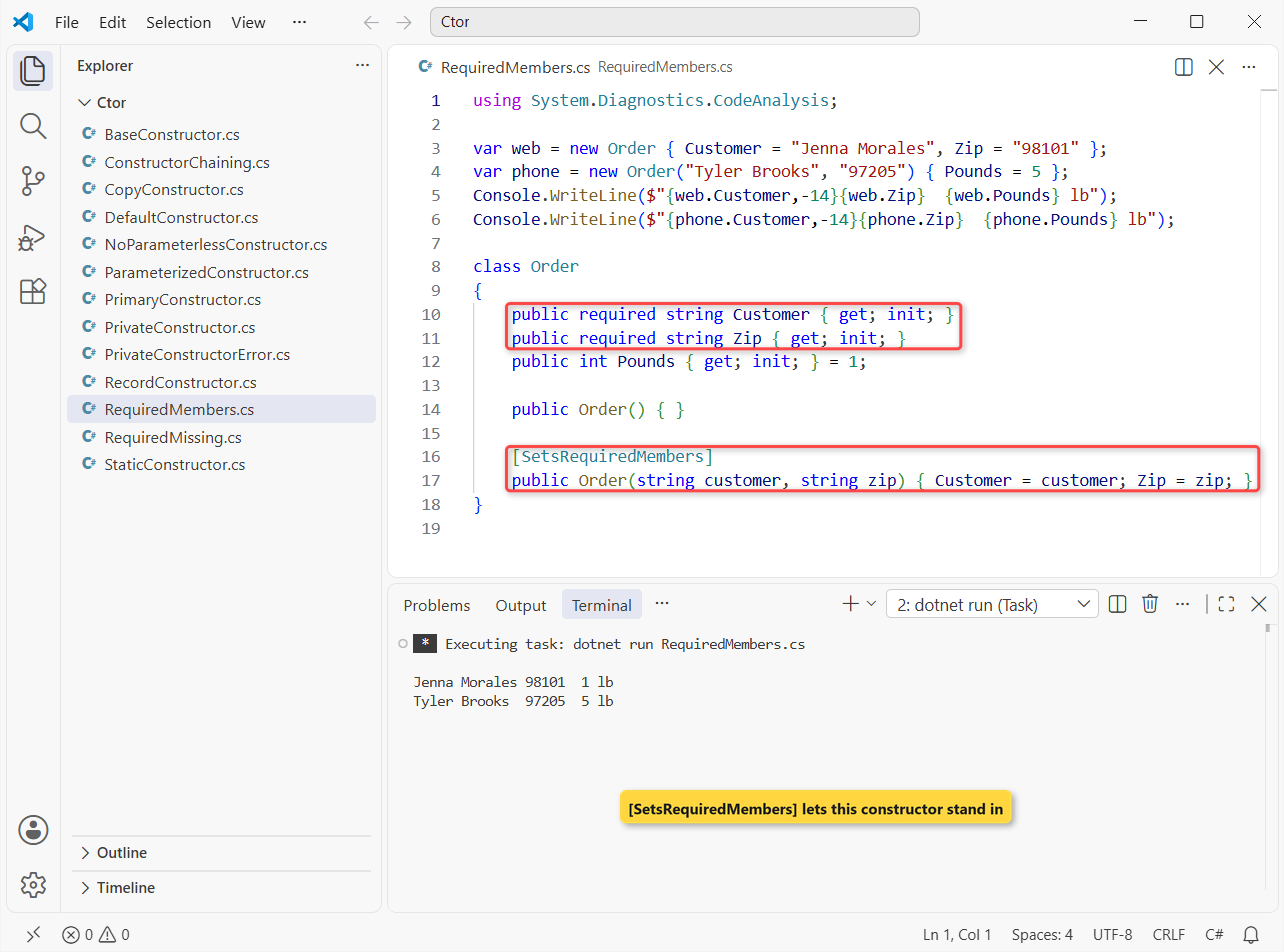
Jenna’s web order uses only the initializer and keeps the default 1 lb. Tyler’s phone order uses the constructor, then sets 5 lb.
[SetsRequiredMembers] tells the compiler that this constructor sets every required member, so callers don’t have to. The compiler takes your word for it, so make sure it’s true.
required only checks that a value was assigned, not that it’s valid, so I still guard against blanks (see how to check for null values in C#).
We use constructors for rules that need checks (like the ZIP length) and required for simple data objects with many optional fields.
How Do Constructors Work in C# Records?
A positional record declares a primary constructor and, unlike a class, turns each parameter into a public init-only property. The compiler also writes a copy constructor that the with expression uses:
var label = new ShippingLabel("Jenna Morales", "Seattle", "98101");
var moved = label with { City = "Tacoma", Zip = "98402" };

Console.WriteLine(label);
Console.WriteLine(moved);
Console.WriteLine(label == new ShippingLabel("Jenna Morales", "Seattle", "98101"));

record ShippingLabel(string Name, string City, string Zip);
Output:
ShippingLabel { Name = Jenna Morales, City = Seattle, Zip = 98101 }
ShippingLabel { Name = Jenna Morales, City = Tacoma, Zip = 98402 }
True
with made a Tacoma copy and left the Seattle label alone. The last line prints True because records compare by value, not by reference.
The printed text comes from a ToString() the compiler writes for records; ToString in C# shows how to override it.
C# Constructor Types Cheat Sheet
This is the table we keep for code reviews, built from the runs above:
| Constructor type | Syntax | Use it when |
|---|---|---|
| Default (parameterless) | public Order() { } or none at all | Every field has a sensible default |
| Parameterized | public Order(string zip, int lb) | The object can’t exist without some values |
| Overloaded + chained | : this(customer, zip, 1, false) | Several ways to create it, one set of rules |
| Base call | : base(customer, pounds) | The base class has no parameterless constructor |
| Static | static Order() { } | One-time setup of static data |
| Private | private Order(...) | Creation goes through a factory or singleton |
| Copy | public Order(Order other) | You need an independent clone of a class |
| Primary (C# 12) | class Order(string zip) | Parameters used across the class, little logic |
| required members | public required string Zip { get; init; } | Data objects built with object initializers |
Common Mistakes to Avoid with Constructors in C#
Adding a constructor and breaking new Order(). Once a class declares any constructor, the free parameterless one is gone. Code that compiled yesterday now fails:
var order = new Order();   // compiled fine before we added the constructor below

class Order
{
    public string Zip { get; }
    public Order(string zip) => Zip = zip;
}
Output:
C:\DotNetDemo\Ctor\NoParameterlessConstructor.cs(1,17): error CS7036: There is no argument given that corresponds to the required parameter 'zip' of 'Order.Order(string)'

The build failed. Fix the build errors and run again.
Fix CS7036 by adding public Order() : this("98101") { } or by passing the argument.
Forgetting a required member. The compiler names the property you skipped:
var order = new Order { Customer = "Jenna Morales" };   // Zip forgotten

class Order
{
    public required string Customer { get; init; }
    public required string Zip { get; init; }
}
Output:
C:\DotNetDemo\Ctor\RequiredMissing.cs(1,17): error CS9035: Required member 'Order.Zip' must be set in the object initializer or attribute constructor.

The build failed. Fix the build errors and run again.- Putting a return type on a constructor.
public void Order()is just a method named Order, and C# won’t run it onnew. - Copying the same work into every overload. Chain with
this(...)so the validation lives in one place. - Doing slow I/O in a constructor. Constructors can’t be
async. Load data in a staticCreateAsyncfactory and keep the constructor private.
Next Steps
Constructors set an object up; the other end of its life is cleanup, covered in Dispose and Finalize in C#. Since a constructor is just a special method, our guide to functions in C# is a good refresher on parameters and overloads.
A few more class topics we’d pair with this one:
- Interfaces in C# and why they have no constructors
- Method overriding in C# with virtual and override
- Abstraction in C# with real examples
- C# interview questions for freshers
Frequently Asked Questions
What is a constructor in C#?
It’s a special method with the same name as the class and no return type. The runtime calls it when you create an object with new, so it’s where you set the object’s starting state.
How many types of constructors are there in C#?
Most tutorials list five: default, parameterized, copy, static and private. Modern C# adds primary constructors (C# 12) and record constructors.
Can a constructor return a value in C#?
No. A constructor has no return type, not even void. If you need to return null or a different type, use a static factory method instead.
Can a constructor be static or private in C#?
Yes. A static constructor runs once to set up static data. A private constructor blocks new from outside the class, which is how factory methods and singletons work.
Are constructors inherited in C#?
No. A derived class declares its own constructors and calls the base one with base(…). If you don’t write that call, C# calls the base parameterless constructor.
Where can I read Microsoft’s docs on constructors?
See Constructors in the C# programming guide on Microsoft Learn, which also lists the order in which fields, initializers and constructors run.

Bijay Kumar is a renowned software engineer, accomplished author, and distinguished Microsoft Most Valuable Professional (MVP) specializing in SharePoint. With a rich professional background spanning over 15 years, Bijay has established himself as an authority in the field of information technology. He possesses unparalleled expertise in multiple programming languages and technologies such as ASP.NET, ASP.NET MVC, C#.NET, and SharePoint, which has enabled him to develop innovative and cutting-edge solutions for clients across the globe. Read more…