
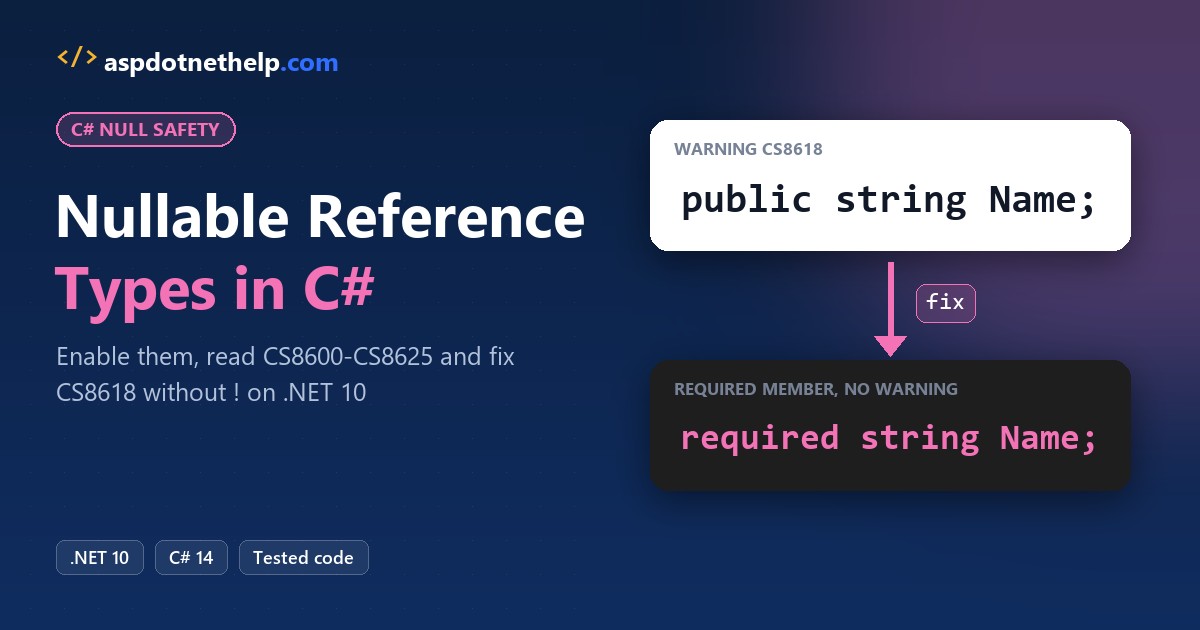
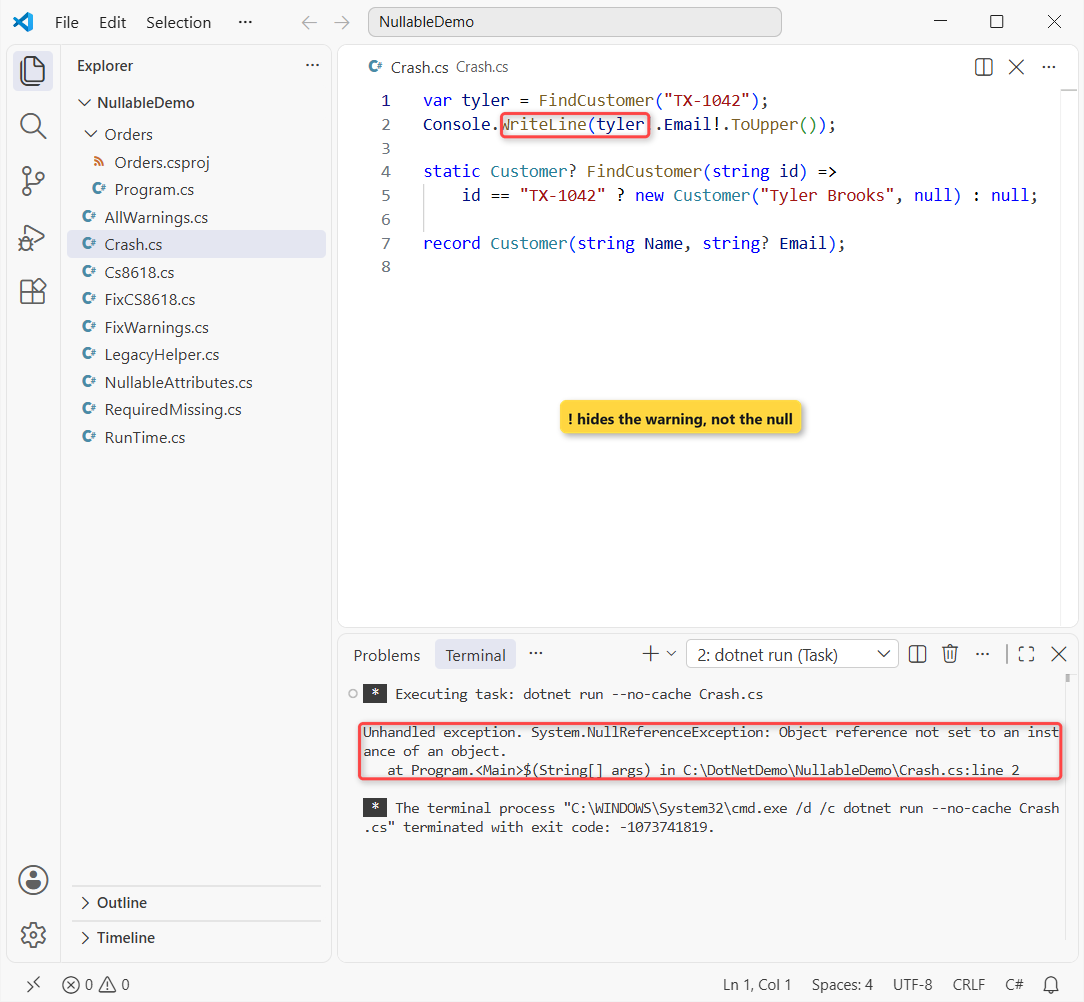
The most common mistake when a team turns on C# nullable reference types is silencing every warning with the ! operator. The build goes quiet, but the app still crashes, because ! only hides the warning:
var tyler = FindCustomer("TX-1042");
Console.WriteLine(tyler!.Email!.ToUpper());

static Customer? FindCustomer(string id) =>
    id == "TX-1042" ? new Customer("Tyler Brooks", null) : null;

record Customer(string Name, string? Email);
Unhandled exception. System.NullReferenceException: Object reference not set to an instance of an object.
at Program.<Main>$(String[] args) in C:\DotNetDemo\NullableDemo\Crash.cs:line 2Quick answer: keep <Nullable>enable</Nullable> on, mark values that can be missing as string?, and fix each warning with a null check, ??, a constructor or a required member.
Below is the playbook we follow on .NET 10, with real compiler output for each warning.
What You Need Before You Turn On Nullable Reference Types
- The .NET 10 SDK. Every demo is a single-file app (how dotnet run app.cs works), plus one small project.
- The sample: a US customer and order book (Tyler Brooks in Austin, Jenna Morales, ZIP codes, shipping addresses).
- One habit: nullable warnings print only when the compiler really runs. A cached
dotnet runprints nothing, so I usedotnet run --no-cache File.csordotnet build --no-incremental.
Step 1: Enable Nullable in the .csproj (c# nullable enable)
New projects from the .NET 6 and later templates already have this line, and .NET 10 file-based apps turn it on by default. Older projects need it added to the PropertyGroup (not sure which SDK you’re on? check your .NET version first):
<Nullable>enable</Nullable>The setting takes four values, and the same names work in a #nullable directive at the top of a file:
| Value | ? annotations | Warnings | When we use it |
|---|---|---|---|
enable | On | On | Every new project; the end goal |
disable | Off | Off | Old default; legacy code you aren’t touching |
warnings | Off | On | Phase 1 of a migration: find real null bugs first |
annotations | On | Off | Library authors annotating a public API first |
#nullable enable, #nullable disable and #nullable restore override the project value for the lines that follow; restore goes back to the .csproj setting.
Does string? Change Anything at Run Time?
No. A nullable reference type is a compile-time annotation only. string and string? are the same System.String, and nothing stops a null from getting in:
string name = "Jenna Morales";
string? nickname = null;

Console.WriteLine(name.GetType() == typeof(string));
Console.WriteLine(nickname is null);

string forced = null!;            // no warning, still null
Console.WriteLine(forced is null);
Output:
True
True
True
All three lines print True. That’s the key difference from nullable value types like int?, where int? really is a different type (Nullable<int>) with HasValue and Value.
Step 2: Read the Six Nullable Warnings You’ll See First
I packed five of the six warnings our team hits most into one file; CS8618 gets its own step. They only apply to reference types like string and classes, and each line is marked with the warning it causes:
string zip = LookupZip("Boise");            // CS8600
string? city = LookupZip("Boise");
Console.WriteLine(city.Length);             // CS8602
string? label = LookupZip("Boise");
PrintLabel(label);                          // CS8604
PrintLabel(null);                           // CS8625
Console.WriteLine(Shorten(zip));

static string? LookupZip(string city) => city == "Boise" ? "83702" : null;
static string Shorten(string? text) => text; // CS8603
static void PrintLabel(string text) => Console.WriteLine($"Label: {text}");
Output:
C:\DotNetDemo\NullableDemo\AllWarnings.cs(1,14): warning CS8600: Converting null literal or possible null value to non-nullable type.
C:\DotNetDemo\NullableDemo\AllWarnings.cs(3,19): warning CS8602: Dereference of a possibly null reference.
C:\DotNetDemo\NullableDemo\AllWarnings.cs(5,12): warning CS8604: Possible null reference argument for parameter 'text' in 'void PrintLabel(string text)'.
C:\DotNetDemo\NullableDemo\AllWarnings.cs(6,12): warning CS8625: Cannot convert null literal to non-nullable reference type.
C:\DotNetDemo\NullableDemo\AllWarnings.cs(10,40): warning CS8603: Possible null reference return.
5
Label: 83702
Label:
83702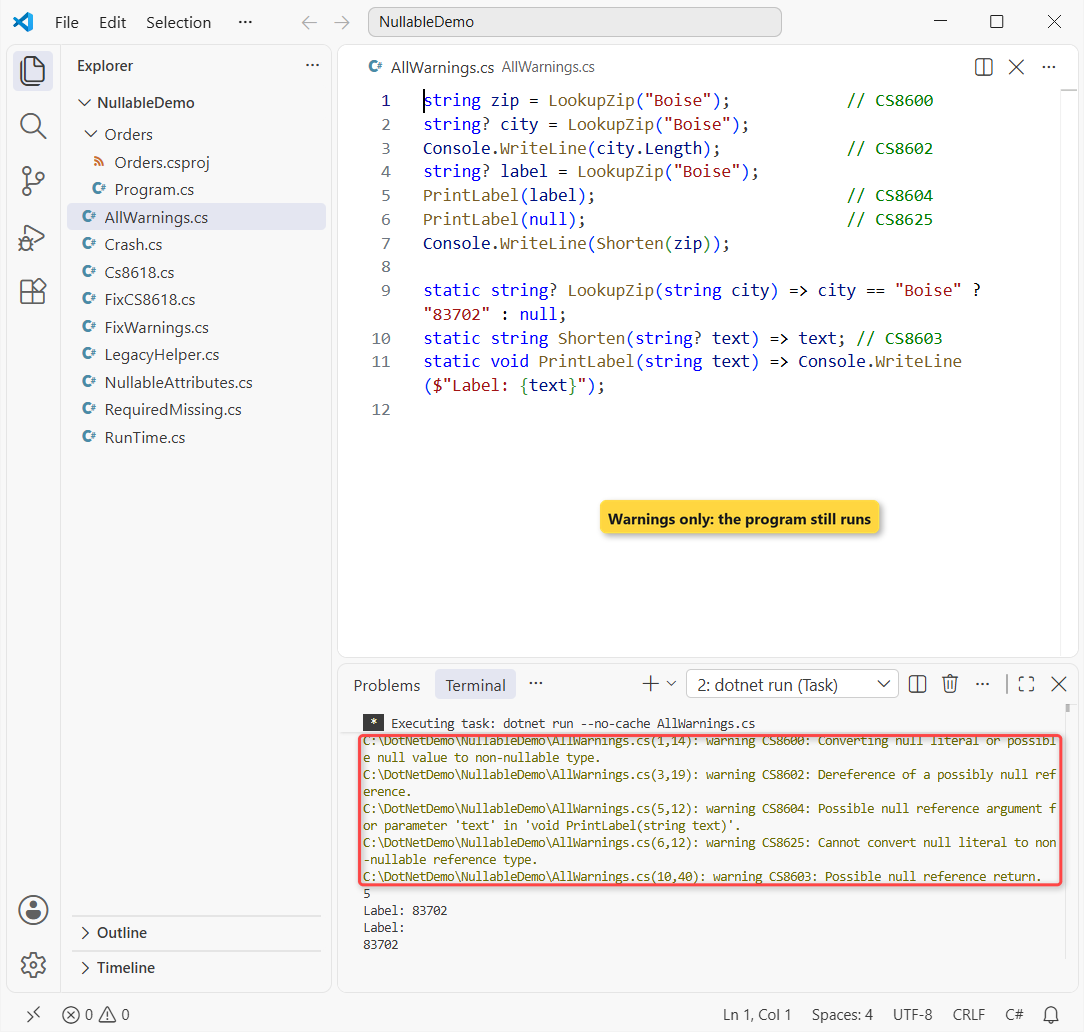
Every one is a warning, not an error, so the program still printed 5 and the labels. That’s why warnings pile up unless the team treats them as work.
| Warning | What the compiler is telling you |
|---|---|
| CS8600 | You store a maybe-null value in a non-nullable variable |
| CS8602 | You dereference (.Length, a method call) something that might be null |
| CS8603 | A method declared to return string might return null |
| CS8604 | You pass a maybe-null argument to a non-nullable parameter |
| CS8618 | A non-nullable property or field is still null when the constructor ends |
| CS8625 | You pass or assign the null literal to a non-nullable type |
Step 3: Fix CS8600, CS8602, CS8603, CS8604 and CS8625
Same ZIP lookup, now fixed. Reno isn’t in the lookup, so this run also proves the fallbacks work:
string zip = LookupZip("Reno") ?? "00000";        // CS8600: ??
string? city = LookupZip("Reno");
Console.WriteLine(city?.Length ?? 0);             // CS8602: ?.
string? label = LookupZip("Boise");
if (label is not null) PrintLabel(label);         // CS8604: null check
PrintLabel(zip);                                  // CS8625: pass a real value
Console.WriteLine($"[{Shorten(null)}]");          // CS8603: fallback

static string? LookupZip(string city) => city == "Boise" ? "83702" : null;
static string Shorten(string? text) => text ?? "";
static void PrintLabel(string text)
{
    ArgumentNullException.ThrowIfNull(text);      // guard public APIs
    Console.WriteLine($"Label: {text}");
}
Output:
0
Label: 83702
Label: 00000
[]
The build is clean. Reno’s city length falls back to 0, Boise prints its label, Reno’s ZIP becomes 00000, and Shorten(null) returns an empty string. The ways to check for null in C# cover is null versus == null in detail.
Our rule of thumb: use ?? when there’s a sensible default, ?. when skipping is fine, and a null check when the logic branches. For text that also can’t be blank, string.IsNullOrEmpty does both checks, and the compiler understands it.
Note: annotations don’t stop callers with nullable turned off from passing null. Public methods still need ArgumentNullException.ThrowIfNull.
Step 4: Fix CS8618 with a Constructor, required or a Default
CS8618 is the warning that floods a project on day one, mostly from model classes like this one:
var contact = new Contact();
Console.WriteLine(contact.Name is null);

class Contact
{
    public string Name { get; set; }
}
Output:
C:\DotNetDemo\NullableDemo\Cs8618.cs(6,19): warning CS8618: Non-nullable property 'Name' must contain a non-null value when exiting constructor. Consider adding the 'required' modifier or declaring the property as nullable.
True
The warning even suggests the fixes, and the second line proves the point: Name really is null. There are four honest fixes, and I put all four in one file:
var tyler = new Customer("Tyler Brooks", "tyler@example.com");
var jenna = new Contact { Name = "Jenna Morales" };

Console.WriteLine($"{tyler.Name} <{tyler.Email}>");
Console.WriteLine($"{jenna.Name}, {jenna.Phone ?? "no phone"}");
Console.WriteLine($"Notes: '{jenna.Notes}'");

class Customer(string name, string email)   // 1
{
    public string Name { get; } = name;
    public string Email { get; } = email;
}

class Contact
{
    public required string Name { get; init; }  // 2
    public string? Phone { get; init; }         // 3
    public string Notes { get; set; } = "";     // 4
}
Output:
Tyler Brooks <tyler@example.com>
Jenna Morales, no phone
Notes: ''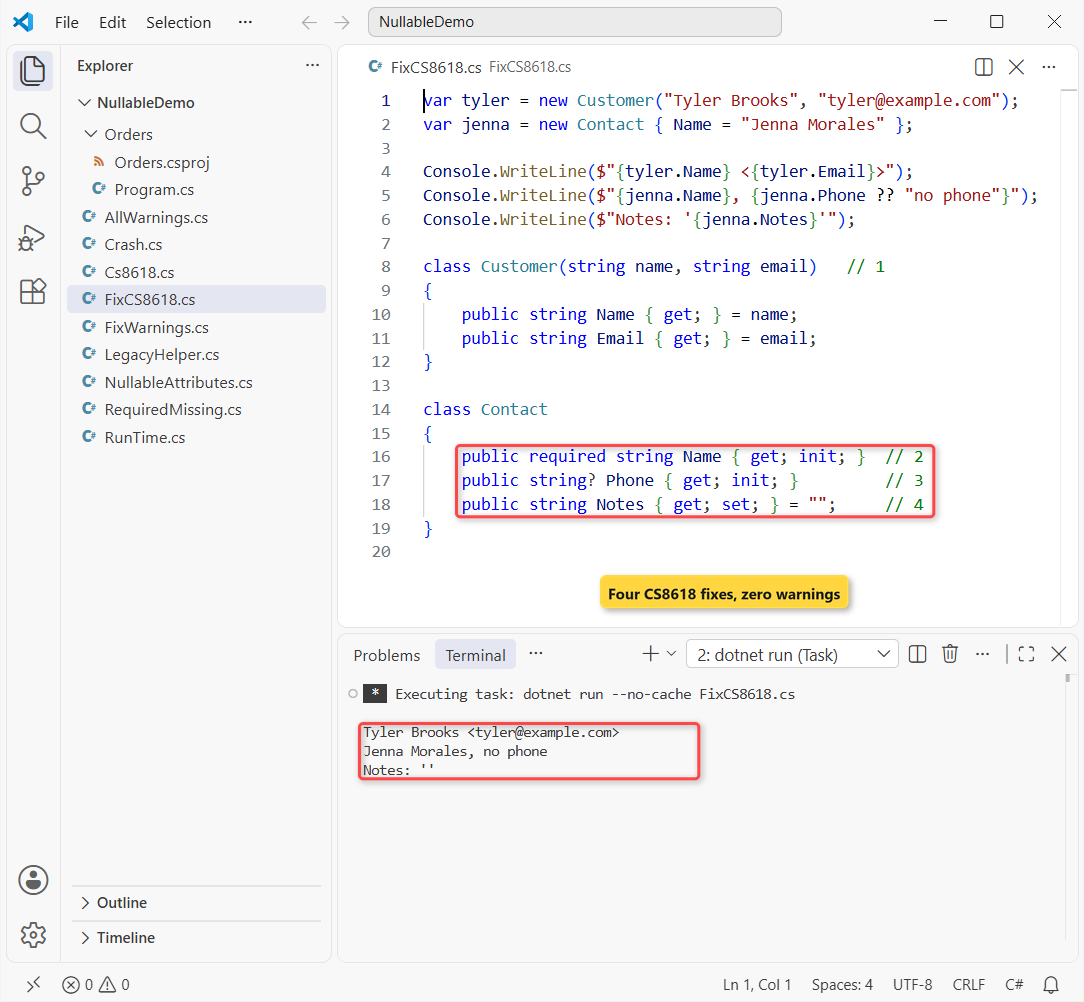
In order: 1 is a constructor for values known at creation, 2 is required (C# 11+) for object-initializer models, 3 is string? for values that can really be missing, and 4 is a default like "", only when empty means something.
required moves the check to the caller. Forget the property and you get a compile error instead of a null:
var contact = new Contact();
Console.WriteLine(contact.Name);

class Contact
{
    public required string Name { get; init; }
}
Build output:
C:\DotNetDemo\NullableDemo\RequiredMissing.cs(1,19): error CS9035: Required member 'Contact.Name' must be set in the object initializer or attribute constructor.

The build failed. Fix the build errors and run again.
That’s CS9035, and it’s exactly what we want: the missing name is caught at build time, not in production.
Step 5: Use the Null-Forgiving Operator (!) Only as a Last Resort
The ! in the opening example tells the compiler “trust me”. It changes nothing at run time, which is why Tyler’s missing email still threw NullReferenceException.
We allow ! in two places only: tests that pass null! on purpose, and members a framework fills in, like an EF Core DbSet<T> declared = null! (our Web API CRUD with EF Core build skips even that with => Set<Product>()).
Everywhere else, a pull request with ! needs a comment saying why.
Step 6: Teach the Compiler with [NotNullWhen], [MaybeNull] and [MemberNotNull]
The compiler doesn’t look inside your methods, so a helper that checks for null still leaves callers with warnings. The attributes in System.Diagnostics.CodeAnalysis describe the contract instead:
using System.Diagnostics.CodeAnalysis;

var book = new CustomerBook();
if (book.TryGetEmail("Tyler Brooks", out string? email))
    Console.WriteLine(email.ToUpperInvariant());     // no CS8602
Console.WriteLine(book.Region.Length);
string[] states = ["Texas", "Ohio"];
Console.WriteLine(FirstMatch(states, s => s.StartsWith('V')) is null);

[return: MaybeNull]
static T FirstMatch<T>(IEnumerable<T> items, Func<T, bool> match)
{
    foreach (T item in items) if (match(item)) return item;
    return default;
}

class CustomerBook
{
    private readonly Dictionary<string, string> emails = new() { ["Tyler Brooks"] = "tyler.brooks@example.com" };
    public string Region { get; private set; }
    public CustomerBook() => Load();

    [MemberNotNull(nameof(Region))]
    private void Load() => Region = "Pacific Northwest";

    public bool TryGetEmail(string name, [NotNullWhen(true)] out string? email) =>
        emails.TryGetValue(name, out email);
}
Output:
TYLER.BROOKS@EXAMPLE.COM
17
True
No warnings. [NotNullWhen(true)] says email isn’t null when TryGetEmail returns true, [MemberNotNull] says Load() sets Region, so there’s no CS8618, and [return: MaybeNull] lets the generic method return default.
The output is the uppercase email, 17 (the length of Pacific Northwest), and True because no state starts with V. The pattern matching guide shows how is { } and is not null narrow null the same way.
Step 7: Turn Nullable Warnings into Build Errors
Warnings that never fail a build get ignored. Once a project is clean, we lock it with WarningsAsErrors. Here’s the file from a plain console project in VS Code:
<Project Sdk="Microsoft.NET.Sdk">

  <PropertyGroup>
    <OutputType>Exe</OutputType>
    <TargetFramework>net10.0</TargetFramework>
    <ImplicitUsings>enable</ImplicitUsings>
    <Nullable>enable</Nullable>
    <WarningsAsErrors>nullable</WarningsAsErrors>
  </PropertyGroup>

</Project>
And a Program.cs with two classic bugs, a missing Customer initializer and an unchecked ShipTo:
var order = new Order { Id = 1042, Customer = "Tyler Brooks" };
Console.WriteLine(order.ShipTo.City);

class Order
{
    public int Id { get; init; }
    public string Customer { get; init; }
    public Address? ShipTo { get; init; }
}

record Address(string City, string State);
dotnet build output:
  Determining projects to restore...
  Restored C:\DotNetDemo\NullableDemo\Orders\Orders.csproj (in 73 ms).
C:\DotNetDemo\NullableDemo\Orders\Program.cs(7,19): error CS8618: Non-nullable property 'Customer' must contain a non-null value when exiting constructor. Consider adding the 'required' modifier or declaring the property as nullable. [C:\DotNetDemo\NullableDemo\Orders\Orders.csproj]
C:\DotNetDemo\NullableDemo\Orders\Program.cs(2,19): error CS8602: Dereference of a possibly null reference. [C:\DotNetDemo\NullableDemo\Orders\Orders.csproj]
Build FAILED.
C:\DotNetDemo\NullableDemo\Orders\Program.cs(7,19): error CS8618: Non-nullable property 'Customer' must contain a non-null value when exiting constructor. Consider adding the 'required' modifier or declaring the property as nullable. [C:\DotNetDemo\NullableDemo\Orders\Orders.csproj]
C:\DotNetDemo\NullableDemo\Orders\Program.cs(2,19): error CS8602: Dereference of a possibly null reference. [C:\DotNetDemo\NullableDemo\Orders\Orders.csproj]
    0 Warning(s)
    2 Error(s)
Time Elapsed 00:00:01.18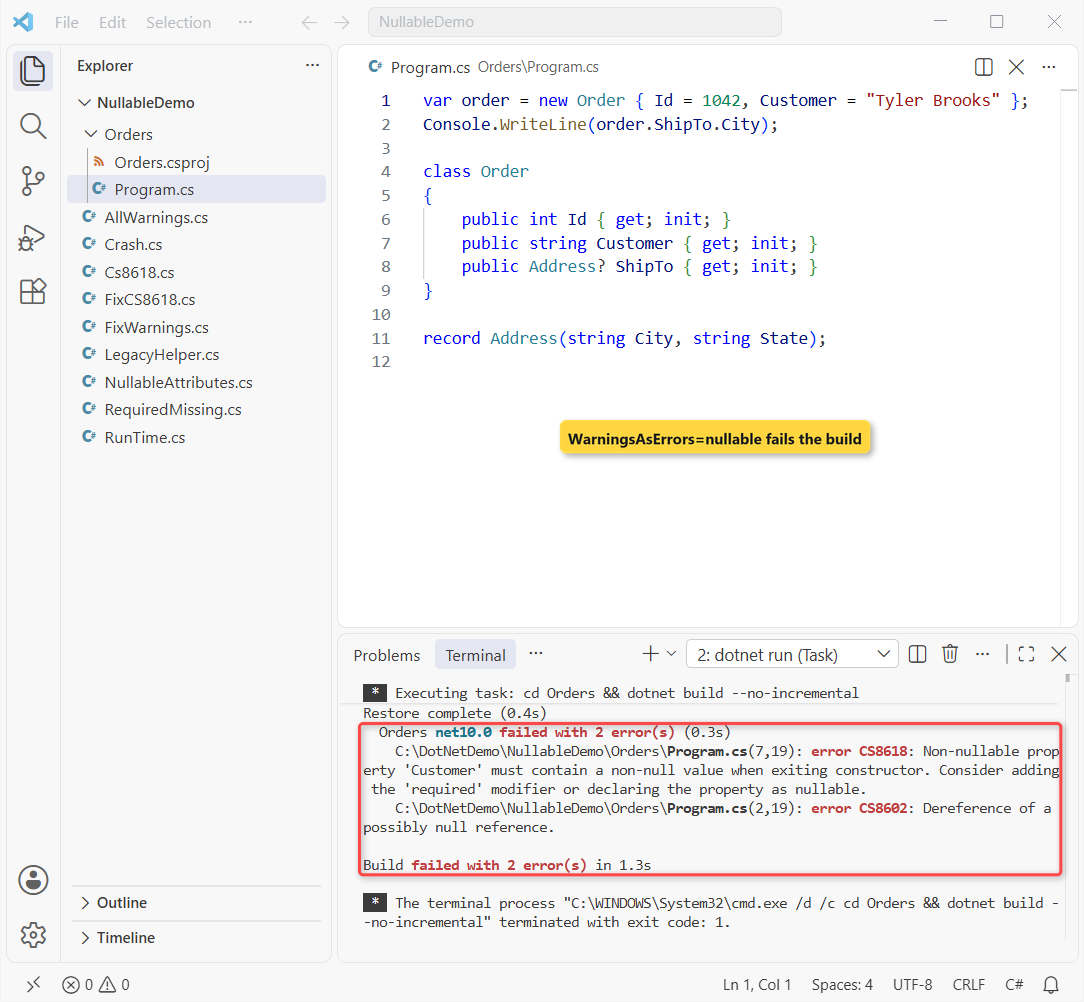
The string nullable covers every nullability warning, so new ones fail CI without a list of numbers. <TreatWarningsAsErrors>true</TreatWarningsAsErrors> fails on every warning, nullable or not; we turn that on only in clean, mature projects.
How Do You Migrate an Existing Project Gradually?
Don’t flip a 300-file project to enable in one pull request. Set the project to enable, add #nullable disable to the files you haven’t migrated, and remove one directive per file as you fix it:
Console.WriteLine(LegacyFormat(null, null));
Console.WriteLine(ModernFormat(null));

#nullable disable
static string LegacyFormat(string name, string? suffix) =>
    name == null ? "(no name)" : name.ToUpper() + suffix;
#nullable restore

static string ModernFormat(string? name) =>
    name is null ? "(no name)" : name.ToUpper();
Output:
C:\DotNetDemo\NullableDemo\LegacyHelper.cs(5,47): warning CS8632: The annotation for nullable reference types should only be used in code within a '#nullable' annotations context.
(no name)
(no name)
Both calls print (no name) and LegacyFormat(null, null) raises no warning, because its parameters are oblivious. The string? inside the disabled region causes CS8632, a sign that file is half-migrated.
| Strategy | Project setting | Best for |
|---|---|---|
| Enable by default | enable + #nullable disable in old files | Active apps; new files start strict |
| Disable by default | disable + #nullable enable per migrated file | Stable code that rarely changes |
| Warnings first | warnings, then enable | Hunting real NullReferenceException bugs |
| Annotations first | annotations, then enable | Libraries publishing a NuGet API |
Start with the leaf classes (models, helpers) and work outward, since annotating a type creates warnings in its callers. Moving to .NET 10 at the same time? Do the .NET 8 to .NET 10 upgrade first, then the nullable pass.
Our Team Rules for Nullable Reference Types
<Nullable>enable</Nullable>in every project; no new#nullable disable.?means “can really be missing”. If it can’t, fix the initialization instead.!and= null!need a code comment, and only for tests or framework-filled members.- Models use constructors or
required; no empty-string defaults just to quiet CS8618. - Clean projects set
<WarningsAsErrors>nullable</WarningsAsErrors>.
Common Mistakes to Avoid
| Mistake | What happens | Fix |
|---|---|---|
! on every warning | Silence now, NullReferenceException later | Null check, ?? or a real value |
Expecting string? to block nulls at run time | It’s compile-time only | Guard public methods |
Plain dotnet run after a fix | Cached build shows no warnings | --no-cache or --no-incremental |
= "" on every property | Empty strings hide missing data | required or a constructor |
Next Steps
Once warnings are under control, try the newer null-friendly syntax, such as null-conditional assignment (customer?.Email = ...) in what is new in C# 14. Records also pair well with non-nullable properties; see record vs class vs struct.
Good follow-ups from our team’s reading list:
- Try-catch in C#, for the NullReferenceException you still need to handle
- Interfaces in C#, where nullability must match the implementation
- What’s new in .NET 10
- All C# tutorials on AspDotnetHelp
Frequently Asked Questions
Are nullable reference types enabled by default in C#?
In new projects, yes: the .NET 6 and later templates add <Nullable>enable</Nullable>, and .NET 10 file-based apps enable it by default. Older projects stay disabled until you add the setting.
Do nullable reference types prevent NullReferenceException?
No. They’re compile-time warnings only. A null can still reach a non-nullable variable through ! , older libraries or callers with nullable disabled, so guard public methods.
How do I fix CS8618 in C#?
Set the member in a constructor, mark it required (C# 11+), give it a meaningful default, or declare it nullable with ? if it can really be missing. Use = null! only for members a framework fills in.
What is the difference between string and string? in C#?
Nothing at run time; both are System.String. The ? tells the compiler the value can be null, so it warns when you dereference it without a check.
How do I make nullable warnings errors?
Add <WarningsAsErrors>nullable</WarningsAsErrors> to the project file. The errors and warnings compiler options page on Microsoft Learn documents the nullable shorthand.
Where is the full list of nullable warnings?
The nullable reference type warnings page covers every CS86xx warning and the fix for each.

Bijay Kumar is a renowned software engineer, accomplished author, and distinguished Microsoft Most Valuable Professional (MVP) specializing in SharePoint. With a rich professional background spanning over 15 years, Bijay has established himself as an authority in the field of information technology. He possesses unparalleled expertise in multiple programming languages and technologies such as ASP.NET, ASP.NET MVC, C#.NET, and SharePoint, which has enabled him to develop innovative and cutting-edge solutions for clients across the globe. Read more…