
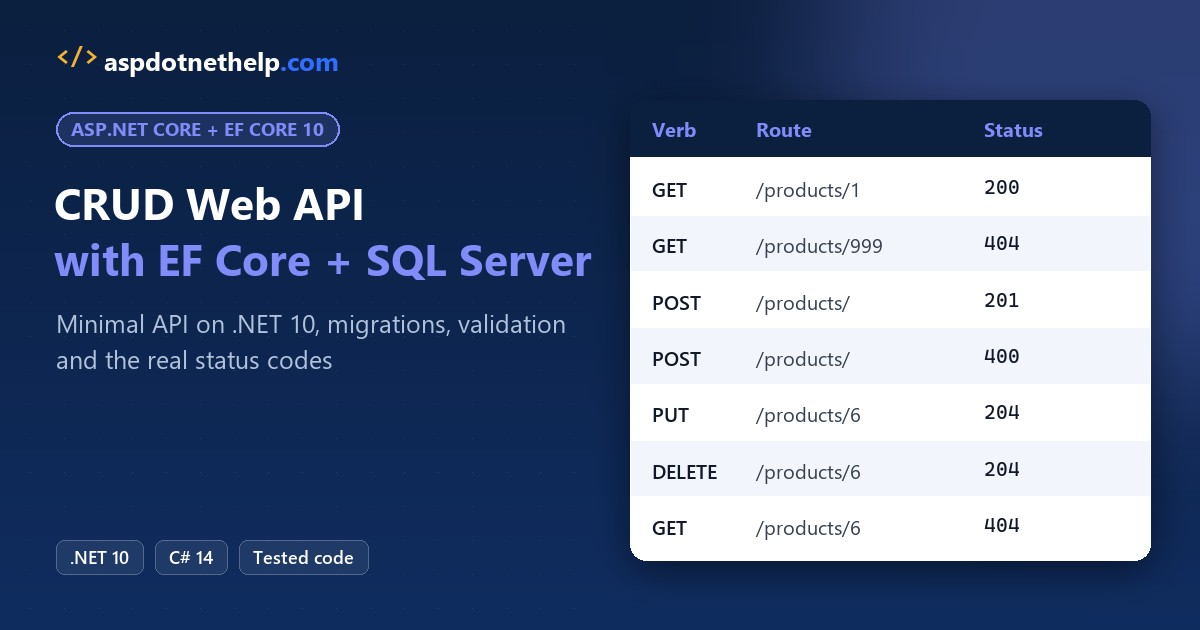
Here’s the short version of this asp.net core web api tutorial: create a minimal API with dotnet new webapi, map five async endpoints to an EF Core 10 DbContext, and let a migration build the SQL Server table. The finished API answers like this:
curl.exe -s http://localhost:5290/api/products/1
{"id":1,"name":"Hiking Backpack 45L","category":"Packs","price":129.99,"stock":42,"warehouseState":"CO"}
Here’s what we’re building, with every CRUD call and the status code it returned in my run:
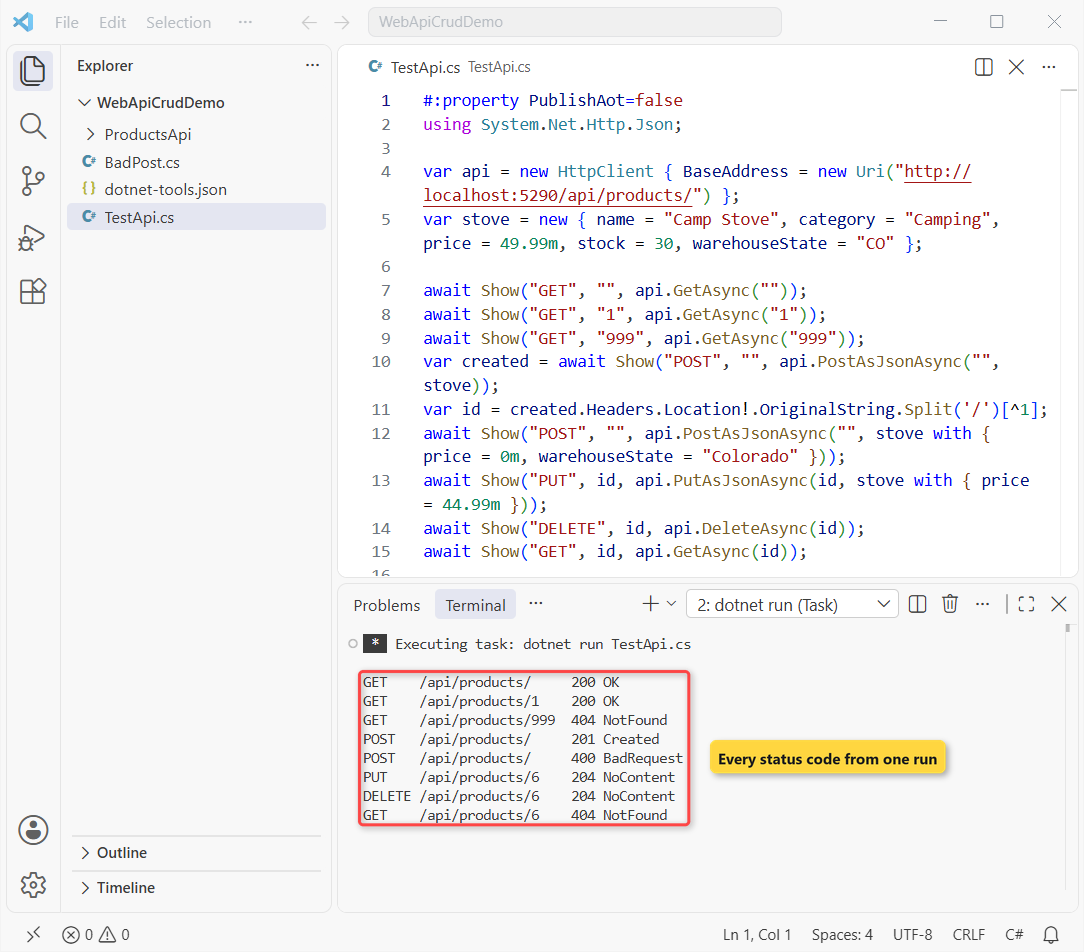
I built it on .NET SDK 10.0.402 against a local SQL Server 2025, so every response below is copied from that run.
Before You Start the ASP.NET Core Web API Tutorial
You need the .NET 10 SDK (I used 10.0.402), any SQL Server you can reach with Windows authentication, and VS Code or Visual Studio. If you’re not sure which SDK is installed, check your .NET version first.
EF Core 10 runs only on .NET 10, so this is a .NET 10 build from the first command. The .NET 10 release notes explain why that’s the LTS to pick in 2026.
The API serves products for a small outdoor-gear store. These five rows are the seed data, all prices in USD:
| Id | Name | Category | Price | Stock | Warehouse |
|---|---|---|---|---|---|
| 1 | Hiking Backpack 45L | Packs | $129.99 | 42 | CO |
| 2 | Insulated Water Bottle | Hydration | $24.95 | 310 | OR |
| 3 | Trail Running Shoes | Footwear | $139.00 | 58 | WA |
| 4 | Camping Hammock | Camping | $59.50 | 77 | TX |
| 5 | LED Headlamp | Lighting | $34.99 | 125 | UT |
These are the exact package versions in the project, current stable on November 1, 2026:
| Package | Version | Why it’s here |
|---|---|---|
| Microsoft.EntityFrameworkCore.SqlServer | 10.0.14 | EF Core plus the SQL Server provider |
| Microsoft.EntityFrameworkCore.Design | 10.0.14 | Design-time code the migrations commands need |
| dotnet-ef (local tool) | 10.0.14 | The dotnet ef command |
| Microsoft.AspNetCore.OpenApi | 10.0.14 | OpenAPI document (from the template) |
| System.Security.Cryptography.Pkcs | 10.0.14 | Patches a vulnerable transitive package (Step 2) |
Minimal API or Controllers for an ASP.NET Core CRUD Web API?
I picked minimal APIs, because dotnet new webapi creates one by default in .NET 10 and the new built-in validation works only with minimal APIs. Controllers are still fully supported; add --use-controllers to the same command if your team prefers them.
| Minimal APIs | Controllers | |
|---|---|---|
| Template in .NET 10 | Default | dotnet new webapi –use-controllers |
| Endpoint shape | MapGet / MapPost lambdas | Classes deriving from ControllerBase |
| Input validation | AddValidation() (new in .NET 10) | [ApiController] model state |
| Best fit | Small to medium APIs, microservices | Large APIs with filters and conventions |
Either way, the EF Core code is identical. Want a docs page to click through? Add one with OpenAPI and Scalar in ASP.NET Core after you finish.
Step 1: Create the ASP.NET Core Web API Project
Create a demo folder and the project inside it. I keep the project in its own subfolder, so the test scripts can sit next to it later:
mkdir WebApiCrudDemo
cd WebApiCrudDemo
dotnet new webapi -n ProductsApi -o ProductsApi
The template gives you a weather sample in Program.cs, an appsettings.Development.json and a .http file. I deleted the last two, and Step 6 replaces Program.cs completely.
I trimmed Properties/launchSettings.json to one http profile on port 5290, so every URL in this post matches:
{
  "$schema": "https://json.schemastore.org/launchsettings.json",
  "profiles": {
    "http": {
      "commandName": "Project",
      "dotnetRunMessages": true,
      "launchBrowser": false,
      "applicationUrl": "http://localhost:5290",
      "environmentVariables": {
        "ASPNETCORE_ENVIRONMENT": "Development"
      }
    }
  }
}
If you’re new to running .NET from the editor, my guide to a console app in VS Code covers the C# Dev Kit setup this project uses too.
Checkpoint: dotnet run inside ProductsApi prints Now listening on: http://localhost:5290.
Step 2: Add the EF Core SQL Server Packages and a Local dotnet-ef Tool
Inside the ProductsApi folder, add the SQL Server provider and the design package with exact versions. I also bumped the template’s OpenAPI package from 10.0.13 to 10.0.14:
dotnet add package Microsoft.EntityFrameworkCore.SqlServer --version 10.0.14
dotnet add package Microsoft.EntityFrameworkCore.Design --version 10.0.14
dotnet add package Microsoft.AspNetCore.OpenApi --version 10.0.14
My first build then warned NU1903. EF Core 10.0.14 pulls Microsoft.Data.SqlClient 6.1.7, which brings System.Security.Cryptography.Pkcs 9.0.11, a version with known advisories. A direct reference to the patched package clears it:
dotnet add package System.Security.Cryptography.Pkcs --version 10.0.14Here’s the finished project file:
<Project Sdk="Microsoft.NET.Sdk.Web">

  <PropertyGroup>
    <TargetFramework>net10.0</TargetFramework>
    <Nullable>enable</Nullable>
    <ImplicitUsings>enable</ImplicitUsings>
  </PropertyGroup>

  <ItemGroup>
    <PackageReference Include="Microsoft.AspNetCore.OpenApi" Version="10.0.14" />
    <PackageReference Include="Microsoft.EntityFrameworkCore.Design" Version="10.0.14">
      <IncludeAssets>runtime; build; native; contentfiles; analyzers; buildtransitive</IncludeAssets>
      <PrivateAssets>all</PrivateAssets>
    </PackageReference>
    <PackageReference Include="Microsoft.EntityFrameworkCore.SqlServer" Version="10.0.14" />
    <PackageReference Include="System.Security.Cryptography.Pkcs" Version="10.0.14" />
  </ItemGroup>

</Project>
Now the tool. Instead of a global install, go back to the WebApiCrudDemo folder and pin dotnet-ef in a tool manifest, so everyone who clones the repo gets the same version:
cd ..
dotnet new tool-manifest
dotnet tool install dotnet-ef --version 10.0.14
One surprise: SDK 10.0.402 wrote dotnet-tools.json straight into the folder, not into a .config subfolder as older SDKs did. Either spot works. Here’s the file:
{
  "version": 1,
  "isRoot": true,
  "tools": {
    "dotnet-ef": {
      "version": "10.0.14",
      "commands": [
        "dotnet-ef"
      ],
      "rollForward": false
    }
  }
}
A teammate runs dotnet tool restore once after cloning. The EF Core 10 packages need a net10.0 project, so an older app needs the .NET 8 to .NET 10 upgrade first.
dotnet list package && dotnet ef --version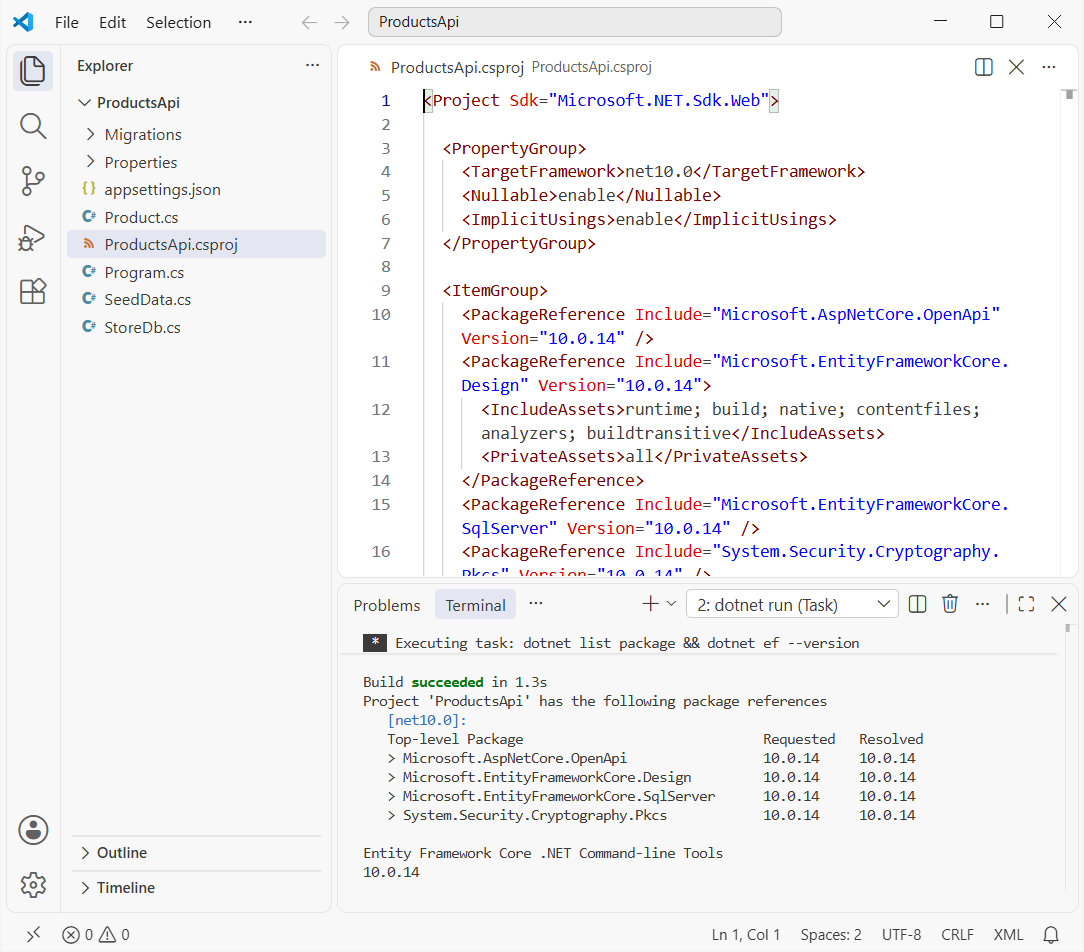
   Top-level Package                              Requested   Resolved
   > Microsoft.AspNetCore.OpenApi                 10.0.14     10.0.14
   > Microsoft.EntityFrameworkCore.Design         10.0.14     10.0.14
   > Microsoft.EntityFrameworkCore.SqlServer      10.0.14     10.0.14
   > System.Security.Cryptography.Pkcs            10.0.14     10.0.14

Entity Framework Core .NET Command-line Tools
10.0.14
Checkpoint: dotnet ef --version prints 10.0.14 from the ProductsApi folder, with no NU1903 warning.
Step 3: Create the Product Entity, Input Record and EF Core DbContext
The entity is a plain class EF Core maps to a table. I used decimal for the price, since money should never be a double; my notes on C# data types explain why. Add Product.cs:
using System.ComponentModel.DataAnnotations;

namespace ProductsApi;

public class Product
{
    public int Id { get; set; }
    public required string Name { get; set; }
    public required string Category { get; set; }
    public decimal Price { get; set; }
    public int Stock { get; set; }
    public required string WarehouseState { get; set; }
}

public record ProductInput(
    [Required, StringLength(100)] string Name,
    [Required, StringLength(50)] string Category,
    [Range(0.01, 10000)] decimal Price,
    [Range(0, 100000)] int Stock,
    [Required, RegularExpression("^[A-Z]{2}$", ErrorMessage = "Use a two-letter US state code, like TX.")]
    string WarehouseState)
{
    public Product ToProduct() => new()
    {
        Name = Name, Category = Category, Price = Price, Stock = Stock, WarehouseState = WarehouseState
    };

    public void CopyTo(Product product)
    {
        product.Name = Name;
        product.Category = Category;
        product.Price = Price;
        product.Stock = Stock;
        product.WarehouseState = WarehouseState;
    }
}
ProductInput is the DTO for POST and PUT. Clients can’t send an Id, and the data annotations on its parameters drive validation in Step 7.
The context uses a primary constructor in C# to receive its options. OnModelCreating sets column sizes and a decimal(10,2) price. Add StoreDb.cs:
using Microsoft.EntityFrameworkCore;

namespace ProductsApi;

public class StoreDb(DbContextOptions<StoreDb> options) : DbContext(options)
{
    public DbSet<Product> Products => Set<Product>();

    protected override void OnModelCreating(ModelBuilder modelBuilder)
    {
        modelBuilder.Entity<Product>(p =>
        {
            p.Property(x => x.Name).HasMaxLength(100);
            p.Property(x => x.Category).HasMaxLength(50);
            p.Property(x => x.Price).HasPrecision(10, 2);
            p.Property(x => x.WarehouseState).HasMaxLength(2).IsFixedLength();
        });
    }
}
Seed data goes in UseSeeding and UseAsyncSeeding, which Microsoft now recommends over HasData. EF Core runs them after dotnet ef database update. Add SeedData.cs:
using Microsoft.EntityFrameworkCore;

namespace ProductsApi;

public static class SeedData
{
    static Product[] Starter() =>
    [
        new() { Name = "Hiking Backpack 45L", Category = "Packs", Price = 129.99m, Stock = 42, WarehouseState = "CO" },
        new() { Name = "Insulated Water Bottle", Category = "Hydration", Price = 24.95m, Stock = 310, WarehouseState = "OR" },
        new() { Name = "Trail Running Shoes", Category = "Footwear", Price = 139.00m, Stock = 58, WarehouseState = "WA" },
        new() { Name = "Camping Hammock", Category = "Camping", Price = 59.50m, Stock = 77, WarehouseState = "TX" },
        new() { Name = "LED Headlamp", Category = "Lighting", Price = 34.99m, Stock = 125, WarehouseState = "UT" },
    ];

    public static void Run(DbContext db)
    {
        if (db.Set<Product>().Any()) return;
        db.Set<Product>().AddRange(Starter());
        db.SaveChanges();
    }

    public static async Task RunAsync(DbContext db, CancellationToken ct)
    {
        if (await db.Set<Product>().AnyAsync(ct)) return;
        db.Set<Product>().AddRange(Starter());
        await db.SaveChangesAsync(ct);
    }
}
Important: implement the synchronous Run too. The EF tools call the sync delegate, so an async-only seed never runs from the command line.
Step 4: Add the EF Core SQL Server Connection String
Put the connection string in appsettings.json under ConnectionStrings. Server=. is the default local instance, Trusted_Connection=True uses your Windows login, and TrustServerCertificate=True accepts the self-signed dev certificate:
{
  "ConnectionStrings": {
    "StoreDb": "Server=.;Database=ProductsDemoDb;Trusted_Connection=True;TrustServerCertificate=True"
  },
  "Logging": {
    "LogLevel": {
      "Default": "Information",
      "Microsoft.AspNetCore": "Warning"
    }
  },
  "AllowedHosts": "*"
}
Then register the context in Program.cs. GetConnectionString("StoreDb") reads that exact key:
builder.Services.AddDbContext<StoreDb>(options => options
    .UseSqlServer(builder.Configuration.GetConnectionString("StoreDb"))
    .UseSeeding((db, _) => SeedData.Run(db))
    .UseAsyncSeeding((db, _, ct) => SeedData.RunAsync(db, ct)));
For SQL logins or Azure SQL, keep the password out of this file; use user secrets locally and environment variables or Key Vault in production. TrustServerCertificate=True is for local dev only.
Checkpoint: the project still builds; nothing touches SQL Server yet.
Step 5: EF Core Add Migration and Update the Database
Run both commands from the ProductsApi folder. The first compares your model with the last snapshot and writes C# code; the second runs it against SQL Server:
dotnet ef migrations add InitialCreate
dotnet ef database update
migrations add printed:
Build started...
Build succeeded.
Done. To undo this action, use 'ef migrations remove'
It created Migrations/20261101124050_InitialCreate.cs plus a designer file and a model snapshot. The migration is readable code, so review it before you apply it:
using Microsoft.EntityFrameworkCore.Migrations;

#nullable disable

namespace ProductsApi.Migrations
{
    /// <inheritdoc />
    public partial class InitialCreate : Migration
    {
        /// <inheritdoc />
        protected override void Up(MigrationBuilder migrationBuilder)
        {
            migrationBuilder.CreateTable(
                name: "Products",
                columns: table => new
                {
                    Id = table.Column<int>(type: "int", nullable: false)
                        .Annotation("SqlServer:Identity", "1, 1"),
                    Name = table.Column<string>(type: "nvarchar(100)", maxLength: 100, nullable: false),
                    Category = table.Column<string>(type: "nvarchar(50)", maxLength: 50, nullable: false),
                    Price = table.Column<decimal>(type: "decimal(10,2)", precision: 10, scale: 2, nullable: false),
                    Stock = table.Column<int>(type: "int", nullable: false),
                    WarehouseState = table.Column<string>(type: "nchar(2)", fixedLength: true, maxLength: 2, nullable: false)
                },
                constraints: table =>
                {
                    table.PrimaryKey("PK_Products", x => x.Id);
                });
        }

        /// <inheritdoc />
        protected override void Down(MigrationBuilder migrationBuilder)
        {
            migrationBuilder.DropTable(
                name: "Products");
        }
    }
}
database update created the database because it didn’t exist yet, applied the migration, then ran UseSeeding. These are the key lines from its real output, trimmed:
Build succeeded.
CREATE DATABASE [ProductsDemoDb];
Applying migration '20261101124050_InitialCreate'.
Applying migration '20261101124050_InitialCreate'.
CREATE TABLE [Products] (
MERGE [Products] USING (
Done.
EF Core 10 inserted all five seed rows in one MERGE statement. To prove the table and the migration history, I queried SQL Server directly:
sqlcmd -S . -E -d ProductsDemoDb -W -s " | " -Q "SET NOCOUNT ON; SELECT MigrationId, ProductVersion FROM __EFMigrationsHistory; SELECT Id, Name, Price, Stock, WarehouseState FROM Products"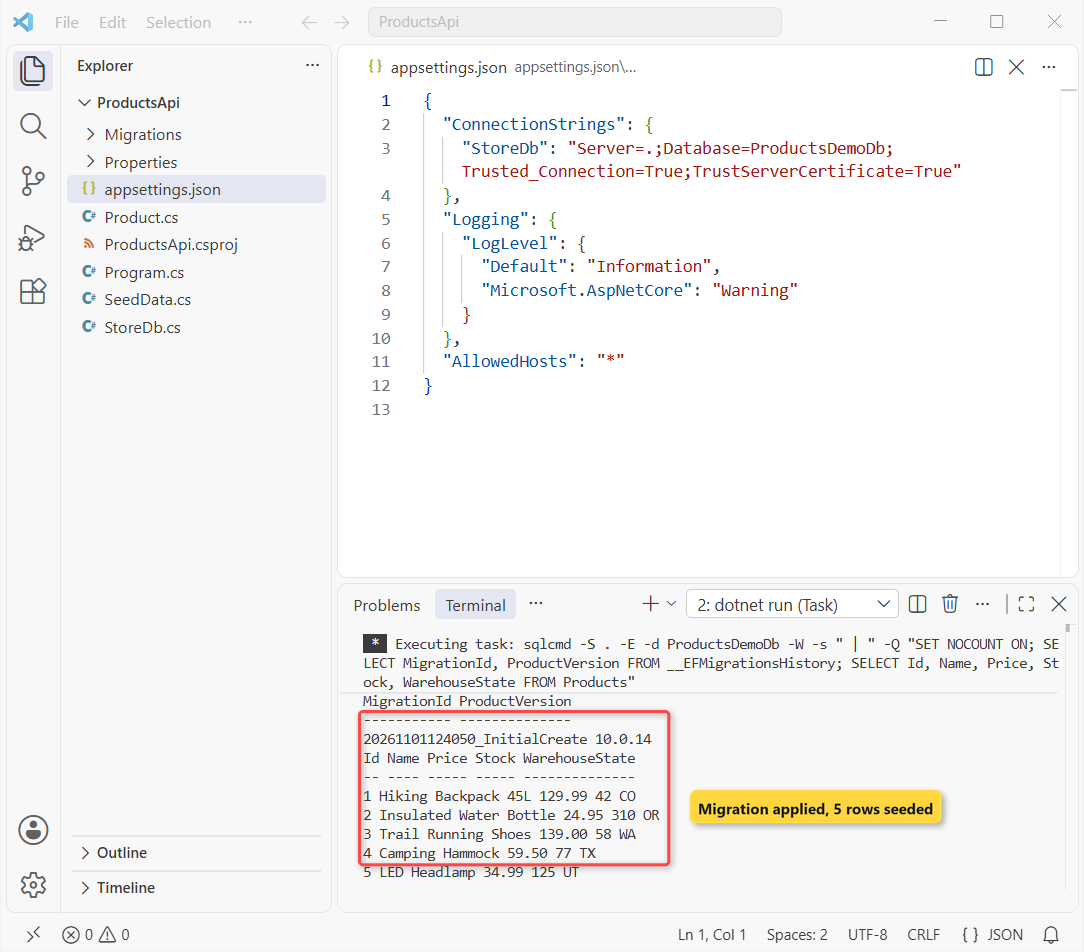
MigrationId ProductVersion
----------- --------------
20261101124050_InitialCreate 10.0.14

Id Name Price Stock WarehouseState
-- ---- ----- ----- --------------
1 Hiking Backpack 45L 129.99 42 CO
2 Insulated Water Bottle 24.95 310 OR
3 Trail Running Shoes 139.00 58 WA
4 Camping Hammock 59.50 77 TX
5 LED Headlamp 34.99 125 UT
Checkpoint: __EFMigrationsHistory lists 20261101124050_InitialCreate with product version 10.0.14, and Products holds five rows.
Step 6: Map the CRUD Endpoints with Async EF Core Calls
Replace all of Program.cs with this. MapGroup puts every route under /api/products, and each handler gets StoreDb from dependency injection:
using Microsoft.AspNetCore.Http.HttpResults;
using Microsoft.EntityFrameworkCore;
using ProductsApi;

var builder = WebApplication.CreateBuilder(args);

builder.Services.AddOpenApi();
builder.Services.AddValidation();
builder.Services.AddDbContext<StoreDb>(options => options
    .UseSqlServer(builder.Configuration.GetConnectionString("StoreDb"))
    .UseSeeding((db, _) => SeedData.Run(db))
    .UseAsyncSeeding((db, _, ct) => SeedData.RunAsync(db, ct)));

var app = builder.Build();

if (app.Environment.IsDevelopment())
{
    app.MapOpenApi();
}

var products = app.MapGroup("/api/products").WithTags("Products");

products.MapGet("/", async (StoreDb db) =>
    TypedResults.Ok(await db.Products.AsNoTracking().OrderBy(p => p.Id).ToListAsync()));

products.MapGet("/{id:int}", async Task<Results<Ok<Product>, NotFound>> (int id, StoreDb db) =>
    await db.Products.AsNoTracking().FirstOrDefaultAsync(p => p.Id == id) is { } product
        ? TypedResults.Ok(product)
        : TypedResults.NotFound());

products.MapPost("/", async (ProductInput input, StoreDb db) =>
{
    var product = input.ToProduct();
    db.Products.Add(product);
    await db.SaveChangesAsync();
    return TypedResults.Created($"/api/products/{product.Id}", product);
});

products.MapPut("/{id:int}", async Task<Results<NoContent, NotFound>> (int id, ProductInput input, StoreDb db) =>
{
    var product = await db.Products.FindAsync(id);
    if (product is null) return TypedResults.NotFound();

    input.CopyTo(product);
    await db.SaveChangesAsync();
    return TypedResults.NoContent();
});

products.MapDelete("/{id:int}", async Task<Results<NoContent, NotFound>> (int id, StoreDb db) =>
    await db.Products.Where(p => p.Id == id).ExecuteDeleteAsync() == 1
        ? TypedResults.NoContent()
        : TypedResults.NotFound());

app.Run();
Every database call is awaited (ToListAsync, FindAsync, SaveChangesAsync), so a request never blocks a thread while SQL Server works. If await still feels fuzzy, read async and await in C# first.
Reads use AsNoTracking(), which skips the change tracker because nothing gets saved. The queries are LINQ in C#, and EF Core logged this SQL for GET /api/products/1:
SELECT TOP(1) [p].[Id], [p].[Category], [p].[Name], [p].[Price], [p].[Stock], [p].[WarehouseState]
FROM [Products] AS [p]
WHERE [p].[Id] = @id
The typed results do the status codes. Results<Ok<Product>, NotFound> means 200 or 404, TypedResults.Created returns 201 with a Location header, and NoContent is the 204 for PUT and DELETE.
PUT loads the tracked entity with FindAsync, returns 404 when it’s null in C#, and saves only the changed columns. DELETE uses ExecuteDeleteAsync, one SQL statement with no load first:
DELETE FROM [p]
FROM [Products] AS [p]
WHERE [p].[Id] = @id
Run dotnet run and open http://localhost:5290/api/products in a browser. The five seeded products come back as a JSON array, the List<T> in C# that ToListAsync built:

Checkpoint: the page shows five products, and the first one is the Hiking Backpack 45L at 129.99.
Step 7: Validate Input with .NET 10 Minimal API Validation
Validation is one line, and it’s already in the Program.cs above: builder.Services.AddValidation();. A source generator then finds ProductInput in the POST and PUT signatures and checks its attributes before the handler runs.
Without AddValidation nothing fails loudly; invalid input just reaches your handler. To see it work, this script posts a $0.00 stove with a spelled-out state:
#:property PublishAot=false
using System.Net.Http.Json;
using System.Text.Json;

var api = new HttpClient { BaseAddress = new Uri("http://localhost:5290/api/products/") };
var bad = new { name = "Camp Stove", category = "Camping", price = 0m, stock = 30, warehouseState = "Colorado" };

var response = await api.PostAsJsonAsync("", bad);
Console.WriteLine($"{(int)response.StatusCode} {response.StatusCode}");

var problem = await response.Content.ReadFromJsonAsync<JsonElement>();
Console.WriteLine(JsonSerializer.Serialize(problem, new JsonSerializerOptions { WriteIndented = true }));
Output:
400 BadRequest
{
  "title": "One or more validation errors occurred.",
  "errors": {
    "Price": [
      "The field Price must be between 0.01 and 10000."
    ],
    "WarehouseState": [
      "Use a two-letter US state code, like TX."
    ]
  }
}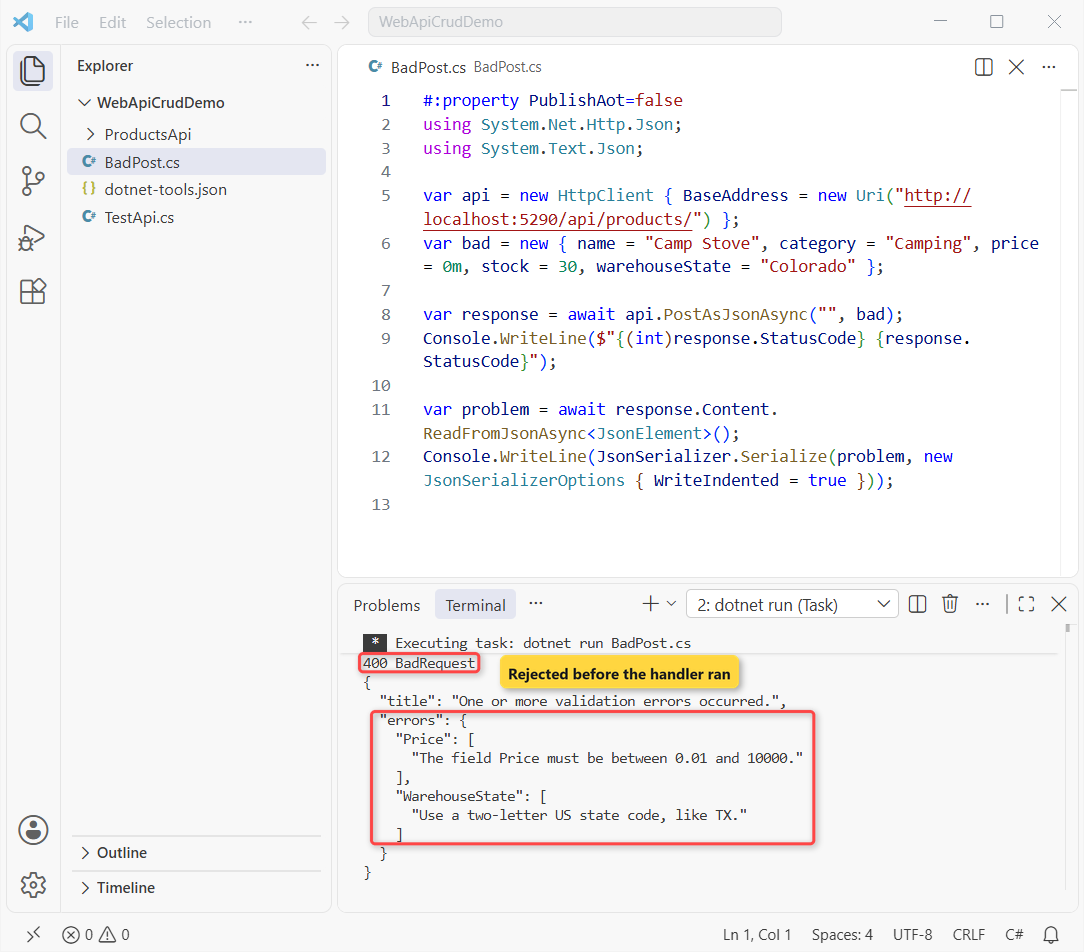
The handler never ran, so no row was inserted. The errors object maps each field to its messages, like a Dictionary in C# of string arrays, which makes it easy for a front end to show.
Note: the #:property PublishAot=false line matters. File-based apps default to Native AOT in .NET 10, which turns off reflection JSON, and my first run of this script threw InvalidOperationException.
Checkpoint: the script prints 400 BadRequest with two errors, Price and WarehouseState.
Test the CRUD API with HttpClient and curl
With the API running, this file-based app calls every endpoint in order and prints one line per call. It sits in WebApiCrudDemo, outside the project folder:
#:property PublishAot=false
using System.Net.Http.Json;

var api = new HttpClient { BaseAddress = new Uri("http://localhost:5290/api/products/") };
var stove = new { name = "Camp Stove", category = "Camping", price = 49.99m, stock = 30, warehouseState = "CO" };

await Show("GET", "", api.GetAsync(""));
await Show("GET", "1", api.GetAsync("1"));
await Show("GET", "999", api.GetAsync("999"));
var created = await Show("POST", "", api.PostAsJsonAsync("", stove));
var id = created.Headers.Location!.OriginalString.Split('/')[^1];
await Show("POST", "", api.PostAsJsonAsync("", stove with { price = 0m, warehouseState = "Colorado" }));
await Show("PUT", id, api.PutAsJsonAsync(id, stove with { price = 44.99m }));
await Show("DELETE", id, api.DeleteAsync(id));
await Show("GET", id, api.GetAsync(id));

async Task<HttpResponseMessage> Show(string verb, string route, Task<HttpResponseMessage> call)
{
    var r = await call;
    Console.WriteLine($"{verb,-7}/api/products/{route,-4} {(int)r.StatusCode} {r.StatusCode}");
    return r;
}
Output:
GET    /api/products/     200 OK
GET    /api/products/1    200 OK
GET    /api/products/999  404 NotFound
POST   /api/products/     201 Created
POST   /api/products/     400 BadRequest
PUT    /api/products/6    204 NoContent
DELETE /api/products/6    204 NoContent
GET    /api/products/6    404 NotFound
Each verb got the status a client expects: 200 for reads and 201 for the create, with 404 and 400 for the bad calls. The final GET returns 404 because the stove is gone.
curl shows the headers too. Here’s the POST, with the new id in the Location header:
curl.exe -i -X POST http://localhost:5290/api/products -H "Content-Type: application/json" -d "{\"name\":\"Camp Stove\",\"category\":\"Camping\",\"price\":49.99,\"stock\":30,\"warehouseState\":\"CO\"}"HTTP/1.1 201 Created
Content-Type: application/json; charset=utf-8
Server: Kestrel
Location: /api/products/6
Transfer-Encoding: chunked
{"id":6,"name":"Camp Stove","category":"Camping","price":49.99,"stock":30,"warehouseState":"CO"}After a PUT that changed the price to $44.99 (it returned 204 No Content), GET /api/products/6 returned:
{"id":6,"name":"Camp Stove","category":"Camping","price":44.99,"stock":30,"warehouseState":"CO"}Deleting the same id twice gave 204 and then 404, which is what clients expect. If you’d rather tune the JSON output, my notes on System.Text.Json options cover the settings.
Make the ASP.NET Core Web API Production-Ready
- Move the connection string to user secrets or environment variables, and drop
TrustServerCertificate=Trueoutside dev. - Apply migrations with a migration bundle (
dotnet ef migrations bundle) or a reviewed SQL script, not from app startup. - Page the GET all endpoint with
Skip/Takebefore the table grows past a few hundred rows. - Add authentication to POST, PUT and DELETE, and keep the OpenAPI page in Development.
Still on .NET 8 or 9 in production? Check the .NET 8 and .NET 9 end-of-support dates before you plan this stack.
Troubleshooting the Web API and EF Core SQL Server Setup
Could not execute because the specified command or file was not found. The local tool isn’t restored. Run dotnet tool restore in the folder that holds dotnet-tools.json.
Your startup project doesn’t reference Microsoft.EntityFrameworkCore.Design. Add the Design package from Step 2, with the same version as the provider.
A network-related or instance-specific error. The Server value is wrong. Use . for a default instance or .\SQLEXPRESS for Express, and check that the SQL Server service is running.
The certificate chain was issued by an authority that is not trusted. Microsoft.Data.SqlClient encrypts by default, so a local self-signed certificate needs TrustServerCertificate=True.
POST accepts bad data. AddValidation() is missing, or the DTO isn’t an endpoint parameter. Unique-key errors still surface as DbUpdateException; catch them with a try-catch in C# and return 409.
Port 5290 already in use. I hit this between runs; a killed server can hold the port for a few seconds. Wait, or change applicationUrl.
Where to Take It Next with This Web API
Lock the write endpoints behind sign-in; my OTP sign-in API in ASP.NET Core is one way to issue the token. Then add a Category table with a foreign key, run dotnet ef migrations add AddCategories, and watch the second migration appear.
Keep going with these guides from the site:
- Every ASP.NET Core tutorial on AspDotnetHelp
- All .NET versions and what changed
- .NET Core interview questions and answers
- Learn C# from the ground up
Frequently Asked Questions
Is this ASP.NET Core Web API tutorial good for beginners?
Yes. You need basic C#, the .NET 10 SDK and a local SQL Server. Each step adds one piece and ends with a checkpoint, so you can stop and check before moving on.
What is the EF Core SQL Server connection string for Windows authentication?
Server=.;Database=ProductsDemoDb;Trusted_Connection=True;TrustServerCertificate=True. Replace . with your instance name, and drop TrustServerCertificate once the server has a trusted certificate.
How do I add a migration in EF Core?
Run dotnet ef migrations add <Name> in the project folder, then dotnet ef database update to apply it. The project needs Microsoft.EntityFrameworkCore.Design. See the EF Core .NET CLI reference on Microsoft Learn.
Do I have to install dotnet-ef globally?
No. A local tool in a manifest pins one version per repo: dotnet new tool-manifest, then dotnet tool install dotnet-ef. Teammates run dotnet tool restore.
Why doesn’t my minimal API return 400 for invalid input?
Minimal APIs validate only after you call builder.Services.AddValidation(), and only class or record parameters with data annotations. See Validation in ASP.NET Core.
Should a Web API return the EF Core entity directly?
For a small API it’s fine to return it, as I did here. Take input through a DTO such as ProductInput, so clients can’t set the Id or fields you add later.

Bijay Kumar is a renowned software engineer, accomplished author, and distinguished Microsoft Most Valuable Professional (MVP) specializing in SharePoint. With a rich professional background spanning over 15 years, Bijay has established himself as an authority in the field of information technology. He possesses unparalleled expertise in multiple programming languages and technologies such as ASP.NET, ASP.NET MVC, C#.NET, and SharePoint, which has enabled him to develop innovative and cutting-edge solutions for clients across the globe. Read more…