
Say you’re building the invoicing app for a Phoenix HVAC company, and its 400 PDF invoices a month vanish every time the web server is redeployed.
That’s the job of the Azure Blob Storage C# SDK, Azure.Storage.Blobs. A BlobClient uploads, downloads, lists and deletes files in a few async calls. We’ll build that invoice store on .NET 10 against the local emulator, then plug it into ASP.NET Core.
What We’re Building: an Invoice Store in Azure Blob Storage
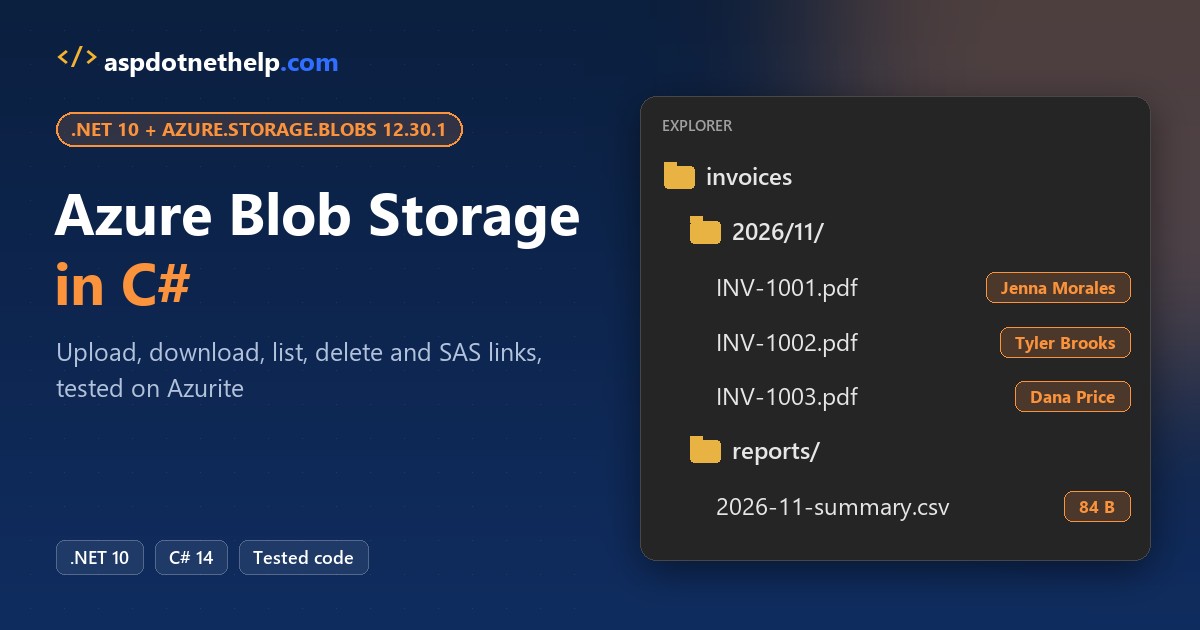
Here’s what we’re building. Three invoice PDFs sit in an invoices container under a 2026/11/ folder, each with its customer name stored as metadata, plus a CSV report in reports/:
Note: every screenshot is the Azurite emulator, not the Azure Portal or Storage Explorer. The C# code is the same for a real storage account.
How Is Azure Blob Storage Organized?
Blob storage has three levels, and the SDK gives you one client class per level:
| Level | In our app | C# client | What you do with it |
|---|---|---|---|
| Storage account | devstoreaccount1 (Azurite) | BlobServiceClient | List or create containers, account settings |
| Container | invoices | BlobContainerClient | Create it, list blobs, delete blobs by name |
| Blob | 2026/11/INV-1001.pdf | BlobClient | Upload, download, metadata, SAS, delete |
There are no real folders: 2026/11/ is part of the blob name. Names must be unique per container, so apps add a date path or a GUID in C#. Container names must be lowercase.
Before You Start with Azure Blob Storage in C#
You need the .NET 10 SDK (check your .NET version) and Node.js for Azurite, but no Azure subscription. I ran these versions on November 1, 2026:
| Tool / package | Version | Why |
|---|---|---|
Azure.Storage.Blobs | 12.30.1 | The Blob Storage client library |
Microsoft.Extensions.Azure | 1.14.1 | AddAzureClients for dependency injection |
Azure.Identity | 1.21.0 | DefaultAzureCredential in production |
| Azurite (npm) | 3.37.0 | Local Blob Storage emulator |
| .NET SDK | 10.0.402 | File-based apps and the web API |
The sample data is four one-page invoice PDFs in an invoices folder next to the code:
| File | Customer | City | Amount | Size |
|---|---|---|---|---|
| INV-1001.pdf | Jenna Morales | Austin, TX | $1,250.00 | 649 bytes |
| INV-1002.pdf | Tyler Brooks | Denver, CO | $860.40 | 646 bytes |
| INV-1003.pdf | Dana Price | Columbus, OH | $2,315.75 | 648 bytes |
| INV-1004.pdf | Marcus Reed | Buffalo, NY | $430.25 | 646 bytes |
Step 1: Start Azurite and Add the Azure.Storage.Blobs Package
Start the blob emulator in its own terminal. Important: without --skipApiVersionCheck, my first upload failed with The API version 2026-10-06 is not supported by Azurite, because SDK 12.30.1 is newer than Azurite 3.37.0:
npx -p azurite@3.37.0 azurite-blob --silent --skipApiVersionCheck --location C:\DotNetDemo\_azurite --blobPort 10000

Azurite Blob service is starting on 127.0.0.1:10000
Azurite Blob service successfully listens on http://127.0.0.1:10000
Each example is a single-file .NET 10 app that starts with #:package Azure.Storage.Blobs@12.30.1, no .csproj. New to that? Read how dotnet run file-based apps work.
Checkpoint: Azurite listens on http://127.0.0.1:10000. The connection string UseDevelopmentStorage=true points the SDK at it, with the public dev account devstoreaccount1.
Step 2: Create a Container and Upload Files with UploadAsync
CreateIfNotExistsAsync makes the container on the first run and does nothing after that. Then UploadAsync sends each PDF from disk with its content type and two metadata values:
#:package Azure.Storage.Blobs@12.30.1
using Azure.Storage.Blobs;
using Azure.Storage.Blobs.Models;

var service = new BlobServiceClient("UseDevelopmentStorage=true");
BlobContainerClient container = service.GetBlobContainerClient("invoices");
var created = await container.CreateIfNotExistsAsync();
Console.WriteLine(created is null ? "Container already exists" : "Container created");

(string Id, string Customer, string State)[] invoices =
    [("INV-1001", "Jenna Morales", "TX"), ("INV-1002", "Tyler Brooks", "CO"), ("INV-1003", "Dana Price", "OH")];

foreach (var (id, customer, state) in invoices)
{
    BlobClient blob = container.GetBlobClient($"2026/11/{id}.pdf");
    await blob.UploadAsync(Path.Combine("invoices", $"{id}.pdf"), new BlobUploadOptions
    {
        HttpHeaders = new BlobHttpHeaders { ContentType = "application/pdf" },
        Metadata = new Dictionary<string, string> { ["customer"] = customer, ["state"] = state },
    });
    Console.WriteLine($"Uploaded {blob.Uri}");
}
Output:
Container created
Uploaded http://127.0.0.1:10000/devstoreaccount1/invoices/2026/11/INV-1001.pdf
Uploaded http://127.0.0.1:10000/devstoreaccount1/invoices/2026/11/INV-1002.pdf
Uploaded http://127.0.0.1:10000/devstoreaccount1/invoices/2026/11/INV-1003.pdf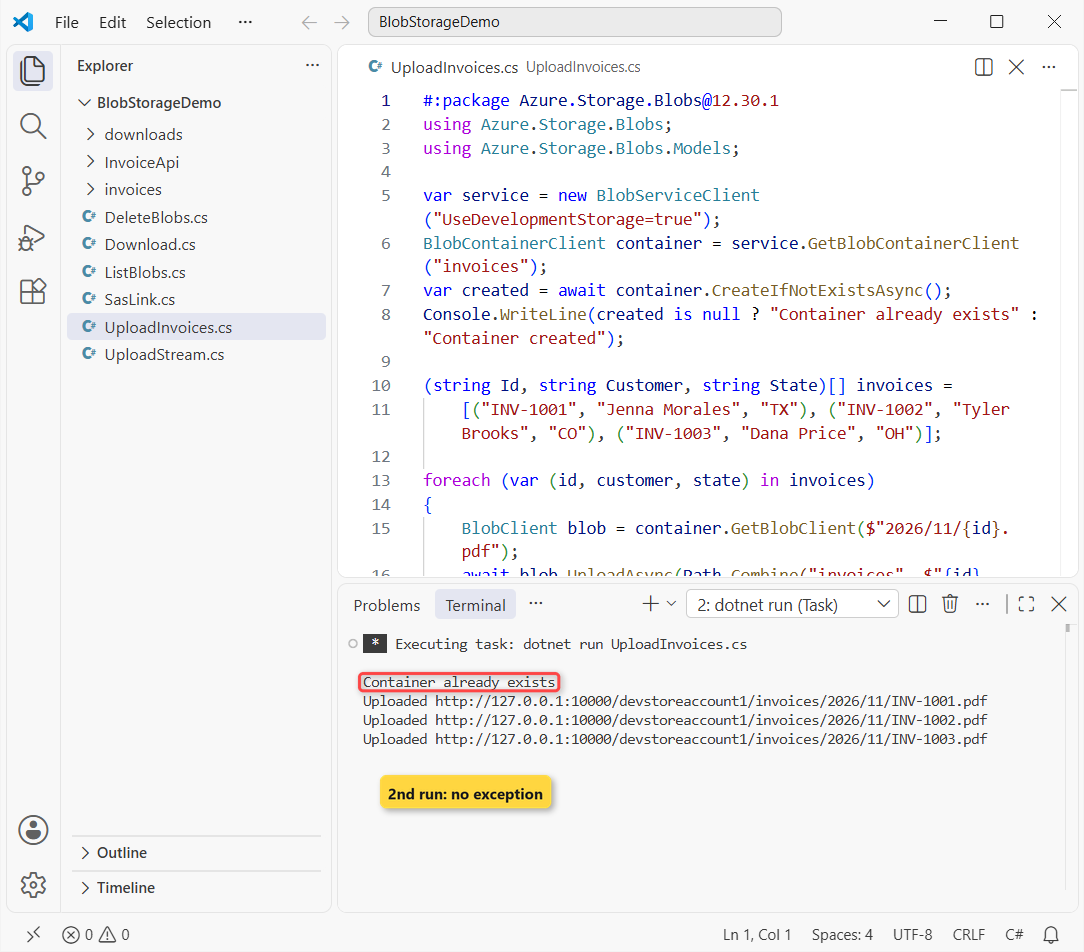
The shot is the second run: CreateIfNotExistsAsync returned null instead of throwing. Every call is awaited (async and await in C#), and metadata is a plain Dictionary in C# of strings.
Checkpoint: three URLs that end in /invoices/2026/11/INV-100x.pdf.
Step 3: Upload from a Stream and Overwrite an Existing Blob
Not every file starts on disk. This CSV report is built in memory, uploaded from a MemoryStream, then replaced:
#:package Azure.Storage.Blobs@12.30.1
using System.Text;
using Azure;
using Azure.Storage.Blobs;

var container = new BlobContainerClient("UseDevelopmentStorage=true", "invoices");
BlobClient report = container.GetBlobClient("reports/2026-11-summary.csv");

string csv = "invoice,customer,amount\nINV-1001,Jenna Morales,1250.00\n";
using var stream = new MemoryStream(Encoding.UTF8.GetBytes(csv));
await report.UploadAsync(stream, overwrite: true);
Console.WriteLine($"Uploaded {report.Name} ({stream.Length} bytes)");

var updated = BinaryData.FromString(csv + "INV-1002,Tyler Brooks,860.40\n");
try { await report.UploadAsync(updated); }
catch (RequestFailedException ex) { Console.WriteLine($"Second upload: {ex.Status} {ex.ErrorCode}"); }

await report.UploadAsync(updated, overwrite: true);
var props = await report.GetPropertiesAsync();
Console.WriteLine($"Overwritten: {props.Value.ContentLength} bytes, {props.Value.ContentType}");
Output:
Uploaded reports/2026-11-summary.csv (55 bytes)
Second upload: 409 BlobAlreadyExists
Overwritten: 84 bytes, application/octet-stream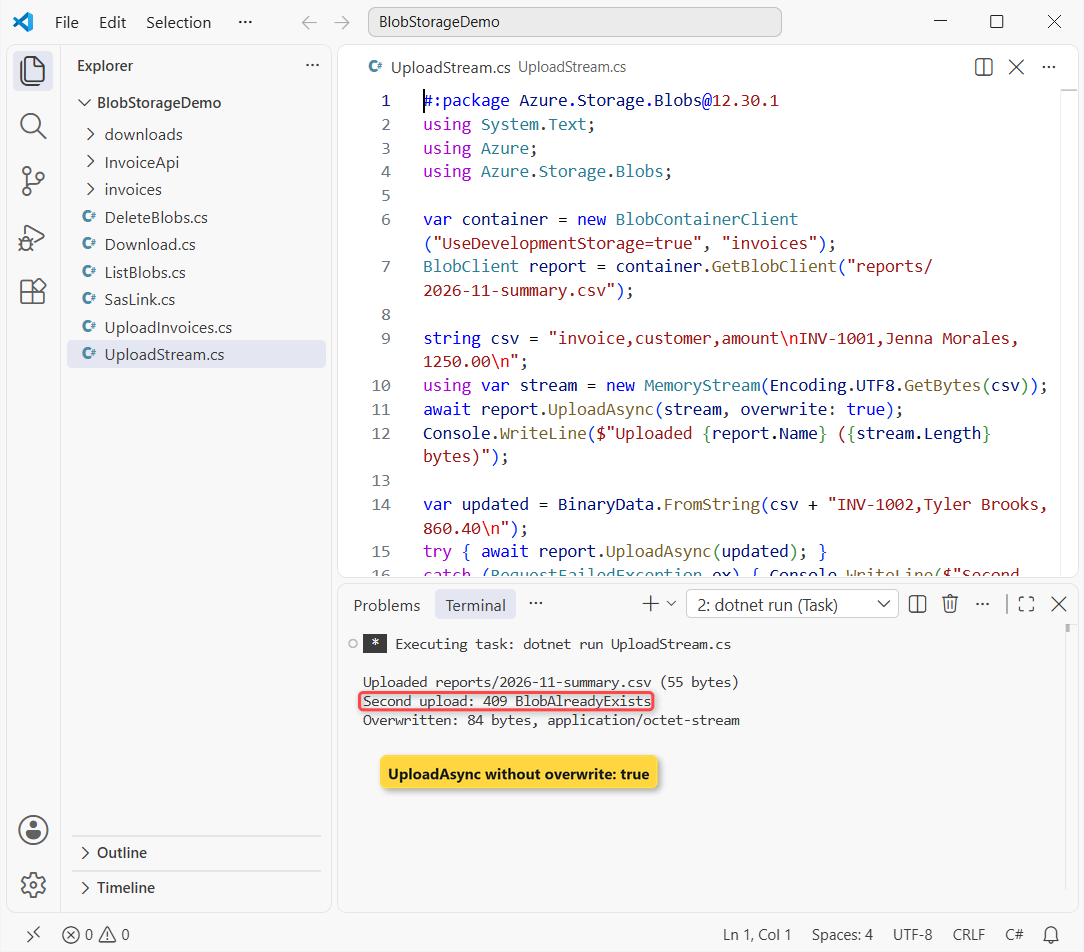
Here’s the gotcha: UploadAsync(content) without overwrite: true won’t replace a blob, so it threw 409 BlobAlreadyExists, caught with a plain try-catch in C#. With no headers, the type is application/octet-stream.
Checkpoint: Second upload: 409 BlobAlreadyExists, then Overwritten: 84 bytes.
Step 4: List Blobs and Virtual Folders with GetBlobsAsync
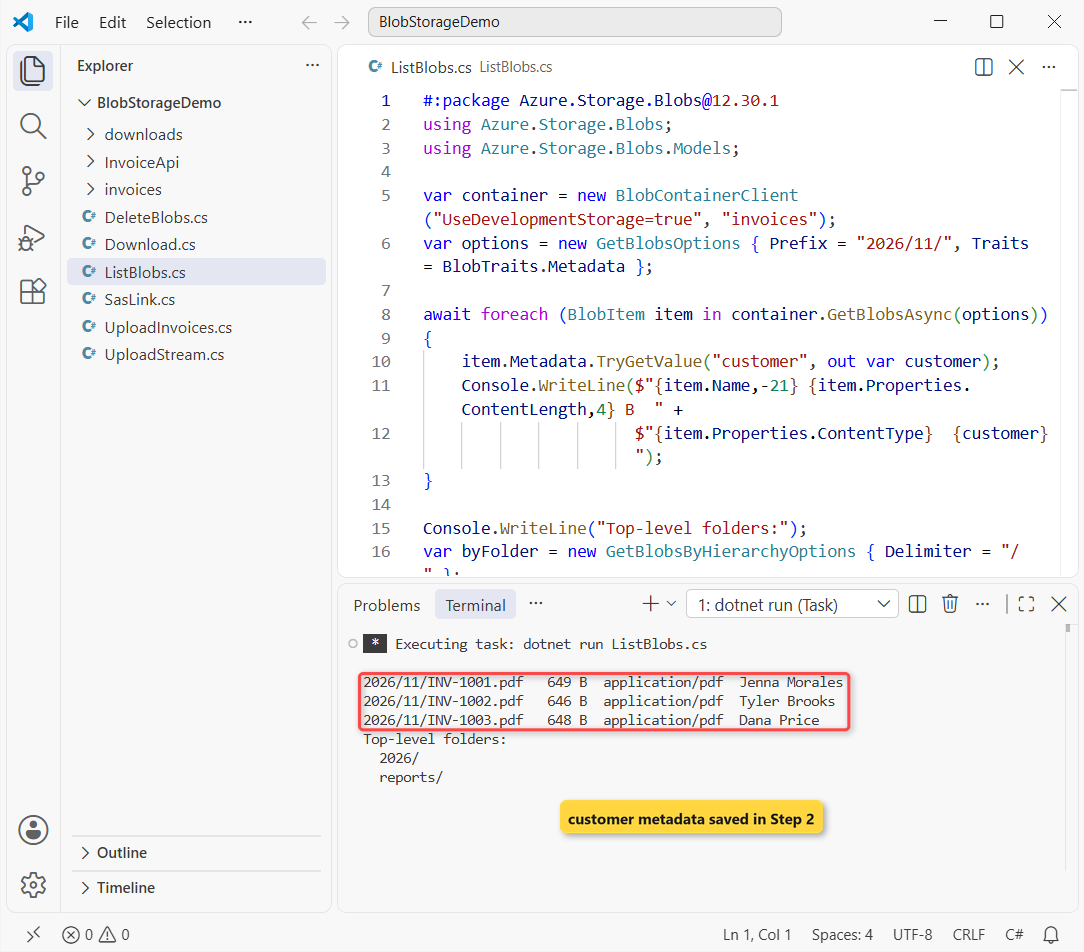
This is the program behind the screenshot at the top. GetBlobsOptions sets the folder prefix and asks for metadata, which listings skip unless you request it:
#:package Azure.Storage.Blobs@12.30.1
using Azure.Storage.Blobs;
using Azure.Storage.Blobs.Models;

var container = new BlobContainerClient("UseDevelopmentStorage=true", "invoices");
var options = new GetBlobsOptions { Prefix = "2026/11/", Traits = BlobTraits.Metadata };

await foreach (BlobItem item in container.GetBlobsAsync(options))
{
    item.Metadata.TryGetValue("customer", out var customer);
    Console.WriteLine($"{item.Name,-21} {item.Properties.ContentLength,4} B  " +
                      $"{item.Properties.ContentType}  {customer}");
}

Console.WriteLine("Top-level folders:");
var byFolder = new GetBlobsByHierarchyOptions { Delimiter = "/" };
await foreach (BlobHierarchyItem entry in container.GetBlobsByHierarchyAsync(byFolder))
    Console.WriteLine(entry.IsPrefix ? $"  {entry.Prefix}" : $"  {entry.Blob.Name}");
Output:
2026/11/INV-1001.pdf   649 B  application/pdf  Jenna Morales
2026/11/INV-1002.pdf   646 B  application/pdf  Tyler Brooks
2026/11/INV-1003.pdf   648 B  application/pdf  Dana Price
Top-level folders:
  2026/
  reports/
In 12.30.1, pass a GetBlobsOptions object; the older GetBlobsAsync(traits, states, prefix) overload now wants every argument. GetBlobsByHierarchyAsync with Delimiter = "/" returns the top-level folders: 2026/ and reports/.
Checkpoint: three PDFs of 1 KB or less with application/pdf and their customer names.
Step 5: Download Blobs with DownloadToAsync and DownloadContentAsync
Use DownloadToAsync to save a blob to a file, and DownloadContentAsync when you want the bytes in memory:
#:package Azure.Storage.Blobs@12.30.1
using Azure.Storage.Blobs;

var container = new BlobContainerClient("UseDevelopmentStorage=true", "invoices");

BlobClient pdf = container.GetBlobClient("2026/11/INV-1002.pdf");
Directory.CreateDirectory("downloads");
await pdf.DownloadToAsync(Path.Combine("downloads", "INV-1002.pdf"));
var props = (await pdf.GetPropertiesAsync()).Value;
Console.WriteLine($"Saved downloads\\INV-1002.pdf ({new FileInfo("downloads/INV-1002.pdf").Length} bytes)");
Console.WriteLine($"  {props.ContentType}, customer = {props.Metadata["customer"]}");

BlobClient csv = container.GetBlobClient("reports/2026-11-summary.csv");
var result = (await csv.DownloadContentAsync()).Value;
Console.WriteLine($"{csv.Name} ({result.Details.ContentType}):");
Console.Write(result.Content.ToString());
Output:
Saved downloads\INV-1002.pdf (646 bytes)
  application/pdf, customer = Tyler Brooks
reports/2026-11-summary.csv (application/octet-stream):
invoice,customer,amount
INV-1001,Jenna Morales,1250.00
INV-1002,Tyler Brooks,860.40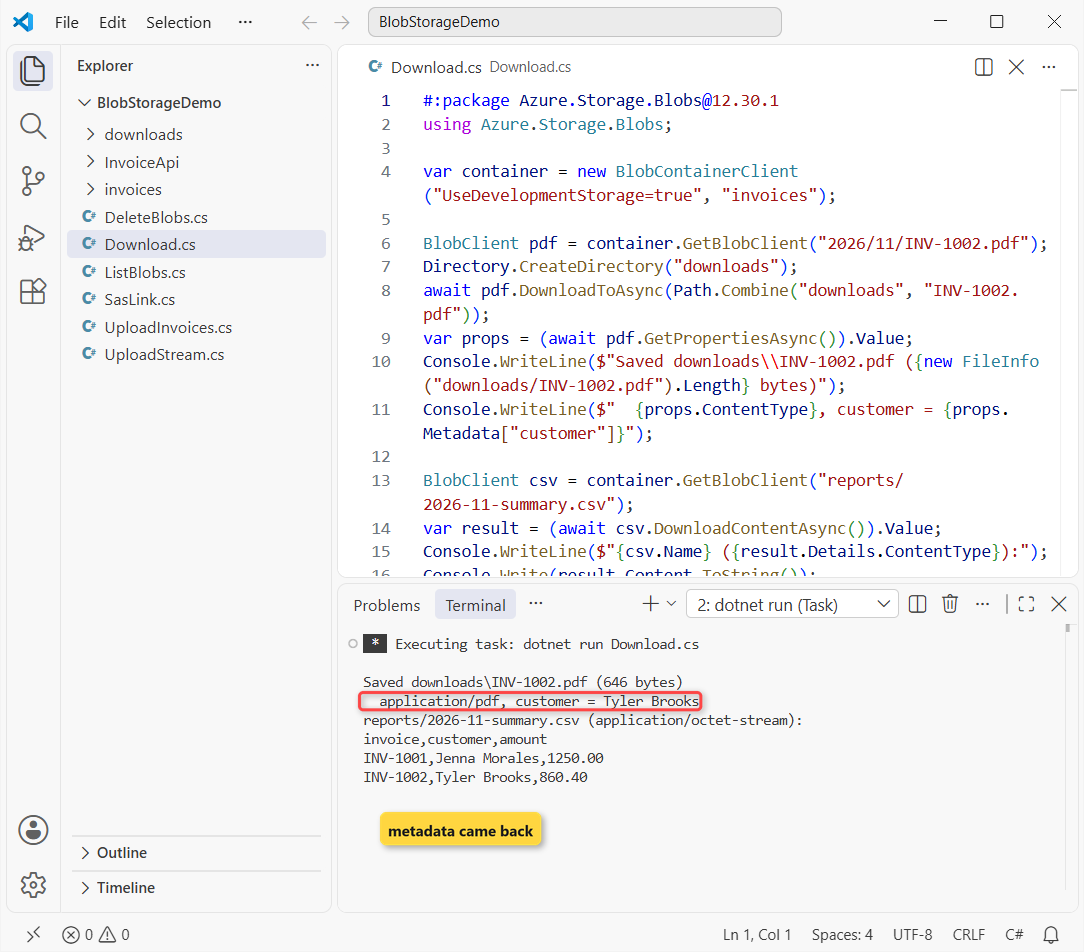
Directory.CreateDirectory is safe when the folder exists, like creating a folder only if it does not exist. For large files, use DownloadStreamingAsync instead of loading everything into memory.
Checkpoint: downloads\INV-1002.pdf exists, and the CSV prints both invoice rows.
Step 6: Generate a SAS URL for a Blob
The invoice email needs a link that works without your keys. A shared access signature (SAS) is a signed, expiring URL; this one is read-only for 15 minutes:
#:package Azure.Storage.Blobs@12.30.1
using System.Web;
using Azure.Storage.Blobs;
using Azure.Storage.Sas;

var container = new BlobContainerClient("UseDevelopmentStorage=true", "invoices");
BlobClient blob = container.GetBlobClient("2026/11/INV-1001.pdf");
Console.WriteLine($"CanGenerateSasUri: {blob.CanGenerateSasUri}");

Uri sasUri = blob.GenerateSasUri(BlobSasPermissions.Read, DateTimeOffset.UtcNow.AddMinutes(15));
var q = HttpUtility.ParseQueryString(sasUri.Query);
Console.WriteLine(sasUri.GetLeftPart(UriPartial.Path));
Console.WriteLine($"  sp={q["sp"]} sr={q["sr"]} sv={q["sv"]} sig=({q["sig"]!.Length} chars)");

using var http = new HttpClient();
Console.WriteLine($"GET with SAS:    {(int)(await http.GetAsync(sasUri)).StatusCode}");
Console.WriteLine($"GET without SAS: {(int)(await http.GetAsync(blob.Uri)).StatusCode}");
Output:
CanGenerateSasUri: True
http://127.0.0.1:10000/devstoreaccount1/invoices/2026/11/INV-1001.pdf
  sp=r sr=b sv=2026-10-06 sig=(44 chars)
GET with SAS:    200
GET without SAS: 403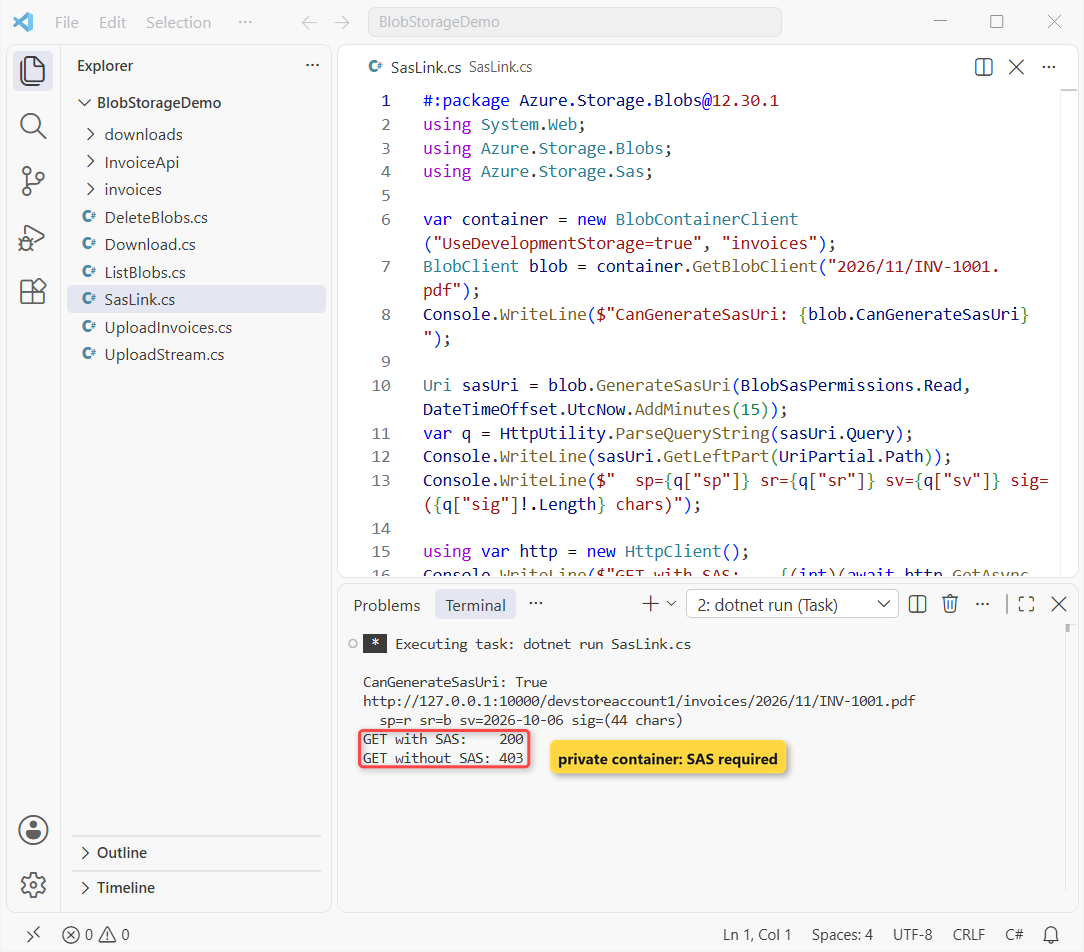
GenerateSasUri needs a client built with the account key, which UseDevelopmentStorage=true has. Without the SAS, Azurite answered 403 because the container is private. sp=r means read and sr=b one blob.
For more options, pass a BlobSasBuilder to GenerateSasUri. The using var line disposes the HttpClient (see Dispose and Finalize in C#).
Checkpoint: GET with SAS: 200.
Step 7: Delete Files from Azure Blob Storage in C#
DeleteIfExistsAsync returns true when it removed something and false when the blob was already gone, so you don’t need a try-catch. To clear a virtual folder, list by prefix and delete each name:
#:package Azure.Storage.Blobs@12.30.1
using Azure;
using Azure.Storage.Blobs;
using Azure.Storage.Blobs.Models;

var container = new BlobContainerClient("UseDevelopmentStorage=true", "invoices");
BlobClient blob = container.GetBlobClient("2026/11/INV-1003.pdf");

Console.WriteLine($"Deleted: {(await blob.DeleteIfExistsAsync()).Value}");
Console.WriteLine($"Deleted again: {(await blob.DeleteIfExistsAsync()).Value}");

try { await blob.DownloadContentAsync(); }
catch (RequestFailedException ex) { Console.WriteLine($"Download now: {ex.Status} {ex.ErrorCode}"); }

int removed = 0;
await foreach (BlobItem item in container.GetBlobsAsync(new GetBlobsOptions { Prefix = "reports/" }))
    if (await container.DeleteBlobIfExistsAsync(item.Name)) removed++;
Console.WriteLine($"Removed {removed} blob(s) under reports/");
Output:
Deleted: True
Deleted again: False
Download now: 404 BlobNotFound
Removed 1 blob(s) under reports/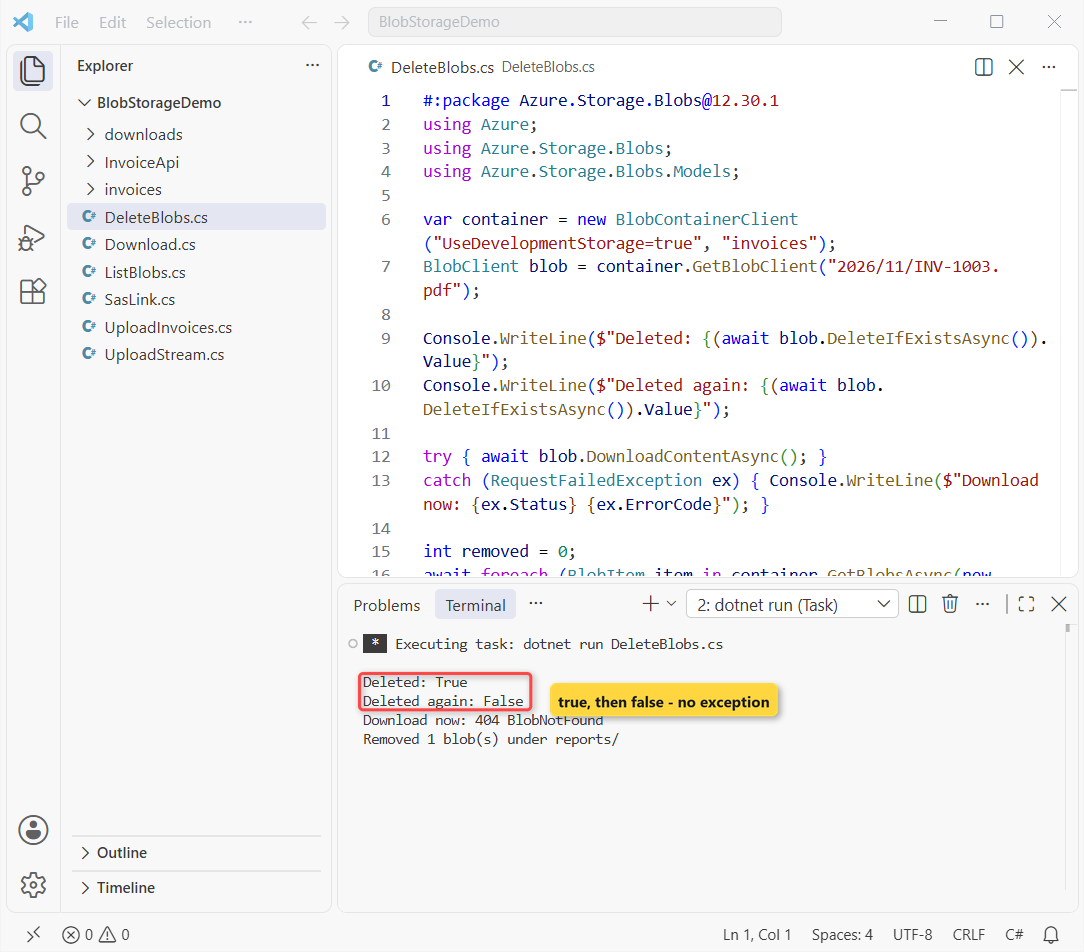
Reading a deleted blob throws 404 BlobNotFound. container.DeleteAsync() drops a whole container, but you can’t reuse its name for 30 seconds. For local files, see how to delete a file from a folder in C#.
Checkpoint: Deleted: True, Deleted again: False, and one blob removed under reports/.
Step 8: Register BlobServiceClient with Dependency Injection (AddAzureClients)
In ASP.NET Core, don’t create a client per request. Microsoft.Extensions.Azure registers one BlobServiceClient to inject anywhere:
dotnet new web -n InvoiceApi
cd InvoiceApi
dotnet add package Azure.Storage.Blobs --version 12.30.1
dotnet add package Microsoft.Extensions.Azure --version 1.14.1
I deleted the template’s Properties folder and appsettings.Development.json. The project file:
<Project Sdk="Microsoft.NET.Sdk.Web">

  <PropertyGroup>
    <TargetFramework>net10.0</TargetFramework>
    <Nullable>enable</Nullable>
    <ImplicitUsings>enable</ImplicitUsings>
  </PropertyGroup>

  <ItemGroup>
    <PackageReference Include="Azure.Storage.Blobs" Version="12.30.1" />
    <PackageReference Include="Microsoft.Extensions.Azure" Version="1.14.1" />
  </ItemGroup>

</Project>
AddBlobServiceClient reads a connectionString or serviceUri key from the config section you pass:
{
  "Logging": {
    "LogLevel": {
      "Default": "Information",
      "Microsoft.AspNetCore": "Warning"
    }
  },
  "AllowedHosts": "*",
  "Storage": {
    "connectionString": "UseDevelopmentStorage=true"
  }
}
And Program.cs, with upload, list, download and delete endpoints. It’s the same shape as an ASP.NET Core Web API CRUD app with EF Core, with blobs instead of tables:
using Azure.Storage.Blobs;
using Azure.Storage.Blobs.Models;
using Microsoft.Extensions.Azure;

var builder = WebApplication.CreateBuilder(args);

// One BlobServiceClient for the whole app, configured from the "Storage" section
builder.Services.AddAzureClients(clients =>
    clients.AddBlobServiceClient(builder.Configuration.GetSection("Storage")));

var app = builder.Build();

static BlobContainerClient Invoices(BlobServiceClient service) =>
    service.GetBlobContainerClient("invoices");

app.MapPost("/invoices", async (IFormFile file, BlobServiceClient service) =>
{
    BlobClient blob = Invoices(service).GetBlobClient($"2026/11/{file.FileName}");
    await using var stream = file.OpenReadStream();
    await blob.UploadAsync(stream, new BlobUploadOptions
    {
        HttpHeaders = new BlobHttpHeaders { ContentType = file.ContentType }
    });
    return Results.Created(blob.Uri, new { blob.Name, file.Length });
}).DisableAntiforgery();

app.MapGet("/invoices", async (BlobServiceClient service) =>
{
    var names = new List<string>();
    await foreach (BlobItem item in Invoices(service).GetBlobsAsync())
        names.Add(item.Name);
    return names;
});

app.MapGet("/invoices/{**name}", async (string name, BlobServiceClient service) =>
{
    BlobClient blob = Invoices(service).GetBlobClient(name);
    if (!await blob.ExistsAsync()) return Results.NotFound();
    var download = await blob.DownloadStreamingAsync();
    return Results.Stream(download.Value.Content, download.Value.Details.ContentType);
});

app.MapDelete("/invoices/{**name}", async (string name, BlobServiceClient service) =>
    await Invoices(service).DeleteBlobIfExistsAsync(name) ? Results.NoContent() : Results.NotFound());

app.Run();
DisableAntiforgery() lets curl post an IFormFile without a token, and {**name} keeps the slashes in blob names.
Checkpoint: dotnet build finishes with 0 warnings and 0 errors.
Test the Invoice Storage API
I started it on http://localhost:5692 and uploaded Marcus Reed’s invoice with curl:
curl -s -F "file=@invoices/INV-1004.pdf;type=application/pdf" http://localhost:5692/invoices{"name":"2026/11/INV-1004.pdf","length":646}That 201 body comes from System.Text.Json in C#. Now list the container:
curl -s http://localhost:5692/invoices
["2026/11/INV-1001.pdf","2026/11/INV-1002.pdf","2026/11/INV-1004.pdf"]
INV-1003 is missing because Step 7 deleted it. Then download, delete, and try again:
curl -s -o downloads/INV-1004.pdf -w "%{http_code} %{content_type} %{size_download} bytes" http://localhost:5692/invoices/2026/11/INV-1004.pdf
200 application/pdf 646 bytes

curl -s -X DELETE -w "%{http_code}" http://localhost:5692/invoices/2026/11/INV-1004.pdf
204

curl -s -o NUL -w "%{http_code}" http://localhost:5692/invoices/2026/11/INV-1004.pdf
404
The download came back as application/pdf with all 646 bytes, the delete returned 204, and the second request returned 404.
Make It Production-Ready: DefaultAzureCredential and Managed Identity
A connection string carries the account key, and anyone with it can reach all your data. In Azure, Learn recommends DefaultAzureCredential from Azure.Identity:
using Azure.Identity;
using Azure.Storage.Blobs;

var service = new BlobServiceClient(
    new Uri("https://<storage-account-name>.blob.core.windows.net"),
    new DefaultAzureCredential());
With DI, swap connectionString for "serviceUri": "https://. AddAzureClients creates a DefaultAzureCredential on its own, or set it with clients.UseCredential(new DefaultAzureCredential()).
- Locally:
az loginor a Visual Studio sign-in. - In Azure: a managed identity on the App Service or container, with no code change.
- Role: Storage Blob Data Contributor on the storage account.
- SAS: a user delegation SAS (
GetUserDelegationKeyAsync), which Microsoft prefers.
Note: I didn’t run this section against real Azure; it follows Microsoft Learn.
Troubleshooting Azure Blob Storage C# Errors
| Error | Cause | Fix |
|---|---|---|
The API version 2026-10-06 is not supported by Azurite | SDK newer than the emulator | Update Azurite or add --skipApiVersionCheck |
409 BlobAlreadyExists | UploadAsync without overwrite | Pass overwrite: true or use BlobUploadOptions |
404 BlobNotFound | Wrong name or already deleted | Check case and the folder prefix; use ExistsAsync |
CS7036 on GetBlobsAsync(prefix: ...) | Old sample on 12.30.1 | Pass new GetBlobsOptions { Prefix = ... } |
CanGenerateSasUri is false | Client uses a token, not the key | Create a user delegation SAS |
| PDF downloads instead of opening | application/octet-stream | Set BlobHttpHeaders.ContentType |
Where to Take It Next with Azure Blob Storage
I’d add a lifecycle rule that moves year-old invoices to the Cool tier, and blob versioning to recover overwrites. Or expose the list and SAS calls to an AI assistant, as in building an MCP server in C#.
For more Azure and ASP.NET Core work on .NET 10, these are good next reads:
- AI and Azure tutorials for .NET developers
- OpenAPI and Scalar docs for an ASP.NET Core API
- Blazor render modes explained
- All ASP.NET Core tutorials
Frequently Asked Questions
Which NuGet package do I use for Azure Blob Storage in C#?
Use Azure.Storage.Blobs (12.30.1 today). WindowsAzure.Storage and Microsoft.Azure.Storage.Blob are the old, deprecated libraries.
How do I upload a file to Azure Blob Storage in C#?
Get a BlobClient from your container with GetBlobClient(name), then call UploadAsync(filePath, overwrite: true), or pass BlobUploadOptions to set the content type and metadata.
How do I delete a file from Azure Blob Storage in C#?
Call DeleteIfExistsAsync() on the BlobClient. It returns true when it deleted the blob and false when the blob didn’t exist.
Can I test Azure Blob Storage without an Azure account?
Yes. Run the Azurite emulator and connect with UseDevelopmentStorage=true. See Microsoft’s Azurite guide on Learn.
Where is the official Azure Blob Storage C# example?
Microsoft’s Blob Storage quickstart for .NET covers creating a container, uploading, listing, downloading and deleting.

Bijay Kumar is a renowned software engineer, accomplished author, and distinguished Microsoft Most Valuable Professional (MVP) specializing in SharePoint. With a rich professional background spanning over 15 years, Bijay has established himself as an authority in the field of information technology. He possesses unparalleled expertise in multiple programming languages and technologies such as ASP.NET, ASP.NET MVC, C#.NET, and SharePoint, which has enabled him to develop innovative and cutting-edge solutions for clients across the globe. Read more…