
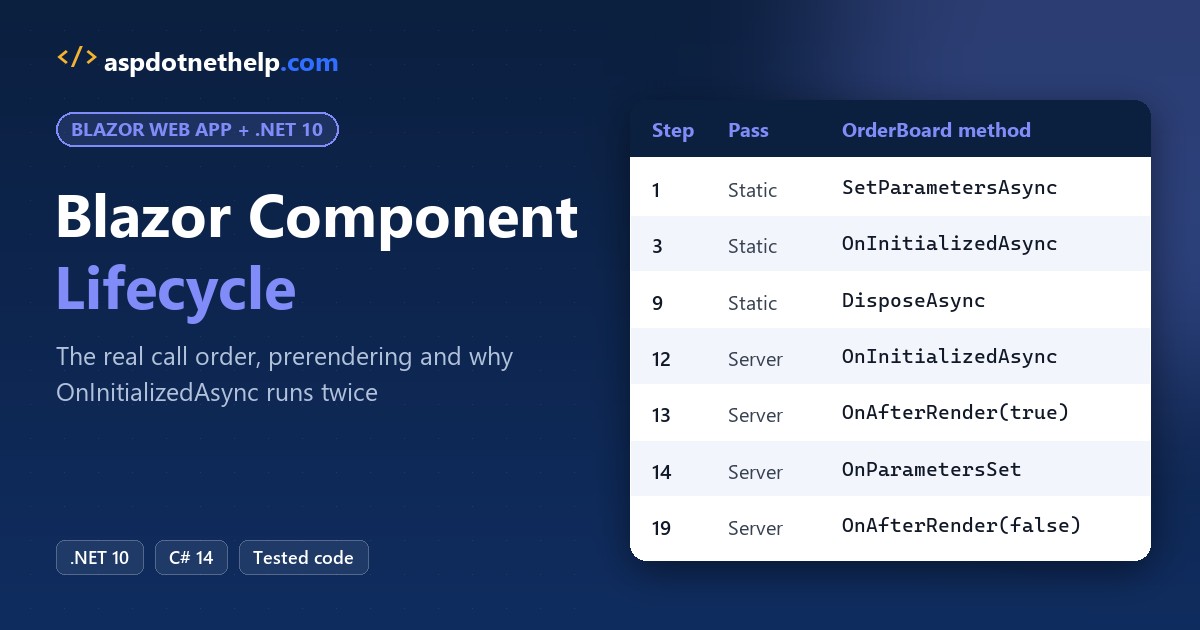
A pizza shop in Chicago’s Wicker Park wanted a live order board in Blazor. My first version hit the database twice on every visit, and its 30-second refresh timer kept firing after the cashier left the page.
Both bugs came from the Blazor component lifecycle.
Quick answer: load data in OnInitializedAsync with [PersistentState], start timers in OnAfterRender(firstRender) and stop them in DisposeAsync. Below is the real call order I logged on .NET 10.
Blazor Component Lifecycle Methods at a Glance
Every component that inherits ComponentBase gets these methods. You override only the ones you need:
| Method | When it runs | During prerendering? |
|---|---|---|
SetParametersAsync | Every time the parent passes parameters (first of all) | Yes |
OnInitialized{Async} | Once per component instance, after the first parameters | Yes |
OnParametersSet{Async} | After the first init and every parameter update | Yes |
ShouldRender | Before each re-render (never the first render) | No re-renders |
OnAfterRender{Async} | After the browser DOM is updated | No |
Dispose / DisposeAsync | When the component leaves the UI | Yes, at the end |
The sync version always runs before its async twin. If the async method returns an unfinished task, Blazor renders once right away and again when the task completes.
Set Up a Blazor Lifecycle Demo That Logs Every Call
You need the .NET 10 SDK (I used 10.0.402); check your .NET version if you’re not sure. New to Blazor pages? My Blazor tutorial for beginners covers the basics.
dotnet new blazor -o BlazorLifecycleI deleted appsettings.Development.json and kept appsettings.json, which quiets the framework’s request logs:
{
  "Logging": {
    "LogLevel": {
      "Default": "Information",
      "Microsoft.AspNetCore": "Warning"
    }
  },
  "AllowedHosts": "*"
}
The launch profile runs the app on plain http, port 5879. The project file is the template’s:
{
  "$schema": "https://json.schemastore.org/launchsettings.json",
  "profiles": {
    "http": {
      "commandName": "Project",
      "dotnetRunMessages": true,
      "launchBrowser": false,
      "applicationUrl": "http://localhost:5879",
      "environmentVariables": {
        "ASPNETCORE_ENVIRONMENT": "Development"
      }
    }
  }
}
<Project Sdk="Microsoft.NET.Sdk.Web">
<PropertyGroup>
<TargetFramework>net10.0</TargetFramework>
<Nullable>enable</Nullable>
<ImplicitUsings>enable</ImplicitUsings>
<BlazorDisableThrowNavigationException>true</BlazorDisableThrowNavigationException>
</PropertyGroup>
</Project>In Program.cs I registered the order store and removed UseHttpsRedirection(), since this demo has no https port:
using BlazorLifecycle.Components;
using BlazorLifecycle.Data;

var builder = WebApplication.CreateBuilder(args);

// Add services to the container.
builder.Services.AddSingleton<OrderStore>();
builder.Services.AddRazorComponents()
    .AddInteractiveServerComponents();

var app = builder.Build();

// Configure the HTTP request pipeline.
if (!app.Environment.IsDevelopment())
{
    app.UseExceptionHandler("/Error", createScopeForErrors: true);
    // The default HSTS value is 30 days. You may want to change this for production scenarios, see https://aka.ms/aspnetcore-hsts.
    app.UseHsts();
}
app.UseStatusCodePagesWithReExecute("/not-found", createScopeForStatusCodePages: true);

app.UseAntiforgery();

app.MapStaticAssets();
app.MapRazorComponents<App>()
    .AddInteractiveServerRenderMode();

app.Run();
The store fakes a 400 ms database query and prints a line per call, so double loads are easy to spot. It’s a singleton (see DI lifetimes in ASP.NET Core), so its call counter covers every request:
namespace BlazorLifecycle.Data;

public class Order
{
    public int Id { get; set; }
    public string Customer { get; set; } = "";
    public decimal Total { get; set; }
    public string Status { get; set; } = "In the oven";
}

public class OrderStore
{
    private int calls;

    public async Task<List<Order>> GetTodayAsync()
    {
        Console.WriteLine($"      OrderStore.GetTodayAsync call #{Interlocked.Increment(ref calls)}");
        await Task.Delay(400);   // stands in for a database query
        return
        [
            new() { Id = 1041, Customer = "Tyler Brooks", Total = 38.50m },
            new() { Id = 1042, Customer = "Jenna Morales", Total = 24.75m },
        ];
    }
}
LifecycleLog numbers each call and tags it with RendererInfo.Name: Static while prerendering, Server once the SignalR circuit is live.
namespace BlazorLifecycle.Data;

public static class LifecycleLog
{
    private static int step;

    public static void Write(string phase, string component, string method) =>
        Console.WriteLine($"{Interlocked.Increment(ref step),2}. [{phase}] {component}.{method}");
}
Each order is a child component, Components/OrderCard.razor, built the way my Blazor components guide shows:
@using System.Globalization
@using BlazorLifecycle.Data

<div class="card mb-2" style="max-width: 30rem;">
    <div class="card-body py-2">
        <strong>#@Order.Id</strong> @Order.Customer - @Order.Total.ToString("C", Us)
        <span class="badge ms-2 @(Order.Status == "Ready" ? "bg-success" : "bg-secondary")">@Order.Status</span>
    </div>
</div>

@code {
    private static readonly CultureInfo Us = new("en-US");
    private string? renderedStatus;

    [Parameter, EditorRequired]
    public Order Order { get; set; } = default!;

    protected override void OnInitialized() => Log("OnInitialized");

    protected override void OnParametersSet() => Log("OnParametersSet");

    protected override bool ShouldRender()
    {
        bool changed = Order.Status != renderedStatus;
        Log($"ShouldRender -> {changed}");
        return changed;
    }

    protected override void OnAfterRender(bool firstRender)
    {
        renderedStatus = Order.Status;
        Log($"OnAfterRender(firstRender: {firstRender})");
    }

    private void Log(string method) => LifecycleLog.Write(RendererInfo.Name, $"OrderCard {Order.Id}", method);
}
The page, Components/Pages/OrderBoard.razor, overrides the main lifecycle methods and logs each one:
@page "/orders"
@rendermode InteractiveServer
@implements IAsyncDisposable
@using BlazorLifecycle.Data
@inject OrderStore Store

<PageTitle>Order Board</PageTitle>

<h1>Wicker Park Pizza - Order Board</h1>
<p>Rendered by: <strong>@RendererInfo.Name</strong> | Auto-refreshes: @refreshes</p>

@if (Orders is null)
{
    <p><em>Loading orders...</em></p>
}
else
{
    @foreach (var order in Orders)
    {
        <OrderCard Order="order" />
    }
    <button class="btn btn-primary" @onclick="MarkNextReady">Mark next order ready</button>
}

@code {
    public List<Order>? Orders { get; set; }
    private int refreshes;
    private PeriodicTimer? timer;

    public override async Task SetParametersAsync(ParameterView parameters)
    {
        Log("SetParametersAsync");
        await base.SetParametersAsync(parameters);
    }

    protected override void OnInitialized() => Log("OnInitialized");

    protected override async Task OnInitializedAsync()
    {
        Log("OnInitializedAsync");
        Orders = await Store.GetTodayAsync();
    }

    protected override void OnParametersSet() => Log("OnParametersSet");

    protected override void OnAfterRender(bool firstRender)
    {
        Log($"OnAfterRender(firstRender: {firstRender})");
        if (firstRender)
            _ = RefreshEvery30SecondsAsync();   // timers start in the browser, never during prerendering
    }

    private async Task RefreshEvery30SecondsAsync()
    {
        timer = new PeriodicTimer(TimeSpan.FromSeconds(30));
        while (await timer.WaitForNextTickAsync())
        {
            Orders = await Store.GetTodayAsync();
            refreshes++;
            StateHasChanged();   // a timer isn't a Blazor event, so ask for the render
        }
        Log("refresh loop stopped");
    }

    private void MarkNextReady()
    {
        var next = Orders?.FirstOrDefault(o => o.Status != "Ready");
        if (next is not null) next.Status = "Ready";
        Log("MarkNextReady (click)");
    }

    public ValueTask DisposeAsync()
    {
        Log("DisposeAsync");
        timer?.Dispose();
        return ValueTask.CompletedTask;
    }

    private void Log(string method) => LifecycleLog.Write(RendererInfo.Name, "OrderBoard", method);
}
What Is the Blazor Component Lifecycle Order on the First Load?
I ran dotnet run, opened /orders in Edge and waited four seconds. Here’s the server console:
 1. [Static] OrderBoard.SetParametersAsync
 2. [Static] OrderBoard.OnInitialized
 3. [Static] OrderBoard.OnInitializedAsync
      OrderStore.GetTodayAsync call #1
 4. [Static] OrderBoard.OnParametersSet
 5. [Static] OrderCard 1041.OnInitialized
 6. [Static] OrderCard 1041.OnParametersSet
 7. [Static] OrderCard 1042.OnInitialized
 8. [Static] OrderCard 1042.OnParametersSet
 9. [Static] OrderBoard.DisposeAsync
10. [Server] OrderBoard.SetParametersAsync
11. [Server] OrderBoard.OnInitialized
12. [Server] OrderBoard.OnInitializedAsync
      OrderStore.GetTodayAsync call #2
13. [Server] OrderBoard.OnAfterRender(firstRender: True)
14. [Server] OrderBoard.OnParametersSet
15. [Server] OrderCard 1041.OnInitialized
16. [Server] OrderCard 1041.OnParametersSet
17. [Server] OrderCard 1042.OnInitialized
18. [Server] OrderCard 1042.OnParametersSet
19. [Server] OrderBoard.OnAfterRender(firstRender: False)
20. [Server] OrderCard 1041.OnAfterRender(firstRender: True)
21. [Server] OrderCard 1042.OnAfterRender(firstRender: True)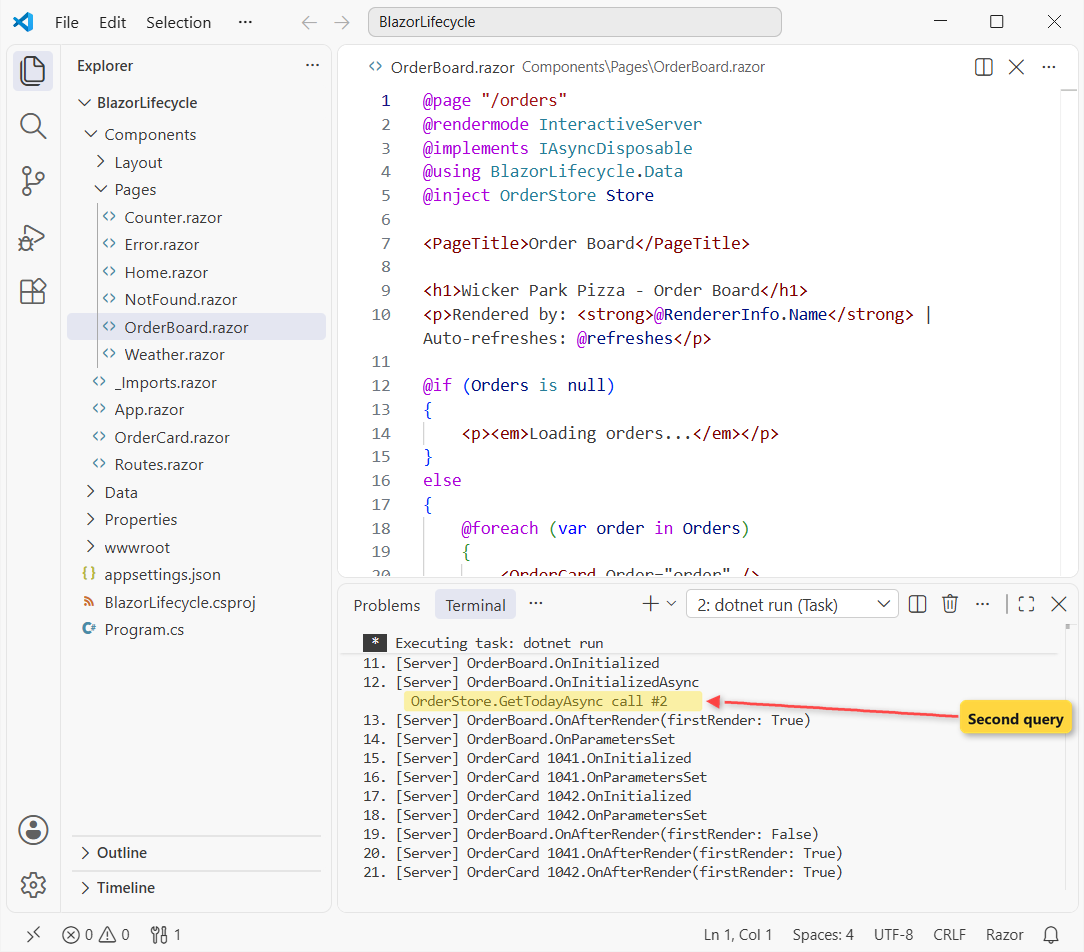
Four things in that log surprised me the first time:
- The whole lifecycle ran twice: 9 calls tagged
Static(prerendering), then again taggedServer. - The prerendered instance was thrown away: step 9 is
DisposeAsyncwith theStatictag. OnAfterRendernever ran in theStaticpass. Prerendering has no browser DOM.- In the
Serverpass,OnAfterRender(firstRender: True)came at step 13, beforeOnParametersSetat step 14.
That last one is the await at work. OnInitializedAsync awaited the store, so Blazor rendered “Loading orders…” first. Also notice the parent finishes its own methods before the child cards initialize.
SetParametersAsync: Where Each Lifecycle Pass Starts
SetParametersAsync receives a ParameterView with everything the parent passed. It’s the only place you see parameters before they’re assigned to your properties.
Important: call await base.SetParametersAsync(parameters). That base call assigns the properties and runs OnInitialized and OnParametersSet; skip it and the rest of the lifecycle never fires.
I only override it for logging or for a performance trick on a hot component. Most components never need it.
OnInitialized vs OnInitializedAsync: Load Data Once
Both run once per component instance, sync first. Put loading code in OnInitializedAsync and await the call there, like my Store.GetTodayAsync().
Because Blazor renders while the task runs, the markup must handle a null list. That’s why the page has the @if (Orders is null) block; nullable reference types remind you of it at compile time.
“Once” means once per instance, though, and prerendering creates two instances. That’s the next section.
Why Does OnInitializedAsync Run Twice in Blazor?
Because @rendermode InteractiveServer prerenders by default. The server renders static HTML first, then the browser opens a circuit and the component starts over. My Blazor render modes guide covers the modes themselves.
A plain curl of /orders shows the first pass alone: the HTML says “Rendered by: Static” and already lists Tyler Brooks’s order. The console showed only Static lines and store call #1.
Fix 1: Persist the Data With [PersistentState] (.NET 10)
In .NET 10, put [PersistentState] on a public property. Blazor serializes it into the prerendered page and restores it in the interactive pass. Two lines change in OrderBoard.razor:
    [PersistentState]
    public List<Order>? Orders { get; set; }

// in OnInitializedAsync
Orders ??= await Store.GetTodayAsync();   // restored from prerendering -> no second query
The ??= skips the query when the list came back from prerendering. Same page load, new log:
 1. [Static] OrderBoard.SetParametersAsync
 2. [Static] OrderBoard.OnInitialized
 3. [Static] OrderBoard.OnInitializedAsync
      OrderStore.GetTodayAsync call #1
 4. [Static] OrderBoard.OnParametersSet
 5. [Static] OrderCard 1041.OnInitialized
 6. [Static] OrderCard 1041.OnParametersSet
 7. [Static] OrderCard 1042.OnInitialized
 8. [Static] OrderCard 1042.OnParametersSet
 9. [Static] OrderBoard.DisposeAsync
10. [Server] OrderBoard.SetParametersAsync
11. [Server] OrderBoard.OnInitialized
12. [Server] OrderBoard.OnInitializedAsync
13. [Server] OrderBoard.OnParametersSet
14. [Server] OrderCard 1041.OnInitialized
15. [Server] OrderCard 1041.OnParametersSet
16. [Server] OrderCard 1042.OnInitialized
17. [Server] OrderCard 1042.OnParametersSet
18. [Server] OrderBoard.OnAfterRender(firstRender: True)
19. [Server] OrderCard 1041.OnAfterRender(firstRender: True)
20. [Server] OrderCard 1042.OnAfterRender(firstRender: True)
One store call instead of two, and no “Loading orders…” flash. The list is serialized with System.Text.Json, so keep it to plain public properties.
Fix 2: Turn Off Prerendering
If you don’t need the HTML up front (an internal dashboard, say), switch prerendering off for the page:
@rendermode @(new InteractiveServerRenderMode(prerender: false))That run logged 12 lifecycle calls, all tagged Server, and one store call. The trade-off: the page stays blank until the circuit connects, and search engines get no content.
OnParametersSet and ShouldRender in Parent and Child Components
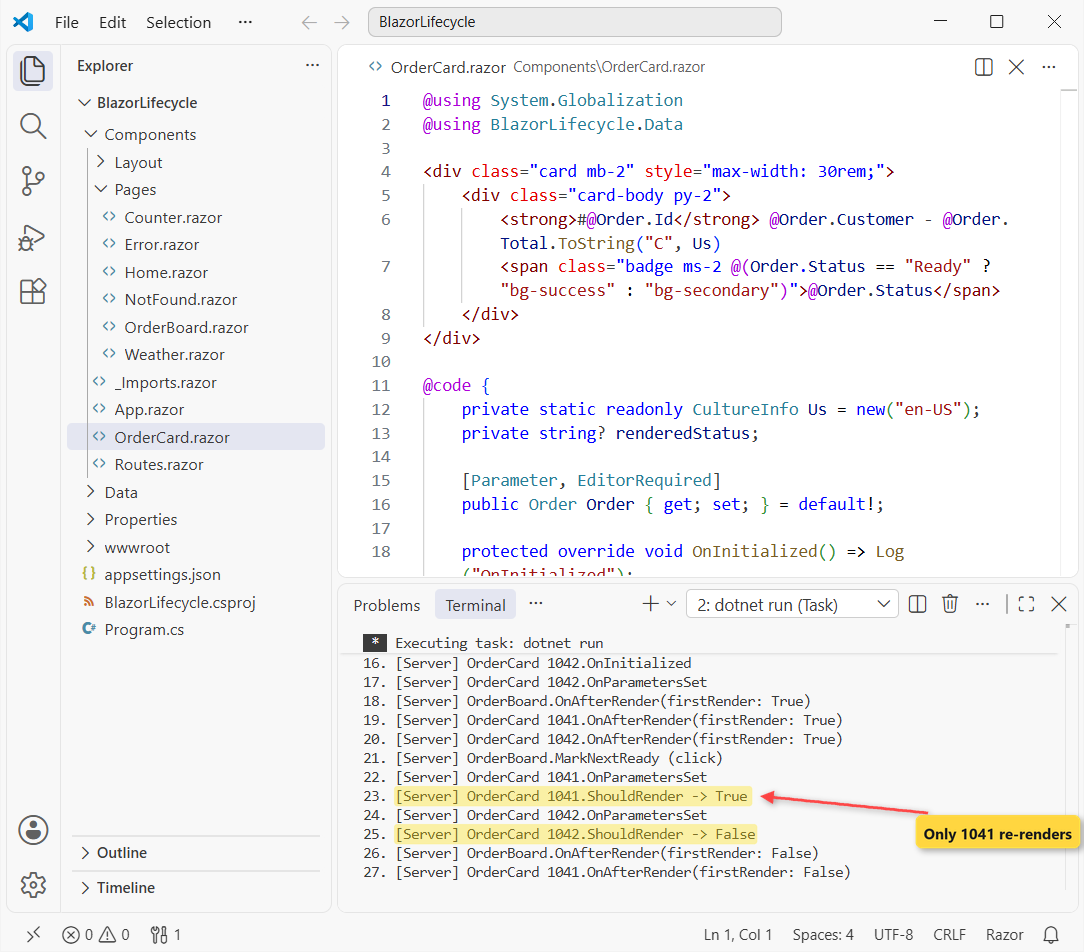
Back to the list of orders. Clicking “Mark next order ready” switches Tyler’s order to Ready. Here’s what the click logged:
21. [Server] OrderBoard.MarkNextReady (click)
22. [Server] OrderCard 1041.OnParametersSet
23. [Server] OrderCard 1041.ShouldRender -> True
24. [Server] OrderCard 1042.OnParametersSet
25. [Server] OrderCard 1042.ShouldRender -> False
26. [Server] OrderBoard.OnAfterRender(firstRender: False)
27. [Server] OrderCard 1041.OnAfterRender(firstRender: False)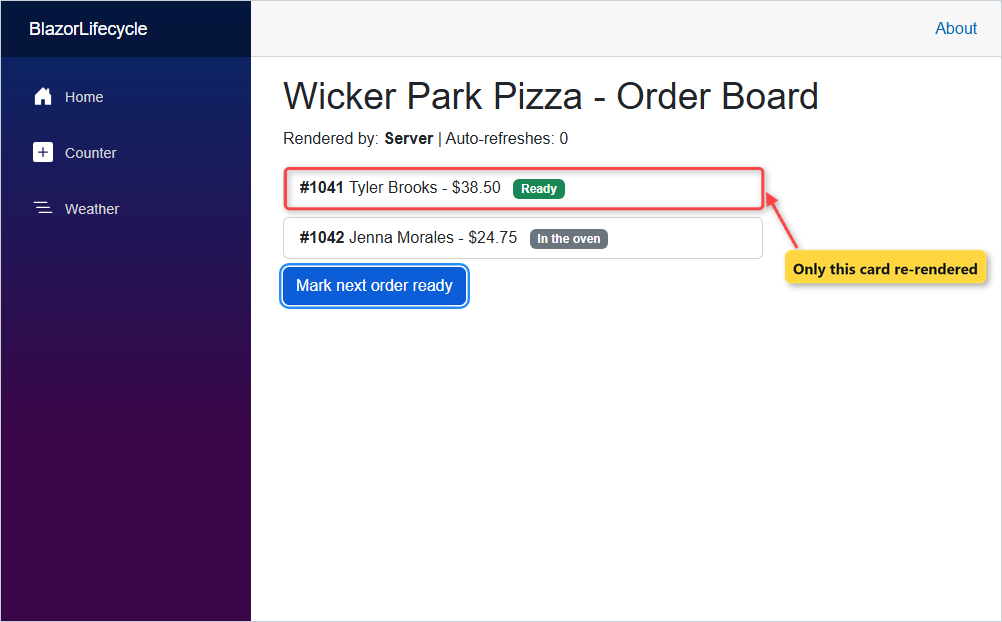
Both cards got OnParametersSet, even though I passed the same Order objects. Blazor can’t tell whether a complex type changed, so it always re-sends it. Unchanged primitive parameters like int or string are skipped instead.
ShouldRender in OrderCard saved the work: card 1041 returned True, card 1042 returned False and got no OnAfterRender. The override:
protected override bool ShouldRender()
{
    bool changed = Order.Status != renderedStatus;
    Log($"ShouldRender -> {changed}");
    return changed;
}
ShouldRender is never called for the first render; a component always renders once.
OnAfterRender and OnAfterRenderAsync: What firstRender Is For
These run after the DOM is updated, so they’re the place for JavaScript interop and anything that needs the browser. Check firstRender so one-time setup runs once.
My board starts its refresh timer there, so the timer never starts during prerendering. Starting it in OnInitialized would start it twice, once in the instance that gets thrown away.
Pro Tip: don’t call StateHasChanged() unconditionally in OnAfterRender. Every render triggers another OnAfterRender, and you get a render loop.
When Do You Need StateHasChanged in Blazor?
Rarely. Blazor re-renders after event handlers and lifecycle methods on its own, which is why MarkNextReady doesn’t call it.
A timer isn’t a Blazor event, though, and neither is a C# event raised by a service. My PeriodicTimer loop calls StateHasChanged() after each refresh. I left the page open for 31 seconds:
      OrderStore.GetTodayAsync call #2
21. [Server] OrderCard 1041.OnParametersSet
22. [Server] OrderCard 1041.ShouldRender -> False
23. [Server] OrderCard 1042.OnParametersSet
24. [Server] OrderCard 1042.ShouldRender -> False
25. [Server] OrderBoard.OnAfterRender(firstRender: False)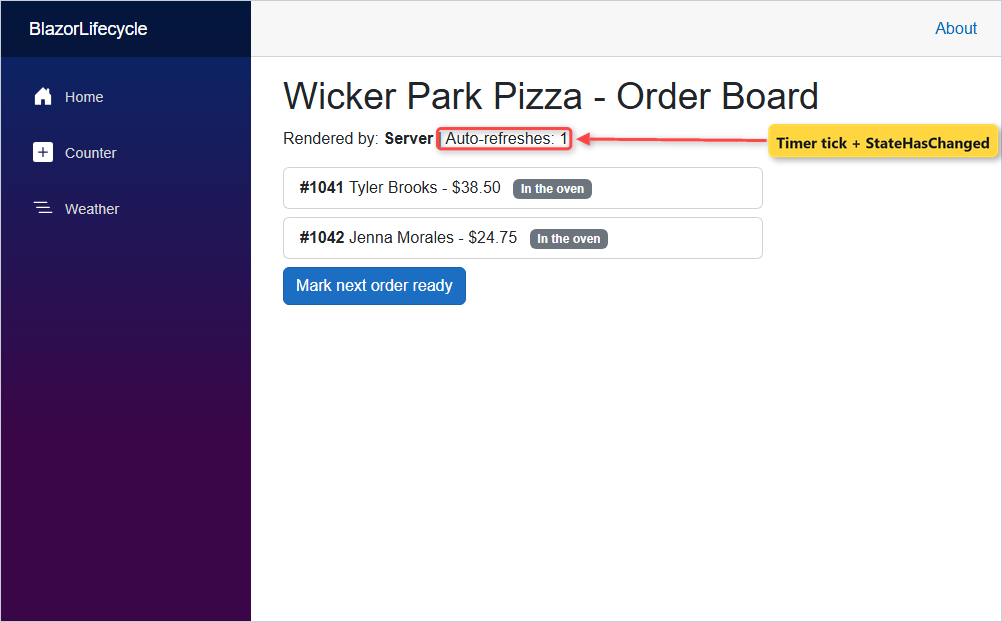
The second store call fired, both cards returned False from ShouldRender (no status changed) and the counter reached 1. The loop runs on Blazor’s synchronization context, so a plain call works. From a System.Timers.Timer callback, use InvokeAsync(StateHasChanged).
Dispose and IAsyncDisposable: Stop Timers When the Component Leaves
Add @implements IAsyncDisposable (or IDisposable) and Blazor calls it when the component leaves the UI, the same Dispose pattern as plain C#. I clicked the BlazorLifecycle home link:
21. [Server] OrderBoard.DisposeAsync
22. [Server] OrderBoard.refresh loop stopped
Disposing the PeriodicTimer made WaitForNextTickAsync return false, so the loop ended. Without it, the timer would keep querying until the circuit closed.
Two rules from Microsoft Learn: if you implement both interfaces, only DisposeAsync runs, and calling StateHasChanged inside dispose isn’t supported. For async work you start yourself, cancel a token here (see CancellationToken in C#).
Common Blazor Lifecycle Mistakes and How to Fix Them
The API is called twice per page load. That’s prerendering. Use [PersistentState] with ??=, or turn prerendering off for that page.
NullReferenceException on the first render. The markup used the data before OnInitializedAsync finished. Render a loading state while it’s null.
JavaScript interop throws during prerendering. Move the call into OnAfterRenderAsync inside if (firstRender).
“The current thread is not associated with the Dispatcher”. You called StateHasChanged from a timer or a background thread. Use InvokeAsync.
An exception in OnInitializedAsync kills the page. An unhandled exception ends the circuit. Wrap the load in try catch and render an error message.
Nothing in the component initializes. An override of SetParametersAsync forgot the base call.
Memory keeps growing. Timers or event subscriptions without Dispose. Unsubscribe every C# event there.
Which Blazor Lifecycle Method Should You Use?
| You want to … | Use |
|---|---|
| Load data once | OnInitializedAsync + [PersistentState] |
| React to a new parameter value | OnParametersSetAsync |
| Call JavaScript or start a timer | OnAfterRenderAsync with firstRender |
| Skip a costly re-render | ShouldRender |
| Refresh after a timer or outside event | InvokeAsync(StateHasChanged) |
| Clean up | DisposeAsync / Dispose |
Exceptions thrown in these methods can end the circuit, so plan for them; my ASP.NET Core global error handling post covers the server side.
If the order board was useful, these pick up where it stops:
- All my Blazor tutorials in one place
- Blazor forms and validation with EditForm
- Show the orders in a sortable Blazor QuickGrid
- Everything new in .NET 10
Frequently Asked Questions
What is the order of Blazor lifecycle methods?
SetParametersAsync, then OnInitialized and OnInitializedAsync (first time only), then OnParametersSet and OnParametersSetAsync, then the render, then OnAfterRender and OnAfterRenderAsync. Dispose or DisposeAsync runs when the component leaves the UI. If an async method awaits, Blazor renders once before it completes.
Why is OnInitializedAsync called twice?
Prerendering. With InteractiveServer, InteractiveWebAssembly or InteractiveAuto, the component runs once on the server to produce static HTML and again when it becomes interactive. Persist the data with [PersistentState] or set prerender: false on the render mode.
Is OnAfterRender called during prerendering?
No. OnAfterRender and OnAfterRenderAsync aren’t called during prerendering or static server-side rendering, because there’s no live browser DOM. They run once the component renders interactively.
What is the difference between OnInitialized and OnParametersSet?
OnInitialized runs once per component instance. OnParametersSet runs after it and again every time the parent re-renders and passes parameters, so code that depends on parameter values belongs there.
When should I call StateHasChanged in Blazor?
Only when Blazor can’t know the state changed: a timer, a C# event from a service, or an async handler with several steps. Event handlers and lifecycle methods re-render on their own. Off the renderer’s thread, use InvokeAsync(StateHasChanged).
Does Blazor call both Dispose and DisposeAsync?
No. If a component implements both IDisposable and IAsyncDisposable, Blazor only calls DisposeAsync. See ASP.NET Core Razor component lifecycle on Microsoft Learn for the full rules.

Bijay Kumar is a renowned software engineer, accomplished author, and distinguished Microsoft Most Valuable Professional (MVP) specializing in SharePoint. With a rich professional background spanning over 15 years, Bijay has established himself as an authority in the field of information technology. He possesses unparalleled expertise in multiple programming languages and technologies such as ASP.NET, ASP.NET MVC, C#.NET, and SharePoint, which has enabled him to develop innovative and cutting-edge solutions for clients across the globe. Read more…