
Our Seattle warehouse team wanted an audit line for every order and an email when a standing desk drops below five units. Events in C# handle that cleanly: the order code announces what happened and never needs to know who’s listening.
In this tutorial, I’ll build that order service step by step and show you how events in C# work on .NET 10: declaring, raising, subscribing, unsubscribing and the mistakes I see most.
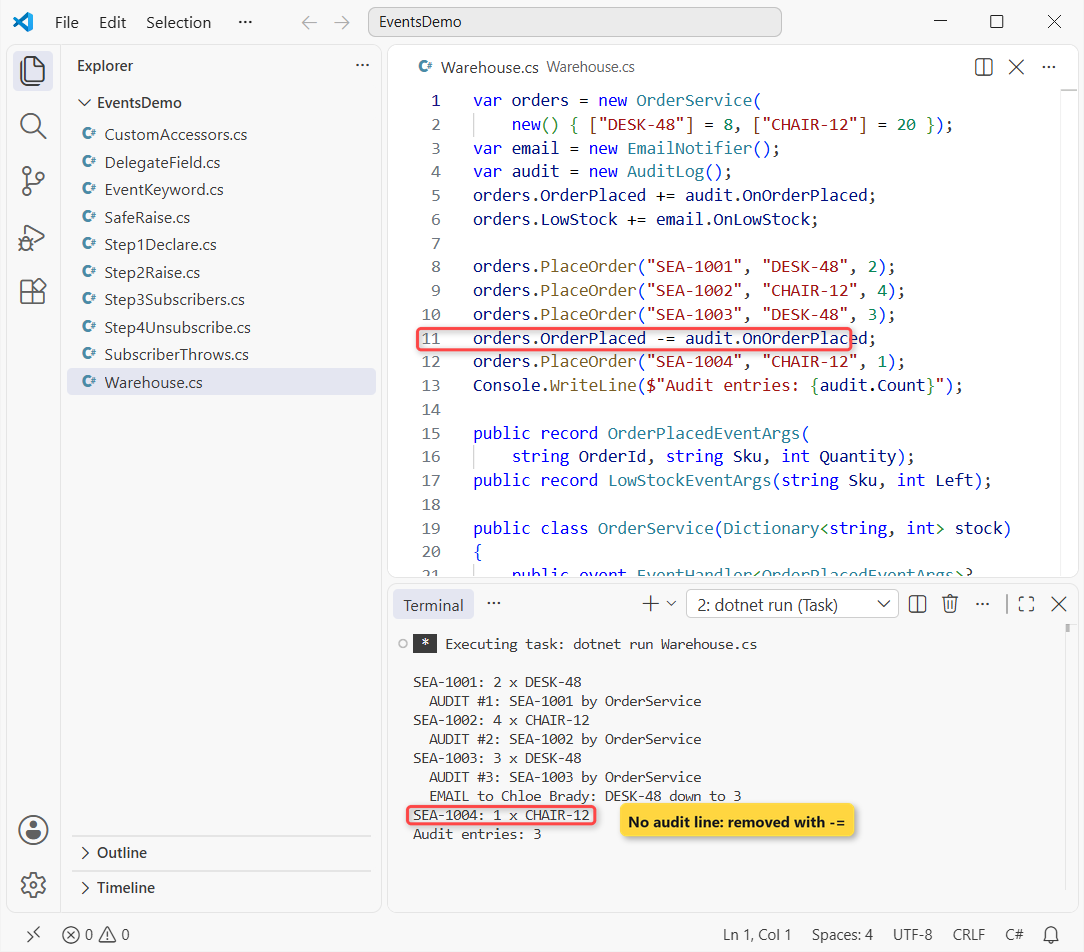
Here’s what we’re building. Four orders go through, the audit log records three of them, and Chloe Brady gets one low-stock email:
It has three parts:
- OrderService (the publisher) raises
OrderPlacedandLowStock. - AuditLog and EmailNotifier (the subscribers) react to them.
- Two small event data types carry the order ID, SKU and quantity left.
Before You Start Building C# Events
You need the .NET 10 SDK and any editor; I run each step as a single-file app with dotnet run File.cs in VS Code. If you haven’t set that up yet, follow my guide to create a console application in Visual Studio Code.
Every step uses the same Seattle stock list, so you only learn one new thing at a time:
| SKU | Item | Starting stock | Low-stock rule |
|---|---|---|---|
| DESK-48 | 48-inch standing desk | 8 | Email when under 5 |
| CHAIR-12 | Ergonomic task chair | 20 | Email when under 5 |
| MONITOR-27 | 27-inch monitor | n/a (step 3 only) | – |
Orders use IDs from SEA-1001 upward. Jenna Moore and Chloe Brady are the people who get the notifications.
Step 1: Declare the C# Event and Its Event Data
An event is a class member declared with the event keyword and a delegate type. For almost everything you’ll use the built-in EventHandler (no data) or EventHandler<TEventArgs> (with data):
var orders = new OrderService();
orders.OrderPlaced += (sender, e) => Console.WriteLine(
    $"Order {e.OrderId}: {e.Quantity} x {e.Sku}");

orders.PlaceOrder("SEA-1001", "DESK-48", 2);
orders.PlaceOrder("SEA-1002", "CHAIR-12", 4);

public record OrderPlacedEventArgs(
    string OrderId, string Sku, int Quantity);

public class OrderService
{
    public event EventHandler<OrderPlacedEventArgs>? OrderPlaced;

    public void PlaceOrder(string id, string sku, int qty) =>
        OrderPlaced?.Invoke(this, new(id, sku, qty));
}
Output:
Order SEA-1001: 2 x DESK-48
Order SEA-1002: 4 x CHAIR-12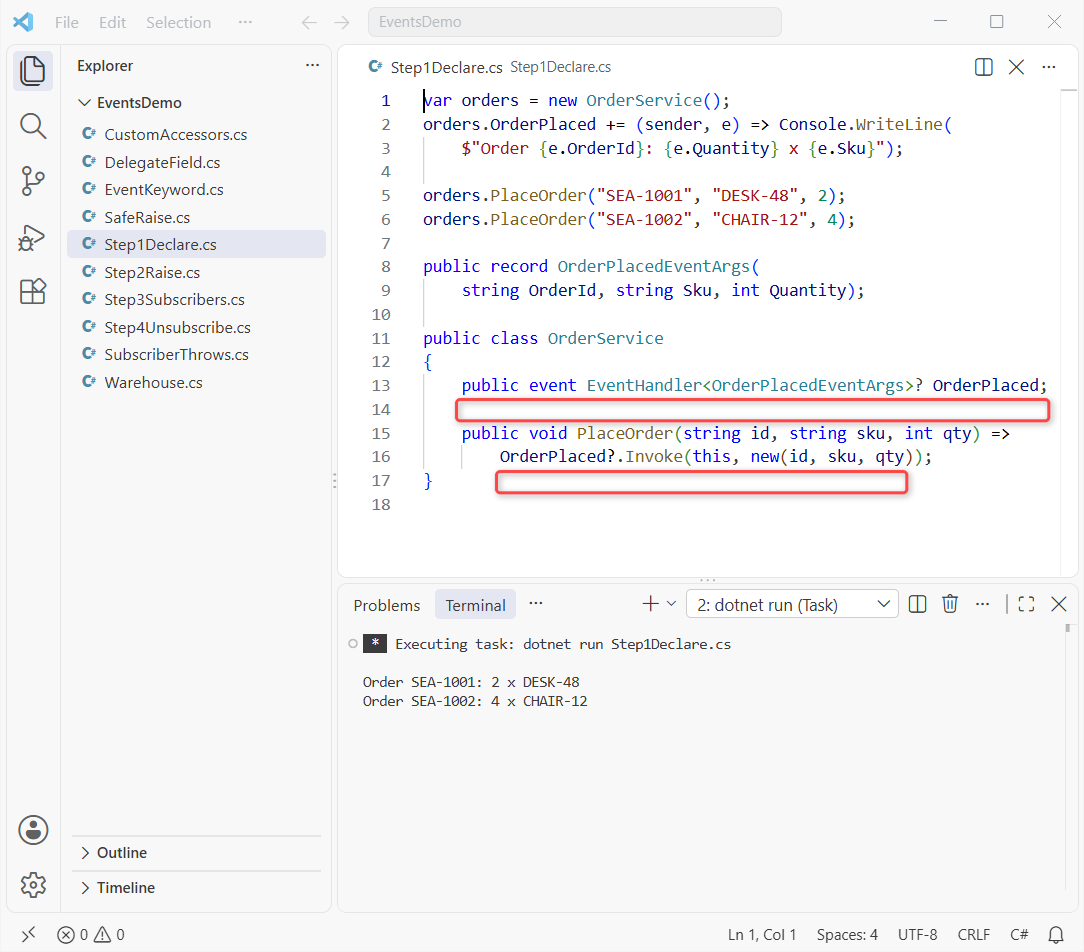
You’ll want to notice three details. Your handler signature is always (object? sender, TEventArgs e), the field is nullable because nobody may be subscribed, and ?.Invoke skips the call when it’s null.
Note: since .NET Core, TEventArgs no longer has to derive from System.EventArgs, so a positional record works fine. That’s handy, because a record can’t inherit from the EventArgs class anyway.
Checkpoint: two lines, Order SEA-1001: 2 x DESK-48 and Order SEA-1002: 4 x CHAIR-12.
Step 2: Raise the Event with a protected virtual OnLowStock Method
Next, the service tracks stock and raises LowStock when a desk drops under five. This time I use the classic event data shape, a class that derives from EventArgs with read-only properties:
var orders = new OrderService();
orders.LowStock += (s, e) =>
    Console.WriteLine($"LOW: {e.Sku} has {e.Left} left");
orders.PlaceOrder("DESK-48", 2);
orders.PlaceOrder("DESK-48", 3);

public class LowStockEventArgs(string sku, int left)
    : EventArgs
{
    public string Sku { get; } = sku;
    public int Left { get; } = left;
}

public class OrderService
{
    readonly Dictionary<string, int> stock =
        new() { ["DESK-48"] = 8 };
    public event EventHandler<LowStockEventArgs>? LowStock;

    public void PlaceOrder(string sku, int qty)
    {
        stock[sku] -= qty;
        Console.WriteLine($"Shipped {qty} x {sku}");
        if (stock[sku] < 5)
            OnLowStock(new(sku, stock[sku]));
    }

    protected virtual void OnLowStock(LowStockEventArgs e)
        => LowStock?.Invoke(this, e);
}
Output:
Shipped 2 x DESK-48
Shipped 3 x DESK-48
LOW: DESK-48 has 3 left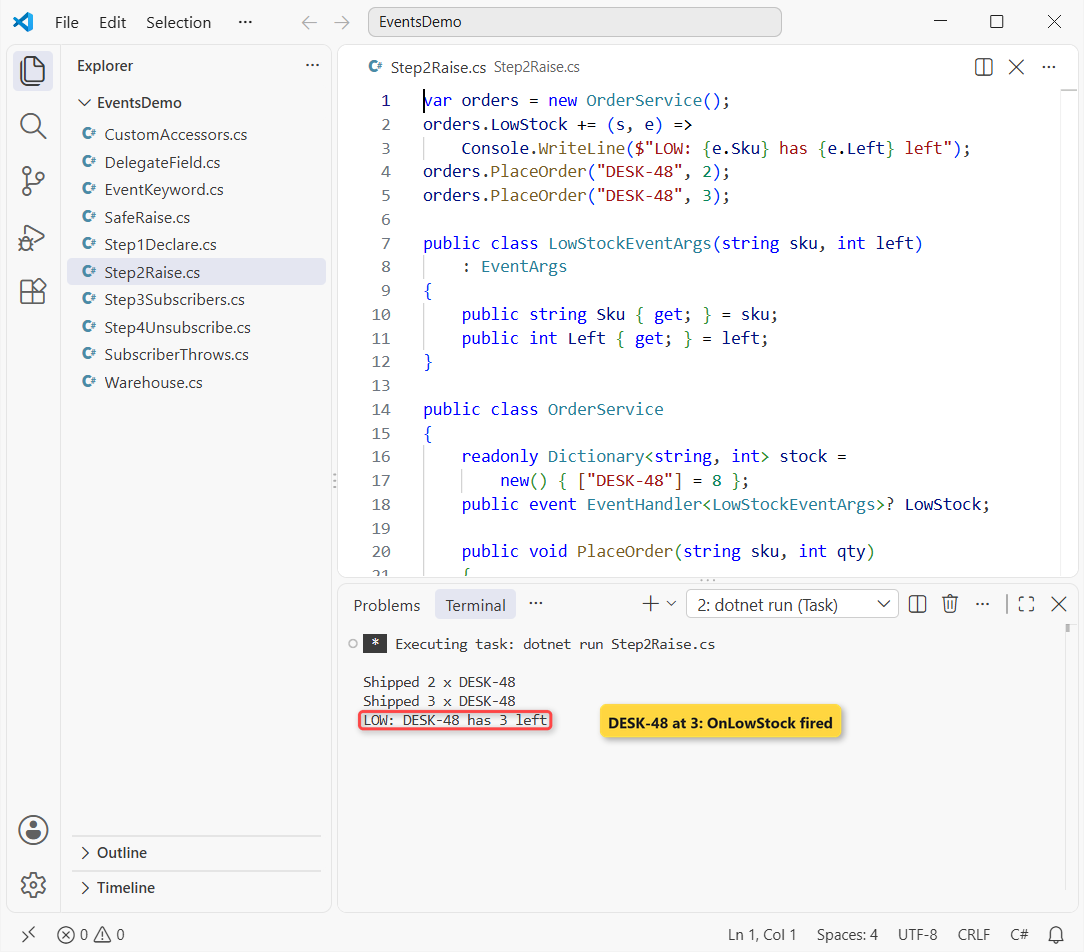
Wrapping the raise in a protected virtual method named On + event name is the standard .NET pattern. A derived class can then override the OnLowStock method and still call base.OnLowStock(e) so subscribers hear about it.
The names follow .NET habits too: the event is a verb phrase, the data type ends in EventArgs, and the raiser starts with On. My notes on C# method naming conventions cover the rest.
Checkpoint: Shipped 2 x DESK-48, then Shipped 3 x DESK-48 and LOW: DESK-48 has 3 left. Stock went 8, 6, 3, so only the second order fires the event.
Step 3: Subscribe Multiple Handlers to One Event with +=
Now the subscribers. You attach a handler with +=, either as a method group or as a lambda, and one event happily holds several. Under the hood it’s a multicast delegate, which my delegates in C# tutorial explains in detail:
var orders = new OrderService();
var email = new EmailNotifier();

// a method group first, then two lambdas
orders.OrderPlaced += email.OnOrderPlaced;
orders.OrderPlaced += (s, e) => Console.WriteLine(
    $"2. Audit: {e.OrderId} from {s?.GetType().Name}");
orders.OrderPlaced += (s, e) =>
    Console.WriteLine($"3. Dashboard: +{e.Quantity}");

orders.PlaceOrder("SEA-1003", "MONITOR-27", 5);

class EmailNotifier
{
    public void OnOrderPlaced(object? sender,
        OrderPlacedEventArgs e) => Console.WriteLine(
            $"1. Email: {e.OrderId} to Jenna Moore");
}

record OrderPlacedEventArgs(
    string OrderId, string Sku, int Quantity);
class OrderService
{
    public event EventHandler<OrderPlacedEventArgs>? OrderPlaced;
    public void PlaceOrder(string id, string sku, int qty) =>
        OrderPlaced?.Invoke(this, new(id, sku, qty));
}
Output:
1. Email: SEA-1003 to Jenna Moore
2. Audit: SEA-1003 from OrderService
3. Dashboard: +5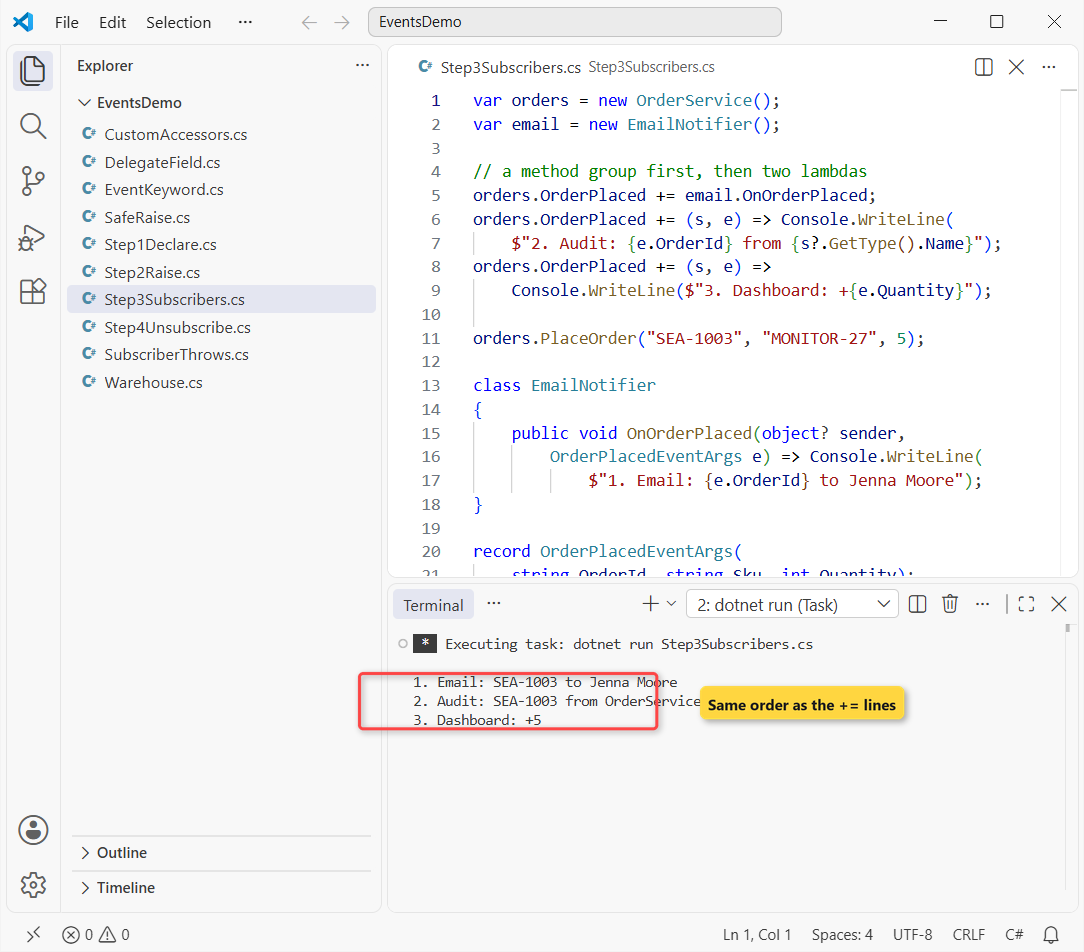
Your handlers run one after another on the same thread, in the order you subscribed them. The audit lambda also reads sender, which is how a subscriber knows which object raised the event.
Lambdas are the shortest way to subscribe, and the older anonymous method syntax in C# works the same way. Just don’t rely on the order for business logic; treat it as an implementation detail.
Checkpoint: three numbered lines for SEA-1003, email first and dashboard last.
Step 4: Unsubscribe from a C# Event with -=
Removing a handler uses -=, and here’s the trap: it only works when you pass the same delegate you added. This file subscribes a static method, an inline lambda and a lambda stored in a variable, then tries to remove all three:
var orders = new OrderService();
EventHandler<OrderPlacedEventArgs> stored =
    (s, e) => Say("stored lambda");
orders.OrderPlaced += Email;
orders.OrderPlaced += (s, e) => Say("inline lambda");
orders.OrderPlaced += stored;
orders.PlaceOrder("SEA-1004");

orders.OrderPlaced -= Email;    // removed
// a new lambda object: nothing to remove
orders.OrderPlaced -= (s, e) => Say("inline lambda");
orders.OrderPlaced -= stored;   // removed
orders.PlaceOrder("SEA-1005");

static void Email(object? s, OrderPlacedEventArgs e) =>
    Say("email");
static void Say(string text) => Console.WriteLine("  " + text);

record OrderPlacedEventArgs(string OrderId);
class OrderService
{
    public event EventHandler<OrderPlacedEventArgs>? OrderPlaced;
    public void PlaceOrder(string id)
    {
        Console.WriteLine($"{id}:");
        OrderPlaced?.Invoke(this, new(id));
    }
}
Output:
SEA-1004:
  email
  inline lambda
  stored lambda
SEA-1005:
  inline lambda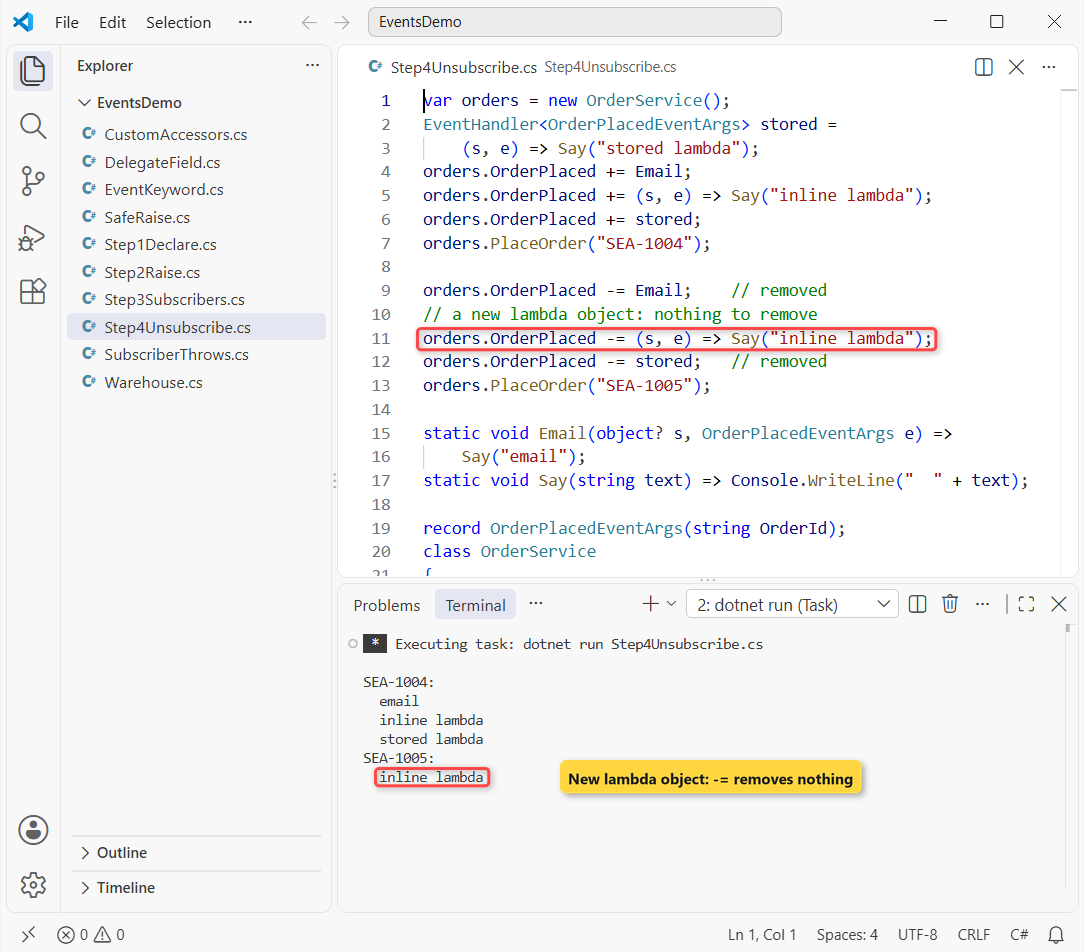
Writing the same lambda again creates a brand-new delegate object, so -= finds nothing to remove and silently does nothing. If you’ll ever unsubscribe, store the lambda in a variable or use a named method.
Checkpoint: SEA-1004 runs all three handlers; SEA-1005 runs only inline lambda.
Step 5: Lock It Down – Event vs a Public Delegate Field
Why bother with the event keyword at all? Here’s the same service with a plain public delegate field instead:
var orders = new LooseOrderService();
orders.OrderPlaced += (s, e) => Say($"Email: {e.OrderId}");
orders.OrderPlaced += (s, e) => Say($"Audit: {e.OrderId}");

// = wipes both handlers, then an outsider raises it
orders.OrderPlaced = (s, e) => Say("Hijacked!");
orders.OrderPlaced(null, new("FAKE-0001", "DESK-48", 99));

static void Say(string text) => Console.WriteLine(text);

record OrderPlacedEventArgs(
    string OrderId, string Sku, int Quantity);
class LooseOrderService
{
    // a plain delegate field: no event keyword
    public EventHandler<OrderPlacedEventArgs>? OrderPlaced;
}
Output:
Hijacked!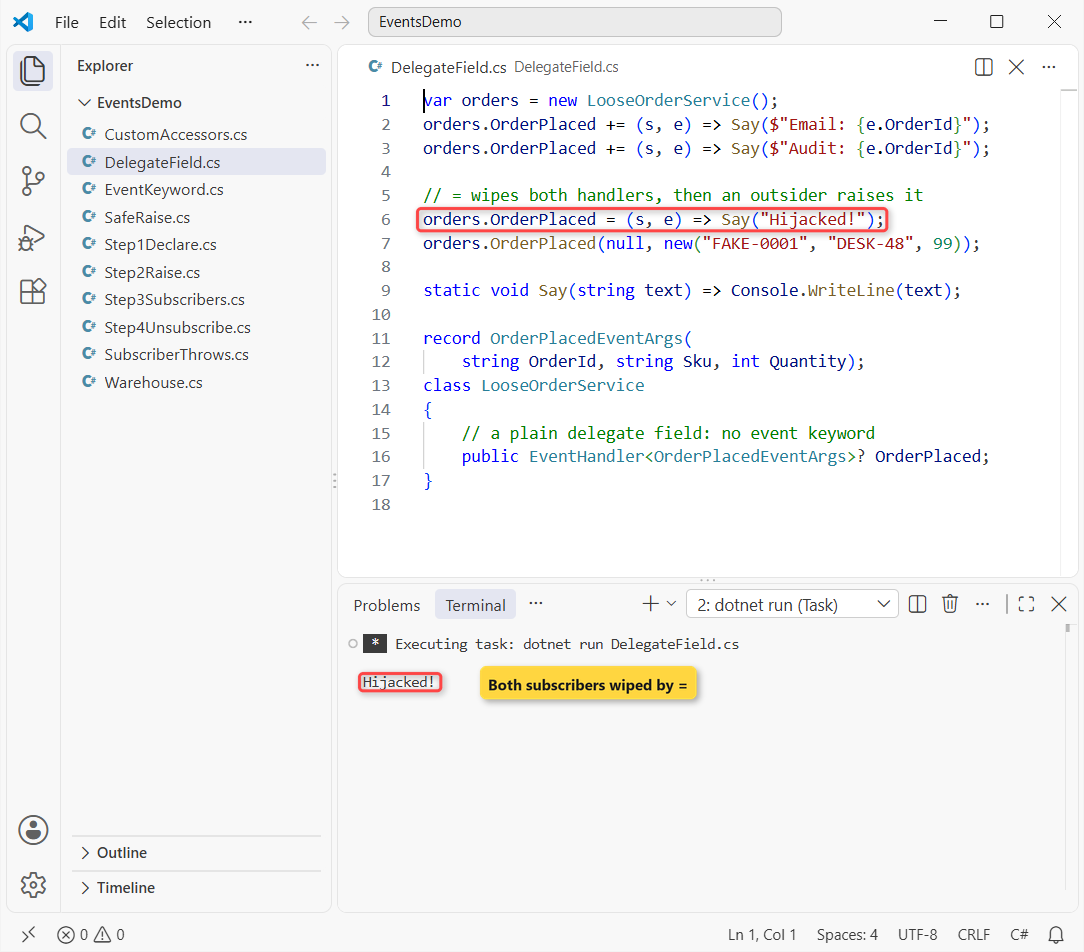
You can see outside code replaced both subscribers with = and then raised a fake order itself. Put event back and the compiler blocks both lines:
var orders = new OrderService();
orders.OrderPlaced += (s, e) => Console.WriteLine($"Email: {e.OrderId}");

orders.OrderPlaced = null;
orders.OrderPlaced(null, new("FAKE-0001", "DESK-48", 99));

record OrderPlacedEventArgs(string OrderId, string Sku, int Quantity);
class OrderService
{
    public event EventHandler<OrderPlacedEventArgs>? OrderPlaced;
    public void PlaceOrder(string id) => OrderPlaced?.Invoke(this, new(id, "DESK-48", 1));
}
Build output:
C:\DotNetDemo\EventsDemo\EventKeyword.cs(4,8): error CS0070: The event 'OrderService.OrderPlaced' can only appear on the left hand side of += or -= (except when used from within the type 'OrderService')
C:\DotNetDemo\EventsDemo\EventKeyword.cs(5,8): error CS0070: The event 'OrderService.OrderPlaced' can only appear on the left hand side of += or -= (except when used from within the type 'OrderService')

The build failed. Fix the build errors and run again.
Error CS0070 means that outside the declaring type, an event only allows += and -=. That’s encapsulation in C# applied to notifications: only OrderService decides when an order was placed.
Checkpoint: Hijacked! from the field version, and two CS0070 errors from the event version.
Test the Finished OrderService Events
Here’s the complete program from the screenshot at the top. It uses records for both event data types and subscribes the audit and email classes by method:
var orders = new OrderService(
    new() { ["DESK-48"] = 8, ["CHAIR-12"] = 20 });
var email = new EmailNotifier();
var audit = new AuditLog();
orders.OrderPlaced += audit.OnOrderPlaced;
orders.LowStock += email.OnLowStock;

orders.PlaceOrder("SEA-1001", "DESK-48", 2);
orders.PlaceOrder("SEA-1002", "CHAIR-12", 4);
orders.PlaceOrder("SEA-1003", "DESK-48", 3);
orders.OrderPlaced -= audit.OnOrderPlaced;
orders.PlaceOrder("SEA-1004", "CHAIR-12", 1);
Console.WriteLine($"Audit entries: {audit.Count}");

public record OrderPlacedEventArgs(
    string OrderId, string Sku, int Quantity);
public record LowStockEventArgs(string Sku, int Left);

public class OrderService(Dictionary<string, int> stock)
{
    public event EventHandler<OrderPlacedEventArgs>? OrderPlaced;
    public event EventHandler<LowStockEventArgs>? LowStock;

    public void PlaceOrder(string id, string sku, int qty)
    {
        Console.WriteLine($"{id}: {qty} x {sku}");
        stock[sku] -= qty;
        OnOrderPlaced(new(id, sku, qty));
        if (stock[sku] < 5)
            OnLowStock(new(sku, stock[sku]));
    }

    protected virtual void OnOrderPlaced(OrderPlacedEventArgs e)
        => OrderPlaced?.Invoke(this, e);
    protected virtual void OnLowStock(LowStockEventArgs e)
        => LowStock?.Invoke(this, e);
}

public class EmailNotifier
{
    public void OnLowStock(object? sender, LowStockEventArgs e)
        => Console.WriteLine(
            $"  EMAIL to Chloe Brady: {e.Sku} down to {e.Left}");
}

public class AuditLog
{
    public int Count { get; private set; }
    public void OnOrderPlaced(object? sender,
        OrderPlacedEventArgs e) => Console.WriteLine(
            $"  AUDIT #{++Count}: {e.OrderId} by {sender?.GetType().Name}");
}
Output:
SEA-1001: 2 x DESK-48
  AUDIT #1: SEA-1001 by OrderService
SEA-1002: 4 x CHAIR-12
  AUDIT #2: SEA-1002 by OrderService
SEA-1003: 3 x DESK-48
  AUDIT #3: SEA-1003 by OrderService
  EMAIL to Chloe Brady: DESK-48 down to 3
SEA-1004: 1 x CHAIR-12
Audit entries: 3
Read your output top to bottom. Three orders produce three audit lines, SEA-1003 drops DESK-48 from 6 to 3 and triggers Chloe’s email, and SEA-1004 runs silently because the audit handler was removed first.
The OrderPlaced and LowStock pair is a tiny version of the observer pattern from my OOP concepts in C# guide.
How Do Events Relate to Delegates in C#?
An event is a wrapper around a delegate field. The compiler generates a private field plus add and remove accessors, so outsiders can only subscribe and unsubscribe.
| Public delegate field | Event | |
|---|---|---|
| Subscribe with += | Yes | Yes |
| Replace all handlers with = | Yes (from anywhere) | Only inside the class |
| Invoke it | Anyone | Only the declaring class (CS0070 elsewhere) |
| Can live on an interface | No (fields can’t) | Yes |
| Typical use | Callbacks you pass in | Notifications to listeners |
So use a delegate parameter when one caller hands you a callback, and an event when any number of listeners may care. Because events can sit on an interface in C#, you can declare event EventHandler<OrderPlacedEventArgs>? OrderPlaced; on an IOrderService.
Troubleshooting C# Events
One Subscriber Throws and the Rest Never Run
If a handler throws, the exception goes straight back to the code that raised the event, and every handler after it is skipped:
var orders = new OrderService();
orders.OrderPlaced += (s, e) => Console.WriteLine("Email sent");
orders.OrderPlaced += (s, e) => throw new InvalidOperationException("SMTP server down");
orders.OrderPlaced += (s, e) => Console.WriteLine("Audit written");

try { orders.PlaceOrder("SEA-1006"); }
catch (InvalidOperationException ex) { Console.WriteLine($"Caught: {ex.Message}"); }

class OrderService
{
    public event EventHandler<string>? OrderPlaced;
    public void PlaceOrder(string id) => OrderPlaced?.Invoke(this, id);
}
Output:
Email sent
Caught: SMTP server down
You can see the audit line never printed. When subscribers are independent, raise the event handler by handler with GetInvocationList() and catch per handler:
var orders = new OrderService();
orders.OrderPlaced += (s, e) => Console.WriteLine("Email sent");
orders.OrderPlaced += (s, e) => throw new InvalidOperationException("SMTP server down");
orders.OrderPlaced += (s, e) => Console.WriteLine("Audit written");
orders.PlaceOrder("SEA-1006");

class OrderService
{
    public event EventHandler<string>? OrderPlaced;
    public void PlaceOrder(string id) => OnOrderPlaced(id);

    protected virtual void OnOrderPlaced(string id)
    {
        if (OrderPlaced is null) return;
        foreach (EventHandler<string> handler in OrderPlaced.GetInvocationList())
        {
            try { handler(this, id); }
            catch (Exception ex) { Console.WriteLine($"Handler failed: {ex.Message}"); }
        }
    }
}
Output:
Email sent
Handler failed: SMTP server down
Audit written
Now your audit still runs. In real code, log the exception instead of printing it; my try-catch in C# guide covers which exceptions are worth catching.
Subscribers That Never Get Garbage Collected
The publisher’s delegate holds a reference to every subscriber. If a long-lived publisher, like a singleton or a static event, keeps a short-lived subscriber in its list, that subscriber can’t be collected.
Unsubscribe with -= in the subscriber’s Dispose, as in my Dispose and Finalize in C# post.
Async Handlers and Thread Safety
Event handlers return void, so an async handler must be async void. Wrap its await in try-catch, since an exception thrown there can’t be observed by the publisher and can take down the process.
For thread safety, OrderPlaced?.Invoke(this, e) reads the field once, so another thread unsubscribing between the null check and the call won’t cause a NullReferenceException.
Where to Take It Next: Custom Event Accessors
You can write the add and remove accessors yourself, much like a property’s get and set. I use this for logging subscriptions or storing handlers somewhere other than a field:
var orders = new OrderService();
EventHandler handler = (s, e) => Console.WriteLine("Truck dispatched");
orders.Shipped += handler;
orders.Ship();
orders.Shipped -= handler;
orders.Ship();

class OrderService
{
    EventHandler? shipped;
    public event EventHandler Shipped
    {
        add { Console.WriteLine("Subscriber added"); shipped += value; }
        remove { Console.WriteLine("Subscriber removed"); shipped -= value; }
    }
    public void Ship() => shipped?.Invoke(this, EventArgs.Empty);
}
Output:
Subscriber added
Truck dispatched
Subscriber removed
Notice Ship() invokes the private shipped field, not the event; with custom accessors you can’t invoke the event name. This version also uses the plain EventHandler with EventArgs.Empty, the right choice when an event carries no data.
Two more ways to grow the sample: add a Cancel flag to the order data so a subscriber can veto an order, or keep the stock list in a dictionary in C# loaded from a file.
If you want to keep going with C# class design, these are worth reading next:
- Split a big class across files with partial classes in C#
- C# class naming conventions
- The full naming convention in C# checklist
- How inheritance in C# works with virtual members
Frequently Asked Questions
What is an event in C#?
An event is a class member, declared with the event keyword and a delegate type, that lets the class notify any number of subscribers when something happens. Outside code can only add or remove handlers with += and -=; only the declaring class can raise it.
What is the difference between EventHandler and EventHandler<TEventArgs>?
EventHandler is for events with no data and passes EventArgs (usually EventArgs.Empty). EventHandler<TEventArgs> passes your own data type as the second parameter. Both take the sender as the first parameter and return void.
Do event args have to inherit from EventArgs?
Not on .NET Core and later .NET versions; the constraint on EventHandler<TEventArgs> was removed, so a record or plain class works. Deriving from EventArgs is still common for consistency with existing libraries.
Why can’t I unsubscribe a lambda from an event?
Each lambda expression creates a new delegate, so -= with a second copy of the same lambda doesn’t match the one you added. Store the lambda in a variable and use that variable for both += and -=.
In what order are event handlers called?
In the order they were subscribed, one after another on the thread that raised the event. Microsoft’s handling and raising events guide describes the underlying multicast delegate.
What does error CS0070 mean?
It means you tried to assign or invoke an event from outside the type that declares it. Outside that type, an event can only appear on the left of += or -=; raise it from a method inside the class instead.

Bijay Kumar is a renowned software engineer, accomplished author, and distinguished Microsoft Most Valuable Professional (MVP) specializing in SharePoint. With a rich professional background spanning over 15 years, Bijay has established himself as an authority in the field of information technology. He possesses unparalleled expertise in multiple programming languages and technologies such as ASP.NET, ASP.NET MVC, C#.NET, and SharePoint, which has enabled him to develop innovative and cutting-edge solutions for clients across the globe. Read more…