
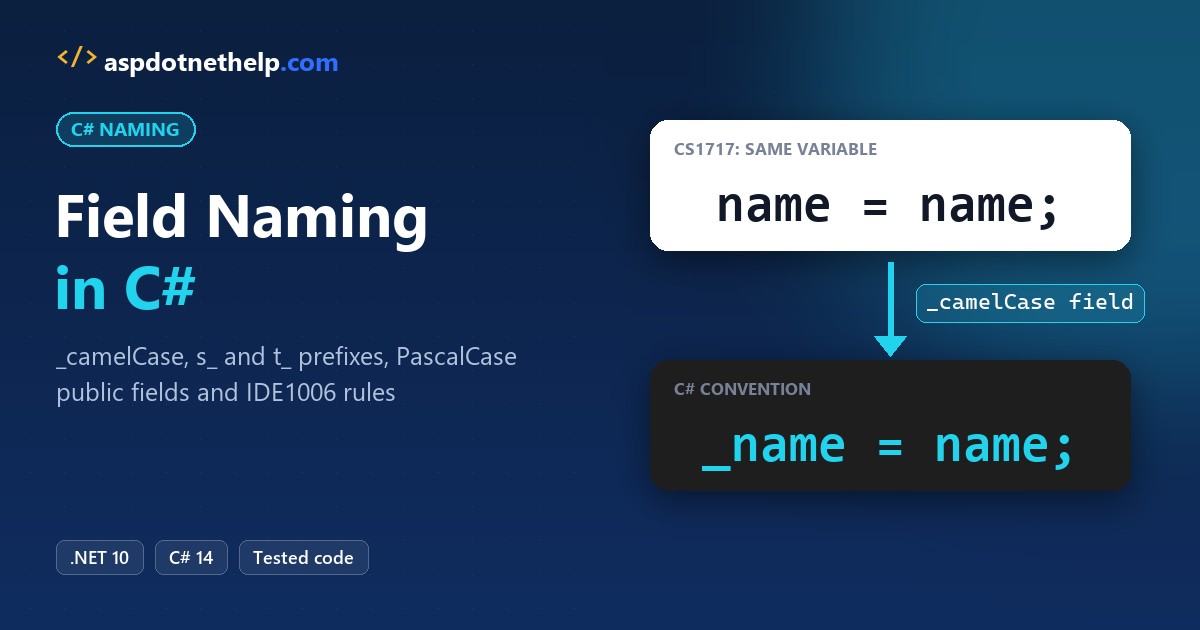
Most field bugs we catch in code review start with name = name; inside a constructor. It compiles with a warning, and the field stays empty, because the parameter hides the field.
Quick answer: the C# field naming conventions are _camelCase for private and internal fields, s_ and t_ prefixes for static and thread-static fields, and PascalCase for public fields and constants.
We tested every rule in a .NET 10 app for a Chicago parking garage, then made the build reject the bad names.
What You Need Before You Start with C# Field Names
- The .NET 10 SDK. Every example is a file-based app you run with
dotnet run File.cs. - VS Code with the C# Dev Kit (here’s how to create a console application in Visual Studio Code).
- The sample: code for Lakeshore Parking, a made-up garage company in Chicago, Illinois.
This page is about fields only. For types, methods, locals and the rest, start with our C# naming conventions overview.
Step 1: Name Private Fields in _camelCase
Here’s the bug from the intro. The garage class uses plain camelCase fields with the same names as the constructor parameters:
var garage = new Garage("Lakeshore Parking", 240);
Console.WriteLine(garage.Describe());

class Garage
{
    private string name = "";
    private int capacity;

    public Garage(string name, int capacity)
    {
        name = name;          // assigns the parameter to itself
        capacity = capacity;
    }

    public string Describe() => $"Garage '{name}' holds {capacity} cars";
}
Output:
C:\DotNetDemo\FieldNamesDemo\SelfAssign.cs(11,9): warning CS1717: Assignment made to same variable; did you mean to assign something else?
C:\DotNetDemo\FieldNamesDemo\SelfAssign.cs(12,9): warning CS1717: Assignment made to same variable; did you mean to assign something else?
C:\DotNetDemo\FieldNamesDemo\SelfAssign.cs(7,17): warning CS0649: Field 'Garage.capacity' is never assigned to, and will always have its default value 0
Garage '' holds 0 cars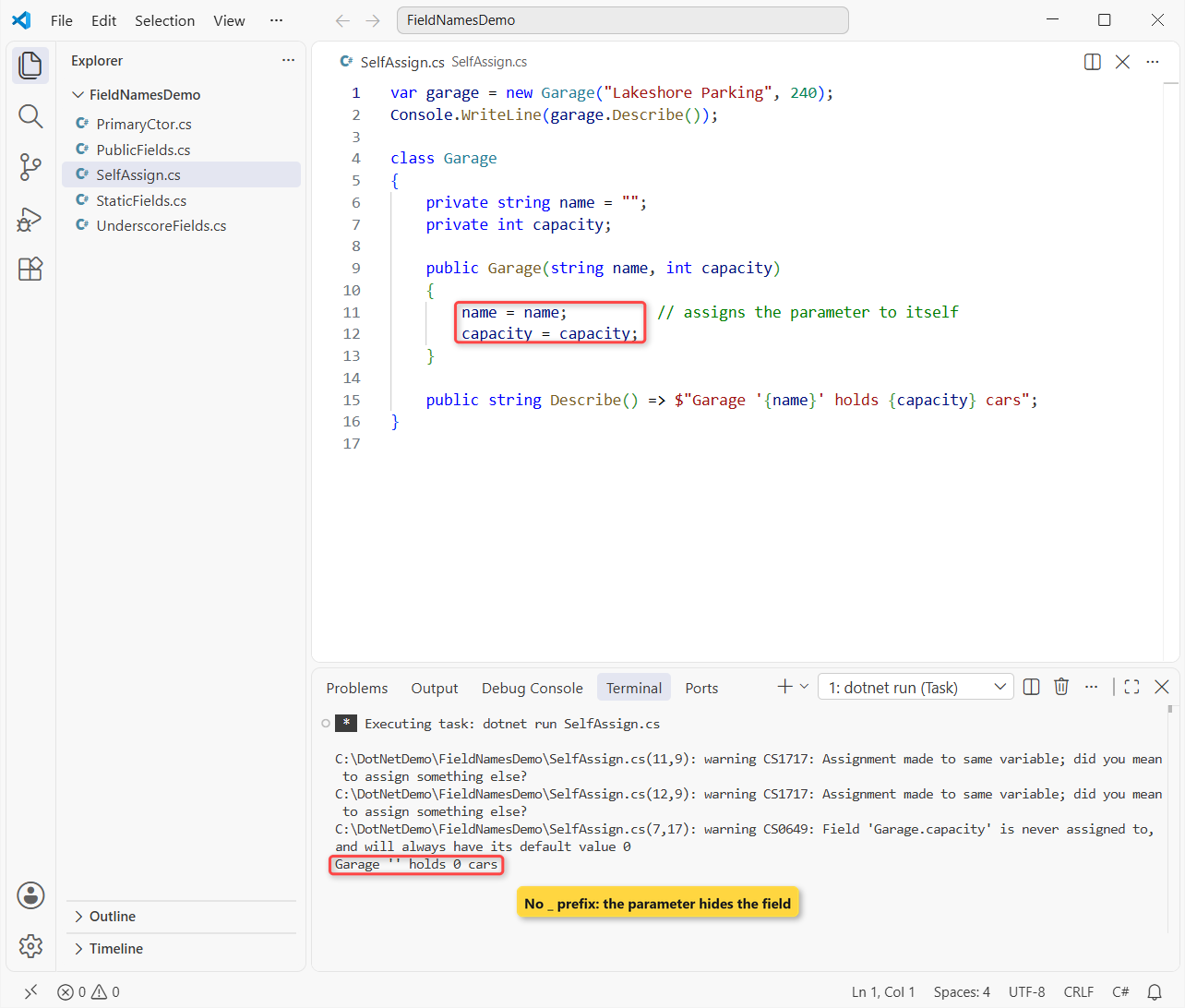
Inside the constructor, name means the parameter, so both lines assign a value to itself. The compiler warns with CS1717 and CS0649, but the app still runs and prints an empty name and 0 cars.
Microsoft’s C# coding conventions fix this with a rule: private and internal non-constant fields use camelCase with a leading _. Same garage, now with the prefix:
var garage = new Garage("Lakeshore Parking", 240);
garage.Park(3);
garage.Park(2);
Console.WriteLine(garage.Describe());

class Garage
{
    private readonly string _name;
    private readonly int _capacity;
    private int _parked;
    private bool _isFull;

    public Garage(string name, int capacity)
    {
        _name = name;
        _capacity = capacity;
    }

    public void Park(int cars)
    {
        _parked += cars;
        _isFull = _parked >= _capacity;
    }

    public string Describe() =>
        $"Garage '{_name}': {_parked}/{_capacity} parked, full: {_isFull}";
}
Output:
Garage 'Lakeshore Parking': 5/240 parked, full: FalseThe garage reports 5 of 240 spaces parked, and _name = name; can’t go wrong. Typing _ in the editor also lists every field.
A Boolean field gets the prefix too (_isFull); our C# boolean naming convention guide covers the Is and Has part.
Step 2: Use s_ for Static Fields and t_ for Thread-Static Fields
The .NET runtime style goes one step further. A private or internal static field starts with s_, and a [ThreadStatic] field starts with t_. Our ticket printer shows why the difference matters:
var worker = new Thread(() =>
{
    TicketPrinter.Print();
    TicketPrinter.Print();
    Console.WriteLine($"Worker thread: {TicketPrinter.Count}");
});
TicketPrinter.Print();
worker.Start();
worker.Join();
Console.WriteLine($"Main thread:   {TicketPrinter.Count}");

static class TicketPrinter
{
    private static int s_total;                  // shared by all threads
    [ThreadStatic] private static int t_printed; // one copy per thread

    public static void Print()
    {
        t_printed++;
        Interlocked.Increment(ref s_total);
    }

    public static string Count => $"{t_printed} printed, {s_total} total";
}
Output:
Worker thread: 2 printed, 3 total
Main thread:   1 printed, 3 total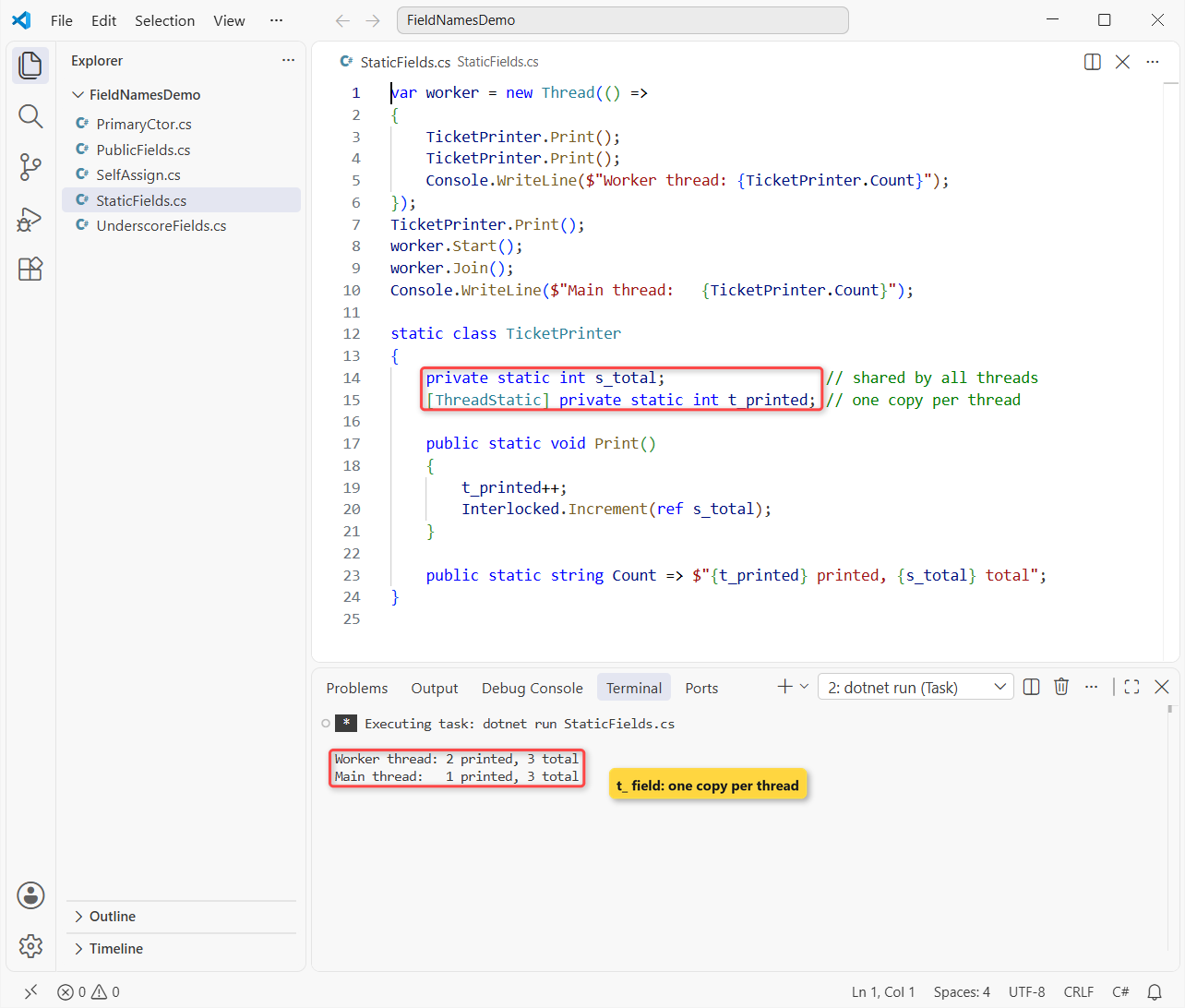
Three tickets were printed in total, but each thread sees only its own t_printed count. Without the prefix, nothing at the call site tells you that.
Note: s_ isn’t the Visual Studio default and isn’t in the Framework Design Guidelines, which say not to prefix fields. Those guidelines only cover public and protected static fields, though, so s_ on private ones doesn’t clash.
A private static readonly field is still a static field, so it’s s_hourlyRate in the runtime style. Write the modifiers as static readonly, not readonly static. A const is different: it’s always PascalCase, as our C# constant naming conventions post shows.
Step 3: Make Public Fields PascalCase (or Use a Property)
Anything callers can see is PascalCase, and Microsoft Learn says the same guidance applies to protected members. Public fields work, but they should be rare. Here’s a parking ticket with one of each:
using System.Globalization;
CultureInfo.CurrentCulture = new("en-US");

var ticket = new ParkingTicket { Plate = "IL 7KX 204", Hours = 5 };
decimal rate = ParkingTicket.HourlyRate;
Console.WriteLine($"{ticket.Plate}: {ticket.Hours} h at {rate:C}");
try { ticket.Hours = -2; }
catch (ArgumentOutOfRangeException ex) { Console.WriteLine(ex.Message); }

class ParkingTicket
{
    public static readonly decimal HourlyRate = 4.50m;
    public string Plate = "";          // public field: PascalCase

    public int Hours                   // C# 14 field keyword
    {
        get;
        set => field = value >= 0 ? value
            : throw new ArgumentOutOfRangeException(
                nameof(value), "Hours can't be negative");
    }
}
Output:
IL 7KX 204: 5 h at $4.50
Hours can't be negative (Parameter 'value')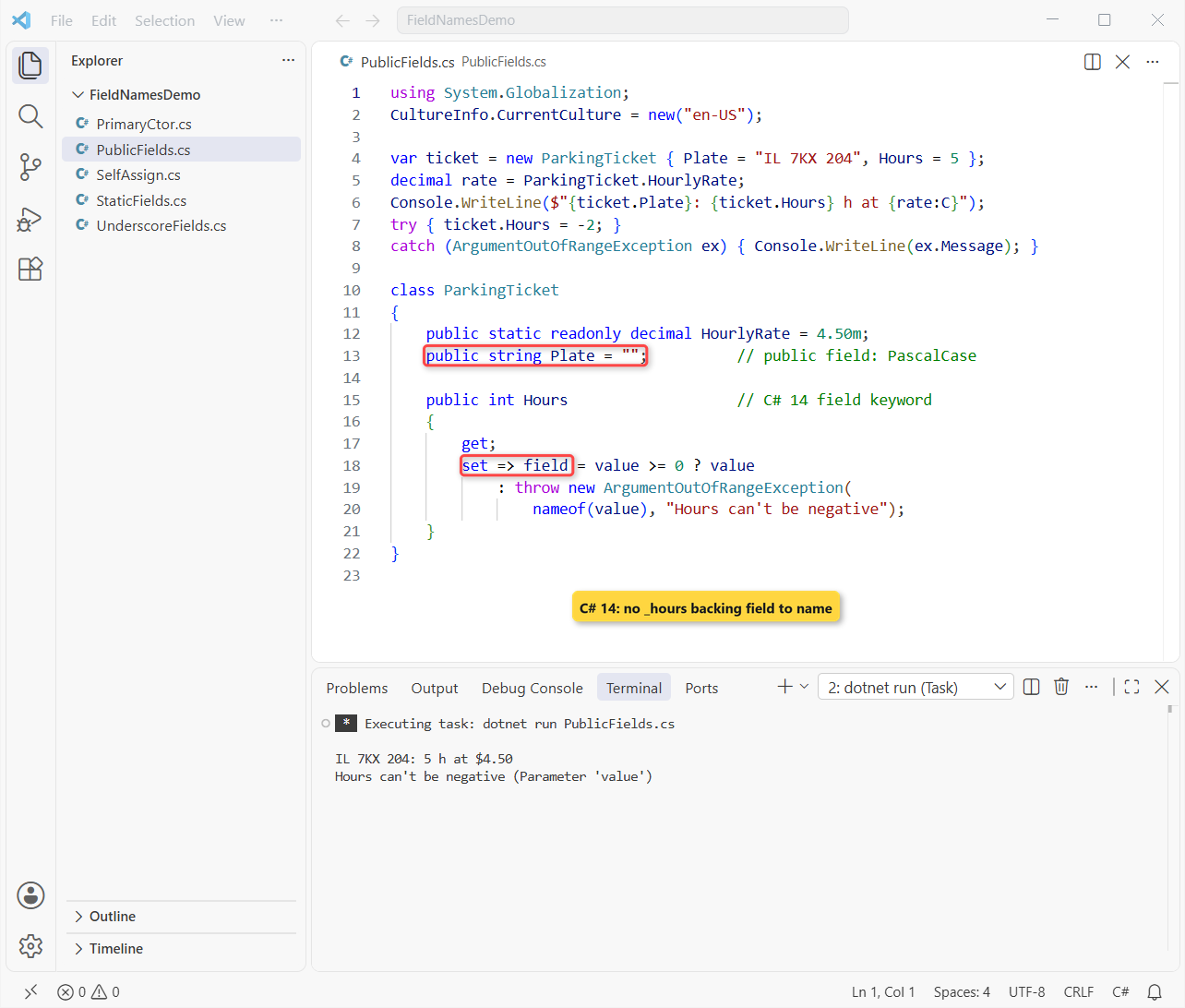
The ticket shows 5 hours at $4.50, and the negative value is rejected. Plate can’t do that, because a field can’t run code when it’s set. That’s the encapsulation in C# argument for properties.
Backing fields and the C# 14 field keyword
Before C# 14, that validation needed a hand-written backing field named after the property:
private int _hours;
public int Hours
{
    get => _hours;
    set => _hours = value >= 0 ? value : throw new ArgumentOutOfRangeException(nameof(value));
}
C# 14 adds the field keyword, which points at the compiler’s own backing field, so there’s no _hours to name at all. It ships with .NET 10; our C# 14 feature rundown lists the other changes.
Step 4: Name Primary Constructor Parameters vs Fields
Primary constructors look like fields but aren’t. In a class or struct, the parameters are camelCase like any method parameter. In a record, they’re PascalCase, because they become public properties:
var lot = new SurfaceLot("Navy Pier Lot", 80);
lot.Fill(30);
lot.Fill(60);
Console.WriteLine(lot.Status());
Console.WriteLine(new DailyRate("Downtown", 32));

class SurfaceLot(string name, int capacity)    // class: camelCase
{
    private readonly string _name = name;       // readonly copy
    private int _used;

    public void Fill(int cars) => _used = Math.Min(capacity, _used + cars);
    public string Status() => $"{_name}: {_used}/{capacity} spaces used";
}

record DailyRate(string Zone, int PriceUsd);   // record: PascalCase
Output:
Navy Pier Lot: 80/80 spaces used
DailyRate { Zone = Downtown, PriceUsd = 32 }
The lot caps at 80 of 80 spaces even after 90 cars try to enter. capacity is captured straight from the parameter, while name is copied into _name because we want it readonly. Our constructors in C# tutorial covers primary constructors in more depth.
Important: pick one. If you copy a parameter into a field and also use the parameter elsewhere, the class stores the value twice and the compiler warns with CS9124.
Step 5: Enforce Field Names with .editorconfig and IDE1006
Reviews miss things, so we let the build check field names. Put this .editorconfig in your project or repo root:
root = true

[*.cs]
# Report naming problems in the build, not only in the editor
dotnet_diagnostic.IDE1006.severity = warning

dotnet_naming_style.pascal_case.capitalization = pascal_case
dotnet_naming_style.s_camel_case.capitalization = camel_case
dotnet_naming_style.s_camel_case.required_prefix = s_
dotnet_naming_style.underscore_camel_case.capitalization = camel_case
dotnet_naming_style.underscore_camel_case.required_prefix = _

# Constants (any access level): PascalCase, wins over the static rule
dotnet_naming_symbols.constants.applicable_kinds = field, local
dotnet_naming_symbols.constants.applicable_accessibilities = *
dotnet_naming_symbols.constants.required_modifiers = const
dotnet_naming_rule.constants_are_pascal_case.symbols = constants
dotnet_naming_rule.constants_are_pascal_case.style = pascal_case
dotnet_naming_rule.constants_are_pascal_case.severity = warning

# Public and protected fields: PascalCase
dotnet_naming_symbols.visible_fields.applicable_kinds = field
dotnet_naming_symbols.visible_fields.applicable_accessibilities = public, protected, protected_internal
dotnet_naming_rule.visible_fields_are_pascal_case.symbols = visible_fields
dotnet_naming_rule.visible_fields_are_pascal_case.style = pascal_case
dotnet_naming_rule.visible_fields_are_pascal_case.severity = warning

# Private and internal static fields: s_camelCase
dotnet_naming_symbols.static_fields.applicable_kinds = field
dotnet_naming_symbols.static_fields.applicable_accessibilities = private, internal, private_protected
dotnet_naming_symbols.static_fields.required_modifiers = static
dotnet_naming_rule.static_fields_are_s_camel.symbols = static_fields
dotnet_naming_rule.static_fields_are_s_camel.style = s_camel_case
dotnet_naming_rule.static_fields_are_s_camel.severity = warning

# Private and internal instance fields: _camelCase
dotnet_naming_symbols.private_fields.applicable_kinds = field
dotnet_naming_symbols.private_fields.applicable_accessibilities = private, internal, private_protected
dotnet_naming_rule.private_fields_are_underscore_camel.symbols = private_fields
dotnet_naming_rule.private_fields_are_underscore_camel.style = underscore_camel_case
dotnet_naming_rule.private_fields_are_underscore_camel.severity = warning
A naming rule’s own severity only shows in the IDE. For build warnings, set dotnet_diagnostic.IDE1006.severity and turn on EnforceCodeStyleInBuild, which the #:property line does in a .NET 10 file-based app. Then I packed the usual mistakes into one class:
#:property EnforceCodeStyleInBuild=true

Console.WriteLine(new Garage().Report());

public class Garage
{
    public const int MaxLevels = 6;
    public int capacity = 240;
    protected string Zone = "Loop";
    private static int openCount = 1;
    [ThreadStatic] private static int t_calls;
    private static readonly int s_hourlyRateUsd = 5;
    private readonly string m_name = "Lakeshore";
    private int parked = 3;
    private int _levelsInUse = 2;

    public string Report() =>
        $"{m_name} {Zone}: {parked}/{capacity}, {_levelsInUse}/" +
        $"{MaxLevels} levels, {openCount}, {++t_calls}, ${s_hourlyRateUsd}";
}
dotnet build NamingCheck.cs –no-incremental -v q -nologo:
C:\DotNetDemo\FieldNamesDemo\NamingCheck.cs(14,17): warning IDE1006: Naming rule violation: Missing prefix: '_' (https://learn.microsoft.com/dotnet/fundamentals/code-analysis/style-rules/ide1006)
C:\DotNetDemo\FieldNamesDemo\NamingCheck.cs(13,29): warning IDE1006: Naming rule violation: Missing prefix: '_' (https://learn.microsoft.com/dotnet/fundamentals/code-analysis/style-rules/ide1006)
C:\DotNetDemo\FieldNamesDemo\NamingCheck.cs(8,16): warning IDE1006: Naming rule violation: These words must begin with upper case characters: capacity (https://learn.microsoft.com/dotnet/fundamentals/code-analysis/style-rules/ide1006)
C:\DotNetDemo\FieldNamesDemo\NamingCheck.cs(10,24): warning IDE1006: Naming rule violation: Missing prefix: 's_' (https://learn.microsoft.com/dotnet/fundamentals/code-analysis/style-rules/ide1006)
C:\DotNetDemo\FieldNamesDemo\NamingCheck.cs(11,39): warning IDE1006: Naming rule violation: Missing prefix: 's_' (https://learn.microsoft.com/dotnet/fundamentals/code-analysis/style-rules/ide1006)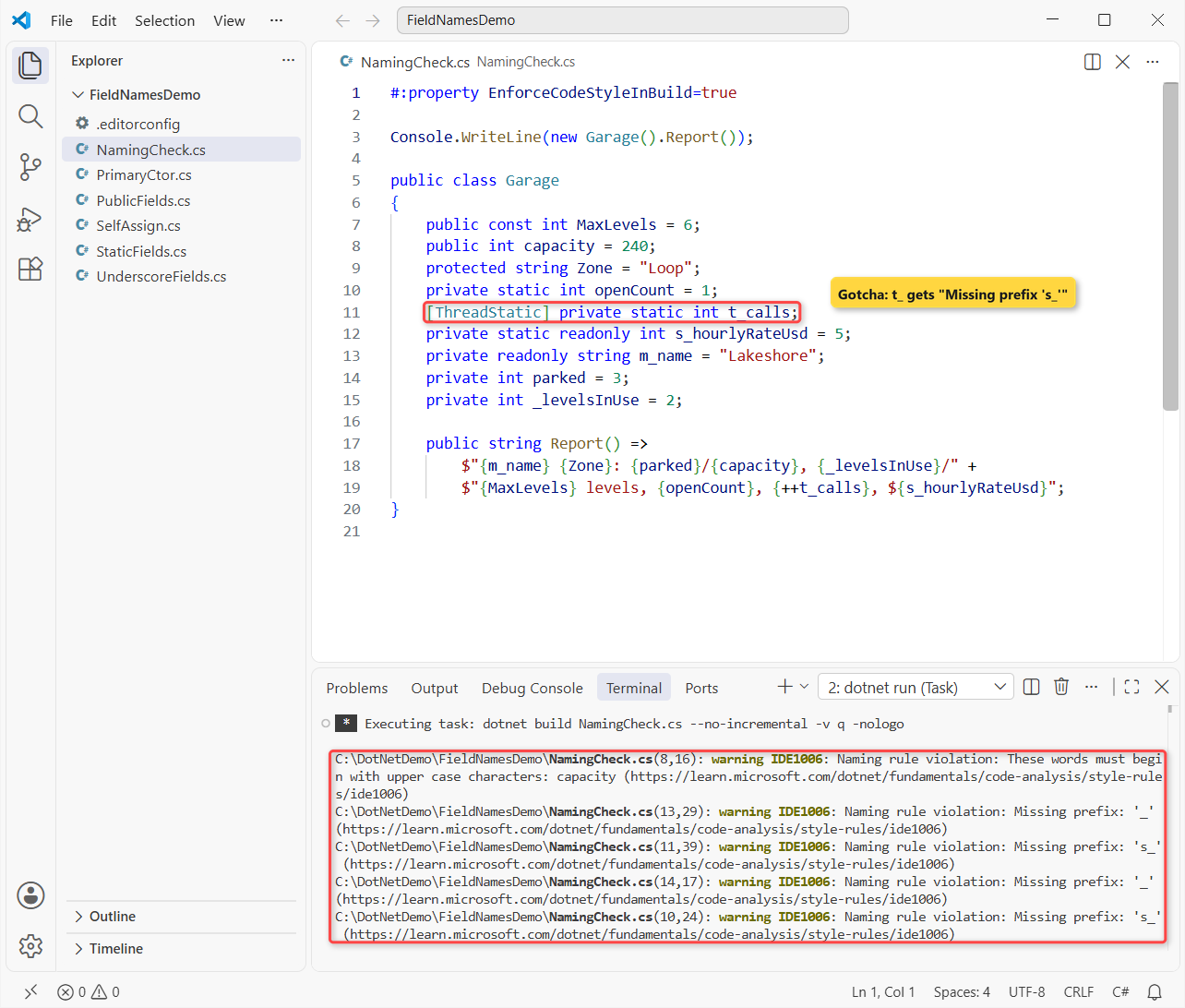
Lines 8, 10, 13 and 14 are real mistakes: a camelCase public field, a static field without s_, the old m_ prefix and a bare private field.
Rule order doesn’t depend on file order; the more specific rule wins, which is why the const rule beats the static one.
Line 11 is the catch. Naming rules match kind, access and modifiers, not attributes, so t_calls gets “Missing prefix: ‘s_'”. We suppress IDE1006 on that one line with #pragma warning disable.
C# Field Naming Cheat Sheet
| Field | Convention | Example |
|---|---|---|
private / internal instance | _camelCase | _parked, _isFull |
private static (incl. readonly) | s_camelCase | s_total, s_hourlyRate |
[ThreadStatic] private static | t_camelCase | t_printed |
public / protected | PascalCase, use sparingly | Plate |
public static readonly | PascalCase | HourlyRate |
const (any access) | PascalCase, no prefix | MaxLevels |
| Class primary constructor parameter | camelCase | capacity |
Should Private Fields Use an Underscore or this.?
Both are valid, and the compiler doesn’t care. Some teams use plain camelCase fields and write this.name = name; to avoid the self-assignment bug.
We use _camelCase because it’s what Microsoft’s docs and the .NET runtime use, and it works even when someone forgets this.. Locals and parameters stay plain camelCase, as in our C# variable naming conventions guide.
What we don’t use: m_ from C++ and MFC, or Hungarian names like strName. The type is already visible in the editor.
Common Mistakes to Avoid with C# Field Names
| Mistake | What happens | Fix |
|---|---|---|
name = name; in a constructor | CS1717, the field stays empty | _name = name; |
public int capacity; | IDE1006: must begin with upper case | public int Capacity { get; set; } |
private static int openCount; | IDE1006: missing prefix ‘s_’ | s_openCount |
m_name, strName | Doesn’t match .NET, IDE1006 on m_ | _name |
_maxLevels for a const | Looks like a mutable field | MaxLevels |
| Field copy plus captured primary constructor parameter | CS9124, the value is stored twice | Use one of them |
Next Steps
Fields sit inside types and next to methods, so the C# class naming conventions and C# method naming conventions posts are the natural next reads.
We’d keep these close too:
- C# enum naming conventions for singular and flags enums
- Variables in C#, from locals to fields
- Structs in C#, which also take primary constructors
- Interfaces in C#, where the I prefix lives
Frequently Asked Questions
Should private fields start with an underscore in C#?
Yes, in Microsoft’s C# coding conventions and the .NET runtime: private and internal non-constant fields are _camelCase, like _name. It’s a convention, not a compiler rule.
What does the s_ prefix mean in C#?
It marks a private or internal static field, like s_total. The .NET runtime team uses it, and t_ for [ThreadStatic] fields. Visual Studio doesn’t apply it by default.
Are public fields camelCase or PascalCase in C#?
PascalCase, like Plate or HourlyRate. Most public data should be a property instead, because a property can validate values and change later without breaking callers.
How do you name a private static readonly field?
s_camelCase in the runtime style, for example s_hourlyRate. Public static readonly fields are PascalCase, like DateTime.MaxValue.
How do I enforce field naming conventions in a C# project?
Add naming rules to .editorconfig, set dotnet_diagnostic.IDE1006.severity = warning and turn on EnforceCodeStyleInBuild. Microsoft Learn documents the syntax in Code-style naming rules.

Bijay Kumar is a renowned software engineer, accomplished author, and distinguished Microsoft Most Valuable Professional (MVP) specializing in SharePoint. With a rich professional background spanning over 15 years, Bijay has established himself as an authority in the field of information technology. He possesses unparalleled expertise in multiple programming languages and technologies such as ASP.NET, ASP.NET MVC, C#.NET, and SharePoint, which has enabled him to develop innovative and cutting-edge solutions for clients across the globe. Read more…