
Most naming mistakes I fix in code reviews look like strCustName, n or tmp2. They compile, but they break the C# variable naming conventions, and the next reader has to guess what each one holds:
string strCustName = "Tyler Brooks";   // before
int n = 3;
string customerName = "Tyler Brooks";  // after
int rentalDays = 3;
Quick answer: name local variables and parameters in camelCase, spell words out, drop type prefixes, and save single letters for loop counters.
I ran every rule below on .NET 10 for a made-up Portland bike rental shop, including the compiler errors you’ll hit.
C# Variable Naming Conventions for Local Variables and Parameters
Locals and method parameters both use camelCase: the first word is lowercase and every later word starts with a capital. Here’s a rental quote for Cascade Bike Rentals:
using System.Globalization;
CultureInfo.CurrentCulture = new("en-US");

string customerName = "Tyler Brooks";
int rentalDays = 3;
decimal dailyRate = 28.50m;
decimal quoteTotal = CalculateTotal(rentalDays, dailyRate);
Console.WriteLine($"{customerName}: {quoteTotal:C}");

var bike = new Bike("E-bike", 42.00m);
var booking = new Booking("Jenna Morales", 2);
Console.WriteLine($"{booking.Rider} books the {bike.Describe()}");

static decimal CalculateTotal(int days, decimal ratePerDay)
    => days * ratePerDay;

class Bike(string modelName, decimal hourlyRate)
{
    public string Describe() => $"{modelName} at {hourlyRate:C}/hr";
}
record Booking(string Rider, int Days);
Output:
Tyler Brooks: $85.50
Jenna Morales books the E-bike at $42.00/hr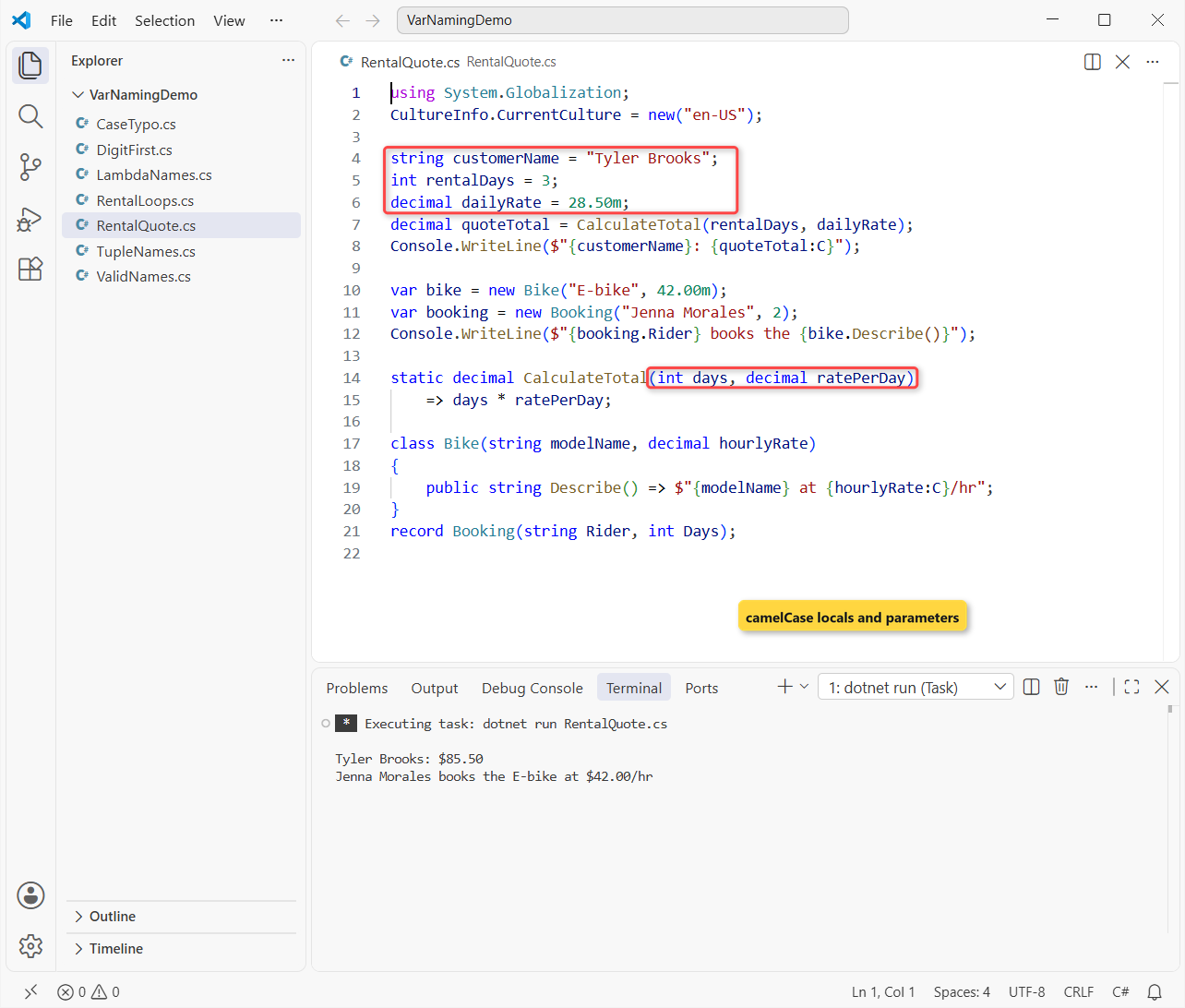
Tyler’s three days at $28.50 come to $85.50, and you never need a comment to explain dailyRate.
Watch the primary constructors: class parameters like modelName stay camelCase, but a record’s parameters become public properties, so you’d write Rider.
New to declarations? Start with how to declare variables in C#. Private fields get _camelCase instead, as our C# fields naming conventions guide shows.
What Makes a Valid Variable Name in C#?
Conventions are advice, but these rules are enforced by the compiler. A name must start with a letter or an underscore, and after that it can hold letters, digits and underscores:
int _retryCount = 2;            // may start with an underscore
int bike2Count = 4;             // digits are fine after the first letter
int total = 10;
int Total = 99;                 // case-sensitive: a second variable
string @class = "Road bike";    // a keyword as a name, with @
string café = "Pearl District"; // Unicode letters are allowed

Console.WriteLine($"{_retryCount} {bike2Count} {total} {Total}");
Console.WriteLine($"{@class}, named \"{nameof(@class)}\"");
Console.WriteLine(café);
Output:
2 4 10 99
Road bike, named "class"
Pearl District
All six declarations compile. total and Total are two different variables, because C# is case-sensitive. The @ lets you use a keyword like class as a name, and nameof proves the @ isn’t part of it.
Legal isn’t good, though: you’d confuse readers with _retryCount as a local, since the underscore signals a field. Names with two underscores in a row are reserved for the compiler.
Descriptive Variable Names vs Abbreviations and Hungarian Notation
Microsoft’s rule is clarity over brevity: no abbreviations unless everyone knows them, and no type in the name. Here’s how you’d apply it:
| Avoid | Why | Use instead |
|---|---|---|
strCustName, iCount | Hungarian notation repeats the type | customerName, count |
custAddr, qty | Abbreviations make readers decode | customerAddress, quantity |
d, tmp2 | Says nothing outside a tiny loop | rentalDays, pendingRefund |
rental_days | Underscores aren’t C# style | rentalDays |
inputInt | Type in the name; may be wrong | iterations |
data, info | True of every variable | monthlyTotals |
Widely known short forms are fine: id, url, html. Write them as words in camelCase, so userId and htmlBody, not userID.
Booleans get one extra habit, an Is/Has/Can prefix, which the C# boolean naming convention post walks through.
Naming Loop Counters, foreach Variables and var Locals
Single-letter names are fine in one place: a simple loop counter. Microsoft’s conventions also say to use var for a for counter, but to write the type in foreach, because the element type isn’t obvious from a collection’s name:
string[] riders = ["Tyler Brooks", "Jenna Morales", "Marcus Reed"];
int[] rentalDays = [3, 2, 5];

for (var i = 0; i < riders.Length; i++)
{
    Console.WriteLine($"{i + 1}. {riders[i]}: {rentalDays[i]} days");
}

var totalDays = 0;                    // type is obvious: int literal
foreach (int days in rentalDays)      // explicit type in foreach
{
    totalDays += days;
}

double averageDays = (double)totalDays / rentalDays.Length;
Console.WriteLine($"Total: {totalDays} days, average {averageDays:F1}");
Output:
1. Tyler Brooks: 3 days
2. Jenna Morales: 2 days
3. Marcus Reed: 5 days
Total: 10 days, average 3.3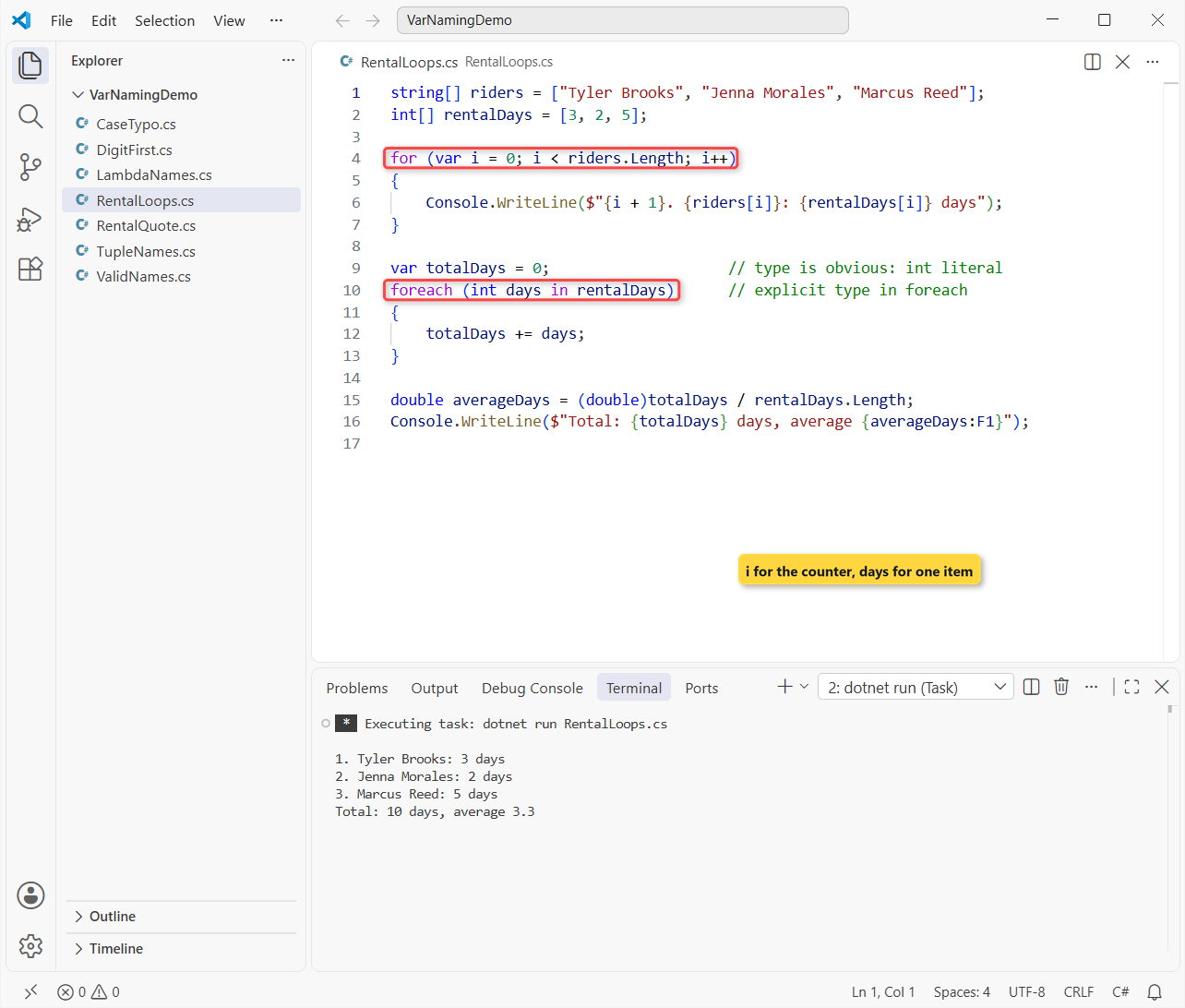
The riders booked 10 days, an average of 3.3. The array is plural (rentalDays) and the foreach loop variable is its singular (days).
Pro Tip: use var only when the right side shows the type, like a literal, a new expression or a cast. int numberOfIterations = Convert.ToInt32(input); stays explicit, because a method name doesn’t prove the type.
How to Name LINQ Lambda Parameters and Range Variables
A lambda parameter is still a parameter, so it’s camelCase and it should name one item. x => x.Days works, but rental => rental.Days reads like a sentence:
List<Rental> rentals =
[
    new("Tyler Brooks", "E-bike", 3),
    new("Jenna Morales", "Road", 1),
    new("Marcus Reed", "E-bike", 5),
];

var longRentalRiders = rentals
    .Where(rental => rental.Days >= 3)
    .Select(rental => rental.Rider);
Console.WriteLine(string.Join(", ", longRentalRiders));

var eBikeRiders = from rental in rentals
                  where rental.Model == "E-bike"
                  select rental.Rider;
Console.WriteLine(string.Join(", ", eBikeRiders));

record Rental(string Rider, string Model, int Days);
Output:
Tyler Brooks, Marcus Reed
Tyler Brooks, Marcus Reed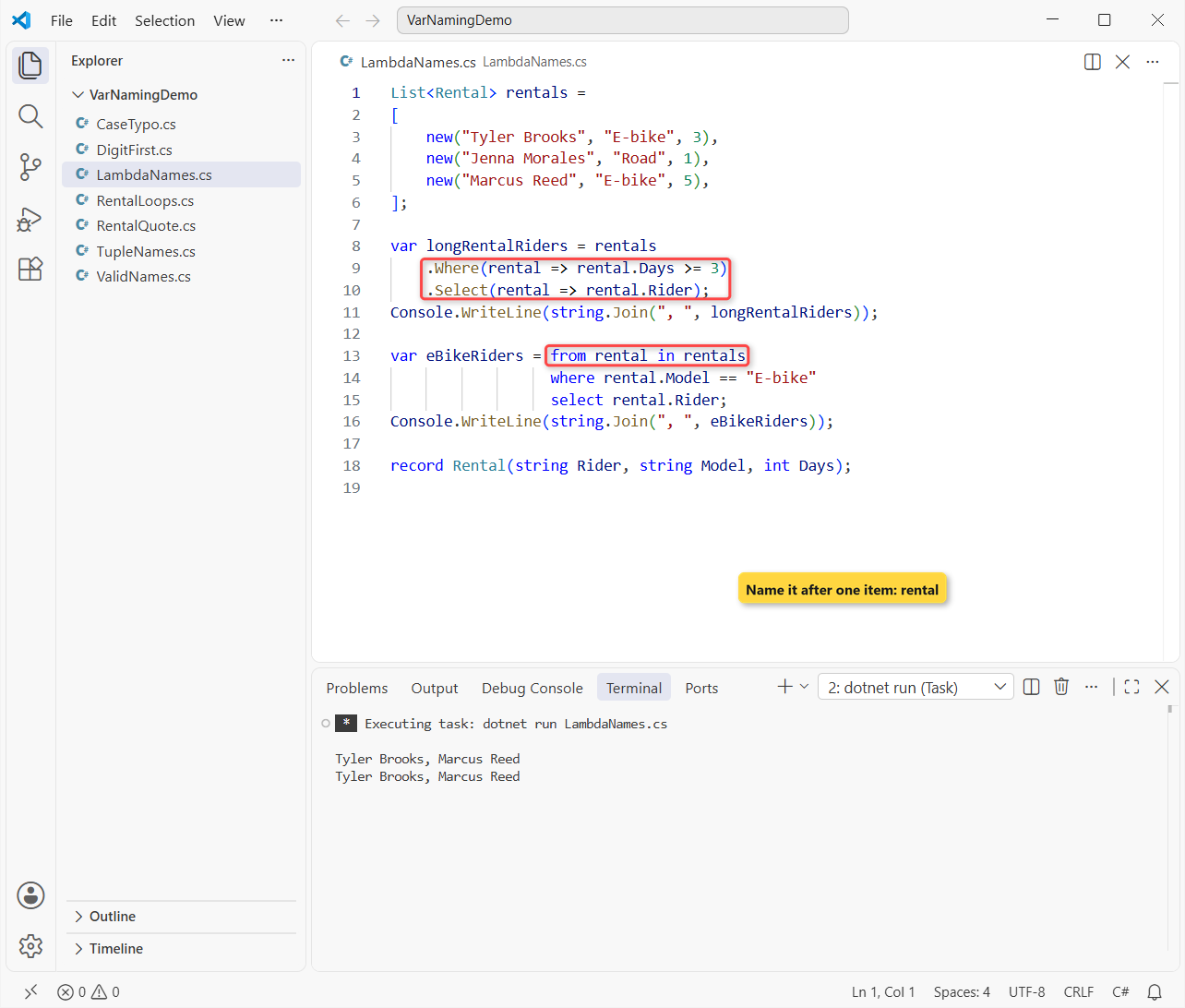
Both queries return Tyler Brooks and Marcus Reed. The query variables (longRentalRiders, eBikeRiders) describe the result, which is what Microsoft’s LINQ guidance asks for.
You can keep one letter in a tiny lambda like prices.Sum(p => p). Once it spans lines, give it a real name.
Variable Naming for Discards and Tuple Elements in C#
A lone _ is a discard, a value you’re telling the reader you’ll never use. Tuples name their elements:
var (rentalCount, totalDays) = Summarize([3, 1, 5]);
Console.WriteLine($"{rentalCount} rentals, {totalDays} days");

var weekend = Summarize([2, 2]);
Console.WriteLine($"{weekend.Count} rentals, {weekend.TotalDays} days");

var (_, onlyDays) = Summarize([4]);      // discard the count
Console.WriteLine($"Days only: {onlyDays}");

if (!int.TryParse("3 days", out _))      // discard the out value
    Console.WriteLine("\"3 days\" isn't a number");

static (int Count, int TotalDays) Summarize(int[] days)
    => (days.Length, days.Sum());
Output:
3 rentals, 9 days
2 rentals, 4 days
Days only: 4
"3 days" isn't a number
Deconstructed values are just locals, so rentalCount and totalDays are camelCase. The element names in the return type, Count and TotalDays, are PascalCase because callers read them like properties (weekend.TotalDays).
That PascalCase style matches Microsoft’s own tuple examples. Our tuple in C# tutorial covers the rest of the syntax.
Enforce Variable Naming Conventions with .editorconfig (IDE1006)
Reviews miss things, so let the build check casing. Put this .editorconfig next to your code:
root = true

[*.cs]
# Report naming problems in the build, not only in the editor
dotnet_diagnostic.IDE1006.severity = warning

# Local variables and parameters: camelCase
dotnet_naming_symbols.locals_and_parameters.applicable_kinds = local, parameter
dotnet_naming_symbols.locals_and_parameters.applicable_accessibilities = *
dotnet_naming_style.camel_case.capitalization = camel_case
dotnet_naming_rule.locals_should_be_camel_case.symbols = locals_and_parameters
dotnet_naming_rule.locals_should_be_camel_case.style = camel_case
dotnet_naming_rule.locals_should_be_camel_case.severity = warning
The rule’s own severity only shows in the editor. For dotnet build warnings, you also need dotnet_diagnostic.IDE1006.severity and EnforceCodeStyleInBuild, which the #:property line sets in a .NET 10 file-based app. I broke the rule twice:
#:property EnforceCodeStyleInBuild=true

int RentalDays = 3;                      // local in PascalCase
string strRiderName = "Olivia Grant";    // Hungarian, still camelCase
decimal quote = Quote(RentalDays, 28.50m);
Console.WriteLine($"{strRiderName}: {quote}");

static decimal Quote(int Days, decimal rate) => Days * rate;
dotnet build NamingCheck.cs –no-incremental -v q -nologo:
C:\DotNetDemo\VarNamingDemo\NamingCheck.cs(3,5): warning IDE1006: Naming rule violation: The first word, 'RentalDays', must begin with a lower case character (https://learn.microsoft.com/dotnet/fundamentals/code-analysis/style-rules/ide1006)
C:\DotNetDemo\VarNamingDemo\NamingCheck.cs(8,26): warning IDE1006: Naming rule violation: The first word, 'Days', must begin with a lower case character (https://learn.microsoft.com/dotnet/fundamentals/code-analysis/style-rules/ide1006)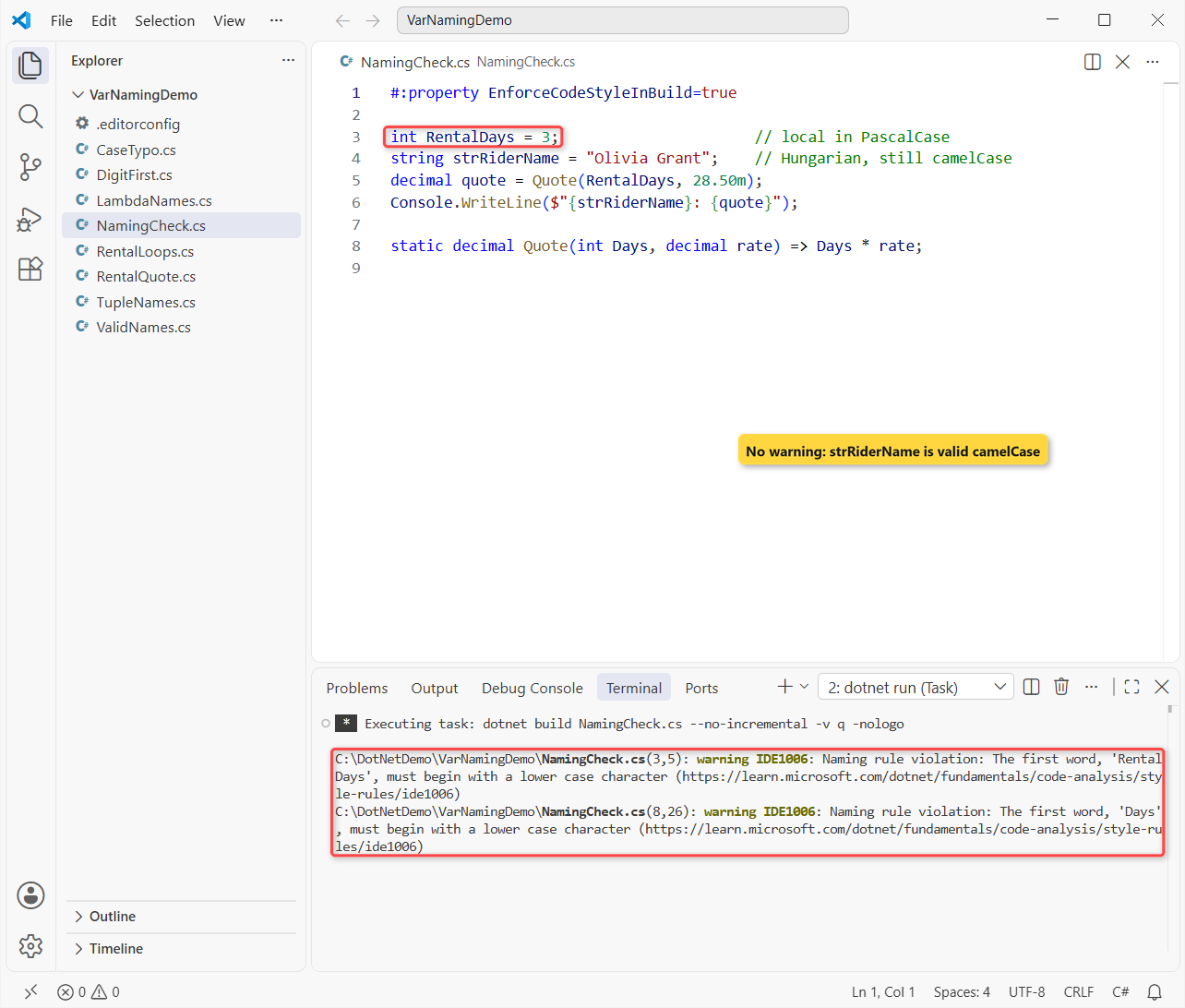
Important: strRiderName passed, because it’s valid camelCase. Naming rules check casing, prefixes and suffixes, not meaning, and they can’t target tuple elements at all. Abbreviations still need a reviewer.
Common Variable Naming Errors and How to Fix Them
You’ll meet two compiler errors that come straight from names. The first is a leading digit:
int 2ndRider = 1;dotnet run DigitFirst.cs:
C:\DotNetDemo\VarNamingDemo\DigitFirst.cs(1,5): error CS1001: Identifier expected
C:\DotNetDemo\VarNamingDemo\DigitFirst.cs(1,5): error CS1003: Syntax error, ',' expected
CS1001 means the compiler wanted an identifier and found a number, so spell it out: secondRider. The try-catch in C# post covers the runtime side of errors.
The second is a casing typo. Because C# is case-sensitive, RentalDays isn’t rentalDays:
int rentalDays = 3;
Console.WriteLine(RentalDays);
dotnet run CaseTypo.cs:
C:\DotNetDemo\VarNamingDemo\CaseTypo.cs(2,19): error CS0103: The name 'RentalDays' does not exist in the current contextCS0103 says the name doesn’t exist, so match the declared casing. A bare keyword like string class fails with CS1001 plus follow-on errors; rename it bikeClass.
C# Variable Naming Cheat Sheet
| What you’re naming | Convention | Example |
|---|---|---|
| Local variable | camelCase, descriptive | rentalDays |
| Method or lambda parameter | camelCase | ratePerDay, rental => |
| Class or struct primary constructor parameter | camelCase | Bike(string modelName) |
| Record primary constructor parameter | PascalCase | Booking(string Rider) |
| Simple loop counter | Single letter is OK | for (var i = 0; ...) |
| Local constant | PascalCase | const int MaxBikes = 12; |
| Tuple element in a type | PascalCase | (int Count, int TotalDays) |
Constants are the one local that isn’t camelCase; the C# constant naming conventions post explains why. For everything else, our naming conventions in C# overview has every rule on one page.
Methods take PascalCase and a verb, covered in C# method naming conventions, and types are nouns, as in C# class naming conventions.
Three more posts I’d read after this one, all short:
- C# enum naming conventions for singular and flags enums
- Delegates in C#, where lambda parameters come from
- C# data types, so the type goes in the declaration, not the name
Frequently Asked Questions
Should C# local variables be camelCase or PascalCase?
camelCase. Microsoft uses camelCase for local variables, method parameters and private fields, and PascalCase for types, methods, properties and constants.
Can a C# variable name start with a number?
No. An identifier must start with a letter or an underscore, so 2ndRider fails with CS1001. Use secondRider instead.
Can I use a C# keyword as a variable name?
Yes, with the @ prefix, like @class. The @ isn’t part of the name, so nameof(@class) returns class. Save it for interop; a plain name like bikeClass reads better.
Is Hungarian notation like strName OK in C#?
No. Microsoft’s conventions say not to put the type in the name, because it can go stale. Name what the value means: customerName.
Are single-letter variable names ever OK?
For simple loop counters like i, yes. Microsoft’s identifier guidance says to avoid single letters everywhere else. See identifier naming rules and conventions on Microsoft Learn.

Bijay Kumar is a renowned software engineer, accomplished author, and distinguished Microsoft Most Valuable Professional (MVP) specializing in SharePoint. With a rich professional background spanning over 15 years, Bijay has established himself as an authority in the field of information technology. He possesses unparalleled expertise in multiple programming languages and technologies such as ASP.NET, ASP.NET MVC, C#.NET, and SharePoint, which has enabled him to develop innovative and cutting-edge solutions for clients across the globe. Read more…