
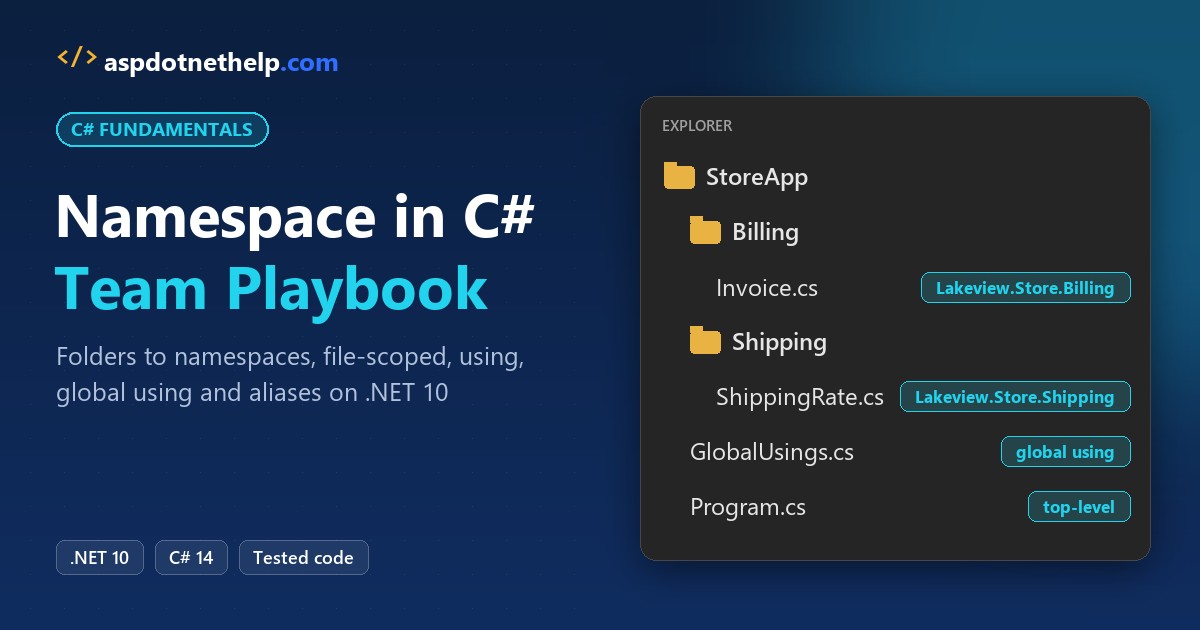
Two classes called Order, one for billing and one for shipping, and the compiler needs to know which one you mean. That’s the whole reason namespaces exist.
Quick answer: A namespace in C# is a named scope that groups related types and keeps their names unique. Declare it with namespace Lakeview.Store.Billing; and import it elsewhere with using Lakeview.Store.Billing;.
namespace Lakeview.Store.Billing;

public record Invoice(string Customer, decimal Amount);
In this tutorial, I’ll show you how my team uses the namespace in C# on .NET 10: block and file-scoped declarations, nested namespaces, every form of the using directive, global usings, name conflicts and naming rules.
What You Need Before You Start with C# Namespaces
- The .NET 10 SDK; most examples run with
dotnet run File.cs. - VS Code with the C# Dev Kit, or any editor. New to it? Here’s how to create a console application in Visual Studio Code.
- The sample: Lakeview Outfitters, a Seattle store with
BillingandShippingareas.
Step 1: Declare a Namespace in C# with a Block
The classic form wraps types in braces. Nesting blocks and writing the dotted name give the same result:
using Lakeview.Store.Billing;

var invoice = new Invoice("Jenna Moore", 249.00m);
Console.WriteLine(invoice.GetType().FullName);
Console.WriteLine(invoice.GetType().Namespace);
Console.WriteLine(typeof(Lakeview.Store.Shipping.Label).FullName);

namespace Lakeview.Store
{
    namespace Billing
    {
        record Invoice(string Customer, decimal Amount);
    }
}

namespace Lakeview.Store.Shipping
{
    class Label { }
}
Output:
Lakeview.Store.Billing.Invoice
Lakeview.Store.Billing
Lakeview.Store.Shipping.Label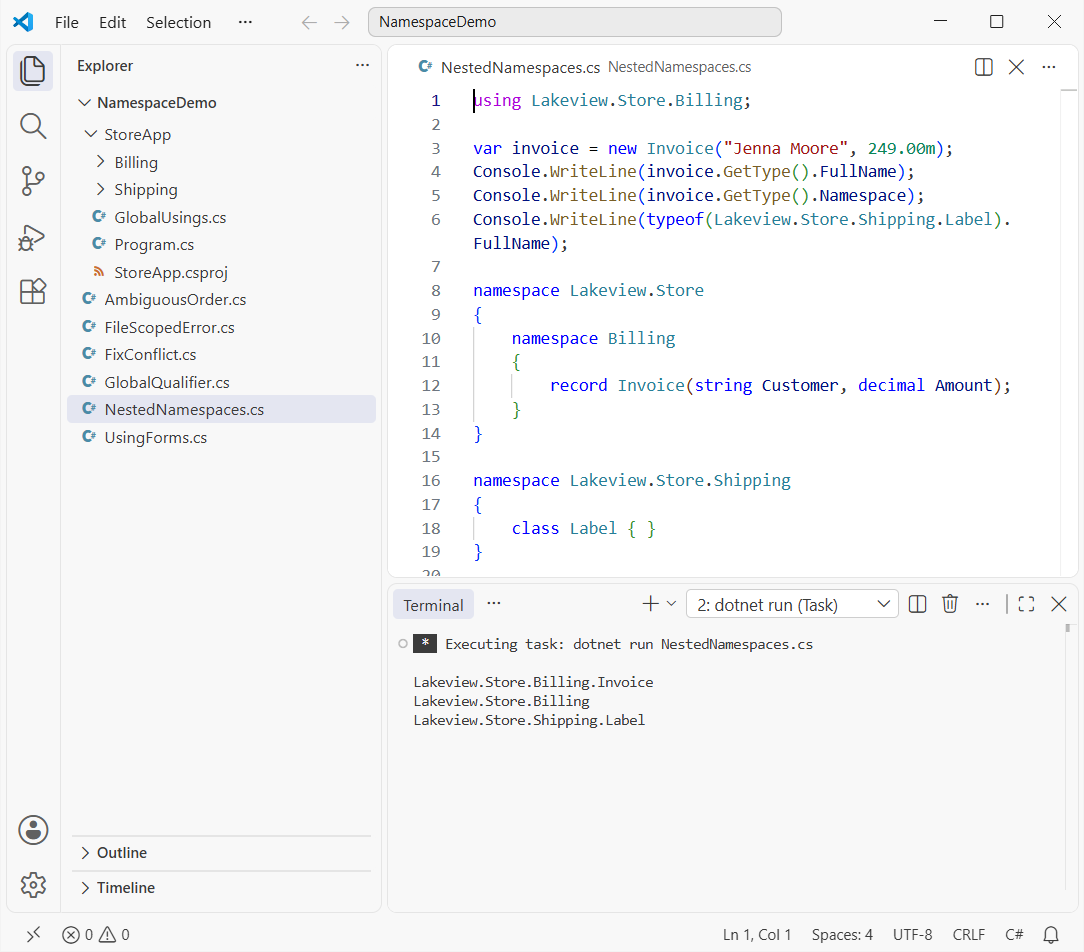
The full name is namespace plus type, and that’s what the runtime uses to tell two types apart. New to C# types? Start with what C# is and how it runs.
Step 2: Use a File-Scoped Namespace (C# 10 and Later)
Most files hold one namespace, so C# 10 added a shorter form. End it with a semicolon and every type in the file belongs to it:
namespace Lakeview.Store.Billing;

public record Invoice(string Customer, string State, decimal Amount);
A file-scoped namespace has two limits. You can’t declare a second namespace or a nested one in the same file, and it must come before every other member.
Why a File-Scoped Namespace Fails Next to Top-Level Statements
That second limit bites in file-based apps and Program.cs, because top-level statements are members of the global namespace:
Console.WriteLine("Store is open");

namespace Lakeview.Store;

class Invoice { }
Build output:
C:\DotNetDemo\NamespaceDemo\FileScopedError.cs(3,11): error CS8956: File-scoped namespace must precede all other members in a file.

The build failed. Fix the build errors and run again.
Keep top-level statements in their own file and your types in other files, or use block namespaces as in Step 1. File-based apps are covered in what is new in .NET 10.
Step 3: Match C# Namespaces to Your Project Folders
In a real app, each folder maps to a namespace. Here’s the Lakeview project:
StoreApp
├── StoreApp.csproj
├── GlobalUsings.cs
├── Program.cs
├── Billing
│   └── Invoice.cs          (namespace Lakeview.Store.Billing)
└── Shipping
    └── ShippingRate.cs     (namespace Lakeview.Store.Shipping)
StoreApp.csproj
<Project Sdk="Microsoft.NET.Sdk">

  <PropertyGroup>
    <OutputType>Exe</OutputType>
    <TargetFramework>net10.0</TargetFramework>
    <ImplicitUsings>enable</ImplicitUsings>
    <Nullable>enable</Nullable>
  </PropertyGroup>

  <ItemGroup>
    <Using Include="System.Globalization" />
  </ItemGroup>

</Project>
Billing\Invoice.cs is the file from Step 2. Shipping\ShippingRate.cs uses a switch expression in C#:
namespace Lakeview.Store.Shipping;

public static class ShippingRate
{
    public static decimal For(string state) => state switch
    {
        "WA" or "OR" => 5.99m,
        "TX" => 8.49m,
        _ => 12.99m
    };
}
Program.cs uses both namespaces without a single using line, which Step 5 explains:
CultureInfo.CurrentCulture = new("en-US");

var invoice = new Invoice("Jenna Moore", "WA", 249.00m);
decimal total = invoice.Amount + ShippingRate.For(invoice.State);
Console.WriteLine($"{invoice.Customer}: {total:C}");

Type t = typeof(Invoice);
Console.WriteLine($"Namespace: {t.Namespace}");
Console.WriteLine($"Full name: {t.FullName}");
Console.WriteLine($"Assembly:  {t.Assembly.GetName().Name}");

Type list = typeof(List<int>);
Console.WriteLine($"List<T>:   {list.Namespace} in {list.Assembly.GetName().Name}");
Output:
Jenna Moore: $254.99
Namespace: Lakeview.Store.Billing
Full name: Lakeview.Store.Billing.Invoice
Assembly:  StoreApp
List<T>:   System.Collections.Generic in System.Private.CoreLib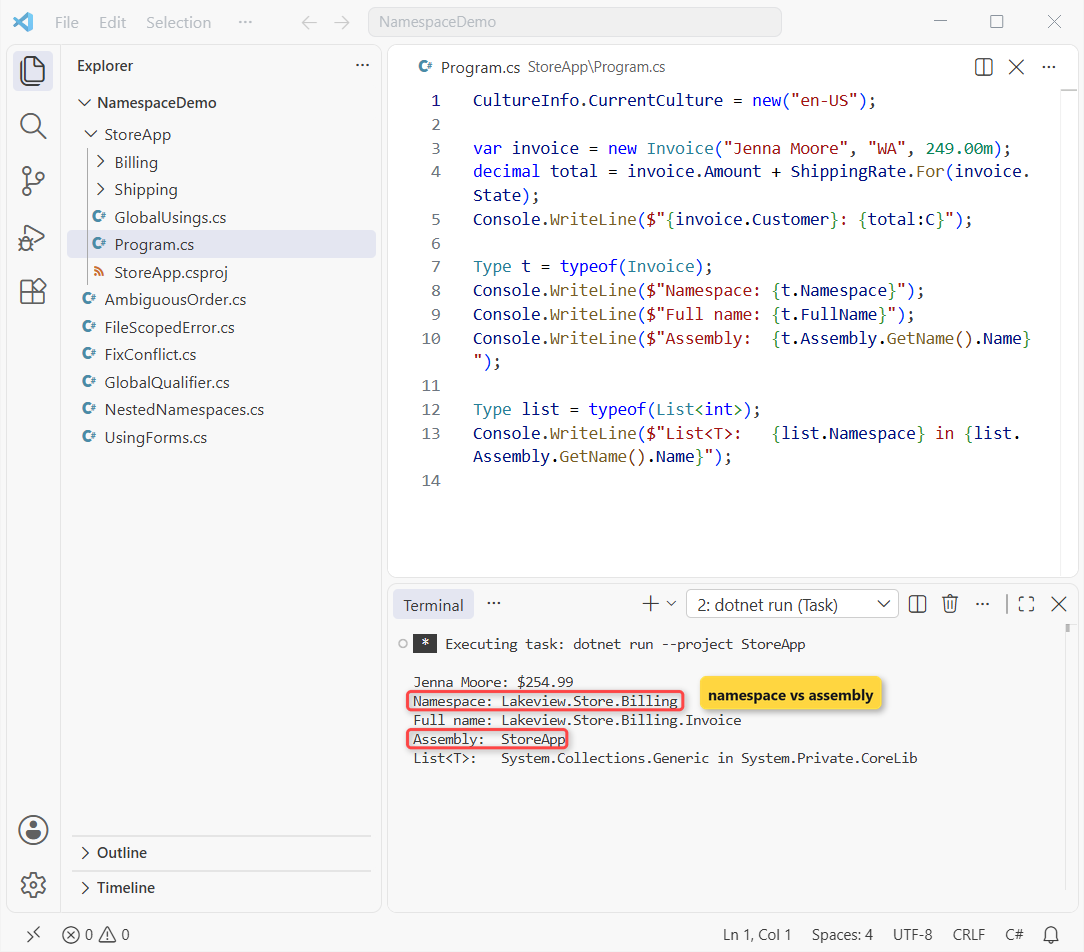
Jenna’s order comes to $254.99, and Invoice sits in the Lakeview.Store.Billing namespace inside the StoreApp assembly.
Step 4: Import a Namespace with the C# using Directive
A plain using Lakeview.Store.Billing; lets you write Invoice instead of the full name. Same store, now with the two other forms: using static and the alias. They pair well with the constructors in C# you call on imported types:
using static System.Math;
using Billing = Lakeview.Store.Billing;
using Money = (decimal Amount, string Currency);

Money total = (Round(249.99m * 1.065m, 2), "USD");
Console.WriteLine($"{total.Amount} {total.Currency}");
Console.WriteLine($"Bigger box: {Max(12, 18)} in");

var invoice = new Billing.Invoice("Chloe Brady");
Console.WriteLine(invoice);

namespace Lakeview.Store.Billing
{
    record Invoice(string Customer);
}
Output:
266.24 USD
Bigger box: 18 in
Invoice { Customer = Chloe Brady }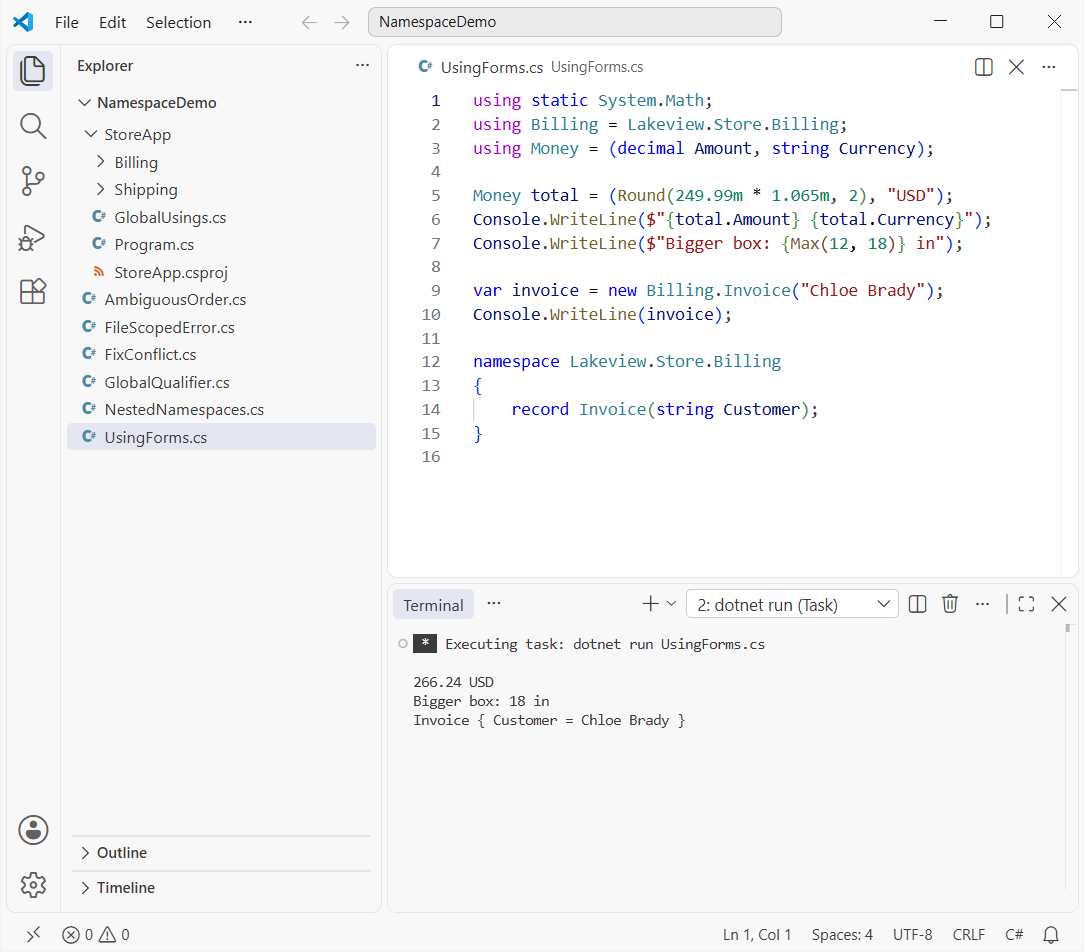
using static drops the Math. prefix, and the tuple alias needs C# 12 or later. The $249.99 jacket plus 6.5% tax rounds to 266.24 USD.
Note: a using directive doesn’t import nested namespaces, so using Lakeview.Store; won’t give you Invoice.
Step 5: Add global using Directives and ImplicitUsings in .NET 10
A global using applies to every file in the project. My team keeps them in one GlobalUsings.cs file:
global using Lakeview.Store.Billing;
global using Lakeview.Store.Shipping;
Generated file (obj folder):
// <auto-generated/>
global using System;
global using System.Collections.Generic;
global using System.Globalization;
global using System.IO;
global using System.Linq;
global using System.Net.Http;
global using System.Threading;
global using System.Threading.Tasks;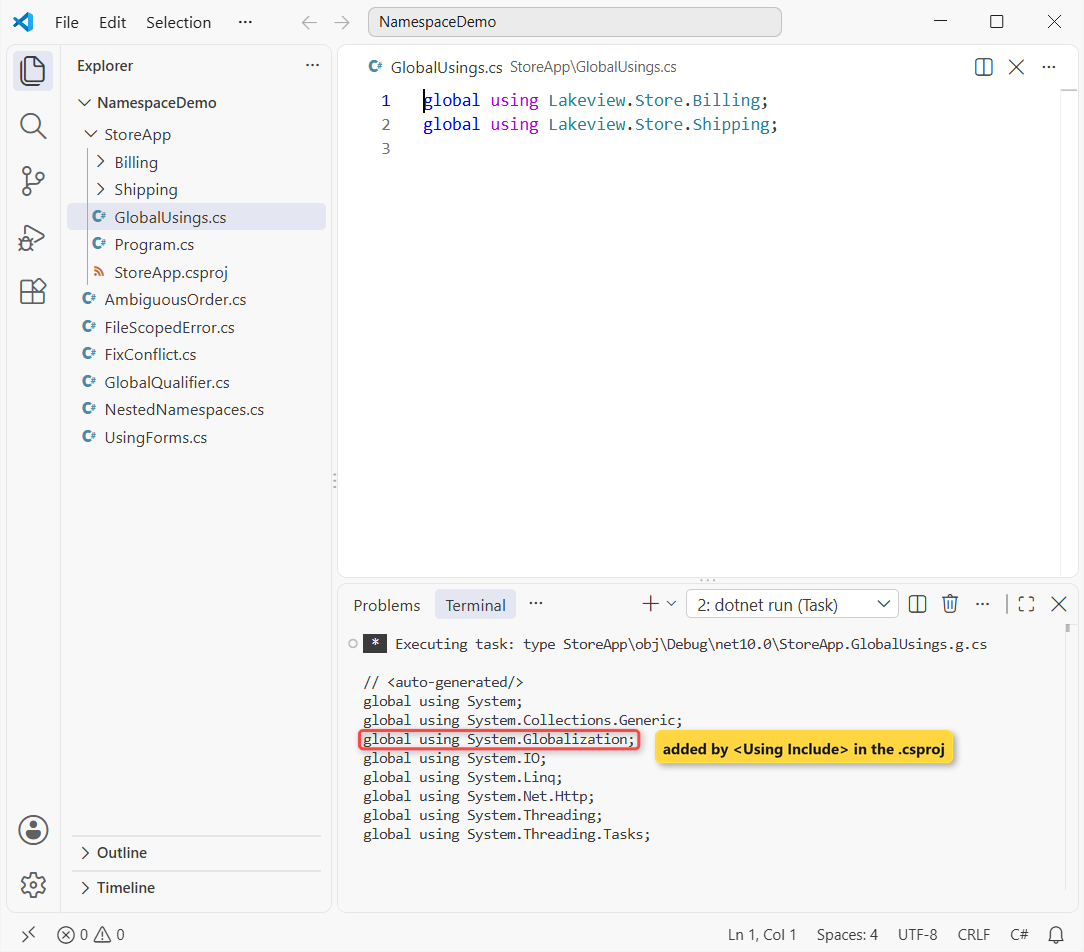
The terminal shows the file the SDK generates because the project has <ImplicitUsings>enable</ImplicitUsings>. The <Using Include="System.Globalization" /> item in the .csproj adds one more line, which is why CultureInfo worked in Step 3.
These are the implicit namespaces for the two SDKs I use most:
| SDK | Implicit global usings |
|---|---|
Microsoft.NET.Sdk (console, class library) | System, System.Collections.Generic, System.IO, System.Linq, System.Net.Http, System.Threading, System.Threading.Tasks |
Microsoft.NET.Sdk.Web (ASP.NET Core) | All of the above plus System.Net.Http.Json and the Microsoft.AspNetCore.* / Microsoft.Extensions.* hosting namespaces |
Important: global usings must come before every normal using and namespace in a file. To drop an implicit one, add <Using Remove="System.Net.Http" /> to the .csproj.
Projects created before .NET 6 have ImplicitUsings off; my guide to upgrade .NET 8 to .NET 10 covers turning it on.
How Do You Fix a Name Conflict Between Two Namespaces?
Back to the two Order classes. Import both namespaces and the compiler refuses to guess:
using Lakeview.Store.Billing;
using Lakeview.Store.Shipping;

var order = new Order();

namespace Lakeview.Store.Billing { class Order { } }
namespace Lakeview.Store.Shipping { class Order { } }
Build output:
C:\DotNetDemo\NamespaceDemo\AmbiguousOrder.cs(4,17): error CS0104: 'Order' is an ambiguous reference between 'Lakeview.Store.Billing.Order' and 'Lakeview.Store.Shipping.Order'

The build failed. Fix the build errors and run again.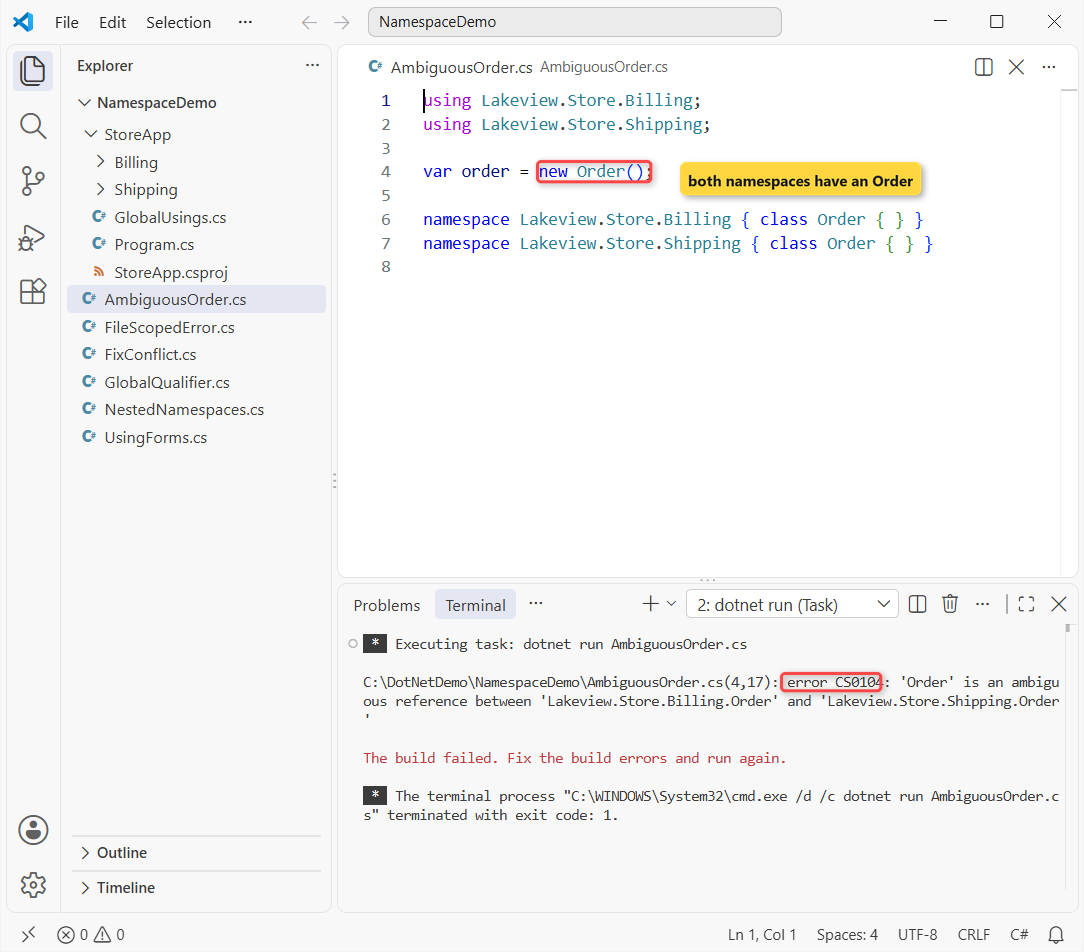
Keep one plain import and reach the other through an alias or its fully qualified name:
using Lakeview.Store.Billing;
using ShipOrder = Lakeview.Store.Shipping.Order;

var bill = new Order();
var ship = new ShipOrder();
var full = new Lakeview.Store.Shipping.Order();

Console.WriteLine(bill.GetType().FullName);
Console.WriteLine(ship.GetType().FullName);
Console.WriteLine(full.GetType().FullName);

namespace Lakeview.Store.Billing { class Order { } }
namespace Lakeview.Store.Shipping { class Order { } }
Output:
Lakeview.Store.Billing.Order
Lakeview.Store.Shipping.Order
Lakeview.Store.Shipping.Order
Use the global:: Qualifier When Your Type Hides a System Type
Sometimes your own type shadows a framework one. Inside Lakeview.Store, this Console class wins, so global:: forces the lookup to start at the global namespace:
Lakeview.Store.Packing.Run();

namespace Lakeview.Store
{
    static class Console
    {
        public static void WriteLine(string text) =>
            global::System.Console.WriteLine($"[store log] {text}");
    }

    static class Packing
    {
        public static void Run()
        {
            Console.WriteLine("Order 1042 packed");
            global::System.Console.WriteLine("Order 1042 shipped");
        }
    }
}
Output:
[store log] Order 1042 packed
Order 1042 shipped
Clashes also show up when a type is split across files; see the partial class in C# guide.
C# Namespace Cheat Sheet
Every form from the steps above, in one place:
| Task | Code | Scope |
|---|---|---|
| Block namespace | namespace Lakeview.Store { ... } | Inside the braces |
| File-scoped namespace | namespace Lakeview.Store.Billing; | Whole file (C# 10+) |
| Import a namespace | using Lakeview.Store.Billing; | One file |
| Import static members | using static System.Math; | One file |
| Alias | using ShipOrder = Lakeview.Store.Shipping.Order; | One file |
| Global import | global using Lakeview.Store.Billing; | Whole project |
| Project-file import | <Using Include="System.Globalization" /> | Whole project |
| Start at the root | global::System.Console | One expression |
Namespace Naming Conventions in C#
These are the namespace rules in our code reviews, taken from Microsoft’s design guidelines. The wider set is in my C# naming conventions guide:
- Use
Company.Product.Feature:Lakeview.Store.Billing, notBillingorUtils. - PascalCase every part, and keep acronyms of three or more letters PascalCase (
Lakeview.Store.Api). - Make folders match the namespace, so a file’s path tells you its namespace.
- Don’t give a class the same name as its namespace; a class named
BillinginsideLakeview.Store.Billingforces full names. The C# class naming conventions post has the type-side rules.
Namespace vs Assembly in C#: What’s the Difference?
A namespace is a logical label in your code; an assembly is the compiled .dll or .exe file. Step 3’s output shows both:
| Namespace | Assembly | |
|---|---|---|
| What it is | A name prefix for types | A compiled file (.dll / .exe) |
| Defined by | namespace in source | The project (.csproj) |
| Used for | Organizing names, avoiding clashes | Deployment, versioning, references |
| Our Invoice | Lakeview.Store.Billing | StoreApp |
List<T> | System.Collections.Generic | System.Private.CoreLib |
One assembly can hold many namespaces, and one namespace can span many assemblies. Access is controlled by the assembly, not the namespace: internal means visible inside the same assembly, which my post on the interface in C# touches on too.
Common Mistakes to Avoid with C# Namespaces
| Mistake | What happens | Fix |
|---|---|---|
| File-scoped namespace after top-level statements | CS8956 | Move types to their own file |
| Importing two namespaces with the same type name | CS0104 ambiguous reference | Alias one, or use the full name |
Expecting using Lakeview.Store; to import Billing | CS0246 type not found | Import the nested namespace itself |
Next Steps
Next, design the types inside your namespaces. My abstract class in C# tutorial shows a base type Billing and Shipping can share.
A few more posts on structuring C# code:
- Structure in C# with practical examples
- How to name methods in C#
- C# variable naming conventions
- What’s new in C# 14 for .NET 10
Frequently Asked Questions
What is a namespace in C#?
A named scope that groups related types so their full names stay unique, for example Lakeview.Store.Billing.Invoice.
What is the difference between a block and a file-scoped namespace?
A block namespace uses braces and can be nested. A file-scoped namespace (C# 10+) ends with a semicolon, covers the whole file and allows no other namespace in it.
Which namespaces does ImplicitUsings add in .NET 10?
Seven for console and library projects, starting with System and System.Linq; web projects add more. See implicit using directives on Microsoft Learn.
Do namespaces have access modifiers?
No, namespaces are always public. Set public or internal on the types inside them instead.
Does a using directive import nested namespaces?
No. using Lakeview.Store; doesn’t bring in Lakeview.Store.Billing; import that one separately.

Bijay Kumar is a renowned software engineer, accomplished author, and distinguished Microsoft Most Valuable Professional (MVP) specializing in SharePoint. With a rich professional background spanning over 15 years, Bijay has established himself as an authority in the field of information technology. He possesses unparalleled expertise in multiple programming languages and technologies such as ASP.NET, ASP.NET MVC, C#.NET, and SharePoint, which has enabled him to develop innovative and cutting-edge solutions for clients across the globe. Read more…