
A pull request for a Texas retailer’s order system hit my queue last week with custName, CUST_ID, and m_total in one class. That’s three naming conventions fighting inside 40 lines of C#.
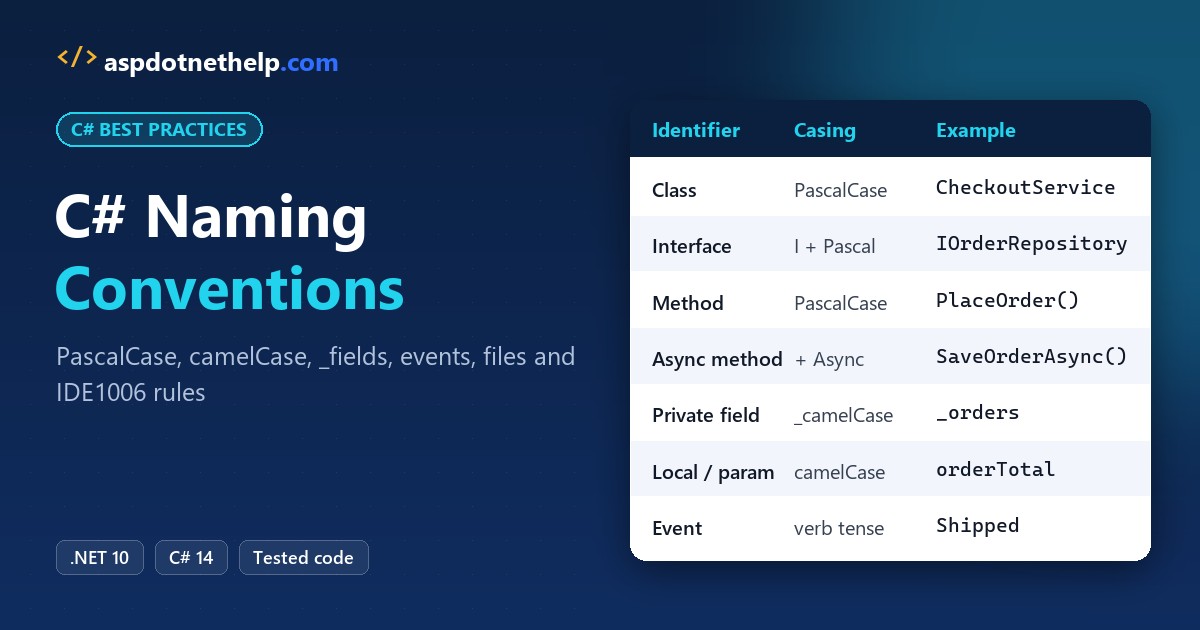
Here’s the quick answer. C# uses PascalCase for types, namespaces, methods, properties, events, and constants, camelCase for local variables and parameters, _camelCase for private fields, and an I prefix for interfaces.
In this tutorial, I’ll walk you through the complete C# naming conventions from Microsoft’s identifier rules and the .NET Framework Design Guidelines. You’ll see every identifier type, events, arrays, dictionaries, files, folders, UI controls, and a real analyzer run that flags bad names on build.
C# Naming Conventions Cheat Sheet
Bookmark this table. It’s the one I keep open when I review code, and every row matches what Microsoft documents for .NET 10 projects.
| Identifier | Casing | Example |
|---|---|---|
| Namespace | PascalCase, Company.Product.Feature | LoneStarOutfitters.Orders |
| Class, record, struct | PascalCase noun | CheckoutService |
| Interface | PascalCase with I prefix | IOrderRepository |
| Method, local function | PascalCase verb phrase | PlaceOrder() |
| Async method | PascalCase + Async suffix | SaveOrderAsync() |
| Property | PascalCase noun or adjective | CustomerName |
| Boolean property | Affirmative, optional Is/Can/Has | IsShipped |
| Event | PascalCase verb, present/past tense | Shipping, Shipped |
| Event args class | PascalCase + EventArgs | ShippedEventArgs |
| Enum type / values | PascalCase, singular (plural for [Flags]) | OrderStatus.Pending |
| Constant (any access) | PascalCase | FreeShippingThreshold |
| Public static field | PascalCase, no prefix | DefaultTimeout |
| Private/internal field | _camelCase | _orders |
| Private static field | s_camelCase (runtime style) | s_ordersToday |
| Parameter, local variable | camelCase | orderTotal |
| Generic type parameter | T or T + descriptive name | TKey, TValue |
| Attribute class | PascalCase + Attribute | AuditedAttribute |
| Record positional parameter | PascalCase | record Order(int OrderId) |
C# Naming Rules vs. Naming Conventions: What Does the Compiler Enforce?
Rules and conventions aren’t the same thing. The compiler enforces a small set of rules, and it won’t build your code if you break one.
- An identifier must start with a letter or an underscore, so
1stOrderfails andfirstOrderworks. - It can contain Unicode letters, digits, and connecting characters, but no hyphens or spaces.
- You can’t use a keyword unless you add the verbatim
@prefix, as in@class. The@isn’t part of the name. - C# is case-sensitive, so
orderandOrderare different identifiers.
Conventions are everything else, and the compiler ignores them. Still, every .NET API follows them, so code that breaks them looks foreign next to the base class library. If you’re new to declaring variables in C#, start with the conventions from day one.
Two extra rules I follow: don’t put two underscores in a row (those names are reserved for compiler-generated code), and don’t create public names that differ only by case. Visual Basic callers can’t tell them apart.
PascalCase and camelCase: The Two C# Naming Styles
PascalCase capitalizes the first letter of every word: SalesTaxRate. camelCase does the same except for the first word: salesTaxRate.
Acronyms trip people up. Two-letter acronyms stay uppercase in PascalCase, like IOStream, but longer ones get only the first letter capitalized, like HtmlTag and XmlReader.
Microsoft also treats some words as single closed-form words. Write Id (not ID), Email, Metadata, and Ok. It feels odd at first, but it matches the .NET APIs you already call.
Skip abbreviations unless they’re universally known. GetWindow beats GetWin, and customerAddress beats custAddr.
C# Naming Conventions in a Real Program
Tables are fine, but I’d rather show you names doing real work. This file-based .NET 10 app models checkout for Lone Star Outfitters, a made-up Austin retailer. Every identifier in it follows the conventions above.
using System.Globalization;
using LoneStarOutfitters.Orders;

CultureInfo.CurrentCulture = CultureInfo.GetCultureInfo("en-US");

IOrderRepository orderRepository = new InMemoryOrderRepository();
var checkoutService = new CheckoutService(orderRepository);

decimal orderTotal = checkoutService.PlaceOrder(new Order(1001, "Megan Bowen", 249.50m));
bool isFreeShipping = orderTotal >= CheckoutService.FreeShippingThreshold;

Console.WriteLine($"Order total: {orderTotal:C}");
Console.WriteLine($"Free shipping: {isFreeShipping}");
Console.WriteLine($"Orders saved: {orderRepository.Count}, today: {CheckoutService.OrdersToday}");
Console.WriteLine($"Status: {OrderStatus.Pending}, options: {ShippingOptions.Ground | ShippingOptions.GiftWrap}");

namespace LoneStarOutfitters.Orders
{
    public interface IOrderRepository
    {
        int Count { get; }
        void Save(Order order);
    }

    public record Order(int OrderId, string CustomerName, decimal Subtotal);

    public enum OrderStatus { Pending, Shipped, Delivered }

    [Flags]
    public enum ShippingOptions { None = 0, Ground = 1, Express = 2, GiftWrap = 4 }

    public class InMemoryOrderRepository : IOrderRepository
    {
        private readonly List<Order> _orders = [];
        public int Count => _orders.Count;
        public void Save(Order order) => _orders.Add(order);
    }

    public class CheckoutService(IOrderRepository orderRepository)
    {
        public const decimal FreeShippingThreshold = 99m;
        private const decimal TexasSalesTaxRate = 0.0625m;
        private static int s_ordersToday;

        public static int OrdersToday => s_ordersToday;

        public decimal PlaceOrder(Order order)
        {
            orderRepository.Save(order);
            s_ordersToday++;
            return CalculateTotal(order.Subtotal);
        }

        private static decimal CalculateTotal(decimal subtotal) =>
            Math.Round(subtotal * (1 + TexasSalesTaxRate), 2);
    }
}
Output:
Order total: $265.09
Free shipping: True
Orders saved: 1, today: 1
Status: Pending, options: Ground, GiftWrap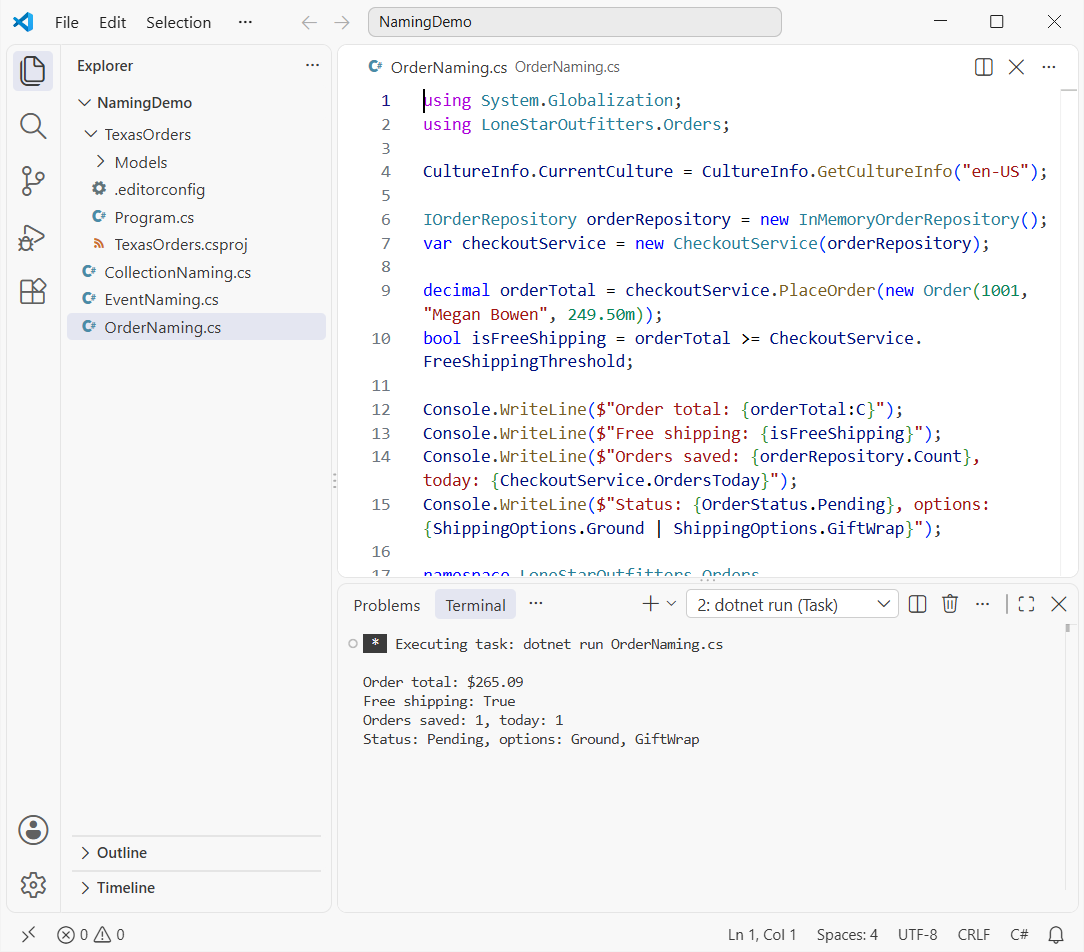
Look at how the casing tells you the scope. _orders is a private field, s_ordersToday is a private static field, orderRepository is a parameter, and FreeShippingThreshold is a constant anyone can read.
The tax math also checks out: $249.50 times 1.0625 is $265.09 after rounding, which is what the run printed.
Naming Classes, Records, Structs, and Interfaces
Types get PascalCase nouns or noun phrases: Order, CheckoutService, InMemoryOrderRepository. I go deeper into suffixes like Service and Repository in my guide to C# class naming conventions.
Interfaces add a capital I: IOrderRepository. That one letter tells you at a glance you can’t new it up. If you’re still getting comfortable with contracts, my interface in C# tutorial covers the basics.
Records follow the same casing, with one twist. Positional record parameters are PascalCase because they become public properties, while primary constructor parameters on a class or struct stay camelCase, like orderRepository above.
Method, Property, and Boolean Naming Conventions
Methods do things, so give them verbs: PlaceOrder, CalculateTotal, SendInvoice. Methods that return a Task or another awaitable type end in Async, like SaveOrderAsync.
You’ll find more verb patterns and the Get/Try/To prefixes in my post on C# method naming conventions.
Properties hold data, so name them with nouns or adjectives: CustomerName, Subtotal. Collection properties take a plural name, Orders rather than OrderList.
Booleans read best as an affirmative yes/no question: IsShipped, CanRefund, HasDiscount. Avoid negatives like IsNotValid. The Boolean variable naming guide has a full list.
Field, Constant, and Local Variable Naming Conventions
Fields cause the most arguments on teams. Microsoft’s coding conventions use _camelCase for private and internal instance fields, and the .NET runtime team adds s_ for static fields and t_ for thread-static ones.
Public static fields are different. The Framework Design Guidelines say PascalCase with no prefix at all. My C# field naming conventions post compares the styles side by side.
Constants are PascalCase at every access level, TexasSalesTaxRate and not TEXAS_SALES_TAX_RATE. The screaming-caps habit comes from C and Java. Here’s why it doesn’t fit C#: C# constant naming conventions.
Locals and parameters are camelCase and descriptive: orderTotal, isFreeShipping. Single letters are fine for loop counters, and that’s about it. The C# variable naming conventions article has more examples.
Enum and Generic Type Parameter Naming
Name a regular enum with a singular noun, OrderStatus, and a [Flags] enum with a plural one, ShippingOptions. Values are PascalCase, so the run printed Ground, GiftWrap for a combined flag.
Don’t add an Enum suffix or repeat the type in every value. I cover those mistakes in C# enum naming conventions.
Generic type parameters start with T. Use plain T when there’s one obvious parameter, and descriptive names like TKey, TValue, or TOrder when there are several.
C# Event Naming Conventions
Events name something that happens, so they’re verbs. The tense tells the subscriber when it fires: present tense before the action, past tense after it.
- Use
ShippingandShipped,ClosingandClosed. Don’t use Before or After prefixes. - Don’t put On in front of the event itself.
OnShippedis the name of the protected virtual method that raisesShipped. - Type the event as
EventHandlerorEventHandler<TEventArgs>and end the data class in EventArgs. - Handlers take two parameters named
senderande.
Here’s a shipment class for the same retailer that raises a cancelable Shipping event and a Shipped event with data.
using System.ComponentModel;
using System.Globalization;

CultureInfo.CurrentCulture = CultureInfo.GetCultureInfo("en-US");

var shipment = new Shipment("TX-58213", "Austin, TX");
shipment.Shipping += Shipment_Shipping;
shipment.Shipped += Shipment_Shipped;
shipment.Ship();

static void Shipment_Shipping(object? sender, CancelEventArgs e) =>
    Console.WriteLine("Shipping (present tense): raised before the label prints");

static void Shipment_Shipped(object? sender, ShippedEventArgs e) =>
    Console.WriteLine($"Shipped (past tense): {e.TrackingNumber} left {e.Warehouse} on {e.ShippedOn:d}");

public class ShippedEventArgs(string trackingNumber, string warehouse, DateOnly shippedOn) : EventArgs
{
    public string TrackingNumber { get; } = trackingNumber;
    public string Warehouse { get; } = warehouse;
    public DateOnly ShippedOn { get; } = shippedOn;
}

public class Shipment(string trackingNumber, string warehouse)
{
    public event EventHandler<CancelEventArgs>? Shipping;
    public event EventHandler<ShippedEventArgs>? Shipped;

    public void Ship()
    {
        var shippingArgs = new CancelEventArgs();
        OnShipping(shippingArgs);
        if (shippingArgs.Cancel) return;
        OnShipped(new ShippedEventArgs(trackingNumber, warehouse, new DateOnly(2026, 10, 26)));
    }

    protected virtual void OnShipping(CancelEventArgs e) => Shipping?.Invoke(this, e);
    protected virtual void OnShipped(ShippedEventArgs e) => Shipped?.Invoke(this, e);
}
Output:
Shipping (present tense): raised before the label prints
Shipped (past tense): TX-58213 left Austin, TX on 10/26/2026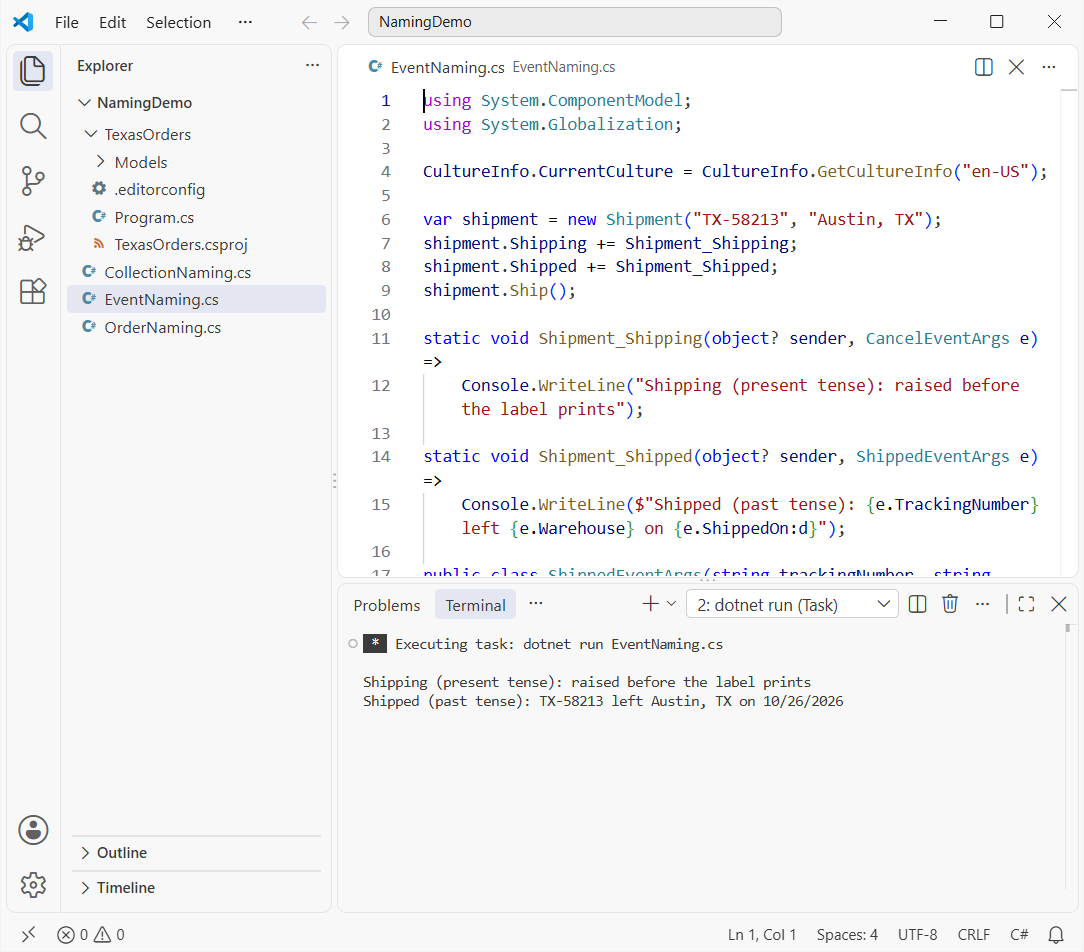
The handler names, Shipment_Shipping and Shipment_Shipped, follow the object_Event pattern Visual Studio generates. It’s the one place an underscore inside a name is normal, and those methods are private.
If events are new to you, read events in C# first. Custom handler delegates are rarer now, but when you need one, end it in EventHandler as shown in delegates in C#.
Array and Dictionary Naming Conventions
A collection holds many things, so give it a plural name. I name arrays after what’s inside, never after the type: storeCities, not cityArray or arrCities.
For dictionaries, I use a pattern that reads like English: the values, then By, then the key. customerNamesById tells you the key is an ID and the value is a name without hovering.
using System.Globalization;

CultureInfo.CurrentCulture = CultureInfo.GetCultureInfo("en-US");

// Arrays: plural nouns, no "Array" suffix
string[] storeCities = ["Austin", "Dallas", "Houston", "San Antonio"];
decimal[,] dailySales = { { 1250.40m, 980.10m }, { 2210.75m, 1874.00m } };   // [store, day]
string[][] deliveryRoutes = [["Plano", "Frisco"], ["Katy", "Sugar Land", "Pearland"]];

// Dictionaries: name the values, then "By" + the key
Dictionary<int, string> customerNamesById = new()
{
    [1001] = "Megan Bowen",
    [1002] = "Alex Wilber",
};
Dictionary<string, decimal> salesTaxRatesByState = new() { ["TX"] = 0.0625m, ["OK"] = 0.045m };

Console.WriteLine($"Stores: {string.Join(", ", storeCities)}");
Console.WriteLine($"Store 2, day 2 sales: {dailySales[1, 1]:C}");
Console.WriteLine($"Route 2 stops: {deliveryRoutes[1].Length}");

foreach (var (customerId, customerName) in customerNamesById)
    Console.WriteLine($"Customer {customerId}: {customerName}");

foreach (KeyValuePair<string, decimal> stateRate in salesTaxRatesByState)
    Console.WriteLine($"{stateRate.Key} state sales tax: {stateRate.Value:P2}");
Output:
Stores: Austin, Dallas, Houston, San Antonio
Store 2, day 2 sales: $1,874.00
Route 2 stops: 3
Customer 1001: Megan Bowen
Customer 1002: Alex Wilber
TX state sales tax: 6.25%
OK state sales tax: 4.50%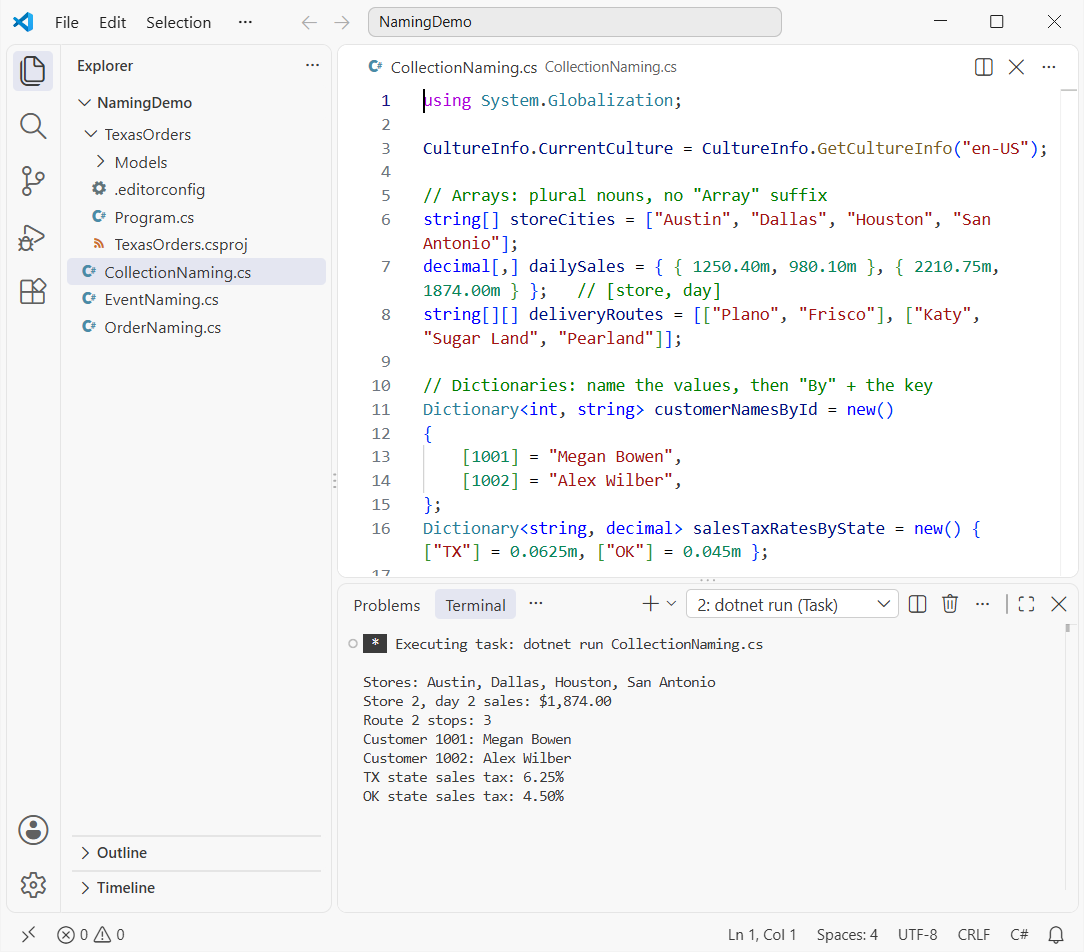
Notice the loop variables, too. Deconstruct the pair into customerId and customerName instead of kvp.Key so the body stays readable.
Some teams prefer customerIdToName. That’s fine, just pick one shape per codebase. For the APIs themselves, see my guides to the C# array and the C# Dictionary.
C# File and Folder Naming Conventions
Name each file after the type it contains: CheckoutService.cs holds CheckoutService. One top-level type per file is the convention most teams follow, and StyleCop’s SA1402 rule can enforce it.
Generic types usually drop the angle brackets, so Repository<T> lives in Repository.cs. For a partial class in C#, add a descriptive part: Order.cs and Order.Validation.cs.
Folders are PascalCase with no spaces or special characters. The ASP.NET Core templates use plural folders like Controllers, Models, and Views, and I follow that.
The bigger rule: the namespace should equal the root namespace plus the folder path. A file in Models should be in TexasOrders.Models. My post on the namespace in C# explains how namespaces group types.
TexasOrders
├── .editorconfig
├── Program.cs
├── TexasOrders.csproj
└── Models
    └── Order.cs   (namespace TexasOrders.Models)
Visual Studio checks this with rule IDE0130. You’ll see it fire on the command line in the next section.
How Do You Enforce C# Naming Conventions with .editorconfig (IDE1006)?
Code reviews shouldn’t be the only thing catching bad names. An .editorconfig naming rule makes the build do it, and every violation shows up as IDE1006.
I built a small console project with dotnet new-style settings. If you haven’t made one before, here’s how to create a console app in VS Code. This is the project file:
<Project Sdk="Microsoft.NET.Sdk">
  <PropertyGroup>
    <OutputType>Exe</OutputType>
    <TargetFramework>net10.0</TargetFramework>
    <ImplicitUsings>enable</ImplicitUsings>
    <Nullable>enable</Nullable>
    <EnforceCodeStyleInBuild>true</EnforceCodeStyleInBuild>
  </PropertyGroup>
  <ItemGroup>
    <CompilerVisibleProperty Include="RootNamespace" />
    <CompilerVisibleProperty Include="ProjectDir" />
  </ItemGroup>
</Project>
EnforceCodeStyleInBuild turns on code-style analysis during dotnet build. The two CompilerVisibleProperty items let IDE0130 know the root namespace and project folder outside Visual Studio.
Next, Models\Order.cs has two planted mistakes: a field without the underscore, and a namespace that doesn’t match its folder.
namespace TexasOrders.Data;

public class Order
{
    private decimal orderTotal;
    private readonly string _customerName;

    public Order(string customerName, decimal total)
    {
        _customerName = customerName;
        orderTotal = total;
    }

    public string Summary => $"{_customerName}: {orderTotal:C}";
}
And Program.cs just creates an order and prints it, so the project has something to build:
using TexasOrders.Data;

var order = new Order("Adele Vance", 149.99m);
Console.WriteLine(order.Summary);
Here’s the .editorconfig and the real build output:
root = true

[*.cs]
# Private fields must be _camelCase
dotnet_naming_symbols.private_fields.applicable_kinds = field
dotnet_naming_symbols.private_fields.applicable_accessibilities = private
dotnet_naming_style.underscore_camel.capitalization = camel_case
dotnet_naming_style.underscore_camel.required_prefix = _
dotnet_naming_rule.private_fields_underscored.symbols = private_fields
dotnet_naming_rule.private_fields_underscored.style = underscore_camel
dotnet_naming_rule.private_fields_underscored.severity = warning

# Report naming and namespace-folder problems on build
dotnet_diagnostic.IDE1006.severity = warning
dotnet_diagnostic.IDE0130.severity = warning
Build output:
  Determining projects to restore...
  All projects are up-to-date for restore.
C:\DotNetDemo\NamingDemo\TexasOrders\Models\Order.cs(1,11): warning IDE0130: Namespace "TexasOrders.Data" does not match folder structure, expected "TexasOrders.Models" (https://learn.microsoft.com/dotnet/fundamentals/code-analysis/style-rules/ide0130) [C:\DotNetDemo\NamingDemo\TexasOrders\TexasOrders.csproj]
C:\DotNetDemo\NamingDemo\TexasOrders\Models\Order.cs(5,21): warning IDE1006: Naming rule violation: Missing prefix: '_' (https://learn.microsoft.com/dotnet/fundamentals/code-analysis/style-rules/ide1006) [C:\DotNetDemo\NamingDemo\TexasOrders\TexasOrders.csproj]
  TexasOrders -> C:\DotNetDemo\NamingDemo\TexasOrders\bin\Debug\net10.0\TexasOrders.dll

Build succeeded.

C:\DotNetDemo\NamingDemo\TexasOrders\Models\Order.cs(1,11): warning IDE0130: Namespace "TexasOrders.Data" does not match folder structure, expected "TexasOrders.Models" (https://learn.microsoft.com/dotnet/fundamentals/code-analysis/style-rules/ide0130) [C:\DotNetDemo\NamingDemo\TexasOrders\TexasOrders.csproj]
C:\DotNetDemo\NamingDemo\TexasOrders\Models\Order.cs(5,21): warning IDE1006: Naming rule violation: Missing prefix: '_' (https://learn.microsoft.com/dotnet/fundamentals/code-analysis/style-rules/ide1006) [C:\DotNetDemo\NamingDemo\TexasOrders\TexasOrders.csproj]
    2 Warning(s)
    0 Error(s)

Time Elapsed 00:00:01.45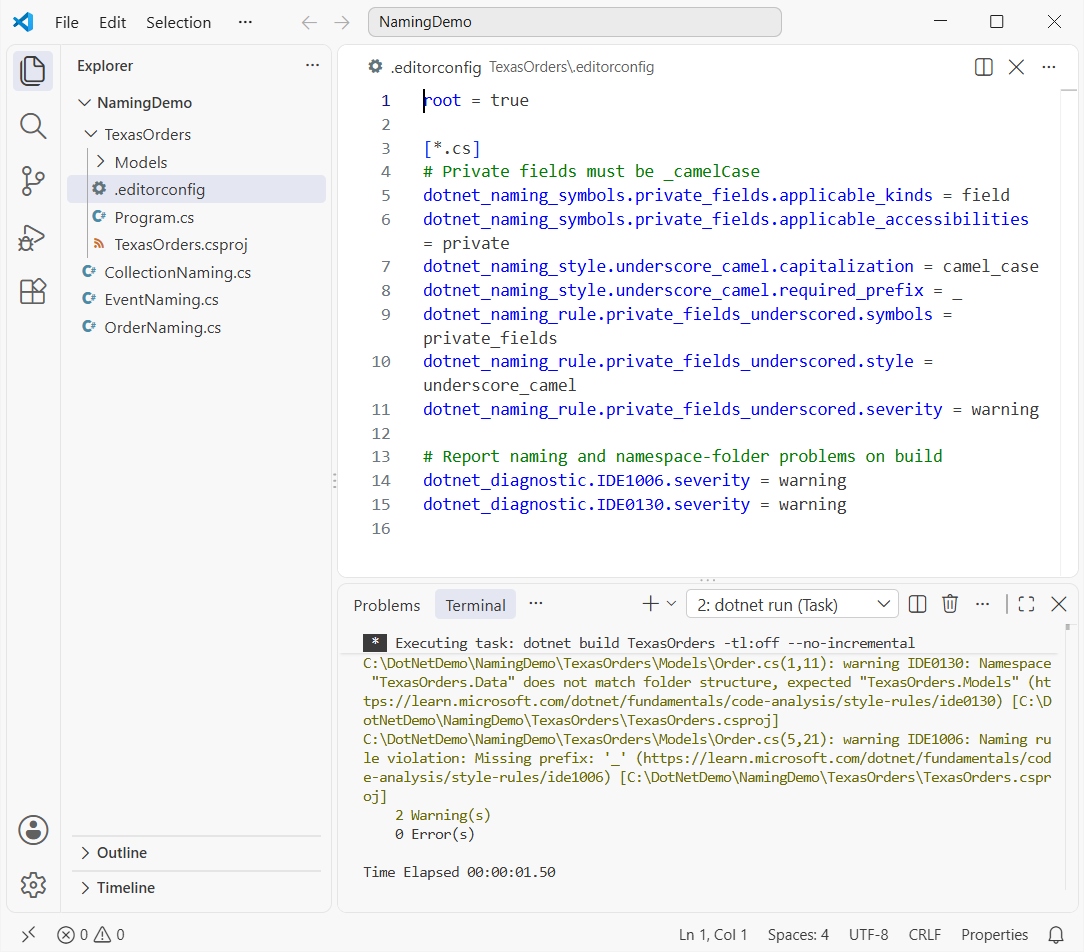
Both warnings point at the exact line and column. Rename the field to _orderTotal and change the namespace to TexasOrders.Models, and the build comes back clean.
One gotcha cost me an hour the first time. The .severity on a naming rule only works inside the IDE, so the dotnet_diagnostic.IDE1006.severity = warning line is what makes the build report it.
WinForms and ASP.NET Control Naming: Are Prefixes Like btn and txt Still OK?
Older WinForms and Web Forms code is full of Hungarian prefixes: btnSubmit, txtEmail, cmbCityNames, ddlState. The Framework Design Guidelines say plainly not to use Hungarian notation.
Those guidelines target public APIs, though, and controls are usually private fields the designer generates. Microsoft’s coding conventions also say you don’t have to rename designer-created objects.
So what do teams actually do? In legacy apps, I keep whatever prefix style is already there, because consistency wins. In new code, I put the control type at the end instead.
| Control | Legacy prefix | Modern name |
|---|---|---|
| Button | btnSubmit | submitButton |
| TextBox | txtEmail | emailTextBox |
| ComboBox | cmbCityNames | cityComboBox |
| DropDownList | ddlState | stateDropDownList |
| Label | lblError | errorLabel |
| CheckBox | chkRememberMe | rememberMeCheckBox |
| GridView | gvOrders | ordersGridView |
Suffix names group by meaning in IntelliSense, so every email-related control sits together. Whatever you pick, never ship comboBox1. The designer’s default name tells the next developer nothing.
Event handlers keep the designer pattern, like cityComboBox_SelectedIndexChanged. For a data-bound grid example, see GridView in ASP.NET.
Which C# Naming Convention Should Your Team Pick?
If you’re starting fresh, copy Microsoft’s conventions as written: PascalCase for anything public, camelCase for locals and parameters, _camelCase for private fields. Then put the rules in .editorconfig so the build enforces them.
If you’re working in an older codebase, match what’s there and fix names as you touch files. A half-converted project is harder to read than one consistent older style.
Want to keep going with the basics behind these names? These are worth a read next:
- Practice enum values with the C# enum tutorial
- Compare value types in structures in C#
- See constructor parameters named in constructors in C#
- Review the design side in OOP concepts in C#
Frequently Asked Questions
What are the standard C# naming conventions?
PascalCase for namespaces, types, methods, properties, events, and constants; camelCase for parameters and local variables; _camelCase for private fields; and an I prefix for interfaces. Microsoft lists them in C# identifier naming rules and conventions.
Should private fields in C# start with an underscore?
Microsoft’s C# coding conventions and the .NET runtime use _camelCase for private and internal instance fields, and s_ for private static fields. Some teams use plain camelCase with this. instead. Pick one and enforce it with .editorconfig.
Are C# constants written in ALL_CAPS?
No. C# constants use PascalCase at every access level, for example MaxItemsPerOrder. ALL_CAPS with underscores is a C and Java habit.
Should a C# event name start with On?
No. Name the event with a verb, like Shipped, and use On only for the protected virtual method that raises it, like OnShipped.
How do I make the build fail on naming violations?
Add a dotnet_naming_rule to .editorconfig, set dotnet_diagnostic.IDE1006.severity to warning or error, and set EnforceCodeStyleInBuild to true in the project file. The code-style naming rules page lists every option.
Is Hungarian notation like btnSave allowed in C#?
It compiles, but the Framework Design Guidelines say not to use Hungarian notation. Many WinForms and Web Forms teams still use control prefixes for consistency in older apps.

Bijay Kumar is a renowned software engineer, accomplished author, and distinguished Microsoft Most Valuable Professional (MVP) specializing in SharePoint. With a rich professional background spanning over 15 years, Bijay has established himself as an authority in the field of information technology. He possesses unparalleled expertise in multiple programming languages and technologies such as ASP.NET, ASP.NET MVC, C#.NET, and SharePoint, which has enabled him to develop innovative and cutting-edge solutions for clients across the globe. Read more…