
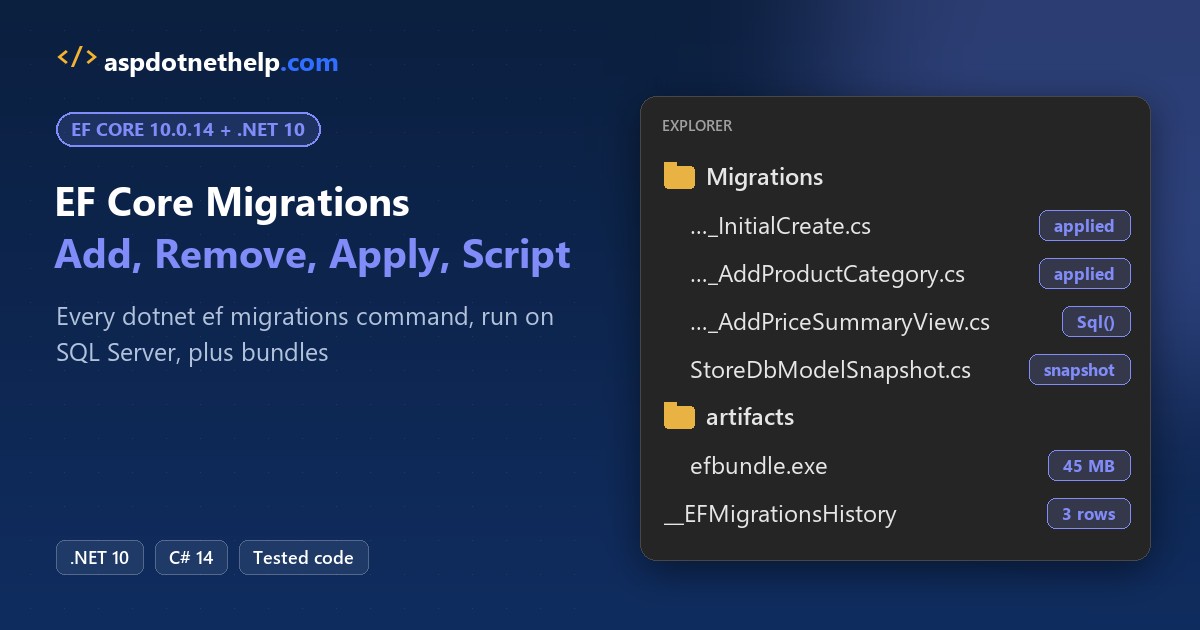
Most EF Core migrations messes I untangle start with dotnet ef migrations remove on a migration that already ran. EF Core 10 refuses: “has already been applied to the database.” Deleting the migration file by hand is worse, because nothing fails at all.
Roll the database back first, then remove the migration:
dotnet ef database update InitialCreate
dotnet ef migrations remove
Below is every migrations command I use, each run on .NET 10 with EF Core 10.0.14 against a local SQL Server, plus the safer ways to ship them to production.
EF Core Migrations Commands Cheat Sheet
Here’s the short version. Every command runs from the project folder, and each one builds the project first unless you pass --no-build:
| Task | .NET CLI command | What it does |
|---|---|---|
| Add a migration | dotnet ef migrations add <Name> | Writes Up/Down code plus a model snapshot |
| See applied vs. pending | dotnet ef migrations list | Marks unapplied ones (Pending) |
| Apply everything | dotnet ef database update | Runs every pending migration |
| Roll back | dotnet ef database update <Name> | Runs Down for every newer migration |
| Undo all | dotnet ef database update 0 | Reverts every migration |
| Remove the last one | dotnet ef migrations remove | Only if it isn’t applied |
| Revert + remove | dotnet ef migrations remove --force | Reverts the database, then deletes the files |
| SQL script | dotnet ef migrations script [from] [to] | Prints or saves the SQL |
| Safe-to-rerun script | dotnet ef migrations script --idempotent | Checks the history table first |
| Bundle | dotnet ef migrations bundle | Builds efbundle.exe |
| Forgot a migration? | dotnet ef migrations has-pending-model-changes | Exit code 1 if the model changed |
This page assumes you already have a DbContext. If you don’t, my EF Core tutorial for beginners builds one from scratch, entities and CRUD included.
Install dotnet-ef and Microsoft.EntityFrameworkCore.Design
The dotnet ef commands come from a .NET tool, and they also need the Design package in your startup project. I install the tool locally, so its version is pinned in the repo next to the code:
dotnet new console -n W11EfMigrations -o W11EfMigrations
cd W11EfMigrations
dotnet add package Microsoft.EntityFrameworkCore.SqlServer --version 10.0.14
dotnet add package Microsoft.EntityFrameworkCore.Design --version 10.0.14
dotnet add package System.Security.Cryptography.Pkcs --version 10.0.14
dotnet new tool-manifest
dotnet tool install dotnet-ef --version 10.0.14
I added the Pkcs line because the SQL Server provider pulls in an older Pkcs package that dotnet build flags with NU1903. Here are the project file and tool manifest those commands made:
<Project Sdk="Microsoft.NET.Sdk">

  <PropertyGroup>
    <OutputType>Exe</OutputType>
    <TargetFramework>net10.0</TargetFramework>
    <ImplicitUsings>enable</ImplicitUsings>
    <Nullable>enable</Nullable>
  </PropertyGroup>

  <ItemGroup>
    <PackageReference Include="Microsoft.EntityFrameworkCore.Design" Version="10.0.14">
      <IncludeAssets>runtime; build; native; contentfiles; analyzers; buildtransitive</IncludeAssets>
      <PrivateAssets>all</PrivateAssets>
    </PackageReference>
    <PackageReference Include="Microsoft.EntityFrameworkCore.SqlServer" Version="10.0.14" />
    <PackageReference Include="System.Security.Cryptography.Pkcs" Version="10.0.14" />
  </ItemGroup>

</Project>
{
"version": 1,
"isRoot": true,
"tools": {
"dotnet-ef": {
"version": "10.0.14",
"commands": [
"dotnet-ef"
],
"rollForward": false
}
}
}A teammate who clones the repo runs dotnet tool restore and gets the same version. Check it with dotnet ef --version:
Entity Framework Core .NET Command-line Tools
10.0.14
EF Core 10 needs .NET 10, so check your .NET SDK version if the packages refuse to install. A project still on .NET 8 needs the .NET 8 to .NET 10 upgrade first.
The Sample EF Core Model Behind Every Command
Every command below runs against the same small catalog for Trailhead Outfitters, a made-up outdoor gear store in Boise, Idaho. Version one of the entity has three properties:
namespace W11EfMigrations;

public class Product
{
    public int Id { get; set; }
    public required string Name { get; set; }
    public decimal Price { get; set; }
}
The context points at a local SQL Server database named W11EfMigrations, with Windows authentication:
using Microsoft.EntityFrameworkCore;

namespace W11EfMigrations;

public class StoreDb : DbContext
{
    public DbSet<Product> Products => Set<Product>();

    protected override void OnConfiguring(DbContextOptionsBuilder options) =>
        options.UseSqlServer("Server=.;Database=W11EfMigrations;Trusted_Connection=True;TrustServerCertificate=True");

    protected override void OnModelCreating(ModelBuilder modelBuilder)
    {
        modelBuilder.Entity<Product>().Property(p => p.Name).HasMaxLength(80);
        modelBuilder.Entity<Product>().Property(p => p.Price).HasPrecision(10, 2);
    }
}
Note: a hard-coded connection string keeps the demo short. In a real app, read it from configuration (my options pattern guide covers that side) and register the context with AddDbContext.
Add a Migration with dotnet ef migrations add
A migration compares your model with the last snapshot and writes C# that changes the schema. Name it like a commit message:
dotnet ef migrations add InitialCreateBuild started...
Build succeeded.
Done. To undo this action, use 'ef migrations remove'It created three files in a Migrations folder: the migration, a designer file with metadata, and the model snapshot that the next migrations add compares against:
20261107200540_InitialCreate.Designer.cs
20261107200540_InitialCreate.cs
StoreDbModelSnapshot.cs
The 14-digit prefix is a UTC timestamp, so files sort in the order they were created. Use --output-dir (-o) for a different folder and --namespace (-n) for a different namespace.
See which migrations are applied with migrations list
Run dotnet ef migrations list. It connects to the database and adds (Pending) after every migration that hasn’t run yet. Right after the add, that’s InitialCreate:
20261107200540_InitialCreate (Pending)Pass --no-connect to list the migrations in the project without touching the database. In code, GetAppliedMigrationsAsync() and GetPendingMigrationsAsync() give you the same two lists.
Apply Migrations with dotnet ef database update
database update creates the database if it’s missing and applies every pending migration:
Acquiring an exclusive lock for migration application. See https://aka.ms/efcore-docs-migrations-lock for more information if this takes too long.
Applying migration '20261107200540_InitialCreate'.
Done.
The “exclusive lock” line comes from EF Core 9 and later. Two deployments can’t apply migrations to the same database at once anymore, which is one of the changes I listed in what is new in .NET 10.
Now a real model change. The store wants a category on each product, so Product gets an optional Category, nullable thanks to nullable reference types:
using System.ComponentModel.DataAnnotations;

namespace W11EfMigrations;

public class Product
{
    public int Id { get; set; }
    public required string Name { get; set; }
    public decimal Price { get; set; }

    [MaxLength(40)]
    public string? Category { get; set; }
}
dotnet ef migrations add AddProductCategory
dotnet ef database updateAlways open the generated file before you apply it. This one is exactly what I wanted, a nullable nvarchar(40) column, with a Down method that drops it again:
using Microsoft.EntityFrameworkCore.Migrations;

#nullable disable

namespace W11EfMigrations.Migrations
{
    /// <inheritdoc />
    public partial class AddProductCategory : Migration
    {
        /// <inheritdoc />
        protected override void Up(MigrationBuilder migrationBuilder)
        {
            migrationBuilder.AddColumn<string>(
                name: "Category",
                table: "Products",
                type: "nvarchar(40)",
                maxLength: 40,
                nullable: true);
        }

        /// <inheritdoc />
        protected override void Down(MigrationBuilder migrationBuilder)
        {
            migrationBuilder.DropColumn(
                name: "Category",
                table: "Products");
        }
    }
}
Acquiring an exclusive lock for migration application. See https://aka.ms/efcore-docs-migrations-lock for more information if this takes too long.
Applying migration '20261107200636_AddProductCategory'.
Done.Important: EF Core can’t tell a rename from a drop plus an add. If you rename a property, change the generated DropColumn/AddColumn pair to RenameColumn, or the data in that column is gone.
How Do You Remove a Migration in EF Core?
If the migration isn’t applied yet, dotnet ef migrations remove deletes the newest migration and rolls the snapshot back. Once it’s applied, you get the error from the top of this page:
dotnet ef migrations removeThe migration '20261107200636_AddProductCategory' has already been applied to the database. Revert it and try again. If the migration has been applied to other databases, consider reverting its changes using a new migration instead.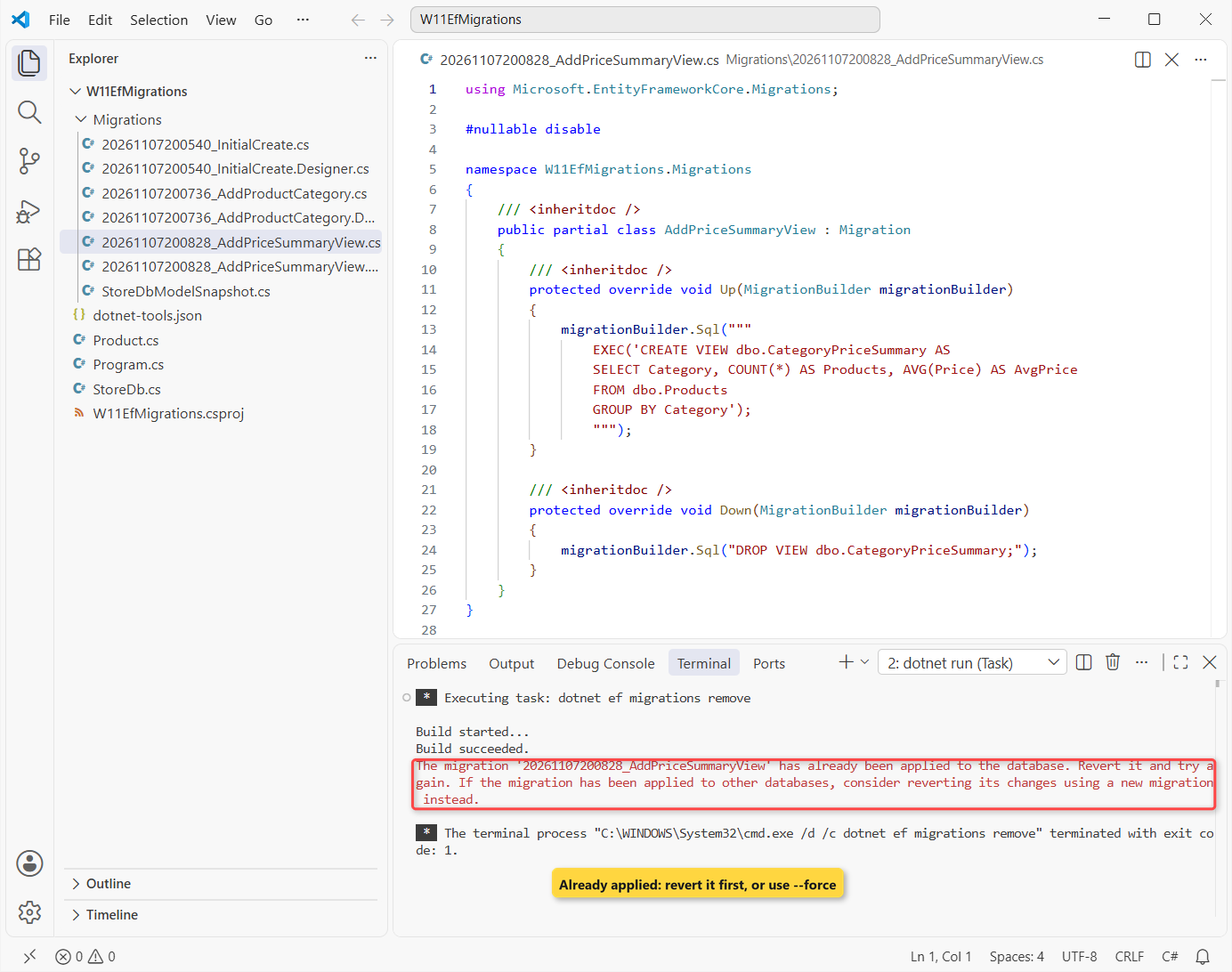
On your own dev database, you have two fixes. Update to the previous migration and then remove, as in the intro, or let --force do both steps:
dotnet ef migrations remove --forceAcquiring an exclusive lock for migration application. See https://aka.ms/efcore-docs-migrations-lock for more information if this takes too long.
Reverting migration '20261107200636_AddProductCategory'.
Removing migration '20261107200636_AddProductCategory'.
Reverting the model snapshot.
Done.That reverted the database and deleted the files. A quick look at the table confirmed the Category column was gone again:
name
----
Id
Name
Price
Important: never remove a migration that already ran on a shared, test or production database. Add a new corrective migration instead, so every database can still move forward from where it is.
For the rest of this page, I added AddProductCategory back and applied it, so it has a new ID: 20261107200736_AddProductCategory.
What Happens If You Delete a Migration File by Hand?
Nothing warns you, and that’s the problem. I deleted the AddProductCategory migration and its designer file while the migration was applied. The list just stopped showing it:
20261107200540_InitialCreatehas-pending-model-changes also said everything was fine, because the snapshot still contains Category:
No changes have been made to the model since the last migration.Then I tried to roll back to InitialCreate. EF Core had no Down code for the missing migration, so it did nothing:
Acquiring an exclusive lock for migration application. See https://aka.ms/efcore-docs-migrations-lock for more information if this takes too long.
No migrations were applied. The database is already up to date.
Done.
The Category column was still there in SQL Server:
name
----
Id
Name
Price
Category
The fix is to restore the files from source control. If they’re truly lost, add a migration that matches what’s in the database, the way Microsoft’s squashing steps do. Either way, let migrations remove delete migrations, not File Explorer.
Roll Back a Migration with database update and a Migration Name
There’s no separate rollback command. database update takes the migration you want the database to end at, and runs the Down method of everything newer. I had three applied migrations at this point:
dotnet ef database update InitialCreateAcquiring an exclusive lock for migration application. See https://aka.ms/efcore-docs-migrations-lock for more information if this takes too long.
Reverting migration '20261107200828_AddPriceSummaryView'.
Reverting migration '20261107200736_AddProductCategory'.
Done.Both newer migrations went back in reverse order, and the list now shows them as pending again:
20261107200540_InitialCreate
20261107200736_AddProductCategory (Pending)
20261107200828_AddPriceSummaryView (Pending)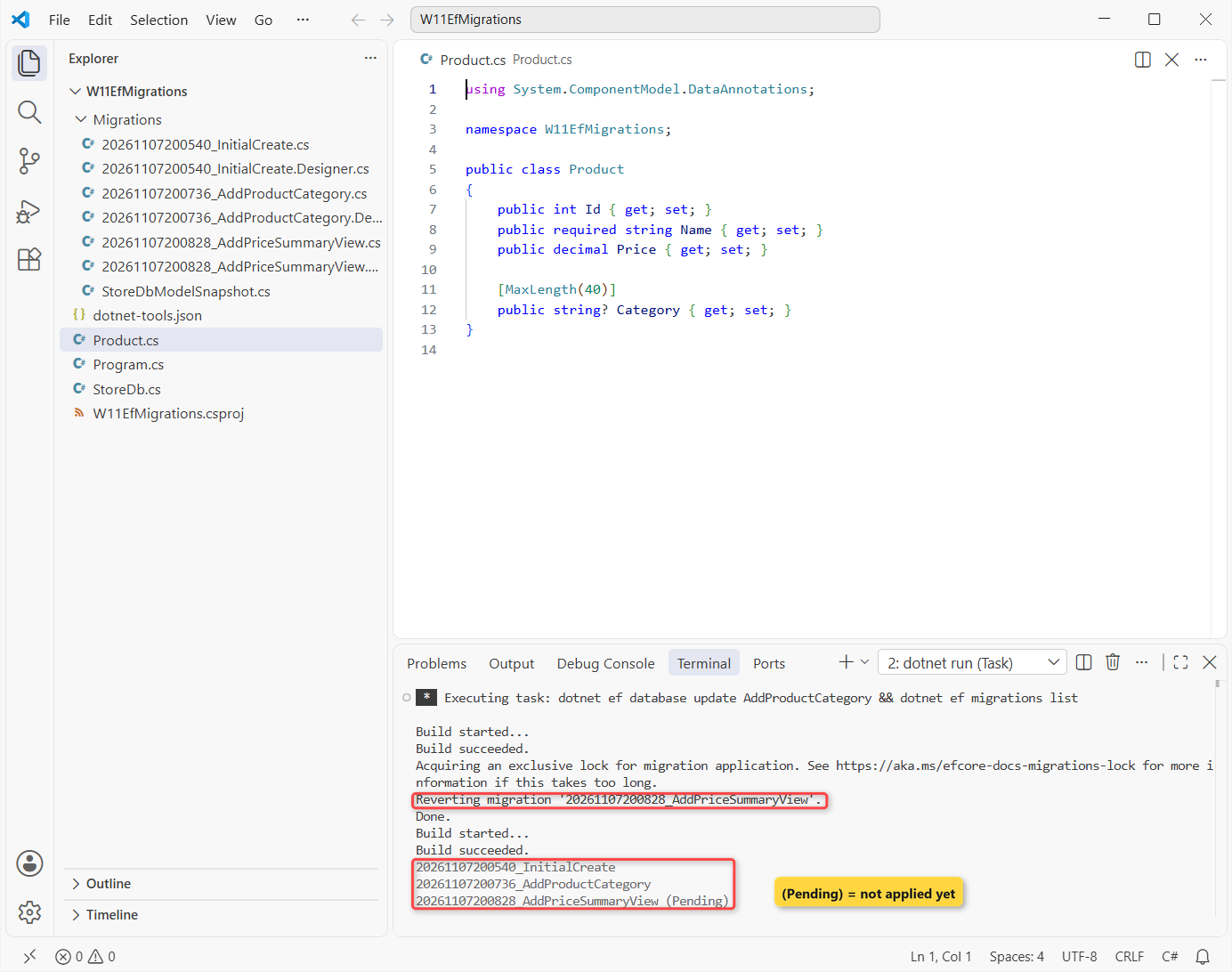
The special target 0 means before the first migration, so it reverts everything:
dotnet ef database update 0Acquiring an exclusive lock for migration application. See https://aka.ms/efcore-docs-migrations-lock for more information if this takes too long.
Reverting migration '20261107200540_InitialCreate'.
Done.Note: a rollback runs real Down code. Down methods that drop columns lose that data, so test them on a copy before you count on them in production.
Catch a Forgotten Migration with has-pending-model-changes
This command, added in EF Core 8, compares the model with the last snapshot. Right after I added Category to the class, and before I added its migration, it said:
dotnet ef migrations has-pending-model-changesChanges have been made to the model since the last migration. Add a new migration.It also exited with code 1, and with 0 once the migration existed. That makes it a one-line CI gate that fails the build when someone changes an entity and forgets migrations add.
In tests, call context.Database.HasPendingModelChanges() and assert it’s false. I’d put that in the same project as the rest of your xUnit tests.
Run Custom SQL in a Migration with migrationBuilder.Sql
Migrations can manage things EF Core doesn’t model, like views, stored procedures and triggers. Add a migration without changing the model, and you get a class with empty Up and Down methods to fill in:
dotnet ef migrations add AddPriceSummaryViewMy first version put a plain CREATE VIEW inside migrationBuilder.Sql. That version is fine with database update, but it breaks the idempotent script in the next section, so here’s the version I kept, with the statement wrapped in EXEC:
using Microsoft.EntityFrameworkCore.Migrations;

#nullable disable

namespace W11EfMigrations.Migrations
{
    /// <inheritdoc />
    public partial class AddPriceSummaryView : Migration
    {
        /// <inheritdoc />
        protected override void Up(MigrationBuilder migrationBuilder)
        {
            migrationBuilder.Sql("""
                EXEC('CREATE VIEW dbo.CategoryPriceSummary AS
                SELECT Category, COUNT(*) AS Products, AVG(Price) AS AvgPrice
                FROM dbo.Products
                GROUP BY Category');
                """);
        }

        /// <inheritdoc />
        protected override void Down(MigrationBuilder migrationBuilder)
        {
            migrationBuilder.Sql("DROP VIEW dbo.CategoryPriceSummary;");
        }
    }
}
The Down method drops the view, so a rollback stays clean. The view groups products by category, the same idea as LINQ GroupBy in C#, just running in SQL Server.
Generate SQL Scripts with dotnet ef migrations script
Scripts are what you hand to a DBA or a release pipeline that wants to review SQL first. With a from and a to, you get just the steps in between. The from is the last migration already applied:
dotnet ef migrations script InitialCreate AddProductCategoryBEGIN TRANSACTION;
ALTER TABLE [Products] ADD [Category] nvarchar(40) NULL;
INSERT INTO [__EFMigrationsHistory] ([MigrationId], [ProductVersion])
VALUES (N'20261107200736_AddProductCategory', N'10.0.14');
COMMIT;
GONo arguments means from 0 to the latest migration. Swap from and to to get a rollback script. Add --output to save a file instead of printing to the console:
dotnet ef migrations script --output artifacts/migrate.sql
dotnet ef migrations script --idempotent --output artifacts/migrate-idempotent.sql
A plain script only works on a database at the exact from migration. An --idempotent script wraps each migration in an IF NOT EXISTS check against the history table, so you can run it against any version of the database.
Why CREATE VIEW broke the idempotent script
Here’s what that check did to my first view migration:
IF NOT EXISTS (
    SELECT * FROM [__EFMigrationsHistory]
    WHERE [MigrationId] = N'20261107200540_InitialCreate'
)
BEGIN
    CREATE TABLE [Products] (
        [Id] int NOT NULL IDENTITY,
        [Name] nvarchar(80) NOT NULL,
        [Price] decimal(10,2) NOT NULL,
        CONSTRAINT [PK_Products] PRIMARY KEY ([Id])
    );
END;

IF NOT EXISTS (
    SELECT * FROM [__EFMigrationsHistory]
    WHERE [MigrationId] = N'20261107200540_InitialCreate'
)
BEGIN
    INSERT INTO [__EFMigrationsHistory] ([MigrationId], [ProductVersion])
    VALUES (N'20261107200540_InitialCreate', N'10.0.14');
END;

COMMIT;
GO

BEGIN TRANSACTION;
IF NOT EXISTS (
    SELECT * FROM [__EFMigrationsHistory]
    WHERE [MigrationId] = N'20261107200736_AddProductCategory'
)
BEGIN
    ALTER TABLE [Products] ADD [Category] nvarchar(40) NULL;
END;

IF NOT EXISTS (
    SELECT * FROM [__EFMigrationsHistory]
    WHERE [MigrationId] = N'20261107200736_AddProductCategory'
)
BEGIN
    INSERT INTO [__EFMigrationsHistory] ([MigrationId], [ProductVersion])
    VALUES (N'20261107200736_AddProductCategory', N'10.0.14');
END;

COMMIT;
GO

BEGIN TRANSACTION;
IF NOT EXISTS (
    SELECT * FROM [__EFMigrationsHistory]
    WHERE [MigrationId] = N'20261107200828_AddPriceSummaryView'
)
BEGIN
    CREATE VIEW dbo.CategoryPriceSummary AS
    SELECT Category, COUNT(*) AS Products, AVG(Price) AS AvgPrice
    FROM dbo.Products
    GROUP BY Category;
END;
SQL Server wants CREATE VIEW to be the first statement in its batch, and here it sits inside BEGIN. Running the script with sqlcmd on an empty W11EfMigrations database failed:
sqlcmd -S . -E -d W11EfMigrations -b -i artifacts\migrate-idempotent.sqlIncorrect syntax near the keyword 'VIEW'.That’s error Msg 156, and it hit after the script had already applied the first 2 migrations. A half-applied deployment script is exactly what you don’t want.
With the EXEC version, the same block becomes legal T-SQL:
BEGIN TRANSACTION;
IF NOT EXISTS (
    SELECT * FROM [__EFMigrationsHistory]
    WHERE [MigrationId] = N'20261107200540_InitialCreate'
)
BEGIN
    CREATE TABLE [Products] (
        [Id] int NOT NULL IDENTITY,
        [Name] nvarchar(80) NOT NULL,
        [Price] decimal(10,2) NOT NULL,
        CONSTRAINT [PK_Products] PRIMARY KEY ([Id])
    );
END;

IF NOT EXISTS (
    SELECT * FROM [__EFMigrationsHistory]
    WHERE [MigrationId] = N'20261107200540_InitialCreate'
)
BEGIN
    INSERT INTO [__EFMigrationsHistory] ([MigrationId], [ProductVersion])
    VALUES (N'20261107200540_InitialCreate', N'10.0.14');
END;

COMMIT;
GO

BEGIN TRANSACTION;
IF NOT EXISTS (
    SELECT * FROM [__EFMigrationsHistory]
    WHERE [MigrationId] = N'20261107200736_AddProductCategory'
)
BEGIN
    ALTER TABLE [Products] ADD [Category] nvarchar(40) NULL;
END;

IF NOT EXISTS (
    SELECT * FROM [__EFMigrationsHistory]
    WHERE [MigrationId] = N'20261107200736_AddProductCategory'
)
BEGIN
    INSERT INTO [__EFMigrationsHistory] ([MigrationId], [ProductVersion])
    VALUES (N'20261107200736_AddProductCategory', N'10.0.14');
END;

COMMIT;
GO

BEGIN TRANSACTION;
IF NOT EXISTS (
    SELECT * FROM [__EFMigrationsHistory]
    WHERE [MigrationId] = N'20261107200828_AddPriceSummaryView'
)
BEGIN
    EXEC('CREATE VIEW dbo.CategoryPriceSummary AS
    SELECT Category, COUNT(*) AS Products, AVG(Price) AS AvgPrice
    FROM dbo.Products
    GROUP BY Category');
END;
This time the script ran with no errors. Running it a second time changed nothing, because every block checks the history table first. Here’s the history table afterward:
MigrationId ProductVersion
----------- --------------
20261107200540_InitialCreate 10.0.14
20261107200736_AddProductCategory 10.0.14
20261107200828_AddPriceSummaryView 10.0.14
Note: a script doesn’t create the database. Provision it first, as I did with CREATE DATABASE, and SQLite can’t generate idempotent scripts at all.
Build and Run a Migration Bundle (efbundle.exe)
A bundle is a single executable that applies your migrations. Microsoft recommends it for automated deployments: the server doesn’t need the .NET SDK, the EF tool or your source code.
dotnet ef migrations bundle --force --output artifacts/efbundle.exeBuilding bundle...
Done. Migrations Bundle: C:\DotNetDemo\W11EfMigrations\artifacts\efbundle.exeMine came out at about 45 MB. I dropped the database and ran it, and it applied all three migrations, including the view:
Acquiring an exclusive lock for migration application. See https://aka.ms/efcore-docs-migrations-lock for more information if this takes too long.
Applying migration '20261107200540_InitialCreate'.
Applying migration '20261107200736_AddProductCategory'.
Applying migration '20261107200828_AddPriceSummaryView'.
Done.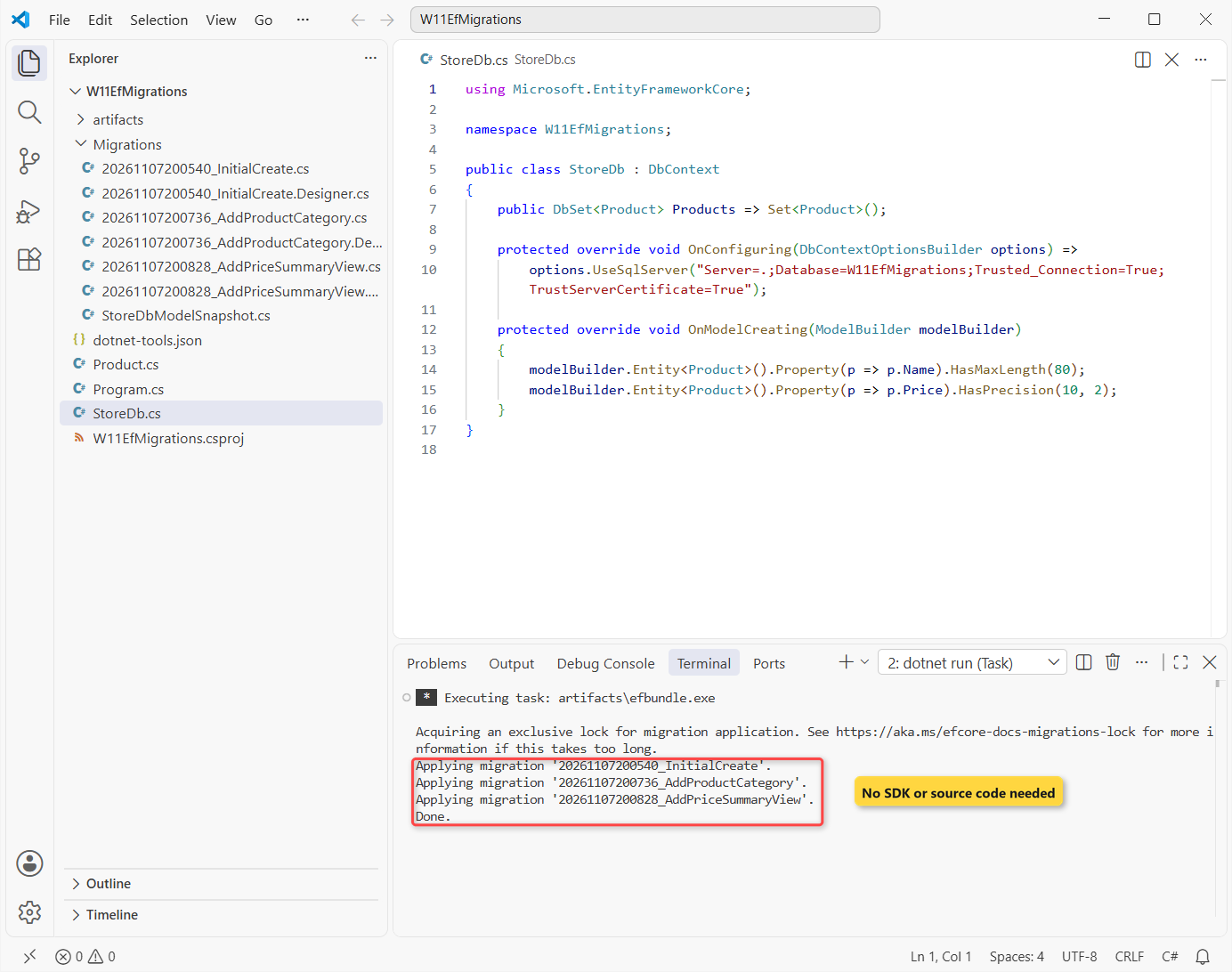
A second run is safe, which is exactly what a deployment pipeline needs:
Acquiring an exclusive lock for migration application. See https://aka.ms/efcore-docs-migrations-lock for more information if this takes too long.
No migrations were applied. The database is already up to date.
Done.
By default, the bundle uses the connection string from OnConfiguring or AddDbContext. In a pipeline, pass --connection from your secret store, and set ASPNETCORE_ENVIRONMENT so it reads the right appsettings file per environment.
For a Linux build agent or container, add --self-contained --target-runtime linux-x64. A bundle also takes a target migration, so efbundle.exe 0 reverts everything.
Should You Apply Migrations on Startup with MigrateAsync?
You can apply migrations from the app itself. Here’s the final Program.cs of my demo: it migrates, then seeds four products if the table is empty:
using System.Globalization;
using Microsoft.EntityFrameworkCore;
using W11EfMigrations;

CultureInfo.CurrentCulture = new CultureInfo("en-US");
await using var db = new StoreDb();

await db.Database.MigrateAsync();   // apply pending migrations at startup
var applied = await db.Database.GetAppliedMigrationsAsync();
Console.WriteLine($"Applied migrations: {applied.Count()}");

if (!await db.Products.AnyAsync())
{
    db.Products.AddRange(
        new Product { Name = "Trail Daypack 28L", Price = 89.99m, Category = "Packs" },
        new Product { Name = "Ridgeline 2P Tent", Price = 249.00m, Category = "Shelter" },
        new Product { Name = "Summit Trekking Poles", Price = 64.50m, Category = "Hiking" },
        new Product { Name = "Canyon Hydration Pack", Price = 74.95m, Category = "Packs" });
    await db.SaveChangesAsync();
}
Console.WriteLine($"Products: {await db.Products.CountAsync()}, total {await db.Products.SumAsync(p => p.Price):C}");
The first run against an empty database created everything, and the awaited calls printed:
Applied migrations: 3
Products: 4, total $478.44
It’s handy for demos, local tools and small single-instance apps. For production, Microsoft’s applying-migrations guide prefers a bundle or a reviewed script, and lists these tradeoffs:
- The app’s database login needs schema-change rights, which you’d normally keep away from the app.
- The SQL runs with no chance to review it first.
- Rolling back an applied migration is harder than with a script or bundle.
- Other apps using the database while it migrates can break. Before EF Core 9, two instances could also migrate at once.
In ASP.NET Core, resolve the context from a scope created from app.Services, because a DbContext is scoped. My DI lifetimes guide explains why you can’t take it from the root provider.
PendingModelChangesWarning: why Migrate() throws in EF Core 9 and 10
Starting with EF Core 9, Migrate() and MigrateAsync() throw if the model has changes with no migration. I added a Stock property and ran the app without a new migration:
using System.ComponentModel.DataAnnotations;

namespace W11EfMigrations;

public class Product
{
    public int Id { get; set; }
    public required string Name { get; set; }
    public decimal Price { get; set; }

    [MaxLength(40)]
    public string? Category { get; set; }

    public int Stock { get; set; }   // new, no migration yet
}
Unhandled exception. System.InvalidOperationException: An error was generated for warning 'Microsoft.EntityFrameworkCore.Migrations.PendingModelChangesWarning': The model for context 'StoreDb' has pending changes. Add a new migration before updating the database. See https://aka.ms/efcore-docs-pending-changes. This exception can be suppressed or logged by passing event ID 'RelationalEventId.PendingModelChangesWarning' to the 'ConfigureWarnings' method in 'DbContext.OnConfiguring' or 'AddDbContext'.In the screenshot, I piped the run through findstr /v /c:" at " to hide the stack trace and keep the message on screen:
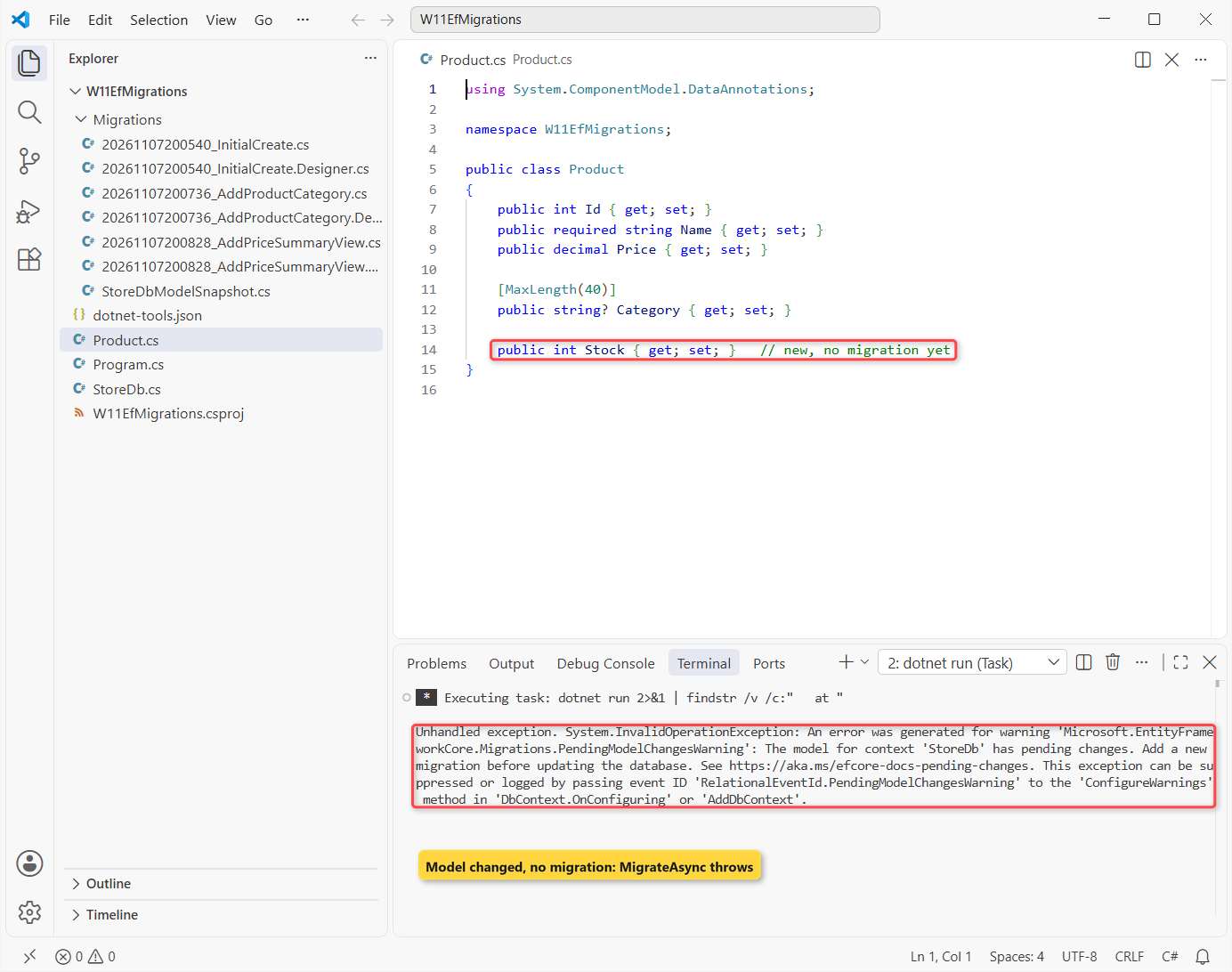
The fix is to add the migration. You can suppress it with ConfigureWarnings(w => w.Ignore(RelationalEventId.PendingModelChangesWarning)), but Microsoft doesn’t recommend that in production. Running has-pending-model-changes in CI catches it before deployment.
What Is the __EFMigrationsHistory Table?
It’s how EF Core knows what’s applied: one row per migration, with the EF Core version that applied it. Same app, then a query straight against SQL Server:
sqlcmd -S . -E -d W11EfMigrations -W -Q "SET NOCOUNT ON; SELECT MigrationId, ProductVersion FROM __EFMigrationsHistory ORDER BY MigrationId"MigrationId ProductVersion
----------- --------------
20261107200540_InitialCreate 10.0.14
20261107200736_AddProductCategory 10.0.14
20261107200828_AddPriceSummaryView 10.0.14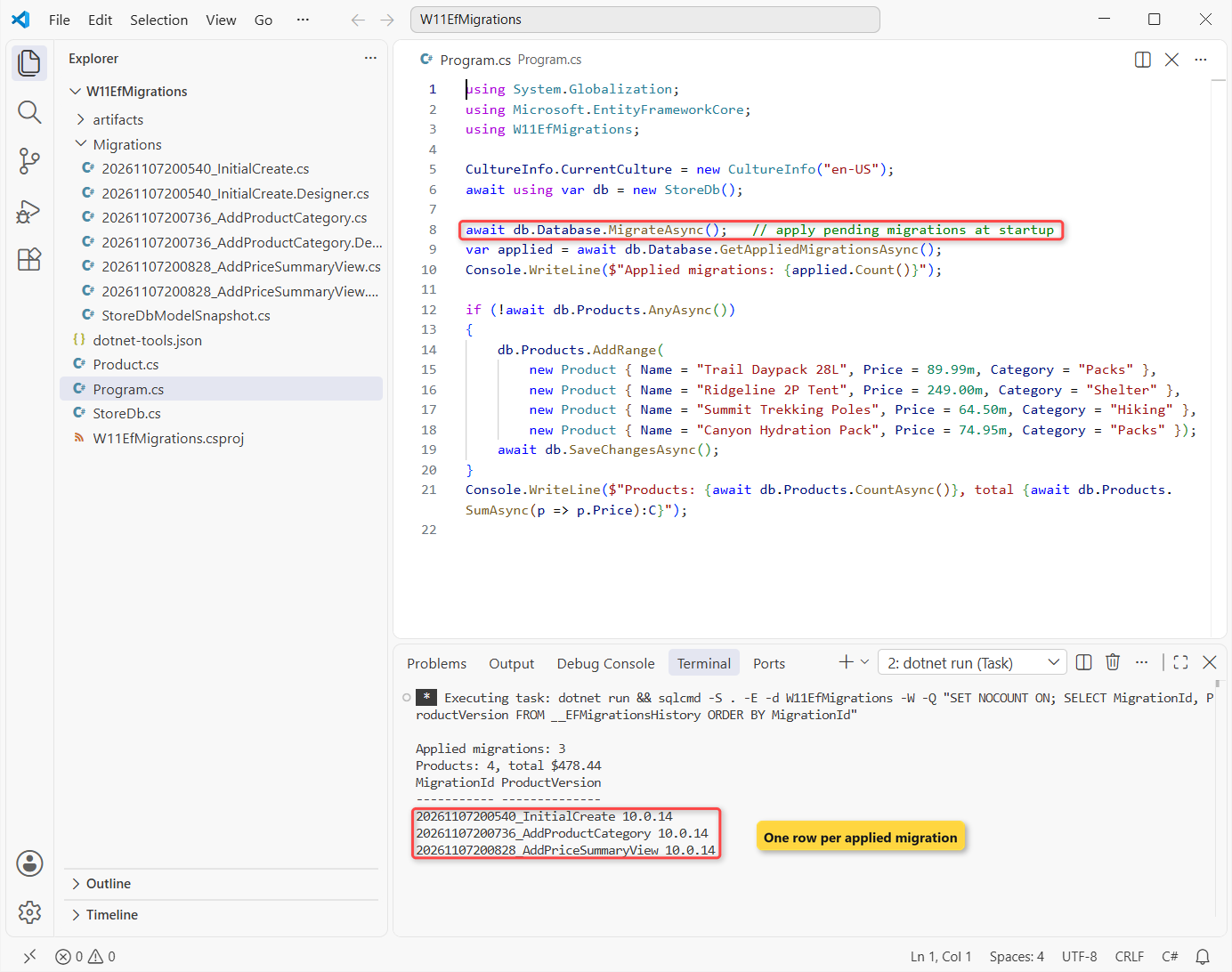
The view from the custom SQL migration works too, averaging the four products by category:
Category Products AvgPrice
-------- -------- --------
Hiking 1 64.500000
Packs 2 82.470000
Shelter 1 249.000000
From C#, GetAppliedMigrationsAsync() returns the same IDs as a sequence, so you can count or filter them with LINQ, as my Program.cs does with Count().
Treat the table as EF Core’s. Editing its rows by hand has the same effect as the deleted-file mistake earlier: EF Core trusts it and skips or repeats migrations.
Package Manager Console Equivalents for EF Core Migrations
In Visual Studio’s Package Manager Console, the same tools take PowerShell names. The Microsoft.EntityFrameworkCore.Tools package provides them:
| dotnet ef (CLI) | Package Manager Console |
|---|---|
migrations add InitialCreate | Add-Migration InitialCreate |
migrations remove | Remove-Migration |
migrations remove --force | Remove-Migration -Force |
migrations list | Get-Migration |
database update InitialCreate | Update-Database InitialCreate |
migrations script --idempotent | Script-Migration -Idempotent |
migrations bundle | Bundle-Migration |
The behavior is identical. I stick to the CLI because the same commands run on a Mac, in a build pipeline and in a console app in VS Code.
EF Core Migrations with Multiple DbContexts or a Separate Project
With more than one DbContext in a project, every command needs --context (-c). Give each context its own folder, so their snapshots don’t collide:
dotnet ef migrations add InitialCreate --context StoreDb --output-dir Migrations/Store
dotnet ef database update --context StoreDb
When the DbContext lives in a class library and a web app or console app with dependency injection starts it, point the tools at both projects:
dotnet ef migrations add AddProductCategory --project src/Store.Data --startup-project src/Store.Api--project is where the files are written, and --startup-project is the one the tools build and run to read your configuration. If that pairing gets messy, the ASP.NET Core Web API CRUD with EF Core post shows the single-project setup most APIs start with.
A few more EF Core and ASP.NET Core pages worth bookmarking:
- Every ASP.NET Core tutorial on the site
- All C# tutorials, beginner to advanced
- Which .NET version supports which EF Core
- The learn C# roadmap
Frequently Asked Questions
How do I add a migration in EF Core?
Run dotnet ef migrations add <Name> in the project folder, review the generated file, then run dotnet ef database update. In Visual Studio’s Package Manager Console, use Add-Migration <Name>.
How do I undo the last EF Core migration?
If it isn’t applied, run dotnet ef migrations remove. If it is, run dotnet ef database update <PreviousMigration> first, or use dotnet ef migrations remove --force, which reverts the database and deletes the files.
Can I delete EF Core migration files manually?
Not safely. The snapshot and the history table still remember the migration, so EF Core can’t roll it back and won’t warn you. Remove migrations with the tools, and restore deleted files from source control.
Should I run Migrate() when my app starts?
Only for small single-instance apps you control. For production, Microsoft recommends a migration bundle or an idempotent SQL script. See Applying Migrations on Microsoft Learn.
Why does Migrate throw PendingModelChangesWarning?
Since EF Core 9, Migrate and MigrateAsync throw when the model changed but no migration captures it. Add the missing migration, and run has-pending-model-changes in CI so it doesn’t reach production.
What does dotnet ef database update 0 do?
It reverts every migration by running each Down method, newest first. The history rows go with them. The full option list is in the EF Core .NET CLI reference.

Bijay Kumar is a renowned software engineer, accomplished author, and distinguished Microsoft Most Valuable Professional (MVP) specializing in SharePoint. With a rich professional background spanning over 15 years, Bijay has established himself as an authority in the field of information technology. He possesses unparalleled expertise in multiple programming languages and technologies such as ASP.NET, ASP.NET MVC, C#.NET, and SharePoint, which has enabled him to develop innovative and cutting-edge solutions for clients across the globe. Read more…