
Your API call keeps coming back 401 Unauthorized, and the token is sitting right there in a variable. HttpClient just isn’t sending it.
Quick answer: to send a C# HttpClient bearer token, set the Authorization header to an AuthenticationHeaderValue with the “Bearer” scheme:
client.DefaultRequestHeaders.Authorization =
    new AuthenticationHeaderValue("Bearer", token);
We tested it against a local .NET 10 API that returns real 401s, then moved the token into a handler that refreshes it on its own.
What You Need Before Adding a Bearer Token
- The .NET 10 SDK (I used 10.0.402). Every sample here is a file-based app, so
dotnet run File.csruns it with no project file. - The
System.Net.Http.Headersnamespace forAuthenticationHeaderValue. It’s part of .NET, no package needed. - For the handler steps:
Microsoft.Extensions.HttpandMicrosoft.Extensions.Hosting10.0.14 (ASP.NET Core apps already have both). - A token. Ours comes from a fake dev endpoint; yours comes from Microsoft Entra ID, Auth0 or your own login API.
Step 1: Run a Local API That Requires a Bearer Token
Testing against a real identity provider makes every run slow and noisy, so we built a tiny orders API on localhost:5886. POST /token hands out a random token that lives 5 seconds, and GET /orders returns a 401 unless the header carries a live one.
#!/usr/bin/env dotnet
#:sdk Microsoft.NET.Sdk.Web
#:property PublishAot=false
#:include Shared.cs
using System.Collections.Concurrent;
using System.Security.Cryptography;

var builder = WebApplication.CreateBuilder(args);
builder.Logging.ClearProviders();
var app = builder.Build();
var tokens = new ConcurrentDictionary<string, (string User, DateTimeOffset Expires)>();
var orders = new Dictionary<string, OrderSummary>
{
    ["jenna.morales"] = new("jenna.morales", 3, 412.50m),
    ["tyler.brooks"] = new("tyler.brooks", 5, 1289.95m),
};

// Fake dev token endpoint: a random token that lives 5 seconds
app.MapPost("/token", (string user) =>
{
    string token = Convert.ToHexString(RandomNumberGenerator.GetBytes(24));
    tokens[token] = (user, DateTimeOffset.UtcNow.AddSeconds(5));
    return new TokenResponse(token, 5);
});

// Simulated key rotation: every token issued so far stops working
app.MapPost("/revoke", () => { tokens.Clear(); return Results.NoContent(); });

app.MapGet("/orders", (HttpContext ctx) =>
{
    string header = ctx.Request.Headers.Authorization.ToString();
    if (!header.StartsWith("Bearer "))
    {
        ctx.Response.Headers.WWWAuthenticate = "Bearer";
        return Results.Unauthorized();
    }
    if (!tokens.TryGetValue(header["Bearer ".Length..], out var t) || t.Expires < DateTimeOffset.UtcNow)
    {
        ctx.Response.Headers.WWWAuthenticate = "Bearer error=\"invalid_token\"";
        return Results.Unauthorized();
    }
    return Results.Ok(orders[t.User]);
});

Console.WriteLine("Orders API on http://localhost:5886");
app.Run("http://localhost:5886");
POST /revoke wipes every token, the way a key rotation would. The server and the clients share these records and helpers through #:include Shared.cs:
using System.Globalization;
using System.Net.Http.Json;
using System.Text.Json.Serialization;

public record TokenResponse(
    [property: JsonPropertyName("access_token")] string AccessToken,
    [property: JsonPropertyName("expires_in")] int ExpiresIn);

public record OrderSummary(string User, int Orders, decimal Total);

public static class Lab
{
    public const string Api = "http://localhost:5886/";

    // Never print a whole token: first 6 characters only
    public static string Mask(string token) => token[..6] + "...";

    public static string Usd(decimal amount) =>
        amount.ToString("C", CultureInfo.GetCultureInfo("en-US"));

    // Dev-only token endpoint of the sample API
    public static async Task<string> GetTokenAsync(HttpClient http, string user)
    {
        using var response = await http.PostAsync($"{Api}token?user={user}", null);
        response.EnsureSuccessStatusCode();
        return (await response.Content.ReadFromJsonAsync<TokenResponse>())!.AccessToken;
    }
}
Note the Mask helper. The demos print only the first 6 characters of a token, and your logs should do the same. A curl call without a header got this back:
HTTP/1.1 401 Unauthorized
Content-Length: 0
Server: Kestrel
WWW-Authenticate: Bearer
Step 2: Add the Bearer Token with DefaultRequestHeaders.Authorization
First, the call that fails. Then we get a token and put it on DefaultRequestHeaders, so every later request from this client sends it:
#!/usr/bin/env dotnet
#:property PublishAot=false
#:include Shared.cs
using System.Net.Http.Headers;
using System.Net.Http.Json;
using static Lab;

HttpClient client = new() { BaseAddress = new Uri(Api) };

var anonymous = await client.GetAsync("orders");
Console.WriteLine($"No header:   {(int)anonymous.StatusCode} {anonymous.StatusCode}");
Console.WriteLine($"Server says: WWW-Authenticate: {anonymous.Headers.WwwAuthenticate}");

string token = await GetTokenAsync(client, "jenna.morales");
client.DefaultRequestHeaders.Authorization =
    new AuthenticationHeaderValue("Bearer", token);

var ok = await client.GetAsync("orders");
var summary = await ok.Content.ReadFromJsonAsync<OrderSummary>();
Console.WriteLine($"With Bearer: {(int)ok.StatusCode} {ok.StatusCode} (token {Mask(token)})");
Console.WriteLine($"{summary!.User}: {summary.Orders} orders, {Usd(summary.Total)}");
Output:
No header:   401 Unauthorized
Server says: WWW-Authenticate: Bearer
With Bearer: 200 OK (token 166D24...)
jenna.morales: 3 orders, $412.50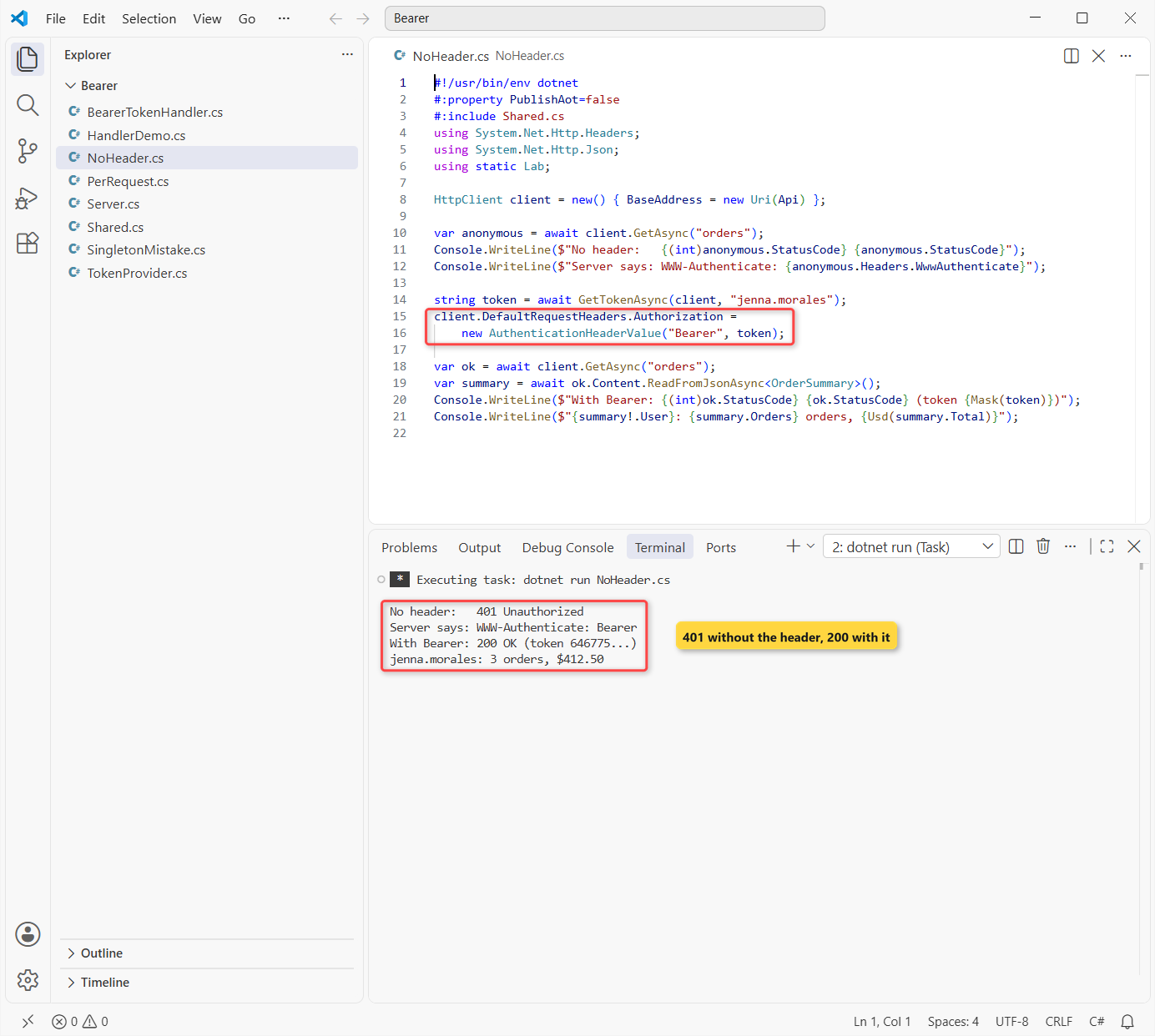
Without the header, the API answered 401 and a WWW-Authenticate: Bearer challenge. With it, we got 200 and Jenna Morales’s 3 orders worth $412.50. The token prefix changes on every run, since the server makes a new random one.
AuthenticationHeaderValue writes the header as Bearer <token> for you, with one space. Pass the raw token, not a string that already starts with “Bearer”.
This is the right choice for a client that talks to one API with one identity, such as a console tool. For the basics of GET, POST and JSON, see the HttpClient in C# guide.
Is It Safe to Change DefaultRequestHeaders on a Shared HttpClient?
No, not once requests are running. Microsoft’s docs say DefaultRequestHeaders should not be modified while there are outstanding requests. The send methods are thread-safe; the header collection isn’t.
That matters when one shared client serves many users, like a web app calling a downstream API on behalf of whoever is logged in. Setting the header per call would leak one user’s token into another user’s request.
Set it once at startup, or not at all. A shared client is the norm in .NET, and the HttpClient vs IHttpClientFactory comparison explains why a client per call is worse.
Step 3: Set the Bearer Token Per Request with HttpRequestMessage
When tokens differ per call, put the header on the HttpRequestMessage and send it with SendAsync. We fired three calls at once from one shared client, with two different users’ tokens:
#!/usr/bin/env dotnet
#:property PublishAot=false
#:include Shared.cs
using System.Net.Http.Headers;
using System.Net.Http.Json;
using static Lab;

HttpClient client = new() { BaseAddress = new Uri(Api) };  // shared
string jenna = await GetTokenAsync(client, "jenna.morales");
string tyler = await GetTokenAsync(client, "tyler.brooks");

async Task<string> OrdersFor(string token)
{
    using var request = new HttpRequestMessage(HttpMethod.Get, "orders");
    request.Headers.Authorization = new AuthenticationHeaderValue("Bearer", token);
    using var response = await client.SendAsync(request);
    var s = await response.Content.ReadFromJsonAsync<OrderSummary>();
    return $"{(int)response.StatusCode} {s!.User}: {s.Orders} orders, {Usd(s.Total)}";
}

string[] results = await Task.WhenAll(OrdersFor(jenna), OrdersFor(tyler), OrdersFor(jenna));
foreach (string line in results) Console.WriteLine(line);
Console.WriteLine($"DefaultRequestHeaders.Authorization: "
    + (client.DefaultRequestHeaders.Authorization?.ToString() ?? "(not set)"));
Output:
200 jenna.morales: 3 orders, $412.50
200 tyler.brooks: 5 orders, $1,289.95
200 jenna.morales: 3 orders, $412.50
DefaultRequestHeaders.Authorization: (not set)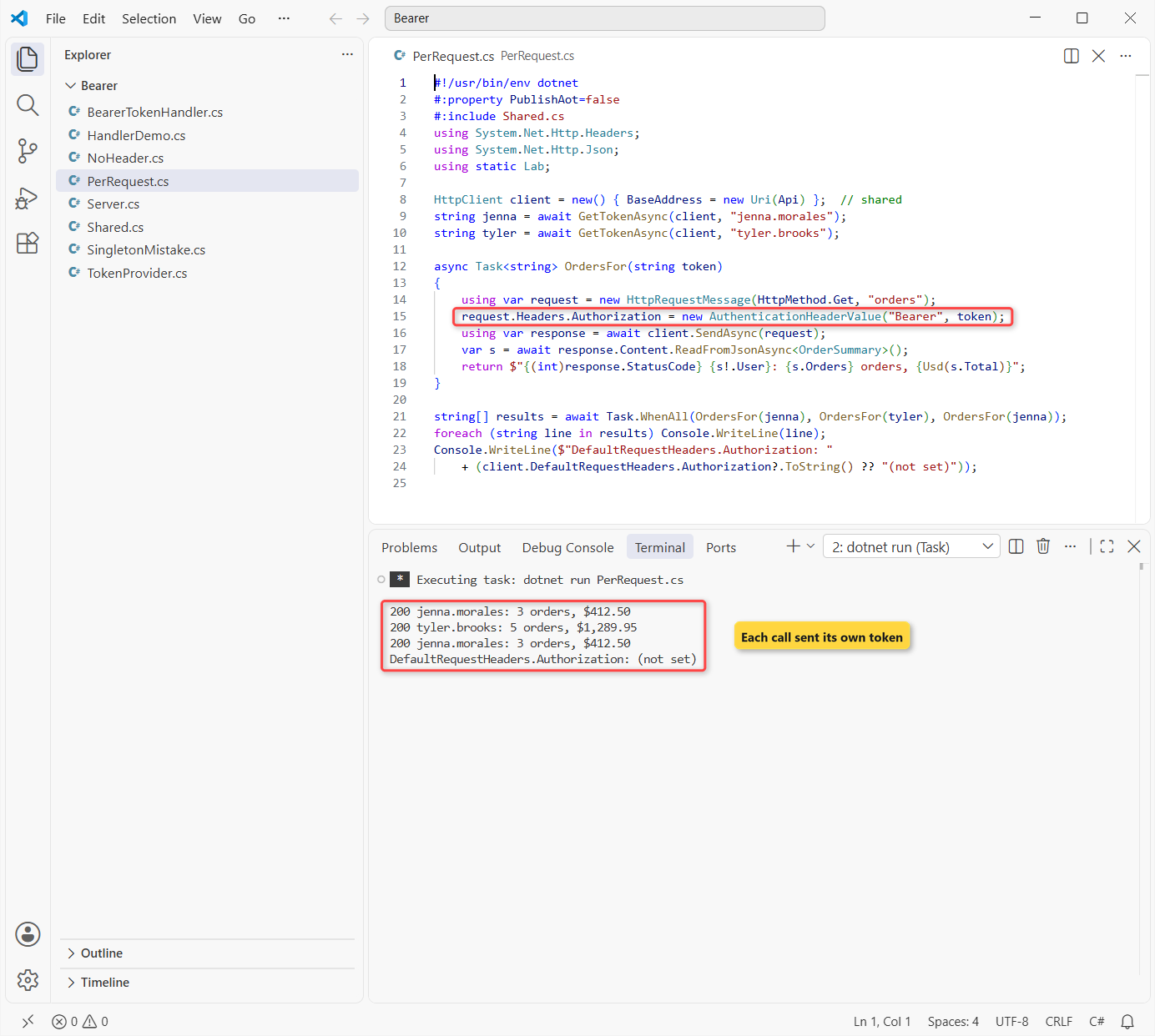
Each response matched its own token: Jenna got $412.50 and Tyler Brooks got 5 orders worth $1,289.95, even with the calls running in parallel through Task.WhenAll. The shared client’s default Authorization stayed (not set).
The using on the request and the response matters too. A request message can be sent only once, so build a new one for every call; my async/await guide covers the Task.WhenAll pattern.
Step 4: Cache and Refresh the Token in a TokenProvider
Asking for a new token before every call doubles your traffic and can trip the identity provider’s rate limits. So we keep one token in memory and get a new one only when it’s about to expire, or when the API has just rejected it:
using System.Net.Http.Json;

// Caches one access token and gets a new one shortly before it expires
public class TokenProvider(IHttpClientFactory factory)
{
    static readonly TimeSpan SafetyMargin = TimeSpan.FromSeconds(1);  // demo; use ~1 minute in production
    readonly SemaphoreSlim _lock = new(1, 1);
    string? _token;
    DateTimeOffset _expires;

    public async Task<string> GetAsync(string? rejected, CancellationToken ct)
    {
        await _lock.WaitAsync(ct);
        try
        {
            // refresh when there's no token, it's about to expire, or the API just rejected it
            if (_token is null || DateTimeOffset.UtcNow >= _expires || _token == rejected)
            {
                HttpClient auth = factory.CreateClient("auth");  // no BearerTokenHandler here
                using var response = await auth.PostAsync($"{Lab.Api}token?user=jenna.morales", null, ct);
                response.EnsureSuccessStatusCode();
                var t = (await response.Content.ReadFromJsonAsync<TokenResponse>(ct))!;
                _token = t.AccessToken;
                _expires = DateTimeOffset.UtcNow.AddSeconds(t.ExpiresIn) - SafetyMargin;
                Console.WriteLine($"  [token] new token {Lab.Mask(_token)}, expires in {t.ExpiresIn} s");
            }
            return _token;
        }
        finally
        {
            _lock.Release();
        }
    }
}
The SemaphoreSlim lets only one caller refresh at a time. The rejected check stops a burst of parallel 401s from fetching a new token each.
The provider gets its own “auth” client from IHttpClientFactory, without the bearer handler on it. Otherwise the token call would try to add a token to itself.
It’s a singleton, so it asks the factory for a client each time instead of keeping one; the DI lifetimes guide explains why that rule exists. Our 1-second safety margin is for the demo. In production, refresh about a minute early.
Step 5: Add the Token with a DelegatingHandler and Retry on 401
A DelegatingHandler sits in the HttpClient pipeline, like ASP.NET Core middleware for outgoing calls. Ours adds the header, and if the API still says 401, it gets a fresh token and retries once:
using System.Net;
using System.Net.Http.Headers;

// Adds "Authorization: Bearer <token>" to every request.
// On a 401 it gets a fresh token and retries the request once.
public class BearerTokenHandler(TokenProvider tokens) : DelegatingHandler
{
    protected override async Task<HttpResponseMessage> SendAsync(
        HttpRequestMessage request, CancellationToken ct)
    {
        string token = await tokens.GetAsync(rejected: null, ct);
        request.Headers.Authorization = new AuthenticationHeaderValue("Bearer", token);
        var response = await base.SendAsync(request, ct);
        if (response.StatusCode != HttpStatusCode.Unauthorized)
            return response;

        Console.WriteLine($"  [handler] 401 with {Lab.Mask(token)}, refreshing and retrying");
        response.Dispose();
        token = await tokens.GetAsync(rejected: token, ct);
        request.Headers.Authorization = new AuthenticationHeaderValue("Bearer", token);
        return await base.SendAsync(request, ct);
    }
}
It uses a primary constructor to receive the TokenProvider. We dispose the failed response before retrying, and we retry only once, so a wrong secret can’t cause an endless loop.
Step 6: Register the Handler with IHttpClientFactory (AddHttpMessageHandler)
Now the wiring. AddHttpMessageHandler<BearerTokenHandler>() puts the handler in front of the “orders” client, and the handler is registered as transient. Then four calls: two in a row, one after the token expires, and one after we revoke every token:
#!/usr/bin/env dotnet
#:sdk Microsoft.NET.Sdk.Worker
#:package Microsoft.Extensions.Hosting@10.0.14
#:package Microsoft.Extensions.Http@10.0.14
#:property PublishAot=false
#:include Shared.cs
#:include TokenProvider.cs
#:include BearerTokenHandler.cs
using System.Net.Http.Json;
using static Lab;

var builder = Host.CreateApplicationBuilder(args);
builder.Logging.ClearProviders();
builder.Services.AddSingleton<TokenProvider>();
builder.Services.AddTransient<BearerTokenHandler>();     // handlers must be transient
builder.Services.AddHttpClient("auth");
builder.Services.AddHttpClient("orders", c => c.BaseAddress = new Uri(Api))
    .AddHttpMessageHandler<BearerTokenHandler>();
using IHost host = builder.Build();

var factory = host.Services.GetRequiredService<IHttpClientFactory>();
async Task Call(string label)
{
    var s = await factory.CreateClient("orders").GetFromJsonAsync<OrderSummary>("orders");
    Console.WriteLine($"{label}: 200 OK, {s!.Orders} orders, {Usd(s.Total)}");
}
await Call("Call 1");
await Call("Call 2");                                   // cached token
await Task.Delay(TimeSpan.FromSeconds(5));
await Call("Call 3 (after 5 s)");                       // token expired
await factory.CreateClient().PostAsync(Api + "revoke", null);
await Call("Call 4 (after revoke)");                    // 401 -> retry
Output:
  [token] new token 3A74C2..., expires in 5 s
Call 1: 200 OK, 3 orders, $412.50
Call 2: 200 OK, 3 orders, $412.50
  [token] new token FFCE26..., expires in 5 s
Call 3 (after 5 s): 200 OK, 3 orders, $412.50
  [handler] 401 with FFCE26..., refreshing and retrying
  [token] new token B5C908..., expires in 5 s
Call 4 (after revoke): 200 OK, 3 orders, $412.50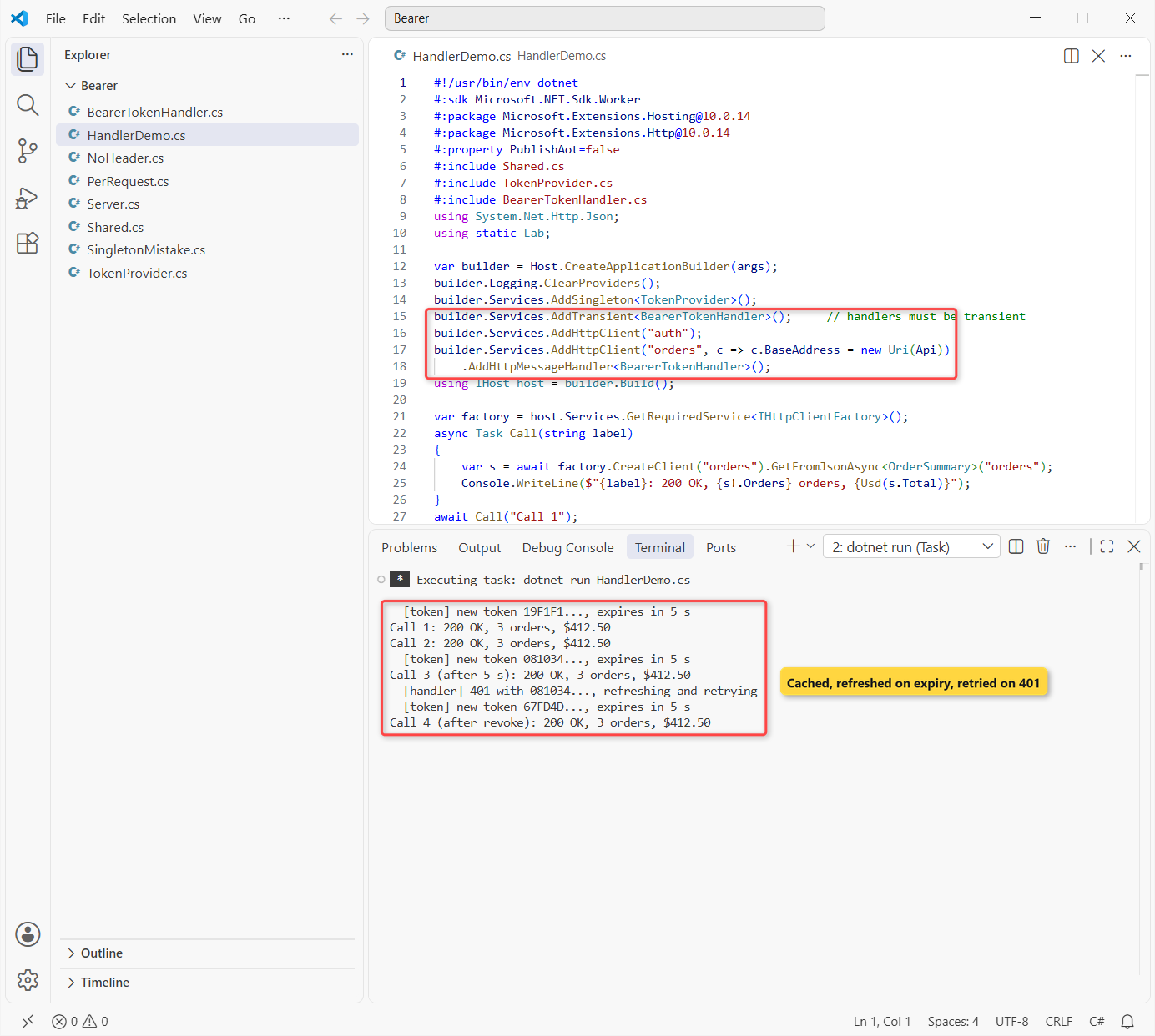
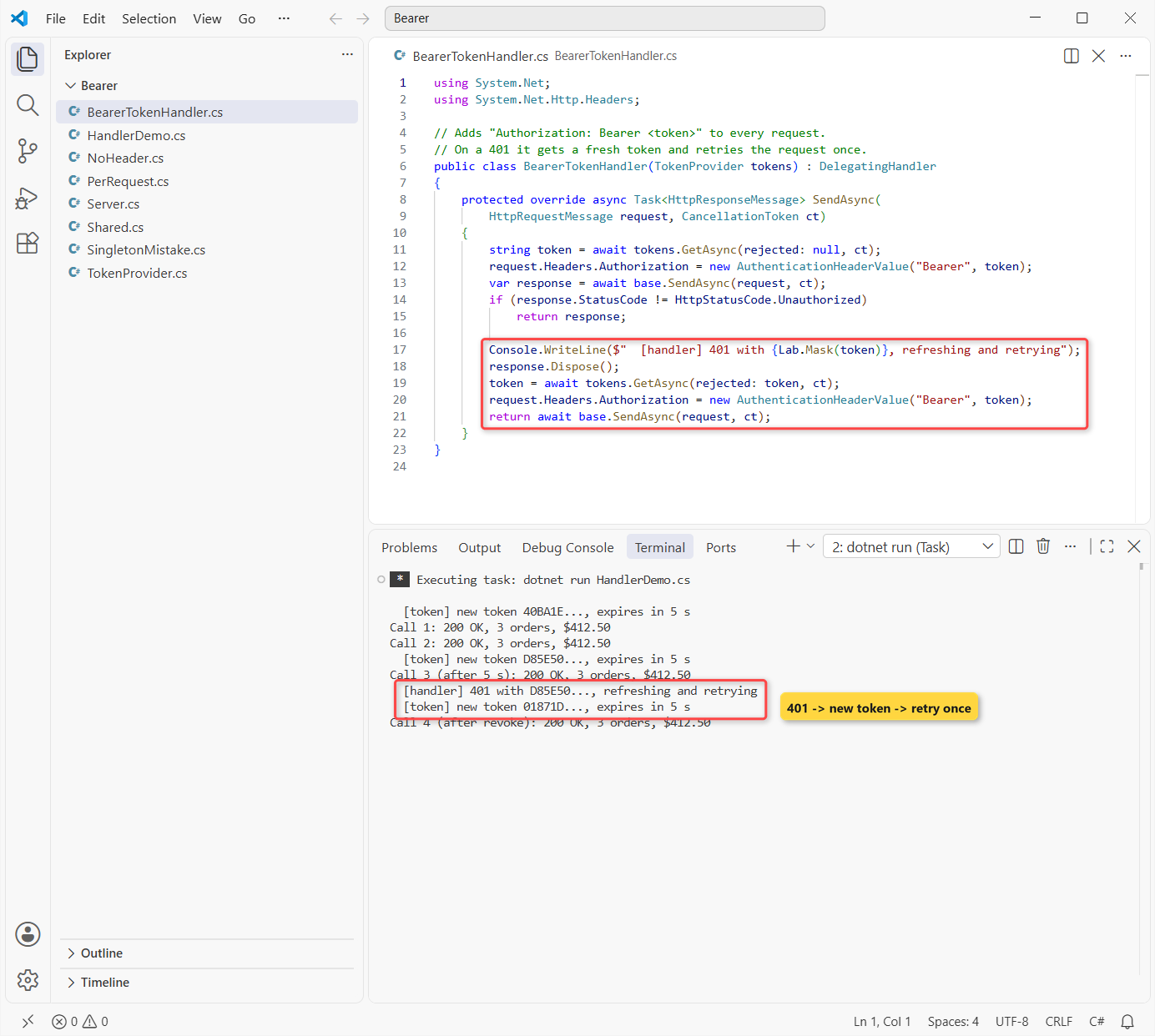
Calls 1 and 2 shared one token. Call 3 came 5 seconds later, so the provider fetched a new one before sending. Call 4 hit a 401 after the revoke, the handler refreshed and retried, and the caller still got 200 OK.
Notice what the calling code doesn’t do: it never touches a token. In an ASP.NET Core app, the registration is the same; with a typed client it looks like this:
builder.Services.AddSingleton<TokenProvider>();
builder.Services.AddTransient<BearerTokenHandler>();
builder.Services.AddHttpClient("auth");
builder.Services.AddHttpClient<OrdersClient>(c => c.BaseAddress = new Uri("https://api.example.com/"))
    .AddHttpMessageHandler<BearerTokenHandler>();
Keep the token endpoint’s client ID and secret out of source code. Bind them from configuration with the options pattern and user secrets in development.
C# HttpClient Bearer Token Cheat Sheet
Everything we tested, in one table:
| Approach | Where the token goes | Use it when | What we saw |
|---|---|---|---|
DefaultRequestHeaders.Authorization | Every request from that client | One API, one identity, set once | 401 without it, 200 with it |
HttpRequestMessage.Headers.Authorization | That one request | Different tokens on one shared client | 3 parallel calls, 2 users, all correct |
DelegatingHandler + TokenProvider | Added by the pipeline | Tokens that expire and need refreshing | Refreshed after 5 s, retried a 401 |
AddHttpMessageHandler<T>() | Named or typed factory client | ASP.NET Core, worker services | Handler must be transient |
Common Bearer Token Mistakes to Avoid
Registering the handler as a singleton. It works for one client, then breaks as soon as a second pipeline needs it. We registered it with AddSingleton and gave two clients the same handler:
#!/usr/bin/env dotnet
#:sdk Microsoft.NET.Sdk.Worker
#:package Microsoft.Extensions.Hosting@10.0.14
#:package Microsoft.Extensions.Http@10.0.14
#:property PublishAot=false
#:include Shared.cs
#:include TokenProvider.cs
#:include BearerTokenHandler.cs
using static Lab;

var builder = Host.CreateApplicationBuilder(args);
builder.Logging.ClearProviders();
builder.Services.AddSingleton<TokenProvider>();
builder.Services.AddSingleton<BearerTokenHandler>();     // wrong lifetime
builder.Services.AddHttpClient("auth");
builder.Services.AddHttpClient("orders", c => c.BaseAddress = new Uri(Api))
    .AddHttpMessageHandler<BearerTokenHandler>();
builder.Services.AddHttpClient("invoices", c => c.BaseAddress = new Uri(Api))
    .AddHttpMessageHandler<BearerTokenHandler>();
using IHost host = builder.Build();

var factory = host.Services.GetRequiredService<IHttpClientFactory>();
try
{
    factory.CreateClient("orders");
    factory.CreateClient("invoices");      // same handler instance, second pipeline
    Console.WriteLine("Both clients created");
}
catch (InvalidOperationException ex)
{
    Console.WriteLine($"{ex.GetType().Name}: {ex.Message}");
}
Output:
InvalidOperationException: The 'InnerHandler' property must be null. 'DelegatingHandler' instances provided to 'HttpMessageHandlerBuilder' must not be reused or cached.
Handler: 'BearerTokenHandler'
Microsoft’s docs say a delegating handler must be registered as transient, because a handler instance can’t be reused across pipelines.
- Adding “Bearer ” twice.
new AuthenticationHeaderValue("Bearer", "Bearer " + token)sendsBearer Bearer ..., and the API answers 401. - Changing DefaultRequestHeaders per call. On a shared client, that races with requests in flight. Use a per-request header instead.
- Logging the token. A bearer token is a password for its lifetime. Log a masked prefix, never the whole value or the full header.
- Retrying a 401 forever. Retry once with a new token, then let the 401 surface so someone fixes the credentials.
- Swallowing the failure. Call
EnsureSuccessStatusCodeand handleHttpRequestExceptionwith a try-catch block where you can do something useful.
Next Steps After Adding the Bearer Token
You can send tokens now; the other half is checking them. Our JWT authentication guide for ASP.NET Core builds an API that issues and validates real JWT bearer tokens, which makes a good server for this handler.
A few more HTTP topics we’d read next:
- See what changed in .NET 10
- Pass a CancellationToken through your HTTP calls
- Read JSON responses with System.Text.Json
- Browse every ASP.NET Core tutorial
Frequently Asked Questions
How do I add a bearer token to HttpClient in C#?
Set client.DefaultRequestHeaders.Authorization = new AuthenticationHeaderValue("Bearer", token); once, or set request.Headers.Authorization on an HttpRequestMessage when the token changes per call. Pass the token without the “Bearer” prefix.
How do I add a JWT token to an HttpClient request?
A JWT is sent the same way as any bearer token: in the Authorization header with the Bearer scheme. HttpClient doesn’t read or validate the JWT; it just sends the string your login or token endpoint returned.
How do I refresh a bearer token automatically with HttpClient?
Put the token logic in a DelegatingHandler. Cache the token with its expiry, get a new one shortly before it runs out, and on a 401 refresh once and retry. Register the handler as transient and attach it with AddHttpMessageHandler.
Why does my HttpClient still return 401 with a bearer token?
The usual causes are an expired token, “Bearer” written twice, the token sent to the wrong API (audience), or a header added to a different HttpClient instance. Check the WWW-Authenticate response header; it often says invalid_token.
Is HttpClient DefaultRequestHeaders thread-safe?
No. The DefaultRequestHeaders docs on Microsoft Learn say not to modify it while requests are outstanding. Set it once, or use per-request headers on HttpRequestMessage.
Should a DelegatingHandler be transient or singleton?
Transient. A handler instance can’t be reused across HttpClient pipelines, and a singleton throws InvalidOperationException. See IHttpClientFactory in ASP.NET Core on Microsoft Learn.

Bijay Kumar is a renowned software engineer, accomplished author, and distinguished Microsoft Most Valuable Professional (MVP) specializing in SharePoint. With a rich professional background spanning over 15 years, Bijay has established himself as an authority in the field of information technology. He possesses unparalleled expertise in multiple programming languages and technologies such as ASP.NET, ASP.NET MVC, C#.NET, and SharePoint, which has enabled him to develop innovative and cutting-edge solutions for clients across the globe. Read more…