
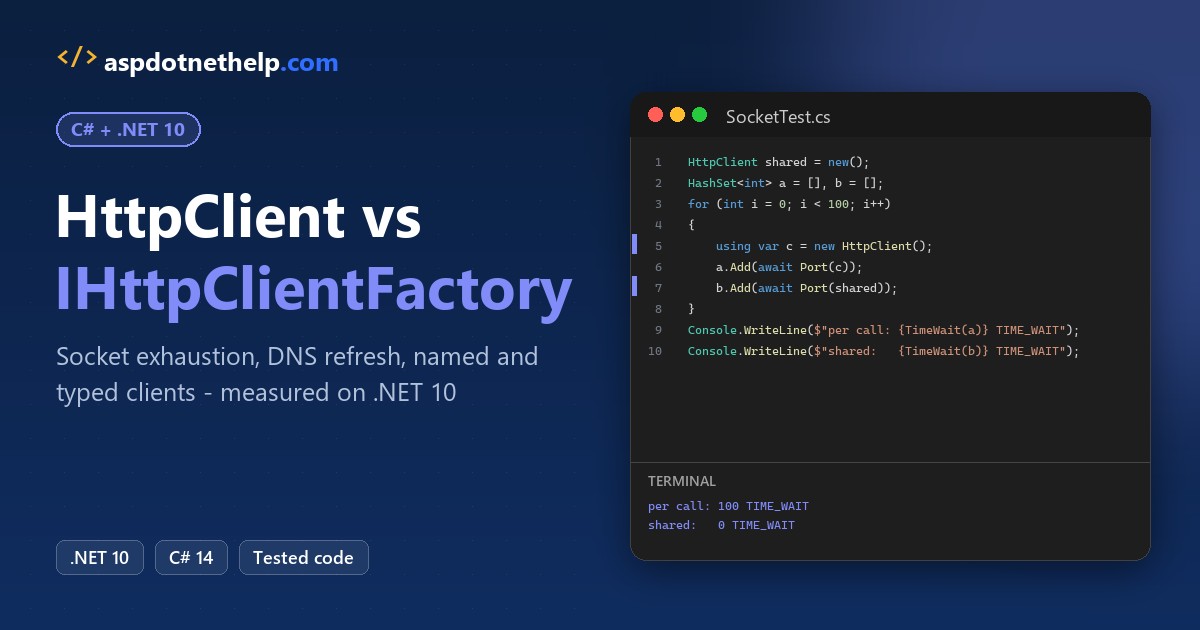
Use IHttpClientFactory when your app has dependency injection, and one shared HttpClient with PooledConnectionLifetime when it doesn’t. That’s my rule for C# HttpClient vs HttpClientFactory. The one wrong answer is new HttpClient() for every request.
I sent 100 requests to a local API on .NET 10. A new client per call opened 100 connections and left 100 sockets in TIME_WAIT. The shared client and the factory each used one connection and left none.
HttpClient vs IHttpClientFactory at a Glance
Here’s what I measured and what Microsoft Learn documents for .NET 10. If you need the request basics first (GET, POST, headers), my HttpClient in C# guide covers them.
| Feature | new HttpClient() per call | Shared static HttpClient | IHttpClientFactory |
|---|---|---|---|
| TCP connections for 100 calls | 100 | 1 | 1 |
| Sockets left in TIME_WAIT | 100 | 0 | 0 |
| Picks up DNS changes | Yes (every call reconnects) | Only with PooledConnectionLifetime | Yes, handlers rotate every 2 minutes |
| Needs dependency injection | No | No | Yes (AddHttpClient) |
| Package | None | None | Microsoft.Extensions.Http (in ASP.NET Core already) |
| Named / typed configuration | No | One config per instance | Yes, per client name or class |
| Cookies | Per instance | Per instance | Shared by the pooled handler (avoid) |
| Good fit | Nowhere in production | Console tools, libraries without DI | ASP.NET Core, worker services |
The Sample API for the HttpClient Tests
Every test calls the same tiny minimal API on localhost:5885. It returns a ground-shipping quote for a US ZIP code, plus the client’s TCP port. A new port means a new connection, so we can count connections without a packet sniffer.
It’s a .NET 10 file-based app, so dotnet run Server.cs starts it with no project file:
#:sdk Microsoft.NET.Sdk.Web
#:property PublishAot=false

var builder = WebApplication.CreateBuilder(args);
builder.Logging.ClearProviders();
var app = builder.Build();

// Ground-shipping quote for a US ZIP code; ClientPort = the caller's TCP port
app.MapGet("/rates/{zip}", (string zip, HttpContext ctx) =>
    new ShippingRate(zip, 5.99m + (zip[0] - '0') * 0.75m, ctx.Connection.RemotePort));

Console.WriteLine("Shipping rate API on http://localhost:5885");
app.Run("http://localhost:5885");

record ShippingRate(string Zip, decimal Rate, int ClientPort);
A quick check with curl returned {"zip":"78701","rate":11.24,"clientPort":56278}. The clients share this Shared.cs through #:include. Its Sockets helper runs netstat -an and counts only this app’s sockets in one TCP state:
using System.Diagnostics;
using System.Globalization;

public record ShippingRate(string Zip, decimal Rate, int ClientPort);

public static class Lab
{
    public const string Url = "http://localhost:5885/rates/";
    public static readonly string[] Zips = ["78701", "80202", "98101", "30303", "60601"];

    public static string Usd(decimal amount) =>
        amount.ToString("C", CultureInfo.GetCultureInfo("en-US"));

    // Counts this app's own sockets to port 5885 in one TCP state (netstat -an)
    public static int Sockets(IEnumerable<int> ports, string state)
    {
        var psi = new ProcessStartInfo("netstat", "-an") { RedirectStandardOutput = true };
        string text = Process.Start(psi)!.StandardOutput.ReadToEnd();
        var mine = ports.Select(p => $":{p}").ToHashSet();
        return text.Split('\n')
            .Select(l => l.Split(' ', StringSplitOptions.RemoveEmptyEntries | StringSplitOptions.TrimEntries))
            .Count(col => col.Length == 4 && col[3] == state && col[2].EndsWith(":5885")
                && mine.Contains(col[1][col[1].LastIndexOf(':')..]));
    }
}
Why Does new HttpClient() Per Request Cause Socket Exhaustion?
Here’s the code I still find in production. It looks tidy because the client is disposed after every call:
#!/usr/bin/env dotnet
#:property PublishAot=false
#:include Shared.cs
using System.Net.Http.Json;
using static Lab;

var ports = new HashSet<int>();
for (int i = 0; i < 100; i++)
{
    using var client = new HttpClient();     // new client per request
    var quote = await client.GetFromJsonAsync<ShippingRate>(Url + Zips[i % 5]);
    ports.Add(quote!.ClientPort);
}
Console.WriteLine($"Requests sent:          100");
Console.WriteLine($"TCP connections opened: {ports.Count}");
Console.WriteLine($"Sockets in TIME_WAIT:   {Sockets(ports, "TIME_WAIT")}");
Output:
Requests sent:          100
TCP connections opened: 100
Sockets in TIME_WAIT:   100
Disposing the client also disposes its handler, and with it the connection pool. So all 100 requests opened a fresh TCP connection, and 100 of them were still sitting in TIME_WAIT when the loop ended.
TIME_WAIT is normal TCP behavior: Windows holds a closed connection’s port for a while before it reuses it. Under real load, those ports pile up until new connections fail with a socket error. That’s socket exhaustion.
Static HttpClient: One Connection for Every Request
Same 100 requests, same API. The only change is one static client that lives as long as the app:
#!/usr/bin/env dotnet
#:property PublishAot=false
#:include Shared.cs
using System.Net.Http.Json;
using static Lab;

var ports = new HashSet<int>();
for (int i = 0; i < 100; i++)
{
    var quote = await Rates.Client.GetFromJsonAsync<ShippingRate>(Url + Zips[i % 5]);
    ports.Add(quote!.ClientPort);
}
Console.WriteLine($"Requests sent:          100");
Console.WriteLine($"TCP connections opened: {ports.Count}");
Console.WriteLine($"Sockets in TIME_WAIT:   {Sockets(ports, "TIME_WAIT")}");
Console.WriteLine($"Sockets ESTABLISHED:    {Sockets(ports, "ESTABLISHED")}");

static class Rates
{
    public static readonly HttpClient Client = new();   // one client for the whole app
}
Output:
Requests sent:          100
TCP connections opened: 1
Sockets in TIME_WAIT:   0
Sockets ESTABLISHED:    1
One connection carried all 100 requests, and it stayed open (1 ESTABLISHED) for the next call. Nothing went into TIME_WAIT. HttpClient is thread-safe for sending requests, so one instance can serve the whole app.
Note: the static field works in any app, even without DI. Use await on every call, as in my async/await guide, so the shared client never blocks a thread.
Does a Static HttpClient Miss DNS Changes?
Yes. HttpClient resolves DNS only when it opens a connection. A connection that never closes never looks up the host again, so after a blue-green deployment or a failover, the client keeps talking to the old IP address.
The fix is PooledConnectionLifetime on SocketsHttpHandler. Same API, two shared clients, one request per second:
#!/usr/bin/env dotnet
#:property PublishAot=false
#:include Shared.cs
using System.Net.Http.Json;
using static Lab;

HttpClient plain = new();
HttpClient recycled = new(new SocketsHttpHandler
{
    PooledConnectionLifetime = TimeSpan.FromSeconds(2.5)
});
var seen = new List<int>();
int Conn(int port) { if (!seen.Contains(port)) seen.Add(port); return seen.IndexOf(port) + 1; }

for (int second = 0; second <= 6; second++)
{
    var a = await plain.GetFromJsonAsync<ShippingRate>(Url + "98101");
    var b = await recycled.GetFromJsonAsync<ShippingRate>(Url + "98101");
    Console.WriteLine($"t={second}s  default: connection #{Conn(a!.ClientPort)}"
        + $"   2.5 s lifetime: connection #{Conn(b!.ClientPort)}");
    await Task.Delay(1000);
}
Output:
t=0s  default: connection #1   2.5 s lifetime: connection #2
t=1s  default: connection #1   2.5 s lifetime: connection #2
t=2s  default: connection #1   2.5 s lifetime: connection #2
t=3s  default: connection #1   2.5 s lifetime: connection #3
t=4s  default: connection #1   2.5 s lifetime: connection #3
t=5s  default: connection #1   2.5 s lifetime: connection #3
t=6s  default: connection #1   2.5 s lifetime: connection #4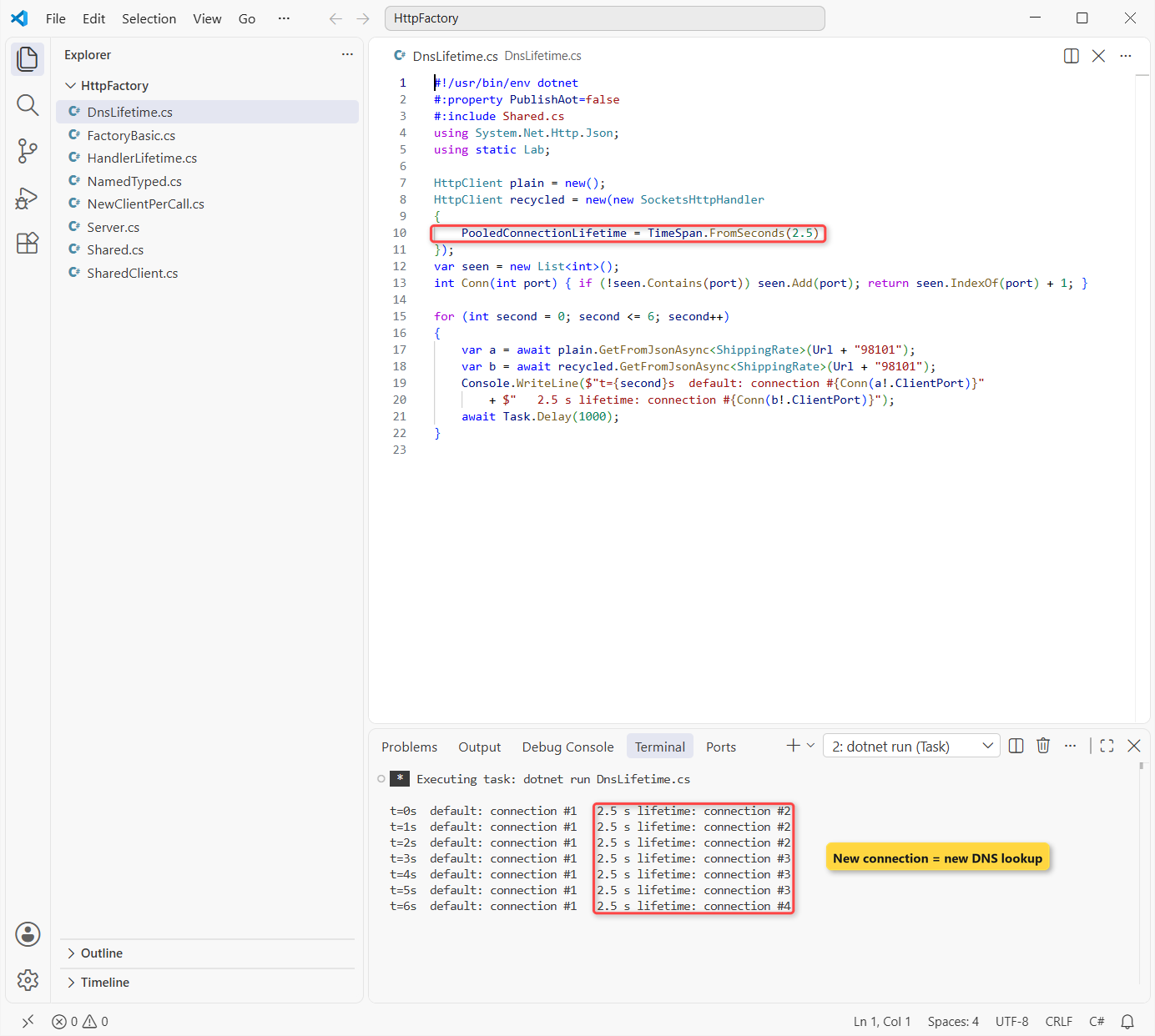
The default client used connection #1 the whole time. The recycled one moved to a new connection about every 3 seconds, reaching connection #4. Each new connection repeats the DNS lookup.
I used 2.5 seconds so the demo finishes fast. In a real app, Microsoft suggests something like 2 minutes, depending on how often your DNS changes:
private static readonly HttpClient Client = new(new SocketsHttpHandler
{
    PooledConnectionLifetime = TimeSpan.FromMinutes(2)
});
IHttpClientFactory Basic Usage with AddHttpClient
With a Generic Host (ASP.NET Core, worker services, or a console app like this one), AddHttpClient() registers IHttpClientFactory. Console apps need the Microsoft.Extensions.Http and Microsoft.Extensions.Hosting packages (10.0.14 today); ASP.NET Core already has both.
Same 100 requests, but now each one gets a brand-new client from the factory and disposes it:
#!/usr/bin/env dotnet
#:sdk Microsoft.NET.Sdk.Worker
#:package Microsoft.Extensions.Hosting@10.0.14
#:package Microsoft.Extensions.Http@10.0.14
#:property PublishAot=false
#:include Shared.cs
using System.Net.Http.Json;
using static Lab;

var builder = Host.CreateApplicationBuilder(args);
builder.Logging.ClearProviders();
builder.Services.AddHttpClient();          // registers IHttpClientFactory
using IHost host = builder.Build();

var factory = host.Services.GetRequiredService<IHttpClientFactory>();
var ports = new HashSet<int>();
for (int i = 0; i < 100; i++)
{
    using HttpClient client = factory.CreateClient();   // pooled handler
    var quote = await client.GetFromJsonAsync<ShippingRate>(Url + Zips[i % 5]);
    ports.Add(quote!.ClientPort);
}
Console.WriteLine($"HttpClient objects created: 100");
Console.WriteLine($"TCP connections opened:     {ports.Count}");
Console.WriteLine($"Sockets in TIME_WAIT:       {Sockets(ports, "TIME_WAIT")}");
Output:
HttpClient objects created: 100
TCP connections opened:     1
Sockets in TIME_WAIT:       0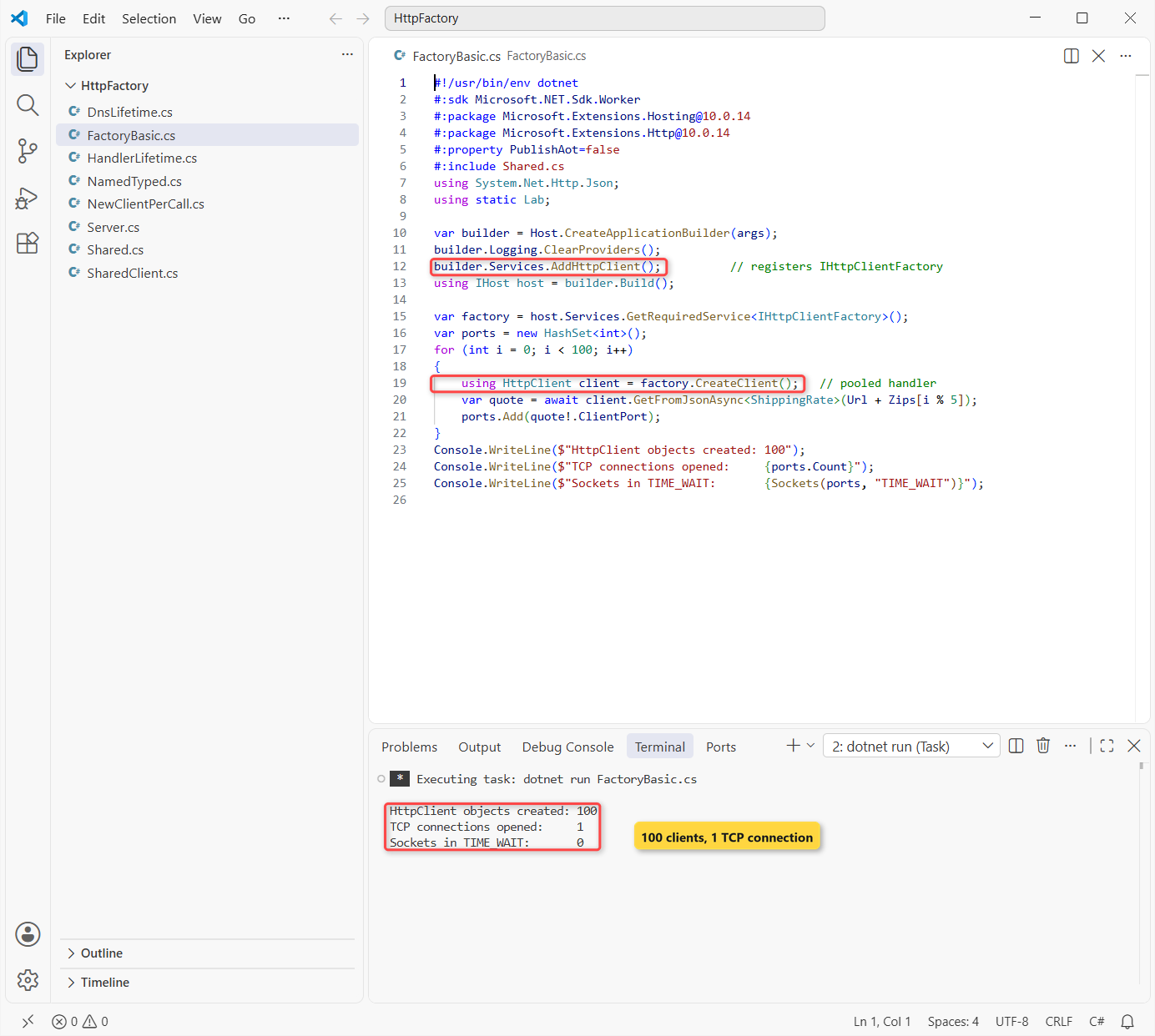
That’s 100 HttpClient objects and still 1 connection. Disposing a factory client doesn’t dispose its handler; the factory keeps the handler and its pool, and hands it to the next client.
That’s why factory clients are meant to be short-lived: create one, use it, let it go. The factory is registered as a singleton, which my DI lifetimes guide explains.
Named vs Typed Clients in IHttpClientFactory
Basic CreateClient() gives you a default client. Most apps want configuration in one place instead. A named client keys it by a string; a typed client binds it to your own class, which gets the HttpClient in its constructor.
Same shipping API, one call each way:
#!/usr/bin/env dotnet
#:sdk Microsoft.NET.Sdk.Worker
#:package Microsoft.Extensions.Hosting@10.0.14
#:package Microsoft.Extensions.Http@10.0.14
#:property PublishAot=false
#:include Shared.cs
using System.Net.Http.Json;
using static Lab;

var builder = Host.CreateApplicationBuilder(args);
builder.Logging.ClearProviders();
builder.Services.AddHttpClient("rates", c =>             // named client
    c.BaseAddress = new Uri(Url));
builder.Services.AddHttpClient<ShippingClient>(c =>      // typed client
    c.BaseAddress = new Uri(Url));
using IHost host = builder.Build();

HttpClient named = host.Services.GetRequiredService<IHttpClientFactory>()
    .CreateClient("rates");
var austin = await named.GetFromJsonAsync<ShippingRate>("78701");
Console.WriteLine($"Named client -> Austin, TX 78701: {Usd(austin!.Rate)}");

var typed = host.Services.GetRequiredService<ShippingClient>();
Console.WriteLine($"Typed client -> Seattle, WA 98101: {await typed.QuoteAsync("98101")}");

class ShippingClient(HttpClient http)
{
    public async Task<string> QuoteAsync(string zip) =>
        Usd((await http.GetFromJsonAsync<ShippingRate>(zip))!.Rate);
}
Output:
Named client -> Austin, TX 78701: $11.24
Typed client -> Seattle, WA 98101: $12.74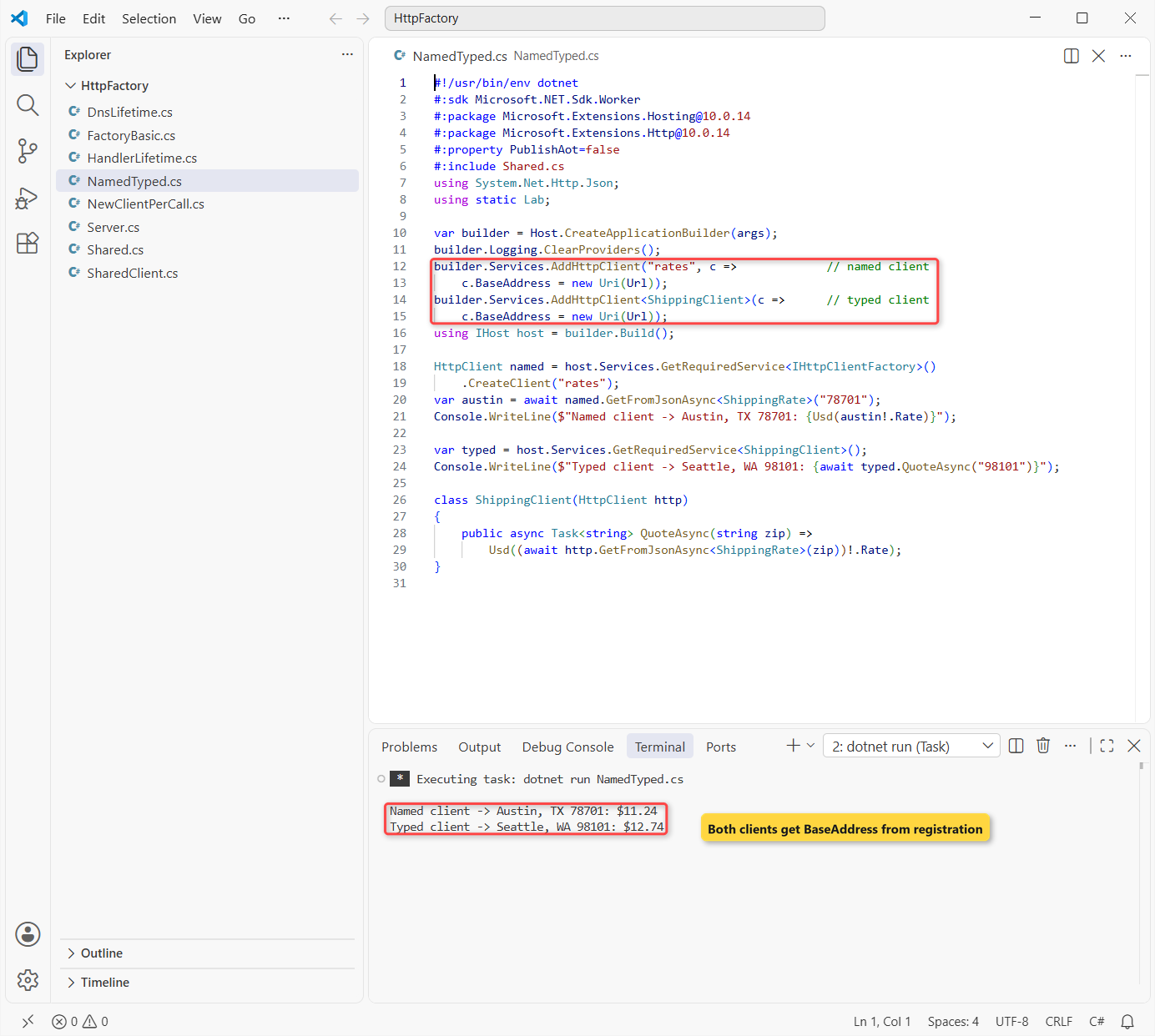
Both returned real quotes: Austin, TX 78701: $11.24 and Seattle, WA 98101: $12.74. I format the price with en-US explicitly, because this PC’s default culture isn’t US.
I pick typed clients for anything bigger than a demo. You get IntelliSense instead of magic strings, and the class hides the HTTP details. The primary constructor ShippingClient(HttpClient http) keeps it short.
How Long Does IHttpClientFactory Keep a Handler?
The default HandlerLifetime is 2 minutes. After that, the factory builds a new handler for new clients (new connections, new DNS lookups) and disposes the old one once no client uses it. SetHandlerLifetime changes it per client:
#!/usr/bin/env dotnet
#:sdk Microsoft.NET.Sdk.Worker
#:package Microsoft.Extensions.Hosting@10.0.14
#:package Microsoft.Extensions.Http@10.0.14
#:property PublishAot=false
#:include Shared.cs
using System.Net.Http.Json;
using static Lab;
using Microsoft.Extensions.Http;
using Microsoft.Extensions.Options;

var builder = Host.CreateApplicationBuilder(args);
builder.Logging.ClearProviders();
builder.Services.AddHttpClient("rates");
builder.Services.AddHttpClient("fast-rotate").SetHandlerLifetime(TimeSpan.FromSeconds(2.5));
using IHost host = builder.Build();

var options = host.Services.GetRequiredService<IOptionsMonitor<HttpClientFactoryOptions>>();
Console.WriteLine($"Default HandlerLifetime: {options.Get("rates").HandlerLifetime}");

var factory = host.Services.GetRequiredService<IHttpClientFactory>();
var seen = new List<int>();
for (int second = 0; second <= 6; second++)
{
    var quote = await factory.CreateClient("fast-rotate")
        .GetFromJsonAsync<ShippingRate>(Url + "60601");
    if (!seen.Contains(quote!.ClientPort)) seen.Add(quote.ClientPort);
    Console.WriteLine($"t={second}s  connection #{seen.IndexOf(quote.ClientPort) + 1}");
    await Task.Delay(1000);
}
Output:
Default HandlerLifetime: 00:02:00
t=0s  connection #1
t=1s  connection #1
t=2s  connection #1
t=3s  connection #2
t=4s  connection #2
t=5s  connection #2
t=6s  connection #3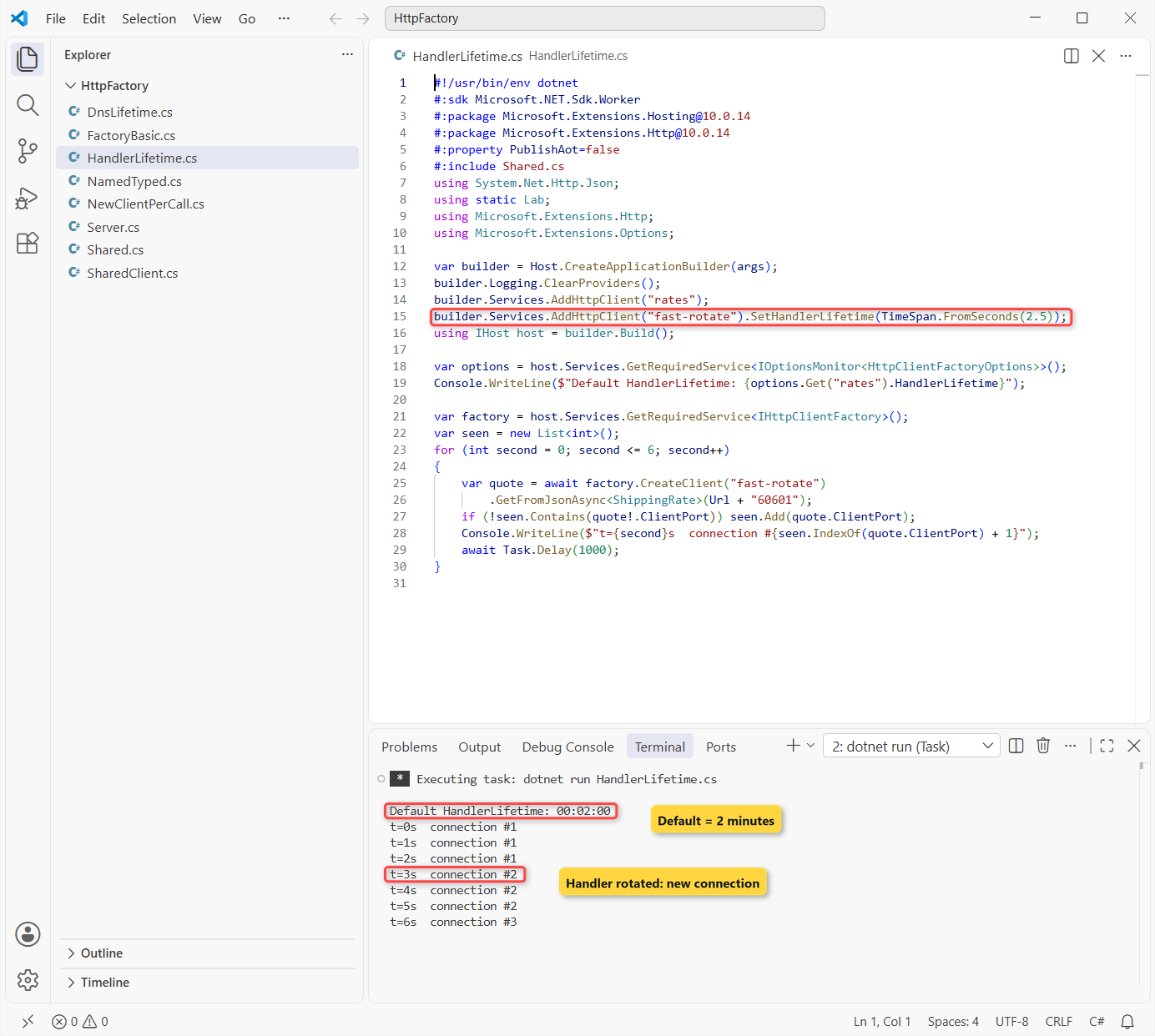
The options report 00:02:00 for an unconfigured client. The fast-rotate client moved to a new connection about every 3 seconds, reaching connection #3, just like PooledConnectionLifetime did for the static client.
You read HttpClientFactoryOptions the same way as any options class, as in my options pattern guide.
Should You Inject HttpClient or IHttpClientFactory?
Inject the typed client (the HttpClient lands in its constructor) into transient or scoped services. Inject IHttpClientFactory and call CreateClient each time when the consumer is a singleton.
The catch: typed clients are registered as transient. If a singleton, like a BackgroundService, captures one, it keeps the same handler forever and stops reacting to DNS changes.
If you need a typed client in a singleton, give it a SocketsHttpHandler with PooledConnectionLifetime and turn off factory rotation:
builder.Services.AddHttpClient<ShippingClient>()
    .UseSocketsHttpHandler((handler, _) =>
        handler.PooledConnectionLifetime = TimeSpan.FromMinutes(2))
    .SetHandlerLifetime(Timeout.InfiniteTimeSpan);
HttpClient or IHttpClientFactory: Which Should You Use?
- ASP.NET Core, worker services, any app with DI:
IHttpClientFactorywith typed clients. - Console tools, scripts, class libraries without DI: one static
HttpClientwithPooledConnectionLifetimeset. - Singleton consumers:
IHttpClientFactoryplusCreateClientper use, or a typed client onSocketsHttpHandler. - Apps that rely on cookies: a shared
HttpClientyou own, since the factory’s pooled handlers share oneCookieContainer. - Never:
new HttpClient()inside a method that runs per request.
How to Switch from new HttpClient() to IHttpClientFactory
- Call
builder.Services.AddHttpClient<ShippingClient>(c => c.BaseAddress = new Uri(...))in Program.cs. - Move the base address, headers and timeout from the old
new HttpClient()into that lambda. - Give the class a constructor that takes
HttpClient, and delete theusing var client = new HttpClient()lines. - Inject the class where you used it. In a singleton, inject
IHttpClientFactoryinstead. - Add
CancellationTokenparameters while you’re there; my CancellationToken guide shows the pattern.
The deciding difference isn’t speed: it’s connection reuse and DNS. Both a shared HttpClient and the factory fixed the 100 TIME_WAIT sockets in my test, so pick by whether your app has DI.
If you’re building HTTP code in .NET, these go well with this one:
- Minimal APIs vs controllers in ASP.NET Core
- System.Text.Json in C# (what GetFromJsonAsync uses)
- JWT authentication in ASP.NET Core
- What’s new in .NET 10
Frequently Asked Questions
Should HttpClient be static or a singleton in C#?
Yes, if you don’t use IHttpClientFactory. Create it once and set PooledConnectionLifetime on a SocketsHttpHandler so it picks up DNS changes. Microsoft’s HttpClient guidelines on Learn recommend exactly that.
Do I need to dispose an HttpClient from IHttpClientFactory?
You can, and a using is fine. Disposing a factory client doesn’t dispose the pooled handler, so it doesn’t cause socket exhaustion. My test disposed 100 of them and still used one connection.
What is the default handler lifetime of IHttpClientFactory?
Two minutes. I read it from HttpClientFactoryOptions.HandlerLifetime on .NET 10 and got 00:02:00. Change it per client with SetHandlerLifetime.
Is IHttpClientFactory available in .NET Framework?
Yes, through the Microsoft.Extensions.Http package, and Microsoft recommends it there because .NET Framework has no PooledConnectionLifetime. The IHttpClientFactory docs on Learn cover setup and the typed-client caveats.
Is HttpClient thread-safe?
Its send methods are, such as GetAsync, PostAsync and SendAsync. Don’t change BaseAddress, Timeout or default headers after the first request; set them once up front.
When should I not use IHttpClientFactory?
When your app depends on cookies, because pooled handlers share one cookie container, and when there’s no DI at all. A shared HttpClient you own is simpler there.

Bijay Kumar is a renowned software engineer, accomplished author, and distinguished Microsoft Most Valuable Professional (MVP) specializing in SharePoint. With a rich professional background spanning over 15 years, Bijay has established himself as an authority in the field of information technology. He possesses unparalleled expertise in multiple programming languages and technologies such as ASP.NET, ASP.NET MVC, C#.NET, and SharePoint, which has enabled him to develop innovative and cutting-edge solutions for clients across the globe. Read more…