
Your page on localhost:5884 calls your API on localhost:5881, curl gets a 200 from the same URL, and the browser console still says this:
Access to fetch at 'http://localhost:5881/api/products' from origin 'http://localhost:5884' has been blocked by CORS policy: No 'Access-Control-Allow-Origin' header is present on the requested resource.The fix is an ASP.NET Core CORS policy: list the front end’s exact origin with AddCors, then switch it on with UseCors:
builder.Services.AddCors(options =>
    options.AddPolicy("Frontend", policy =>
        policy.WithOrigins("http://localhost:5884")
              .AllowAnyHeader()
              .AllowAnyMethod()));
// after var app = builder.Build();
app.UseCors("Frontend");
I ran every policy below on .NET 10 against a real API and a real page in Edge, so each header, status code and exception here came from a run.
Why Does the Browser Say “Blocked by CORS Policy”?
An origin is the scheme, host and port together. So http://localhost:5884 and http://localhost:5881 are two different origins, even on the same machine.
Browsers follow the same-origin policy: a script may send a request to another origin, but it can’t read the response unless the server answers with an Access-Control-Allow-Origin header that names the page’s origin.
To see it fail for real, I built a small store front end. It’s a file-based app (StoreWeb/Front.cs) that serves one HTML page on port 5884:
#:sdk Microsoft.NET.Sdk.Web
#:property PublishAot=false

// Serves the store's front-end page on its own origin
var app = WebApplication.Create(args);
app.MapGet("/", () => Results.File(Path.GetFullPath("index.html"), "text/html"));
app.Run("http://localhost:5884");
The page (StoreWeb/index.html) makes a simple GET and a JSON POST to the API and prints what happened:
<!DOCTYPE html>
<html lang="en">
<head>
  <meta charset="utf-8">
  <title>Trailhead Outfitters</title>
  <style>
    body { font-family: "Segoe UI", sans-serif; margin: 24px 32px; color: #1f2933; }
    pre { background: #f4f6f8; border: 1px solid #d9dee3; padding: 12px; font-size: 15px; }
    h2 { font-size: 18px; margin-top: 22px; }
  </style>
</head>
<body>
  <h1>Trailhead Outfitters</h1>
  <p>This page runs on <code>http://localhost:5884</code> and calls the API on <code>http://localhost:5881</code>.</p>

  <h2>GET /api/products</h2>
  <pre id="get">loading...</pre>

  <h2>POST /api/orders (JSON body, so the browser sends a preflight)</h2>
  <pre id="post">loading...</pre>

  <script>
    const api = "http://localhost:5881";
    const show = (id, text) => { document.getElementById(id).textContent = text; console.log(id + ": " + text); };

    fetch(api + "/api/products")
      .then(r => r.json())
      .then(items => show("get", items.map(p => `${p.sku}  ${p.name}  $${p.price.toFixed(2)}`).join("\n")))
      .catch(e => show("get", "Blocked: " + e));

    fetch(api + "/api/orders", {
      method: "POST",
      headers: { "Content-Type": "application/json" },
      body: JSON.stringify({ customer: "Jenna Morales", sku: "TENT-2P", quantity: 1 })
    })
      .then(r => r.json().then(o => show("post", `${r.status} Created: ${o.quantity} x ${o.sku} for ${o.customer}`)))
      .catch(e => show("post", "Blocked: " + e));
  </script>
</body>
</html>
With no CORS code in the API at all, headless Edge showed this:
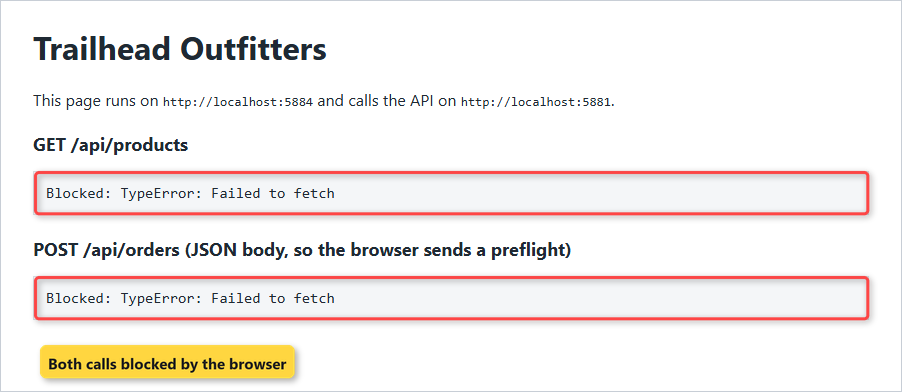
JavaScript only gets a vague TypeError. The real reason is in the browser console, and the POST got a slightly different message because the browser asked permission first:
Access to fetch at 'http://localhost:5881/api/orders' from origin 'http://localhost:5884' has been blocked by CORS policy: Response to preflight request doesn't pass access control check: No 'Access-Control-Allow-Origin' header is present on the requested resource.Here’s the part that confuses people. The API itself worked fine. The same GET from curl, with the same Origin header, came back 200:
curl -s -o nul -D - -H "Origin: http://localhost:5884" http://localhost:5881/api/productsHTTP/1.1 200 OK
Content-Type: application/json; charset=utf-8There’s no Access-Control-Allow-Origin header, and curl doesn’t care. CORS is a browser rule. Microsoft’s docs are blunt that it isn’t a security feature: the server relaxes the same-origin policy, and the browser enforces it.
That’s also why Postman and server-to-server calls never hit this error.
Enable CORS in ASP.NET Core with a Named Policy (AddCors + UseCors)
Here’s the API project, StoreApi, made with dotnet new web. The project file is the template’s own; CORS ships in the ASP.NET Core shared framework, so there’s no NuGet package to add:
<Project Sdk="Microsoft.NET.Sdk.Web">
<PropertyGroup>
<TargetFramework>net10.0</TargetFramework>
<Nullable>enable</Nullable>
<ImplicitUsings>enable</ImplicitUsings>
</PropertyGroup>
</Project>The models are two records and a small catalog (StoreApi/Models.cs):
namespace StoreApi;
public record Product(string Sku, string Name, decimal Price);
public record Order(string Customer, string Sku, int Quantity);
public static class Catalog
{
public static readonly Product[] Products =
[
new("TENT-2P", "Ridgeline 2-Person Tent", 189.99m),
new("BAG-20F", "Summit 20F Sleeping Bag", 129.50m),
new("STOVE-1", "Trail Camp Stove", 44.95m),
];
}And here’s Program.cs with a named policy called Frontend:
using StoreApi;
var builder = WebApplication.CreateBuilder(args);
builder.Services.AddCors(options =>
options.AddPolicy("Frontend", policy =>
policy.WithOrigins("http://localhost:5884")
.AllowAnyHeader()
.AllowAnyMethod()));
builder.Services.AddControllers();
var app = builder.Build();
app.UseCors("Frontend");
app.MapGet("/api/products", () => Catalog.Products);
app.MapPost("/api/orders", (Order order) =>
Results.Created("/api/orders/1001", order));
app.MapControllers();
app.Run();Three calls do the work:
AddCorsregisters the CORS services, andAddPolicygives the policy a name.WithOriginslists the origins that may read responses.AllowAnyHeaderandAllowAnyMethodlet the JSON POST through its preflight.UseCors("Frontend")adds the middleware and applies that policy to every endpoint.
I started it with dotnet run -- --urls http://localhost:5881 and sent the same curl request again:
curl -s -o nul -D - -H "Origin: http://localhost:5884" http://localhost:5881/api/productsHTTP/1.1 200 OK
Content-Type: application/json; charset=utf-8
Access-Control-Allow-Origin: http://localhost:5884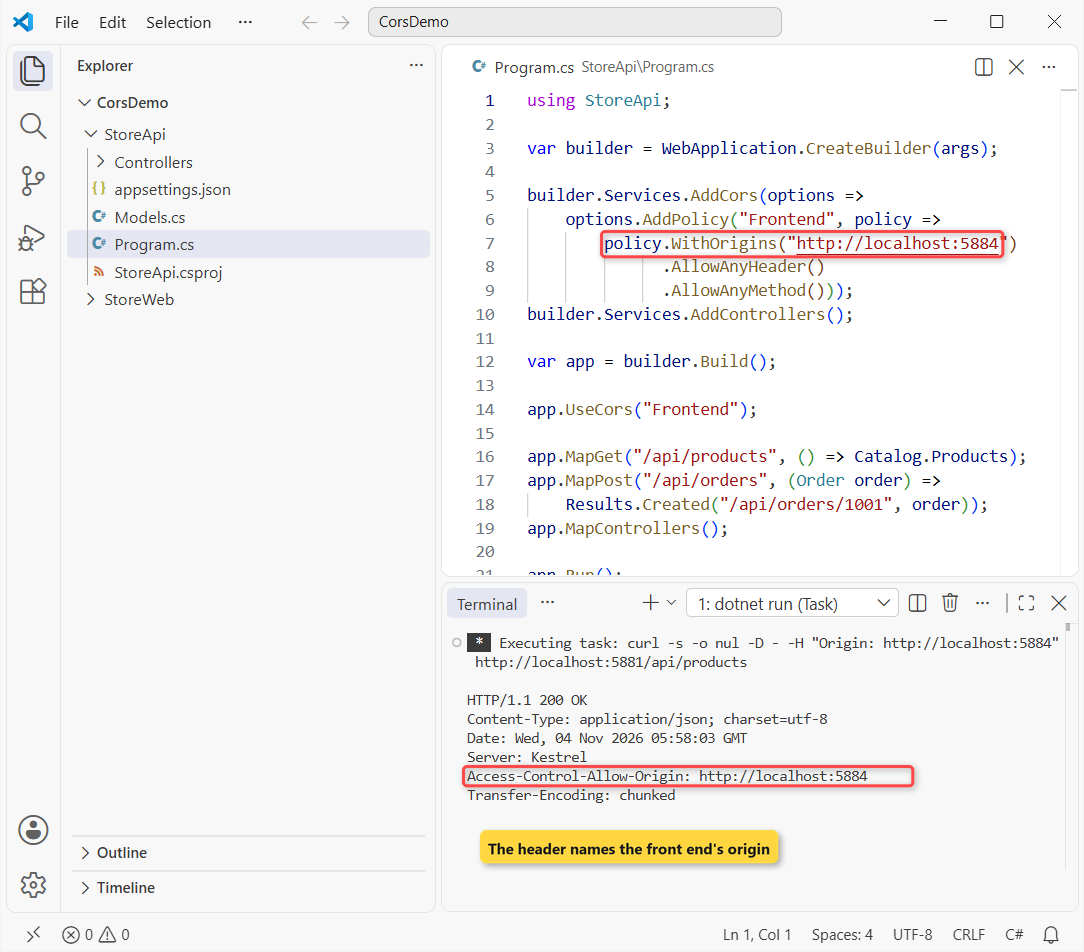
In the shot I left the Date and Server lines in; the code block skips them. The browser page now loads both calls:
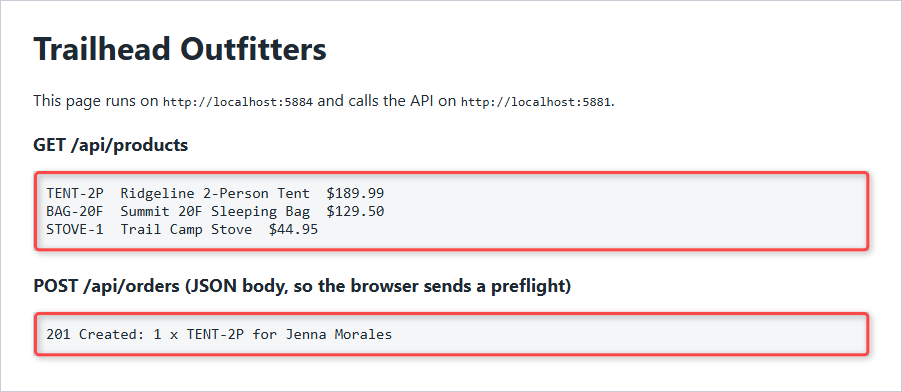
The GET listed all three products, and the POST came back 201 Created: 1 x TENT-2P for Jenna Morales. An origin that isn’t on the list, such as http://localhost:3000, still got a 200 with no CORS header:
HTTP/1.1 200 OK
Content-Type: application/json; charset=utf-8The server never refuses the request. It just leaves the header out, and the browser blocks the read. If you call this API from .NET code instead, HttpClient ignores CORS completely.
Where Does UseCors Go in the Middleware Order?
Microsoft Learn’s rule for .NET 10: call UseCors after UseRouting (if you call it) and before UseAuthorization. With response caching, it also goes before UseResponseCaching.
In a larger app, the pipeline looks like this:
var app = builder.Build();
app.UseHttpsRedirection();
app.UseStaticFiles();
app.UseRouting();
app.UseCors("Frontend");
app.UseAuthentication();
app.UseAuthorization();
app.MapControllers();
app.Run();Order matters because anything that ends the request early runs before CORS can add its headers. My ASP.NET Core middleware guide covers how short-circuiting works; here’s what it does to CORS.
I put a simple API key check in front of UseCors:
using StoreApi;
var builder = WebApplication.CreateBuilder(args);
builder.Services.AddCors(options =>
options.AddPolicy("Frontend", policy =>
policy.WithOrigins("http://localhost:5884")
.AllowAnyHeader()
.AllowAnyMethod()));
builder.Services.AddControllers();
var app = builder.Build();
// API key check that ends the request with 401
app.Use(async (context, next) =>
{
if (!context.Request.Headers.ContainsKey("X-Api-Key"))
{
context.Response.StatusCode = 401;
return;
}
await next();
});
app.UseCors("Frontend"); // too late
app.MapGet("/api/products", () => Catalog.Products);
app.MapPost("/api/orders", (Order order) =>
Results.Created("/api/orders/1001", order));
app.MapControllers();
app.Run();Browsers never send custom headers such as X-Api-Key with a preflight, so the preflight hit the key check first:
curl -s -o nul -D - -X OPTIONS -H "Origin: http://localhost:5884" -H "Access-Control-Request-Method: POST" -H "Access-Control-Request-Headers: content-type,x-api-key" http://localhost:5881/api/ordersHTTP/1.1 401 Unauthorized
Content-Length: 0A 401 with no CORS headers. In the browser, that looks exactly like the preflight error from the first section. Then I moved UseCors above the key check:
using StoreApi;
var builder = WebApplication.CreateBuilder(args);
builder.Services.AddCors(options =>
options.AddPolicy("Frontend", policy =>
policy.WithOrigins("http://localhost:5884")
.AllowAnyHeader()
.AllowAnyMethod()));
builder.Services.AddControllers();
var app = builder.Build();
app.UseCors("Frontend"); // first
// API key check that ends the request with 401
app.Use(async (context, next) =>
{
if (!context.Request.Headers.ContainsKey("X-Api-Key"))
{
context.Response.StatusCode = 401;
return;
}
await next();
});
app.MapGet("/api/products", () => Catalog.Products);
app.MapPost("/api/orders", (Order order) =>
Results.Created("/api/orders/1001", order));
app.MapControllers();
app.Run();HTTP/1.1 204 No Content
Access-Control-Allow-Headers: content-type,x-api-key
Access-Control-Allow-Methods: POST
Access-Control-Allow-Origin: http://localhost:5884The preflight now gets a 204 from the CORS middleware. A real request without a key still gets its 401, but now the 401 carries Access-Control-Allow-Origin, so the front end can read it:
HTTP/1.1 401 Unauthorized
Content-Length: 0
Access-Control-Allow-Origin: http://localhost:5884Real authentication behaves the same way, which is why UseCors goes before UseAuthentication and UseAuthorization in apps that use JWT bearer authentication.
How Does the CORS Preflight (OPTIONS) Request Work?
For anything beyond a simple request, the browser first sends an OPTIONS request to ask for permission. A request skips that step only when all of these are true:
- The method is GET, HEAD or POST.
- It only sets headers like Accept, Accept-Language, Content-Language or Content-Type.
- Content-Type, if set, is application/x-www-form-urlencoded, multipart/form-data or text/plain.
Our POST sends application/json, so it gets a preflight. You can send the same OPTIONS request with curl:
curl -s -o nul -D - -X OPTIONS -H "Origin: http://localhost:5884" -H "Access-Control-Request-Method: POST" -H "Access-Control-Request-Headers: content-type" http://localhost:5881/api/ordersHTTP/1.1 204 No Content
Access-Control-Allow-Headers: content-type
Access-Control-Allow-Methods: POST
Access-Control-Allow-Origin: http://localhost:5884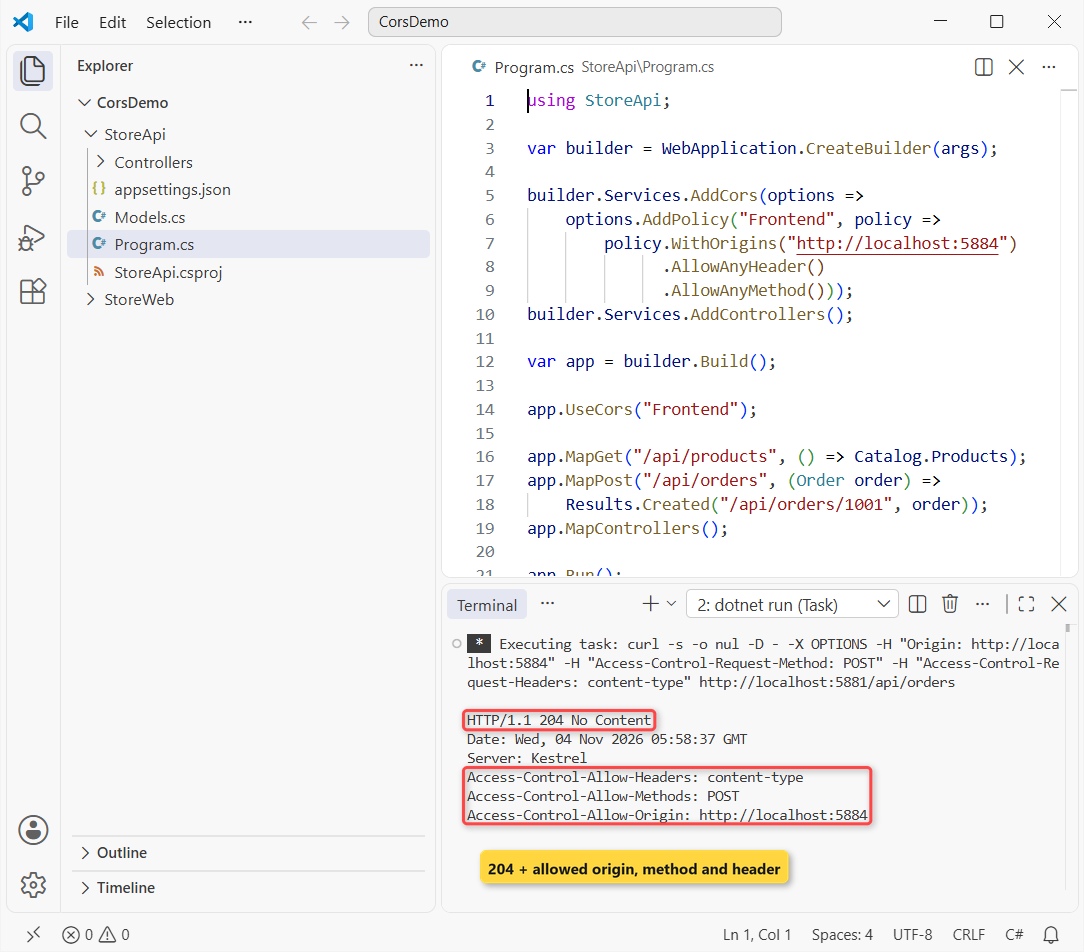
The policy echoed back exactly what the browser asked for: POST and content-type. When the same preflight came from http://localhost:3000, the answer was a bare 204:
HTTP/1.1 204 No ContentThat matches the docs: a rejected preflight still returns 204, just without CORS headers. Before I added CORS at all, the preflight got 405 Method Not Allowed, because nothing handled OPTIONS on that route:
HTTP/1.1 405 Method Not Allowed
Content-Length: 0
Allow: POSTOnce the preflight passes, the real POST runs. If it then comes back 400, that’s your minimal API validation talking, not CORS.
Pro Tip: SetPreflightMaxAge(TimeSpan.FromMinutes(10)) adds Access-Control-Max-Age so browsers cache the preflight instead of repeating it before every call.
Allow All Origins in ASP.NET Core with AllowAnyOrigin
For a public, read-only API, like the product catalog in my Web API CRUD tutorial with EF Core, or a quick local test, you can allow every origin. This version uses AddDefaultPolicy, so a plain UseCors() picks it up:
using StoreApi;
var builder = WebApplication.CreateBuilder(args);
builder.Services.AddCors(options =>
options.AddDefaultPolicy(policy =>
policy.AllowAnyOrigin()
.AllowAnyHeader()
.AllowAnyMethod()));
builder.Services.AddControllers();
var app = builder.Build();
app.UseCors();
app.MapGet("/api/products", () => Catalog.Products);
app.MapPost("/api/orders", (Order order) =>
Results.Created("/api/orders/1001", order));
app.MapControllers();
app.Run();curl -s -o nul -D - -H "Origin: https://anything.example.net" http://localhost:5881/api/productsHTTP/1.1 200 OK
Content-Type: application/json; charset=utf-8
Access-Control-Allow-Origin: *The wildcard * lets any site read the response. Don’t ship this for an API that returns customer data; list your real origins instead.
AllowAnyOrigin with AllowCredentials Throws at Startup
The moment you need cookies or an Authorization header from the browser, you’ll reach for AllowCredentials. Adding it to the allow-all policy looks harmless:
using StoreApi;
var builder = WebApplication.CreateBuilder(args);
builder.Services.AddCors(options =>
options.AddDefaultPolicy(policy =>
policy.AllowAnyOrigin()
.AllowAnyHeader()
.AllowAnyMethod()
.AllowCredentials()));
builder.Services.AddControllers();
var app = builder.Build();
app.UseCors();
app.MapGet("/api/products", () => Catalog.Products);
app.MapPost("/api/orders", (Order order) =>
Results.Created("/api/orders/1001", order));
app.MapControllers();
app.Run();On .NET 10 (see what changed in .NET 10), the app didn’t even start. Here are the first lines of the console:
crit: Microsoft.AspNetCore.Hosting.Diagnostics[6]
Application startup exception
System.InvalidOperationException: The CORS protocol does not allow specifying a wildcard (any) origin and credentials at the same time. Configure the CORS policy by listing individual origins if credentials needs to be supported.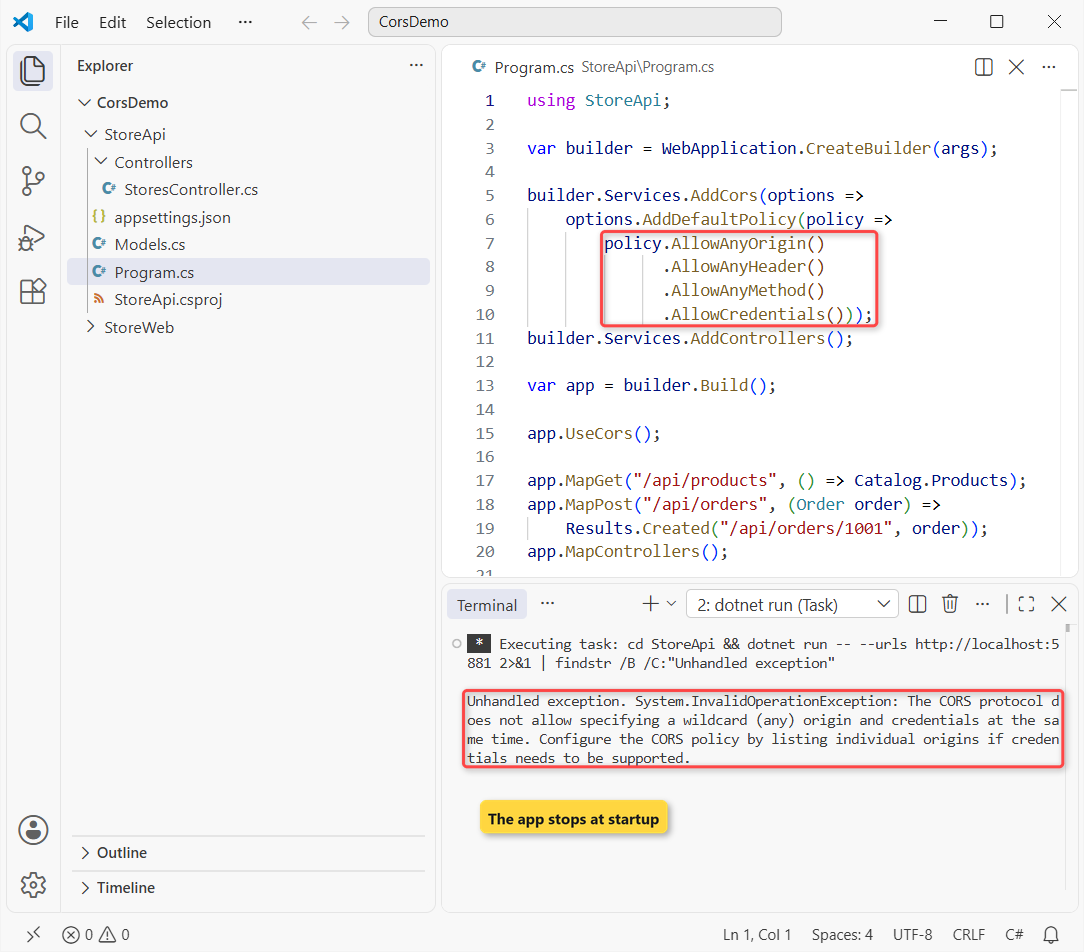
In the shot, findstr keeps only the last line of that output. The CORS spec forbids * together with credentials, because any site could then make logged-in requests for your users. The fix is to name the origins:
using StoreApi;
var builder = WebApplication.CreateBuilder(args);
builder.Services.AddCors(options =>
options.AddDefaultPolicy(policy =>
policy.WithOrigins("http://localhost:5884")
.AllowAnyHeader()
.AllowAnyMethod()
.AllowCredentials()));
builder.Services.AddControllers();
var app = builder.Build();
app.UseCors();
app.MapGet("/api/products", () => Catalog.Products);
app.MapPost("/api/orders", (Order order) =>
Results.Created("/api/orders/1001", order));
app.MapControllers();
app.Run();HTTP/1.1 200 OK
Content-Type: application/json; charset=utf-8
Access-Control-Allow-Credentials: true
Access-Control-Allow-Origin: http://localhost:5884Now the response carries Access-Control-Allow-Credentials: true and the exact origin. On the JavaScript side, the fetch call also needs credentials: "include".
Allow Localhost on Any Port with SetIsOriginAllowed
React on 3000, Angular on 4200, a Blazor WebAssembly app on its own port: listing every dev port gets old. SetIsOriginAllowed takes a function, so you can allow any port on localhost:
using StoreApi;
var builder = WebApplication.CreateBuilder(args);
builder.Services.AddCors(options =>
options.AddPolicy("LocalDev", policy =>
policy.SetIsOriginAllowed(origin =>
new Uri(origin).Host == "localhost")
.AllowAnyHeader()
.AllowAnyMethod()));
builder.Services.AddControllers();
var app = builder.Build();
app.UseCors("LocalDev");
app.MapGet("/api/products", () => Catalog.Products);
app.MapPost("/api/orders", (Order order) =>
Results.Created("/api/orders/1001", order));
app.MapControllers();
app.Run();I tried three origins against it:
curl -s -o nul -D - -H "Origin: http://localhost:3000" http://localhost:5881/api/products
curl -s -o nul -D - -H "Origin: http://localhost:4200" http://localhost:5881/api/products
curl -s -o nul -D - -H "Origin: http://192.168.1.20:5884" http://localhost:5881/api/productsHTTP/1.1 200 OK
Content-Type: application/json; charset=utf-8
Access-Control-Allow-Origin: http://localhost:3000
Vary: Origin
HTTP/1.1 200 OK
Content-Type: application/json; charset=utf-8
Access-Control-Allow-Origin: http://localhost:4200
Vary: Origin
HTTP/1.1 200 OK
Content-Type: application/json; charset=utf-8Both localhost ports were allowed and echoed back with Vary: Origin, so caches don’t hand one origin’s answer to another. The LAN address got nothing.
Important: keep this policy for Development only, for example behind builder.Environment.IsDevelopment(). Microsoft calls SetIsOriginAllowed(_ => true) with credentials an insecure setup.
Allow Wildcard Subdomains with SetIsOriginAllowedToAllowWildcardSubdomains
If every store gets its own subdomain, write the origin with *. and add SetIsOriginAllowedToAllowWildcardSubdomains. Without that call, the star is just text:
using StoreApi;
var builder = WebApplication.CreateBuilder(args);
builder.Services.AddCors(options =>
options.AddPolicy("Shops", policy =>
policy.WithOrigins("https://*.example.com")
.SetIsOriginAllowedToAllowWildcardSubdomains()
.AllowAnyHeader()
.AllowAnyMethod()));
builder.Services.AddControllers();
var app = builder.Build();
app.UseCors("Shops");
app.MapGet("/api/products", () => Catalog.Products);
app.MapPost("/api/orders", (Order order) =>
Results.Created("/api/orders/1001", order));
app.MapControllers();
app.Run();curl -s -o nul -D - -H "Origin: https://shop.example.com" http://localhost:5881/api/products
curl -s -o nul -D - -H "Origin: https://example.com" http://localhost:5881/api/productsHTTP/1.1 200 OK
Content-Type: application/json; charset=utf-8
Access-Control-Allow-Origin: https://shop.example.com
Vary: Origin
HTTP/1.1 200 OK
Content-Type: application/json; charset=utf-8https://shop.example.com was allowed. The bare domain wasn’t, because the pattern only matches subdomains, so add the root origin to WithOrigins too if you need it.
Read CORS Allowed Origins from appsettings.json
Hard-coded origins mean a rebuild for every new front end. I moved the list to StoreApi/appsettings.json under a Cors section:
{
"Logging": {
"LogLevel": {
"Default": "Information",
"Microsoft.AspNetCore": "Warning"
}
},
"AllowedHosts": "*",
"Cors": {
"AllowedOrigins": [ "http://localhost:5884", "https://shop.example.com" ]
}
}Program.cs reads it into a string array and passes that to WithOrigins:
using StoreApi;
var builder = WebApplication.CreateBuilder(args);
string[] origins = builder.Configuration
.GetSection("Cors:AllowedOrigins").Get<string[]>() ?? [];
builder.Services.AddCors(options =>
options.AddPolicy("Frontend", policy =>
policy.WithOrigins(origins)
.AllowAnyHeader()
.AllowAnyMethod()));
builder.Services.AddControllers();
var app = builder.Build();
app.UseCors("Frontend");
app.MapGet("/api/products", () => Catalog.Products);
app.MapPost("/api/orders", (Order order) =>
Results.Created("/api/orders/1001", order));
app.MapControllers();
app.Run();HTTP/1.1 200 OK
Content-Type: application/json; charset=utf-8
Access-Control-Allow-Origin: https://shop.example.com
Vary: Origin
HTTP/1.1 200 OK
Content-Type: application/json; charset=utf-8
Access-Control-Allow-Origin: http://localhost:5884
Vary: OriginBoth origins from the file worked. Since it’s ordinary configuration, an environment variable such as Cors__AllowedOrigins__0 can replace an entry in production. For typed settings with validation, the options pattern in ASP.NET Core is the next step up.
Apply CORS to One Endpoint with RequireCors
Calling UseCors("Frontend") applies the policy everywhere. To opt in per endpoint, call UseCors() with no name and no default policy, then add RequireCors to the minimal API endpoints that need it:
using StoreApi;
var builder = WebApplication.CreateBuilder(args);
builder.Services.AddCors(options =>
options.AddPolicy("Frontend", policy =>
policy.WithOrigins("http://localhost:5884")
.AllowAnyHeader()
.AllowAnyMethod()));
builder.Services.AddControllers();
var app = builder.Build();
app.UseCors(); // no default policy: endpoints opt in
app.MapGet("/api/products", () => Catalog.Products)
.RequireCors("Frontend");
app.MapPost("/api/orders", (Order order) =>
Results.Created("/api/orders/1001", order));
app.MapControllers();
app.Run();GET /api/products opted in, so it got the header:
HTTP/1.1 200 OK
Content-Type: application/json; charset=utf-8
Access-Control-Allow-Origin: http://localhost:5884POST /api/orders didn’t, and its preflight got the same 405 as the app with no CORS at all:
HTTP/1.1 405 Method Not Allowed
Content-Length: 0
Allow: POSTMicrosoft calls per-endpoint policies the finest control. If you’re weighing endpoint styles for a new API, my minimal API vs controllers comparison covers more than CORS.
Use [EnableCors] and [DisableCors] on ASP.NET Core Controllers
Controllers use attributes instead of RequireCors. With the same UseCors() pipeline, [EnableCors("Frontend")] on the class turns the policy on, and [DisableCors] turns it off for one action:
using Microsoft.AspNetCore.Cors;
using Microsoft.AspNetCore.Mvc;

namespace StoreApi.Controllers;

[ApiController]
[Route("api/[controller]")]
[EnableCors("Frontend")]
public class StoresController : ControllerBase
{
    [HttpGet]
    public string[] Get() => ["Denver, CO", "Austin, TX", "Boise, ID"];

    [HttpGet("inventory")]
    [DisableCors]
    public string Inventory() => "internal: nightly sync only";
}
That’s StoreApi/Controllers/StoresController.cs. I called both actions with the front end’s Origin header:
curl -s -o nul -D - -H "Origin: http://localhost:5884" http://localhost:5881/api/stores
curl -s -o nul -D - -H "Origin: http://localhost:5884" http://localhost:5881/api/stores/inventory
HTTP/1.1 200 OK
Content-Type: application/json; charset=utf-8
Access-Control-Allow-Origin: http://localhost:5884
HTTP/1.1 200 OK
Content-Type: text/plain; charset=utf-8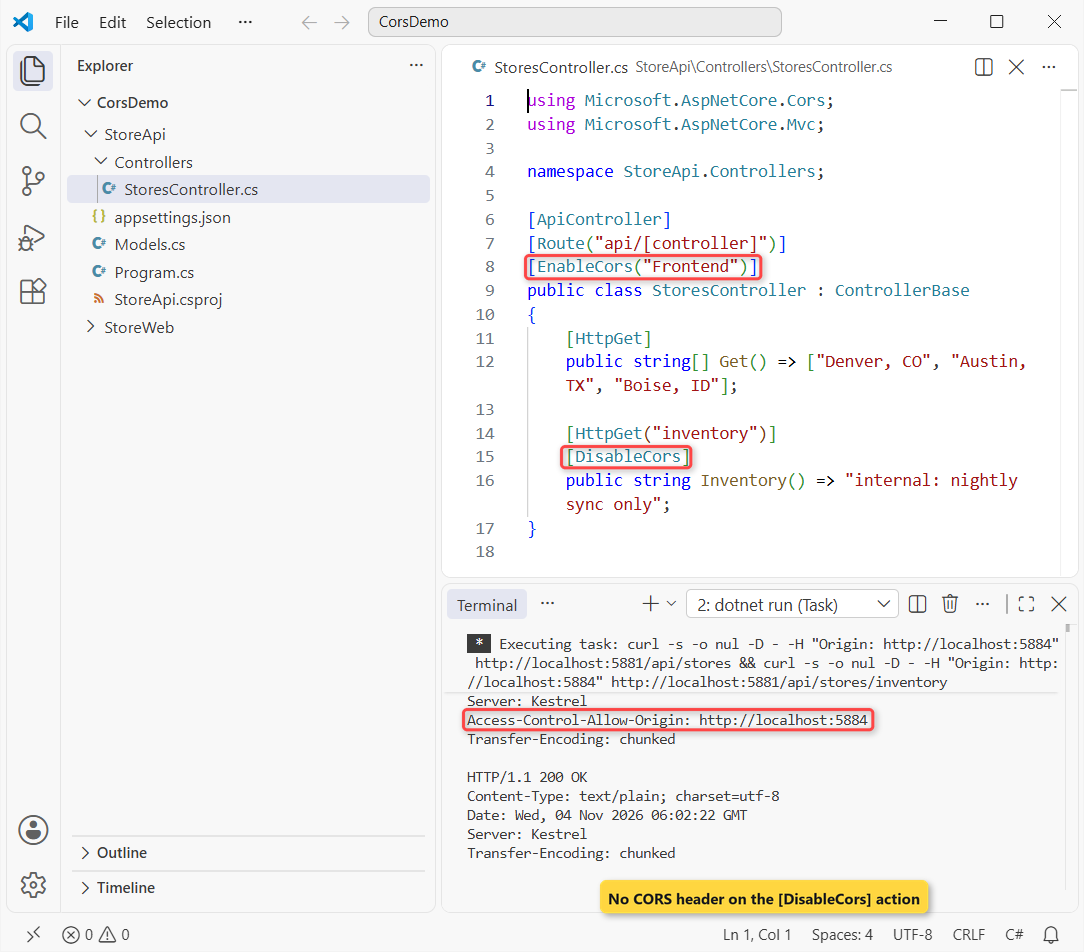
/api/stores returned the header. /api/stores/inventory still answered 200 (internal: nightly sync only) but without it, so a browser page can’t read it.
Note: Learn says [DisableCors] doesn’t turn off CORS that endpoint routing enabled with RequireCors. I kept the two styles on separate endpoints.
The Trailing-Slash CORS Origin Mistake
This one cost me an afternoon once. I copied the origin from the address bar, slash included:
policy.WithOrigins("http://localhost:5884/")HTTP/1.1 200 OK
Content-Type: application/json; charset=utf-8No header, no error, no log entry. Browsers send the Origin header without a trailing slash, and the comparison is exact, so the policy never matched. Remove the slash and it works.
Why Is CORS Still Not Working in ASP.NET Core?
When the error won’t go away, check these in order. Each one gave me a missing header or a failed preflight in these runs:
- The origin doesn’t match exactly. Scheme, host and port must match: http vs https, or 5884 vs 5885, is a different origin.
- Trailing slash in WithOrigins. http://localhost:5884/ never matches.
- UseCors() with no name and no default policy. It only helps endpoints that opt in with RequireCors or [EnableCors].
- Middleware that ends the request before UseCors. The preflight got a 401 with no headers until UseCors moved up.
- The endpoint never opted in. A preflight to an endpoint without a policy got 405.
- AllowAnyOrigin with AllowCredentials. The app throws InvalidOperationException at startup.
- Testing with curl or Postman. They always work; test in a browser and read the console message.
If the browser says CORS but the API is really failing with a 500, fix the server error first. My ASP.NET Core global error handling guide shows how to return clean problem details.
Once CORS works, these four reads pick up where the API goes next:
- All ASP.NET Core tutorials on AspDotnetHelp
- Unit test your API code with xUnit
- Document the API with OpenAPI and Scalar
- Dependency injection lifetimes in ASP.NET Core
Frequently Asked Questions
How do I enable CORS in ASP.NET Core?
Register a policy with builder.Services.AddCors and AddPolicy, list your front end’s origin with WithOrigins, and call app.UseCors with the policy name after building the app. CORS is built into ASP.NET Core, so no NuGet package is needed.
Why does CORS work in Postman but not in the browser?
CORS is enforced by browsers only. Postman, curl and server code read any response; a browser blocks the read when the response has no Access-Control-Allow-Origin header that matches the page’s origin.
Where should UseCors go in Program.cs?
After UseRouting (if you call it) and before UseAuthentication, UseAuthorization and UseResponseCaching. Anything that ends the request before UseCors, such as an auth check, returns responses without CORS headers.
Can I use AllowAnyOrigin with AllowCredentials?
No. The CORS protocol forbids a wildcard origin with credentials. In .NET 10 the app throws InvalidOperationException at startup. List the origins with WithOrigins, then add AllowCredentials.
How do I allow all localhost ports for CORS in development?
Use SetIsOriginAllowed(origin => new Uri(origin).Host == “localhost”) in a policy that only runs in Development. It allowed localhost:3000 and localhost:4200 in my test and rejected other hosts.
Does CORS make my ASP.NET Core API more secure?
No. CORS relaxes the browser’s same-origin policy; it doesn’t block curl, scripts or other servers. Protect the API with authentication. See Enable Cross-Origin Requests (CORS) in ASP.NET Core on Microsoft Learn.

Bijay Kumar is a renowned software engineer, accomplished author, and distinguished Microsoft Most Valuable Professional (MVP) specializing in SharePoint. With a rich professional background spanning over 15 years, Bijay has established himself as an authority in the field of information technology. He possesses unparalleled expertise in multiple programming languages and technologies such as ASP.NET, ASP.NET MVC, C#.NET, and SharePoint, which has enabled him to develop innovative and cutting-edge solutions for clients across the globe. Read more…