

An ArrayList in C# is a resizable list from System.Collections that stores everything as object. Create it with new ArrayList(), call Add, and cast each item back when you read it:
using System.Collections;

var cart = new ArrayList { "Hammer", 3, 24.99m };
cart.Add(true);                        // any type goes in
Console.WriteLine($"Items: {cart.Count}");
int qty = (int)cart[1]!;               // cast to read it back
Console.WriteLine($"Qty x 2 = {qty * 2}");
Output:
Items: 4
Qty x 2 = 6
I ran every example below on .NET 10, including the casting errors, and finished by converting the list to the List<T> Microsoft recommends today.
What Is an ArrayList in C#?
ArrayList lives in the System.Collections namespace and implements IList on top of an object[] that grows when it fills up. Unlike a fixed-size array, you never set the length up front.
If fixed arrays are new to you, start with arrays in C#; ArrayList was .NET 1.0’s answer to their fixed size. Here’s what you get:
| Feature | ArrayList behavior |
|---|---|
| Namespace | System.Collections (needs using System.Collections;) |
| Element type | object, so mixed types are allowed |
| Size | Grows automatically; Count = items, Capacity = slots |
| Index | Zero-based, list[i] returns object? |
| Nulls and duplicates | Both allowed |
| Thread safety | Not thread safe for writes; ArrayList.Synchronized wraps it |
Important: Microsoft’s own reference page says it doesn’t recommend ArrayList for new development. Use List<T>, or List<object> when you truly need mixed types.
How Do You Create an ArrayList and Add Items?
You’ll meet ArrayList mostly in older code, so this one example covers every way to fill one. The sample is a Phoenix hardware store’s curbside pickup queue:
using System.Collections;

var queue = new ArrayList();                  // Phoenix store pickup queue
Console.WriteLine($"Empty capacity: {queue.Capacity}");
queue.Add("Jenna Morales");
queue.Add("Tyler Brooks");
queue.AddRange(new[] { "Ava Collins", "Marcus Reed" });
queue.Insert(1, "Dana Whitfield");            // jump the line
queue.InsertRange(0, new[] { "Owen Hart" });
queue.Add("Tyler Brooks");                    // duplicates are fine
Console.WriteLine($"Count: {queue.Count}, Capacity: {queue.Capacity}");
for (int i = 0; i < queue.Count; i++)
    Console.WriteLine($"[{i}] {queue[i]}");
Output:
Empty capacity: 0
Count: 7, Capacity: 8
[0] Owen Hart
[1] Jenna Morales
[2] Dana Whitfield
[3] Tyler Brooks
[4] Ava Collins
[5] Marcus Reed
[6] Tyler Brooks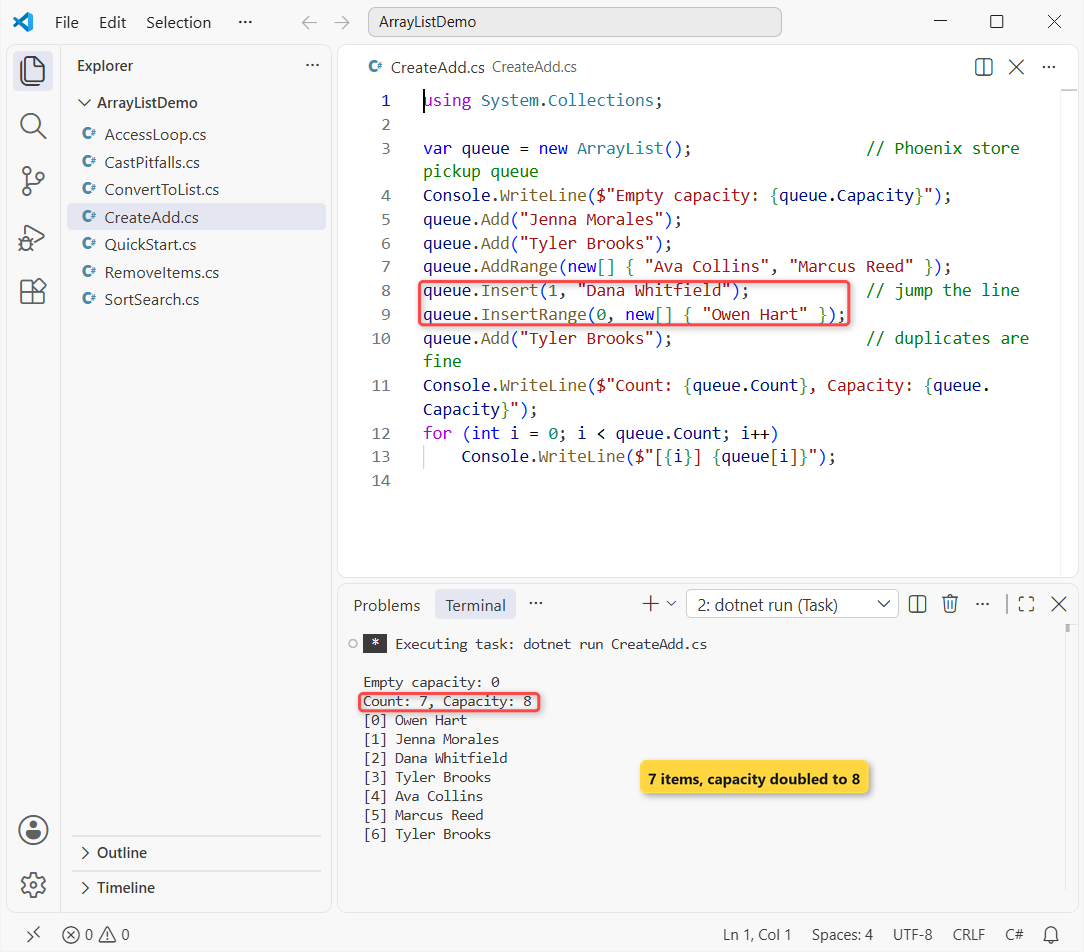
An empty ArrayList starts with capacity 0, jumps to 4 on the first Add, then doubles. After seven names the queue reports Count 7 and Capacity 8.
Insert(1, ...) pushed Tyler Brooks from index 1 to 2, and InsertRange(0, ...) moved everyone down one more. The second Tyler Brooks shows duplicates are accepted without complaint.
Pro Tip: if you know the size, pass it to the constructor (new ArrayList(500)) to skip the resize copies. The same idea applies to dynamic arrays in C#.
Access ArrayList Elements by Index and with foreach
Reading works like an array, with one catch: the indexer returns object, so you cast. Same queue, now trimmed to three names:
using System.Collections;

var queue = new ArrayList { "Owen Hart", "Jenna Morales", "Tyler Brooks" };
string first = (string)queue[0]!;             // indexer returns object
queue[2] = "Tyler J. Brooks";                 // replace by index
Console.WriteLine($"First up: {first}");
foreach (string name in queue)                // cast happens here
    Console.WriteLine($"Calling {name}");
try { object? x = queue[3]; }
catch (ArgumentOutOfRangeException) { Console.WriteLine("queue[3]: ArgumentOutOfRangeException"); }
Output:
First up: Owen Hart
Calling Owen Hart
Calling Jenna Morales
Calling Tyler J. Brooks
queue[3]: ArgumentOutOfRangeException
(string)queue[0] gives back Owen Hart, and assigning queue[2] replaced Tyler’s entry in place. Asking for index 3 on a three-item list throws ArgumentOutOfRangeException, not IndexOutOfRangeException like an array would.
foreach (string name in queue) looks cast-free, but the compiler inserts a cast on every item. The foreach loop in C# explains that hidden conversion; use a for loop when you need the index too.
Remove Items from an ArrayList: Remove, RemoveAt, RemoveRange and Clear
There are four ways to take items out, and they behave differently when the item isn’t there. Back to six names in the queue:
using System.Collections;

var queue = new ArrayList { "Owen Hart", "Jenna Morales", "Dana Whitfield",
                            "Tyler Brooks", "Ava Collins", "Marcus Reed" };
queue.Remove("Tyler Brooks");          // by value, first match
queue.Remove("Nobody");                // not found: no error
queue.RemoveAt(0);                     // by index
queue.RemoveRange(1, 2);               // 2 items from index 1
Console.WriteLine(string.Join(", ", queue.ToArray()));
Console.WriteLine($"Count: {queue.Count}");
queue.Clear();
Console.WriteLine($"After Clear: {queue.Count}");
Output:
Jenna Morales, Marcus Reed
Count: 2
After Clear: 0
Remove("Tyler Brooks") deletes the first match by value, while Remove("Nobody") silently does nothing. RemoveAt(0) drops Owen, and RemoveRange(1, 2) takes Dana and Ava, leaving Jenna Morales and Marcus Reed.
Index-based removals throw ArgumentOutOfRangeException for a bad index. Clear() empties the list but keeps the capacity, so call TrimToSize() afterward if memory matters.
Sort and Search an ArrayList
Sort() uses each element’s IComparable implementation, which works only when every item has the same type. Here are four Phoenix-area ZIP codes stored as int:
using System.Collections;

var zips = new ArrayList { 85004, 85251, 85003, 85281 };
zips.Sort();
Console.WriteLine(string.Join(" ", zips.ToArray()));
Console.WriteLine($"Contains 85251: {zips.Contains(85251)}");
Console.WriteLine($"Contains \"85251\": {zips.Contains("85251")}");
Console.WriteLine($"IndexOf 85281: {zips.IndexOf(85281)}");
Console.WriteLine($"BinarySearch 85004: {zips.BinarySearch(85004)}");
zips.Reverse();
Console.WriteLine(string.Join(" ", zips.ToArray()));
zips.Add("85016");                     // a string sneaks in
try { zips.Sort(); }
catch (InvalidOperationException ex) { Console.WriteLine(ex.Message); }
Output:
85003 85004 85251 85281
Contains 85251: True
Contains "85251": False
IndexOf 85281: 3
BinarySearch 85004: 1
85281 85251 85004 85003
Failed to compare two elements in the array.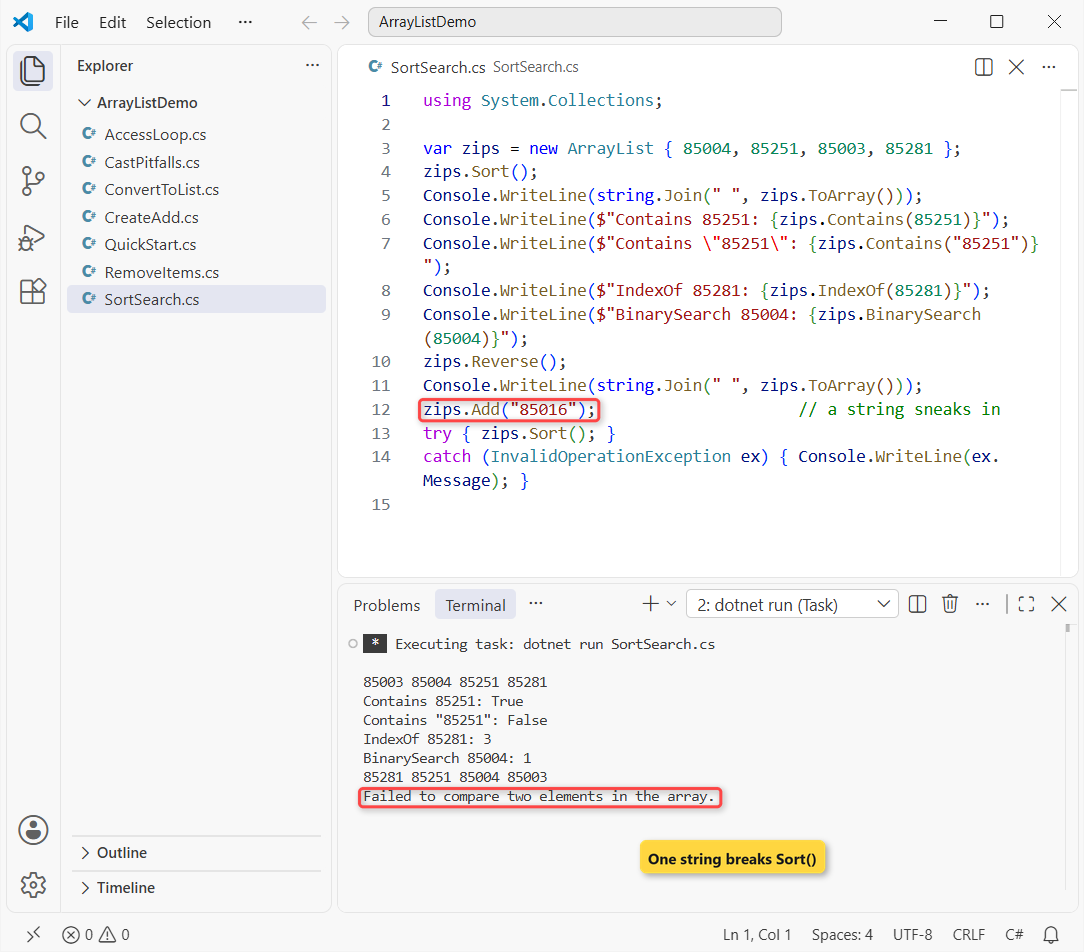
After Sort(), Contains(85251) is True but Contains("85251") is False, because a boxed int never equals a string. BinarySearch found 85004 at index 1.
BinarySearch needs a sorted list, or its answer is meaningless. Once the string "85016" got in, Sort() threw InvalidOperationException: “Failed to compare two elements in the array.”
With a typed sort on an array in C# or a List<int>, that bad Add wouldn’t even compile.
ArrayList Type Casting Pitfalls: InvalidCastException and Boxing
Mixed types are the reason ArrayList exists, and also its biggest trap. One order row: product, quantity and price:
using System.Collections;

var row = new ArrayList { "Hammer", 3, 24.99m };
int qty = (int)row[1]!;
Console.WriteLine($"Qty: {qty}");
try { double price = (double)row[2]!; }
catch (InvalidCastException ex) { Console.WriteLine(ex.Message); }
if (row[2] is decimal p)
    Console.WriteLine($"Line total: {qty * p}");
try { foreach (string s in row) Console.WriteLine(s); }
catch (InvalidCastException) { Console.WriteLine("hit the int"); }
Output:
Qty: 3
Unable to cast object of type 'System.Decimal' to type 'System.Double'.
Line total: 74.97
Hammer
hit the int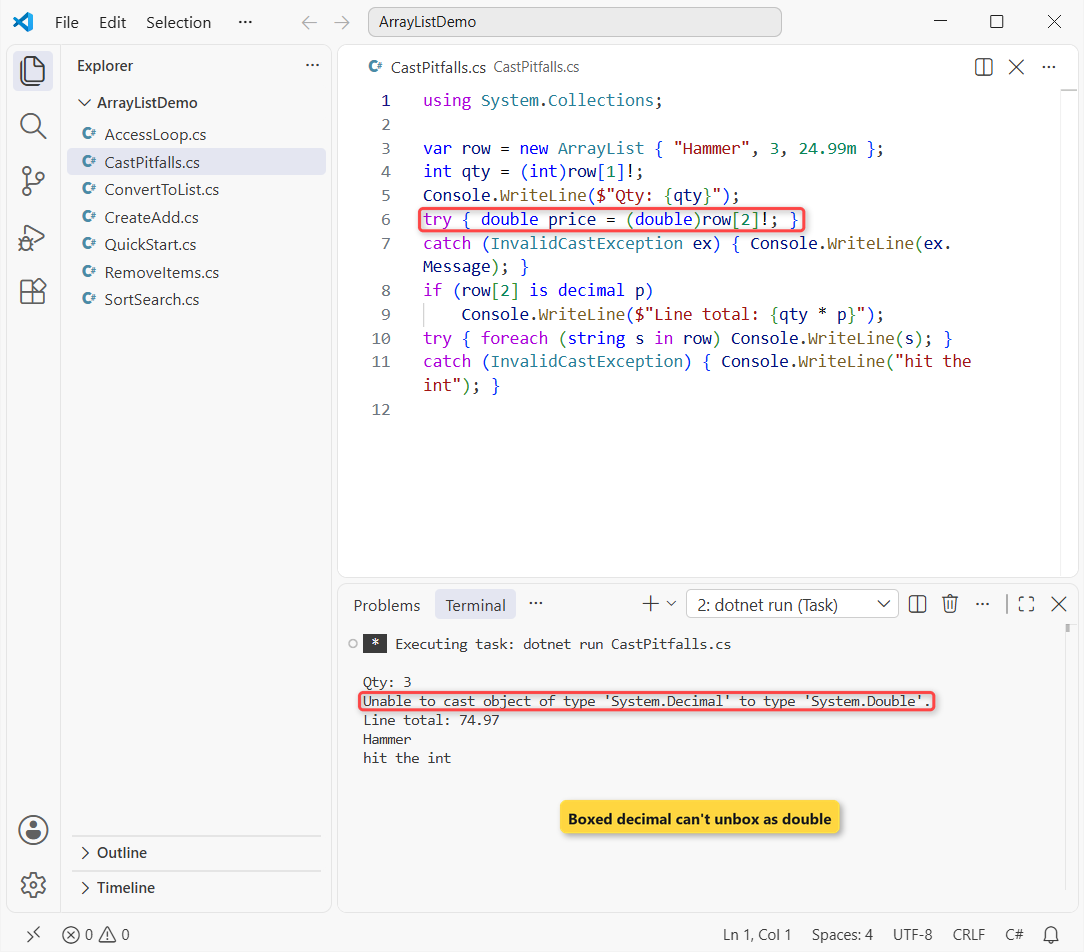
(int)row[1] works because the box holds an int. (double)row[2] throws, because unboxing must name the exact type stored, and 24.99m is a decimal.
Pattern matching with is decimal p never throws and gave a line total of 74.97. The foreach (string s ...) loop printed Hammer, then hit the int and threw.
Every value type you Add also gets boxed into a heap object. The boxing and unboxing guide times ArrayList against List<int>, and type casting in C# covers safe conversions.
Why Is List<T> Preferred Over ArrayList Today?
Everything above that needed a cast, or threw at run time, is a compile-time check with generics. Side by side:
ArrayList | List<T> | |
|---|---|---|
| Namespace | System.Collections | System.Collections.Generic |
| Item type | object (anything) | One declared type T |
| Reading items | Cast every time | No cast |
| Wrong type added | Fails later at run time | Compile error |
Value types (int, decimal) | Boxed on every Add | Stored directly |
| LINQ | Needs Cast<T>() / OfType<T>() first | Works directly |
Microsoft’s guidance is plain: List<T> for one type, List<object> for a mixed bag. I haven’t started a new ArrayList in years, and my full guide to List<T> in C# is the modern replacement for everything in this post.
The same goes for the other legacy collection: swap Hashtable for a typed Dictionary.
How Do You Convert an ArrayList to List<T> or an Array?
When you inherit an ArrayList from old code or a legacy API, convert it at the boundary and use List<T> from there on:
using System.Collections;

var legacy = new ArrayList { "Jenna", "Tyler", "Ava" };
List<string> names = legacy.Cast<string>().ToList();
string[] arr = new string[legacy.Count];
legacy.CopyTo(arr);
Console.WriteLine($"List: {names.Count}, array: {arr.Length}");

var mixed = new ArrayList { "Owen Hart", 42, "Dana Reed", null };
List<string> onlyNames = mixed.OfType<string>().ToList();
Console.WriteLine(string.Join(", ", onlyNames));
var everything = new List<object?>(mixed.Cast<object?>());
Console.WriteLine($"List<object?>: {everything.Count}");
Output:
List: 3, array: 3
Owen Hart, Dana Reed
List<object?>: 4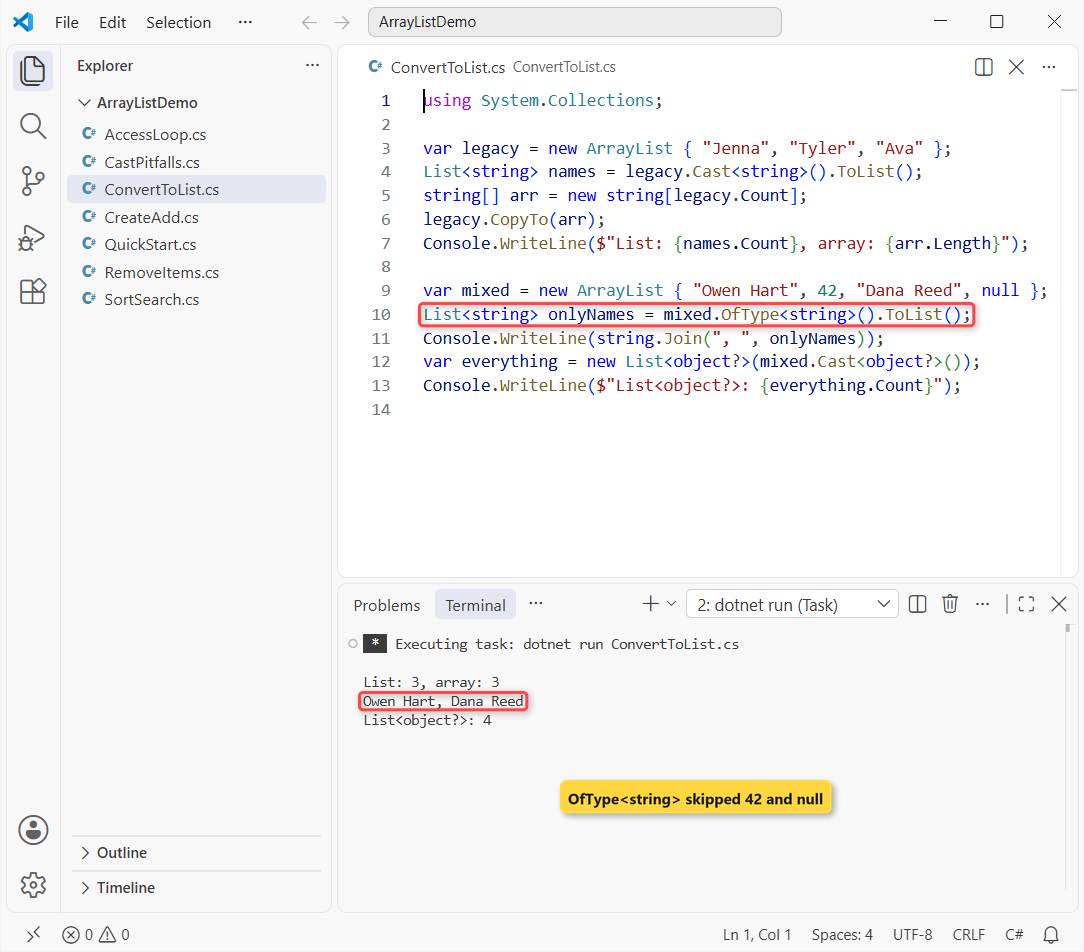
Cast<string>().ToList() and CopyTo(arr) both gave 3 items. Each throws InvalidCastException if even one item has another type.
OfType<string>() is the forgiving one: it skipped 42 and null and kept Owen Hart and Dana Reed. To keep all four values, copy into a List<object?>.
For the next step in your collections cleanup, these help:
- Store key/value pairs with a typed Dictionary in C#
- Walk a list by index with a for loop
- Turn a List into a comma-separated string
- Check whether a string array contains an element
Frequently Asked Questions
What is an ArrayList in C#?
It’s a non-generic, resizable collection in System.Collections that stores items as object. It grows automatically as you add items, accepts mixed types, nulls and duplicates, and needs a cast when you read an item back.
Is ArrayList obsolete in C#?
It isn’t marked obsolete and still works on .NET 10, but Microsoft doesn’t recommend it for new code. The ArrayList class page on Microsoft Learn points you to List<T> instead.
What is the difference between ArrayList and List<T> in C#?
ArrayList stores object, so reads need casts, value types get boxed and type mistakes show up at run time. List<T> holds one declared type, needs no casts and catches wrong types at compile time.
Why do I get InvalidCastException when reading from an ArrayList?
The cast must match the exact type stored. A boxed decimal can’t be cast to double, and a boxed int can’t be cast to long. Use the exact type, or test it first with is decimal p.
How do I convert an ArrayList to a List<string>?
Call list.Cast<string>().ToList() when every item is a string, or list.OfType<string>().ToList() to skip items of other types and nulls.
What is the difference between Count and Capacity in ArrayList?
Count is the number of items you added. Capacity is how many slots the internal array has right now; it starts at 0, becomes 4 on the first Add and doubles as needed.

Bijay Kumar is a renowned software engineer, accomplished author, and distinguished Microsoft Most Valuable Professional (MVP) specializing in SharePoint. With a rich professional background spanning over 15 years, Bijay has established himself as an authority in the field of information technology. He possesses unparalleled expertise in multiple programming languages and technologies such as ASP.NET, ASP.NET MVC, C#.NET, and SharePoint, which has enabled him to develop innovative and cutting-edge solutions for clients across the globe. Read more…