
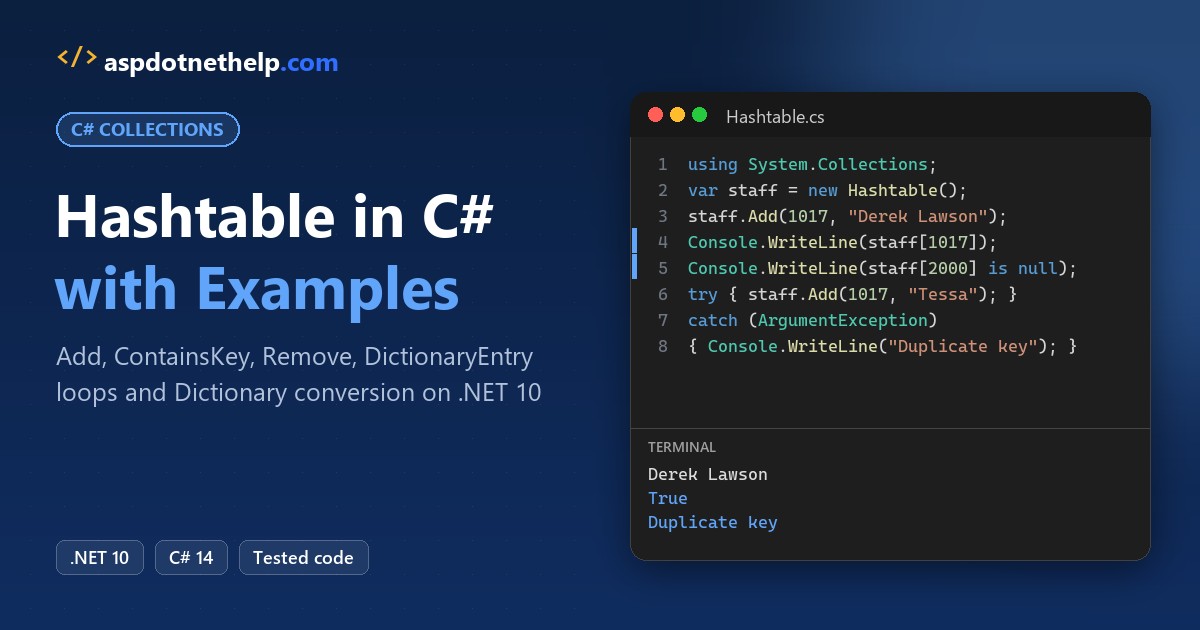
To use a Hashtable in C#, add using System.Collections;, create new Hashtable(), store pairs with Add(key, value) and cast each value back to its real type when you read it.
For new code, Microsoft recommends the generic Dictionary<TKey,TValue> instead. I ran every example here on .NET 10 against one staff table, including the exceptions that duplicate and null keys throw.
The Sample Hashtable We’ll Use: Print Shop Staff Badges
Every method below works on the same small table from a Raleigh, North Carolina print shop: badge numbers as keys and employee names as values. Here’s how I create and fill it:
using System.Collections;

var staff = new Hashtable();            // badge number -> name
staff.Add(1042, "Carla Jennings");
staff.Add(1017, "Derek Lawson");
staff.Add(1088, "Holly Brennan");
staff.Add(1003, "Marcus Webb");

string name = (string)staff[1017]!;     // indexer returns object?
Console.WriteLine($"Badge 1017: {name}");
Console.WriteLine($"Staff count: {staff.Count}");

var crew = new Hashtable { { "Mon", 3 }, { "Sat", 2 } };
Console.WriteLine($"Saturday crew: {crew["Sat"]}");
Output:
Badge 1017: Derek Lawson
Staff count: 4
Saturday crew: 2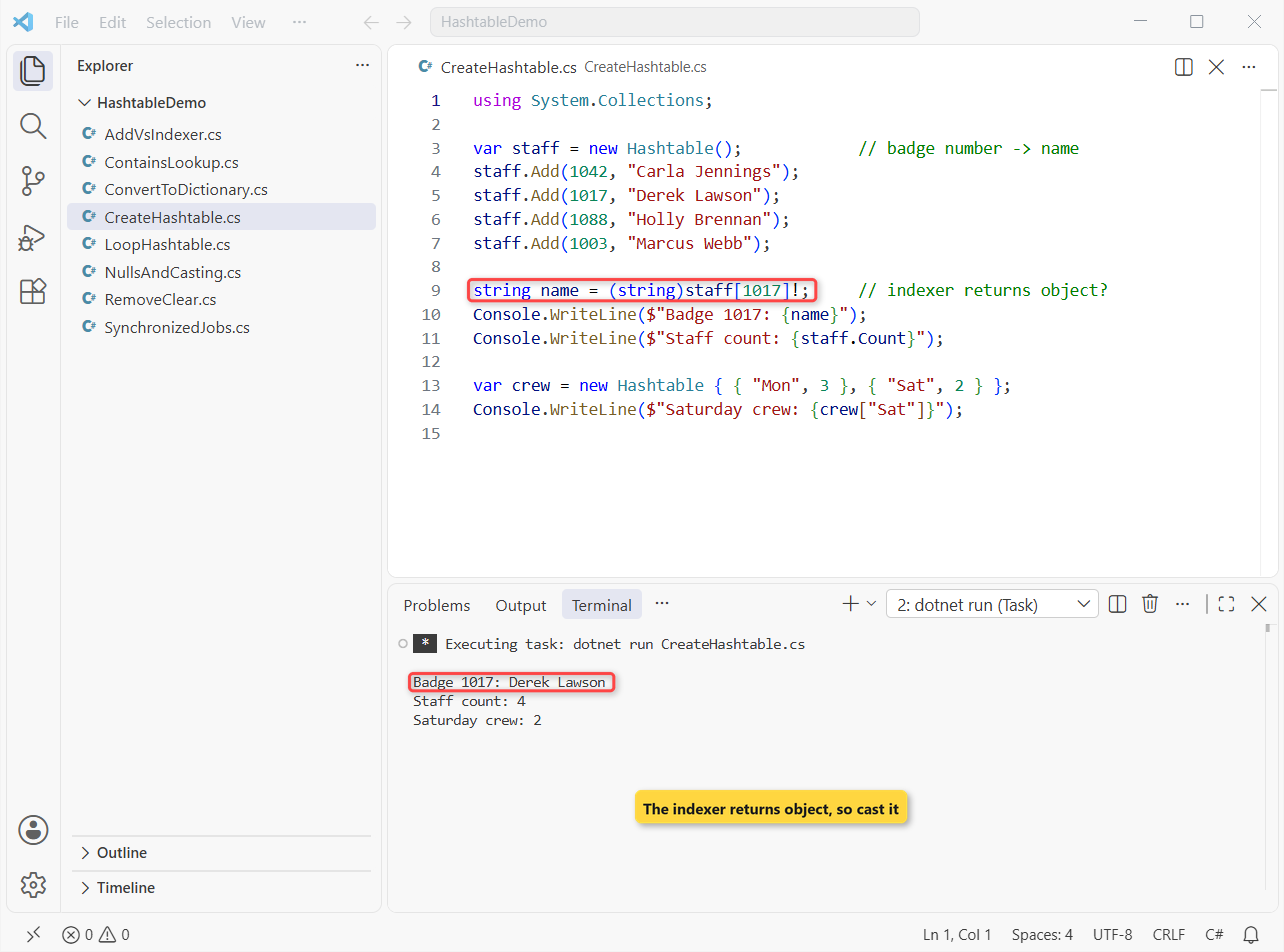
The program prints Derek Lawson for badge 1017, a count of 4, and a Saturday crew of 2.
How does this code work?
Hashtable lives in System.Collections, which isn’t one of .NET 10’s implicit usings, so the using line is required. Keys and values are both typed object, which is why an int key and a string value go in without complaint.
The indexer hands back object?, so (string)staff[1017]! casts it to a string; the ! just tells the compiler I know it isn’t null. The second table shows the { key, value } collection initializer, which calls Add for you.
Each int key is boxed into an object on the way in. The boxing and unboxing guide shows what that costs.
Method 1: Add or Update Hashtable Items with Add() vs the Indexer
There are two ways to put a pair into the table, and they disagree about duplicates. Same staff table, starting with two badges:
using System.Collections;

var staff = new Hashtable
{
    { 1042, "Carla Jennings" },
    { 1017, "Derek Lawson" }
};
staff[1088] = "Holly Brennan";          // new key: added
staff[1017] = "Derek J. Lawson";        // existing key: replaced
Console.WriteLine($"Count: {staff.Count}");
Console.WriteLine($"1017: {staff[1017]}");

try { staff.Add(1042, "Tessa Nguyen"); }   // duplicate key
catch (ArgumentException ex) { Console.WriteLine(ex.Message); }
Output:
Count: 3
1017: Derek J. Lawson
Item has already been added. Key in dictionary: '1042'  Key being added: '1042'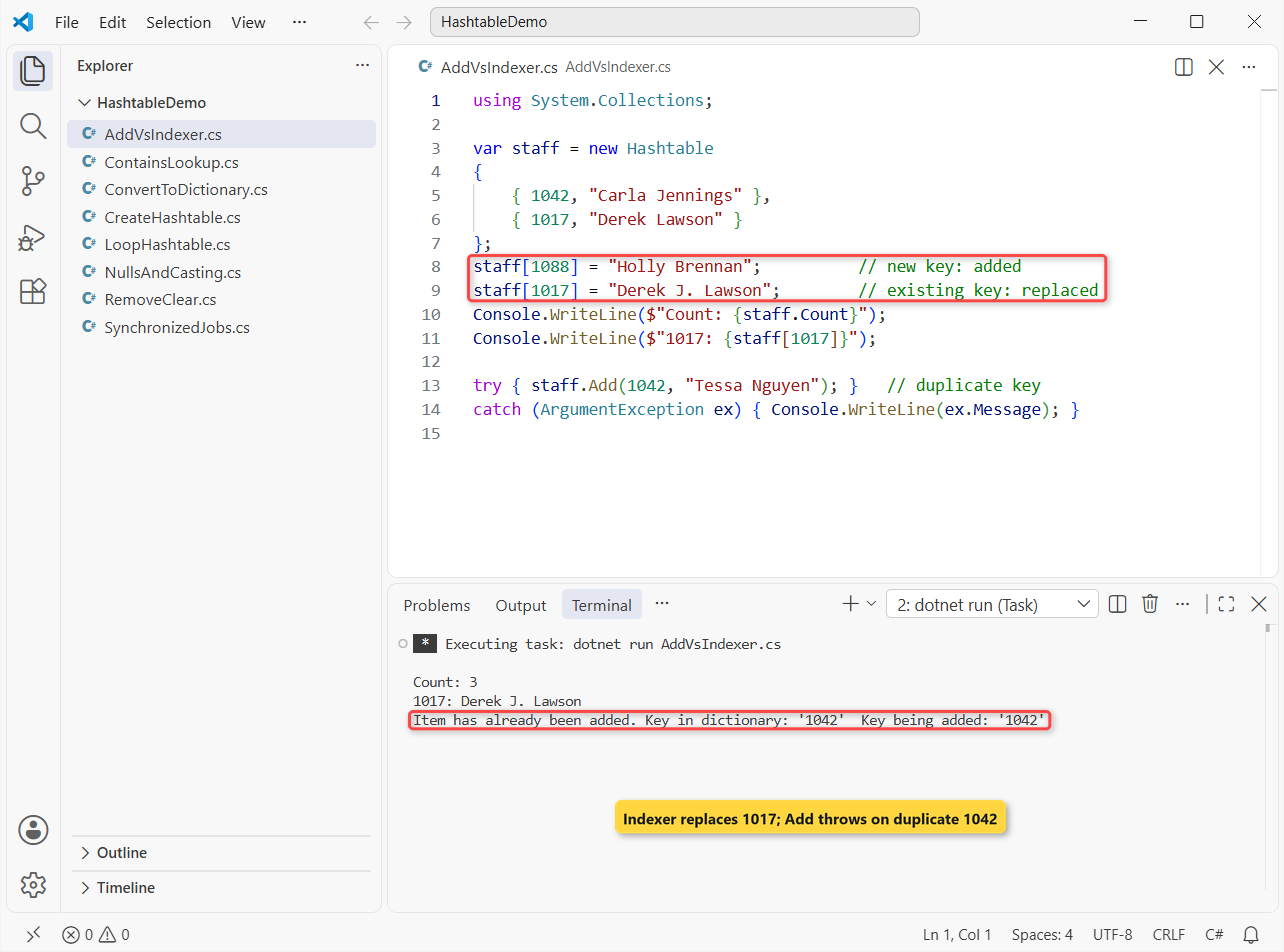
The count reaches 3, badge 1017 now reads Derek J. Lawson, and the duplicate Add is caught as an ArgumentException.
How does this code work?
staff[1088] = ... adds a pair because 1088 isn’t there yet. staff[1017] = ... finds an existing key and quietly replaces the value, so the indexer is how you update a Hashtable.
Add(1042, ...) won’t overwrite. Its message on .NET 10 is “Item has already been added. Key in dictionary: ‘1042’ Key being added: ‘1042’”.
Important: don’t use a try-catch block to skip duplicates in normal code. Check ContainsKey first, or use the indexer when overwriting is fine.
Method 2: Check a Hashtable Key or Value with ContainsKey and ContainsValue
Before reading or adding, you’ll usually ask whether a key exists. Same table, three badges:
using System.Collections;

var staff = new Hashtable
{
    { 1042, "Carla Jennings" },
    { 1017, "Derek Lawson" },
    { 1088, "Holly Brennan" }
};
Console.WriteLine($"ContainsKey(1088):   {staff.ContainsKey(1088)}");
Console.WriteLine($"Contains(1088):      {staff.Contains(1088)}");
Console.WriteLine($"ContainsKey(\"1088\"): {staff.ContainsKey("1088")}");
Console.WriteLine($"ContainsKey(1088L):  {staff.ContainsKey(1088L)}");
bool hasDerek = staff.ContainsValue("Derek Lawson");
Console.WriteLine($"ContainsValue:       {hasDerek}");

object? missing = staff[2000];          // no exception
Console.WriteLine($"staff[2000] is null: {missing is null}");
Output:
ContainsKey(1088):   True
Contains(1088):      True
ContainsKey("1088"): False
ContainsKey(1088L):  False
ContainsValue:       True
staff[2000] is null: True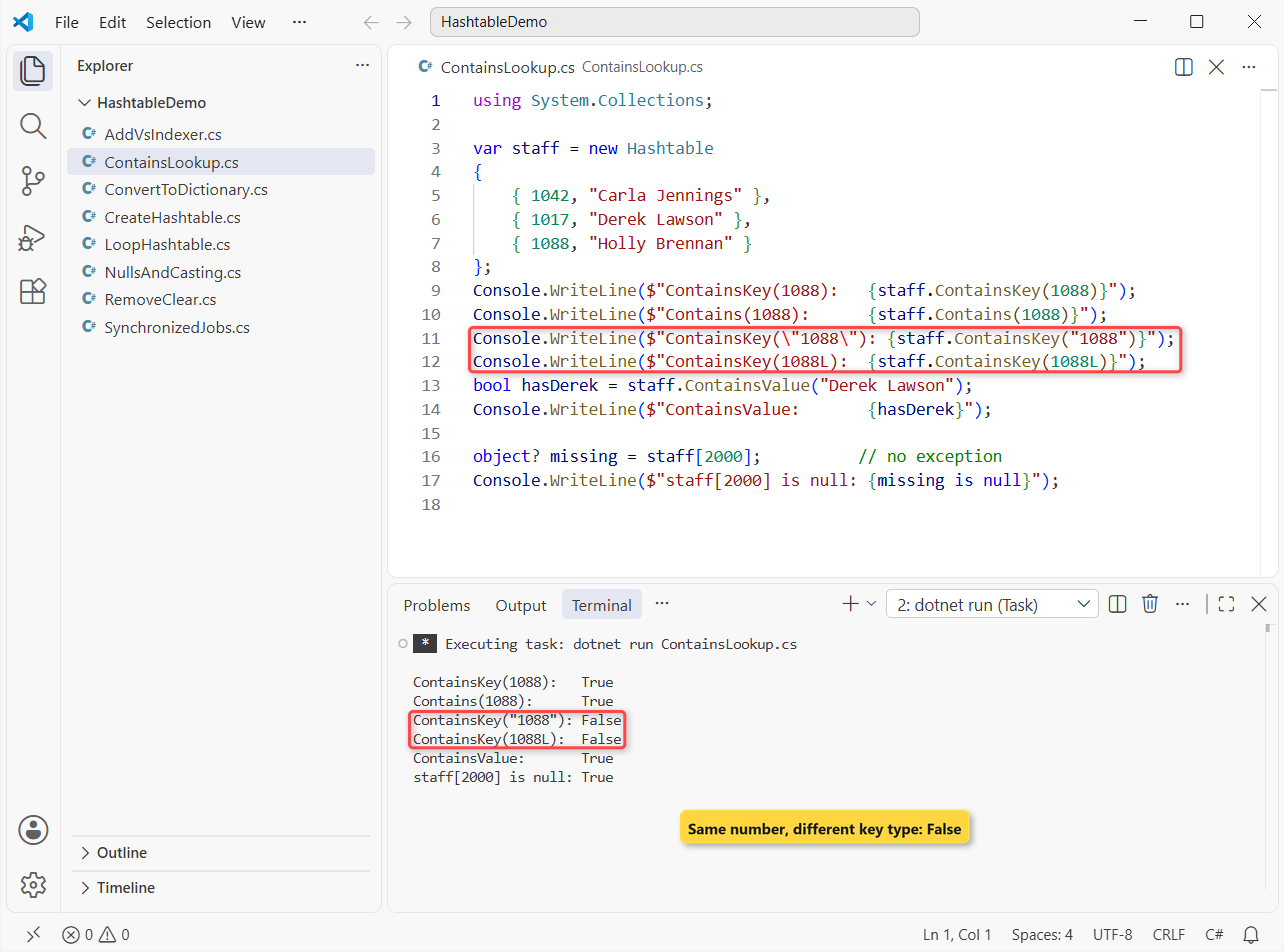
Two checks surprised me the first time: the string "1088" and the long 1088L both return False, even though badge 1088 is in the table.
How does this code work?
ContainsKey and Contains are the same method under two names, and both are O(1). Equality uses the key’s own Equals, and a boxed int never equals a boxed long or a string.
ContainsValue has no hash to use, so it scans every entry; avoid it on big tables. And staff[2000] returned null instead of throwing, which is the opposite of a Dictionary.
Pro Tip: if values may be null, null from the indexer can mean “missing” or “stored null”. Pair it with ContainsKey, or see how to check for null values in C#.
Method 3: Remove Items from a Hashtable with Remove() and Clear()
Back to all four badges. Marcus Webb leaves, someone removes a badge that never existed, and then I try a cleanup loop:
using System.Collections;

var staff = new Hashtable
{
    { 1042, "Carla Jennings" }, { 1017, "Derek Lawson" },
    { 1088, "Holly Brennan" }, { 1003, "Marcus Webb" }
};
staff.Remove(1003);                     // Marcus Webb leaves
staff.Remove(9999);                     // not there: no error
Console.WriteLine($"After Remove: {staff.Count}");

try { foreach (DictionaryEntry e in staff) staff.Remove(e.Key); }
catch (InvalidOperationException ex) { Console.WriteLine(ex.Message); }

staff.Clear();
Console.WriteLine($"After Clear: {staff.Count}");
Output:
After Remove: 3
Collection was modified; enumeration operation may not execute.
After Clear: 0
The count drops to 3, the loop fails with “Collection was modified; enumeration operation may not execute.”, and Clear() leaves 0.
How does this code work?
Remove(1003) deletes that pair by key. Remove(9999) does nothing at all; unlike Add, it never complains about a missing key.
Changing the table inside its own foreach breaks the enumerator, so the loop threw on the next step. To remove items while looping, copy the keys first with new ArrayList(staff.Keys) and loop over the copy.
Method 4: Loop Through a Hashtable with foreach and DictionaryEntry
Each item a Hashtable gives you is a DictionaryEntry with Key and Value properties. The foreach loop in C# is the usual way to walk the same four badges:
using System.Collections;

var staff = new Hashtable
{
    { 1042, "Carla Jennings" }, { 1017, "Derek Lawson" },
    { 1088, "Holly Brennan" }, { 1003, "Marcus Webb" }
};
foreach (DictionaryEntry entry in staff)
    Console.WriteLine($"{entry.Key}: {entry.Value}");

Console.WriteLine("Keys: " + string.Join(", ", staff.Keys.Cast<int>()));
var sorted = staff.Keys.Cast<int>().Order();
Console.WriteLine("Sorted: " + string.Join(", ", sorted));

IDictionaryEnumerator it = staff.GetEnumerator();
while (it.MoveNext())
    Console.Write($"{it.Key}={((string)it.Value!)[0]} ");
Output:
1042: Carla Jennings
1088: Holly Brennan
1017: Derek Lawson
1003: Marcus Webb
Keys: 1042, 1088, 1017, 1003
Sorted: 1003, 1017, 1042, 1088
1042=C 1088=H 1017=D 1003=M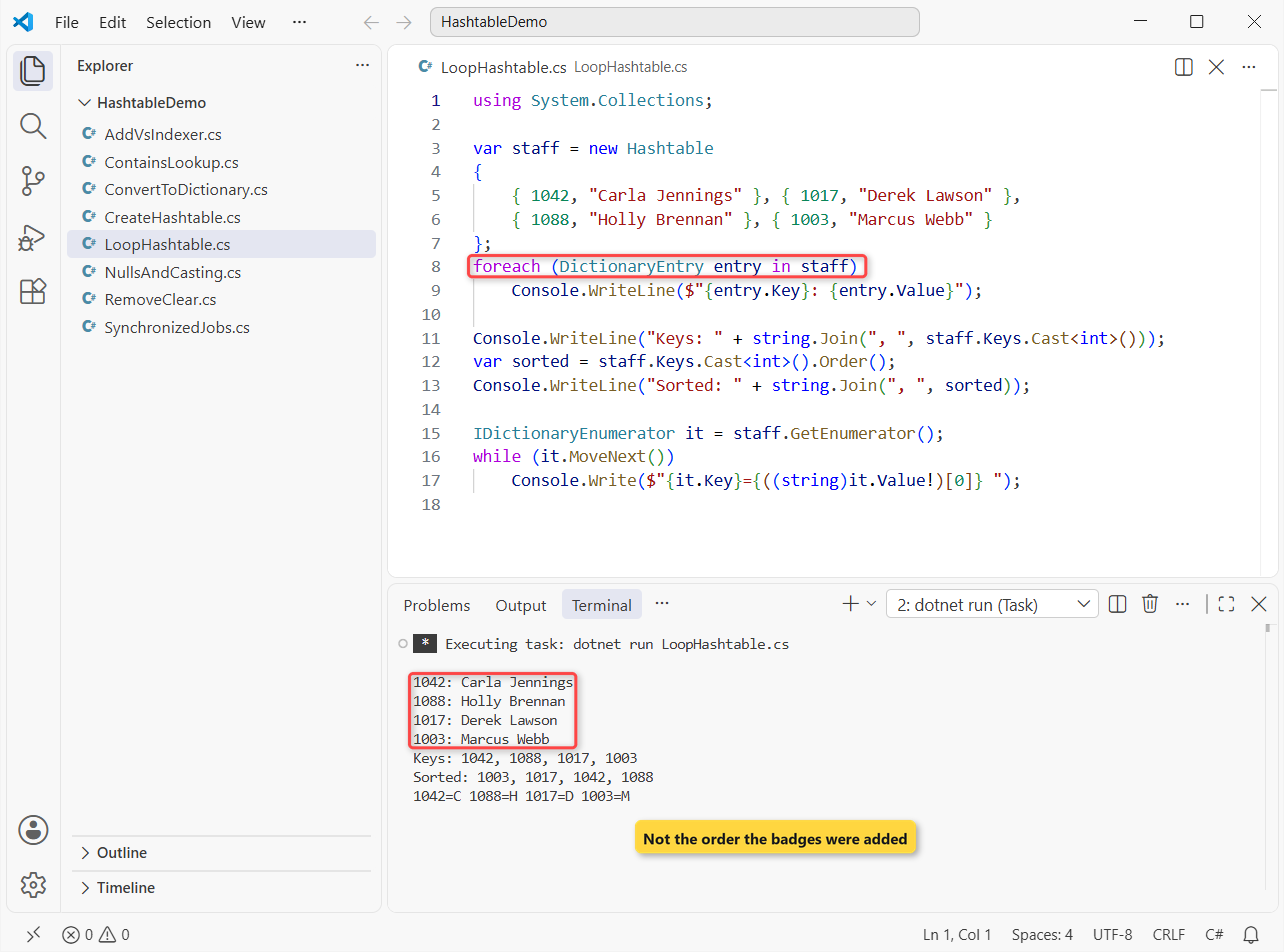
The badges came out as 1042, 1088, 1017, 1003, not in the order I added them. The sorted line reads 1003, 1017, 1042, 1088.
How does this code work?
foreach (DictionaryEntry entry in staff) reads each pair; entry.Value is still object, so cast it before you call string methods on it.
Keys and Values are plain ICollection objects. Cast<int>() turns the keys into a typed sequence, and LINQ’s Order() sorts them.
GetEnumerator() returns an IDictionaryEnumerator, which is what foreach uses under the hood. You’ll see it in older code; I prefer the foreach.
Important: Hashtable order depends on the key hashes and the table size. Never rely on it, and sort keys when you display them.
How Do You Handle Null Keys, Null Values and Casting in a Hashtable?
Values in a Hashtable can be anything, including null, but keys can’t. Here the shop stores hourly rates by name:
using System.Collections;
using System.Globalization;
CultureInfo.CurrentCulture = CultureInfo.GetCultureInfo("en-US");

var rates = new Hashtable();            // name -> hourly rate
rates["Carla Jennings"] = 28.50m;
rates["Derek Lawson"] = null;           // null value: allowed
Console.WriteLine($"Count: {rates.Count}");

try { rates.Add(null!, 30m); }
catch (ArgumentNullException ex) { Console.WriteLine(ex.Message); }

try { double r = (double)rates["Carla Jennings"]!; }
catch (InvalidCastException ex) { Console.WriteLine(ex.Message); }

if (rates["Carla Jennings"] is decimal rate)
    Console.WriteLine($"Weekly pay (40 h): {rate * 40:C}");
Output:
Count: 2
Value cannot be null. (Parameter 'key')
Unable to cast object of type 'System.Decimal' to type 'System.Double'.
Weekly pay (40 h): $1,140.00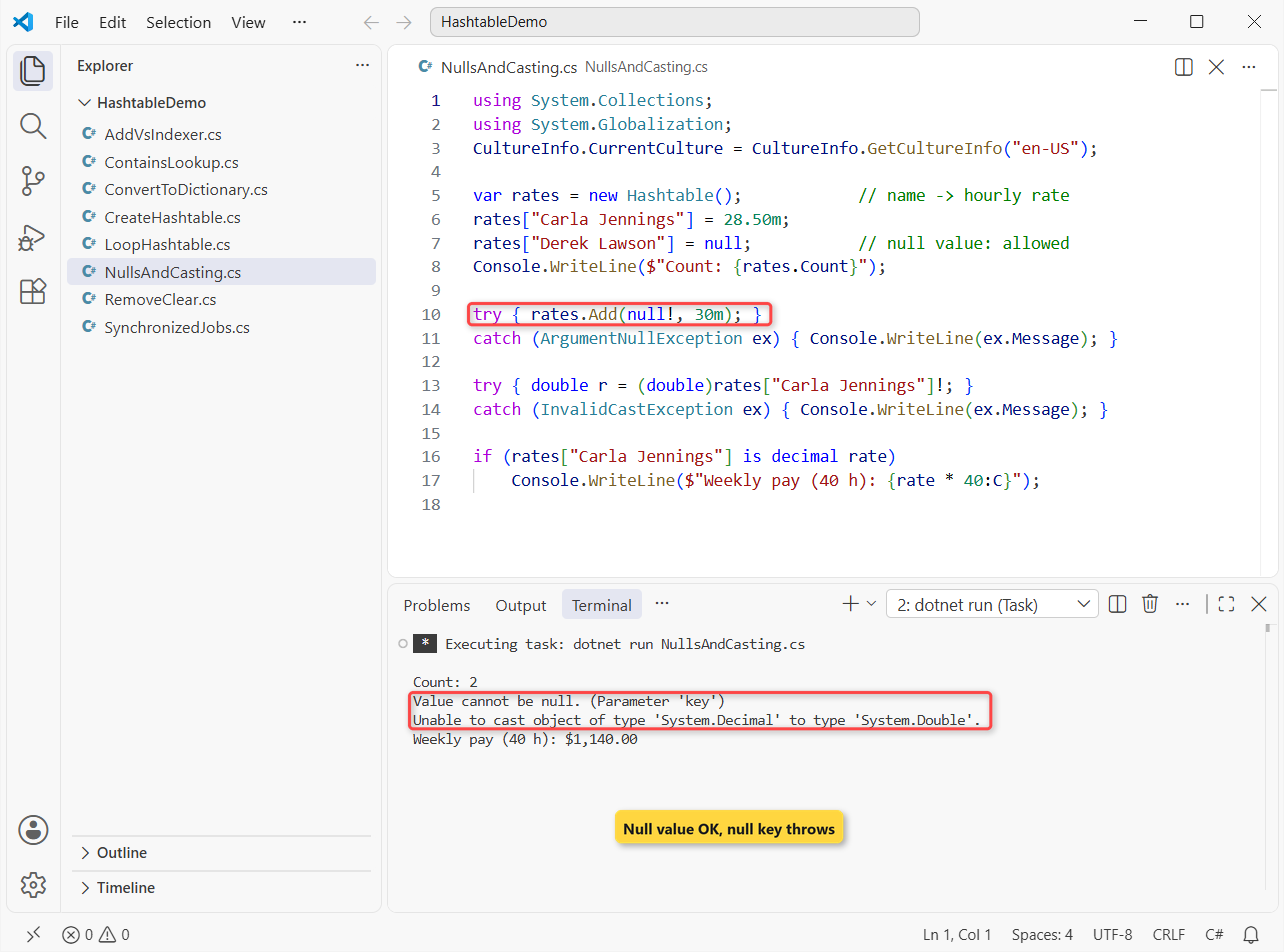
The table holds 2 entries, the null key throws, the double cast fails, and the weekly pay prints $1,140.00.
How does this code work?
rates["Derek Lawson"] = null stores a real entry, so the count is 2. Add(null!, 30m) throws ArgumentNullException with “Value cannot be null. (Parameter ‘key’)”.
28.50m was boxed as a decimal, and unboxing must name that exact type, so (double) threw InvalidCastException. Type casting in C# covers the safe conversions.
The pattern is decimal rate tests and casts in one step and never throws. I set the culture to en-US so :C prints dollars on any machine.
Is a Hashtable Thread-Safe in C#?
Partly. Microsoft documents a Hashtable as safe for many reader threads and one writer thread. For several writers, wrap it with Hashtable.Synchronized. Here 1,000 parallel print jobs write to the same table:
using System.Collections;

var jobs = Hashtable.Synchronized(new Hashtable());
Console.WriteLine($"IsSynchronized: {jobs.IsSynchronized}");

Parallel.For(0, 1000, i => jobs[i] = $"Print job {i}");   // many writers
Console.WriteLine($"Jobs stored: {jobs.Count}");

lock (jobs.SyncRoot)                    // enumeration still needs a lock
{
    int seen = 0;
    foreach (DictionaryEntry e in jobs) seen++;
    Console.WriteLine($"Enumerated: {seen}");
}
Output:
IsSynchronized: True
Jobs stored: 1000
Enumerated: 1000
All 1,000 jobs are stored, and the locked loop counts 1,000 entries.
How does this code work?
Hashtable.Synchronized returns a wrapper that locks around every call, which is why IsSynchronized is True. Every thread must go through that wrapper, not the inner table.
Enumeration isn’t covered by the wrapper. Microsoft’s advice is to lock the whole loop, which is what lock (jobs.SyncRoot) does.
In new code I’d skip both and use ConcurrentDictionary<TKey,TValue> from System.Collections.Concurrent.
Hashtable vs Dictionary in C#: What’s the Difference?
Both are hash tables with near O(1) lookups. The differences are about types, and they’re why Microsoft points new code to the Dictionary in C#:
Hashtable | Dictionary<TKey,TValue> | |
|---|---|---|
| Namespace | System.Collections | System.Collections.Generic |
| Key and value types | object (anything) | Declared TKey and TValue |
| Reading a value | Cast every time | No cast |
| Missing key with the indexer | Returns null | Throws KeyNotFoundException |
Value types (int, decimal) | Boxed | Stored directly |
| foreach item | DictionaryEntry | KeyValuePair<TKey,TValue> |
| Threads | Many readers + one writer; Synchronized wrapper | Many readers, no writers; use ConcurrentDictionary |
| Microsoft’s advice | Not for new development | Recommended |
It’s the same story as ArrayList in C# versus List in C#: the non-generic type still works on .NET 10, but the generic one catches mistakes at compile time.
Method 5: Convert a Hashtable to a Dictionary
When old code or an older library hands you a Hashtable, convert it once and work with a typed Dictionary from there. Same three badges:
using System.Collections;

var staff = new Hashtable
{
    { 1042, "Carla Jennings" },
    { 1017, "Derek Lawson" },
    { 1088, "Holly Brennan" }
};
Dictionary<int, string> byBadge = staff.Cast<DictionaryEntry>()
    .ToDictionary(e => (int)e.Key, e => (string)e.Value!);
Console.WriteLine($"Dictionary count: {byBadge.Count}");
Console.WriteLine($"1088 -> {byBadge[1088]}");   // no cast

var back = new Hashtable(byBadge);       // and back again
Console.WriteLine($"Hashtable count: {back.Count}");

try { _ = byBadge[2000]; }
catch (KeyNotFoundException) { Console.WriteLine("KeyNotFoundException"); }
Output:
Dictionary count: 3
1088 -> Holly Brennan
Hashtable count: 3
KeyNotFoundException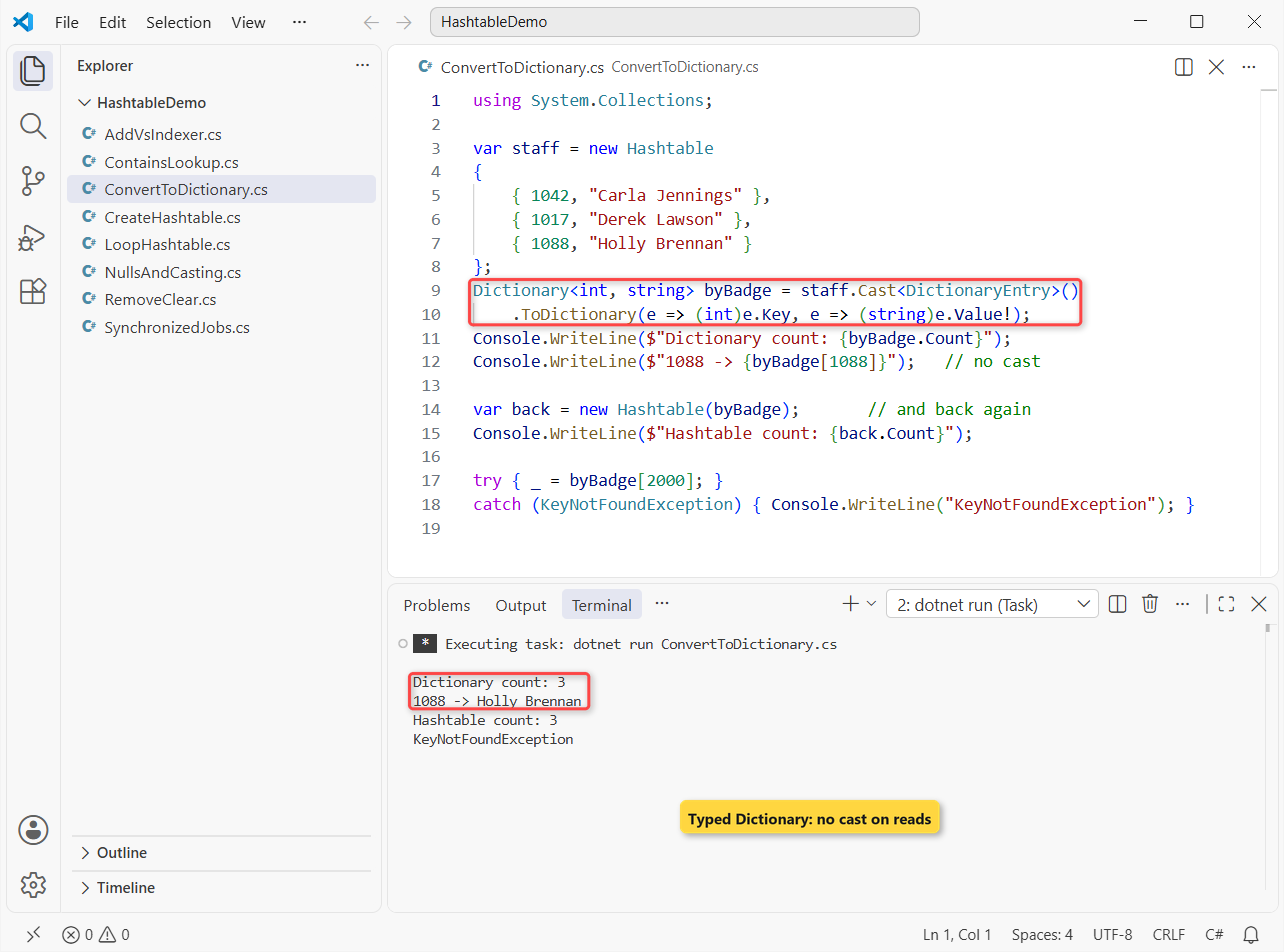
The Dictionary has 3 entries, reads Holly Brennan for 1088 without a cast, and converts back to a 3-entry Hashtable.
How does this code work?
Cast<DictionaryEntry>() makes the table usable with LINQ, and ToDictionary casts each key to int and each value to string. One wrong type in the table and it throws InvalidCastException.
new Hashtable(byBadge) goes the other way, since a Dictionary implements IDictionary. The last line shows the behavior change: the Dictionary throws for badge 2000 where the Hashtable returned null.
Pro Tip: if you only need a quick pair of values rather than a lookup table, a tuple in C# is lighter than either collection.
Which Hashtable Method Should You Use?
| Task | My pick | Why |
|---|---|---|
| Add a key that must be new | Add(key, value) | Throws on a duplicate |
| Add or overwrite | Indexer table[key] = value | Never throws |
| Check a key | ContainsKey | O(1); same as Contains |
| Read a value | Indexer + is pattern | No exception for a missing key or a wrong type |
| Loop | foreach (DictionaryEntry e ...) | Key and value together |
| New code | Dictionary<TKey,TValue> | Typed, no boxing, Microsoft’s advice |
Things to Keep in Mind
- The key type must match exactly.
1088,1088Land"1088"are three different keys. - A missing key returns null. Use
ContainsKeywhen null is also a valid stored value. - Order isn’t guaranteed. Sort the keys before you display them.
- Don’t change the table inside its foreach. Loop over a copy of the keys instead.
- String keys are case-sensitive. Pass
StringComparer.OrdinalIgnoreCaseto the constructor to ignore case.
Once the Hashtable makes sense, these fill in the rest of the collections picture:
- Store a fixed number of items with arrays in C#
- Grow a collection at run time with dynamic arrays
- Walk a collection by index with a for loop
- Practice with C# interview questions for freshers
Frequently Asked Questions
What is a Hashtable in C#?
It’s a non-generic collection in System.Collections that stores key/value pairs organized by the hash code of each key. Keys and values are typed object, keys must be unique and non-null, and values can be null.
Is Hashtable obsolete in C#?
It isn’t marked obsolete and still works on .NET 10. The Hashtable class page on Microsoft Learn says Microsoft doesn’t recommend it for new development and points to Dictionary<TKey,TValue> instead.
What happens when I read a key that isn’t in a Hashtable?
The indexer returns null; it doesn’t throw. A Dictionary throws KeyNotFoundException in the same case, so check ContainsKey when you need to tell a missing key from a stored null.
Can a Hashtable have duplicate keys?
No. Add throws an ArgumentException for a key that’s already there, and the indexer replaces the old value. Values can repeat.
Is a Hashtable faster than a Dictionary?
Both are hash tables with near O(1) lookups. A Dictionary usually wins for value types like int because it doesn’t box them, and you skip the casts on every read.
How do I sort a Hashtable in C#?
You can’t sort it in place. Sort the keys with table.Keys.Cast<int>().Order() and read the values by key, or copy the data into a SortedDictionary or SortedList.

Bijay Kumar is a renowned software engineer, accomplished author, and distinguished Microsoft Most Valuable Professional (MVP) specializing in SharePoint. With a rich professional background spanning over 15 years, Bijay has established himself as an authority in the field of information technology. He possesses unparalleled expertise in multiple programming languages and technologies such as ASP.NET, ASP.NET MVC, C#.NET, and SharePoint, which has enabled him to develop innovative and cutting-edge solutions for clients across the globe. Read more…