
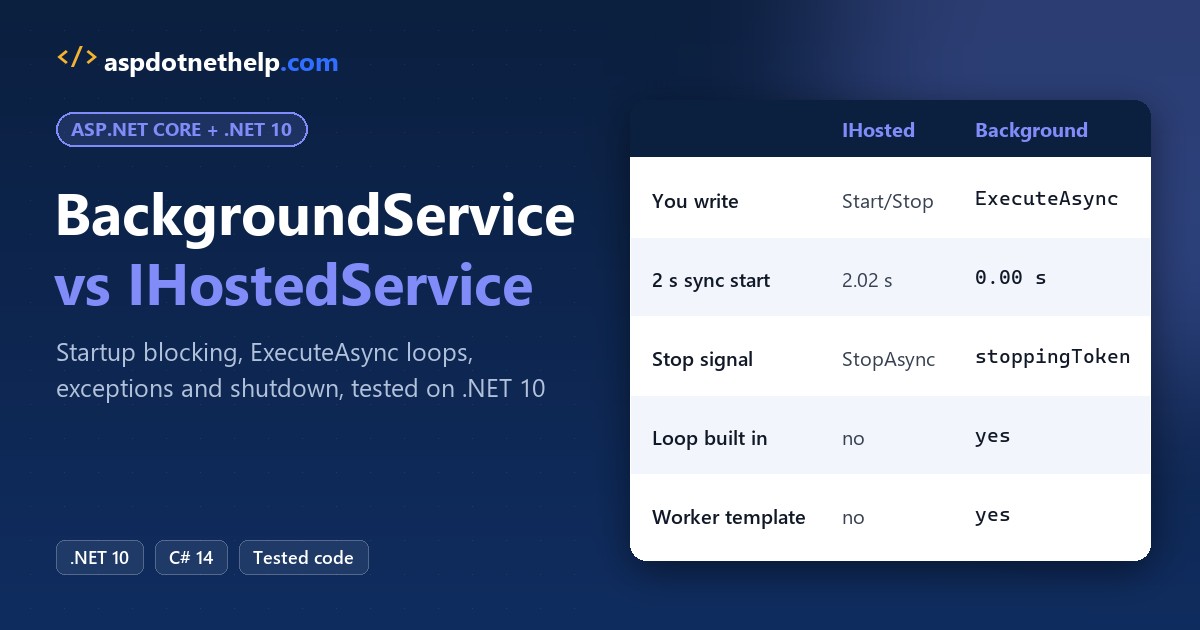
Use BackgroundService for work that runs as long as the app does, like a sync loop, and IHostedService only when you need exact control over start and stop. That’s the rule for BackgroundService vs IHostedService: one is built on the other.
I timed both on .NET 10 with 2 seconds of blocking startup work. IHostedService held the host for 2.02 s and BackgroundService for 0.00 s. On .NET 8, both blocked.
BackgroundService vs IHostedService at a Glance
Every row below comes from a run later in this post (SDK 10.0.402, runtime 10.0.13):
| Feature | IHostedService | BackgroundService |
|---|---|---|
| What it is | Interface in Microsoft.Extensions.Hosting | Abstract class that implements IHostedService |
| What you write | StartAsync and StopAsync | ExecuteAsync (start/stop overrides optional) |
| Long-running loop | You start and track your own task or timer | ExecuteAsync is the loop |
| Stop signal | StopAsync gets called | stoppingToken is canceled, then the host waits for ExecuteAsync |
| 2 s of sync startup work (.NET 10) | Blocks startup (2.02 s) | Doesn’t block (0.00 s) |
| Unhandled exception | Thrown from StartAsync: the host fails to start | Logged, then the host stops (StopHost default) |
| Registration and lifetime | AddHostedService<T>(), singleton | AddHostedService<T>(), singleton |
| Worker Service template | Not used | dotnet new worker generates one |
Because BackgroundService is an abstract class that implements the IHostedService interface, you never really pick one or the other. You pick how much of the plumbing you want to write yourself.
The Sample: An Order Sync Worker from dotnet new worker
All the demos use one job: a worker that syncs pending orders for an Austin, Texas store every second. I started it from the Worker Service template:
dotnet new worker -o OrderSyncWorkerThe template uses the Worker SDK and pins Microsoft.Extensions.Hosting 10.0.13:
<Project Sdk="Microsoft.NET.Sdk.Worker">

  <PropertyGroup>
    <TargetFramework>net10.0</TargetFramework>
    <Nullable>enable</Nullable>
    <ImplicitUsings>enable</ImplicitUsings>
    <UserSecretsId>dotnet-OrderSyncWorker-193126ab-5242-40f5-8ff9-b7a1bc2474f6</UserSecretsId>
  </PropertyGroup>

  <ItemGroup>
    <PackageReference Include="Microsoft.Extensions.Hosting" Version="10.0.13" />
  </ItemGroup>
</Project>
Its Worker class is already a BackgroundService, and Program.cs registers it with AddHostedService:
namespace OrderSyncWorker;

public class Worker(ILogger<Worker> logger) : BackgroundService
{
    protected override async Task ExecuteAsync(CancellationToken stoppingToken)
    {
        while (!stoppingToken.IsCancellationRequested)
        {
            if (logger.IsEnabled(LogLevel.Information))
            {
                logger.LogInformation("Worker running at: {time}", DateTimeOffset.Now);
            }
            await Task.Delay(1000, stoppingToken);
        }
    }
}
using OrderSyncWorker;
var builder = Host.CreateApplicationBuilder(args);
builder.Services.AddHostedService<Worker>();
var host = builder.Build();
host.Run();I kept appsettings.json as generated and deleted appsettings.Development.json and Properties/launchSettings.json, which this demo doesn’t use:
{
  "Logging": {
    "LogLevel": {
      "Default": "Information",
      "Microsoft.Hosting.Lifetime": "Information"
    }
  }
}
The smaller demos are file-based apps with #:sdk Microsoft.NET.Sdk.Worker and Microsoft.Extensions.Hosting 10.0.14. Two use the Web SDK instead, because they need the shared framework.
Does a Hosted Service Block App Startup?
Yes for IHostedService, and on .NET 10, no for BackgroundService. The host starts hosted services one at a time, so a slow StartAsync delays every service registered after it, and in a web app, Kestrel too.
Same pending orders, but each service now does 2 seconds of synchronous work first, as if it loaded a big price file. I ran the file on .NET 10 and again with -p:TargetFramework=net8.0:
#:sdk Microsoft.NET.Sdk.Web
#:property PublishAot=false
using System.Diagnostics;

await TimeStartup<SlowStartService>("IHostedService.StartAsync");
await TimeStartup<SlowExecuteWorker>("BackgroundService.ExecuteAsync");

static async Task TimeStartup<T>(string where) where T : class, IHostedService
{
    var builder = Host.CreateApplicationBuilder();
    builder.Logging.ClearProviders();
    builder.Services.AddHostedService<T>();
    using IHost host = builder.Build();
    var clock = Stopwatch.StartNew();
    await host.StartAsync();
    double s = clock.Elapsed.TotalSeconds;
    Console.WriteLine($".NET {Environment.Version}: 2 s sync work in {where,-30} -> started in {s:F2} s");
    await host.StopAsync();
}

class SlowStartService : IHostedService
{
    public Task StartAsync(CancellationToken ct) { Thread.Sleep(2000); return Task.CompletedTask; }
    public Task StopAsync(CancellationToken ct) => Task.CompletedTask;
}

class SlowExecuteWorker : BackgroundService
{
    protected override async Task ExecuteAsync(CancellationToken stoppingToken)
    {
        Thread.Sleep(2000);   // sync work before the first await (loading a price file)
        await Task.Delay(Timeout.Infinite, stoppingToken);
    }
}
Output:
.NET 10.0.13: 2 s sync work in IHostedService.StartAsync      -> started in 2.02 s
.NET 10.0.13: 2 s sync work in BackgroundService.ExecuteAsync -> started in 0.00 s
.NET 8.0.33: 2 s sync work in IHostedService.StartAsync      -> started in 2.01 s
.NET 8.0.33: 2 s sync work in BackgroundService.ExecuteAsync -> started in 2.01 s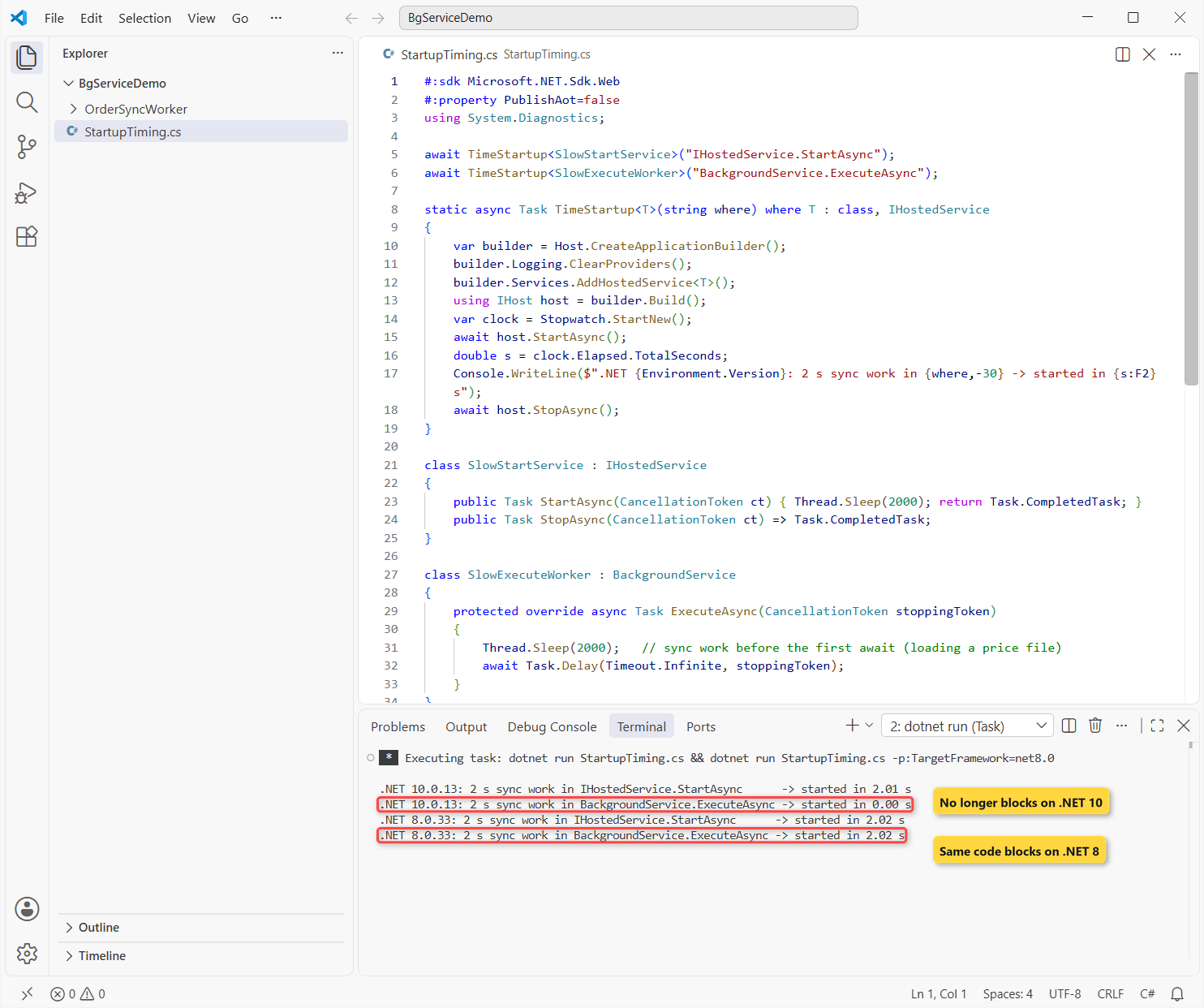
On .NET 8 the BackgroundService also blocked for 2.01 s, because the code before the first await in ExecuteAsync ran on the startup thread. In .NET 10, Microsoft moved all of ExecuteAsync to a background thread.
Important: if you relied on that old blocking, for example to warm a cache before requests arrive, move the code into the constructor or into an overridden StartAsync before base.StartAsync. Check the .NET 8 to .NET 10 upgrade steps for the other breaking changes.
StartAsync vs ExecuteAsync: Lifecycle Order with IHostedLifecycleService
IHostedLifecycleService (.NET 8+) extends IHostedService with four more hooks: StartingAsync, StartedAsync, StoppingAsync and StoppedAsync. A BackgroundService can implement it too.
To show where each hook runs in ASP.NET Core, this web app on localhost:5882 hosts an audit service, calls its own /health endpoint and stops:
#:sdk Microsoft.NET.Sdk.Web
#:property PublishAot=false
using Microsoft.Extensions.Options;

var builder = WebApplication.CreateBuilder(args);
builder.Logging.ClearProviders();
builder.Services.AddHostedService<OrderAuditService>();
var app = builder.Build();
app.MapGet("/health", () => "Austin order sync: healthy");

app.Lifetime.ApplicationStarted.Register(() => Step.Log("ApplicationStarted (Kestrel is listening)"));
app.Lifetime.ApplicationStopping.Register(() => Step.Log("ApplicationStopping"));
app.Lifetime.ApplicationStopped.Register(() => Step.Log("ApplicationStopped"));

app.Urls.Add("http://localhost:5882");
await app.StartAsync();
Console.WriteLine("   GET /health -> " + await new HttpClient().GetStringAsync("http://localhost:5882/health"));
var timeout = app.Services.GetRequiredService<IOptions<HostOptions>>().Value.ShutdownTimeout;
Console.WriteLine($"   HostOptions.ShutdownTimeout = {timeout.TotalSeconds} seconds");
await app.StopAsync();

class OrderAuditService : BackgroundService, IHostedLifecycleService
{
    public Task StartingAsync(CancellationToken ct) => Step.Done("StartingAsync");
    public override Task StartAsync(CancellationToken ct) { Step.Log("StartAsync (starts ExecuteAsync)"); return base.StartAsync(ct); }
    public Task StartedAsync(CancellationToken ct) => Step.Done("StartedAsync");
    public Task StoppingAsync(CancellationToken ct) => Step.Done("StoppingAsync");
    public override Task StopAsync(CancellationToken ct) { Step.Log("StopAsync (cancels stoppingToken)"); return base.StopAsync(ct); }
    public Task StoppedAsync(CancellationToken ct) => Step.Done("StoppedAsync");

    protected override async Task ExecuteAsync(CancellationToken stoppingToken)
    {
        try { await Task.Delay(Timeout.Infinite, stoppingToken); }
        catch (OperationCanceledException) { Step.Log("ExecuteAsync returns (stoppingToken canceled)"); }
    }
}

static class Step
{
    static int n;
    public static void Log(string what) => Console.WriteLine($"{++n,2}. {what}");
    public static Task Done(string what) { Log(what); return Task.CompletedTask; }
}
Output:
 1. StartingAsync
 2. StartAsync (starts ExecuteAsync)
 3. StartedAsync
 4. ApplicationStarted (Kestrel is listening)
   GET /health -> Austin order sync: healthy
   HostOptions.ShutdownTimeout = 30 seconds
 5. StoppingAsync
 6. ApplicationStopping
 7. StopAsync (cancels stoppingToken)
 8. ExecuteAsync returns (stoppingToken canceled)
 9. StoppedAsync
10. ApplicationStopped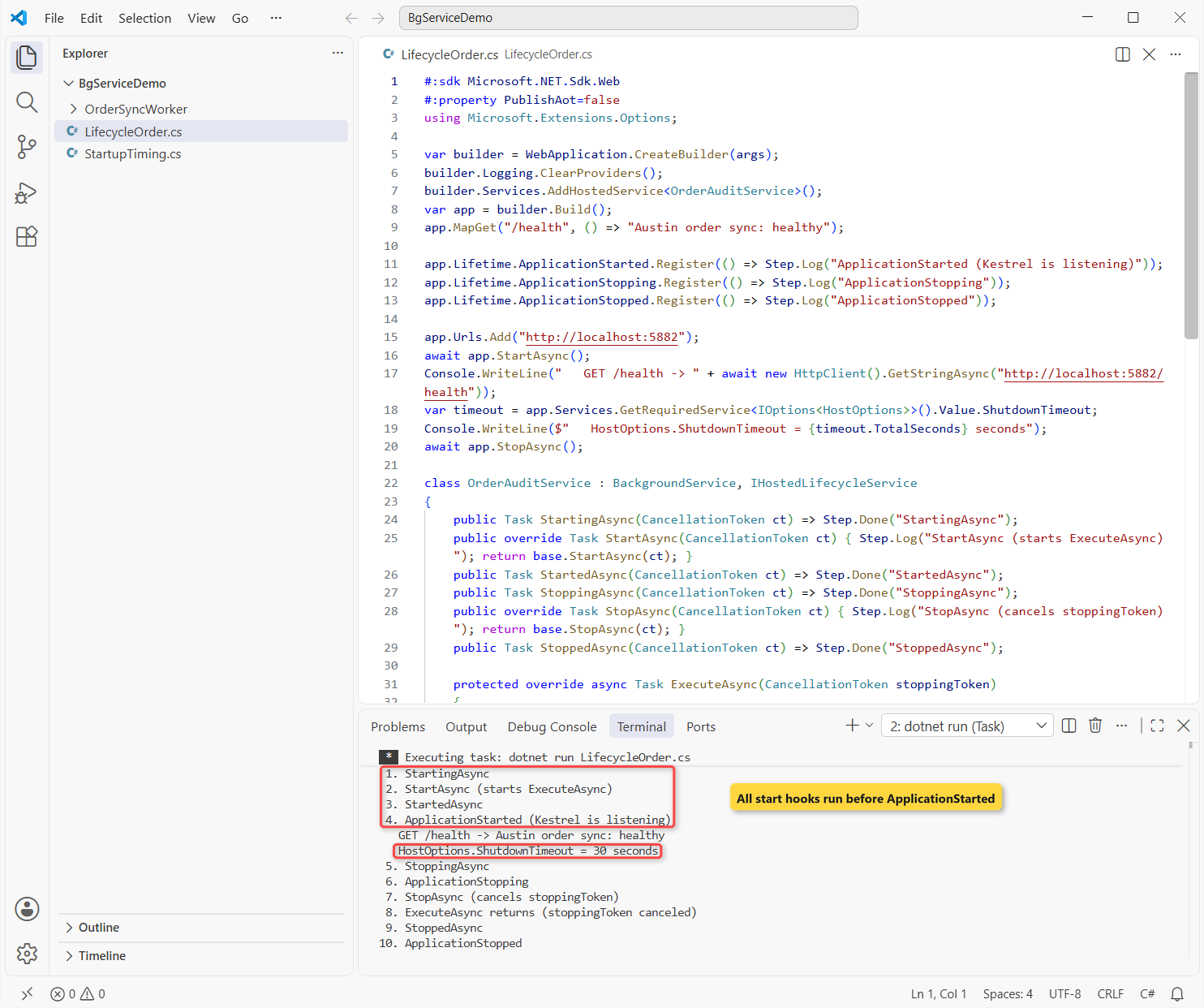
All three start hooks ran before ApplicationStarted, so a hosted service starts before the app takes its first request. That’s why the order-sync work belongs in ExecuteAsync and not in StartAsync.
Note: I stopped the app with app.StopAsync(), and StoppingAsync ran before ApplicationStopping. Microsoft’s docs list ApplicationStopping first for a Ctrl+C shutdown, so don’t depend on the order between those two.
PeriodicTimer Loop and Scoped Services with IServiceScopeFactory
Back to the OrderSyncWorker project. With IHostedService, a recurring job usually means a System.Threading.Timer started in StartAsync and stopped in StopAsync. That timer fires again even when the last run hasn’t finished.
In a BackgroundService, PeriodicTimer turns the loop into plain async and await code: one tick, one batch, never two at once. Each tick also creates a new scope for OrderBatch, the way you’d get a fresh DbContext.
Here’s the scoped service, the new Worker.cs and the two-line change in Program.cs:
namespace OrderSyncWorker;

// Scoped: one instance per batch, like an EF Core DbContext
public class OrderBatch
{
    static int created;
    public int Id { get; } = Interlocked.Increment(ref created);

    public (string Customer, decimal Total)[] LoadPending(int batch) => batch switch
    {
        1 => [("Jenna Morales", 84.50m), ("Tyler Brooks", 129.99m)],
        2 => [("Rachel Kim", 42.00m)],
        _ => [("Marcus Reed", 315.25m), ("Ava Collins", 18.75m)],
    };
}
namespace OrderSyncWorker;
public class Worker(IServiceScopeFactory scopeFactory, IHostApplicationLifetime lifetime,
ILogger<Worker> logger) : BackgroundService
{
protected override async Task ExecuteAsync(CancellationToken stoppingToken)
{
using PeriodicTimer timer = new(TimeSpan.FromSeconds(1));
int batch = 0;
while (await timer.WaitForNextTickAsync(stoppingToken))
{
using IServiceScope scope = scopeFactory.CreateScope();
var orders = scope.ServiceProvider.GetRequiredService<OrderBatch>();
var pending = orders.LoadPending(++batch);
logger.LogInformation("Batch {Batch} used OrderBatch #{Id}: synced {Count} order(s), ${Total}",
batch, orders.Id, pending.Length, pending.Sum(o => o.Total));
if (batch == 3) lifetime.StopApplication(); // demo: stop after 3 batches
}
}
}using OrderSyncWorker;
var builder = Host.CreateApplicationBuilder(args);
builder.Services.AddScoped<OrderBatch>();
builder.Services.AddHostedService<Worker>();
var host = builder.Build();
host.Run();Output:
info: Microsoft.Hosting.Lifetime[0]
      Application started. Press Ctrl+C to shut down.
info: Microsoft.Hosting.Lifetime[0]
      Hosting environment: Production
info: Microsoft.Hosting.Lifetime[0]
      Content root path: C:\DotNetDemo\BgServiceDemo\OrderSyncWorker
info: OrderSyncWorker.Worker[0]
      Batch 1 used OrderBatch #1: synced 2 order(s), $214.49
info: OrderSyncWorker.Worker[0]
      Batch 2 used OrderBatch #2: synced 1 order(s), $42.00
info: OrderSyncWorker.Worker[0]
      Batch 3 used OrderBatch #3: synced 2 order(s), $334.00
info: Microsoft.Hosting.Lifetime[0]
      Application is shutting down...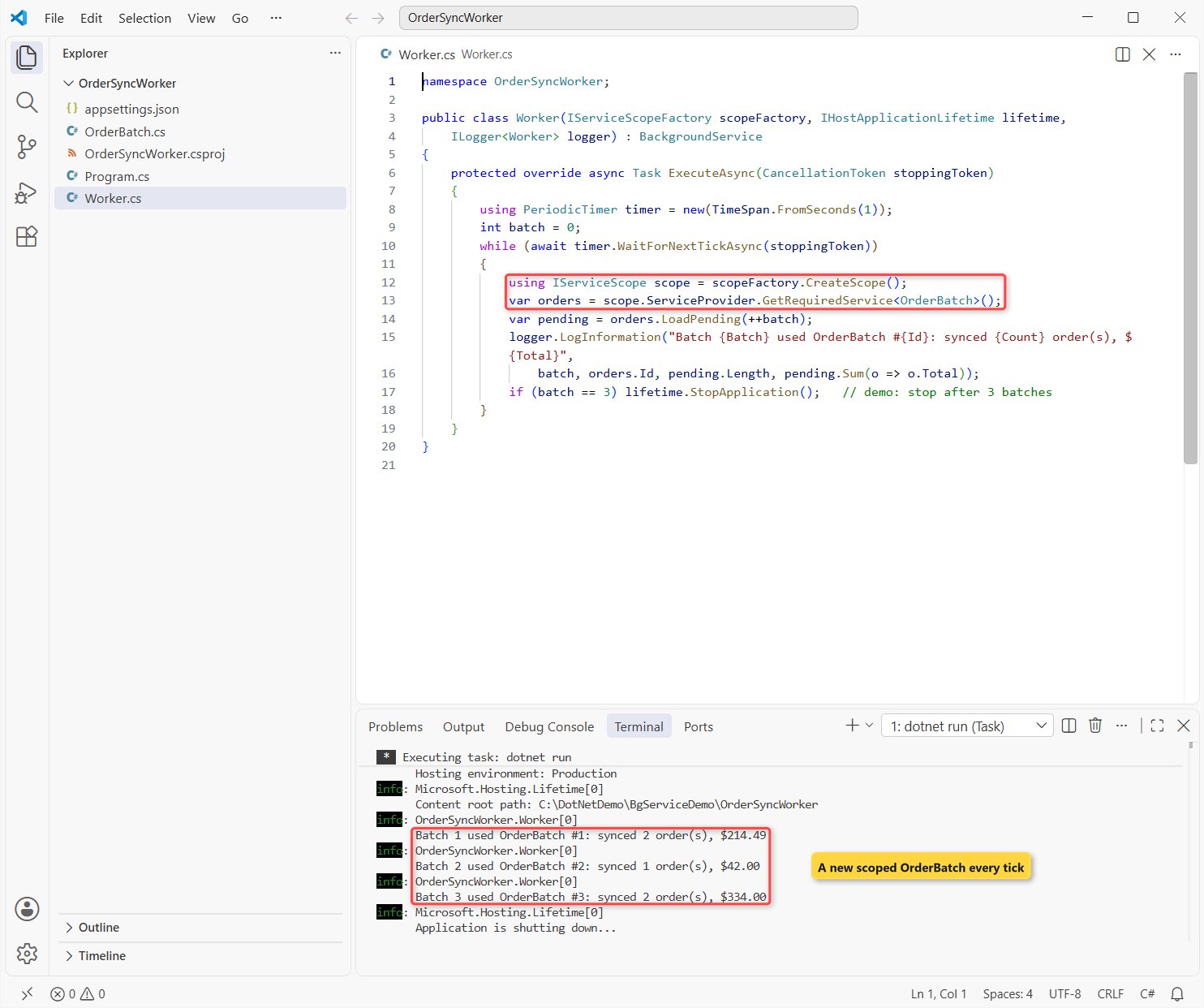
Each batch got its own OrderBatch instance (#1, #2, #3), so nothing leaks between ticks. WaitForNextTickAsync throws when stoppingToken is canceled, and the host treats that as a normal stop, not a crash.
Can a BackgroundService Inject a Scoped Service Like DbContext?
Not through its constructor. Hosted services are singletons, and a singleton that captures a scoped service keeps one instance forever. In Development, scope validation catches it when the host is built:
#:sdk Microsoft.NET.Sdk.Worker
#:package Microsoft.Extensions.Hosting@10.0.14
#:property PublishAot=false
var builder = Host.CreateApplicationBuilder(
    new HostApplicationBuilderSettings { EnvironmentName = Environments.Development });
builder.Services.AddScoped<OrderBatch>();
builder.Services.AddHostedService<BadSyncWorker>();

try { builder.Build(); }
catch (AggregateException ex) { Console.WriteLine(ex.InnerException!.Message); }

class OrderBatch
{
    public int PendingCount => 3;
}

class BadSyncWorker(OrderBatch batch) : BackgroundService   // scoped service in a singleton
{
    protected override Task ExecuteAsync(CancellationToken stoppingToken)
    {
        Console.WriteLine($"{batch.PendingCount} pending orders");
        return Task.CompletedTask;
    }
}
Output:
Error while validating the service descriptor 'ServiceType: Microsoft.Extensions.Hosting.IHostedService Lifetime: Singleton ImplementationType: BadSyncWorker': Cannot consume scoped service 'OrderBatch' from singleton 'Microsoft.Extensions.Hosting.IHostedService'.The fix is the IServiceScopeFactory pattern from the worker above. My guide to transient, scoped and singleton lifetimes explains why the container refuses this, and the EF Core tutorial shows the DbContext you’d resolve inside the scope.
Unhandled Exceptions: BackgroundServiceExceptionBehavior StopHost vs Ignore
An exception in IHostedService.StartAsync fails startup right away. An exception inside ExecuteAsync happens later, and since .NET 6 the host logs it and, by default, stops everything.
Same pending orders, now synced next to a price-feed worker that throws after 1.2 seconds. The first run uses the default; the second sets BackgroundServiceExceptionBehavior.Ignore:
#:sdk Microsoft.NET.Sdk.Worker
#:package Microsoft.Extensions.Hosting@10.0.14
#:property PublishAot=false
var builder = Host.CreateApplicationBuilder(args);
builder.Logging.ClearProviders().AddSimpleConsole(o => o.SingleLine = true);
builder.Logging.AddFilter("Microsoft.Hosting.Lifetime", LogLevel.None);
if (args is ["ignore"])
    builder.Services.Configure<HostOptions>(o =>
        o.BackgroundServiceExceptionBehavior = BackgroundServiceExceptionBehavior.Ignore);
builder.Services.AddHostedService<PriceFeedWorker>();
builder.Services.AddHostedService<OrderSyncWorker>();
using IHost host = builder.Build();

var run = host.RunAsync();
await Task.WhenAny(run, Task.Delay(3500));
Console.WriteLine(run.IsCompleted ? "Host STOPPED: order sync died with the price feed"
                                  : "Host still running: order sync kept going");
if (!run.IsCompleted) await host.StopAsync();

class PriceFeedWorker : BackgroundService
{
    protected override async Task ExecuteAsync(CancellationToken stoppingToken)
    {
        await Task.Delay(1200, stoppingToken);
        throw new HttpRequestException("Price feed returned 503");
    }
}

class OrderSyncWorker : BackgroundService
{
    protected override async Task ExecuteAsync(CancellationToken stoppingToken)
    {
        for (int batch = 1; ; batch++)
        {
            Console.WriteLine($"Order sync batch {batch}");
            await Task.Delay(1000, stoppingToken);
        }
    }
}
Output (stack traces trimmed):
Order sync batch 1
Order sync batch 2
fail: Microsoft.Extensions.Hosting.Internal.Host[9] BackgroundService failed System.Net.Http.HttpRequestException: Price feed returned 503
crit: Microsoft.Extensions.Hosting.Internal.Host[10] The HostOptions.BackgroundServiceExceptionBehavior is configured to StopHost. A BackgroundService has thrown an unhandled exception, and the IHost instance is stopping. To avoid this behavior, configure this to Ignore; however the BackgroundService will not be restarted. System.Net.Http.HttpRequestException: Price feed returned 503
Host STOPPED: order sync died with the price feed
Order sync batch 1
Order sync batch 2
fail: Microsoft.Extensions.Hosting.Internal.Host[9] BackgroundService failed System.Net.Http.HttpRequestException: Price feed returned 503
Order sync batch 3
Order sync batch 4
Host still running: order sync kept going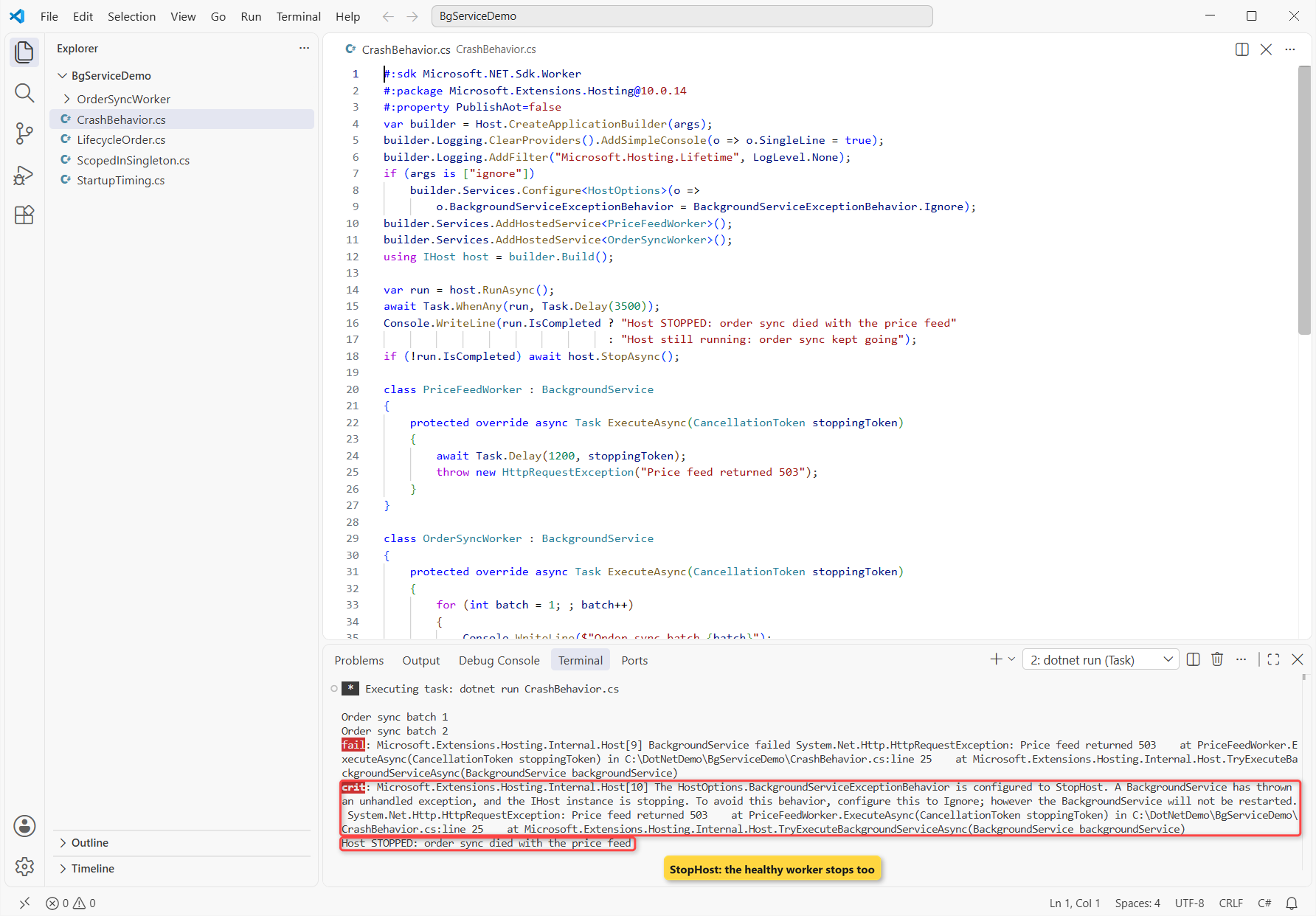
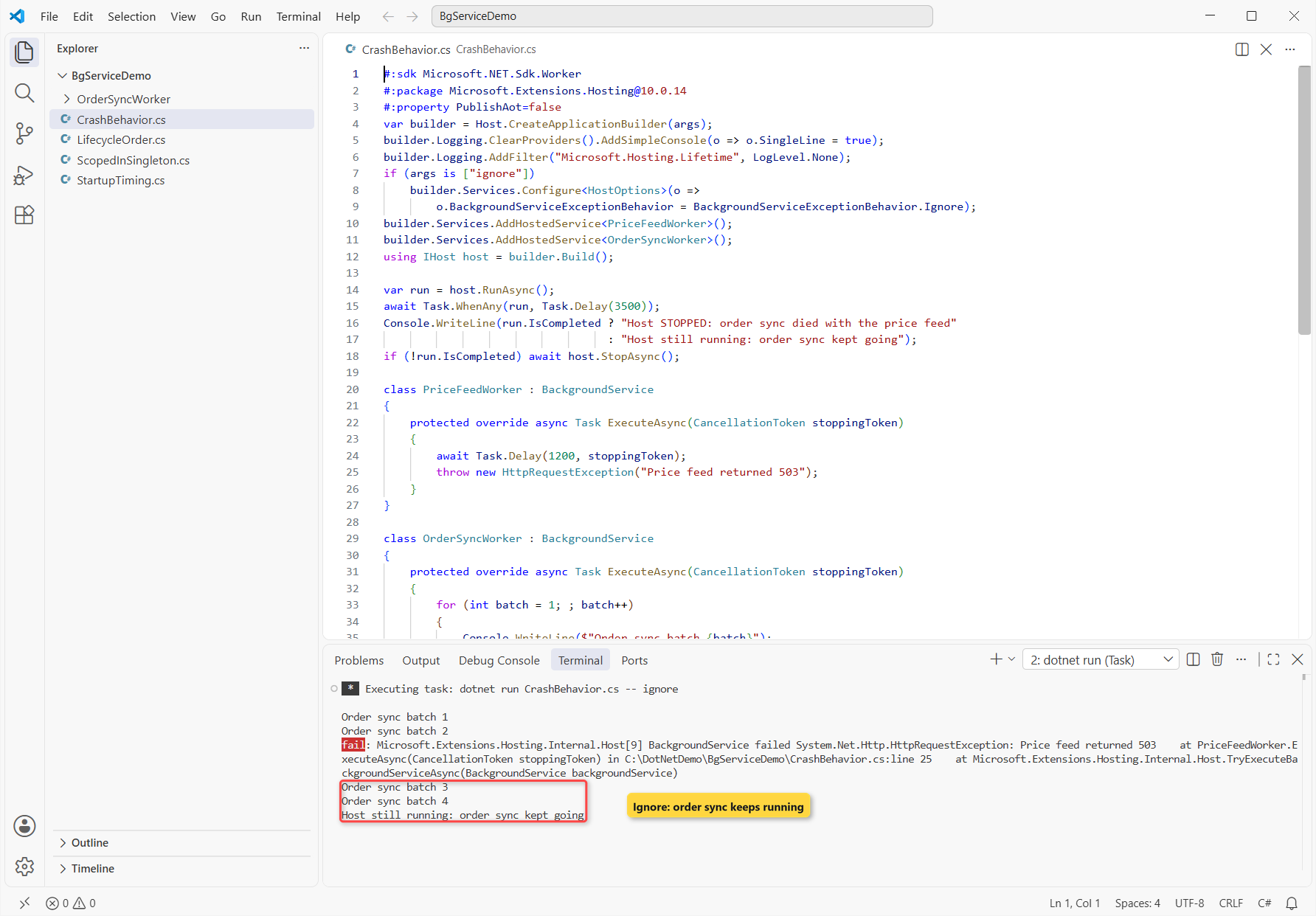
With StopHost, one failed worker stopped the healthy order sync too, which is the safe default. Ignore kept the sync running, but the price feed stayed dead: the host never restarts a failed BackgroundService.
So I don’t use Ignore as error handling. I wrap each loop iteration in a try-catch block, log the failure and keep looping. For request errors, use global error handling in ASP.NET Core, since it doesn’t cover hosted services.
Graceful Shutdown: stoppingToken and HostOptions.ShutdownTimeout
On shutdown, the host cancels stoppingToken and waits for ExecuteAsync, but only until HostOptions.ShutdownTimeout runs out. The default is 30 seconds, as the lifecycle demo printed.
Same pending orders, now with an export worker that needs 1 second per order to flush three orders after the stop signal. I ran it with a 1.5-second timeout and a 5-second one:
#:sdk Microsoft.NET.Sdk.Worker
#:package Microsoft.Extensions.Hosting@10.0.14
#:property PublishAot=false
using System.Diagnostics;
using System.Globalization;

double seconds = double.Parse(args[0], CultureInfo.InvariantCulture);
var builder = Host.CreateApplicationBuilder();
builder.Logging.ClearProviders();
builder.Services.Configure<HostOptions>(o => o.ShutdownTimeout = TimeSpan.FromSeconds(seconds));
builder.Services.AddHostedService<ExportWorker>();
using IHost host = builder.Build();

await host.StartAsync();
var clock = Stopwatch.StartNew();
await host.StopAsync();
Console.WriteLine($"ShutdownTimeout {seconds} s: host stopped after {clock.Elapsed.TotalSeconds:F1} s");

class ExportWorker : BackgroundService
{
    protected override async Task ExecuteAsync(CancellationToken stoppingToken)
    {
        try { await Task.Delay(Timeout.Infinite, stoppingToken); }
        catch (OperationCanceledException) { }
        foreach (var order in new[] { "#1041", "#1042", "#1043" })
        {
            await Task.Delay(1000);   // flush one order to the warehouse (1 s each)
            Console.WriteLine($"  flushed order {order}");
        }
    }
}
Output:
  flushed order #1041
ShutdownTimeout 1.5 s: host stopped after 1.5 s
  flushed order #1041
  flushed order #1042
  flushed order #1043
ShutdownTimeout 5 s: host stopped after 3.0 s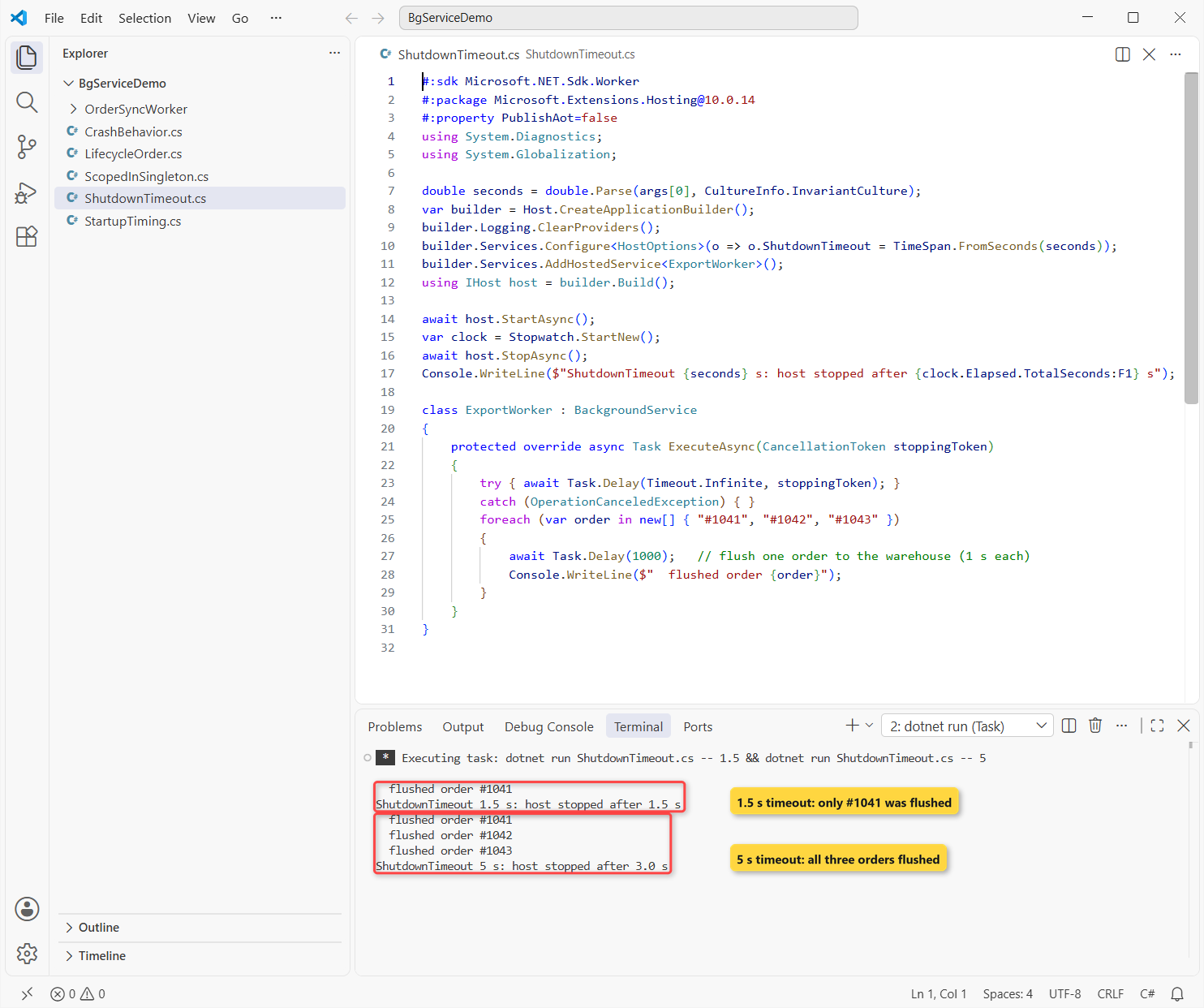
With 1.5 seconds, StopAsync returned after 1.5 s and orders #1042 and #1043 never made it. No exception, no warning. With 5 seconds, all three flushed in 3.0 s.
Pass stoppingToken to every awaited call so the loop ends fast, and raise ShutdownTimeout only for work that truly needs it. My CancellationToken guide covers passing tokens through.
When to Use IHostedService Instead of BackgroundService
Here’s how I pick today:
- A loop, queue reader or scheduled job that runs until shutdown: BackgroundService with
PeriodicTimer. - Short setup or cleanup that must finish before the app serves traffic (warm a cache, check a database): IHostedService, with the work in
StartAsync. - Code that must run at an exact point of startup or shutdown: add IHostedLifecycleService to either one.
- Work started by an HTTP request: a BackgroundService that reads a queue, so the endpoint can return 202 right away. Endpoint style is covered in minimal APIs vs controllers.
How to Switch from IHostedService to BackgroundService
- Change the base type to
BackgroundServiceand delete yourStartAsync/StopAsyncplumbing. - Move the timer callback into
ExecuteAsyncas aPeriodicTimerloop. - Replace your own cancellation source with
stoppingToken. - Keep
AddHostedService<T>()as it is; the registration doesn’t change.
If the old StartAsync had blocking work that had to finish first, keep it in an overridden StartAsync and call base.StartAsync afterward.
So the deciding differences are small but real: BackgroundService gives you the loop, the token and, on .NET 10, a non-blocking start. IHostedService gives you control over exactly when startup finishes. See what’s new in .NET 10 for the rest of the release.
If you’re building workers, these pair well with this one:
- All ASP.NET Core tutorials on AspDotnetHelp
- Options pattern in ASP.NET Core for worker settings
- HttpClient in C# for workers that call APIs
- ASP.NET Core middleware, the request-side counterpart
Frequently Asked Questions
Is BackgroundService an IHostedService?
Yes. BackgroundService is an abstract class that implements IHostedService and IDisposable, so both register with AddHostedService<T>().
How do I run a background task every few minutes in ASP.NET Core?
Derive from BackgroundService and loop on PeriodicTimer.WaitForNextTickAsync(stoppingToken). For cron schedules, retries or a dashboard, a library like Hangfire or Quartz.NET fits better.
Does BackgroundService run on a separate thread?
On .NET 10, yes: all of ExecuteAsync runs on the thread pool. On .NET 8 and 9, the part before the first await ran during startup. See the .NET 10 breaking change on Microsoft Learn.
Can I have several hosted services in one app?
Yes. They start in registration order and stop in reverse order. Set HostOptions.ServicesStartConcurrently to true to start them in parallel.
Why does my BackgroundService stop the whole app?
An unhandled exception in ExecuteAsync stops the host by default (BackgroundServiceExceptionBehavior.StopHost). Catch exceptions inside the loop, or set Ignore if one dead worker is acceptable. More in background tasks with hosted services on Microsoft Learn.

Bijay Kumar is a renowned software engineer, accomplished author, and distinguished Microsoft Most Valuable Professional (MVP) specializing in SharePoint. With a rich professional background spanning over 15 years, Bijay has established himself as an authority in the field of information technology. He possesses unparalleled expertise in multiple programming languages and technologies such as ASP.NET, ASP.NET MVC, C#.NET, and SharePoint, which has enabled him to develop innovative and cutting-edge solutions for clients across the globe. Read more…