
One wrong letter in a config key is the bug I see most in ASP.NET Core apps. This compiles, runs without a warning, and quietly gives every customer free shipping:
#:sdk Microsoft.NET.Sdk.Web
#:property PublishAot=false
var builder = WebApplication.CreateBuilder(args);

// typo: "Shiping" - no error, just a default value
var threshold = builder.Configuration.GetValue<decimal>("Shipping:FreeShipingThreshold");
Console.WriteLine($"Free shipping on orders over ${threshold}");
Free shipping on orders over $0A threshold of $0 means every order ships free. The fix is the options pattern ASP.NET Core ships with: bind the JSON section to a typed class once, validate it at startup, and inject IOptions<T> where you need it.
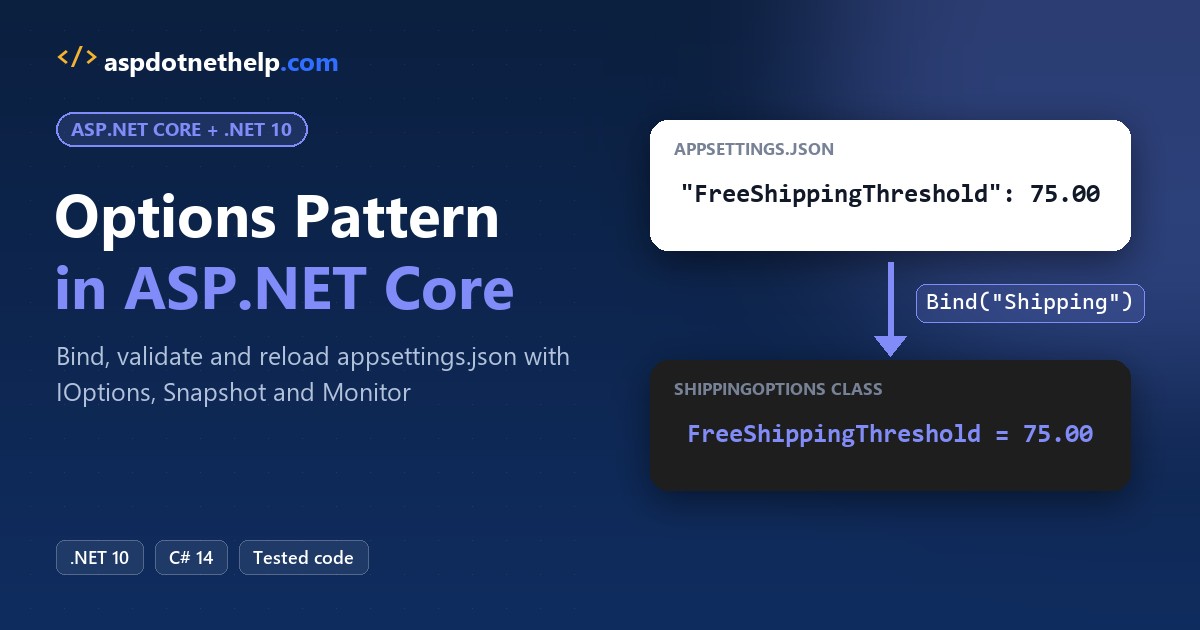
Here’s what we’re building, a .NET 10 shipping-quote API whose settings all come from appsettings.json:
What Is the Options Pattern in ASP.NET Core?
The options pattern binds a configuration section, such as Shipping in appsettings.json, to a plain C# class and registers it with ASP.NET Core dependency injection. Code asks for the class instead of reading string keys.
You get checked property names, one place to validate, and three wrappers that decide whether a running app sees file edits:
| Interface | Lifetime | Sees file changes? | Named options | Use it in |
|---|---|---|---|---|
IOptions<T> | Singleton | No, read once | No | Settings that never change at runtime |
IOptionsSnapshot<T> | Scoped | Yes, per request | Yes | Endpoints, controllers, scoped services |
IOptionsMonitor<T> | Singleton | Yes, any time + OnChange | Yes | Singletons and background services |
The options class must be a non-abstract class with a public parameterless constructor and public read-write properties. Fields aren’t bound.
Before You Start the Options Pattern Build
You need the .NET 10 SDK (I used 10.0.402); check your installed .NET version if you’re not sure. No NuGet packages are needed, because everything used here ships in the ASP.NET Core shared framework.
Every demo is a single-file app from what’s new in .NET 10: #:sdk Microsoft.NET.Sdk.Web makes it a web app. I added #:property PublishAot=false because file-based apps default to Native AOT, which warns about reflection-based validation.
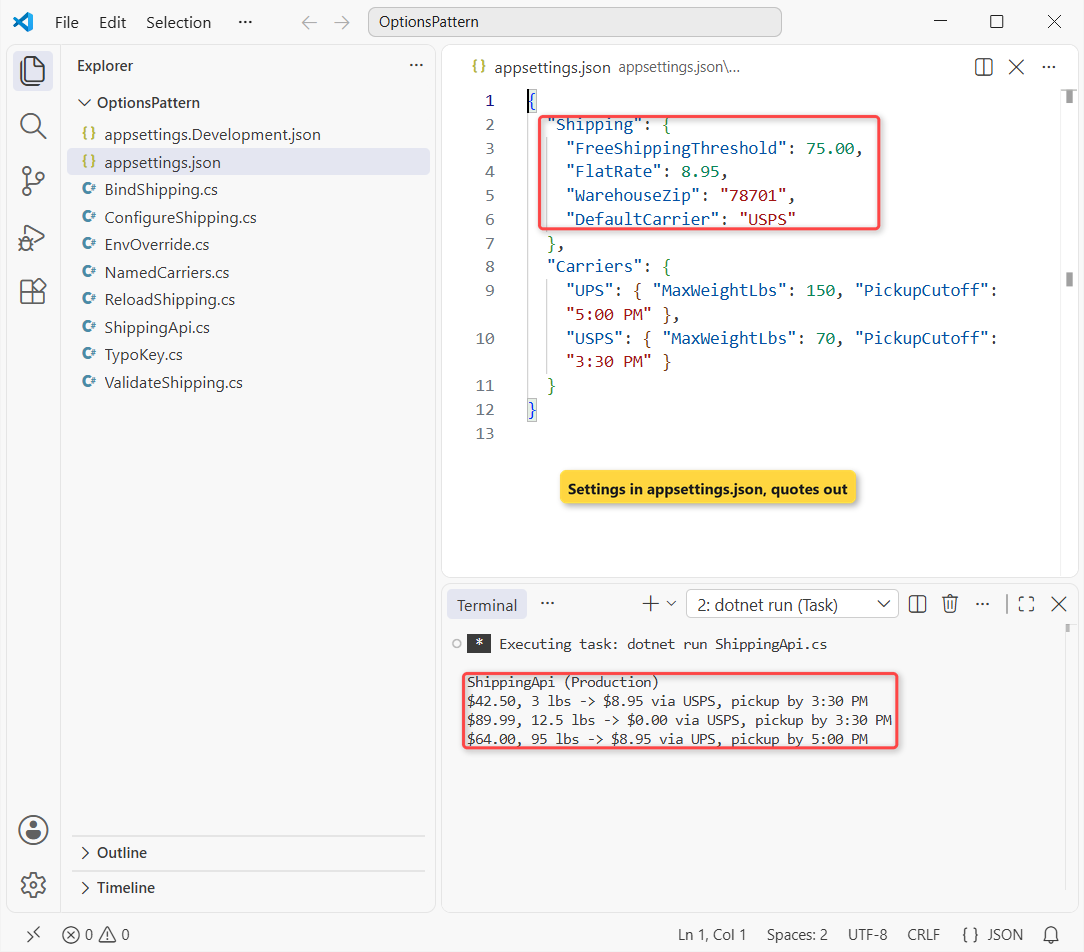
The store ships from Austin, Texas. Create a folder with this appsettings.json:
{
  "Shipping": {
    "FreeShippingThreshold": 75.00,
    "FlatRate": 8.95,
    "WarehouseZip": "78701",
    "DefaultCarrier": "USPS"
  },
  "Carriers": {
    "UPS": { "MaxWeightLbs": 150, "PickupCutoff": "5:00 PM" },
    "USPS": { "MaxWeightLbs": 70, "PickupCutoff": "3:30 PM" }
  }
}| Key | Type | Value | Meaning |
|---|---|---|---|
| Shipping:FreeShippingThreshold | decimal | 75.00 | Orders at or above this ship free (USD) |
| Shipping:FlatRate | decimal | 8.95 | Fee below the threshold |
| Shipping:WarehouseZip | string | 78701 | Austin, TX warehouse |
| Shipping:DefaultCarrier | string | USPS | Carrier for light boxes |
| Carriers:UPS / Carriers:USPS | object | 150 / 70 lbs | Per-carrier limits (named options) |
Step 1: Create the ShippingOptions Class and Bind appsettings.json
Make a class whose property names match the JSON keys, then bind the section with Get<T>() to prove the names line up.
- Add a
ShippingOptionsclass with one property per key underShipping. - Give it a
Sectionconstant so the string"Shipping"lives in one place (constants aren’t bound). - Call
GetSection(...).Get<ShippingOptions>()and print each value.
#:sdk Microsoft.NET.Sdk.Web
#:property PublishAot=false
var builder = WebApplication.CreateBuilder(args);

var shipping = builder.Configuration
    .GetSection(ShippingOptions.Section)
    .Get<ShippingOptions>()!;

Console.WriteLine($"Free shipping over: ${shipping.FreeShippingThreshold}");
Console.WriteLine($"Flat rate:          ${shipping.FlatRate}");
Console.WriteLine($"Warehouse ZIP:      {shipping.WarehouseZip}");
Console.WriteLine($"Default carrier:    {shipping.DefaultCarrier}");

public class ShippingOptions
{
    public const string Section = "Shipping";
    public decimal FreeShippingThreshold { get; set; }
    public decimal FlatRate { get; set; }
    public string WarehouseZip { get; set; } = "";
    public string DefaultCarrier { get; set; } = "";
}
Output:
Free shipping over: $75.00
Flat rate:          $8.95
Warehouse ZIP:      78701
Default carrier:    USPS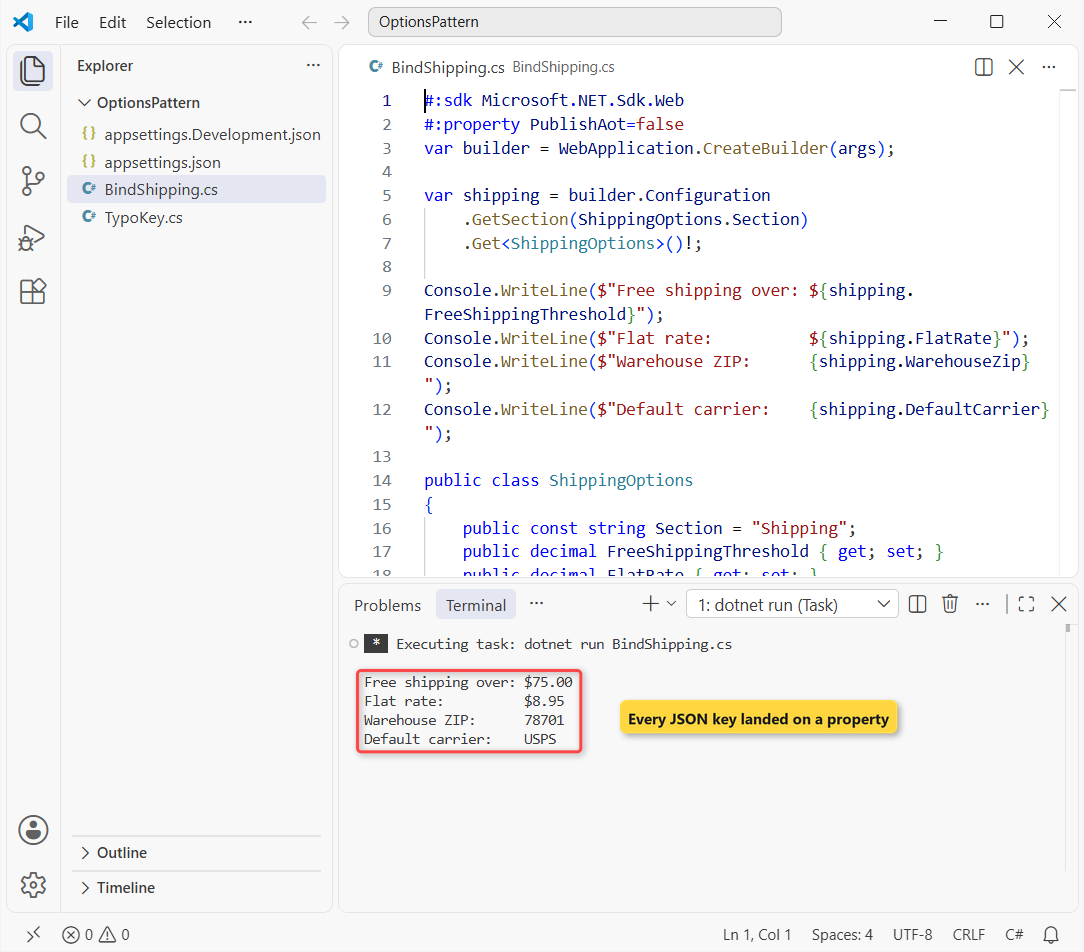
Checkpoint: four lines with $75.00, $8.95, 78701 and USPS. A zero or blank value means a property name doesn’t match its key.
The ! after Get is the null-forgiving operator from nullable reference types in C#: Get returns null when the section is missing. Binding also ignores case and never throws on a missing key.
Step 2: Register the Options with builder.Services.Configure and Inject IOptions
Registering the class lets any endpoint, controller or service ask for it instead of binding by hand.
- Call
builder.Services.Configure<ShippingOptions>(section)beforebuilder.Build(). - Add
IOptions<ShippingOptions> optionsas an endpoint parameter (or constructor parameter). - Read the bound object from
options.Value.
#:sdk Microsoft.NET.Sdk.Web
#:property PublishAot=false
using Microsoft.Extensions.Options;

var builder = WebApplication.CreateBuilder(args);
builder.Logging.ClearProviders();
builder.Services.Configure<ShippingOptions>(
    builder.Configuration.GetSection(ShippingOptions.Section));
var app = builder.Build();

app.MapGet("/quote", (decimal subtotal, IOptions<ShippingOptions> options) =>
{
    ShippingOptions o = options.Value;
    decimal fee = subtotal >= o.FreeShippingThreshold ? 0.00m : o.FlatRate;
    return $"Subtotal ${subtotal} -> shipping ${fee} via {o.DefaultCarrier}";
});

app.Urls.Add("http://localhost:5878");
await app.StartAsync();
var http = new HttpClient { BaseAddress = new Uri("http://localhost:5878") };
Console.WriteLine(await http.GetStringAsync("/quote?subtotal=42.50"));
Console.WriteLine(await http.GetStringAsync("/quote?subtotal=75.00"));
await app.StopAsync();

public class ShippingOptions
{
    public const string Section = "Shipping";
    public decimal FreeShippingThreshold { get; set; }
    public decimal FlatRate { get; set; }
    public string WarehouseZip { get; set; } = "";
    public string DefaultCarrier { get; set; } = "";
}
Output:
Subtotal $42.50 -> shipping $8.95 via USPS
Subtotal $75.00 -> shipping $0.00 via USPS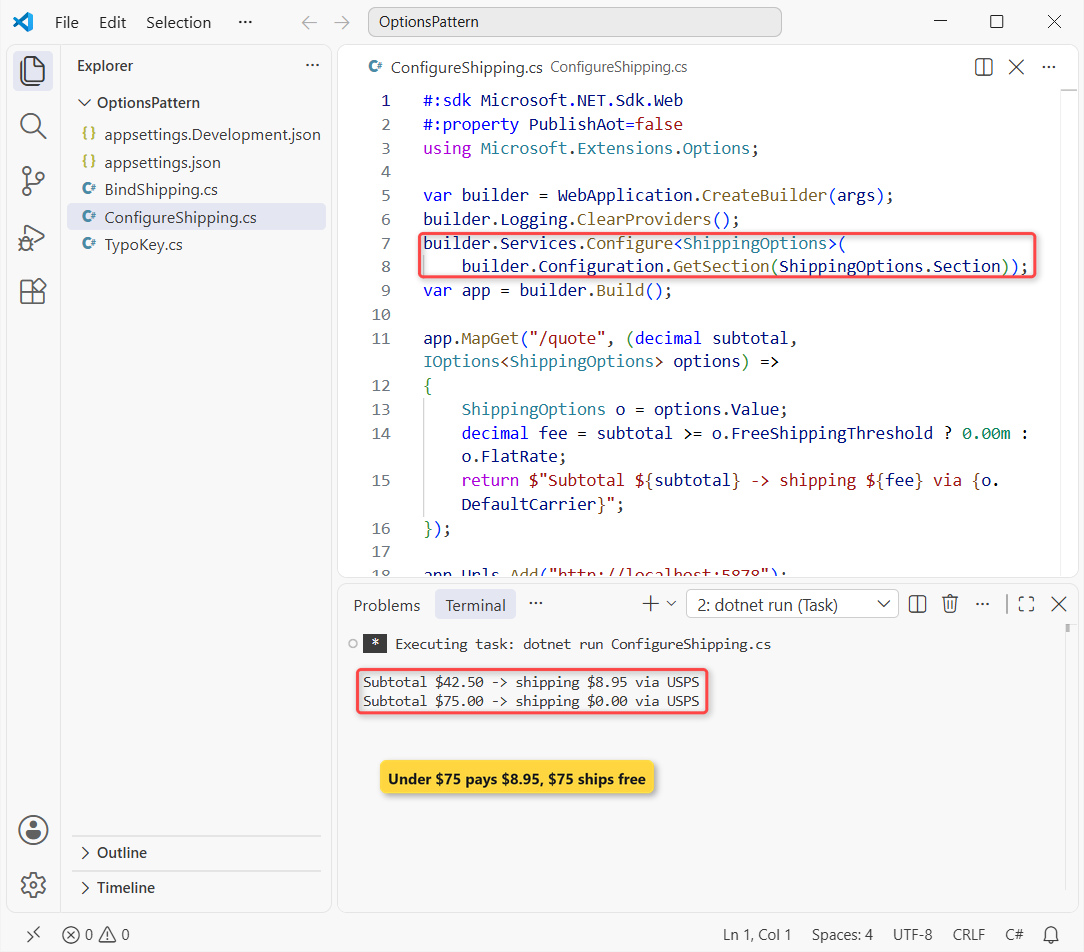
Checkpoint: Subtotal $42.50 -> shipping $8.95 via USPS and then Subtotal $75.00 -> shipping $0.00 via USPS.
The same parameter works in controllers too; the minimal API vs controllers comparison shows both styles side by side.
Step 3: Use AddOptions().Bind with ValidateDataAnnotations and ValidateOnStart
Configure accepts anything, including a negative threshold. AddOptions<T>() returns an OptionsBuilder that chains binding and validation.
- Replace
ConfigurewithAddOptions<ShippingOptions>().BindConfiguration(ShippingOptions.Section). - Add
[Range],[Required]and[RegularExpression]attributes, then callValidateDataAnnotations(). - Add a cross-property rule with
Validate(o => ..., "message"). - End with
ValidateOnStart()so bad settings stop the app at startup.
#:sdk Microsoft.NET.Sdk.Web
#:property PublishAot=false
using System.ComponentModel.DataAnnotations;
using Microsoft.Extensions.Options;

var builder = WebApplication.CreateBuilder(args);
builder.Logging.ClearProviders();
builder.Services.AddOptions<ShippingOptions>()
    .BindConfiguration(ShippingOptions.Section)
    .ValidateDataAnnotations()
    .Validate(o => o.FlatRate < o.FreeShippingThreshold,
        "FlatRate must be lower than FreeShippingThreshold.")
    .ValidateOnStart();
var app = builder.Build();

app.Urls.Add("http://localhost:5878");
try
{
    await app.StartAsync();   // ValidateOnStart runs here, before any request
}
catch (OptionsValidationException ex)
{
    foreach (string failure in ex.Failures)
        Console.WriteLine($"Invalid setting: {failure}");
    return;
}
var o = app.Services.GetRequiredService<IOptions<ShippingOptions>>().Value;
Console.WriteLine($"Started: free over ${o.FreeShippingThreshold}, ZIP {o.WarehouseZip}");
await app.StopAsync();

public class ShippingOptions
{
    public const string Section = "Shipping";
    [Range(0.01, 500)] public decimal FreeShippingThreshold { get; set; }
    [Range(0, 50)] public decimal FlatRate { get; set; }
    [Required, RegularExpression(@"^\d{5}$")] public string WarehouseZip { get; set; } = "";
    [Required] public string DefaultCarrier { get; set; } = "";
}
Output:
Started: free over $75.00, ZIP 78701StartAsync throws OptionsValidationException, and its Failures list holds one message per broken rule. I print them instead of letting a stack trace bury them.
To test the rules, I broke two values with environment variables (Step 6 explains why they beat the JSON):
set "Shipping__FreeShippingThreshold=-5" && set "Shipping__WarehouseZip=7870" && dotnet run ValidateShipping.csInvalid setting: DataAnnotation validation failed for 'ShippingOptions' members: 'FreeShippingThreshold' with the error: 'The field FreeShippingThreshold must be between 0.01 and 500.'.
Invalid setting: DataAnnotation validation failed for 'ShippingOptions' members: 'WarehouseZip' with the error: 'The field WarehouseZip must match the regular expression '^\d{5}$'.'.
Invalid setting: FlatRate must be lower than FreeShippingThreshold.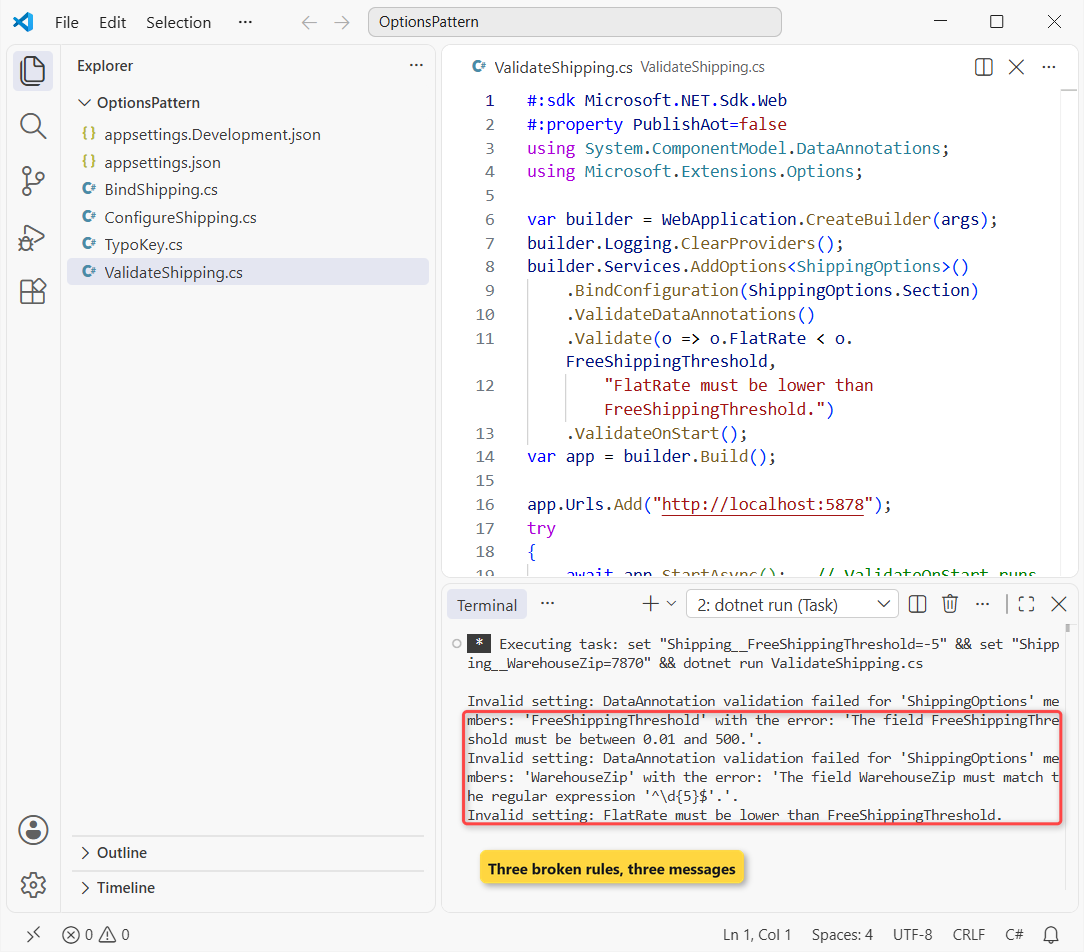
Checkpoint: the good run prints Started: free over $75.00, ZIP 78701, and the broken run prints three Invalid setting lines, including the FlatRate rule.
Without ValidateOnStart, the same exception waits for the first .Value read, usually inside a customer’s request. Pair it with global error handling in ASP.NET Core for errors that do slip through.
Step 4: Compare IOptions vs IOptionsSnapshot vs IOptionsMonitor with a Live Reload
WebApplication.CreateBuilder loads appsettings.json with reload-on-change turned on. Whether your code notices depends on the interface you inject.
- Inject all three interfaces into one
/thresholdendpoint. - Register an
OnChangecallback onIOptionsMonitor. - While the app runs, rewrite the threshold in appsettings.json from 75.00 to 50.00, then put it back.
#:sdk Microsoft.NET.Sdk.Web
#:property PublishAot=false
using Microsoft.Extensions.Options;

var builder = WebApplication.CreateBuilder(args);
builder.Logging.ClearProviders();
builder.Services.Configure<ShippingOptions>(builder.Configuration.GetSection("Shipping"));
var app = builder.Build();

app.MapGet("/threshold", (IOptions<ShippingOptions> options,
    IOptionsSnapshot<ShippingOptions> snapshot, IOptionsMonitor<ShippingOptions> monitor) =>
    $"IOptions ${options.Value.FreeShippingThreshold} | " +
    $"IOptionsSnapshot ${snapshot.Value.FreeShippingThreshold} | " +
    $"IOptionsMonitor ${monitor.CurrentValue.FreeShippingThreshold}");

app.Services.GetRequiredService<IOptionsMonitor<ShippingOptions>>()
    .OnChange(o => Console.WriteLine($"OnChange: threshold is now ${o.FreeShippingThreshold}"));

app.Urls.Add("http://localhost:5878");
await app.StartAsync();
var http = new HttpClient { BaseAddress = new Uri("http://localhost:5878") };
Console.WriteLine("Before: " + await http.GetStringAsync("/threshold"));

string original = File.ReadAllText("appsettings.json");
File.WriteAllText("appsettings.json", original.Replace("75.00", "50.00"));  // edit while running
await Task.Delay(1500);
Console.WriteLine("After:  " + await http.GetStringAsync("/threshold"));

File.WriteAllText("appsettings.json", original);  // put the file back
await Task.Delay(1500);
await app.StopAsync();

public class ShippingOptions
{
    public const string Section = "Shipping";
    public decimal FreeShippingThreshold { get; set; }
    public decimal FlatRate { get; set; }
    public string WarehouseZip { get; set; } = "";
    public string DefaultCarrier { get; set; } = "";
}
Output:
Before: IOptions $75.00 | IOptionsSnapshot $75.00 | IOptionsMonitor $75.00
OnChange: threshold is now $50.00
OnChange: threshold is now $50.00
After:  IOptions $75.00 | IOptionsSnapshot $50.00 | IOptionsMonitor $50.00
OnChange: threshold is now $75.00
OnChange: threshold is now $75.00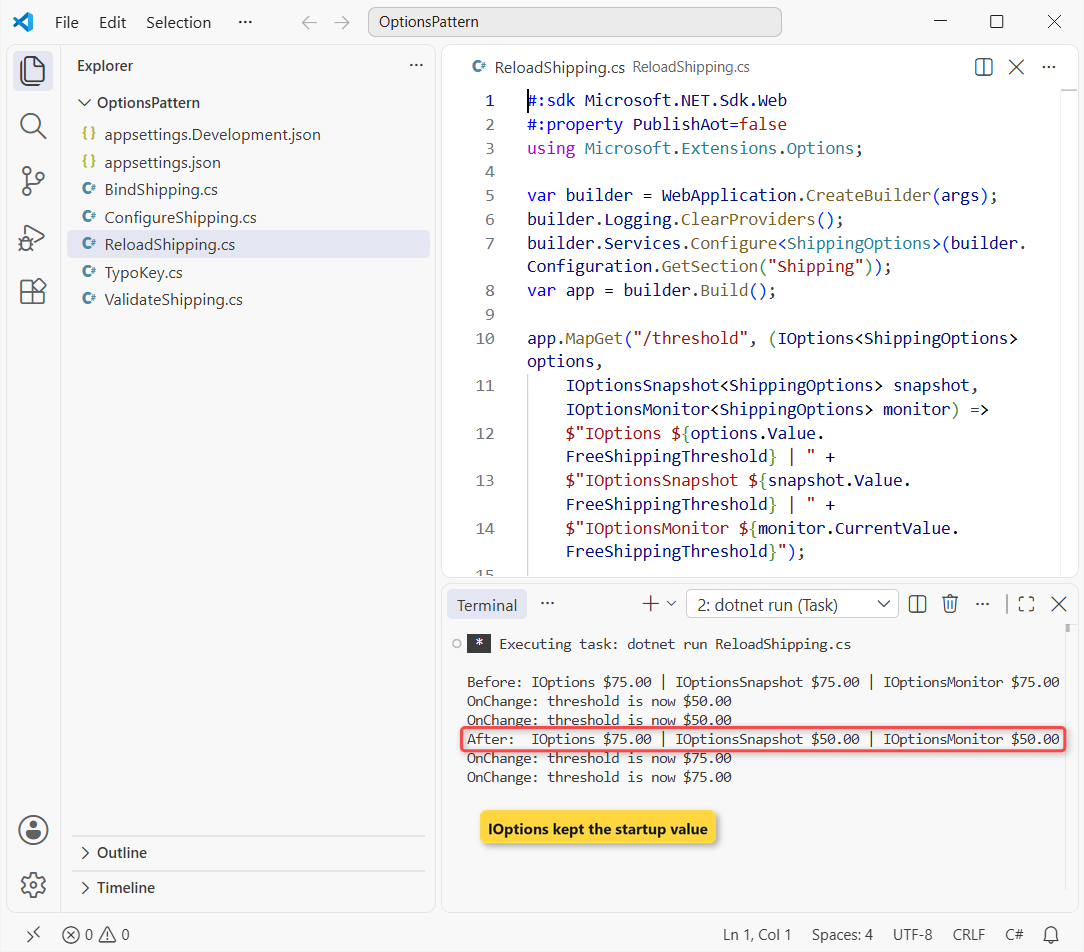
Checkpoint: the After line reads IOptions $75.00 | IOptionsSnapshot $50.00 | IOptionsMonitor $50.00.
IOptions caches its value for the life of the app. IOptionsSnapshot rebinds once per request, and IOptionsMonitor.CurrentValue always has the latest values. The Task.Delay calls just give the file watcher time; see async and await in C# for how those awaits work.
Note: the OnChange line can print more than once for a single save, because the file watcher may raise several events. Make OnChange handlers safe to run twice.
Step 5: Add Named Options for Each Carrier
UPS and USPS share one shape but have different limits. Named options register the same CarrierOptions class twice under different names.
- Call
Configure<CarrierOptions>("UPS", section)once per carrier. - Inject
IOptionsSnapshot<CarrierOptions>orIOptionsMonitor<CarrierOptions>; plainIOptionshas no named support. - Read one with
Get("UPS").
#:sdk Microsoft.NET.Sdk.Web
#:property PublishAot=false
using Microsoft.Extensions.Options;

var builder = WebApplication.CreateBuilder(args);
builder.Logging.ClearProviders();
builder.Services.Configure<CarrierOptions>("UPS", builder.Configuration.GetSection("Carriers:UPS"));
builder.Services.Configure<CarrierOptions>("USPS", builder.Configuration.GetSection("Carriers:USPS"));
var app = builder.Build();

app.MapGet("/carriers/{name}", (string name, IOptionsSnapshot<CarrierOptions> carriers) =>
{
    CarrierOptions c = carriers.Get(name);
    return $"{name,-5} max {c.MaxWeightLbs,3} lbs, pickup cutoff '{c.PickupCutoff}'";
});

app.Urls.Add("http://localhost:5878");
await app.StartAsync();
var http = new HttpClient { BaseAddress = new Uri("http://localhost:5878") };
foreach (var name in new[] { "UPS", "USPS", "FedEx" })
    Console.WriteLine(await http.GetStringAsync($"/carriers/{name}"));
await app.StopAsync();

public class CarrierOptions
{
    public int MaxWeightLbs { get; set; }
    public string PickupCutoff { get; set; } = "";
}
Output:
UPS   max 150 lbs, pickup cutoff '5:00 PM'
USPS  max  70 lbs, pickup cutoff '3:30 PM'
FedEx max   0 lbs, pickup cutoff ''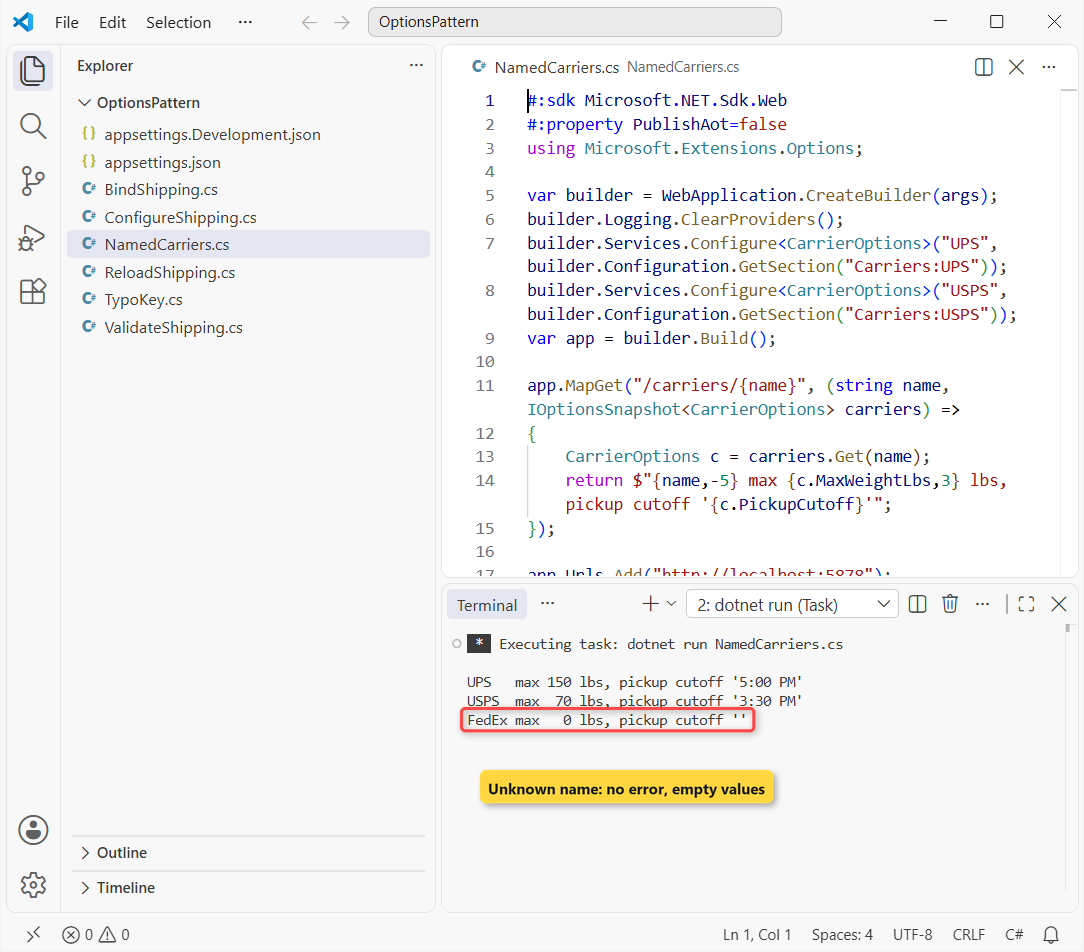
Checkpoint: UPS shows 150 lbs, USPS shows 70 lbs, and FedEx shows 0 with a blank cutoff.
That FedEx line is the trap: an unknown name returns a default instance, not an error. Validate named options with AddOptions<T>("UPS") if a missing carrier should fail.
Step 6: Override Options with appsettings.Development.json and Environment Variables
Configuration sources stack, and the last one wins. For a default web app the order is appsettings.json, then appsettings.{Environment}.json, then environment variables, then command-line arguments.
- Add appsettings.Development.json with only the keys that differ on a dev box.
- Set
ASPNETCORE_ENVIRONMENT=Developmentto load it. - Set
Shipping__FlatRateto override one key; the double underscore stands for the colon.
{
  "Shipping": {
    "FreeShippingThreshold": 25.00,
    "WarehouseZip": "78758"
  }
}
#:sdk Microsoft.NET.Sdk.Web
#:property PublishAot=false
using Microsoft.Extensions.Options;
var builder = WebApplication.CreateBuilder(args);
builder.Services.Configure<ShippingOptions>(builder.Configuration.GetSection("Shipping"));
var app = builder.Build();
var o = app.Services.GetRequiredService<IOptions<ShippingOptions>>().Value;
Console.WriteLine($"{app.Environment.EnvironmentName,-11}: free over ${o.FreeShippingThreshold}, " +
$"flat ${o.FlatRate}, ZIP {o.WarehouseZip}");
public class ShippingOptions
{
public const string Section = "Shipping";
public decimal FreeShippingThreshold { get; set; }
public decimal FlatRate { get; set; }
public string WarehouseZip { get; set; } = "";
public string DefaultCarrier { get; set; } = "";
}Output:
Production : free over $75.00, flat $8.95, ZIP 78701
Development: free over $25.00, flat $8.95, ZIP 78758
Development: free over $25.00, flat $5.95, ZIP 78758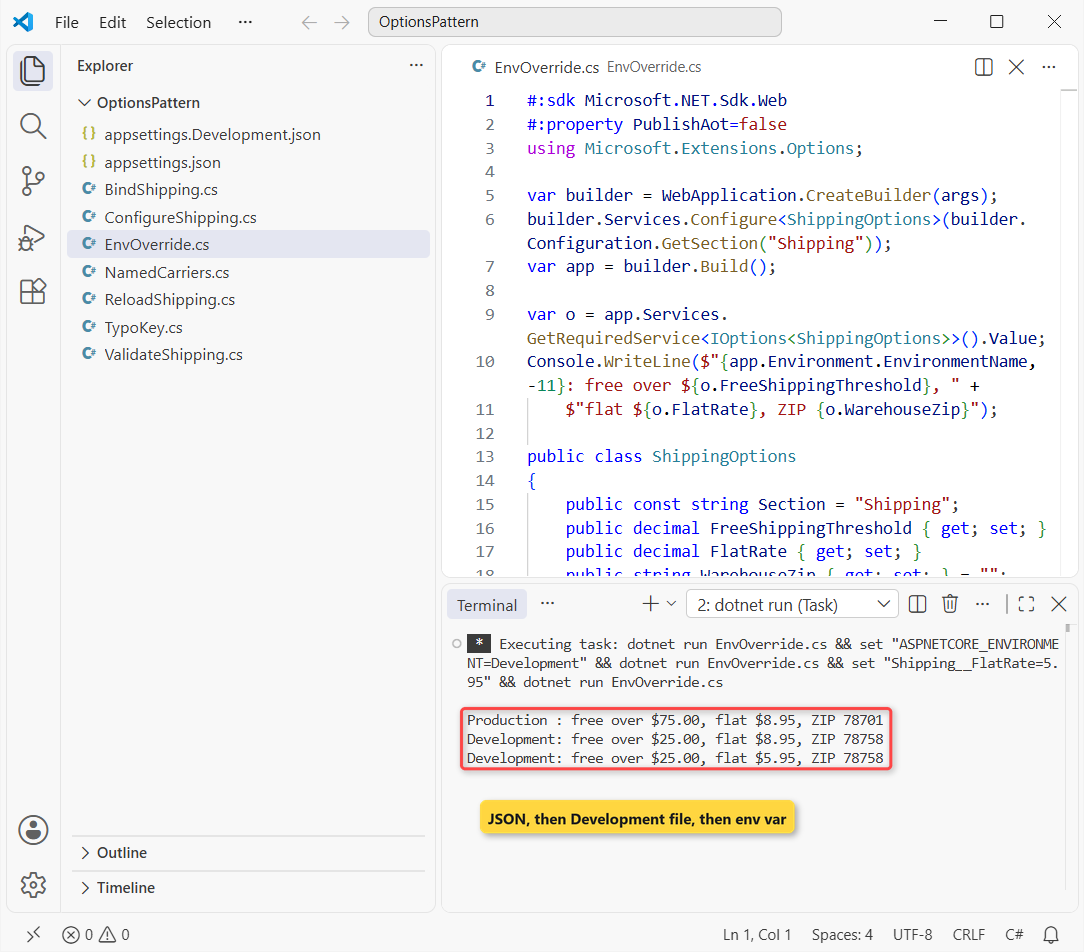
Checkpoint: the last line reads Development: free over $25.00, flat $5.95, ZIP 78758.
Keys you don’t override keep their appsettings.json values, so the Development file stays tiny. Connection strings work the same way, as in this ASP.NET Core Web API CRUD with EF Core build.
Test the ShippingApi with IOptionsMonitor in a Singleton Service
The finished app puts it together: validated ShippingOptions, named carriers, and a ShippingCalculator singleton that reads both through IOptionsMonitor.
#:sdk Microsoft.NET.Sdk.Web
#:property PublishAot=false
using System.ComponentModel.DataAnnotations;
using Microsoft.Extensions.Options;

var builder = WebApplication.CreateBuilder(args);
builder.Logging.ClearProviders();
builder.Services.AddOptions<ShippingOptions>()
    .BindConfiguration(ShippingOptions.Section)
    .ValidateDataAnnotations()
    .ValidateOnStart();
builder.Services.Configure<CarrierOptions>("UPS", builder.Configuration.GetSection("Carriers:UPS"));
builder.Services.Configure<CarrierOptions>("USPS", builder.Configuration.GetSection("Carriers:USPS"));
builder.Services.AddSingleton<ShippingCalculator>();
var app = builder.Build();

app.MapGet("/quote", (decimal subtotal, double weightLbs, ShippingCalculator calc) =>
    calc.Quote(subtotal, weightLbs));

app.Urls.Add("http://localhost:5878");
await app.StartAsync();
var http = new HttpClient { BaseAddress = new Uri("http://localhost:5878") };
Console.WriteLine($"ShippingApi ({app.Environment.EnvironmentName})");
Console.WriteLine(await http.GetStringAsync("/quote?subtotal=42.50&weightLbs=3"));
Console.WriteLine(await http.GetStringAsync("/quote?subtotal=89.99&weightLbs=12.5"));
Console.WriteLine(await http.GetStringAsync("/quote?subtotal=64.00&weightLbs=95"));
await app.StopAsync();

// singleton service: IOptionsMonitor is safe here, IOptionsSnapshot (scoped) is not
public class ShippingCalculator(IOptionsMonitor<ShippingOptions> shipping,
    IOptionsMonitor<CarrierOptions> carriers)
{
    public string Quote(decimal subtotal, double weightLbs)
    {
        ShippingOptions s = shipping.CurrentValue;
        string carrier = weightLbs > carriers.Get("USPS").MaxWeightLbs ? "UPS" : s.DefaultCarrier;
        decimal fee = subtotal >= s.FreeShippingThreshold ? 0.00m : s.FlatRate;
        return $"${subtotal}, {weightLbs} lbs -> ${fee} via {carrier}, " +
               $"pickup by {carriers.Get(carrier).PickupCutoff}";
    }
}

public class ShippingOptions
{
    public const string Section = "Shipping";
    [Range(0.01, 500)] public decimal FreeShippingThreshold { get; set; }
    [Range(0, 50)] public decimal FlatRate { get; set; }
    [Required, RegularExpression(@"^\d{5}$")] public string WarehouseZip { get; set; } = "";
    [Required] public string DefaultCarrier { get; set; } = "";
}

public class CarrierOptions
{
    public int MaxWeightLbs { get; set; }
    public string PickupCutoff { get; set; } = "";
}
Output:
ShippingApi (Production)
$42.50, 3 lbs -> $8.95 via USPS, pickup by 3:30 PM
$89.99, 12.5 lbs -> $0.00 via USPS, pickup by 3:30 PM
$64.00, 95 lbs -> $8.95 via UPS, pickup by 5:00 PM
In Production, a $42.50 order pays the flat rate, $89.99 ships free, and a 95 lb box goes UPS because it’s over the USPS 70 lb limit. That’s the run in the first screenshot.
Running it with the Development environment drops the free-shipping line to $25.00:
ShippingApi (Development)
$42.50, 3 lbs -> $0.00 via USPS, pickup by 3:30 PM
$89.99, 12.5 lbs -> $0.00 via USPS, pickup by 3:30 PM
$64.00, 95 lbs -> $0.00 via UPS, pickup by 5:00 PM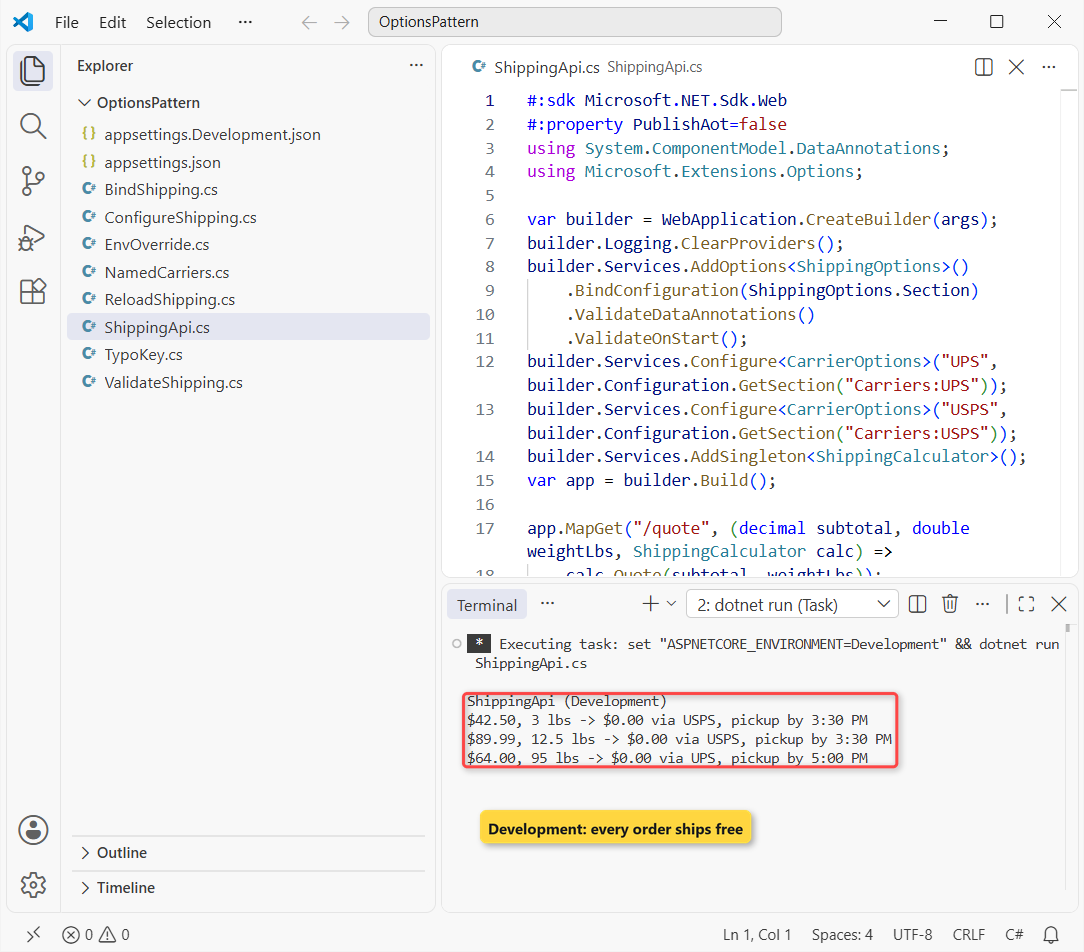
Important: the calculator is a singleton, so it can’t take the scoped IOptionsSnapshot; IOptionsMonitor fits. To grow this into a full project, run dotnet project convert ShippingApi.cs, covered in file-based apps with dotnet run.
Troubleshooting the Options Pattern in ASP.NET Core
Values are 0 or empty. A property name doesn’t match its key, the section name is wrong, or the setter isn’t public. Print the bound object like Step 1 does.
Cannot consume scoped service IOptionsSnapshot from singleton. Use IOptionsMonitor in singletons and hosted services.
OptionsValidationException on the first request. Add ValidateOnStart() so it fails at deploy time instead, and log the message in a try-catch block if you read options outside DI.
Where to Take It Next with ASP.NET Core Options
Move validation rules into a class that implements IValidateOptions<T>, or use the [OptionsValidator] source generator for trim-friendly validation. Then wire the same pattern into your custom ASP.NET Core middleware settings.
For API keys and connection strings, bind a settings class the same way in JWT authentication in ASP.NET Core. Keep the real secret values out of appsettings.json.
Other reading I’d line up after this build:
- All ASP.NET Core tutorials on AspDotnetHelp
- HttpClient in C# for calling the API from a client
- Interfaces in C#, the idea behind IOptions
- Dictionary in C# for lookup tables you don’t need to configure
Frequently Asked Questions
What is the options pattern in ASP.NET Core?
It binds a configuration section to a typed class and registers it in dependency injection, so code reads IOptions<T> instead of string keys like "Shipping:FlatRate".
What’s the difference between IOptions, IOptionsSnapshot and IOptionsMonitor?
IOptions is a singleton that reads values once. IOptionsSnapshot is scoped and rebinds per request. IOptionsMonitor is a singleton with CurrentValue, named options and OnChange notifications.
Should I use Configure or AddOptions?
Both register the same options. AddOptions<T>() returns an OptionsBuilder, so use it when you want Bind, ValidateDataAnnotations and ValidateOnStart in one chain.
Does IOptions reload when appsettings.json changes?
No. In my run it kept $75.00 after the file changed to $50.00, while IOptionsSnapshot and IOptionsMonitor returned $50.00. See the Options pattern in ASP.NET Core guide on Microsoft Learn.
When does options validation run?
The first time the options object is created, unless you call ValidateOnStart(). Then it runs during app startup and the app won’t start with bad values. It also runs again on every reload.

Bijay Kumar is a renowned software engineer, accomplished author, and distinguished Microsoft Most Valuable Professional (MVP) specializing in SharePoint. With a rich professional background spanning over 15 years, Bijay has established himself as an authority in the field of information technology. He possesses unparalleled expertise in multiple programming languages and technologies such as ASP.NET, ASP.NET MVC, C#.NET, and SharePoint, which has enabled him to develop innovative and cutting-edge solutions for clients across the globe. Read more…