
To use LINQ in C#, you call query methods such as Where, Select and OrderBy on any array or list, and pass each one a small lambda that says what to keep, pick or sort by:
var bigSpenders = orders.Where(o => o.Total > 200).Select(o => o.Customer);
Console.WriteLine(string.Join(", ", bigSpenders));
// Jenna Morales, Marcus Reed, Tyler Brooks
I ran the queries below on .NET 10 against one list of six US orders, including the new LeftJoin and the deferred execution trap that bites almost everyone once.
The Sample Orders We’ll Use in Every LINQ Query
Every program here starts with the same six orders in an array of records. LINQ works the same on a C# array or a List in C#, since both implement IEnumerable<T>.
| Id | Customer | State | Total |
|---|---|---|---|
| 1 | Jenna Morales | TX | $249.99 |
| 2 | Tyler Brooks | CA | $89.50 |
| 3 | Jenna Morales | TX | $120.00 |
| 4 | Marcus Reed | NY | $410.25 |
| 5 | Olivia Grant | CA | $64.75 |
| 6 | Tyler Brooks | CA | $305.00 |
Two customers have two orders each and California has three. Those repeats are what make grouping and Distinct interesting.
What Is LINQ in C#? Query Syntax vs Method Syntax
LINQ (Language-Integrated Query) is a set of methods in System.Linq that filter, sort, group and join any sequence. You write it with SQL-like keywords or as chained method calls; I use method syntax after Method 1.
Each o => ... lambda becomes a Func delegate; see delegates in C# and the older anonymous method syntax if lambdas feel new.
Method 1: Filter with Where and Project with C# LINQ Select
Where keeps the items that pass a test; Select turns each item into something else. Here’s the same filter in both syntaxes on the same orders:
Order[] orders =
[
    new(1, "Jenna Morales", "TX", 249.99m),
    new(2, "Tyler Brooks", "CA", 89.50m),
    new(3, "Jenna Morales", "TX", 120.00m),
    new(4, "Marcus Reed", "NY", 410.25m),
    new(5, "Olivia Grant", "CA", 64.75m),
    new(6, "Tyler Brooks", "CA", 305.00m),
];

var caNames = from o in orders              // query syntax
              where o.State == "CA"
              select o.Customer;
Console.WriteLine(string.Join(", ", caNames));

var bigSpenders = orders.Where(o => o.Total > 200)
                        .Select(o => o.Customer);
Console.WriteLine(string.Join(", ", bigSpenders));

record Order(int Id, string Customer, string State, decimal Total);
Output:
Tyler Brooks, Olivia Grant, Tyler Brooks
Jenna Morales, Marcus Reed, Tyler Brooks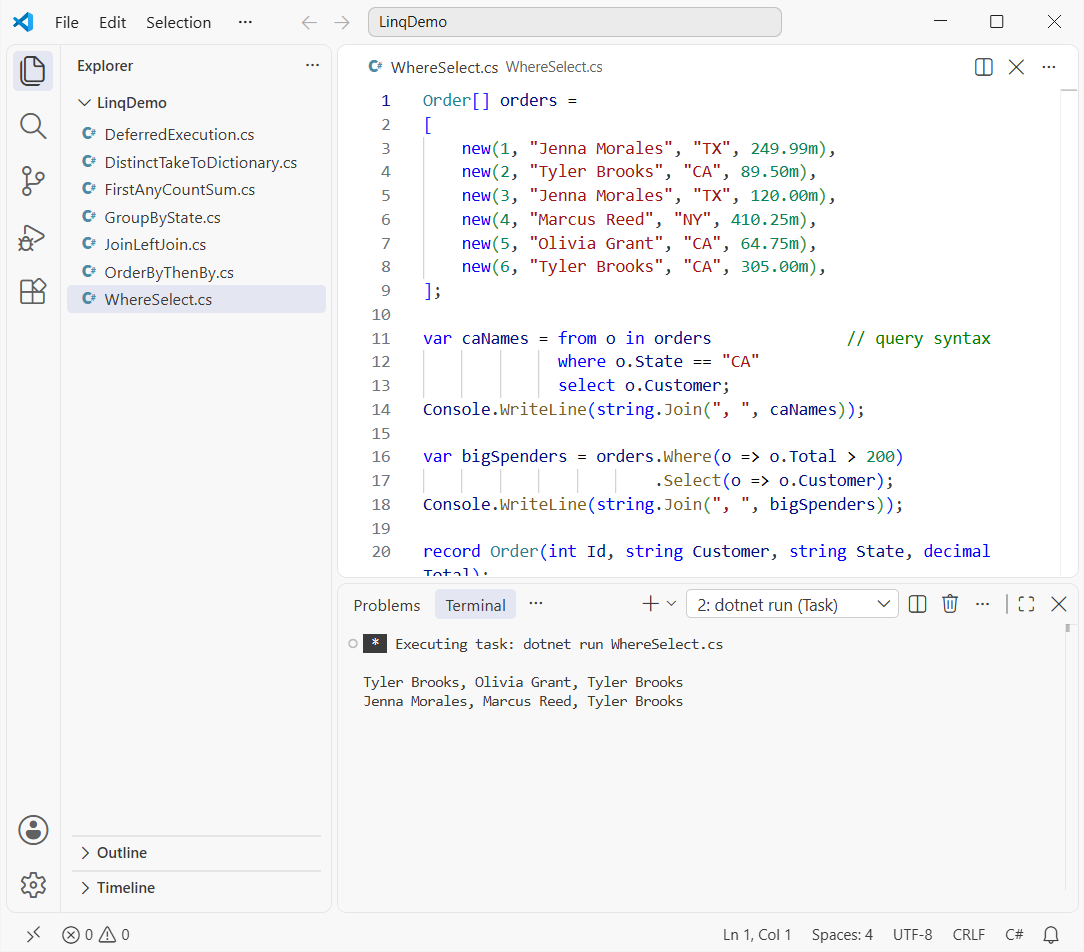
You get the three CA order names, then the three customers with orders over $200.
How does this code work?
Where returns another IEnumerable<Order>, which a foreach loop in C# can walk. Select changes the item type, here from Order to string; new { o.Id, o.Total } would give you an anonymous type instead.
Method 2: Sort with LINQ OrderBy, OrderByDescending and ThenBy
Same orders, now sorted. OrderByDescending sorts by one key, and ThenBy or ThenByDescending breaks ties:
Order[] orders =
[
    new(1, "Jenna Morales", "TX", 249.99m),
    new(2, "Tyler Brooks", "CA", 89.50m),
    new(3, "Jenna Morales", "TX", 120.00m),
    new(4, "Marcus Reed", "NY", 410.25m),
    new(5, "Olivia Grant", "CA", 64.75m),
    new(6, "Tyler Brooks", "CA", 305.00m),
];

var byTotal = orders.OrderByDescending(o => o.Total);
Console.WriteLine(string.Join(", ", byTotal.Select(o => o.Total)));

var byState = orders.OrderBy(o => o.State)
                    .ThenByDescending(o => o.Total);
foreach (Order o in byState)
    Console.WriteLine($"{o.State} {o.Total,7} {o.Customer}");

record Order(int Id, string Customer, string State, decimal Total);
Output:
410.25, 305.00, 249.99, 120.00, 89.50, 64.75
CA  305.00 Tyler Brooks
CA   89.50 Tyler Brooks
CA   64.75 Olivia Grant
NY  410.25 Marcus Reed
TX  249.99 Jenna Morales
TX  120.00 Jenna Morales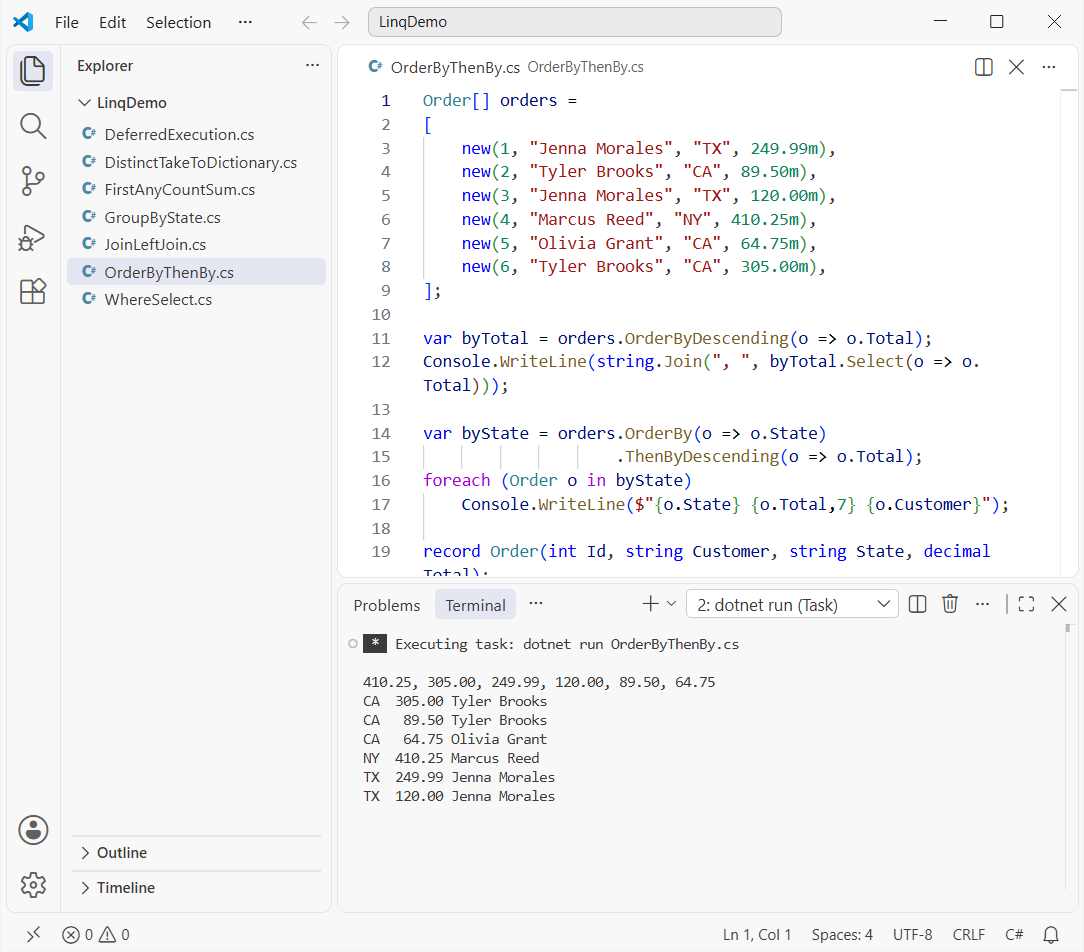
Totals run from 410.25 down to 64.75, and the second list goes CA, NY, TX with Tyler’s $305.00 order on top.
How does this code work?
OrderBy is a stable sort that returns a new sequence; the array doesn’t change. To sort in place, use Array.Sort from how to sort an array in C#. Important: a second OrderBy throws away the first sort, so use ThenBy.
Method 3: LINQ First, FirstOrDefault, Single, Any, Count and Sum
These run the query right away and return one item, one yes/no or one number (en-US culture so :C prints dollars):
using System.Globalization;

Order[] orders =
[
    new(1, "Jenna Morales", "TX", 249.99m),
    new(2, "Tyler Brooks", "CA", 89.50m),
    new(3, "Jenna Morales", "TX", 120.00m),
    new(4, "Marcus Reed", "NY", 410.25m),
    new(5, "Olivia Grant", "CA", 64.75m),
    new(6, "Tyler Brooks", "CA", 305.00m),
];

CultureInfo.CurrentCulture = new CultureInfo("en-US");

Console.WriteLine($"First CA: #{orders.First(o => o.State == "CA").Id}");
Order? ohio = orders.FirstOrDefault(o => o.State == "OH");
Console.WriteLine($"First OH: {(ohio is null ? "none" : ohio.Id)}");
try { orders.Single(o => o.Customer == "Tyler Brooks"); }
catch (InvalidOperationException ex) { Console.WriteLine(ex.Message); }

Console.WriteLine($"Any NY: {orders.Any(o => o.State == "NY")}");
Console.WriteLine($"All over $50: {orders.All(o => o.Total > 50)}");
Console.WriteLine($"CA count: {orders.Count(o => o.State == "CA")}");
Console.WriteLine($"Sum {orders.Sum(o => o.Total):C}, avg {orders.Average(o => o.Total):C}");
Console.WriteLine($"Min {orders.Min(o => o.Total):C}, max {orders.Max(o => o.Total):C}");

record Order(int Id, string Customer, string State, decimal Total);
Output:
First CA: #2
First OH: none
Sequence contains more than one matching element
Any NY: True
All over $50: True
CA count: 3
Sum $1,239.49, avg $206.58
Min $64.75, max $410.25
The first CA order is #2, there’s no OH order, the six orders total $1,239.49 and the average is $206.58.
How does this code work?
First throws Sequence contains no matching element when nothing matches, while FirstOrDefault returns null, so check for null before you use it. Single throws when Tyler’s two orders both match, which makes it a cheap data check.
Any stops at the first match, so it beats Count() > 0. MaxBy returns the whole top order.
Method 4: C# LINQ Group By with Count and Sum
GroupBy puts the same orders into buckets by a key. Each bucket is an IGrouping with a Key and its items, a lot like one entry in a dictionary in C#:
Order[] orders =
[
    new(1, "Jenna Morales", "TX", 249.99m),
    new(2, "Tyler Brooks", "CA", 89.50m),
    new(3, "Jenna Morales", "TX", 120.00m),
    new(4, "Marcus Reed", "NY", 410.25m),
    new(5, "Olivia Grant", "CA", 64.75m),
    new(6, "Tyler Brooks", "CA", 305.00m),
];

var byState = orders
    .GroupBy(o => o.State)
    .Select(g => new { g.Key, Count = g.Count(),
                       Total = g.Sum(o => o.Total) })
    .OrderByDescending(g => g.Total);
foreach (var g in byState)
    Console.WriteLine($"{g.Key}: {g.Count} order(s), {g.Total}");

record Order(int Id, string Customer, string State, decimal Total);
Output:
CA: 3 order(s), 459.25
NY: 1 order(s), 410.25
TX: 2 order(s), 369.99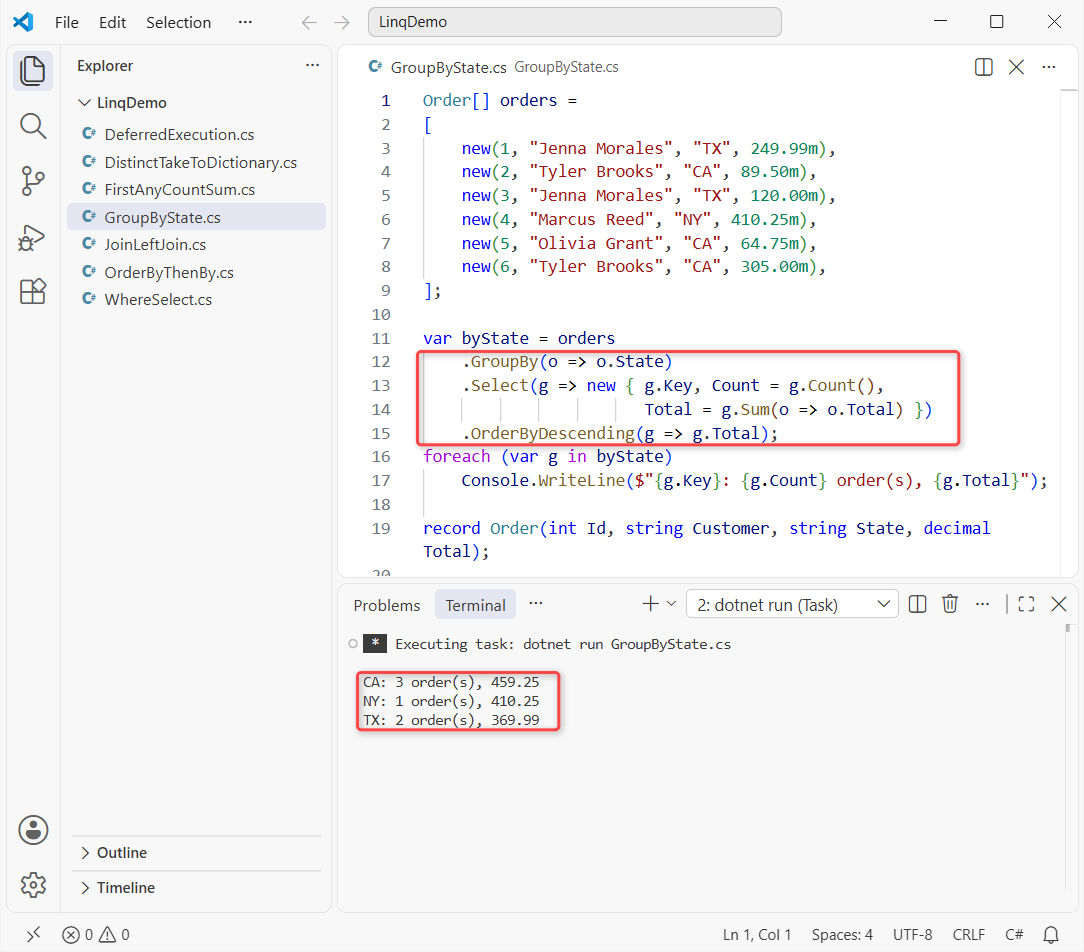
CA has 3 orders worth 459.25, NY 1 worth 410.25 and TX 2 worth 369.99.
How does this code work?
g.Key is the state, and g.Count() and g.Sum(...) run over that state’s orders only. CountBy (.NET 9+) counts without building groups, and AggregateBy does the same for sums.
Method 5: LINQ Join and the New LeftJoin in .NET 10
Now I join the orders to four customers by name. Olivia Grant isn’t in that list, and Ava Kim has no orders. LeftJoin is new in .NET 10, and Join is the classic inner join:
Order[] orders =
[
    new(1, "Jenna Morales", "TX", 249.99m),
    new(2, "Tyler Brooks", "CA", 89.50m),
    new(3, "Jenna Morales", "TX", 120.00m),
    new(4, "Marcus Reed", "NY", 410.25m),
    new(5, "Olivia Grant", "CA", 64.75m),
    new(6, "Tyler Brooks", "CA", 305.00m),
];
Customer[] customers =
[
    new("Jenna Morales", "Austin"), new("Ava Kim", "Columbus"),
    new("Marcus Reed", "Albany"), new("Tyler Brooks", "Napa"),
];

var left = customers.LeftJoin(orders,       // .NET 10
    c => c.Name, o => o.Customer,
    (c, o) => $"{c.Name,-14} {o?.Total.ToString() ?? "none"}");
foreach (string line in left) Console.WriteLine(line);

var inner = orders.Join(customers, o => o.Customer, c => c.Name,
    (o, c) => $"#{o.Id} {c.City}");
Console.WriteLine("Join: " + string.Join(", ", inner));

record Order(int Id, string Customer, string State, decimal Total);
record Customer(string Name, string City);
Output:
Jenna Morales  249.99
Jenna Morales  120.00
Ava Kim        none
Marcus Reed    410.25
Tyler Brooks   89.50
Tyler Brooks   305.00
Join: #1 Austin, #2 Napa, #3 Austin, #4 Albany, #6 Napa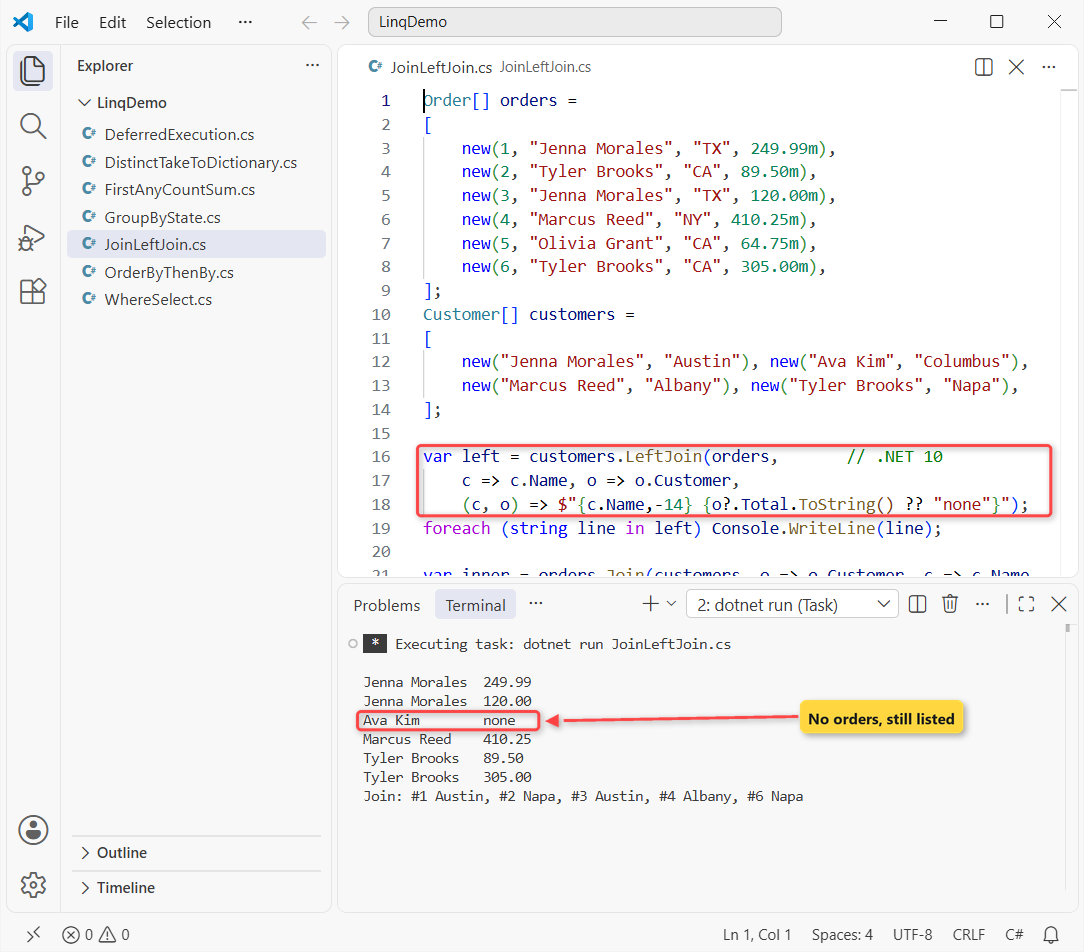
LeftJoin lists all four customers and prints none for Ava Kim. Join returns five orders with cities, and order #5 is gone.
How does this code work?
The two key lambdas pick the values to match, and the last one builds each row. In LeftJoin the order parameter is nullable, so o?.Total covers Ava.
Before .NET 10, a left join meant GroupJoin + SelectMany + DefaultIfEmpty. LeftJoin and RightJoin are among the LINQ additions in what’s new in .NET 10.
Method 6: LINQ Distinct, Take, Skip and ToDictionary
Same six orders, trimmed and converted. Distinct drops repeats, Skip + Take cut a page, and ToDictionary stores the result:
Order[] orders =
[
    new(1, "Jenna Morales", "TX", 249.99m),
    new(2, "Tyler Brooks", "CA", 89.50m),
    new(3, "Jenna Morales", "TX", 120.00m),
    new(4, "Marcus Reed", "NY", 410.25m),
    new(5, "Olivia Grant", "CA", 64.75m),
    new(6, "Tyler Brooks", "CA", 305.00m),
];

var states = orders.Select(o => o.State).Distinct();
Console.WriteLine("States: " + string.Join(", ", states));
var onePerCustomer = orders.DistinctBy(o => o.Customer).Select(o => o.Id);
Console.WriteLine("Ids: " + string.Join(", ", onePerCustomer));

int page = 2, pageSize = 2;
var rows = orders.OrderBy(o => o.Id).Skip((page - 1) * pageSize).Take(pageSize);
Console.WriteLine($"Page {page}: " + string.Join(", ", rows.Select(o => o.Id)));

Dictionary<int, Order> byId = orders.ToDictionary(o => o.Id);
Console.WriteLine($"Order 4: {byId[4].Customer}");
List<Order> caList = orders.Where(o => o.State == "CA").ToList();
Console.WriteLine($"CA list: {caList.Count}");
try { orders.ToDictionary(o => o.Customer); }
catch (ArgumentException ex) { Console.WriteLine(ex.Message); }

record Order(int Id, string Customer, string State, decimal Total);
Output:
States: TX, CA, NY
Ids: 1, 2, 4, 5
Page 2: 3, 4
Order 4: Marcus Reed
CA list: 3
An item with the same key has already been added. Key: Jenna Morales
The states are TX, CA, NY; one order per customer leaves Ids 1, 2, 4, 5; page 2 is orders 3 and 4; and keying by customer throws.
How does this code work?
DistinctBy (.NET 6+) keeps each customer’s first order. Always OrderBy before Skip/Take, or the page depends on the source order. Names repeat, so the last ToDictionary throws; catch it in a try-catch block or use ToLookup.
Why Does My LINQ Query Return Different Results? Deferred Execution
Here’s the gotcha. Where doesn’t run when you write it; it runs each time you loop over it. Same orders, this time in a List so I can add one:
List<Order> orders =
[
    new(1, "Jenna Morales", "TX", 249.99m),
    new(2, "Tyler Brooks", "CA", 89.50m),
    new(3, "Jenna Morales", "TX", 120.00m),
    new(4, "Marcus Reed", "NY", 410.25m),
    new(5, "Olivia Grant", "CA", 64.75m),
    new(6, "Tyler Brooks", "CA", 305.00m),
];

var caQuery = orders.Where(o => o.State == "CA");  // lazy
List<Order> snapshot = caQuery.ToList();  // runs now
orders.Add(new(7, "Ava Kim", "CA", 150.00m));
Console.WriteLine($"{caQuery.Count()} vs {snapshot.Count}");
int calls = 0;
bool Over100(Order o) { calls++; return o.Total > 100; }
var tracked = orders.Where(Over100);
tracked.Count(); tracked.Count();
Console.WriteLine($"Predicate calls: {calls}");

record Order(int Id, string Customer, string State, decimal Total);
Output:
4 vs 3
Predicate calls: 14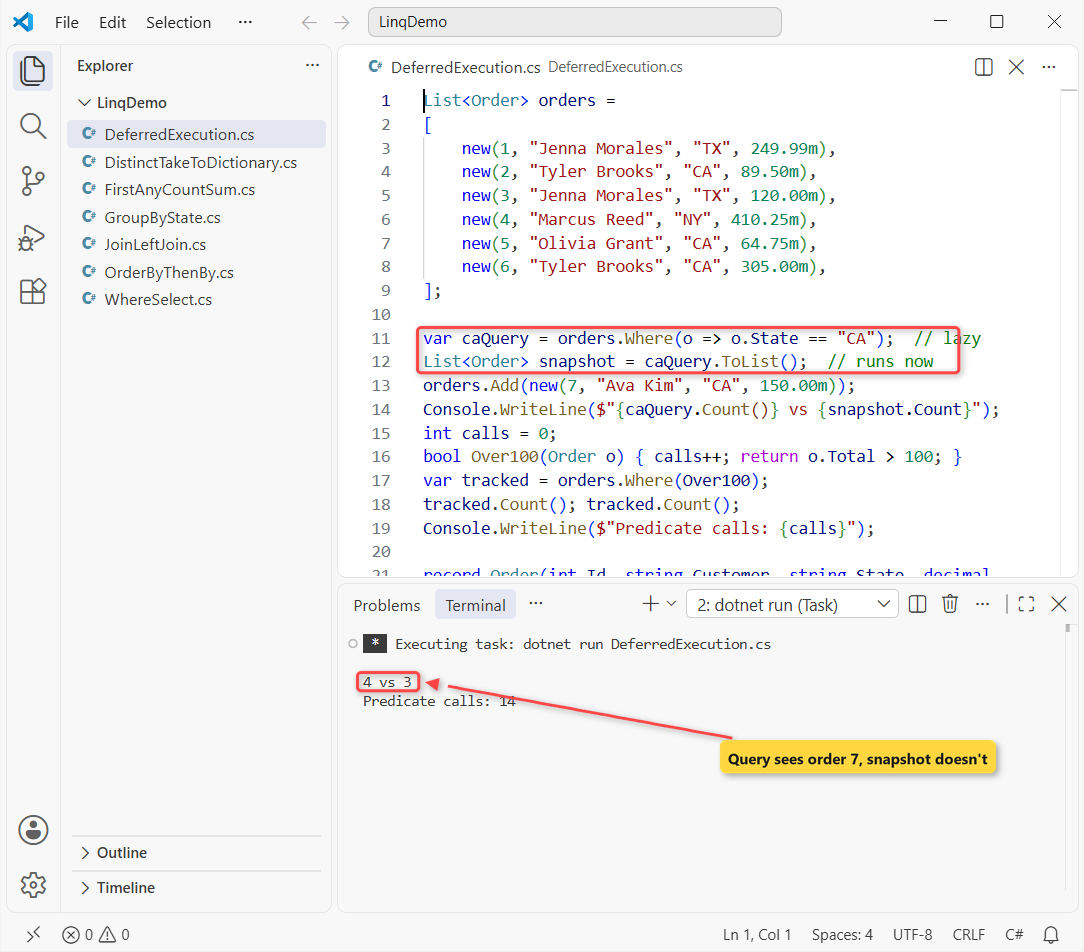
After Ava Kim’s CA order arrives, the query counts 4 vs 3 in the snapshot, and the predicate ran 14 times.
How does this code work?
caQuery stores the recipe, not the results; ToList() ran it once and kept a copy. Each Count() on tracked walked all 7 orders through Over100: 7 + 7 = 14 calls.
Pro Tip: call ToList() when you’ll reuse a result, and keep side effects out of lambdas. The same applies when you join a list into a comma-separated string from a query.
Which LINQ Method Should You Use?
| Task | Method | Watch out for |
|---|---|---|
| Filter / reshape | Where, Select | SelectMany flattens nested lists |
| Sort by two keys | OrderBy + ThenBy | Never two OrderBy calls |
| One item that may be missing | FirstOrDefault | Null check the result |
| Totals per key | GroupBy + Sum | CountBy on .NET 9+ |
| Keep unmatched rows | LeftJoin | .NET 10 only |
| Reuse results | ToList, ToDictionary | Duplicate keys throw |
Things to Keep in Mind
- Queries are lazy. Call
ToList()to freeze results before the source changes. FirstandSinglethrow. Use theOrDefaultversions when no match is normal.Joindrops unmatched rows. UseLeftJoinon .NET 10 to keep them.ToDictionaryneeds unique keys. Group first or useToLookup.
Want more practice with the collections LINQ runs on? Start here:
- Grow a collection at run time with dynamic arrays
- C# 14 features you can use with these queries
- The older non-generic Hashtable and why LINQ skips it
- All C# tutorials on aspdotnethelp.com
Frequently Asked Questions
What is LINQ in C#?
LINQ (Language-Integrated Query) is the set of query operators in System.Linq, like Where and GroupBy. They work on any IEnumerable<T>, and EF Core uses the same syntax for databases.
What is the difference between Select and SelectMany in C# LINQ?
Select returns one result per item. SelectMany is for items that each hold a collection, like orders with line items, and flattens them into one sequence.
How do you do a left join in C# LINQ?
On .NET 10, call outer.LeftJoin(inner, outerKey, innerKey, (o, i) => ...); i is null when nothing matches (Enumerable.LeftJoin on Microsoft Learn). On older versions, use GroupJoin with SelectMany and DefaultIfEmpty.
Is LINQ slower than foreach in C#?
A plain loop is usually a little faster, since LINQ adds delegate calls. For everyday data the gap is tiny, so I pick LINQ for readability and loops for measured hot paths.
Does LINQ change the original list?
No. LINQ operators return new sequences and leave the source alone. OrderBy doesn’t sort the list in place, and Where doesn’t remove anything.

Bijay Kumar is a renowned software engineer, accomplished author, and distinguished Microsoft Most Valuable Professional (MVP) specializing in SharePoint. With a rich professional background spanning over 15 years, Bijay has established himself as an authority in the field of information technology. He possesses unparalleled expertise in multiple programming languages and technologies such as ASP.NET, ASP.NET MVC, C#.NET, and SharePoint, which has enabled him to develop innovative and cutting-edge solutions for clients across the globe. Read more…