
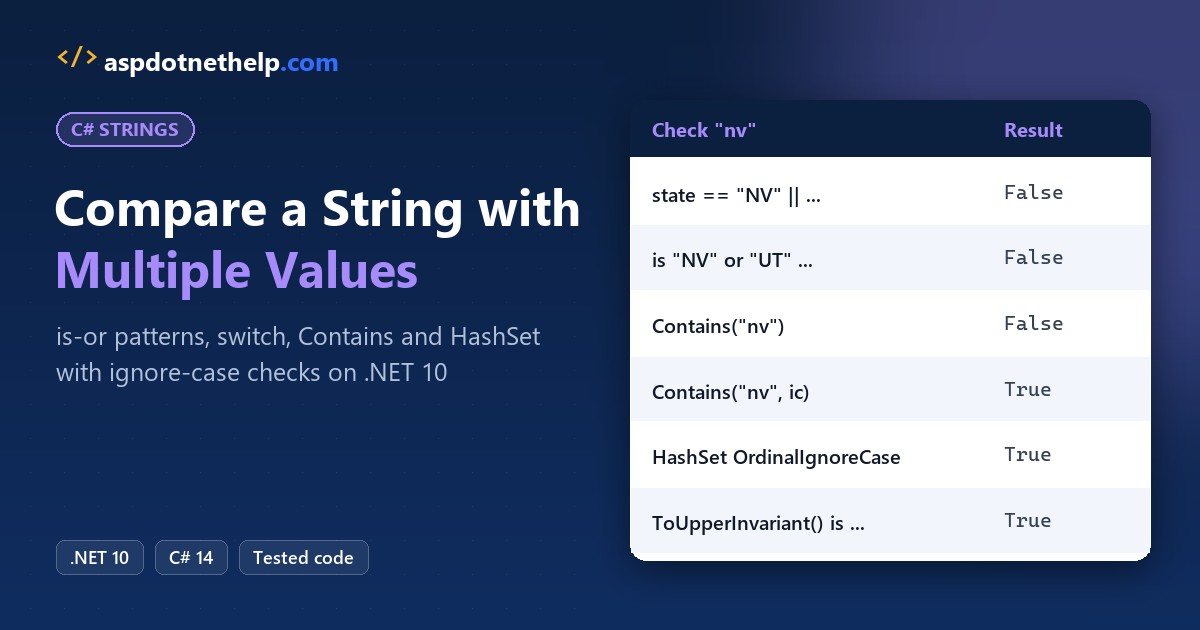
Many C# guides still chain == checks with || to test one input against a list. It works, but every new value adds a clause, and ignoring case makes the line twice as long.
The cleaner way to compare string with multiple values in C# is the is "AZ" or "CA" pattern for a short fixed list, and a HashSet<string> with StringComparer.OrdinalIgnoreCase when the list is long or loaded at runtime.
I ran six approaches on .NET 10 against real checkout input, lowercase and null included.
The Sample Strings and Values We’ll Use
Picture an outdoor gear store in Phoenix, AZ that ships to five Western states only. Checkout has to decide whether the state code a customer typed is on that list:
| Input | What’s tricky |
|---|---|
"NV" | On the list, exact case |
"nv" | On the list, but lowercase |
"TX" | Not on the list |
null | Customer skipped the field |
The allowed values are AZ, CA, NV, NM and UT. The switch method uses order statuses instead.
Method 1: Compare a String with Multiple Values Using == and ||
This is the old way, fine for two or three values. Same three strings here, checked against all five states:
string[] inputs = ["NV", "nv", "TX"];

foreach (string state in inputs)
{
    bool ships = state == "AZ" || state == "CA" || state == "NV"
              || state == "NM" || state == "UT";
    Console.WriteLine($"{state}: {ships}");
}
Output:
NV: True
nv: False
TX: False
NV passes; nv and TX fail, because the comparison is exact.
How does this code work?
Each == on two strings is an ordinal, case-sensitive comparison of their characters, the same check I break down when I compare two strings character by character in C#. || stops at the first true.
So here’s the catch: state appears five times, and an ignore-case version needs five string.Equals calls.
Method 2: Use the is “A” or “B” Pattern (C# 9+) (Recommended)
For a short list known at compile time, this is my pick. C# 9 added or, and and not pattern combinators, so one is expression checks every constant:
string?[] inputs = ["NV", "nv", "TX", null];
Console.WriteLine("code ships blocked");

foreach (string? state in inputs)
{
    bool ships = state is "AZ" or "CA" or "NV"
                       or "NM" or "UT";
    bool blocked = state is not ("AZ" or "CA"
                       or "NV" or "NM" or "UT");
    string label = state ?? "null";
    Console.WriteLine($"{label,-4} {ships,-5} {blocked}");
}

string typed = "nv";
bool fixedCase = typed.ToUpperInvariant()
    is "AZ" or "CA" or "NV" or "NM" or "UT";
Console.WriteLine($"nv upper-cased: {fixedCase}");
Output:
code ships blocked
NV   True  False
nv   False True
TX   False True
null False True
nv upper-cased: True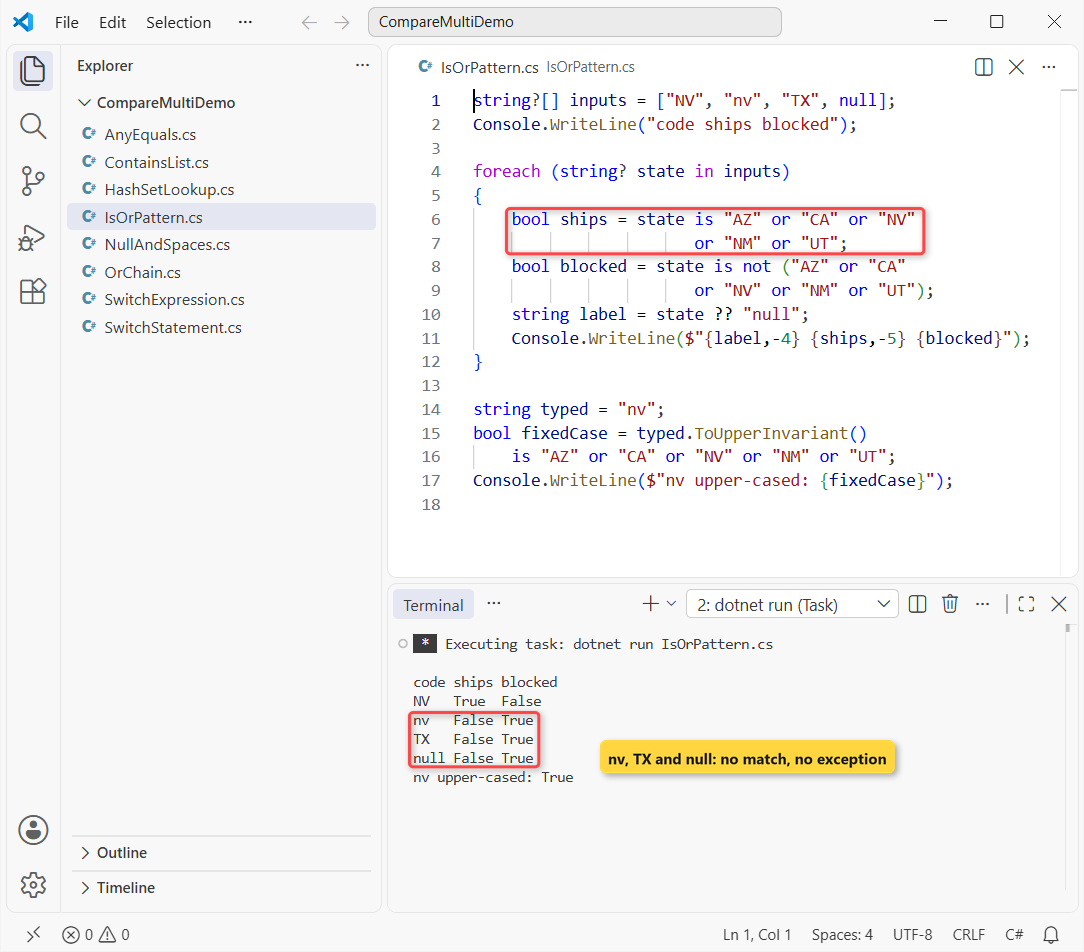
NV ships; nv, TX and null don’t, and the blocked column flags those three. Upper-cased first, nv matches.
How does this code work?
Each string literal is a constant pattern, which Microsoft describes as an alternative syntax for == with a constant. or matches when any of them match, and the variable is written only once.
not (...) needs the parentheses, since not binds tighter than or. A null input matches none of the constants, so you get false instead of an exception.
Important: patterns compare exactly, so normalize case first with ToUpperInvariant(). The values must be constants, not variables.
Method 3: Match Multiple Values with a switch Expression or switch Statement
When each group of values needs its own result, use a switch. Here, several order statuses share one message:
string?[] statuses =
    ["Shipped", "Returned", "Pending", "Lost", null];

foreach (string? status in statuses)
{
    string label = status ?? "null";
    Console.WriteLine($"{label,-8} -> {Describe(status)}");
}

static string Describe(string? status) => status switch
{
    "Pending" or "Processing" => "Not shipped yet",
    "Shipped" or "Out for Delivery" => "On the way",
    "Delivered" => "Done",
    "Canceled" or "Returned" => "Refund due",
    null => "Missing status",
    _ => "Unknown status"
};
Output:
Shipped  -> On the way
Returned -> Refund due
Pending  -> Not shipped yet
Lost     -> Unknown status
null     -> Missing status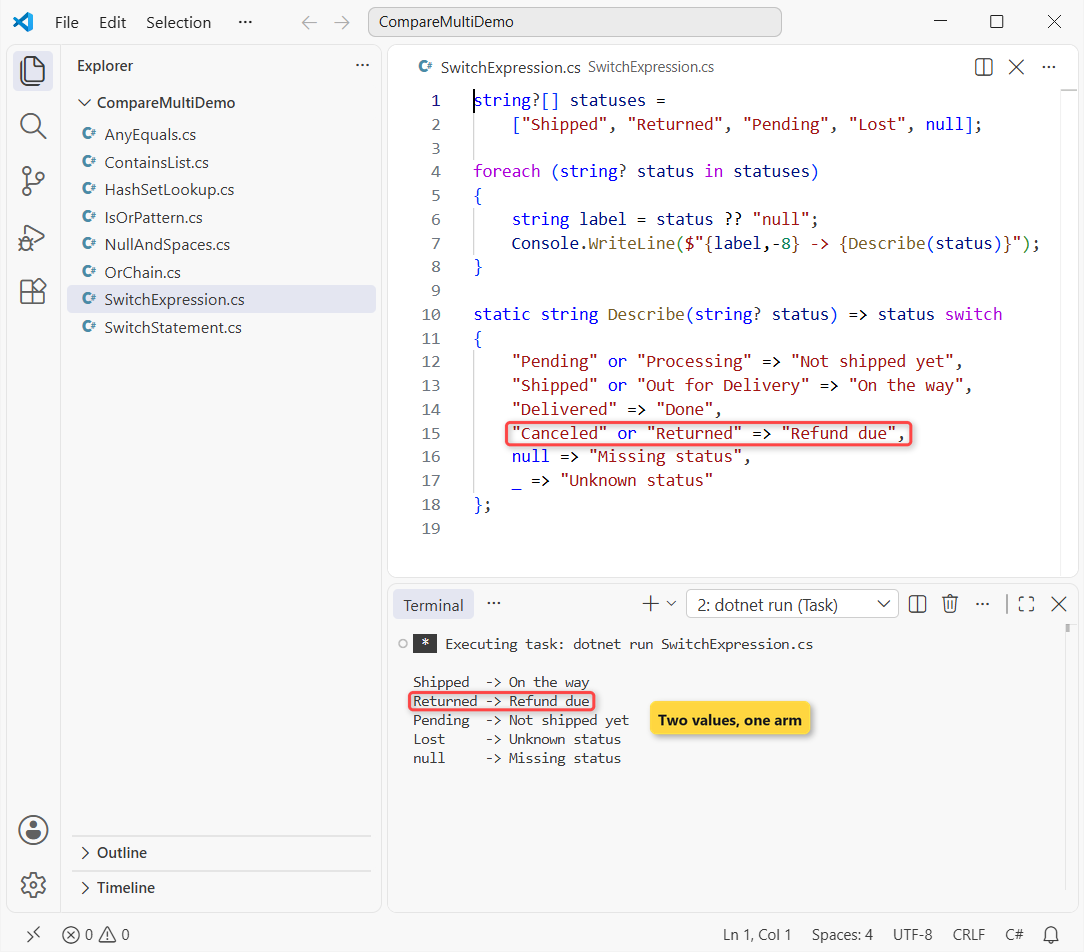
Returned maps to Refund due, Lost falls to Unknown status, and null hits its own arm.
How does this code work?
Each arm is a pattern, so "Canceled" or "Returned" covers two values. Arms are checked top to bottom, and the discard _ catches anything unlisted so the expression never throws.
Older code uses a switch statement with stacked case labels. More on both in my switch case in C# guide:
string status = "Out for Delivery";

switch (status)
{
    case "Shipped":
    case "Out for Delivery":
        Console.WriteLine("On the way");
        break;
    case "Canceled":
    case "Returned":
        Console.WriteLine("Refund due");
        break;
    default:
        Console.WriteLine("Check the order");
        break;
}
Output:
On the wayIt prints “On the way”. If you own these statuses, an enum in C# is safer than raw strings because typos won’t compile.
Method 4: Check if a String Is in a List of Values with Contains
When the allowed values live in an array or List<string>, ask the collection. Same values, now stored in an array:
string[] west = ["AZ", "CA", "NV", "NM", "UT"];
List<string> hold = ["Pending", "On Hold"];
var ic = StringComparer.OrdinalIgnoreCase;

Console.WriteLine($"NV: {west.Contains("NV")}");
Console.WriteLine($"nv: {west.Contains("nv")}");
Console.WriteLine($"nv, ic: {west.Contains("nv", ic)}");
Console.WriteLine($"list: {hold.Contains("on hold", ic)}");
Console.WriteLine($"NM at {Array.IndexOf(west, "NM")}");
Output:
NV: True
nv: False
nv, ic: True
list: True
NM at 3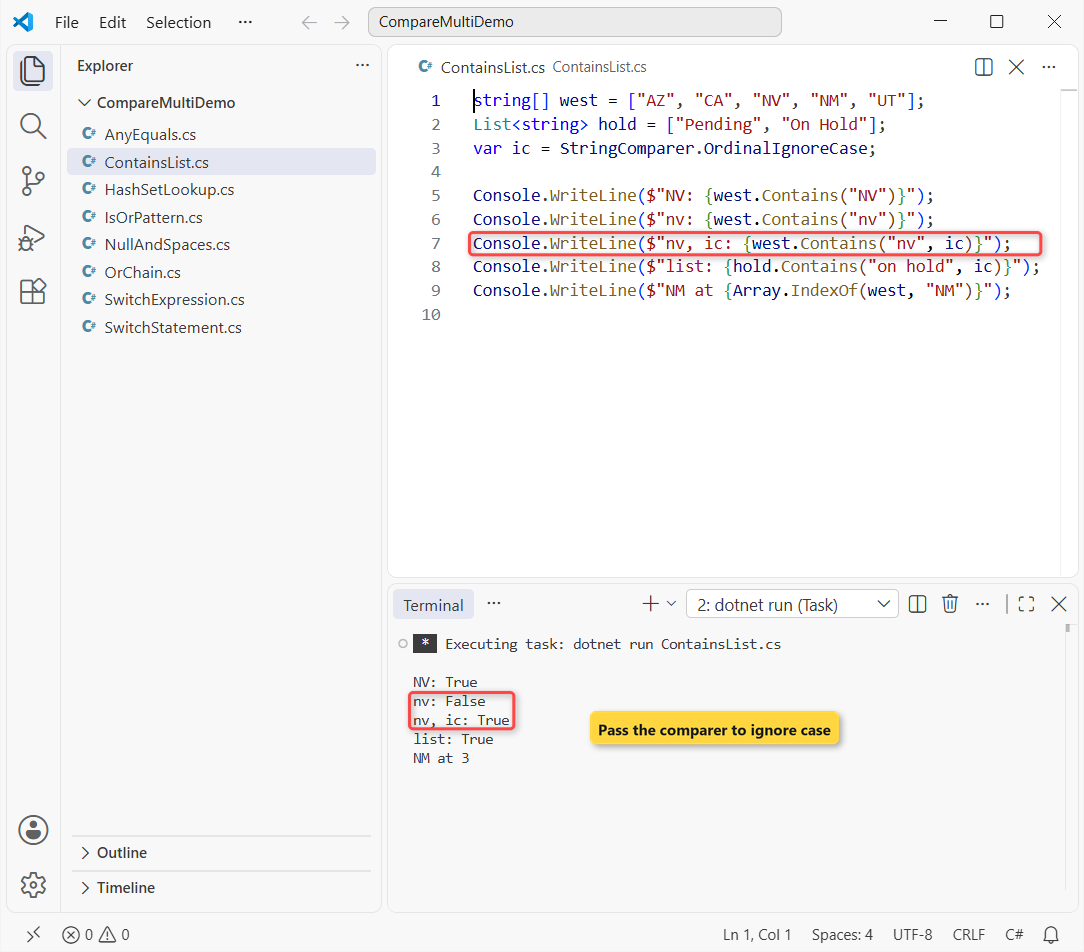
Contains(“nv”) is False until you pass the comparer, and IndexOf finds NM at index 3.
How does this code work?
Plain Contains uses the default string equality, which is ordinal and case-sensitive. The two-argument overload takes an IEqualityComparer<string>, and StringComparer.OrdinalIgnoreCase is one.
Contains scans item by item. More array cases are in how to check if a string array contains a value, and the List in C# post covers the list side.
Method 5: Use a HashSet or FrozenSet for Many Values
Once the list grows to dozens of values, or you check it in a loop, use a set. Here’s the code with the same values:
using System.Collections.Frozen;

var ic = StringComparer.OrdinalIgnoreCase;
var shipTo = new HashSet<string>(ic)
    { "AZ", "CA", "NV", "NM", "UT" };

Console.WriteLine($"nv: {shipTo.Contains("nv")}");
Console.WriteLine($"TX: {shipTo.Contains("TX")}");
Console.WriteLine($"add CO: {shipTo.Add("CO")}");
Console.WriteLine($"add co: {shipTo.Add("co")}");

FrozenSet<string> frozen = shipTo.ToFrozenSet(ic);
Console.WriteLine($"frozen co: {frozen.Contains("co")}");
Console.WriteLine($"count: {frozen.Count}");
Output:
nv: True
TX: False
add CO: True
add co: False
frozen co: True
count: 6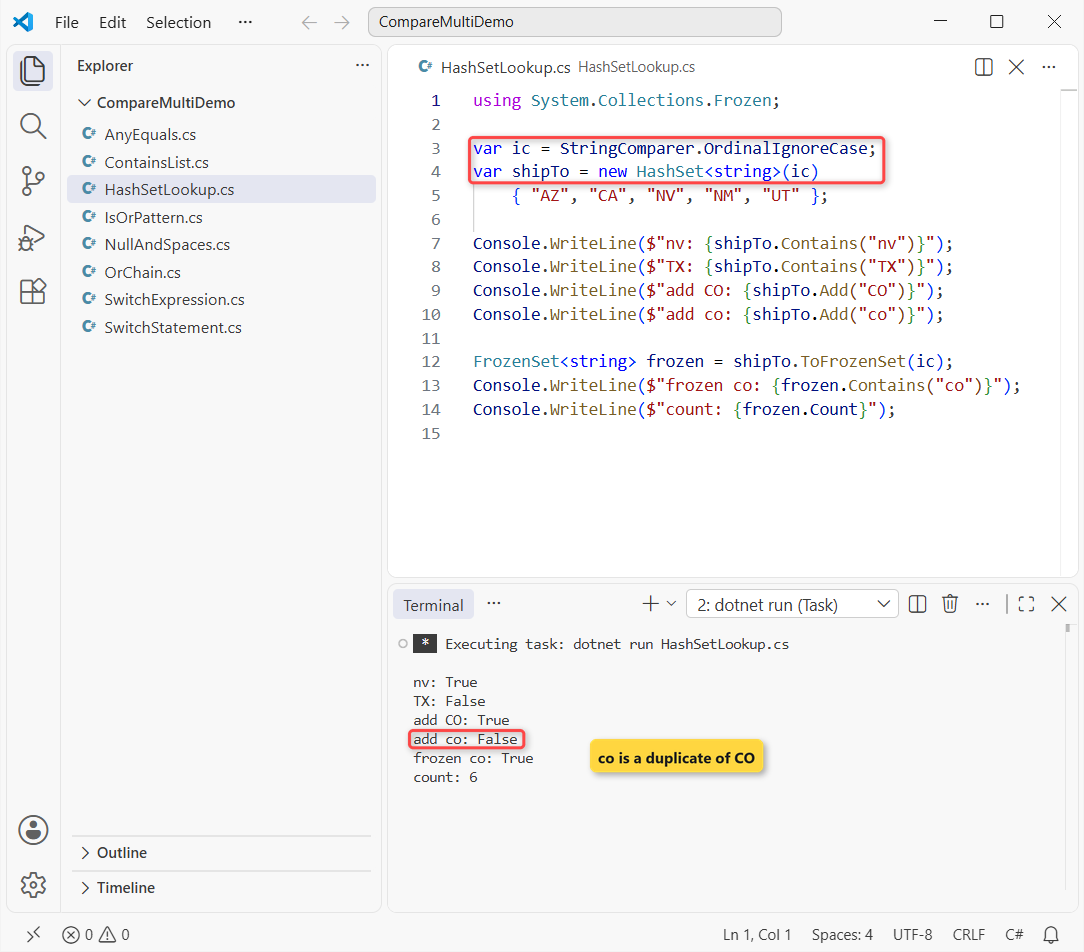
nv is found, TX isn’t, co is rejected as a duplicate of CO, and the FrozenSet finds co among 6 items.
How does this code work?
A HashSet<string> hashes each value once, so Contains jumps straight to the right bucket instead of scanning. The comparer passed to the constructor decides both hashing and equality.
ToFrozenSet (.NET 8+) builds a read-only set tuned for lookups, which suits lists loaded once at startup. Need a value per code, like a tax rate? Use a Dictionary in C# with the same comparer.
Method 6: Ignore Case with Any() and string.Equals
LINQ’s Any lets you pick the exact comparison per call. Same array, with a customer who typed ut:
string[] westStates = ["AZ", "CA", "NV", "NM", "UT"];
string typed = "ut";

bool ships = westStates.Any(s =>
    string.Equals(s, typed, StringComparison.OrdinalIgnoreCase));
Console.WriteLine($"Any + string.Equals: {ships}");
Console.WriteLine($"IsAnyOf: {typed.IsAnyOf("AZ", "CA", "NV", "NM", "UT")}");
Console.WriteLine($"null IsAnyOf: {((string?)null).IsAnyOf("AZ", "CA")}");

static class StringMatch
{
    extension(string? value)
    {
        public bool IsAnyOf(params ReadOnlySpan<string> options)
        {
            foreach (string option in options)
                if (string.Equals(value, option, StringComparison.OrdinalIgnoreCase))
                    return true;
            return false;
        }
    }
}
Output:
Any + string.Equals: True
IsAnyOf: True
null IsAnyOf: False
It prints True, True, and False for null.
How does this code work?
Any stops at the first item where the lambda returns true. The static string.Equals(a, b, comparison) accepts nulls, unlike typed.Equals(...), which throws if typed is null.
Pro Tip: wrap it in a helper. The extension block is new in C# 14, covered in what is new in C# 14, and params ReadOnlySpan<string> lets you write typed.IsAnyOf("AZ", "CA") like SQL’s IN.
What Happens When the String Is Null or Has Spaces?
Forms send nulls and stray spaces all the time. Same values, now with a null state and ” ut “:
string? missing = null;
string padded = " ut ";
string[] states = ["AZ", "CA", "NV", "NM", "UT"];
var ic = StringComparer.OrdinalIgnoreCase;
var set = new HashSet<string?>(states, ic);

Console.WriteLine(missing == "AZ" || missing == "CA");
Console.WriteLine(missing is "AZ" or "CA" or "NV");
Console.WriteLine(states.Contains(missing));
Console.WriteLine(set.Contains(missing));
Console.WriteLine(set.Contains(padded));
Console.WriteLine(set.Contains(padded.Trim()));
Output:
False
False
False
False
False
True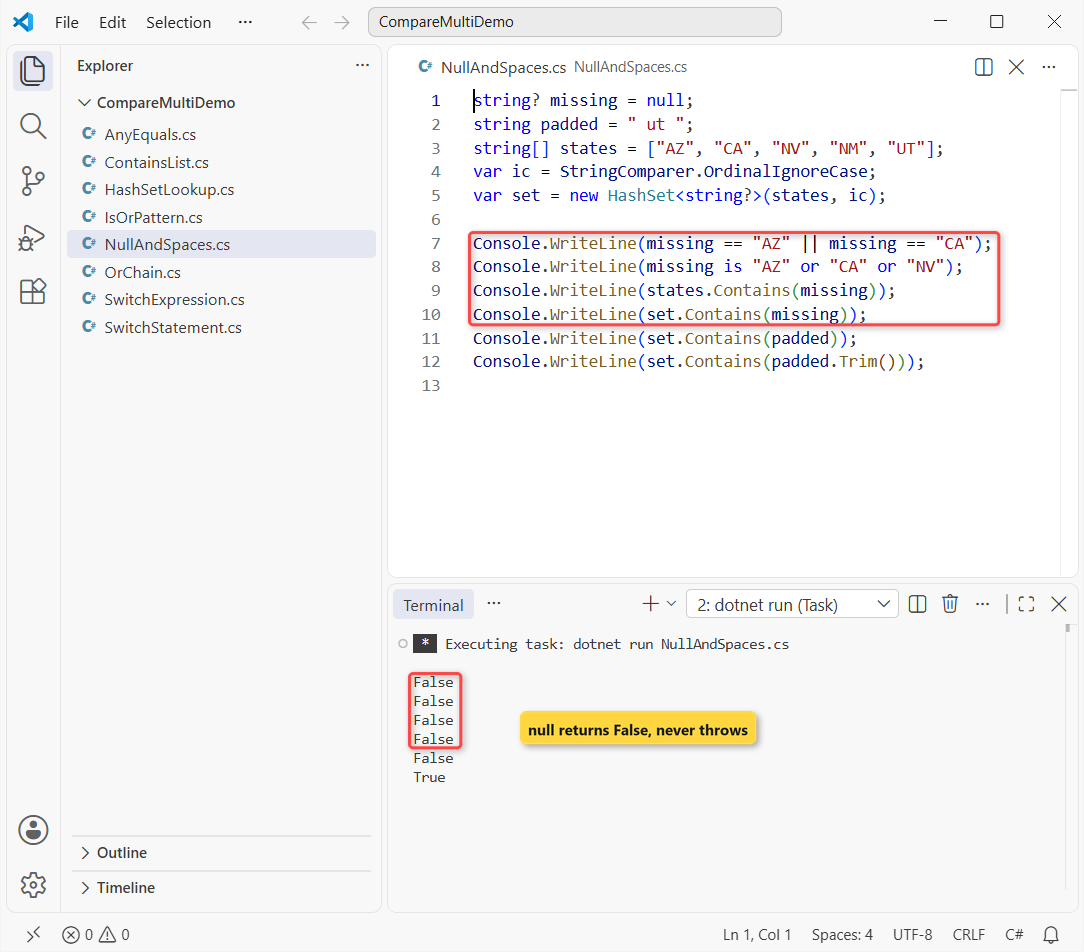
The first four lines are False for null, and ” ut ” matches only after Trim().
The comparisons are null-safe, but missing.Trim() or ToUpper() on null throws NullReferenceException. Normalize only after you check that the string is not null or empty.
Which Method Should You Use to Compare a String with Multiple Values?
| Situation | Use | Why |
|---|---|---|
| 2-3 values | == with || | Nothing to set up |
| Short fixed list | is "A" or "B" | One expression, null-safe |
| Different result per group | switch expression | Values and results side by side |
| Values in an array or list | Contains(value, comparer) | No new collection |
| Many values or hot loops | HashSet / FrozenSet | Hash lookup, no scan |
| Custom rule per call | Any + string.Equals | Pick the comparison inline |
My default is the is-or pattern, then a HashSet once the list passes about ten values. If you need to find a value inside text rather than an exact match, see how to check if a string contains a character.
Things to Keep in Mind
- ==, patterns and Contains are case-sensitive by default; pass StringComparer.OrdinalIgnoreCase or normalize first.
- Trim user input before comparing, or ” ut ” won’t match UT.
- Call string.Equals(a, b, …) instead of a.Equals(b) when a can be null.
- Build a HashSet once and reuse it; creating it inside the loop throws away the speed.
Still working through string and collection checks? These pair well with this one:
- Arrays in C#, with examples
- The foreach loop in C#
- How to check for null values in C#
- String vs StringBuilder in C#
Frequently Asked Questions
How do I check if a string equals any of multiple values in C#?
Use a pattern: state is "AZ" or "CA" or "NV" (C# 9 or later). For values stored in a collection, call values.Contains(state), or a HashSet<string> for many values.
Is there an IN operator in C# like SQL?
No. The closest built-in options are the or pattern and Contains on an array, or a small IsAnyOf extension like the one above.
How do I compare a string with multiple values and ignore case?
Pass StringComparer.OrdinalIgnoreCase to Contains or to the HashSet constructor, or use string.Equals(a, b, StringComparison.OrdinalIgnoreCase) inside Any. With patterns, call ToUpperInvariant() first.
Can a switch case have multiple string values in C#?
Yes. In a switch expression, write "Canceled" or "Returned" => .... In a switch statement, stack the labels: case "Canceled": case "Returned": above one body.
What does the or pattern return when the string is null?
False. A null value matches none of the string constants and nothing throws. The pattern matching reference on Microsoft Learn covers or, and and not.

Bijay Kumar is a renowned software engineer, accomplished author, and distinguished Microsoft Most Valuable Professional (MVP) specializing in SharePoint. With a rich professional background spanning over 15 years, Bijay has established himself as an authority in the field of information technology. He possesses unparalleled expertise in multiple programming languages and technologies such as ASP.NET, ASP.NET MVC, C#.NET, and SharePoint, which has enabled him to develop innovative and cutting-edge solutions for clients across the globe. Read more…