
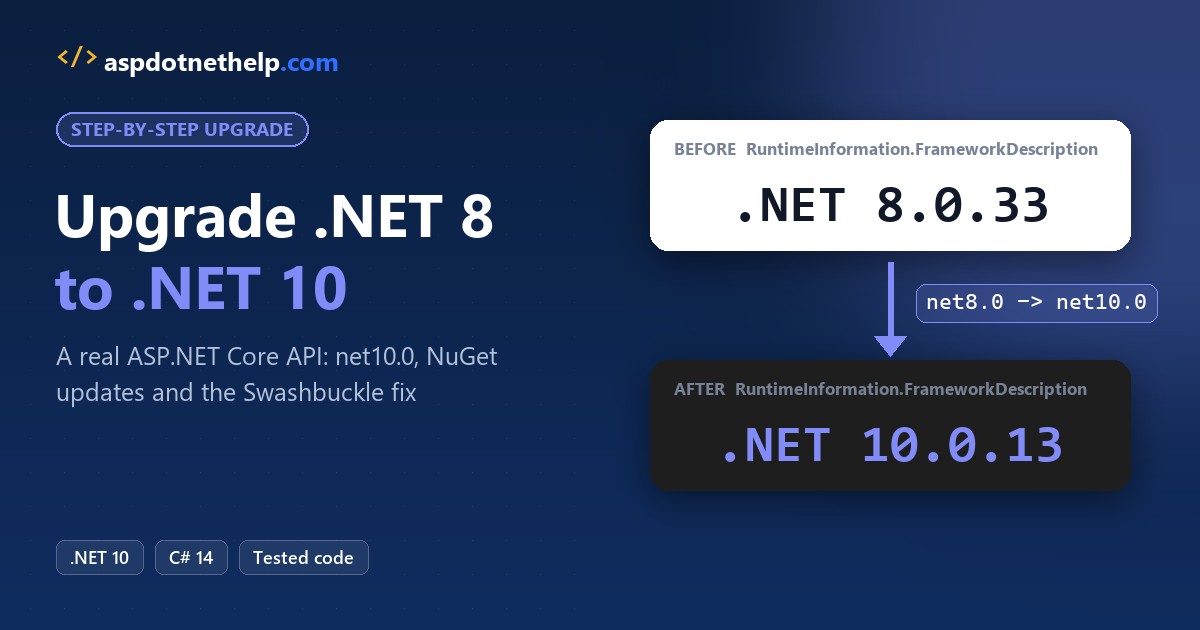
Upgrading a .NET 8 app to .NET 10 took me one afternoon, and most of it was package work. With .NET 8 support ending November 10, 2026, now’s the time to move.
The short answer: to upgrade .NET 8 to .NET 10, install the .NET 10 SDK, point global.json at it, change net8.0 to net10.0, update your Microsoft packages to 10.0.x, then fix the warnings and breaking changes the build shows you.
In this tutorial, I’ll upgrade .NET 8 to .NET 10 on a real ASP.NET Core Minimal API, step by step. You’ll see the app running on .NET 8, the crash I hit halfway through, the fix, and the same app running on .NET 10.
What You Need Before You Upgrade .NET 8 to .NET 10
My demo is a small “US store orders” Minimal API. It uses EF Core with the InMemory provider, Swashbuckle for Swagger, and Microsoft.AspNetCore.OpenApi, all pinned at 8.x like a typical project created from the .NET 8 template.
I work in VS Code on Windows 11. You need the .NET 10 SDK installed next to the .NET 8 one, and it doesn’t remove anything. If you’re not sure what’s on your machine, here’s how to check which .NET version is installed:
dotnet --list-sdks
dotnet --version
Output:
7.0.403 [C:\Program Files\dotnet\sdk]
8.0.427 [C:\Program Files\dotnet\sdk]
10.0.402 [C:\Program Files\dotnet\sdk]
8.0.427
The --list-sdks command ignores global.json, but dotnet --version doesn’t. That’s why it prints 8.0.427: my folder still pins the .NET 8 SDK.
| Item | Before | After |
|---|---|---|
SDK in global.json | 8.0.427 | 10.0.100 (rolls forward to 10.0.402) |
TargetFramework | net8.0 | net10.0 |
| Microsoft.AspNetCore.OpenApi | 8.0.11 | 10.0.14 |
| Microsoft.EntityFrameworkCore.InMemory | 8.0.11 | 10.0.14 |
| Swashbuckle.AspNetCore | 6.6.2 | Removed (built-in MapOpenApi) |
| Runtime | .NET 8.0.33 | .NET 10.0.13 |
Step 1: Run the ASP.NET Core App on .NET 8 First
Never start an upgrade from a broken build. I want proof of what works today, so I can compare after the change. Here’s the folder layout:
UpgradeDemo
├── global.json
└── UsStoreOrders
    ├── UsStoreOrders.csproj
    ├── Program.cs
    ├── appsettings.json
    └── UsStoreOrders.http
This is the .NET 8 global.json. The rollForward policy lets the CLI use a newer 8.0 feature band if one is installed:
{
  "sdk": {
    "version": "8.0.427",
    "rollForward": "latestFeature"
  }
}
And the project file, with the same package versions you’d find in a lot of 2024 projects:
<Project Sdk="Microsoft.NET.Sdk.Web">

  <PropertyGroup>
    <TargetFramework>net8.0</TargetFramework>
    <Nullable>enable</Nullable>
    <ImplicitUsings>enable</ImplicitUsings>
  </PropertyGroup>

  <ItemGroup>
    <PackageReference Include="Microsoft.AspNetCore.OpenApi" Version="8.0.11" />
    <PackageReference Include="Microsoft.EntityFrameworkCore.InMemory" Version="8.0.11" />
    <PackageReference Include="Swashbuckle.AspNetCore" Version="6.6.2" />
  </ItemGroup>

</Project>
Program.cs follows the .NET 8 Web API template: Swashbuckle for Swagger, WithOpenApi() on each endpoint, and an /about endpoint that reports the runtime with RuntimeInformation.FrameworkDescription:
using System.Runtime.InteropServices;
using Microsoft.EntityFrameworkCore;

var builder = WebApplication.CreateBuilder(args);
builder.Services.AddEndpointsApiExplorer();
builder.Services.AddSwaggerGen();
builder.Services.AddDbContext<StoreDb>(o => o.UseInMemoryDatabase("orders"));
var app = builder.Build();

if (app.Environment.IsDevelopment())
{
    app.UseSwagger();
    app.UseSwaggerUI();
}

using (var scope = app.Services.CreateScope())
{
    var db = scope.ServiceProvider.GetRequiredService<StoreDb>();
    db.Orders.AddRange(
        new Order(1001, "Megan Bowen", "Austin", "TX", 249.99m),
        new Order(1002, "Alex Wilber", "Denver", "CO", 89.50m),
        new Order(1003, "Adele Vance", "Seattle", "WA", 1325.00m));
    db.SaveChanges();
}

app.MapGet("/about", () => new
{
    Runtime = RuntimeInformation.FrameworkDescription,
    Target = AppContext.TargetFrameworkName
}).WithName("About").WithOpenApi();

app.MapGet("/orders", (StoreDb db) => db.Orders.OrderBy(o => o.Id).ToListAsync())
   .WithName("ListOrders").WithOpenApi();

app.MapGet("/orders/{id:int}", async (int id, StoreDb db) =>
    await db.Orders.FindAsync(id) is Order o ? Results.Ok(o) : Results.NotFound())
   .WithName("GetOrder").WithOpenApi();

app.Run();

public record Order(int Id, string Customer, string City, string State, decimal Total);

public class StoreDb(DbContextOptions<StoreDb> options) : DbContext(options)
{
    public DbSet<Order> Orders => Set<Order>();
}
The appsettings.json file sets the URL and quiets the logs. Records like Order are a compact way to model data; if they’re new, compare them with a structure in C#.
{
  "Logging": {
    "LogLevel": {
      "Default": "Warning",
      "Microsoft.Hosting.Lifetime": "Information"
    }
  },
  "AllowedHosts": "*",
  "Urls": "http://localhost:5280"
}
I keep a UsStoreOrders.http file for quick manual calls from the editor:
@host = http://localhost:5280

GET {{host}}/about
Accept: application/json

###

GET {{host}}/orders/1001
Accept: application/json
I started the API with dotnet run --project UsStoreOrders -- --environment Development in one terminal and called it from another:
dotnet --version
curl -s -w "\n" http://localhost:5280/about
curl -s -w "\n" http://localhost:5280/orders/1001
curl -s -o NUL -w "swagger.json: %{http_code}\n" http://localhost:5280/swagger/v1/swagger.json
Output:
8.0.427
{"runtime":".NET 8.0.33","target":".NETCoreApp,Version=v8.0"}
{"id":1001,"customer":"Megan Bowen","city":"Austin","state":"TX","total":249.99}
swagger.json: 200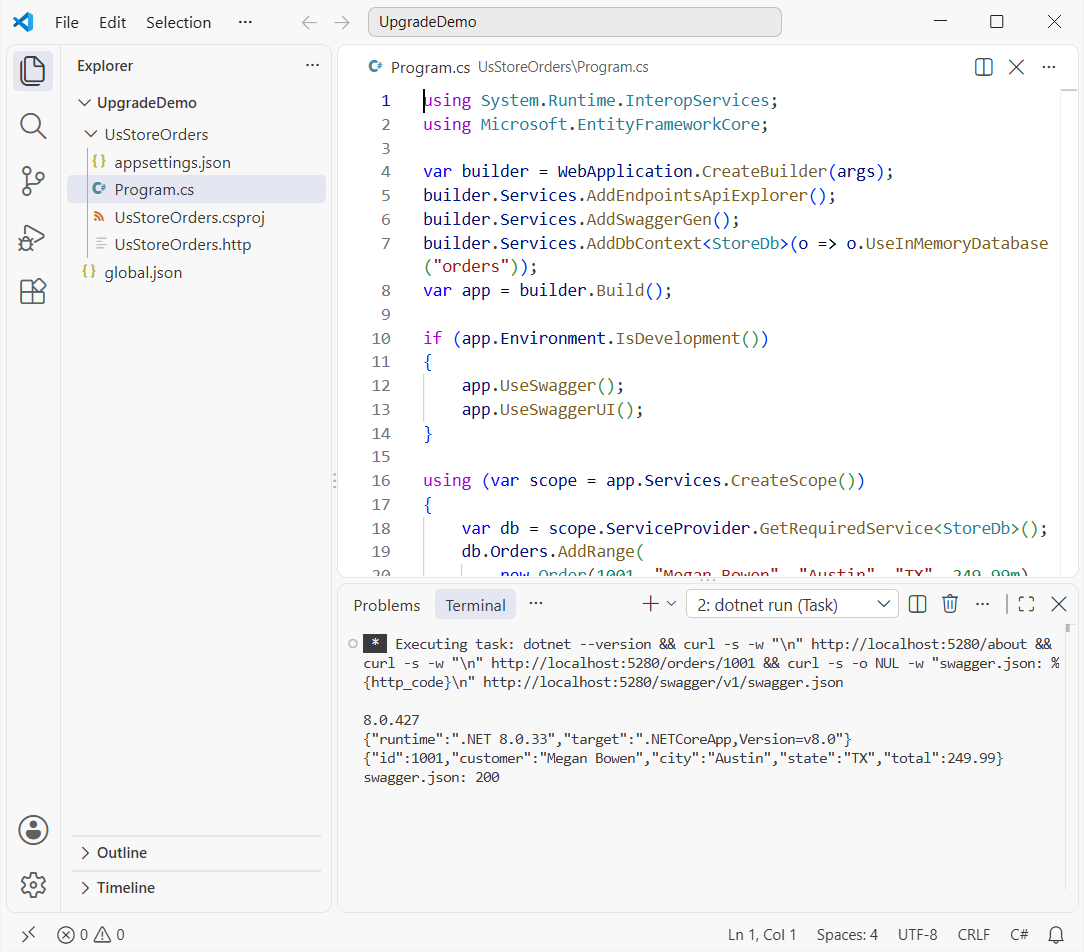
Everything works: the SDK is 8.0.427, the runtime is .NET 8.0.33, and Swagger answers. You can browse more Minimal API projects like this one in my ASP.NET Core tutorials.
Step 2: Install the .NET 10 SDK and Update global.json
Download the .NET 10 SDK from dotnet.microsoft.com, or use winget install Microsoft.DotNet.SDK.10. Then change the version in global.json. Microsoft’s migration guide shows this exact edit:
{
  "sdk": {
    "version": "10.0.100",
    "rollForward": "latestFeature"
  }
}
I used 10.0.100 with latestFeature, so any newer 10.0 SDK satisfies it. Check that the CLI picked it up:
dotnet --versionOutput:
10.0.402If you skip this step, the build fails because a .NET 8 SDK can’t target net10.0. Not sure if you even need to move? My post on .NET 8 and .NET 9 end of support explains what happens after November 10.
Step 3: Change TargetFramework From net8.0 to net10.0
Next, edit the project file. This one-line change is what most people mean by upgrading to .NET 10:
<TargetFramework>net10.0</TargetFramework>I changed only the target framework and left every package at 8.x, then built:
dotnet build UsStoreOrdersOutput:
  Determining projects to restore...
  Restored C:\DotNetDemo\UpgradeDemo\UsStoreOrders\UsStoreOrders.csproj (in 348 ms).
  UsStoreOrders -> C:\DotNetDemo\UpgradeDemo\UsStoreOrders\bin\Debug\net10.0\UsStoreOrders.dll

Build succeeded.
    0 Warning(s)
    0 Error(s)

Time Elapsed 00:00:02.21
No warnings, no errors. The 8.x packages still compile against .NET 10, which surprises people. But a clean build doesn’t mean the upgrade’s done, because you’re still shipping .NET 8 libraries that won’t get .NET 10 fixes.
With several projects, change all of them together, or move the property into a shared Directory.Build.props. Tracking each project’s settings is easier when you know your namespaces and project structure well.
Step 4: Update NuGet Packages to the .NET 10 Versions
Microsoft’s guidance is to update every Microsoft.AspNetCore.*, Microsoft.EntityFrameworkCore.*, Microsoft.Extensions.* and System.Net.Http.Json reference to 10.0.0 or later. To see what’s behind, run:
dotnet list UsStoreOrders package --outdatedOutput:
  Determining projects to restore...
  All projects are up-to-date for restore.

The following sources were used:
   https://api.nuget.org/v3/index.json
   C:\Program Files (x86)\Microsoft SDKs\NuGetPackages\

Project `UsStoreOrders` has the following updates to its packages
   [net10.0]:
   Top-level Package                             Requested   Resolved   Latest
   > Microsoft.AspNetCore.OpenApi                8.0.11      8.0.11     10.0.14
   > Microsoft.EntityFrameworkCore.InMemory      8.0.11      8.0.11     10.0.14
   > Swashbuckle.AspNetCore                      6.6.2       6.6.2      10.3.1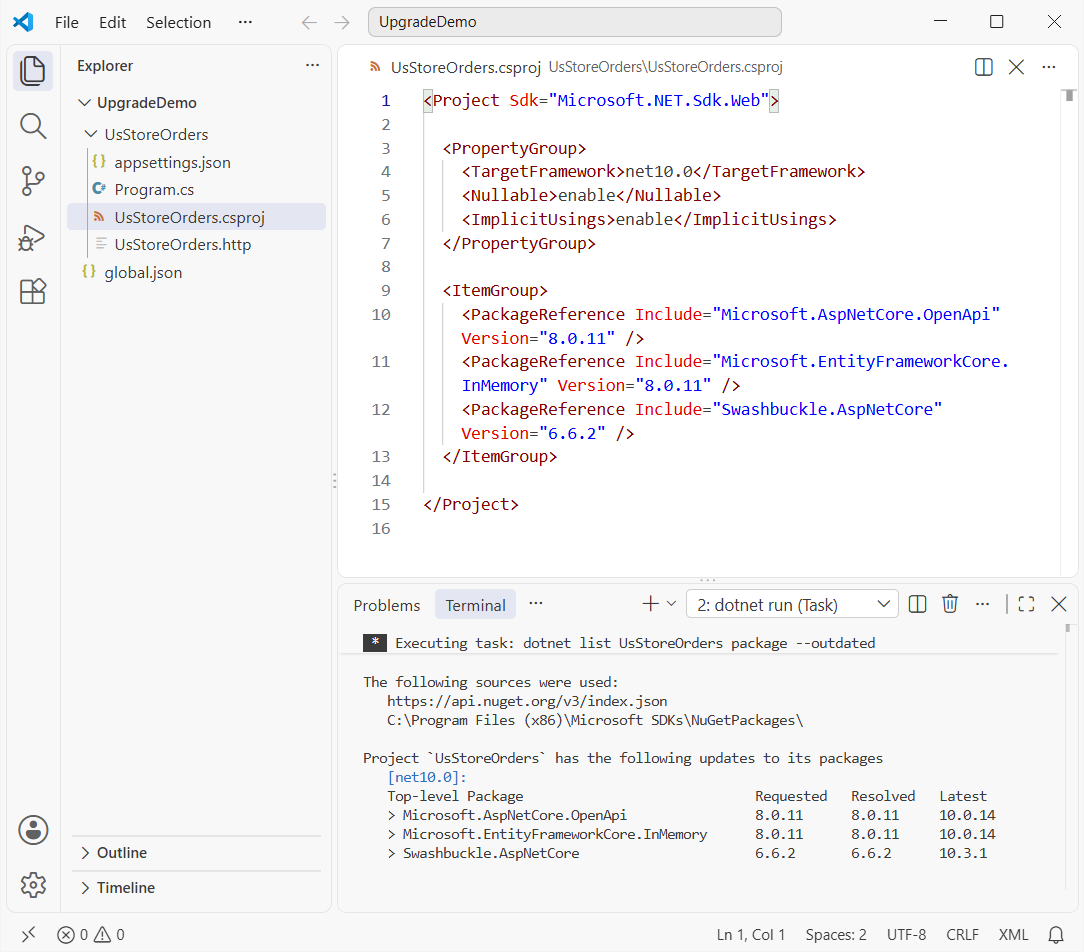
I updated the two Microsoft packages with dotnet add package, which rewrites the version in the project file:
dotnet add UsStoreOrders package Microsoft.AspNetCore.OpenApi --version 10.0.14
dotnet add UsStoreOrders package Microsoft.EntityFrameworkCore.InMemory --version 10.0.14
I left Swashbuckle at 6.6.2 on purpose. Many teams update only the Microsoft packages first, and I wanted to see what happens. Here’s the project file at that point:
<Project Sdk="Microsoft.NET.Sdk.Web">

  <PropertyGroup>
    <TargetFramework>net10.0</TargetFramework>
    <Nullable>enable</Nullable>
    <ImplicitUsings>enable</ImplicitUsings>
  </PropertyGroup>

  <ItemGroup>
    <PackageReference Include="Microsoft.AspNetCore.OpenApi" Version="10.0.14" />
    <PackageReference Include="Microsoft.EntityFrameworkCore.InMemory" Version="10.0.14" />
    <PackageReference Include="Swashbuckle.AspNetCore" Version="6.6.2" />
  </ItemGroup>

</Project>
Step 5: Fix the .NET 10 Breaking Changes You Hit
This is where my upgrade got interesting. The build passed, but with warnings, and the app crashed before it served a single request:
dotnet run --project UsStoreOrders -- --environment DevelopmentOutput:
C:\DotNetDemo\UpgradeDemo\UsStoreOrders\Program.cs(26,1): warning ASPDEPR002: 'OpenApiEndpointConventionBuilderExtensions.WithOpenApi<TBuilder>(TBuilder)' is obsolete: 'WithOpenApi is deprecated and will be removed in a future release. For more information, visit https://aka.ms/aspnet/deprecate/002.' (https://aka.ms/aspnet/deprecate/002) [C:\DotNetDemo\UpgradeDemo\UsStoreOrders\UsStoreOrders.csproj]
C:\DotNetDemo\UpgradeDemo\UsStoreOrders\Program.cs(32,1): warning ASPDEPR002: 'OpenApiEndpointConventionBuilderExtensions.WithOpenApi<TBuilder>(TBuilder)' is obsolete: 'WithOpenApi is deprecated and will be removed in a future release. For more information, visit https://aka.ms/aspnet/deprecate/002.' (https://aka.ms/aspnet/deprecate/002) [C:\DotNetDemo\UpgradeDemo\UsStoreOrders\UsStoreOrders.csproj]
C:\DotNetDemo\UpgradeDemo\UsStoreOrders\Program.cs(35,1): warning ASPDEPR002: 'OpenApiEndpointConventionBuilderExtensions.WithOpenApi<TBuilder>(TBuilder)' is obsolete: 'WithOpenApi is deprecated and will be removed in a future release. For more information, visit https://aka.ms/aspnet/deprecate/002.' (https://aka.ms/aspnet/deprecate/002) [C:\DotNetDemo\UpgradeDemo\UsStoreOrders\UsStoreOrders.csproj]
Unhandled exception. System.TypeLoadException: Method 'GetSwagger' in type 'Swashbuckle.AspNetCore.SwaggerGen.SwaggerGenerator' from assembly 'Swashbuckle.AspNetCore.SwaggerGen, Version=6.6.2.0, Culture=neutral, PublicKeyToken=d84d99fb0135530a' does not have an implementation.
   at Microsoft.Extensions.DependencyInjection.SwaggerGenServiceCollectionExtensions.AddSwaggerGen(IServiceCollection services, Action`1 setupAction)
   at Microsoft.Extensions.DependencyInjection.SwaggerGenServiceCollectionExtensions.AddSwaggerGen(IServiceCollection services, Action`1 setupAction)
   at Program.<Main>$(String[] args) in C:\DotNetDemo\UpgradeDemo\UsStoreOrders\Program.cs:line 6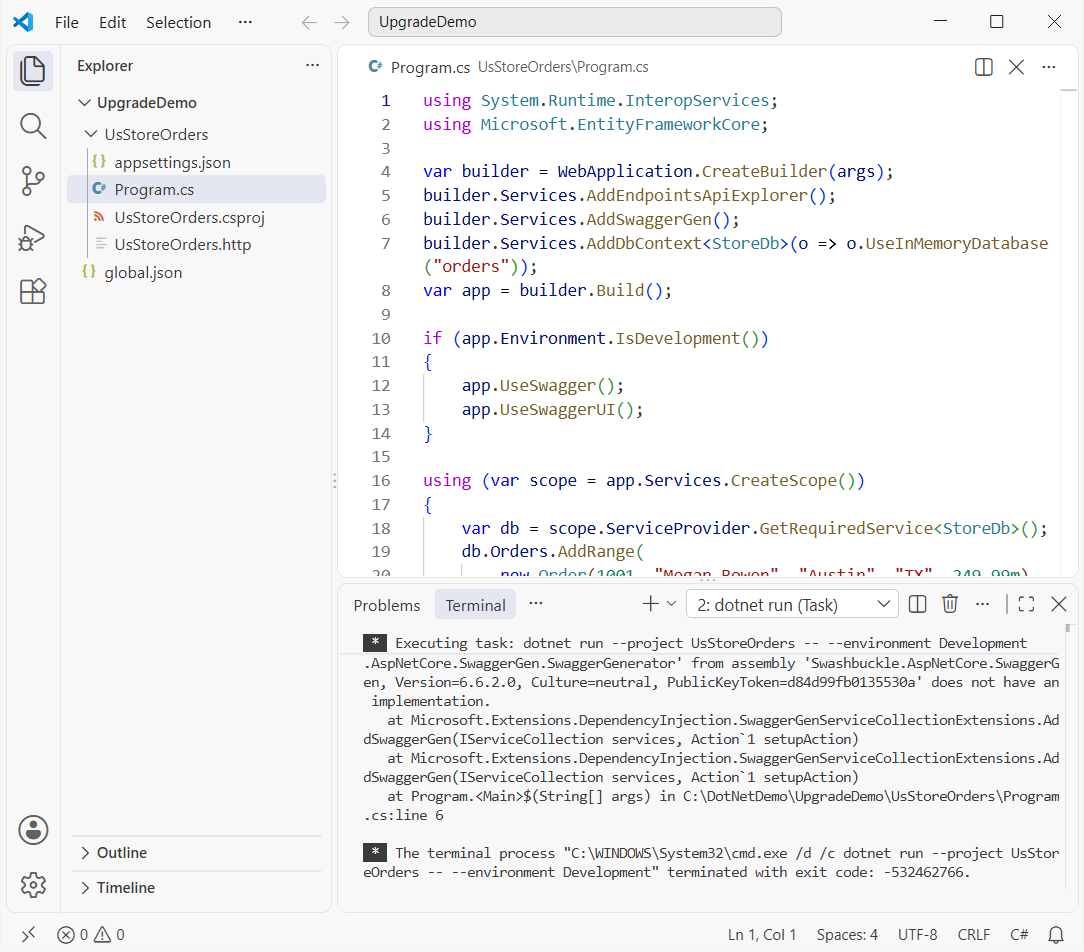
Exceptions at startup like this one can’t be handled with a try-catch block in C#, because the type itself fails to load. You fix them by fixing the package graph.
Fix 1: Replace Swashbuckle 6.x With AddOpenApi and MapOpenApi
Microsoft.AspNetCore.OpenApi 10.0 brings in a newer Microsoft.OpenApi library than Swashbuckle 6.6.2 was built for. The TypeLoadException on GetSwagger is that mismatch. You have two ways out:
- Upgrade Swashbuckle too.
dotnet list package --outdatedshowed 10.3.1; I tried it in a copy of the project, and it started and servedswagger.jsonon .NET 10. - Drop Swashbuckle and use the built-in generator. The ASP.NET Core Web API template now calls
AddOpenApi()andMapOpenApi()instead.
I went with the built-in option, since it’s one package fewer to keep in sync. I removed the package from the CLI:
dotnet remove UsStoreOrders package Swashbuckle.AspNetCoreFix 2: Remove WithOpenApi to Clear ASPDEPR002
Microsoft deprecated WithOpenApi in .NET 10. It still compiles and runs, but every call raises warning ASPDEPR002:
C:\DotNetDemo\UpgradeDemo\UsStoreOrders\Program.cs(26,1): warning ASPDEPR002: 'OpenApiEndpointConventionBuilderExtensions.WithOpenApi<TBuilder>(TBuilder)' is obsolete: 'WithOpenApi is deprecated and will be removed in a future release. For more information, visit https://aka.ms/aspnet/deprecate/002.' (https://aka.ms/aspnet/deprecate/002) [C:\DotNetDemo\UpgradeDemo\UsStoreOrders\UsStoreOrders.csproj]The fix is to delete the .WithOpenApi() calls. If you used the overload to tweak an operation, move that code into AddOpenApiOperationTransformer. Swashbuckle users would use an IOperationFilter, a plain interface in C# you implement.
Here’s the finished .NET 10 Program.cs:
using System.Runtime.InteropServices;
using Microsoft.EntityFrameworkCore;

var builder = WebApplication.CreateBuilder(args);
builder.Services.AddOpenApi();
builder.Services.AddDbContext<StoreDb>(o => o.UseInMemoryDatabase("orders"));
var app = builder.Build();

if (app.Environment.IsDevelopment())
{
    app.MapOpenApi();
}

using (var scope = app.Services.CreateScope())
{
    var db = scope.ServiceProvider.GetRequiredService<StoreDb>();
    db.Orders.AddRange(
        new Order(1001, "Megan Bowen", "Austin", "TX", 249.99m),
        new Order(1002, "Alex Wilber", "Denver", "CO", 89.50m),
        new Order(1003, "Adele Vance", "Seattle", "WA", 1325.00m));
    db.SaveChanges();
}

app.MapGet("/about", () => new
{
    Runtime = RuntimeInformation.FrameworkDescription,
    Target = AppContext.TargetFrameworkName
}).WithName("About");

app.MapGet("/orders", (StoreDb db) => db.Orders.OrderBy(o => o.Id).ToListAsync())
   .WithName("ListOrders");

app.MapGet("/orders/{id:int}", async (int id, StoreDb db) =>
    await db.Orders.FindAsync(id) is Order o ? Results.Ok(o) : Results.NotFound())
   .WithName("GetOrder");

app.Run();

public record Order(int Id, string Customer, string City, string State, decimal Total);

public class StoreDb(DbContextOptions<StoreDb> options) : DbContext(options)
{
    public DbSet<Order> Orders => Set<Order>();
}
And the final project file, two packages lighter on worries:
<Project Sdk="Microsoft.NET.Sdk.Web">

  <PropertyGroup>
    <TargetFramework>net10.0</TargetFramework>
    <Nullable>enable</Nullable>
    <ImplicitUsings>enable</ImplicitUsings>
  </PropertyGroup>

  <ItemGroup>
    <PackageReference Include="Microsoft.AspNetCore.OpenApi" Version="10.0.14" />
    <PackageReference Include="Microsoft.EntityFrameworkCore.InMemory" Version="10.0.14" />
  </ItemGroup>

</Project>
The build is clean again:
  UsStoreOrders -> C:\DotNetDemo\UpgradeDemo\UsStoreOrders\bin\Debug\net10.0\UsStoreOrders.dll
Build succeeded.
    0 Warning(s)
    0 Error(s)
Other Breaking Changes in .NET 9 and .NET 10 to Check
Jumping from .NET 8 to .NET 10 means you take the .NET 9 changes too. My demo didn’t hit these, but they’re on Microsoft’s breaking-change lists, and real apps do:
| Change | Who it affects |
|---|---|
| Cookie login redirects disabled for known API endpoints | APIs that relied on a redirect to a login page; they now get 401/403 |
WebHostBuilder, IWebHost and WebHost are obsolete | Old Startup.cs hosting code; move to WebApplication.CreateBuilder |
IActionContextAccessor is obsolete | MVC apps that inject it; use IHttpContextAccessor and endpoint metadata |
| Razor runtime compilation is obsolete | MVC/Razor Pages apps that edit views without rebuilding |
dotnet restore audits transitive packages | Builds that treat warnings as errors may now fail on NU190x audit warnings |
UseStaticFiles to MapStaticAssets (.NET 9) | MVC, Razor Pages and Blazor apps with static files (optional but recommended) |
If you serialize your own JSON, also test payloads carefully; I covered serializer quirks in converting an object to JSON without escape characters.
Step 6: Run the Upgraded App on .NET 10
Same commands as Step 1, same requests, new runtime. The only difference in the output is the OpenAPI URL, since the built-in document lives at /openapi/v1.json:
dotnet --version
curl -s -w "\n" http://localhost:5280/about
curl -s -w "\n" http://localhost:5280/orders/1001
curl -s -o NUL -w "openapi/v1.json: %{http_code}\n" http://localhost:5280/openapi/v1.json
Output:
10.0.402
{"runtime":".NET 10.0.13","target":".NETCoreApp,Version=v10.0"}
{"id":1001,"customer":"Megan Bowen","city":"Austin","state":"TX","total":249.99}
openapi/v1.json: 200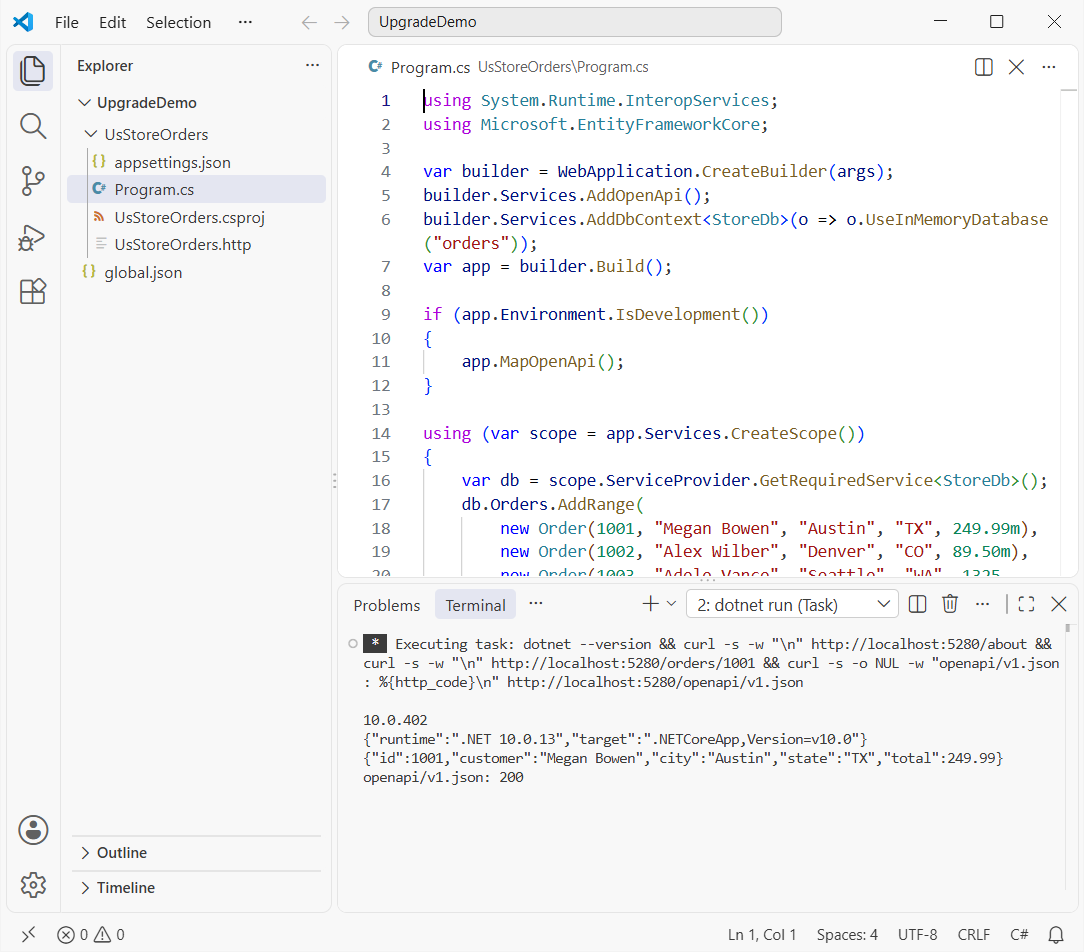
FrameworkDescription went from .NET 8.0.33 to .NET 10.0.13, and the order data is identical. The built-in document also reports "openapi": "3.1.1", since .NET 10 generates OpenAPI 3.1 by default. I list other changes in what is new in .NET 10.
The project also compiles as C# 14 now. Nothing in my code needed it, but features like the field keyword are free to use; see the new features in C# 14.
How Do You Update Docker Images and CI for .NET 10?
Your code isn’t the only place that names .NET 8. Search the repo for 8.0 and update Dockerfiles and pipelines. Here’s a Dockerfile snippet for this project with the .NET 10 tags (I didn’t build the image on this PC):
FROM mcr.microsoft.com/dotnet/sdk:10.0 AS build
WORKDIR /src
COPY . .
RUN dotnet publish UsStoreOrders/UsStoreOrders.csproj -c Release -o /app

FROM mcr.microsoft.com/dotnet/aspnet:10.0
WORKDIR /app
COPY --from=build /app .
ENTRYPOINT ["dotnet", "UsStoreOrders.dll"]
Watch the base OS. The default .NET 10 tags use Ubuntu 24.04 “Noble” instead of Debian, and Microsoft doesn’t ship Debian images for .NET 10. If your Dockerfile runs apt-get, test it again.
For GitHub Actions, bump the SDK in actions/setup-dotnet. Pointing it at global.json keeps CI and your machine on the same SDK:
- uses: actions/setup-dotnet@v4
  with:
    dotnet-version: '10.0.x'
    # or: global-json-file: global.json
Azure DevOps works the same way with the UseDotNet@2 task. If you deploy to Azure, my AI and Azure .NET tutorials cover the hosting side.
Can a Tool Upgrade .NET 8 to .NET 10 for You?
Partly. The .NET Upgrade Assistant is officially deprecated now. Microsoft points you to the GitHub Copilot modernization chat agent instead, which comes with Visual Studio 2026 and Visual Studio 2022 17.14.16 or later.
The agent analyzes your projects and dependencies, builds a step-by-step plan, and commits each change so you can roll back. For a project this size, I’d still do it by hand; it’s five edits, and you learn where your risks are.
On big solutions with dozens of projects, the agent saves real time. Just review every commit, the same way you’d review a teammate’s pull request. Upgrade questions like this also come up in .NET Core interview questions.
My .NET 8 to .NET 10 Upgrade Checklist
Here’s the order I’d follow on any ASP.NET Core 8 app:
- Build and run on .NET 8, and save sample responses.
- Install the .NET 10 SDK and update
global.json. - Change
net8.0tonet10.0in every project. - Run
dotnet list package --outdatedand update Microsoft packages to 10.0.x. - Update or replace third-party packages that depend on old Microsoft libraries, like Swashbuckle 6.x.
- Fix warnings such as ASPDEPR002, then run the app and your tests.
- Update Dockerfiles, CI and hosting to .NET 10.
Compare the responses from step 1 with the new ones before you deploy. All the .NET release posts live on my .NET versions hub.
If you’re still getting comfortable with the language side of .NET, these are worth a read:
- Create a console app in VS Code
- Add log4net to an ASP.NET Core application
- What C# is and what it’s used for
- C# interview questions for experienced developers
Frequently Asked Questions
Is upgrading from .NET 8 to .NET 10 a breaking change?
Usually it’s small. Changing net8.0 to net10.0 often builds cleanly, but package updates can surface obsolete APIs (like WithOpenApi) and version conflicts (like Swashbuckle 6.x). Test the app, not just the build.
Can I skip .NET 9 and go straight from .NET 8 to .NET 10?
Yes. You don’t install or target .NET 9 in between. You do need to review the .NET 9 breaking changes as well as the .NET 10 ones, since you’re crossing both releases.
Do I have to update NuGet packages when I upgrade to .NET 10?
You should. Microsoft recommends updating Microsoft.AspNetCore.*, Microsoft.EntityFrameworkCore.*, Microsoft.Extensions.* and System.Net.Http.Json to 10.0.0 or later. The steps are in Microsoft’s .NET 9 to .NET 10 migration guide.
What does warning ASPDEPR002 mean?
It means you’re calling WithOpenApi, which is deprecated in .NET 10. Remove the call, or move per-endpoint changes to AddOpenApiOperationTransformer. Microsoft lists it in Breaking changes in ASP.NET Core 10.
Does Swashbuckle work with .NET 10?
Version 6.6.2 crashed with a TypeLoadException once Microsoft.AspNetCore.OpenApi 10.0 was in the project. Swashbuckle 10.3.1 worked in my test. Or switch to the built-in AddOpenApi and MapOpenApi.
When does .NET 8 support end?
November 10, 2026, the same day as .NET 9. .NET 10 is an LTS release supported until November 14, 2028.

Bijay Kumar is a renowned software engineer, accomplished author, and distinguished Microsoft Most Valuable Professional (MVP) specializing in SharePoint. With a rich professional background spanning over 15 years, Bijay has established himself as an authority in the field of information technology. He possesses unparalleled expertise in multiple programming languages and technologies such as ASP.NET, ASP.NET MVC, C#.NET, and SharePoint, which has enabled him to develop innovative and cutting-edge solutions for clients across the globe. Read more…